 [:cn:](./README.md) | [:jp:](./README.jp.md) | [:kr:](./README.kr.md)
# Candlelight
Custom skins for fcitx5, tested with fcitx5-rime.
## Overview
### Background Highlight Series
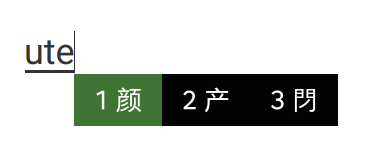
- **Spring / 春日 Green**
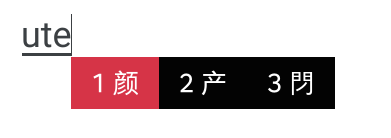
- **Summer / Summer Red**
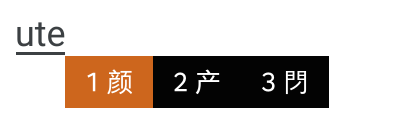
- **Autumn / Autumn Orange**
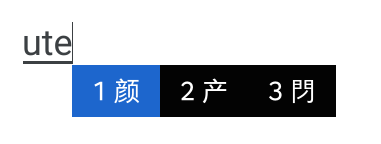
- **Winter / Winter Blue**
### Candidate Highlight Series
- **Green / Fluorescent Green**
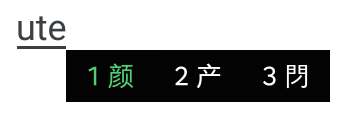
- **Transparent Green / Transparent Fluorescent Green**
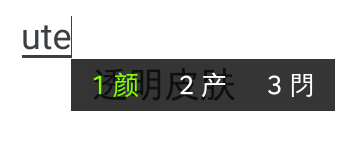
### macOS Inspired Themes
- **macOS Light**
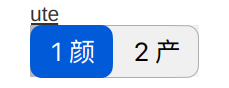
- Original macOS Sonoma Light:

- **macOS Dark**
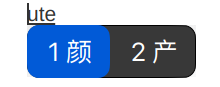
- Original macOS Sonoma Dark:

## Usage
1. Clone the repository:
```bash
git clone https://github.com/thep0y/fcitx5-themes-candlelight.git
```
2. Copy the desired theme to the appropriate directory:
```bash
mkdir -p ~/.local/share/fcitx5/themes
cd fcitx5-themes-candlelight
cp -r ~/.local/share/fcitx5/themes/
```
3. Configure the theme settings:
```bash
vim ~/.config/fcitx5/conf/classicui.conf
```
Add the following lines (adjust the font as needed):
```apacheconf
Vertical Candidate List=False
PerScreenDPI=True
Font="Smartisan Compact CNS 13"
Theme=
```
4. For single-line mode in fcitx5-rime, configure:
```bash
vim ~/.config/fcitx5/conf/rime.conf
```
Add:
```apacheconf
PreeditInApplication=True
```
5. Restart fcitx5 to apply the changes.
The available themes are:
- **spring**
- **summer**
- **autumn**
- **winter**
- **green**
- **transparent-green**
- **macOS-light**
- **macOS-dark**
To switch between single and double line (pre-edit) modes, use the shortcut: `++P`.
---
Explore more themes for macOS and Windows:
- [Rime 98 Themes](https://github.com/thep0y/rime-98/tree/master/themes)
## Note
Some desktop environments or programs do not support rendering SVG, which causes display anomalies during input. Therefore, I have created an identical PNG version for all SVG skins. It is recommended to prioritize using the SVG version, and switch to the PNG version if anomalies occur.
The SVG version skins have no suffix in their names, while the PNG version skins have `-png` as a suffix. For example, `macOS-light` is the SVG version, and `macOS-light-png` is the PNG version.
[:cn:](./README.md) | [:jp:](./README.jp.md) | [:kr:](./README.kr.md)
# Candlelight
Custom skins for fcitx5, tested with fcitx5-rime.
## Overview
### Background Highlight Series
- **Spring / 春日 Green**

- **Summer / Summer Red**

- **Autumn / Autumn Orange**

- **Winter / Winter Blue**

### Candidate Highlight Series
- **Green / Fluorescent Green**

- **Transparent Green / Transparent Fluorescent Green**

### macOS Inspired Themes
- **macOS Light**

- Original macOS Sonoma Light:

- **macOS Dark**

- Original macOS Sonoma Dark:

## Usage
1. Clone the repository:
```bash
git clone https://github.com/thep0y/fcitx5-themes-candlelight.git
```
2. Copy the desired theme to the appropriate directory:
```bash
mkdir -p ~/.local/share/fcitx5/themes
cd fcitx5-themes-candlelight
cp -r ~/.local/share/fcitx5/themes/
```
3. Configure the theme settings:
```bash
vim ~/.config/fcitx5/conf/classicui.conf
```
Add the following lines (adjust the font as needed):
```apacheconf
Vertical Candidate List=False
PerScreenDPI=True
Font="Smartisan Compact CNS 13"
Theme=
```
4. For single-line mode in fcitx5-rime, configure:
```bash
vim ~/.config/fcitx5/conf/rime.conf
```
Add:
```apacheconf
PreeditInApplication=True
```
5. Restart fcitx5 to apply the changes.
The available themes are:
- **spring**
- **summer**
- **autumn**
- **winter**
- **green**
- **transparent-green**
- **macOS-light**
- **macOS-dark**
To switch between single and double line (pre-edit) modes, use the shortcut: `++P`.
---
Explore more themes for macOS and Windows:
- [Rime 98 Themes](https://github.com/thep0y/rime-98/tree/master/themes)
## Note
Some desktop environments or programs do not support rendering SVG, which causes display anomalies during input. Therefore, I have created an identical PNG version for all SVG skins. It is recommended to prioritize using the SVG version, and switch to the PNG version if anomalies occur.
The SVG version skins have no suffix in their names, while the PNG version skins have `-png` as a suffix. For example, `macOS-light` is the SVG version, and `macOS-light-png` is the PNG version.