# mhrv-rs — Full guide
This is the long version — every config option, every advanced mode, every troubleshooting tip. For the 5-minute quick start, see the [main README](../README.md).
[Persian version (راهنمای فارسی)](guide.fa.md)
## Contents
- [How it works in detail](#how-it-works-in-detail)
- [Platforms and binaries](#platforms-and-binaries)
- [Where files live on disk](#where-files-live-on-disk)
- [Apps Script deployment](#apps-script-deployment)
- [Cloudflare Worker variant (faster)](#cloudflare-worker-variant)
- [Direct mode (when ISP blocks `script.google.com`)](#direct-mode)
- [CLI reference](#cli-reference)
- [scan-ips API mode](#scan-ips-api-mode)
- [Telegram via xray](#telegram-via-xray)
- [Full Tunnel mode](#full-tunnel-mode)
- [How deployment IDs affect performance](#how-deployment-ids-affect-performance)
- [Quick start](#full-mode-quick-start)
- [Exit node — for ChatGPT / Claude / Grok](#exit-node)
- [Sharing via hotspot](#sharing-via-hotspot)
- [Running on OpenWRT or any musl distro](#running-on-openwrt)
- [Diagnostics](#diagnostics)
- [SNI pool editor](#sni-pool-editor)
- [What's implemented and what isn't](#whats-implemented-and-what-isnt)
- [Known limitations](#known-limitations)
- [Security posture](#security-posture)
- [FAQ](#faq)
## How it works in detail
```
Browser / Telegram / xray
|
| HTTP proxy (8085) or SOCKS5 (8086)
v
mhrv-rs (local)
|
| TLS to Google IP, SNI = www.google.com
v ^
DPI sees www.google.com |
| | Host: script.google.com (inside TLS)
v |
Google edge frontend ---------+
|
v
Apps Script relay (your free Google account)
|
v
Real destination
```
The censor's DPI inspects the TLS SNI and lets `www.google.com` through. Google's edge serves both `www.google.com` and `script.google.com` from the same IP and routes by the HTTP `Host` header inside the encrypted stream.
For Google-owned domains (`google.com`, `youtube.com`, `fonts.googleapis.com`, …) the same tunnel is used directly — no Apps Script relay. This bypasses the per-fetch quota and avoids the locked-in `Google-Apps-Script` User-Agent for those sites. Add more domains via the `hosts` map in `config.json`.
## Platforms and binaries
Linux (x86_64, aarch64), macOS (x86_64, aarch64), Windows (x86_64), **Android 7.0+** (universal APK covering arm64, armv7, x86_64, x86). Prebuilt binaries on the [releases page](https://github.com/therealaleph/MasterHttpRelayVPN-RUST/releases).
**Android:** download `mhrv-rs-android-universal-v*.apk`. Full walk-through in [docs/android.md](android.md) (English) or [docs/android.fa.md](android.fa.md) (Persian). The Android build runs the same `mhrv-rs` Rust crate as desktop (via JNI) plus a TUN bridge via `tun2proxy` so every app on the device routes its IP traffic through the proxy without per-app config.
> **Important Android caveat (issues [#74](https://github.com/therealaleph/MasterHttpRelayVPN-RUST/issues/74) / [#81](https://github.com/therealaleph/MasterHttpRelayVPN-RUST/issues/81)):** TUN captures all IP traffic, but HTTPS from third-party apps only works for apps that trust user-installed CAs. From Android 7+ apps must opt in via `networkSecurityConfig`. **Chrome and Firefox do**; **Telegram, WhatsApp, Instagram, YouTube, banking apps, games** do not. For those: use `PROXY_ONLY` mode and point in-app proxy at `127.0.0.1:1081` (SOCKS5), or use `google_only` mode (no CA, Google services only), or set `upstream_socks5` to an external VPS. This is an Android security design, not a bug.
### What's in a release
Each archive contains:
| file | purpose |
|---|---|
| `mhrv-rs` / `mhrv-rs.exe` | CLI. Headless use, servers, automation. No system deps on macOS / Windows. |
| `mhrv-rs-ui` / `mhrv-rs-ui.exe` | Desktop UI (egui). Config form, Start / Stop / Test buttons, live stats, log panel. |
| `run.sh` / `run.command` / `run.bat` | Platform launcher: installs the MITM CA (needs sudo / admin) then starts the UI. Use this on first run. |
macOS archives also ship `mhrv-rs.app` (in `*-app.zip`) — double-click in Finder. Run `mhrv-rs --install-cert` or `run.command` once first to install the CA.
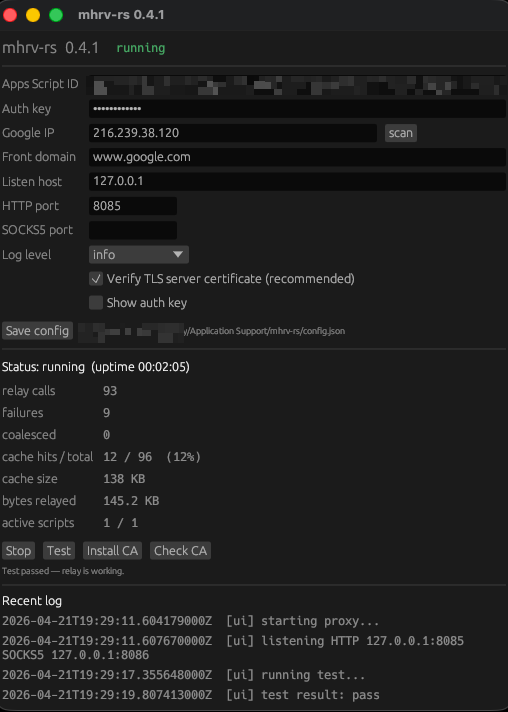
Linux UI also needs `libxkbcommon`, `libwayland-client`, `libxcb`, `libgl`, `libx11`, `libgtk-3`. On most desktop distros these are already there; on a headless box install them via your package manager, or just use the CLI.
## Where files live on disk
Config and the MITM CA live in the OS user-data dir:
- macOS: `~/Library/Application Support/mhrv-rs/`
- Linux: `~/.config/mhrv-rs/`
- Windows: `%APPDATA%\mhrv-rs\`
Inside that dir:
- `config.json` — your settings (written by the UI's **Save** button or hand-edited)
- `ca/ca.crt`, `ca/ca.key` — the MITM root certificate. Only you have the private key.
The CLI also falls back to `./config.json` in the current working directory for backward compatibility.
## Apps Script deployment
The 5-minute version is in the [main README](../README.md#step-1--make-the-google-apps-script-one-time). This section covers the variants.
### Cloudflare Worker variant
A variant in [`assets/apps_script/Code.cfw.gs`](../assets/apps_script/Code.cfw.gs) + [`assets/cloudflare/worker.js`](../assets/cloudflare/worker.js) turns Apps Script into a thin forwarder and offloads the actual `fetch` to a Cloudflare Worker you deploy. **Day-one win:** latency (~10–50 ms at the CF edge vs ~250–500 ms in Apps Script — visibly snappier for browsing and Telegram).
It does **not** reduce your daily 20k Apps Script `UrlFetchApp` count, because today's mhrv-rs always sends single-URL relay requests; the batch path on the GAS+Worker side is wired and ready (`ceil(N/40)` quota per N-URL batch) but no shipping client emits it.
**Trade-offs:**
- Worse for YouTube long-form (30 s wall clock vs 6 min Apps Script)
- Doesn't fix Cloudflare anti-bot
- **Not compatible with `mode: "full"`** (no tunnel-ops support → won't help WhatsApp / messengers on Android Full mode)
Full setup and trade-off table in [`assets/cloudflare/README.md`](../assets/cloudflare/README.md). mhrv-rs needs no config changes — same `mode: "apps_script"`, same `script_id`, same `auth_key`.
### Direct mode
If your ISP is already blocking Google Apps Script (or all of Google), you need Step 1 to succeed *before* you have a relay. mhrv-rs ships a `direct` mode for exactly this — SNI-rewrite tunnel only, no Apps Script relay required. (Was named `google_only` before v1.9 — old name still accepted.)
1. Download the binary (see [main README → Step 2](../README.md#step-2--download-mhrv-rs))
2. Copy [`config.direct.example.json`](../config.direct.example.json) to `config.json` — no `script_id`, no `auth_key` required
3. Run `mhrv-rs serve` and set browser HTTP proxy to `127.0.0.1:8085`
4. In `direct` mode, the proxy only routes `*.google.com`, `*.youtube.com`, and other Google-edge hosts (plus any [`fronting_groups`](fronting-groups.md) you've configured) via the SNI-rewrite tunnel. Other traffic goes raw — no Apps Script relay exists yet.
5. Now do Step 1 in your browser (the connection to `script.google.com` will be SNI-fronted). Deploy `Code.gs`, copy the Deployment ID.
6. In the UI / Android app / by editing `config.json`, switch mode to `apps_script`, paste the Deployment ID and your auth key, and restart.
Verify reachability before even starting the proxy: `mhrv-rs test-sni` probes `*.google.com` directly and works without any config beyond `google_ip` + `front_domain`.
## CLI reference
Everything the UI does is also in the CLI. Copy `config.example.json` to `config.json` (next to the binary, or in the user-data dir):
```json
{
"mode": "apps_script",
"google_ip": "216.239.38.120",
"front_domain": "www.google.com",
"script_id": "PASTE_YOUR_DEPLOYMENT_ID_HERE",
"auth_key": "same-secret-as-in-code-gs",
"listen_host": "127.0.0.1",
"listen_port": 8085,
"socks5_port": 8086,
"log_level": "info",
"verify_ssl": true
}
```
Then:
```bash
./mhrv-rs # serve (default)
./mhrv-rs test # one-shot end-to-end probe
./mhrv-rs scan-ips # rank Google frontend IPs by latency
./mhrv-rs test-sni # probe SNI names against your google_ip
./mhrv-rs --install-cert # reinstall the MITM CA
./mhrv-rs --remove-cert # uninstall + delete the whole ca/ dir
./mhrv-rs --help
```
`--remove-cert` deletes the CA from the OS trust store, deletes the on-disk `ca/` directory, and verifies the revocation by name. NSS cleanup (Firefox, Chrome on Linux) is best-effort: if `certutil` isn't on PATH or a browser holds the NSS DB open, the tool logs a manual-cleanup hint. Your `config.json` and the Apps Script deployment are untouched, so a fresh CA does not require redeploying `Code.gs`.
> **Upgrading from pre-v1.2.11?** Earlier versions wrote a bare `user_pref("security.enterprise_roots.enabled", true);` into each Firefox profile's `user.js` without a marker. `--remove-cert` does not strip that line — it's indistinguishable from one a user or corp policy wrote. Firefox falls back to its built-in Mozilla root store the moment the MITM CA leaves the OS trust store, so this has no functional effect. Delete by hand if it bothers you.
`script_id` can also be a JSON array: `["id1", "id2", "id3"]`.
### scan-ips API mode
By default, `scan-ips` uses a static list. Enable dynamic IP discovery in `config.json`:
```json
{
"fetch_ips_from_api": true,
"max_ips_to_scan": 100,
"scan_batch_size": 100,
"google_ip_validation": true
}
```
When enabled:
- Fetches `goog.json` from Google's public IP ranges API
- Extracts CIDRs and expands them to individual IPs
- Prioritizes IPs from famous Google domains (google.com, youtube.com, etc.)
- Randomly selects up to `max_ips_to_scan` candidates (prioritized first)
- Tests only those candidates for connectivity and frontend validation
You may find IPs faster than the static array, but no guarantee they all work.
## Telegram via xray
The Apps Script relay only speaks HTTP request / response, so non-HTTP protocols (Telegram MTProto, IMAP, SSH, raw TCP) can't travel through it. Without anything else, those flows hit the direct-TCP fallback — which means they're not actually tunneled, and an ISP that blocks Telegram still blocks them.
**Fix:** run a local [xray](https://github.com/XTLS/Xray-core) (or v2ray / sing-box) with a VLESS / Trojan / Shadowsocks outbound to your own VPS, and point mhrv-rs at xray's SOCKS5 inbound via the **Upstream SOCKS5** field (or the `upstream_socks5` config key). When set, raw-TCP flows through mhrv-rs's SOCKS5 listener get chained into xray → the real tunnel.
```
Telegram ┐ ┌─ Apps Script ── HTTP/HTTPS
├─ SOCKS5 :8086 ─┤ mhrv-rs ├─ SNI rewrite ──────── google.com, youtube.com, …
Browser ┘ └─ upstream SOCKS5 ─ xray ── VLESS ── your VPS (Telegram, IMAP, SSH, raw TCP)
```
Config fragment:
```json
{
"upstream_socks5": "127.0.0.1:50529"
}
```
HTTP / HTTPS keeps going through Apps Script (no change), and the SNI-rewrite tunnel for `google.com` / `youtube.com` keeps bypassing both — YouTube stays as fast as before while Telegram gets a real tunnel.
## Full Tunnel mode
`"mode": "full"` routes **all** traffic end-to-end through Apps Script and a remote [tunnel-node](../tunnel-node/) — no MITM certificate needed. TCP carried as persistent tunnel sessions, UDP from Android / TUN clients via SOCKS5 `UDP ASSOCIATE` to the tunnel-node which emits real UDP server-side. Trade-off: higher per-request latency (every byte goes Apps Script → tunnel-node → destination), but works for any protocol and any app, no CA install required.
### How deployment IDs affect performance
Each Apps Script batch round-trip takes ~2 s. In Full mode, mhrv-rs runs a **pipelined batch multiplexer** that fires multiple batches concurrently without waiting on the previous one. Each Deployment ID (= one Google account) gets its own concurrency pool of **30 in-flight requests** — matching the per-account Apps Script execution limit.
```
max_concurrent = 30 × number_of_deployment_ids
```
| Deployments | Concurrent | Notes |
|---|---|---|
| 1 | 30 | Single account — fine for light browsing |
| 3 | 90 | Good for daily use |
| 6 | 180 | Recommended for heavy use |
| 12 | 360 | Multi-account power setup |
More deployments = more total concurrency = lower per-session latency. Each batch round-robins across your IDs, spreading load and reducing the chance of hitting any single deployment's quota ceiling.
**Resource guards:**
- **50 ops max** per batch — if more sessions are active, the mux splits into multiple batches
- **4 MB payload cap** per batch — well under Apps Script's 50 MB limit
- **30 s timeout** per batch — slow / dead targets can't block other sessions forever
### Full mode quick start
1. Deploy [`CodeFull.gs`](../assets/apps_script/CodeFull.gs) as a Web App on **each Google account** (same steps as `Code.gs`, but use the full-mode script that forwards to your tunnel-node). One deployment per account — the 30-concurrent limit is per account, so multiple deployments on one account share the pool. To scale, use more accounts:
- **Solo use** → 1–2 accounts
- **Shared with ~3 people** → 3 accounts
- **Shared with a group** → one account per heavy user
2. Deploy [tunnel-node](../tunnel-node/) on a VPS. Fastest is the prebuilt Docker image:
```bash
docker run -d --name mhrv-tunnel --restart unless-stopped \
-p 8080:8080 -e TUNNEL_AUTH_KEY=your-strong-secret \
ghcr.io/therealaleph/mhrv-tunnel-node:latest
```
Multi-arch (linux/amd64 + linux/arm64), runs as non-root, ~32 MB compressed. Pin a version tag (`:1.5.0`) for production. See [tunnel-node/README.md](../tunnel-node/README.md) for Cloud Run, docker-compose, and source-build alternatives.
3. Set `"mode": "full"` in your config with all deployment IDs:
```json
{
"mode": "full",
"script_id": ["id1", "id2", "id3", "id4", "id5", "id6"],
"auth_key": "your-secret"
}
```
## Exit node
Cloudflare-fronted services (chatgpt.com, claude.ai, grok.com, x.com, openai.com) flag traffic from Google datacenter IPs as bots and serve a Turnstile / CAPTCHA challenge. The exit node fix is a small TypeScript HTTP handler you deploy on a serverless host (Deno Deploy, fly.io, or your own VPS) that sits between Apps Script and the destination:
```
client → Apps Script (Google IP) → your exit node (non-Google IP) → CF-protected site
```
The destination sees the exit node's IP, not Google's, so the anti-bot heuristic doesn't fire.
**Setup:** [`assets/exit_node/README.md`](../assets/exit_node/README.md). 5 min, free tier.
## Sharing via hotspot
mhrv-rs listens on `0.0.0.0` by default, so any device on the same network can use it. Common scenario: share the tunnel from an Android phone to an iPhone, iPad, or laptop over hotspot:
1. **Android:** enable mobile hotspot + start the app
2. **Other device:** connect to the Android hotspot Wi-Fi
3. **Configure proxy** on the other device:
- Server: `192.168.43.1` (Android's default hotspot IP)
- Port: `8080` (HTTP) or `1081` (SOCKS5)
### iOS
Settings → Wi-Fi → tap (i) on the hotspot network → Configure Proxy → Manual → Server `192.168.43.1`, Port `8080`.
For full device-wide coverage on iOS, use [Shadowrocket](https://apps.apple.com/app/shadowrocket/id932747118) or [Potatso](https://apps.apple.com/app/potatso/id1239860606) — point at SOCKS5 (`192.168.43.1:1081`) and it routes all traffic through the tunnel.
### macOS / Windows
Set system HTTP proxy to `192.168.43.1:8080`, or per-app SOCKS5 to `192.168.43.1:1081`.
> If `listen_host` is `127.0.0.1` in your config, change to `0.0.0.0` to allow other devices.
## Running on OpenWRT
The `*-linux-musl-*` archives ship a fully static CLI that runs on OpenWRT, Alpine, and any libc-less Linux. Put the binary on the router and start as a service:
```sh
# From a machine that can reach your router:
scp mhrv-rs root@192.168.1.1:/usr/bin/mhrv-rs
scp mhrv-rs.init root@192.168.1.1:/etc/init.d/mhrv-rs
scp config.json root@192.168.1.1:/etc/mhrv-rs/config.json
# On the router:
chmod +x /usr/bin/mhrv-rs /etc/init.d/mhrv-rs
/etc/init.d/mhrv-rs enable
/etc/init.d/mhrv-rs start
logread -e mhrv-rs -f # tail logs
```
LAN devices then point HTTP proxy at the router's LAN IP (default port `8085`) or SOCKS5 at `:8086`. Set `listen_host` to `0.0.0.0` in `/etc/mhrv-rs/config.json` so the router accepts LAN connections.
Memory footprint ~15–20 MB resident — fine on anything ≥128 MB RAM. No UI on musl (routers are headless).
## Diagnostics
- **`mhrv-rs test`** — sends one request through the relay, reports success / latency. First thing to try when something breaks — separates "relay is up" from "client config is wrong".
- **`mhrv-rs scan-ips`** — parallel TLS probe of 28 known Google frontend IPs, sorted by latency. Take the winner, put it in `google_ip`. UI has same thing behind **scan** button.
- **`mhrv-rs test-sni`** — parallel TLS probe of every SNI name in your rotation pool against `google_ip`. Tells you which front-domain names pass through your ISP's DPI. UI has same thing in **SNI pool…** window with checkboxes, per-row **Test** buttons, and **Keep ✓ only** to auto-trim.
- **Periodic stats** logged every 60 s at `info` level (relay calls, cache hit rate, bytes relayed, active vs blacklisted scripts). UI shows live.
### SNI pool editor
By default, mhrv-rs rotates through `{www, mail, drive, docs, calendar}.google.com` on outbound TLS to your `google_ip`, to avoid fingerprinting one name too heavily. Some may be locally blocked (e.g. `mail.google.com` has been targeted in Iran at various times).
Either:
- UI → **SNI pool…** → **Test all** → **Keep ✓ only** to auto-trim. Add custom names via the text field at the bottom. Save.
- Or edit `config.json`:
```json
{
"sni_hosts": ["www.google.com", "drive.google.com", "docs.google.com"]
}
```
Leaving `sni_hosts` unset gives you the default auto-pool. Run `mhrv-rs test-sni` to verify what works from your network.
## What's implemented and what isn't
This port focuses on the **`apps_script` mode** — the only one that reliably works against a modern censor in 2026. Implemented:
- [x] Local HTTP proxy (CONNECT for HTTPS, plain forwarding for HTTP)
- [x] Local SOCKS5 with smart TLS / HTTP / raw-TCP dispatch (Telegram, xray, etc.)
- [x] MITM with on-the-fly per-domain certs via `rcgen`
- [x] CA generation + auto-install on macOS / Linux / Windows
- [x] Firefox NSS cert install (best-effort via `certutil`)
- [x] Apps Script JSON relay protocol-compatible with `Code.gs`
- [x] Connection pooling (45 s TTL, max 20 idle)
- [x] Gzip response decoding
- [x] Multi-script round-robin
- [x] Auto-blacklist failing scripts on 429 / quota errors (10 min cooldown)
- [x] Response cache (50 MB, FIFO + TTL, `Cache-Control: max-age` aware, heuristics for static assets)
- [x] Request coalescing: concurrent identical GETs share one upstream fetch
- [x] SNI-rewrite tunnels for `google.com`, `youtube.com`, `youtu.be`, `youtube-nocookie.com`, `fonts.googleapis.com`, configurable via `hosts` map
- [x] Automatic redirect handling on the relay (`/exec` → `googleusercontent.com`)
- [x] Header filtering (strip connection-specific, brotli)
- [x] `test` and `scan-ips` subcommands
- [x] Script IDs masked in logs (`prefix…suffix`) so logs don't leak deployment IDs
- [x] Desktop UI (egui) — cross-platform, no bundler needed
- [x] Optional upstream SOCKS5 chaining for non-HTTP traffic (Telegram MTProto, IMAP, SSH…)
- [x] Connection pool pre-warm on startup
- [x] Per-connection SNI rotation across `{www, mail, drive, docs, calendar}.google.com`
- [x] Optional parallel script-ID dispatch (`parallel_relay`): fan-out to N script instances, return first success
- [x] Per-site stats drill-down in the UI (requests, cache hit %, bytes, avg latency per host)
- [x] Editable SNI rotation pool (UI window + `sni_hosts` config field) with reachability probes
- [x] OpenWRT / Alpine / musl builds — static binaries, procd init script included
- [x] **Exit node** support for Cloudflare-fronted sites (v1.9.4+)
- [x] **Goog.script.init iframe unwrap** — defense-in-depth against deployments that return HtmlService-wrapped responses (v1.9.6+)
Intentionally **not** implemented:
- **HTTP/2 multiplexing** — `h2` crate state machine has too many subtle hang cases; coalescing + 20-conn pool gets most of the benefit
- **Request batching (`q:[...]` mode in apps_script mode)** — connection pool + tokio async already parallelizes well; batching adds ~200 lines of state for unclear gain
- **Range-based parallel download** — edge cases real (non-Range servers, chunked mid-stream); YouTube already bypasses Apps Script via SNI-rewrite tunnel
- **Other modes** (`domain_fronting`, `google_fronting`, `custom_domain`) — Cloudflare killed generic domain fronting in 2024; Cloud Run needs a paid plan
## Known limitations
These are inherent to the Apps Script + domain-fronting approach, not bugs in this client. The original Python version has the same issues.
- **User-Agent fixed to `Google-Apps-Script`** for traffic through the relay. `UrlFetchApp.fetch()` doesn't allow override. Sites that detect bots (Google search, some CAPTCHAs) serve degraded / no-JS pages. Workaround: add the affected domain to the `hosts` map so it's routed through the SNI-rewrite tunnel with your real browser's UA. `google.com`, `youtube.com`, `fonts.googleapis.com` are already there.
- **Video playback slow and quota-limited** for anything through the relay. YouTube HTML loads fast (SNI-rewrite tunnel), but `googlevideo.com` chunks go through Apps Script. Free tier: ~20k `UrlFetchApp` calls / day, 50 MB body cap per fetch. Fine for text browsing, painful for 1080p. Rotate multiple `script_id`s for headroom, or use a real VPN for video.
- **Brotli stripped** from forwarded `Accept-Encoding`. Apps Script can decompress gzip but not `br`; forwarding `br` would garble responses. Minor size overhead.
- **WebSockets don't work** through the relay — it's request / response JSON. Sites that upgrade to WS fail (ChatGPT streaming, Discord voice, etc.).
- **HSTS-preloaded / hard-pinned sites** reject the MITM cert. Most sites are fine; a handful aren't.
- **Google / YouTube 2FA and sensitive logins** may trigger "unrecognized device" warnings because requests originate from Google's Apps Script IPs, not yours. Log in once via the tunnel (`google.com` is in the rewrite list) to avoid this.
## Security posture
- The MITM root **stays on your machine only**. `ca/ca.key` private key is generated locally and never leaves the user-data dir.
- `auth_key` is a shared secret you pick. Server-side `Code.gs` rejects requests without a matching key.
- Traffic between your machine and Google's edge is standard TLS 1.3.
- What Google can see: the destination URL and headers of each request (Apps Script fetches on your behalf). Same trust model as any hosted proxy — if not acceptable, use a self-hosted VPN instead.
- **IP exposure caveat (`apps_script` mode):** v1.2.9 strips every `X-Forwarded-For` / `X-Real-IP` / `Forwarded` / `Via` / `CF-Connecting-IP` / `True-Client-IP` / `Fastly-Client-IP` and ~10 related identity-revealing headers from outbound before reaching Apps Script ([#104](https://github.com/therealaleph/MasterHttpRelayVPN-RUST/issues/104)). What it does **not** cover: whatever Google's own infrastructure may add when its Apps Script runtime makes the subsequent `UrlFetchApp.fetch()` to the target. That second leg is server-side, outside this client's control. Destination sees a Google datacenter IP, but no public guarantee Google never propagates the original caller's IP in some internal header chain. If your threat model requires the destination cannot under any circumstances learn your IP, **use Full Tunnel mode** (traffic exits from your own VPS, only the VPS IP is exposed end-to-end). `apps_script` mode is fine for bypassing DPI / reaching blocked sites where "seen by Google" is acceptable. Raised in [#148](https://github.com/therealaleph/MasterHttpRelayVPN-RUST/issues/148).
- v1.9.6+ Code.gs / CodeFull.gs also strip `X-Forwarded-*` / `Forwarded` / `Via` server-side as a second line of defense.
## FAQ
**How many Deployment IDs do I need?** One is fine for normal use. The free `UrlFetchApp` quota is 20,000 fetches / day per account (100,000 for paid Workspace), with a 50 MB body cap per fetch. Use **one deployment per Google account** — the 30-concurrent limit is per account, so multiple deployments on the same account don't add concurrency. To scale, deploy in different Google accounts. Reference:
**Why does Google search show without JavaScript sometimes?** Apps Script is forced to set `User-Agent: Google-Apps-Script`. Some sites detect that and serve no-JS fallback. Domains in the SNI-rewrite list (`google.com`, `youtube.com`, etc.) are immune because they go directly to Google's edge, not through Apps Script.
**Is logging into a Google account through this safe?** Recommended: log in once **without** the proxy, or with a real VPN, the first time. Google may flag the Apps Script IP as an "unknown device" and warn. After the initial login, use is fine.
**How do I remove the certificate later?**
- **Easiest (any OS):** click **Remove CA** in the UI, or:
- macOS / Linux: `sudo ./mhrv-rs --remove-cert`
- Windows (run as administrator): `mhrv-rs.exe --remove-cert`
- Removes from system trust store, NSS (Firefox / Chrome on Linux), and deletes `ca/ca.crt` + `ca/ca.key` on disk. Your `config.json` and Apps Script deployment are not touched.
- **Manually:** the cert's Common Name is `MasterHttpRelayVPN` (not `mhrv-rs` — that's the app name).
- **macOS:** Keychain Access → System → search `MasterHttpRelayVPN` → delete. Then `rm -rf ~/Library/Application\ Support/mhrv-rs/ca/`
- **Windows:** `certmgr.msc` → Trusted Root Certification Authorities → search `MasterHttpRelayVPN` → delete
- **Linux:** delete `/usr/local/share/ca-certificates/MasterHttpRelayVPN.crt` then `sudo update-ca-certificates`
**`GLIBC_2.39 not found` error on Linux?** Use `mhrv-rs-linux-musl-amd64.tar.gz` — fully static, runs on any Linux without `glibc`.
## License
MIT. See [LICENSE](../LICENSE).