
# DSCode
A local-first, multi-provider coding agent with DeepSeek defaults.
简体中文 ·
MIT License ·
Comparison
DSCode is an opinionated coding-agent runtime with DeepSeek V4 Flash as its economical default and
built-in support for Codex, OpenAI, Anthropic, OpenRouter, Z.AI, Kimi, MiniMax, xAI, and OpenCode Zen Go. It combines
provider-aware model routing with local sessions, safe patching, parallel agents, OS sandboxing, and
transparent usage reporting.
It is not trying to out-feature every general-purpose agent. It keeps the runtime local and inspectable
while letting each repository task use the model capabilities it actually needs.
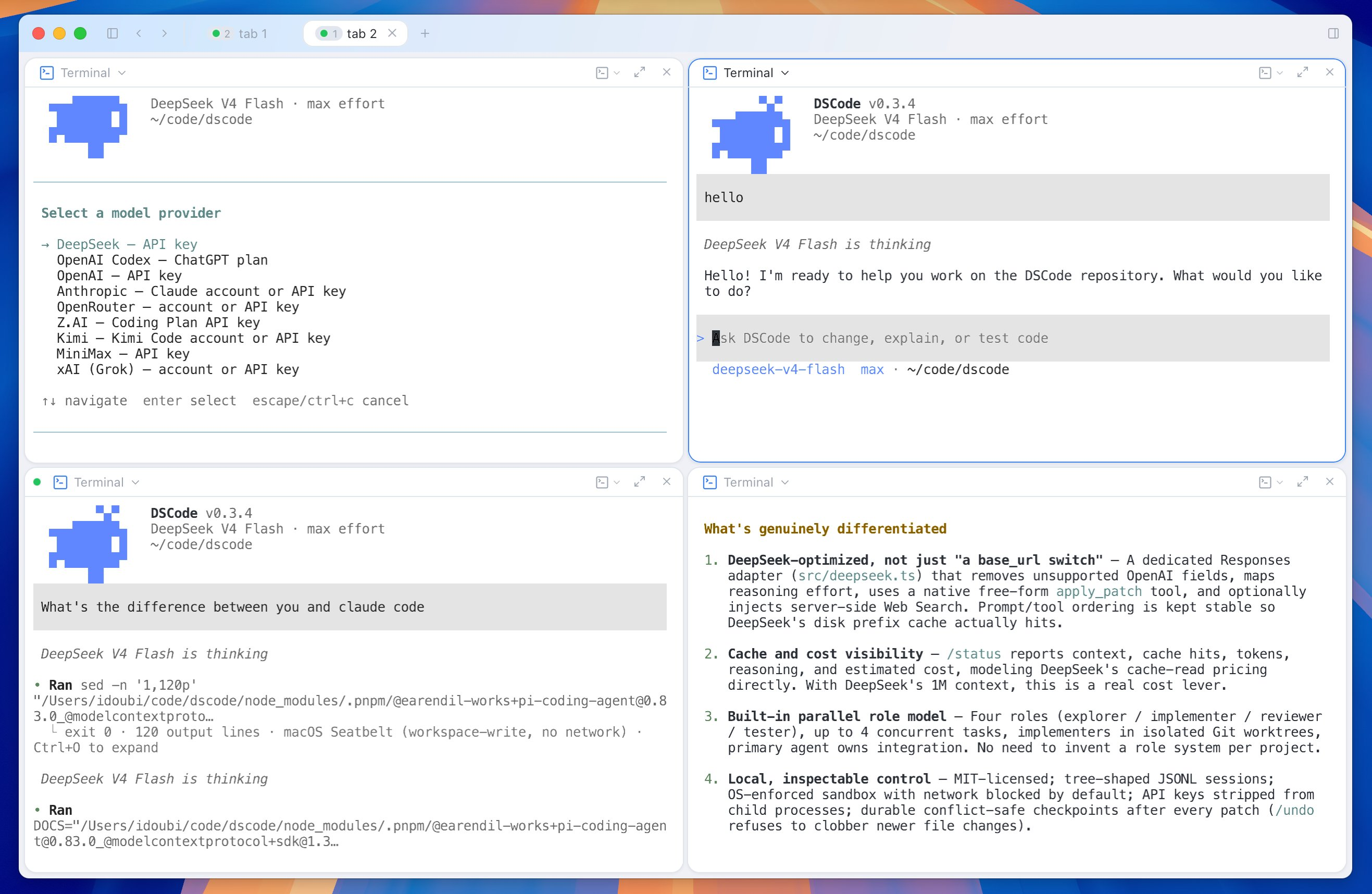
## Terminal app
## Desktop app
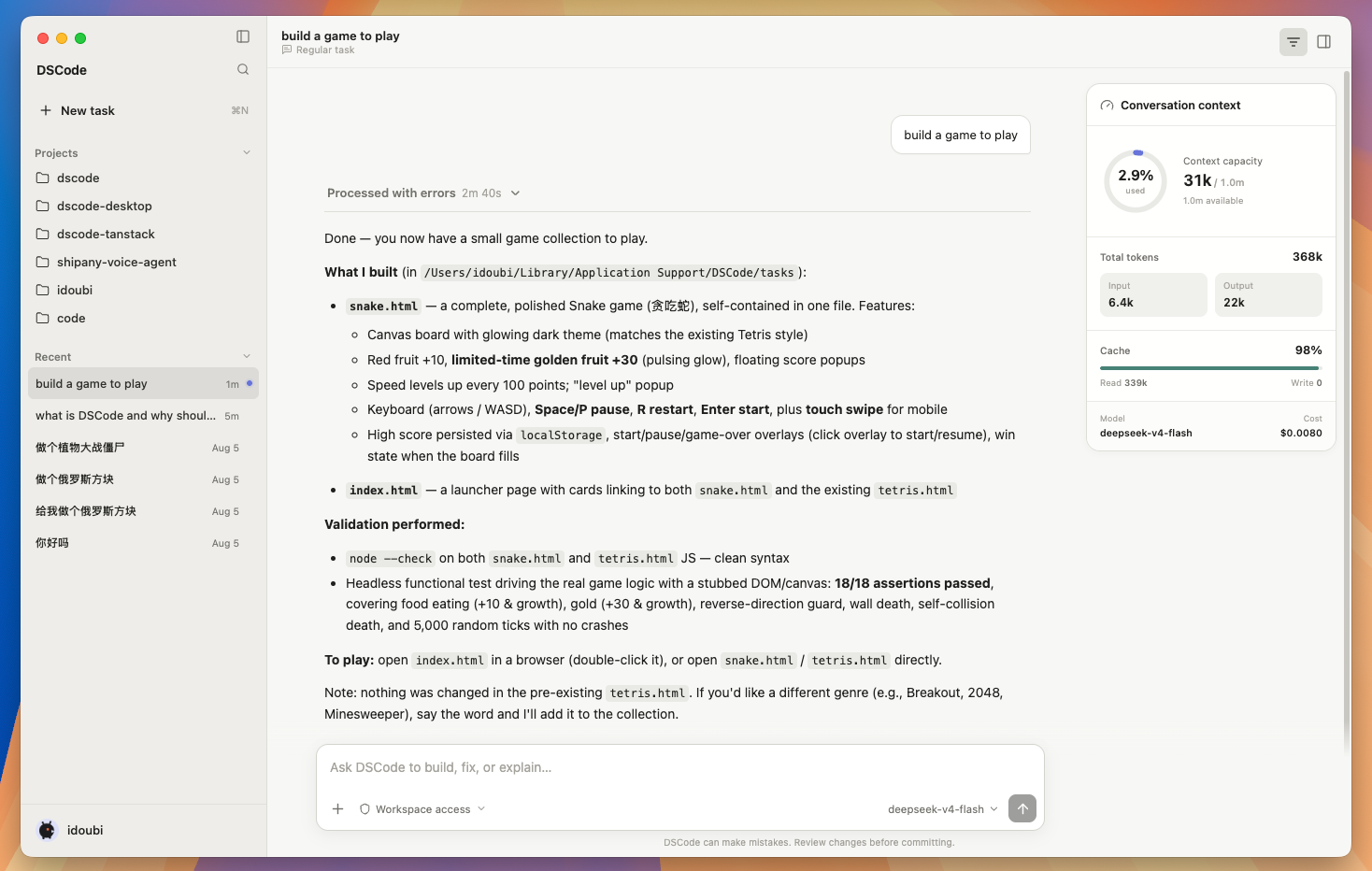
Download **DSCode Desktop v0.1.0** from the
[release page](https://github.com/thinkany-ai/dscode/releases/tag/desktop-v0.1.0), or use a direct
installer link:
| Platform | Download |
| --- | --- |
| macOS · Apple Silicon | [DMG](https://github.com/thinkany-ai/dscode/releases/download/desktop-v0.1.0/DSCode_0.1.0_arm64.dmg) |
| macOS · Intel | [DMG](https://github.com/thinkany-ai/dscode/releases/download/desktop-v0.1.0/DSCode_0.1.0_x64.dmg) |
| Windows · x64 | [Setup EXE](https://github.com/thinkany-ai/dscode/releases/download/desktop-v0.1.0/DSCode_0.1.0_x64-setup.exe) |
| Debian / Ubuntu · x64 | [DEB](https://github.com/thinkany-ai/dscode/releases/download/desktop-v0.1.0/DSCode_0.1.0_amd64.deb) |
| Fedora / RHEL · x64 | [RPM](https://github.com/thinkany-ai/dscode/releases/download/desktop-v0.1.0/DSCode_0.1.0_x86_64.rpm) |
The macOS builds are signed with a Developer ID certificate, notarized by Apple, and stapled. Windows
and Linux builds are currently unsigned. See the [Desktop documentation](apps/desktop/README.md) for
development and packaging details.
## Why DSCode
- **DeepSeek-first, not DeepSeek-only.** DeepSeek V4 Flash remains the default, with its dedicated
Responses adapter, native free-form `apply_patch`, and optional server-side Web Search. Switch to
Codex, OpenAI, Anthropic, OpenRouter, Z.AI, Kimi, MiniMax, Grok, or OpenCode Zen Go without changing tools or sessions.
- **Vision when the model supports it.** Paste an image in the TUI or pass an image as `@file`; models
such as GPT-5.6 receive the actual image attachment while text-only DeepSeek models fail clearly.
- **Cost-aware by design.** DeepSeek's 1M context and disk prefix cache are reflected in the runtime;
`/status` reports context, cache hits, tokens, reasoning, and estimated cost. See current
[DeepSeek pricing](https://api-docs.deepseek.com/quick_start/pricing/).
- **Parallel work with clear ownership.** Run explorer, implementer, reviewer, and tester roles with up
to four tasks in parallel. Implementers work in isolated Git worktrees; the primary agent owns
integration and final validation.
- **Local control.** Sessions are stored as local tree-shaped JSONL. Commands run in an OS sandbox with
network blocked by default, API keys are removed from child-process environments, and every successful
patch creates a durable, conflict-safe checkpoint.
- **No workflow reset.** DSCode understands `AGENTS.md` and `CLAUDE.md`, and supports Agent Skills, MCP,
hooks, project trust, background jobs, JSONL/CI, RPC, and a VS Code entry point.
For an evidence-based comparison with Claude Code and Codex, see
[DSCode compared](docs/COMPARISON.en.md). The short version: those products have broader and more mature
ecosystems; DSCode is smaller, DeepSeek-first, locally controlled, and MIT-licensed.
## Quick start
Requirements: Node.js 22.19+ and Git. DSCode also uses `rg`; the installer prepares pnpm and installs
ripgrep through Homebrew when available.
Install from npm:
```bash
npm install -g @thinkany/dscode
```
Alternatively, install the latest source build:
```bash
curl -fsSL https://raw.githubusercontent.com/thinkany-ai/dscode/refs/heads/main/scripts/install.sh | sh
```
Make sure `~/.local/bin` is on your `PATH`, then start DSCode:
```bash
dscode -C /path/to/project
```
On a fresh installation, enter `/login` in the TUI and choose a provider. DSCode completes
authentication and selects that provider's default model. DeepSeek remains the default for
non-interactive commands and explicit provider-free configuration.
| Provider | ID | Authentication |
| --- | --- | --- |
| DeepSeek | `deepseek` | API key |
| OpenAI Codex | `openai-codex` | Eligible ChatGPT plan |
| OpenAI | `openai` | API key |
| Anthropic | `anthropic` | Claude account or API key |
| OpenRouter | `openrouter` | OpenRouter account or API key |
| Z.AI Coding Plan | `zai` | API key |
| Kimi For Coding | `kimi-coding` | Kimi Code account or API key |
| MiniMax | `minimax` | API key |
| xAI / Grok | `xai` | Grok/X account or API key |
| OpenCode Zen Go | `opencode-go` | API key |
The aliases `kimi` and `grok` are accepted by `/login` and `--provider`.
When configuring DeepSeek, DSCode masks the API key, then offers an optional API base URL. Press Enter to use
`https://api.deepseek.com`, or enter a DeepSeek/OpenAI-compatible gateway URL. By default, credentials
use the operating system keyring; `~/.dscode/auth.json` is the owner-only fallback for headless hosts
or unavailable keyring services. The endpoint is stored in `~/.dscode/config.json` with `0600`
permissions. Resolution order is `--base-url`, `DEEPSEEK_BASE_URL`, saved config, then the official
DeepSeek URL. To avoid storing a key:
```bash
export DEEPSEEK_API_KEY="sk-..."
export DEEPSEEK_BASE_URL="https://api.deepseek.com"
dscode -C /path/to/project
```
You can also authenticate before opening the TUI:
```bash
dscode login deepseek # DeepSeek API key
dscode login openai-codex # browser OAuth; uses ChatGPT plan limits
dscode login openai # securely prompts for an OpenAI API key
dscode login anthropic # Claude account or Anthropic API key
dscode login openrouter # OpenRouter account or API key
dscode login opencode-go # OpenCode Zen Go API key
```
The selected provider and model are saved for later runs. Override them at any time:
```bash
dscode --provider openai-codex --model gpt-5.6-sol -C /path/to/project
dscode --provider deepseek --model deepseek-v4-flash -C /path/to/project
```
DSCode keeps all of its global state under `~/.dscode`:
```text
~/.dscode/settings.json TUI and runtime preferences
~/.dscode/config.json DSCode storage policy and DeepSeek endpoint
~/.dscode/auth.json Owner-only credential fallback
~/.dscode/credential-metadata.json Non-secret keyring index
~/.dscode/state.sqlite Thread metadata and desktop runtime state
~/.dscode/skills/ Global skills
~/.dscode/extensions/ Global extensions
~/.dscode/mcp.json Global MCP servers
~/.dscode/hooks.json Global hooks
~/.dscode/sessions/YYYY/MM/DD/ JSONL session transcripts
~/.dscode/archived_sessions/ Archived transcripts
```
The flat `sessions/*.jsonl` names are hard-link compatibility entries for the current terminal
runtime; each points to the same inode as its date-partitioned transcript and does not duplicate
content. JSONL is the transcript source of truth. SQLite contains only searchable thread metadata,
pin/archive state, and file fingerprints.
Credential and history behavior can be configured in `~/.dscode/config.json`:
```json
{
"cli_auth_credentials_store": "auto",
"history": { "persistence": "save-all" }
}
```
Credential modes are `auto`, `keyring`, and `file`. Set history persistence to `none` to run new
sessions without writing transcripts. `DSCODE_SQLITE_HOME` relocates only SQLite state.
Set `DSCODE_HOME` to relocate the directory, or `DSCODE_SESSIONS_DIR` to relocate only session
history. DSCode does not inherit `PI_CODING_AGENT_DIR`. Existing files under `~/.dscode/agent` are
copied into the new layout on first launch without deleting or overwriting anything. Project skills
should use the portable `.agents/skills/` convention.
## Default runtime
Fresh installations use:
```text
model deepseek-v4-flash
transport responses
thinking max
harness minimal
permission auto
sandbox workspace-write
network blocked
```
The default `minimal` harness exposes a small set of high-leverage tools: sandboxed commands,
background-process interaction, free-form patches, and parallel delegation. Use `--harness safe` to add
explicit file reading, file search, and automatic language diagnostics.
## Everyday commands
```bash
# Start a new session
dscode -C ./my-project
# Continue or select a previous session
dscode -C ./my-project --continue
dscode -C ./my-project --resume
# One-shot output, JSONL automation, or IDE RPC
dscode -C ./my-project -p "Explain the authentication flow"
dscode -C ./my-project --mode json -p "Fix lint errors and run tests"
dscode -C ./my-project --mode rpc
# Inspect a screenshot with a vision-capable model
dscode --provider openai-codex @screenshot.png "Explain this error"
```
Inside the TUI, paste a PNG, JPEG, GIF, or WebP image and add your question. DSCode immediately replaces
the terminal's local path with an `[Image #N]` marker, attaches the image bytes to the message, and
supports up to eight images of 20 MB each per turn.
Inside the TUI:
| Command | Purpose |
| --- | --- |
| `/plan` | Enter or leave structured read-only planning |
| `/permissions` | Show or change `plan`, `ask`, `auto`, or `full` access |
| `/status` | Show model, context, cache hits, tokens, cost, and session details |
| `/diff` | Inspect the current patch transcript |
| `/checkpoints` / `/undo` | Inspect or restore durable patch checkpoints |
| `/new` / `/clear` | Clear the current context and start a new session (aliases) |
| `/resume` / `/fork` / `/tree` | Navigate tree-shaped local sessions |
| `/compact` | Compact older context while preserving current work |
| `/jobs` | Inspect reconnectable background commands |
| `/mcp` / `/agents` / `/doctor` | Inspect integrations, agents, and runtime health |
| `/login [provider]` | Choose and authenticate a supported model provider |
| `/model` | Select a configured model; the choice is saved |
| `/effort ...` | Change the active model's reasoning effort |
Type `/` for all commands and `/hotkeys` for keyboard shortcuts.
## Safety model
Permissions decide when DSCode asks. The sandbox decides what a command can actually access.
| Mode | Behavior |
| --- | --- |
| `plan` | Read-only exploration; write, delegation, and MCP tools are hidden |
| `ask` | Commands, writes, delegation, and MCP require approval |
| `auto` | Routine workspace work runs automatically; destructive commands, network, host access, and external MCP remain gated |
| `full` | Trusted mode with unrestricted host filesystem and network access |
The default command boundary is `workspace-write` with no network. When a command needs network or host
access, the TUI offers **Allow once**, **Allow this command for this session**, or **Deny**, then retries
an approved command with the smallest applicable access. Use `--network` to pre-authorize network for a
run; use `--permission full` only in a trusted workspace. `dscode -y` is the explicit YOLO shortcut: it
trusts project resources for that run, skips tool approvals, disables the sandbox, and enables network.
macOS uses Seatbelt. Linux and Windows use a configured Docker sandbox:
```bash
export DSCODE_SANDBOX_IMAGE="your-reviewed-image:tag"
dscode -C ./project --sandbox workspace-write
```
If no sandbox backend is available, DSCode fails closed rather than silently executing on the host.
## DeepSeek-specific behavior
- The Responses API is stateless; DSCode replays messages, reasoning items, and tool results from the
local session tree.
- The adapter removes unsupported OpenAI storage, cache-retention, and include fields.
- Thinking mode removes sampling parameters that DeepSeek ignores and supports `low`, `high`, and `max`
effort selection.
- `apply_patch` uses a native free-form custom tool to avoid JSON escaping for large diffs.
- Prompt and tool ordering remain stable so DeepSeek's automatic prefix cache has useful prefixes.
- `--web` adds DeepSeek server-side Web Search without replacing local repository search.
These transformations run only when the active provider is `deepseek`; other providers use their
native runtime implementations. Provider API keys are stripped from commands, hooks, and stdio MCP
server environments.
## Extensibility and automation
- Hierarchical `AGENTS.md` and `CLAUDE.md` project instructions
- User and project Agent Skills
- Trusted-project hooks and MCP servers
- Reconnectable background commands
- JSONL output for CI and a full stdin/stdout RPC mode
- Reusable `@thinkany/dscode-core` package with a bundled headless RPC worker
- Native Electron desktop client in [apps/desktop](apps/desktop/README.md)
- VS Code extension in [editors/vscode](editors/vscode/README.md)
- Automatic TypeScript, Pyright, Rust, Go, and Swift diagnostics with the `safe` harness
Graphical clients and IDE integrations can install `@thinkany/dscode-core` without requiring a global
CLI. It exposes credential and settings APIs plus a typed RPC client backed by the exact same Agent,
tools, permissions, and local session format as the terminal client:
```ts
import { createDSCodeRpcClient } from "@thinkany/dscode-core/rpc";
const client = createDSCodeRpcClient({ cwd: "/path/to/project" });
await client.start();
client.onEvent((event) => render(event));
await client.prompt("Review this repository");
```
The normal `@thinkany/dscode` tarball embeds its matching Core build, so existing CLI installations do
not add a registry-time dependency or change their command, configuration, and session behavior.
The Desktop package uses the monorepo's `workspace:*` Core dependency and embeds the matching Core
build in each installer, preventing source and npm versions from drifting during development.
Signed and notarized macOS installers, plus Windows and Linux packages, are available from
[GitHub Releases](https://github.com/thinkany-ai/dscode/releases).
## Build from source
```bash
git clone https://github.com/thinkany-ai/dscode.git
cd dscode
corepack enable
pnpm install
pnpm check
pnpm dev -C /path/to/project
```
Useful validation commands:
```bash
pnpm check # typecheck, tests, and production build
pnpm desktop:check # desktop typecheck, tests, and production build
pnpm smoke:live # real DeepSeek edit-and-test smoke flow
pnpm acceptance:live # complete real-API feature acceptance
```
Daily development happens on `dev`. A versioned merge to `main` automatically creates the matching
GitHub Release and publishes the npm package after CI passes. See [Releasing DSCode](docs/RELEASING.md).
## Current boundaries
- DeepSeek V4 Flash remains text-only. Select a vision-capable model for screenshots and other image
inputs.
- ChatGPT-plan access follows the models, limits, and workspace permissions available to the signed-in
account; OpenAI API-key usage is billed separately by the API platform.
- The VS Code extension is a local integration and is not published to the Marketplace yet.
- Linux and Windows isolation depends on the Docker image you configure.
- DSCode is an early project. Claude Code and Codex currently have broader IDE, cloud, multimodal, and
ecosystem support.
We do not claim that a feature checklist makes DSCode universally better. The project is designed to be
measured on real repository tasks by success rate, time, cost, safety, and human intervention.
## License
[MIT](LICENSE)