# PocketMocker User Manual
Welcome to PocketMocker! This is an in-page HTTP controller designed specifically for frontend developers. This manual will help you master the features of PocketMocker, from basic rule configuration to advanced dynamic simulations.
---
## Table of Contents
1. [Quick Start](#quick-start)
2. [Interface Overview](#interface-overview)
3. [Rule Management](#rule-management)
- [Creating Rules](#creating-rules)
- [Editing Rules](#editing-rules)
- [Rule Grouping](#rule-grouping)
- [Smart Mock Syntax](#smart-mock-syntax)
- [Dynamic Function Mock](#dynamic-function-mock)
4. [State Management](#state-management)
5. [Network Debugging](#network-debugging)
6. [Importing Configurations](#importing-configurations)
7. [FAQ](#faq)
---
## Quick Start
PocketMocker provides two modes of usage to meet different needs.
### 1. Local Mode (Zero Configuration)
Best for quick trials or non-Vite projects. Data is stored only in the browser's LocalStorage. It persists across refreshes but cannot be shared with a team.
**Installation**:
```bash
npm install pocket-mocker -D
```
**Usage**:
Add the following to your project's entry file (e.g., `main.ts` or `index.js`):
```javascript
import { pocketMock } from 'pocket-mocker';
if (process.env.NODE_ENV === 'development') {
pocketMock();
}
```
### 2. Server Mode (Recommended, Vite Plugin)
Best for team collaboration. Mock rules are saved as JSON files in the project's root directory and can be committed to Git.
**Configure `vite.config.ts`**:
```typescript
import { defineConfig } from 'vite';
import pocketMockPlugin from 'pocket-mocker/vite-plugin';
export default defineConfig({
plugins: [
pocketMockPlugin()
]
});
```
After starting the dev server, PocketMocker automatically detects and connects to the file system.
---
## Interface Overview
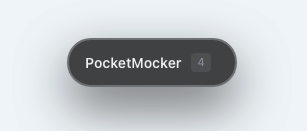
After starting your project, you'll see the PocketMocker floating capsule at the bottom right of the page.
### Floating Capsule
- **Click**: Expand/Collapse the control panel.
- **Drag**: Move the capsule to any position on the screen.
- **Rule Count**: Displays the number of currently active rules.
### Main Control Panel
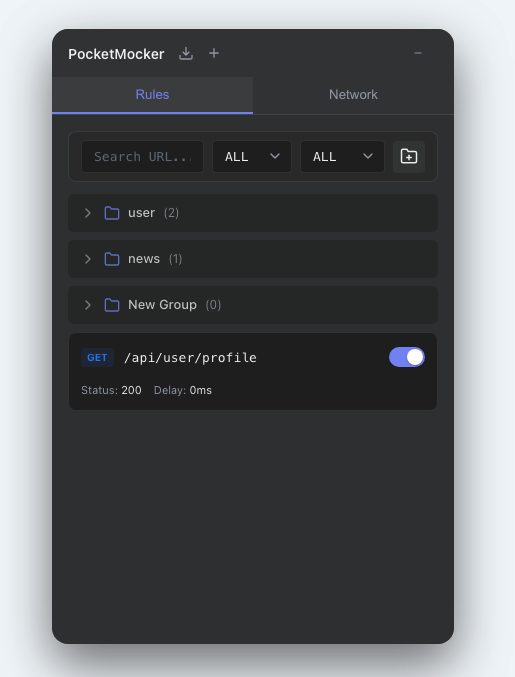
The panel is divided into three main areas:
1. **Header**:
- **Import Button**: Support for importing Postman or OpenAPI files.
- **New Rule (+)**: Manually create a blank rule.
- **Minimize**: Collapse the panel.
2. **Tabs**:
- **Rules**: Manage all Mock rules.
- **Network**: Monitor network request logs in real-time.
- **State**: Inspect and edit shared Mock State used by dynamic rules.
3. **Content Area**: Displays the rule list, network logs, or shared state editor.
> **Tip**: You can drag the edges of the panel to resize it.
---
## Rule Management
### Creating Rules
You can create rules in several ways:
1. Click the **+** button in the header to create one manually.
2. In the **Network** tab, click the "Mock" button on any request log (Recommended).
3. Import external API documentation.
### Editing Rules
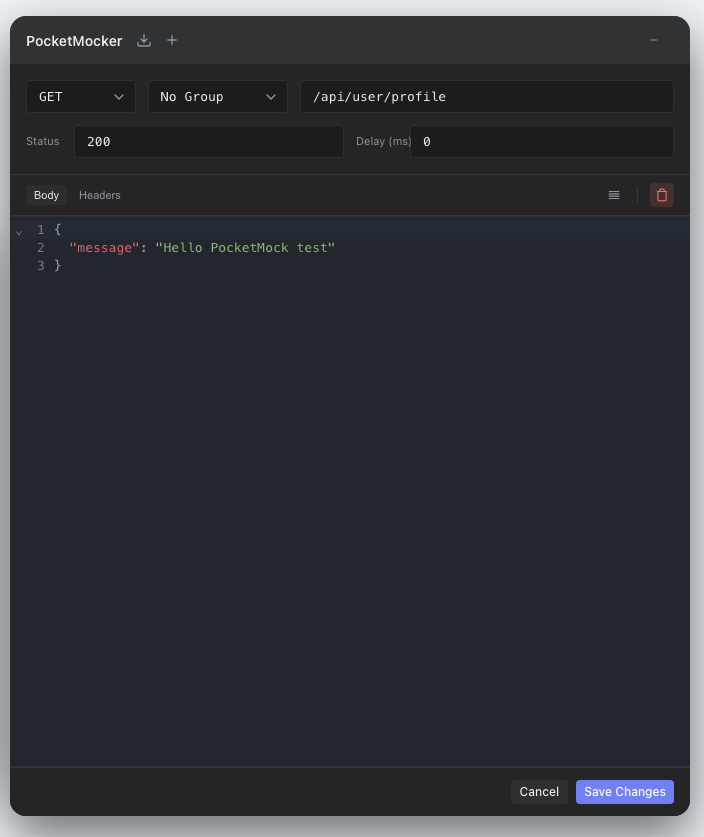
Click any rule to enter edit mode.
- **URL**: Request path, supports pattern matching.
- Exact match: `/api/user`
- Param match: `/api/user/:id` (e.g., `/api/user/123`)
- Wildcard: `/api/*`
- **Method**: HTTP method (GET, POST, etc.).
- **Status**: Response status code. Common: 200 (Success), 404 (Not Found), 500 (Server Error).
- **Delay**: Response delay (ms). Used to simulate slow networks and test loading states.
- **Response Type**:
- **JSON**: Returns static JSON data, supports Smart Mock syntax.
- **Function**: Write JavaScript functions for dynamic responses.
### Rule Grouping
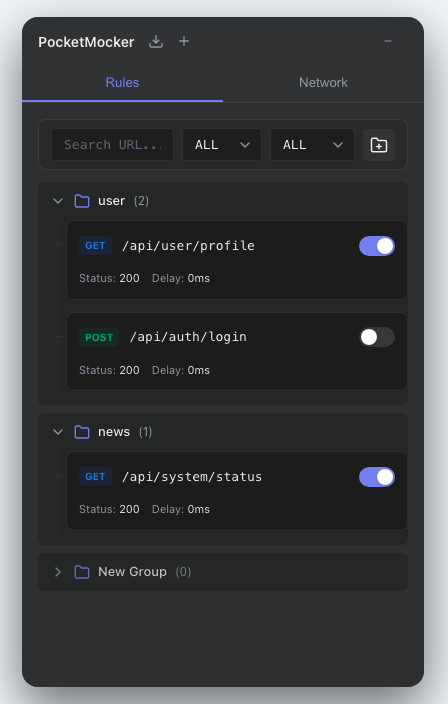
When you have many rules, use groups to manage them.
1. Click the **Folder Icon** on the toolbar to create a new group.
2. In the rule details, use the "Group" dropdown to move a rule to a specific group.
3. Click a group title to collapse/expand its rules.
### Filtering and Searching
In the toolbar at the top of the rule list:
- **Search Box**: Filter rules by URL keywords.
- **Method**: Filter by HTTP method.
- **Status**: Filter "Enabled" or "Disabled" rules.
### Smart Mock Syntax
In the JSON editor, PocketMocker supports special syntax to generate random data.
#### Basic Types
| Syntax | Description | Example |
| :--- | :--- | :--- |
| `@guid` | Generate a UUID | `"550e84..."` |
| `@integer(min, max)` | Random integer | `@integer(1, 100)` → `42` |
| `@float(min, max, dec)` | Random float | `@float(0, 100, 2)` → `42.57` |
| `@boolean` | Random boolean | `true` |
| `@string(length)` | Random string of specific length | `@string(8)` → `"aB3dEf9g"` |
| `@pick(a, b, c)` | Pick one randomly | `@pick(Admin, User)` → `"Admin"` |
| `@date(start, end)` | Random date | `@date(2023-01-01, 2023-12-31)` |
| `@color` | Random hex color | `"#f0a1b2"` |
#### Users and Info
| Syntax | Description | Example |
| :--- | :--- | :--- |
| `@name` | Random name | `"John Doe"` |
| `@email(domains)` | Random email | `@email(gmail.com, outlook.com)` |
| `@phone(prefix)` | Random phone number | `@phone(+86)` |
| `@username` | Random username | `"happy_cat_123"` |
| `@ip` | Random IP address (supports v6) | `@ip` or `@ip(v6)` |
| `@address(country)` | Random address object | `@address(US)` |
| `@company(industry)` | Random company object | `@company(Tech)` |
#### Content Generation
| Syntax | Description | Example |
| :--- | :--- | :--- |
| `@image(WxH)` | Placeholder image URL | `@image(200x200)` |
| `@url(tlds)` | Random URL | `@url(com, cn)` |
| `@text(words)` | Random English text paragraph | `@text(20)` |
#### Array Generation
Generate an array by adding `|count` to the key name.
**Example**:
```json
{
"users|5": { // Generates an array of 5 users
"id": "@guid",
"name": "@name",
"avatar": "@image(100x100)",
"role": "@pick(admin, editor, viewer)"
}
}
```
### Dynamic Function Mock
PocketMocker's editor features smart detection. When you write a JavaScript function in the **Body** editor (instead of standard JSON format), the editor automatically recognizes and switches to **Function** mode for full dynamic response logic.
Function mocks receive two arguments:
- `req`: Current request information, including `url`, `method`, `params`, `query`, `body`, and `headers`.
- `ctx`: Runtime context. `ctx.state` is a shared state store that can be used by different mock rules.
```javascript
(req) => {
// req contains: url, method, params, query, body, headers
// Case 1: Return different data based on ID
if (req.params.id === '1') {
return { name: 'Admin', role: 'admin' };
}
// Case 2: Simulate an error
if (req.query.forceError) {
return {
status: 500,
body: { error: 'Internal Server Error' }
};
}
// Case 3: Echo request body
return {
receivedData: req.body,
timestamp: Date.now()
};
}
```
#### Shared Mock State
Use `ctx.state` when one API needs to affect another API.
**POST `/api/users` - create a user:**
```javascript
(req, ctx) => {
const user = {
id: Date.now(),
...req.body
};
ctx.state.update('users', (users = []) => [user, ...users]);
return {
code: 0,
message: 'created',
data: user
};
}
```
**GET `/api/users` - list users:**
```javascript
(req, ctx) => {
const users = ctx.state.get('users') || [];
return {
code: 0,
data: users,
total: users.length
};
}
```
After these two rules are configured, creating a user updates shared Mock State, and listing users returns the latest data.
Available state APIs:
| API | Description |
| :--- | :--- |
| `ctx.state.get(key)` | Read a state value |
| `ctx.state.set(key, value)` | Replace a state value |
| `ctx.state.update(key, updater)` | Update a value from the previous value |
| `ctx.state.delete(key)` | Remove one state key |
| `ctx.state.clear()` | Clear all state |
| `ctx.state.all()` | Return the full state object |
---
## State Management
Switch to the **State** tab to inspect and manage the shared Mock State used by dynamic function rules.
### What State Is For
State is useful when you need linked API behavior:
- Create an item with `POST`, then list it with `GET`.
- Update an item with `PUT` or `PATCH`, then read the updated detail.
- Delete an item with `DELETE`, then verify it disappears from the list.
- Prepare initial test data before using the page.
### State Panel Actions
- **Edit JSON**: Modify the full shared state directly.
- **Save**: Apply the edited JSON to the runtime state.
- **Clear**: Remove all keys from Mock State.
- **Copy**: Copy the current state JSON to the clipboard.
- **Import**: Import a JSON file as the current state.
- **Persist**: Control whether state is saved across page refreshes.
### Persistence
In Local Mode, PocketMocker stores state in `localStorage` under `pocket_mock_state_v1`.
In Server Mode with the Vite plugin, state is saved to:
```txt
pocket-mock-state.json
```
The state file is JSON-compatible and can be edited manually if needed.
---
## Network Debugging
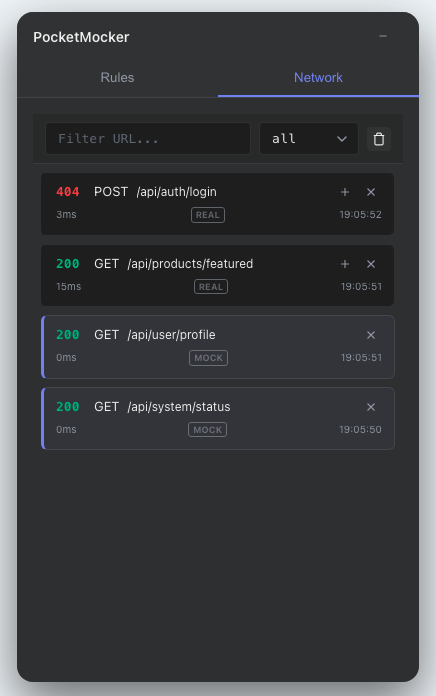
Switch to the **Network** tab, where PocketMocker records all fetch and XMLHttpRequest requests (whether mocked or not).
- **View Details**: Click a list item to expand and view full Request Headers, Body, and Response Body.
- **Context Menu**: Right-click on any log to:
- **Copy URL/Response**: Quickly copy data to clipboard.
- **Copy as cURL**: Generate a cURL command to reproduce the request in terminal.
- **Add to Mock Rules**: Instantly convert a real request into a mock rule.
- **One-click Mock**: Click the **Mock** button on the right of a log. The system automatically extracts the URL, Method, and Response to create a new Mock rule. This is the fastest way to create rules!
- **Status Markers**:
- **MOCK**: Logs with a blue left border and a "MOCK" tag indicate the request was intercepted.
- **REAL**: Logs with a "REAL" tag indicate a real passthrough request.
- **Status Color**: Green indicates success (2xx), red indicates failure (4xx/5xx).
---
## Import & Export
PocketMocker seamlessly integrates with your existing API workflow.
### Import
Supports importing configurations from popular API documentation tools:
1. Click the **Import** icon in the header (folder with arrow).
2. Select an exported JSON file.
3. The system will automatically convert and generate Mock rules with Smart syntax.
**Supported Formats**:
- Postman Collection (v2.1)
- OpenAPI 3.0 (Swagger)
### Export
You can export any mock rule to Postman JSON format directly from the rule editor, making it easy to share or test in other tools.
- In the rule editor, click the export button to download the JSON file.
---
## FAQ
**Q: Why is my request not being intercepted?**
A: Please check the following:
1. Ensure the rule is set to "Enabled".
2. Check if the request URL matches the rule's Pattern.
3. Ensure the request Method matches.
4. Verify that PocketMocker is correctly initialized at the project entry point.
**Q: Why is `req.body` empty in my Function Mock?**
A: Ensure you set the correct `Content-Type` (e.g., `application/json`) when sending the request; otherwise, the parser may fail to parse the body.
**Q: How do I make `POST /api/users` affect `GET /api/users`?**
A: Use `ctx.state` in Function Mock. Write data in the `POST` rule with `ctx.state.update('users', ...)`, then read it in the `GET` rule with `ctx.state.get('users')`.
**Q: Why did my Mock State disappear after refreshing?**
A: Open the **State** tab and enable **Persist**. In Server Mode, also make sure `pocket-mock-state.json` can be written by the Vite dev server.
**Q: How do I disable PocketMocker in production?**
A: Wrap the initialization with an environment variable check:
```javascript
if (process.env.NODE_ENV === 'development') {
pocketMock();
}
```
This way, the Tree-shaking process will automatically remove the related code during production builds.