
# TileLang-Ascend
[](https://deepwiki.com/tile-ai/tilelang-ascend)
Tile Language Ascend (**tilelang-ascend**) is a specialized variant of the tile-lang domain-specific language, specifically optimized for Huawei Ascend NPU (Neural Processing Unit) architecture. Built upon the foundation of tile-lang's Pythonic syntax and [TVM](https://tvm.apache.org/) compiler infrastructure, tilelang-ascend enables developers to efficiently create high-performance AI compute kernels tailored for Ascend processors, including operations like GEMM, vector operations, and attention mechanisms. Tilelang-ascend allows developers to focus on productivity without sacrificing the low-level optimizations necessary for state-of-the-art performance on the NPU. The compiler backend supports two technical routes: [Ascend C & PTO](https://github.com/tile-ai/tilelang-ascend/tree/ascendc_pto) and [AscendNPU IR](https://github.com/tile-ai/tilelang-ascend/tree/npuir).
## Latest News
- 04/24/2026 🚀: Released DeepSeek V4 kernels [DeepSeek-V4](./examples/deepseek_v4/)
- 03/28/2026 🚀: Released high-performance [Flash Attention](./examples/flash_attention/) & [Sparse Flash Attention](./examples/sparse_flash_attention/) benchmark and optimization guide, see [PR#698](https://github.com/tile-ai/tilelang-ascend/pull/698) and [PR#665](https://github.com/tile-ai/tilelang-ascend/pull/665).
- 03/16/2026 🚀: Introduced [wheel package installation](https://github.com/tile-ai/tilelang-ascend?tab=readme-ov-file#installation), enabling easy setup via `pip install`!
- 03/12/2026 ✨: New [ACLGraph](./examples/aclgraph/) integration example for graph-level optimization on Ascend NPU.
- 03/03/2026 ✨: Supported [shared memory (shmem) with put/get API](https://github.com/tile-ai/tilelang-ascend/pull/194) for inter-core communication.
- 01/29/2026 📖: Published the [TileLang-Ascend Programming Guide](./docs/TileLang-Ascend%20Programming%20Guide.md) with comprehensive development tutorials.
- 01/23/2026 🚀: Landed [PTO backend](https://github.com/tile-ai/tilelang-ascend/pull/341) as a new code generation target.
- 01/21/2026 ✨: New [torch_tl_ascend](./examples/torch_tl_ascend/) PyTorch integration example for seamless NPU + PyTorch workflows, see [PR#292](https://github.com/tile-ai/tilelang-ascend/pull/292).
- 01/15/2026 ✨: Introduced [T.Pipelined](https://github.com/tile-ai/tilelang-ascend/pull/274) for software pipelining on Ascend NPU.
- 12/08/2025 ✨: Supported [T.Parallel](https://github.com/tile-ai/tilelang-ascend?tab=readme-ov-file#tparallel) for automatic vectorization, check out [PR#113](https://github.com/tile-ai/tilelang-ascend/pull/113) for details.
- 11/25/2025 ✨: Enabled [automatic buffer reuse](https://github.com/tile-ai/tilelang-ascend?tab=readme-ov-file#automatic-buffer-reuse) to reduce on-chip memory footprint, see [PR#101](https://github.com/tile-ai/tilelang-ascend/pull/101).
- 11/17/2025 🛠️: Shipped debug tools `T.printf` and `T.dump_tensor` for [printing and dumping](https://github.com/tile-ai/tilelang-ascend/tree/ascendc_pto/examples/print) device-side buffers.
- 11/07/2025 ✨: Enabled [automatic intra-kernel synchronization insertion](https://github.com/tile-ai/tilelang-ascend?tab=readme-ov-file#automatic-insertion-of-synchronization-instruction), see [PR#74](https://github.com/tile-ai/tilelang-ascend/pull/74).
- 10/28/2025 🚀: Optimized tl_templates performance and delivered a high-performance [GEMM kernel](https://github.com/tile-ai/tilelang-ascend/blob/ascendc_pto/examples/gemm/example_gemm_intrinsic.py).
- 09/29/2025 🎉: tilelang-ascend is now open source! A DSL for high-performance AI workloads on Ascend NPUs.
## Programming Guide
For more instructions and tips on using TileLang-Ascend, please refer to the [TileLang-Ascend Programming Guide](./docs/TileLang-Ascend%20Programming%20Guide.md).
## Lessons
Welcome to the TileLang-Ascend video course series. You can access all the lessons via the links below:
| Lesson | Topic | Video Link |
| :---: | :--- | :---: |
| **01** | Introduction to TileLang-Ascend Development Environment | [📺 Start learning](https://www.bilibili.com/video/BV1EdFVzpEbg/) |
| **02** | TileLang-Ascend Programming Fundamentals | [📺 Start learning](https://www.bilibili.com/video/BV1uvFLzyEZ3/) |
| **03** | TileLang-Ascend Developer Programming Model Deep Dive | [📺 Start learning](https://www.bilibili.com/video/BV1DoFzz2EHB/) |
| **04** | Getting Started with TileLang-Ascend Performance Tuning and Debugging Tools | [📺 Start learning](https://www.bilibili.com/video/BV1QdFzz7E5W/) |
| **05** | TileLang-Ascend Engineering Practice: Compilation, Integration, and Deployment | [📺 Start learning](https://www.bilibili.com/video/BV1bmFkzHEb6/) |
## Tested Devices
Although tilelang-ascend aims to be portable across a range of Ascend devices, it has been specifically tested and validated on the following NPUs: A2 and A3.
## OP Implementation Examples
**tilelang-ascend** provides the building blocks to implement a wide variety of operators on the NPU.
Some examples include:
- [Matrix Multiplication (GEMM)](./examples/gemm/)
- [Batch GEMM](./examples/batch_gemm/)
- [Elementwise Operations](./examples/elementwise/)
- [Flash Attention](./examples/flash_attention/)
- [Sparse Flash Attention](./examples/sparse_flash_attention/)
- [Linear Attention & RNN](./examples/linear_attention_and_rnn/)
- [Softmax](./examples/softmax/)
- [Normalization](./examples/normalization/)
- [Activation Functions](./examples/activation/)
- [Reduce](./examples/reduce/)
- [Sort](./examples/sort/)
- [Convolution](./examples/convolution/)
- [Cross Entropy Loss](./examples/cross_entropy_loss/)
- [Dispatch & Combine](./examples/dispatch_combine/)
Within the `examples` directory, you will also find additional complex kernels—such as [LightningIndexer](./examples/lightning_indexer/), [TopK Selector](./examples/topk_selector/), and [ACLGraph Integration](./examples/aclgraph/). More operators are continuously being added.
## Installation
### Environment Preparation
We assume you already have an ascend environment with CANN (at least [8.3.RC1](https://www.hiascend.com/developer/download/community/result?cann=8.3.RC1&product=1&model=30)) and torch-npu (at least 2.6.0.RC1) installed. Firstly, set cann environment variables.
```bash
source {your-cann-installed-path}/ascend-toolkit/set_env.sh
```
### TileLang-Ascend Installation
Here we provide two installation methods: installing from wheel package and compiling from source code.
#### Method 1: Install from Wheel Package (Recommended)
Download the pre-built wheel package and install it directly:
```bash
# Set Ascend environment variable
export ASCEND_HOME_PATH=/usr/local/Ascend/ascend-toolkit/latest
# Install the wheel package
pip install tilelang-*.whl
```
#### Method 2: Build Wheel Package from Source
If you need to build the wheel package from source:
```bash
# Clone the repository
git clone --recursive https://github.com/tile-ai/tilelang-ascend.git
cd tilelang-ascend
# Set Ascend environment variable
export ASCEND_HOME_PATH=/usr/local/Ascend/ascend-toolkit/latest
# Build and install wheel package
./build_wheel_ascend.sh [--enable-llvm]
# Install the built wheel package
pip install dist/tilelang-*.whl
```
#### Method 3: Compile and Install from Source
a) Download
git clone --recursive https://github.com/tile-ai/tilelang-ascend.git
cd tilelang-ascend
b) Compile and Install
bash install_ascend.sh
c) Environment Variable Setup
source set_env.sh
## Run
In this section, you will learn how to call NPU TileLang operators.
Here we use the **Matrix Multiplication** operator as an example for introduction.
```
cd examples/gemm
python example_gemm.py
```
Upon success, it will print:
```
Kernel Output Match!
```
## Comparison with NVIDIA Backend Implementation
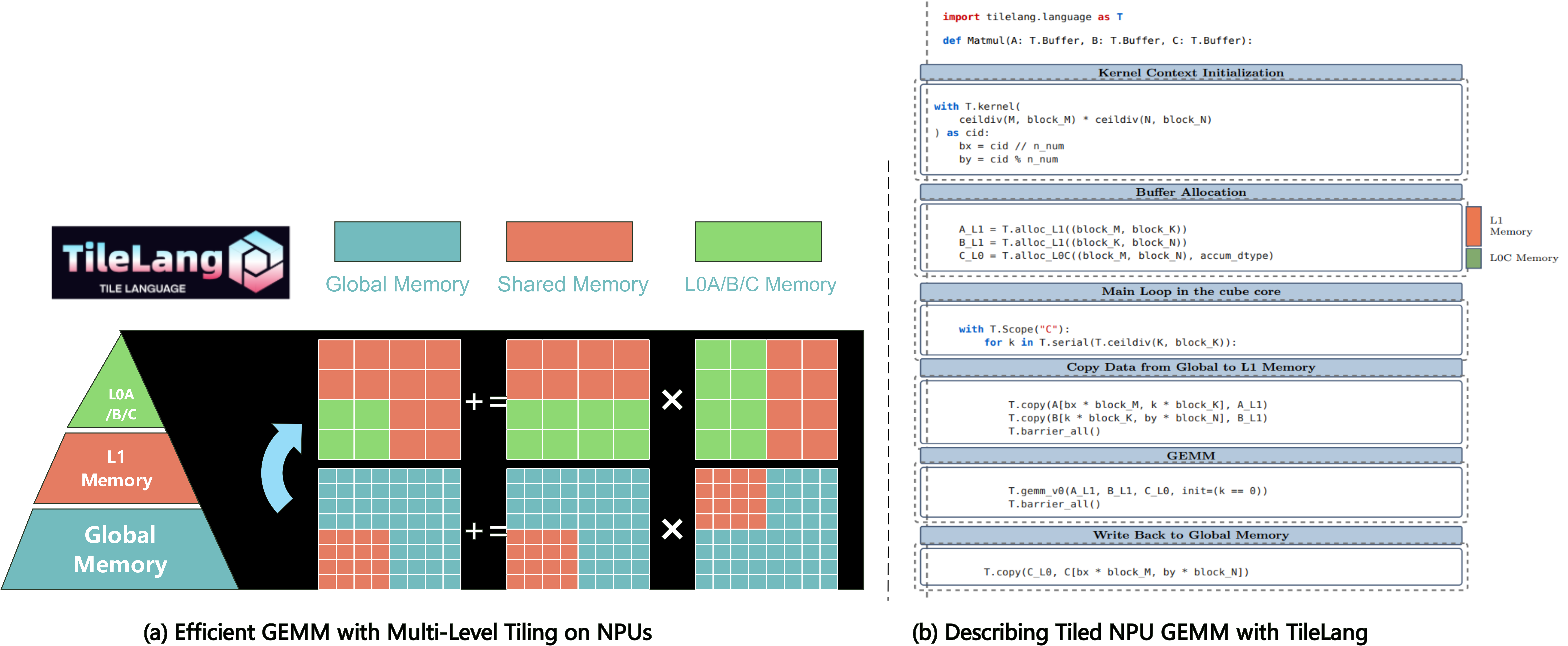
GPUs primarily feature a three-level memory hierarchy that can be analogously mapped to NPU hardware architecture as follows:
**Memory Hierarchy Mapping:**
- `global memory` ↔ `global memory`
- `shared memory` ↔ `L1 buffer on cube core and unified buffer on vector core`
- `register memory` ↔ `L0A/B/C buffer`
**Memory Management:**
TileLang-Ascend provides memory allocation primitives similar to the GPU version. For example, `alloc_{L1/ub/...}` functions allow on-chip memory allocation in a manner comparable to GPU programming.
**Multiple Styles for Vector Operations:**
TileLang-Ascend offers multiple ways to express vector computations on the NPU, from high-level automatic vectorization to fine-grained tile primitives:
```python
# Style 1: T.Parallel — automatic vectorization
for (i, j) in T.Parallel(M, N):
C_ub[i, j] = A_ub[i, j] + B_ub[i, j]
# Style 2: Tile primitives — explicit tile-level operations
T.tile.add(C_ub, A_ub, B_ub)
```
**Automatic Cube/Vector Scope Separation:**
Cube and vector cores on A2/A3 exchange data through global memory/L2 cache. In **Developer mode**, the compiler automatically separates Cube/Vector scopes and inserts synchronization. In **Expert mode**, you explicitly specify execution scopes using `T.Scope("C")/T.Scope("V")` and manage synchronization via `T.set_cross_flag` / `T.wait_cross_flag`.
## Quick Start
In this section, you'll learn how to write and execute a straightforward GEMM (matrix multiplication) kernel using tilelang-ascend, The next chapter will introduce how to write a high-performance gemm kernel.
### GEMM Example with Annotations
Below is an example that demonstrates how to quickly implement a gemm on the ascend.
```python
@tilelang.jit(out_idx=[-1])
def matmul(M, N, K, block_M, block_N, K_L1, dtype="float16", accum_dtype="float"):
# Calculate number of blocks in M and N dimensions
m_num = M // block_M
n_num = N // block_N
@T.prim_func
def main(
A: T.Tensor((M, K), dtype), # Input matrix A (M×K)
B: T.Tensor((K, N), dtype), # Input matrix B (K×N)
C: T.Tensor((M, N), dtype), # Output matrix C (M×N)
):
with T.Kernel(m_num * n_num, is_npu=True) as (cid, _):
bx = cid // n_num # Block row index
by = cid % n_num # Block column index
# Allocate L1 cache buffers for input matrices
A_L1 = T.alloc_L1((block_M, K_L1), dtype) # A block in L1
B_L1 = T.alloc_L1((K_L1, block_N), dtype) # B block in L1
# Allocate L0C buffer for accumulation
C_L0 = T.alloc_L0C((block_M, block_N), accum_dtype)
# Core computation scope
with T.Scope("C"):
# Calculate number of K-dimension iterations
loop_k = T.ceildiv(K, K_L1)
# Iterate over K dimension blocks
for k in T.serial(loop_k):
# Copy A and B blocks from global memory to L1 cache
T.copy(A[bx * block_M, k * K_L1], A_L1)
T.copy(B[k * K_L1, by * block_N], B_L1)
# Synchronize all cores before computation
T.barrier_all()
# Perform matrix multiplication
T.gemm_v0(A_L1, B_L1, C_L0, init=(k == 0))
# Synchronize all cores after computation
T.barrier_all()
# Copy final result from L0C to global memory
T.copy(C_L0, C[bx * block_M, by * block_N])
return main
```
### High Performance GEMM Example. (Layout, L2 Cache Swizzling, and Pipelining, etc.)
Below is an example that demonstrates more advanced features: layout annotation, parallelized copy, and swizzle for improved L2 cache locality. This snippet shows how to adapt your kernel to maximize performance on complex hardware.
```python
@tilelang.jit(out_idx=[-1])
def matmul(M, N, K, block_M, block_N, block_K, K_L1, S1, S2, dtype="float16", accum_dtype="float"):
m_num = M // block_M
n_num = N // block_N
core_num = 20
@T.macro
def init_flag():
T.set_flag("mte1", "mte2", 0)
T.set_flag("mte1", "mte2", 1)
T.set_flag("m", "mte1", 0)
T.set_flag("m", "mte1", 1)
T.set_flag("fix", "m", 0)
@T.macro
def clear_flag():
T.wait_flag("mte1", "mte2", 0)
T.wait_flag("mte1", "mte2", 1)
T.wait_flag("m", "mte1", 0)
T.wait_flag("m", "mte1", 1)
T.wait_flag("fix", "m", 0)
@T.prim_func
def main(
A: T.Tensor((M, K), dtype),
B: T.Tensor((K, N), dtype),
C: T.Tensor((M, N), dtype),
):
with T.Kernel(core_num, is_npu=True) as (cid, _):
A_L1 = T.alloc_L1((S1, block_M, K_L1), dtype)
B_L1 = T.alloc_L1((S1, K_L1, block_N), dtype)
T.annotate_layout({
A_L1: make_zn_layout(A_L1),
B_L1: make_zn_layout(B_L1),
})
A_L0 = T.alloc_L0A((S2, block_M, block_K), dtype)
B_L0 = T.alloc_L0B((S2, block_K, block_N), dtype)
C_L0 = T.alloc_L0C((block_M, block_N), accum_dtype)
with T.Scope("C"):
init_flag()
for i in T.serial(T.ceildiv(m_num * n_num, core_num)):
T.use_swizzle(
i * core_num + cid, M, N, K, block_M, block_N, off=3, in_loop=True)
bx = cid // n_num
by = cid % n_num
loop_k = T.ceildiv(K, K_L1)
T.wait_flag("mte1", "mte2", 0)
T.copy(A[bx * block_M, 0], A_L1[0, :, :])
T.copy(B[0, by * block_N], B_L1[0, :, :])
T.set_flag("mte2", "mte1", 0)
T.wait_flag("fix", "m", 0)
for k in T.serial(loop_k):
if k < loop_k - 1:
T.wait_flag("mte1", "mte2", (k + 1) % S1)
T.copy(A[bx * block_M, (k + 1) * K_L1], A_L1[(k + 1) % S1, :, :])
T.copy(B[(k + 1) * K_L1, by * block_N], B_L1[(k + 1) % S1, :, :])
T.set_flag("mte2", "mte1", (k + 1) % S1)
loop_kk = T.ceildiv(K_L1, block_K)
for kk in T.serial(loop_kk):
if kk == 0:
T.wait_flag("mte2", "mte1", k % S1)
T.wait_flag("m", "mte1", kk % S2)
T.copy(A_L1[k % S1, 0, kk * block_K], A_L0[kk % S2, :, :])
T.copy(B_L1[k % S1, kk * block_K, 0], B_L0[kk % S2, :, :])
if kk == 3:
T.set_flag("mte1", "mte2", k % S1)
T.set_flag("mte1", "m", kk % S2)
T.wait_flag("mte1", "m", kk % S2)
if k == 0 and kk == 0:
T.mma(A_L0[kk % S2, :, :], B_L0[kk % S2, :, :], C_L0, init=True)
else:
T.mma(A_L0[kk % S2, :, :], B_L0[kk % S2, :, :], C_L0)
T.set_flag("m", "mte1", kk % S2)
T.set_flag("m", "fix", 0)
T.wait_flag("m", "fix", 0)
T.copy(C_L0, C[bx * block_M, by * block_N])
T.set_flag("fix", "m", 0)
clear_flag()
T.barrier_all()
return main
```
### Automatic insertion of synchronization instruction
We have supported automatic insertion of synchronization instructions within the core, which can be enabled by setting the TL_ASCEND_AUTO_SYNC attribute in the JIT's pass_configs parameter. Here is a simple example:
```python
pass_configs = {
tilelang.PassConfigKey.TL_ASCEND_AUTO_SYNC: True
}
@tilelang.jit(out_idx=[-1], pass_configs=pass_configs)
def vec_add(M, N, block_M, block_N, dtype="float"):
m_num = M // block_M
n_num = N // block_N
VEC_NUM = 2
@T.prim_func
def main(
A: T.Tensor((M, N), dtype),
B: T.Tensor((M, N), dtype),
C: T.Tensor((M, N), dtype),
):
with T.Kernel(m_num * n_num, is_npu=True) as (cid, vid):
bx = cid // n_num
by = cid % n_num
a_ub = T.alloc_ub((block_M // VEC_NUM, block_N), dtype)
b_ub = T.alloc_ub((block_M // VEC_NUM, block_N), dtype)
c_ub = T.alloc_ub((block_M // VEC_NUM, block_N), dtype)
with T.Scope("V"):
T.copy(A[bx * block_M + vid * block_M // VEC_NUM, by * block_N], a_ub)
T.copy(B[bx * block_M + vid * block_M // VEC_NUM, by * block_N], b_ub)
T.add(c_ub, a_ub, b_ub)
T.copy(c_ub, C[bx * block_M + vid * block_M // VEC_NUM, by * block_N])
return main
```
### Automatic Buffer Reuse
We have supported automatic buffer reuse, which can be enabled by setting the TL_ASCEND_MEMORY_PLANNING attribute in the JIT's pass_configs parameter. Here is a example based on example_sparse_flash_attn.py:
```python
pass_configs = {
tilelang.PassConfigKey.TL_ASCEND_MEMORY_PLANNING: True
}
@tilelang.jit(out_idx=[3], pass_configs=pass_configs)
def sparse_attention_fwd(
# other code...
#Manual configuration of T.annotate_address is no longer needed.
# T.annotate_address({
# # L1 address
# q_l1: 0,
# q_tail_l1: 65536,
# kv_l1: 73728,
# kv_tail_l1: 139264,
# acc_s_l1: 139264,
# # L0C address
# acc_s_l0c: 0,
# acc_o_l0c: 0,
# ## ub address
# acc_o: 0,
# sumexp: 65536,
# m_i: 65664,
# indices_ub_: 65792,
# kv_ub: 66048,
# kv_tail_ub: 67072,
# acc_s_ub: 66048,
# m_i_prev: 74240,
# acc_s_ub_: 74368,
# tmp_ub: 74368,
# sumexp_i_ub: 98944,
# acc_s_half: 98944,
# acc_o_ub: 98944,
# acc_o_half: 98944
# })
# other code...
)
```
### T.Parallel
We have supported [T.parallel](https://github.com/tile-ai/tilelang-ascend/blob/ascendc_pto/docs/tutorials/t_parallel.md), which transforms the parallel iteration space into vectorized operations that are lowered into AscendC vector instructions. Here is an example based on [example_sparse_flash_attn.py](https://github.com/tile-ai/tilelang-ascend/blob/ascendc_pto/examples/sparse_flash_attention/example_sparse_flash_attn.py):
```python
pass_configs = {
tilelang.PassConfigKey.TL_ASCEND_AUTO_SYNC: True
}
@tilelang.jit(out_idx=[3], pass_configs=pass_configs)
def sparse_attention_fwd(
...
# T.tile.add(acc_s_ub, acc_s_ub, acc_s_ub_)
for (i, j) in T.Parallel(v_block, BI):
acc_s_ub[i, j] = acc_s_ub[i, j] + acc_s_ub_[i, j]
...
# T.tile.mul(acc_s_ub, acc_s_ub, sm_scale)
for (i, j) in T.Parallel(v_block, BI):
acc_s_ub[i, j] = acc_s_ub[i, j] * sm_scale
...
# T.tile.max(m_i, m_i, m_i_prev)
for i in T.Parallel(v_block):
m_i[i] = T.max(m_i[i], m_i_prev[i])
...
# for h_i in range(v_block):
# T.tile.sub(acc_s_ub[h_i, :], acc_s_ub[h_i, :], m_i[h_i])
for (h_i, j) in T.Parallel(v_block, D):
acc_s_ub[h_i, j] = acc_s_ub[h_i, j] - m_i[h_i]
)
```
### Auto-allocated Workspace
We now support [automatic workspace allocation](./docs/tutorials/automatic_workspace_allocation.md), enabling users to call operators without managing workspace or output tensor allocation—they only need to handle input tensors. Refer to [example_sparse_flash_attn.py](https://github.com/tile-ai/tilelang-ascend/blob/ascendc_pto/examples/sparse_flash_attention/example_sparse_flash_attn.py) for a concrete example.
```python
# Specify workspace positions in parameter list via workspace_idx
@tilelang.jit(out_idx=[3], workspace_idx=[4,5,6,7,8])
def sparse_attention_fwd(...):
@T.prim_func
def main(
# --- Input tensors ---
Q: T.Tensor(q_shape, dtype),
KV: T.Tensor(kv_shape, dtype),
Indices: T.Tensor(indices_shape, indices_dtype),
# --- Auto-allocated output (index 3 in out_idx) ---
Output: T.Tensor(o_shape, dtype),
# --- Auto-allocated workspaces (indices 4-8 in workspace_idx) ---
# These are temporary buffers managed by the runtime
workspace_1: T.Tensor([block_num, BI, D], dtype),
workspace_2: T.Tensor([block_num, BI, D_tail], dtype),
workspace_3: T.Tensor([block_num, H_per_block, BI], accum_dtype),
workspace_4: T.Tensor([block_num, H_per_block, BI], dtype),
workspace_5: T.Tensor([block_num, H_per_block, D], accum_dtype),
):
...
# Instantiate sparse attention function
func = sparse_attention_fwd(
heads=128,
dim=512,
tail_dim=64,
topk=2048,
kv_stride=1,
)
# Prepare input tensors
q = torch.randn((B, S, H, DQK), dtype=dtype)
kv = torch.randn((B, SKV, HKV, DQK), dtype=dtype)
indices = torch.full((B, S, HKV, topk), SKV, dtype=torch.int32)
for b in range(B):
for t in range(S):
for h in range(HKV):
i_i = torch.randperm(max(1, ((t + q_start_s_index) // KV_stride)))[:topk]
indices[b, t, h, :len(i_i)] = i_i
# Call operator - output and workspaces are automatically allocated!
output = func(q, kv, indices)
```
### T.Pipelined
[T.Pipelined](https://github.com/tile-ai/tilelang-ascend/blob/ascendc_pto/docs/tutorials/t_pipelined.md) enables automatic pipeline scheduling to achieve intra-core computation and data movement overlap, as well as inter-core pipeline overlap between Cube and Vector units.
**Usage:**
```python
for i in T.Pipelined(loop_range, num_stages=N):
# loop body
```
**Usage Constraints:**
- `T.Pipelined` **does not support nesting**. You cannot place a `T.Pipelined` loop inside another `T.Pipelined` loop.
- For inter-core pipelining, place both Cube and Vector operations in a single `T.Pipelined` loop.
- For intra-core pipelining only, use separate `T.Pipelined` loops for Cube and Vector respectively.
```python
# Correct: inter-core pipeline (Cube + Vector in one loop)
for i in T.Pipelined(loop, num_stages=2):
cube_operations()
vector_operations()
# Correct: intra-core pipeline (separate loops)
for i in T.Pipelined(loop, num_stages=2):
cube_operations()
for i in T.Pipelined(loop, num_stages=2):
vector_operations()
# WRONG: nested T.Pipelined is NOT supported
for i in T.Pipelined(outer, num_stages=2):
for j in T.Pipelined(inner, num_stages=2): # Error!
...
```
An intra-core example refers to [matmul_add_pipeline.py](https://github.com/tile-ai/tilelang-ascend/blob/ascendc_pto/examples/pipeline/matmul_add_pipeline.py):
```python
for k in T.Pipelined(loop_k, num_stages=2):
T.copy(A[bx * block_M, k * block_K], A_L1)
T.copy(B[k * block_K, by * block_N], B_L1)
T.barrier_all()
if k == 0:
T.gemm_v0(A_L1, B_L1, C_L0, init=True)
else:
T.gemm_v0(A_L1, B_L1, C_L0)
T.barrier_all()
```
An inter-core example refers to [flash_attn_bshd_pipeline.py](https://github.com/tile-ai/tilelang-ascend/blob/ascendc_pto/examples/pipeline/flash_attn_bshd_pipeline.py):
```python
for k in T.Pipelined(T.ceildiv(seq_len, block_N), num_stages=2):
T.copy(K[bz, by, k * block_N:(k + 1) * block_N, :], k_l1)
T.gemm_v0(q_l1, k_l1, acc_s_l0c, transpose_B=True, init=True)
T.copy(acc_s_l0c, workspace_1[cid, :, :])
T.tile.fill(acc_s_ub, 0.0)
T.copy(m_i, m_i_prev)
T.copy(
workspace_1[cid, vid * block_M // 2:vid * block_M // 2 + block_M // 2, :],
acc_s_ub_)
T.tile.add(acc_s_ub, acc_s_ub, acc_s_ub_)
T.tile.mul(acc_s_ub, acc_s_ub, sm_scale)
...
```
For performance tuning with `T.Pipelined` (choosing `num_stages`, Double Buffer, etc.), see the [Flash Attention Performance Optimization Guide](./examples/flash_attention/fa_opt/docs/optimization_guide_zh.md).
### Dive Deep into TileLang Beyond GEMM
In addition to GEMM, we provide a variety of examples to showcase the versatility and power of TileLang-Ascend, including:
- [FlashAttention](./examples/flash_attention/): Implementations of FlashAttention with TileLang-Ascend.
- [LightningIndexer](./examples/lightning_indexer/): Implementations of LightningIndexer with TileLang-Ascend.
- [SparseFlashAttention](./examples/sparse_flash_attention/): Implementations of SparseFlashAttention with TileLang-Ascend.
### Automatic insert synchronization flags between AIC and AIV, such as CrossCoreSetFlag / CrossCoreWaitFlag.
Two switches need to be turned on:
```python
pass_configs = {
tilelang.PassConfigKey.TL_ASCEND_AUTO_CV_COMBINE: True,
tilelang.PassConfigKey.TL_ASCEND_AUTO_CV_SYNC: True,
}
```
Here is an example:
- [FlashAttention](./examples/flash_attention/flash_attn_bhsd_cc_sync.py): Implementations of FlashAttention without inserting synchronization flags manually.
### Vid reduction & Auto CV Ratio
The parameter `threads` needs to be set. (Only 1 or 2 are allowed).When setting thread parameters, the return value will only have cid and no vid:
```python
with T.Kernel(m_num * n_num, threads=2, is_npu=True) as (cid):
```
Therefore, ub application and transfer will no longer need to consider core allocation, and the usage will change as follows:
```python
# UB allocation original form
c_ub = T.alloc_shared((block_M // VEC_NUM, block_N), dtype)
# New form after UB reduce elimination
c_ub = T.alloc_shared((block_M, block_N), dtype)
# UB moved to its original form
T.copy(c_ub, C[bx * block_M + vid * block_M // VEC_NUM, by * block_N])
# New form after UB transport elimination
T.copy(c_ub, C[bx * block_M, by * block_N])
# for loop original form
for h_i, j in T.Parallel(v_block // VEC_NUM, BI):
acc_s_ub[h_i, j] = acc_s_ub[h_i, j] - m_i[h_i]
# New form after UB transport elimination
for h_i, j in T.Parallel(v_block, BI):
acc_s_ub[h_i, j] = acc_s_ub[h_i, j] - m_i[h_i]
```
Here is some examples:
- [MatmulAddDeveloper](./examples/developer_mode/matmul_add_developer.py)
- [SparseFlashAttnDeveloperVidReduce](./examples/developer_mode/sparse_flash_attn_developer_vid_reduce.py)
For a more detailed feature introduction, please see:
- [vid_reduction_and_auto_cv_ratio.md](./docs/tutorials/vid_reduction_and_auto_cv_ratio.md)
### Workspace reduction
Workspace Reduction is **automatically enabled** in the compilation pipeline. No manual configuration required. It automates workspace allocation for cross-core data transfer (L0C → UB), eliminating the need for users to manually write two-stage GM copy scripts and manage workspace buffers.
```python
@T.prim_func
def flash_attn(...):
with T.Kernel(..., threads=2, is_npu=True) as (cid):
# Cube computation
T.gemm_v0(q_l1, k_l1, acc_s_l0c, transpose_B=True, init=True)
# Single copy statement — Workspace Reduction automatically handles GM transfer
T.copy(acc_s_l0c, acc_s_ub)
# Vector computation
T.tile.exp(acc_s_ub, acc_s_ub)
T.reduce_max(acc_s_ub, m_i, dim=-1)
T.tile.sub(acc_s_ub, acc_s_ub, m_i)
```
Here are some examples:
- [FlashAttnDeveloper](./examples/developer_mode/flash_attn_bshd_developer.py)
For a more detailed feature introduction, please see:
- [workspace_reduction_tutorial.md](./docs/tutorials/workspace_reduction_tutorial.md)
## Contributing
We welcome contributions of new operators and framework improvements! Please follow the guidelines below to ensure your changes integrate smoothly.
### Contributing Operators
When adding a new operator:
1. Create your operator under the `examples/` directory (e.g., `examples/my_op/my_op.py`).
2. Make sure your script prints `Kernel Output Match!` or `Test Passed!` upon success, so the CI can recognize it.
3. Verify that `bench_test.sh` can discover and run your script — it auto-discovers `*.py` files up to 2 levels deep under `examples/`.
4. Run the full test suite locally before submitting:
```bash
cd examples
bash bench_test.sh
```
### Contributing Framework Changes
When modifying the compiler, passes, or runtime:
1. Ensure **all existing tests pass** by running `bench_test.sh` end-to-end. Framework changes must not break any existing operator.
2. The CI will also run `pytest` on `testing/python/` — make sure those tests pass as well.
3. If your change adds a new API or primitive, add corresponding test coverage under `testing/python/` or a new example under `examples/`.
### CI Overview
The current CI workflow is triggered manually via [`bench_test.sh`](./examples/bench_test.sh).
> **Rule of thumb**: If you add an operator, make sure `bench_test.sh` picks it up. If you change the framework, make sure `bench_test.sh` still reports 100% pass.
## Upcoming Features
Check our [tilelang-ascend development plan](https://github.com/tile-ai/tilelang-ascend/issues/3) for upcoming features.
## Acknowledgements
We gratefully acknowledge the valuable support provided by Huawei's HiSilicon, ICT, Compiler and Programming Language Lab and the Peking University Kunpeng & Ascend Center for Excellence in Science, Education, and Innovation.