 [](http://cocoapods.org/pods/TLPhotoPicker)
[](http://cocoapods.org/pods/TLPhotoPicker)
[](http://cocoapods.org/pods/TLPhotoPicker)

[](https://github.com/sponsors/tilltue)
# TLPhotoPicker
A modern, flexible photo and video picker for iOS applications. TLPhotoPicker enables selecting media from multiple smart albums with an interface similar to Facebook's photo picker.
## Demo 🙉
| Facebook Picker | TLPhotoPicker |
| ------------- | ------------- |
|  |  |
## Features
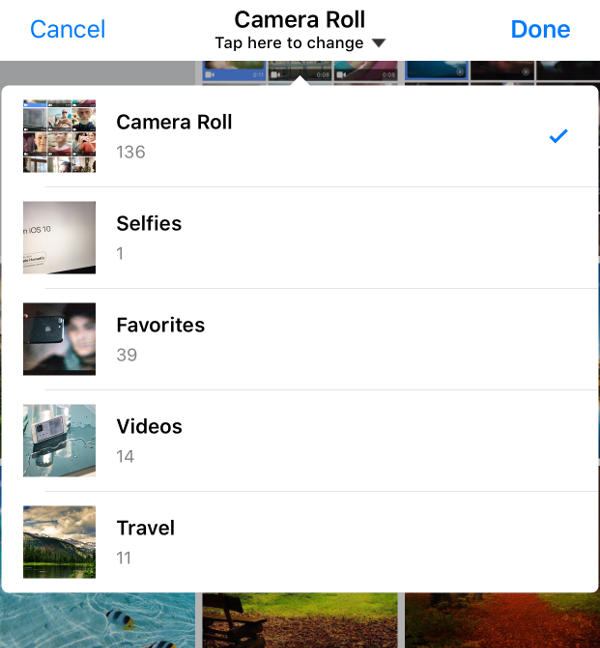
- ✅ **Smart Album Support** - Camera roll, selfies, panoramas, favorites, videos, and custom albums
- 📱 **Selection Order** - Visual order indicators for selected media
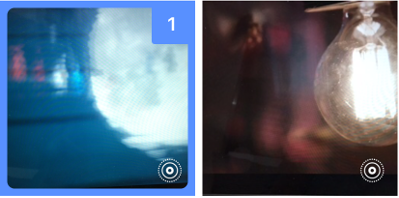
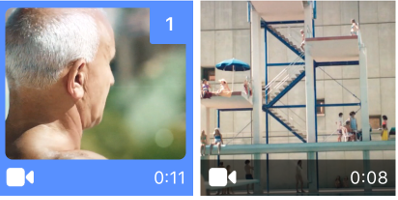
- ▶️ **Media Playback** - Preview videos and Live Photos directly in the picker
- ⏱️ **Video Duration** - Display video length on thumbnails
- ⚡ **High Performance** - Async asset loading with excellent scrolling performance
- 🎨 **Customizable** - Custom cells, selection rules, and UI elements
- 🔄 **Live Updates** - Automatic reload when Photos library changes
- ☁️ **iCloud Support** - Seamless iCloud Photo Library integration
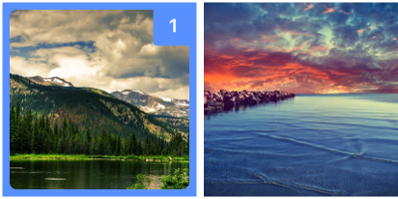
| Smart Albums | Live Photo | Video | Photo | Custom Cell |
| ------------- | ------------- | ------------- | ------------- | ------------- |
|  |  |  |  |  |
### Custom Camera Cell
| Live Camera Cell |
| ------------- |
|  |
## Requirements
- **iOS 13.0+**
- **Swift 5.0+**
- **Xcode 14.0+**
## Installation
### CocoaPods
```ruby
platform :ios, '13.0'
pod "TLPhotoPicker"
```
### Swift Package Manager
Add TLPhotoPicker as a dependency in your `Package.swift`:
```swift
dependencies: [
.package(url: "https://github.com/tilltue/TLPhotoPicker.git", .upToNextMajor(from: "2.1.0"))
]
```
### Privacy Configuration
Add the following keys to your `Info.plist`:
```xml
NSPhotoLibraryUsageDescription
Access to photos is required to select images
NSCameraUsageDescription
Camera access is required to take photos
```
[](http://cocoapods.org/pods/TLPhotoPicker)
[](http://cocoapods.org/pods/TLPhotoPicker)
[](http://cocoapods.org/pods/TLPhotoPicker)

[](https://github.com/sponsors/tilltue)
# TLPhotoPicker
A modern, flexible photo and video picker for iOS applications. TLPhotoPicker enables selecting media from multiple smart albums with an interface similar to Facebook's photo picker.
## Demo 🙉
| Facebook Picker | TLPhotoPicker |
| ------------- | ------------- |
|  |  |
## Features
- ✅ **Smart Album Support** - Camera roll, selfies, panoramas, favorites, videos, and custom albums
- 📱 **Selection Order** - Visual order indicators for selected media
- ▶️ **Media Playback** - Preview videos and Live Photos directly in the picker
- ⏱️ **Video Duration** - Display video length on thumbnails
- ⚡ **High Performance** - Async asset loading with excellent scrolling performance
- 🎨 **Customizable** - Custom cells, selection rules, and UI elements
- 🔄 **Live Updates** - Automatic reload when Photos library changes
- ☁️ **iCloud Support** - Seamless iCloud Photo Library integration
| Smart Albums | Live Photo | Video | Photo | Custom Cell |
| ------------- | ------------- | ------------- | ------------- | ------------- |
|  |  |  |  |  |
### Custom Camera Cell
| Live Camera Cell |
| ------------- |
|  |
## Requirements
- **iOS 13.0+**
- **Swift 5.0+**
- **Xcode 14.0+**
## Installation
### CocoaPods
```ruby
platform :ios, '13.0'
pod "TLPhotoPicker"
```
### Swift Package Manager
Add TLPhotoPicker as a dependency in your `Package.swift`:
```swift
dependencies: [
.package(url: "https://github.com/tilltue/TLPhotoPicker.git", .upToNextMajor(from: "2.1.0"))
]
```
### Privacy Configuration
Add the following keys to your `Info.plist`:
```xml
NSPhotoLibraryUsageDescription
Access to photos is required to select images
NSCameraUsageDescription
Camera access is required to take photos
```
 > **iOS 14+ Limited Photo Access**
>
> To suppress automatic prompting, add this to `Info.plist`:
> ```xml
> PHPhotoLibraryPreventAutomaticLimitedAccessAlert
>
> ```
> [Learn more](https://developer.apple.com/videos/play/wwdc2020/10641/)
## Quick Start
### Basic Usage
```swift
import TLPhotoPicker
class ViewController: UIViewController {
@IBAction func openPhotoPicker() {
let picker = TLPhotosPickerViewController()
picker.delegate = self
present(picker, animated: true)
}
}
extension ViewController: TLPhotosPickerViewControllerDelegate {
func dismissPhotoPicker(withTLPHAssets: [TLPHAsset]) {
// Handle selected assets
for asset in withTLPHAssets {
print("Selected: \(asset.originalFileName ?? "Unknown")")
}
}
}
```
### Modern Async/Await (iOS 13+)
```swift
// Load images asynchronously
Task {
if let image = await selectedAssets.first?.fullResolutionImage() {
await MainActor.run {
self.imageView.image = image
}
}
}
// Load multiple images concurrently
Task {
let images = await withTaskGroup(of: UIImage?.self) { group in
for asset in selectedAssets {
group.addTask { await asset.fullResolutionImage() }
}
var results: [UIImage] = []
for await image in group {
if let image = image { results.append(image) }
}
return results
}
await MainActor.run {
self.displayImages(images)
}
}
```
### Configuration with Builder Pattern
```swift
let picker = TLPhotosPickerViewController()
// Use presets
picker.configure = .singlePhoto
picker.configure = .videoOnly
picker.configure = .compactGrid
// Or build custom configuration
picker.configure = TLPhotosPickerConfigure()
.numberOfColumns(3)
.maxSelection(20)
.allowVideo(true)
.allowLivePhotos(true)
.selectedColor(.systemPink)
.useCameraButton(true)
// Extend presets
picker.configure = .videoOnly
.numberOfColumns(4)
.selectedColor(.systemBlue)
present(picker, animated: true)
```
## Documentation
For detailed information, see:
- **[Configuration Guide](Documentation/CONFIGURATION.md)** - Complete configuration options
- **[Advanced Usage](Documentation/ADVANCED.md)** - Custom cells, delegates, and rules
- **[API Reference](Documentation/API.md)** - TLPHAsset and helper methods
- **[Migration Guide](Documentation/MIGRATION.md)** - Upgrading from older versions
## Common Use Cases
### Single Photo Selection
```swift
picker.configure = .singlePhoto
.selectedColor(.systemPurple)
```
### Video Recording Only
```swift
picker.configure = TLPhotosPickerConfigure()
.mediaType(.video)
.allowPhotograph(false)
.allowVideoRecording(true)
```
### Instagram-style Grid
```swift
picker.configure = .compactGrid
.maxSelection(10)
.selectedColor(UIColor(red: 0/255, green: 122/255, blue: 255/255, alpha: 1.0))
```
### Custom Selection Rules
```swift
picker.canSelectAsset = { asset in
// Only allow images larger than 300x300
return asset.pixelWidth >= 300 && asset.pixelHeight >= 300
}
picker.didExceedMaximumNumberOfSelection = { picker in
// Show alert when limit reached
}
```
### Capture Camera Media URL
```swift
let picker = TLPhotosPickerViewController()
picker.didCaptureMediaURL = { url in
// Both the camera picker and TLPhotosPickerViewController are already
// dismissed at this point. Just present your next screen.
let uploadVC = MyUploadViewController(fileURL: url)
presentingViewController.present(uploadVC, animated: true)
}
present(picker, animated: true)
```
When set, camera captures are returned as temporary file URLs instead of being saved to the Photo Library. By the time the closure fires, the camera picker and `TLPhotosPickerViewController` have both been fully dismissed — the caller only needs to `present` their next view controller, never `dismiss`.
## Delegate Methods
```swift
protocol TLPhotosPickerViewControllerDelegate {
func shouldDismissPhotoPicker(withTLPHAssets: [TLPHAsset]) -> Bool
func dismissPhotoPicker(withTLPHAssets: [TLPHAsset])
func dismissPhotoPicker(withPHAssets: [PHAsset])
func photoPickerDidCancel()
func dismissComplete()
func canSelectAsset(phAsset: PHAsset) -> Bool
func didExceedMaximumNumberOfSelection(picker: TLPhotosPickerViewController)
func handleNoAlbumPermissions(picker: TLPhotosPickerViewController)
func handleNoCameraPermissions(picker: TLPhotosPickerViewController)
}
```
## TLPHAsset
The library provides `TLPHAsset`, a wrapper around `PHAsset` with convenient helper methods:
```swift
public struct TLPHAsset {
public var phAsset: PHAsset?
public var selectedOrder: Int
public var type: AssetType // .photo, .video, .livePhoto
public var originalFileName: String?
public var isSelectedFromCamera: Bool
// Async image loading
public func fullResolutionImage() async -> UIImage?
// iCloud download
public func cloudImageDownload(
progressBlock: @escaping (Double) -> Void,
completionBlock: @escaping (UIImage?) -> Void
) -> PHImageRequestID?
// Export to file
public func tempCopyMediaFile(
convertLivePhotosToJPG: Bool = false,
progressBlock: ((Double) -> Void)? = nil,
completionBlock: @escaping ((URL, String) -> Void)
) -> PHImageRequestID?
// File size
public func photoSize(completion: @escaping (Int) -> Void)
public func videoSize(completion: @escaping (Int) -> Void)
// Static method
public static func asset(with localIdentifier: String) -> TLPHAsset?
}
```
See [API Reference](Documentation/API.md) for complete documentation.
## Contributing
Issues and pull requests are welcome! Please check existing issues before creating new ones.
## 💖 Support This Project
TLPhotoPicker is an open-source project maintained in my free time. If you find it useful, please consider supporting its development:
[](https://github.com/sponsors/tilltue)
Your support helps me:
- 🐛 Fix bugs and maintain compatibility with latest iOS versions
- ✨ Develop new features and improvements
- 📚 Improve documentation and examples
- ⚡ Performance optimizations and code quality
Every contribution is appreciated! 🙏
## Author
**wade.hawk** - junhyi.park@gmail.com
Does your organization use TLPhotoPicker? Let me know!
## License
TLPhotoPicker is available under the MIT license. See the [LICENSE](LICENSE) file for details.
> **iOS 14+ Limited Photo Access**
>
> To suppress automatic prompting, add this to `Info.plist`:
> ```xml
> PHPhotoLibraryPreventAutomaticLimitedAccessAlert
>
> ```
> [Learn more](https://developer.apple.com/videos/play/wwdc2020/10641/)
## Quick Start
### Basic Usage
```swift
import TLPhotoPicker
class ViewController: UIViewController {
@IBAction func openPhotoPicker() {
let picker = TLPhotosPickerViewController()
picker.delegate = self
present(picker, animated: true)
}
}
extension ViewController: TLPhotosPickerViewControllerDelegate {
func dismissPhotoPicker(withTLPHAssets: [TLPHAsset]) {
// Handle selected assets
for asset in withTLPHAssets {
print("Selected: \(asset.originalFileName ?? "Unknown")")
}
}
}
```
### Modern Async/Await (iOS 13+)
```swift
// Load images asynchronously
Task {
if let image = await selectedAssets.first?.fullResolutionImage() {
await MainActor.run {
self.imageView.image = image
}
}
}
// Load multiple images concurrently
Task {
let images = await withTaskGroup(of: UIImage?.self) { group in
for asset in selectedAssets {
group.addTask { await asset.fullResolutionImage() }
}
var results: [UIImage] = []
for await image in group {
if let image = image { results.append(image) }
}
return results
}
await MainActor.run {
self.displayImages(images)
}
}
```
### Configuration with Builder Pattern
```swift
let picker = TLPhotosPickerViewController()
// Use presets
picker.configure = .singlePhoto
picker.configure = .videoOnly
picker.configure = .compactGrid
// Or build custom configuration
picker.configure = TLPhotosPickerConfigure()
.numberOfColumns(3)
.maxSelection(20)
.allowVideo(true)
.allowLivePhotos(true)
.selectedColor(.systemPink)
.useCameraButton(true)
// Extend presets
picker.configure = .videoOnly
.numberOfColumns(4)
.selectedColor(.systemBlue)
present(picker, animated: true)
```
## Documentation
For detailed information, see:
- **[Configuration Guide](Documentation/CONFIGURATION.md)** - Complete configuration options
- **[Advanced Usage](Documentation/ADVANCED.md)** - Custom cells, delegates, and rules
- **[API Reference](Documentation/API.md)** - TLPHAsset and helper methods
- **[Migration Guide](Documentation/MIGRATION.md)** - Upgrading from older versions
## Common Use Cases
### Single Photo Selection
```swift
picker.configure = .singlePhoto
.selectedColor(.systemPurple)
```
### Video Recording Only
```swift
picker.configure = TLPhotosPickerConfigure()
.mediaType(.video)
.allowPhotograph(false)
.allowVideoRecording(true)
```
### Instagram-style Grid
```swift
picker.configure = .compactGrid
.maxSelection(10)
.selectedColor(UIColor(red: 0/255, green: 122/255, blue: 255/255, alpha: 1.0))
```
### Custom Selection Rules
```swift
picker.canSelectAsset = { asset in
// Only allow images larger than 300x300
return asset.pixelWidth >= 300 && asset.pixelHeight >= 300
}
picker.didExceedMaximumNumberOfSelection = { picker in
// Show alert when limit reached
}
```
### Capture Camera Media URL
```swift
let picker = TLPhotosPickerViewController()
picker.didCaptureMediaURL = { url in
// Both the camera picker and TLPhotosPickerViewController are already
// dismissed at this point. Just present your next screen.
let uploadVC = MyUploadViewController(fileURL: url)
presentingViewController.present(uploadVC, animated: true)
}
present(picker, animated: true)
```
When set, camera captures are returned as temporary file URLs instead of being saved to the Photo Library. By the time the closure fires, the camera picker and `TLPhotosPickerViewController` have both been fully dismissed — the caller only needs to `present` their next view controller, never `dismiss`.
## Delegate Methods
```swift
protocol TLPhotosPickerViewControllerDelegate {
func shouldDismissPhotoPicker(withTLPHAssets: [TLPHAsset]) -> Bool
func dismissPhotoPicker(withTLPHAssets: [TLPHAsset])
func dismissPhotoPicker(withPHAssets: [PHAsset])
func photoPickerDidCancel()
func dismissComplete()
func canSelectAsset(phAsset: PHAsset) -> Bool
func didExceedMaximumNumberOfSelection(picker: TLPhotosPickerViewController)
func handleNoAlbumPermissions(picker: TLPhotosPickerViewController)
func handleNoCameraPermissions(picker: TLPhotosPickerViewController)
}
```
## TLPHAsset
The library provides `TLPHAsset`, a wrapper around `PHAsset` with convenient helper methods:
```swift
public struct TLPHAsset {
public var phAsset: PHAsset?
public var selectedOrder: Int
public var type: AssetType // .photo, .video, .livePhoto
public var originalFileName: String?
public var isSelectedFromCamera: Bool
// Async image loading
public func fullResolutionImage() async -> UIImage?
// iCloud download
public func cloudImageDownload(
progressBlock: @escaping (Double) -> Void,
completionBlock: @escaping (UIImage?) -> Void
) -> PHImageRequestID?
// Export to file
public func tempCopyMediaFile(
convertLivePhotosToJPG: Bool = false,
progressBlock: ((Double) -> Void)? = nil,
completionBlock: @escaping ((URL, String) -> Void)
) -> PHImageRequestID?
// File size
public func photoSize(completion: @escaping (Int) -> Void)
public func videoSize(completion: @escaping (Int) -> Void)
// Static method
public static func asset(with localIdentifier: String) -> TLPHAsset?
}
```
See [API Reference](Documentation/API.md) for complete documentation.
## Contributing
Issues and pull requests are welcome! Please check existing issues before creating new ones.
## 💖 Support This Project
TLPhotoPicker is an open-source project maintained in my free time. If you find it useful, please consider supporting its development:
[](https://github.com/sponsors/tilltue)
Your support helps me:
- 🐛 Fix bugs and maintain compatibility with latest iOS versions
- ✨ Develop new features and improvements
- 📚 Improve documentation and examples
- ⚡ Performance optimizations and code quality
Every contribution is appreciated! 🙏
## Author
**wade.hawk** - junhyi.park@gmail.com
Does your organization use TLPhotoPicker? Let me know!
## License
TLPhotoPicker is available under the MIT license. See the [LICENSE](LICENSE) file for details.