
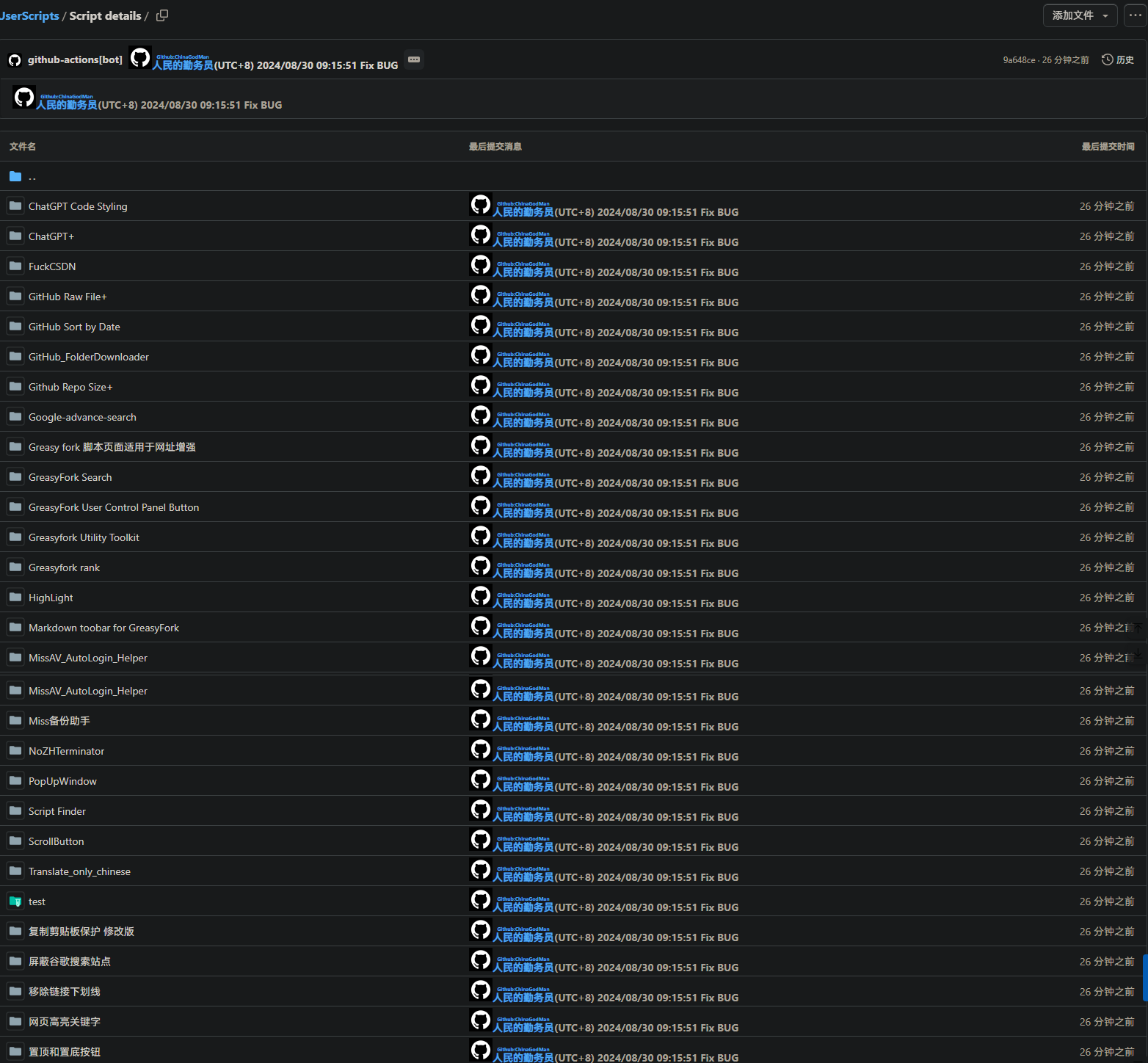
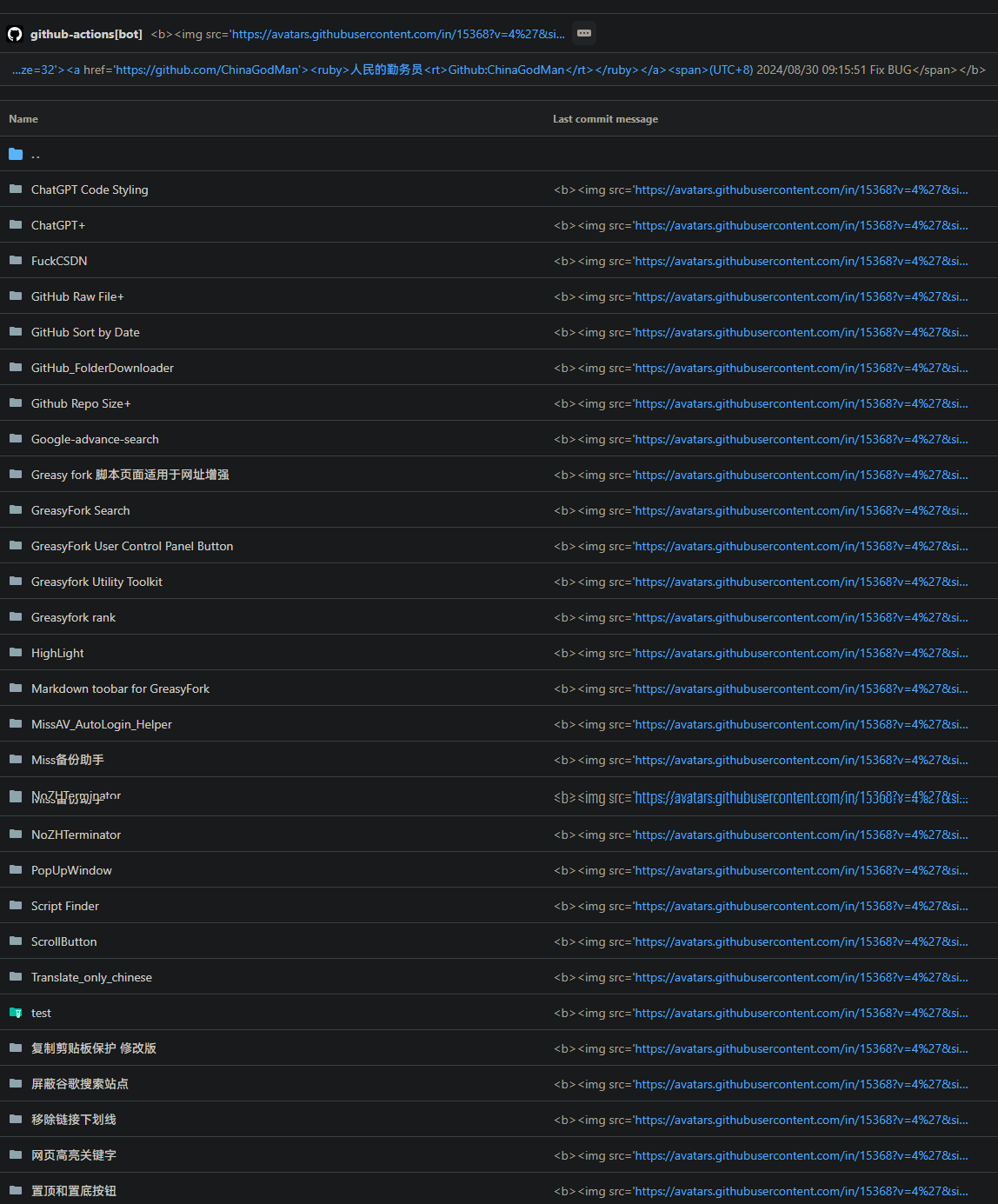
「 该脚本将 GitHub 上的提交信息转化为 HTML 视图,以更清晰地查看提交详情。它会自动将提交信息列表、提交头部和最新提交信息转化为 HTML 格式,提供更佳的视觉效果和用户体验。 」

Download:Github | ⭐Greasy Fork
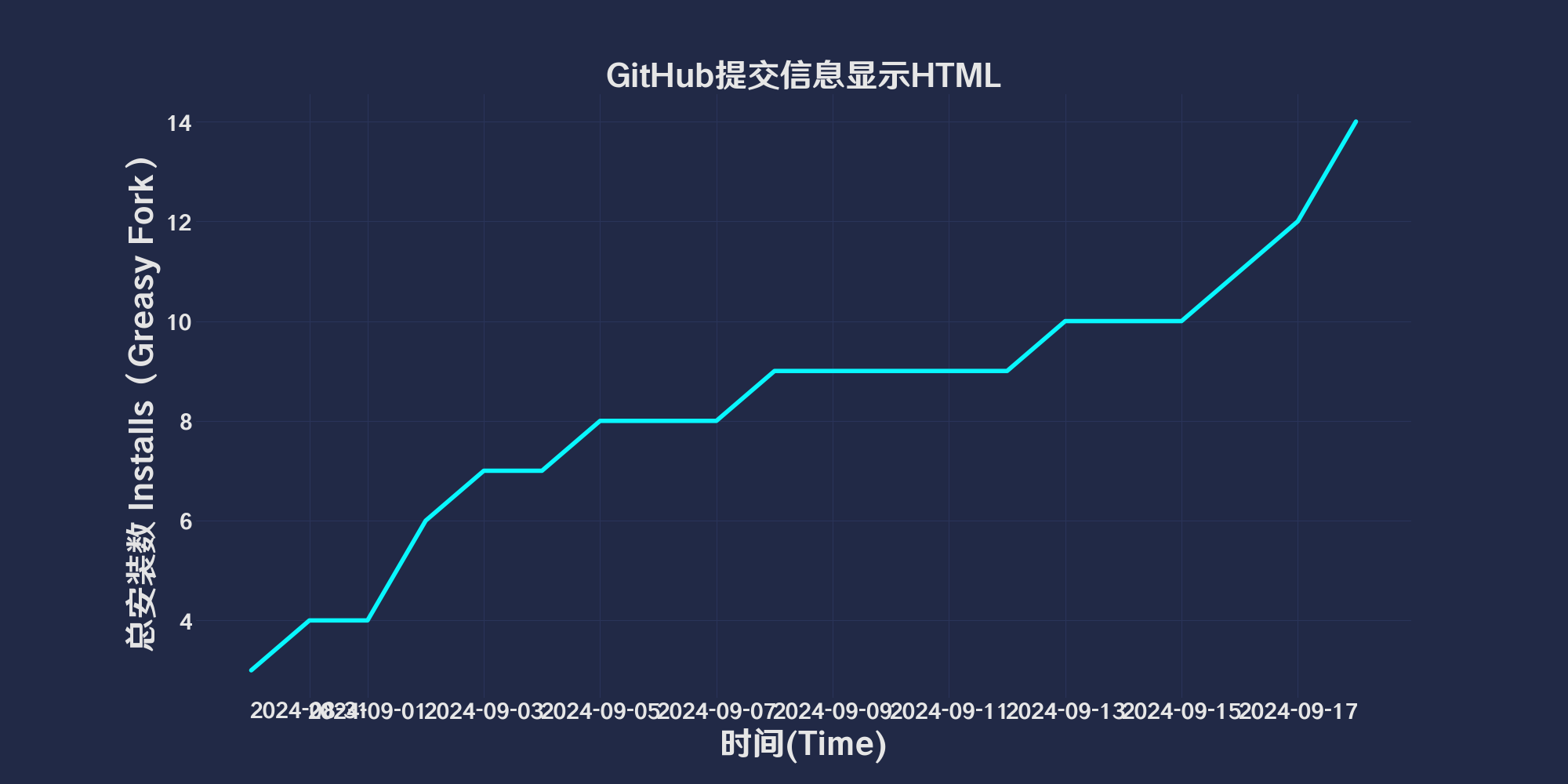 # GitHub CommitMessage Html View
## 描述
`GitHub CommitMessage Html View` 是一个用户脚本,旨在将 GitHub 上的提交信息转换为 HTML 视图,从而提供更清晰的提交详情。该脚本自动将提交信息列表、提交头部和最新提交信息转换为 HTML 格式,以增强视觉效果和用户体验,配合git使用
## 功能
- **提交信息列表转换**: 将提交消息列表中的提交信息转化为 HTML 视图。
- **头部信息展示**: 显示提交头部和最新提交的详细信息。
- **增强视觉效果**: 改善提交信息的可视性和用户体验。
## PowerShell配合上传到远程仓库
点击[qinwuyuan.ps1](https://raw.githubusercontent.com/ChinaGodMan/UserScripts/main/Script%20details/github-commit-viewer/preview/qinwuyuan.ps1)下载Powershell脚本
# GitHub CommitMessage Html View
## 描述
`GitHub CommitMessage Html View` 是一个用户脚本,旨在将 GitHub 上的提交信息转换为 HTML 视图,从而提供更清晰的提交详情。该脚本自动将提交信息列表、提交头部和最新提交信息转换为 HTML 格式,以增强视觉效果和用户体验,配合git使用
## 功能
- **提交信息列表转换**: 将提交消息列表中的提交信息转化为 HTML 视图。
- **头部信息展示**: 显示提交头部和最新提交的详细信息。
- **增强视觉效果**: 改善提交信息的可视性和用户体验。
## PowerShell配合上传到远程仓库
点击[qinwuyuan.ps1](https://raw.githubusercontent.com/ChinaGodMan/UserScripts/main/Script%20details/github-commit-viewer/preview/qinwuyuan.ps1)下载Powershell脚本
param (
[string]$qinwuyuan_messageFilePath
)
$qinwuyuan_scriptPath = $PSScriptRoot
$qinwuyuan_rootDrive1 = [System.IO.Path]::GetPathRoot($qinwuyuan_scriptPath).TrimEnd('\')
if (-not $qinwuyuan_messageFilePath) {
$qinwuyuan_messageFilePath = "$qinwuyuan_rootDrive1\path\to\change\commit.txt"
}
$qinwuyuan_oldCommitFilePath = "$qinwuyuan_scriptPath\oldcommit.txt"
if (-not (Test-Path $qinwuyuan_messageFilePath)) {
exit 1
}
if (-not (Test-Path .git)) {
exit 1
}
$qinwuyuan_newCommitMessage = Get-Content $qinwuyuan_messageFilePath -Raw
$qinwuyuan_oldCommitMessage = if (Test-Path $qinwuyuan_oldCommitFilePath) {
Get-Content $qinwuyuan_oldCommitFilePath -Raw
} else {
""
}
if ($qinwuyuan_newCommitMessage -eq $qinwuyuan_oldCommitMessage) {
$qinwuyuan_currentDateTime = Get-Date -Format "yyyy/M/d HH:mm:ss"
$qinwuyuan_commitMessage = @"
https://avatars.githubusercontent.com/u/96548841?v=4&size=32">
https://github.com/ChinaGodMan">
人民的勤务员
(UTC+8) $qinwuyuan_currentDateTime
"@
} else {
$qinwuyuan_currentDateTime = Get-Date -Format "yyyy/M/d HH:mm:ss"
$qinwuyuan_commitMessage = $qinwuyuan_newCommitMessage -replace '\$qinwuyuan_currentDateTime', $qinwuyuan_currentDateTime
}
$qinwuyuan_currentBranch = git rev-parse --abbrev-ref HEAD
if ($LASTEXITCODE -ne 0) {
exit 1
}
git add .
git commit -m $qinwuyuan_commitMessage
if ($LASTEXITCODE -ne 0) {
exit 1
}
git push origin $qinwuyuan_currentBranch --force
if ($LASTEXITCODE -ne 0) {
exit 1
}
Copy-Item -Path $qinwuyuan_messageFilePath -Destination $qinwuyuan_oldCommitFilePath -Force
> ### 🔍你可能在找GitHub相关脚本
> - [**GitHub提交信息显示HTML**](https://greasyfork.org/scripts/505830): 该脚本将 GitHub 上的提交信息转化为 HTML 视图,以更清晰地查看提交详情。它会自动将提交信息列表、提交头部和最新提交信息转化为 HTML 格式,提供更佳的视觉效果和用户体验。
> - [**GitHub 文件列表美化器**](https://greasyfork.org/scripts/508047): GitHub 文件列表美化器是一个用户脚本,用于增强 GitHub 仓库中的文件显示效果。它可以为文件和文件夹添加颜色,并将文件类型图标替换为小图像,使得代码库更加易于浏览和管理。
> - [**GitHub 自动确认设备授权**](https://greasyfork.org/scripts/508956): 在GitHub授权页面自动输入授权码与自动确认。
> - [**GitHub文件夹下载**](https://greasyfork.org/scripts/505496): 添加一个下载按钮,允许轻松下载特定的 GitHub 文件夹。
> - [**GitHub下载单文件和复制文件URL**](https://greasyfork.org/scripts/505501): 在每个文件行的末尾添加按钮,以复制原始文件 URL 和下载文件
> - [**github显示仓库大小**](https://greasyfork.org/scripts/502291): 在Github查看仓库和搜索仓库时显示仓库大小
> - [**GitHub Sort by Date**](https://greasyfork.org/scripts/505218): 仓库列表文件排序方式改为日期降序,方便查看最新更新的文件。
## 支持
- [报告问题](https://github.com/ChinaGodMan/UserScripts/issues)
- [项目主页](https://github.com/ChinaGodMan/UserScripts)
## 许可证
此脚本使用 [MIT 许可证](https://opensource.org/licenses/MIT)
使用后:
使用前:
## 使用帮助
推荐浏览器和脚本管理器:
* **Greasemonkey + Waterfox**
* **Tampermonkey/Violentmonkey + Firefox**
* **Tampermonkey/Violentmonkey + Chrome**
* **Userscripts + ios Safari**
* **Violentmonkey/KiWiBrowser + Android**
**如果你需要了解更多关于如何安装用户脚本,[点击我](https://github.com/ChinaGodMan/UserScripts/blob/main/docs/help/README.md)查看图文教学!**
### 查看所有发布脚本
> ### 🔍你可能在找 ChatGPT相关脚本
> - [**ChatGPT代码字体缩小**](https://greasyfork.org/scripts/505209): 让 ChatGPT 代码字体变小
> - [**ChatGPT 聊天复制代码按钮**](https://greasyfork.org/scripts/509598): 在 chatgpt.com 上代码块的右下角添加一个带有动画的“复制代码”按钮
> - [**ChatGPT 字符计数器**](https://greasyfork.org/scripts/506166): 添加一个字符计数器到输入框,限制为 32732 个字符。(ChatGPT 的限制是 32732 个字符。)
> - [**ChatGPT 折叠自己消息和最大宽度**](https://greasyfork.org/scripts/504901): 自动折叠由你发送的长消息,节省屏幕空间。允许你设置聊天窗口的最大宽度,使得长消息不会超出指定范围。
> ### 🔍你可能在找 网页相关脚本
> - [**网页写入剪辑版授权管理器**](https://greasyfork.org/scripts/497403): 禁止网页向剪辑版拉屎,绿色为放行,红色禁止,橙色临时方向
> - [**解除CSDN登录复制限制**](https://greasyfork.org/scripts/505207): 去你妈的 CSDN 登录复制,无需登录即可复制代码框内容
> - [**绚丽渐变美化网页表格**](https://greasyfork.org/scripts/507036): 自动为网页上的表格所有列应用颜色渐变美化.
> - [**小窗口预览**](https://greasyfork.org/scripts/504880): 拖拽链接时在弹出窗口中打开链接,并在打开前提供预览,使用 Edge 的预读技术。同时在小窗口打开时在背后添加亚克力效果。
> - [**去除链接下划线**](https://greasyfork.org/scripts/498625): 去除网页链接的下划线
> ### 🔍你可能在找 GitHub相关脚本
> - [**GitHub提交信息显示HTML**](https://greasyfork.org/scripts/505830): 该脚本将 GitHub 上的提交信息转化为 HTML 视图,以更清晰地查看提交详情。它会自动将提交信息列表、提交头部和最新提交信息转化为 HTML 格式,提供更佳的视觉效果和用户体验。
> - [**GitHub 文件列表美化器**](https://greasyfork.org/scripts/508047): GitHub 文件列表美化器是一个用户脚本,用于增强 GitHub 仓库中的文件显示效果。它可以为文件和文件夹添加颜色,并将文件类型图标替换为小图像,使得代码库更加易于浏览和管理。
> - [**GitHub 自动确认设备授权**](https://greasyfork.org/scripts/508956): 在GitHub授权页面自动输入授权码与自动确认。
> - [**GitHub文件夹下载**](https://greasyfork.org/scripts/505496): 添加一个下载按钮,允许轻松下载特定的 GitHub 文件夹。
> - [**GitHub下载单文件和复制文件URL**](https://greasyfork.org/scripts/505501): 在每个文件行的末尾添加按钮,以复制原始文件 URL 和下载文件
> - [**github显示仓库大小**](https://greasyfork.org/scripts/502291): 在Github查看仓库和搜索仓库时显示仓库大小
> - [**GitHub Sort by Date**](https://greasyfork.org/scripts/505218): 仓库列表文件排序方式改为日期降序,方便查看最新更新的文件。
> ### 🔍你可能在找 Google相关脚本
> - [**Google 高级搜索**](https://greasyfork.org/scripts/502652): 这是一个为 Google 添加高级搜索表单的用户脚本。它能在页面顶部添加一个可隐藏的高级搜索表单,使您能够更精确地搜索信息。
> - [**Google 搜索屏蔽指定站点**](https://greasyfork.org/scripts/500262): 在搜索引擎结果中屏蔽特定的站点,帮助用户过滤掉不需要的搜索结果。 自定义输入屏蔽站点。格式-zhihu -baidu 用于屏蔽谷歌搜索内容
> ### 🔍你可能在找 GreasyFork相关脚本
> - [**GreasyFork适用于增强**](https://greasyfork.org/scripts/497317): 脚本详情页增加适用于链接增加点击打开网页,复制网页,轮胎搜索
> - [**GrreasyFork 用户发布的脚本数据可视化**](https://greasyfork.org/scripts/508968): 使用Chart.js获取和可视化获取用户脚本数据,并在用户个人主页生成一个图表在下方显示详细安装情况
> - [**GreaysFork 增强 WebHook同步设置**](https://greasyfork.org/scripts/506717): 这个脚本可以帮助你快速输入脚本同步信息,并批量增加多个国家的语言代码,而不用一个个地点击选择框再去对应的网址。
> - [**GreasyFork Markdown toobar**](https://greasyfork.org/scripts/505164): 在论坛默认使用 Markdown 格式,添加格式帮助链接及 Markdown 工具栏绍
> - [**GreasyFork 显示脚本评分**](https://greasyfork.org/scripts/501119): 脚本列表添加评价分数
> - [**GreasyFork 高级搜索**](https://greasyfork.org/scripts/505215): 使用谷歌搜索 GreasyFork 和 SleazyFork 上的脚本
> - [**GreasyFork 导航栏增强**](https://greasyfork.org/scripts/501880): 增强greasyfork导航栏,增加用户列表,用户控制台等
> - [**Greasyfork糊裱匠**](https://greasyfork.org/scripts/497346): 增强greasyfork,复制代码,脚本下载,精确时间到秒,主页清理,讨论一键举报,脚本列表跳转代码添加下载 美化查看代码显示代码引用文件,显示脚本图标,跳转成人脚本等等一些操作
> - [**Greasyfork 通知助手**](https://greasyfork.org/scripts/506345): 当你的脚本或你参与的讨论有新回复时,脚本会在网页上以模态窗口显示最新的讨论内容。
> - [**Script Finder油猴脚本查找器**](https://greasyfork.org/scripts/498904): Script Finder 是一个用户脚本(userscript),它可以帮助你在任何网站上查找和管理用户脚本
> ### 🔍你可能在找 相关脚本
> - [**网页高亮关键字+(推荐)**](https://greasyfork.org/scripts/498906): 对网页上的文字进行高亮显示
> - [**高亮网页文本_迷你版**](https://greasyfork.org/scripts/498905): 在网页上自定义关键词突出显示包括滚动时动态加载的内容
> - [**上下滚动小按钮**](https://greasyfork.org/scripts/497251): 页面右侧添加上下滚动按钮
> - [**一键置顶和置底按钮**](https://greasyfork.org/scripts/500255): 修改自Greasyfork用户脚本 为网页添加置顶和置底按钮,方便在长页面中快速移动到顶部或底部。 增加向下滚动时按钮变色,3秒内无滚动自动停止
> ### 🔍你可能在找 成人脚本
> - [**MiSSAV自动登录**](https://greasyfork.org/scripts/505325): 检测 MisssAV 状态,并且在未登录时自动登录
> - [**MissAV收藏管理器**](https://greasyfork.org/scripts/497682): miss片单备份,支持下载图片保存视频信息.导出本地网页 支持导出到webdav
> - [**TissAV自动登录**](https://greasyfork.org/scripts/506528): 检测 TissAV 状态,并且在未登录时自动登录
> - [**JableTV自动登录**](https://greasyfork.org/scripts/506730): 检测 JableTV 状态,并且在未登录时自动登录
> ### 🔍你可能在找 自动翻译
> - [**外语终结者**](https://greasyfork.org/scripts/504890): 识别非中文字符,如果长度大于 5 且翻译文本中不含中文,则替换为中文,需要可访问google的网络
> - [**网页翻译——自动翻译为中文**](https://greasyfork.org/scripts/505208): 给每个非中文的网页右下角(可以调整到左下角)添加一个 google 翻译图标,该版本为中文翻译版本,只把外语翻译为中文,添加自动翻译


