# OmnySSH ### Every server you manage, in one window. Dashboard, terminal, SFTP, snippets. OmnySSH GUI dashboard [![Downloads](https://img.shields.io/github/downloads/timhartmann7/omnyssh/total?label=total%20installs&color=2ea44f)](https://github.com/timhartmann7/omnyssh/releases) [![Latest release](https://img.shields.io/github/v/release/timhartmann7/omnyssh?label=latest)](https://github.com/timhartmann7/omnyssh/releases/latest) [![Stars](https://img.shields.io/github/stars/timhartmann7/omnyssh?style=flat)](https://github.com/timhartmann7/omnyssh/stargazers) [![License](https://img.shields.io/badge/license-Apache--2.0-blue.svg)](LICENSE) [![Build](https://img.shields.io/github/actions/workflow/status/timhartmann7/omnyssh/ci.yml?branch=main)](https://github.com/timhartmann7/omnyssh/actions) **[Install](#install)** • **[Features](#features)** • **[SSH keys](#ssh-key-setup)** • **[Comparison](#comparison)** • **[TUI version](#the-tui-version)** • **[Telegram](#dev-notes)**
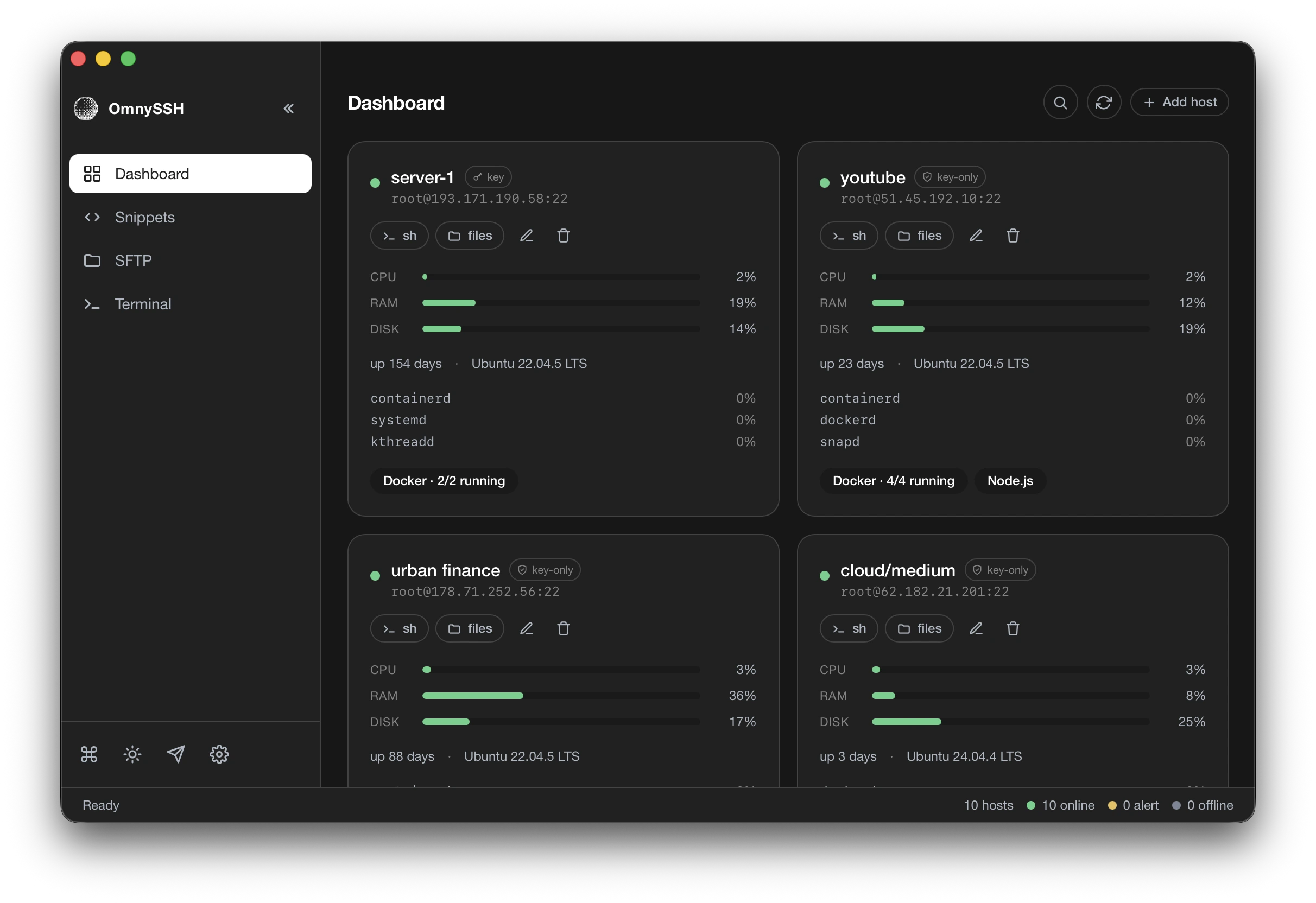

--- ## Install One command on macOS and Linux: ```bash curl -fsSL https://raw.githubusercontent.com/timhartmann7/omnyssh/main/install.sh | sh ``` The script detects your OS and architecture and installs the latest desktop build — into `/Applications` on macOS, your app menu on Linux. Want the terminal app instead, or both? `curl … | sh -s -- --tui` (or `--both`). Prefer clicking? Grab the file for your platform from [**Releases**](https://github.com/timhartmann7/omnyssh/releases/latest). | Platform | File | |----------|------| | macOS Apple Silicon | `OmnySSH-aarch64-apple-darwin.dmg` | | macOS Intel | `OmnySSH-x86_64-apple-darwin.dmg` | | Linux x86_64 | `OmnySSH-x86_64.AppImage` / `.deb` / `.rpm` | | Windows x86_64 | `OmnySSH-x86_64-setup.exe` | No account, no login screen, no telemetry. The app opens with an empty dashboard and reads your existing `~/.ssh/config` if you have one — hosts behind a bastion (`ProxyJump`) included. --- ## What it does You add a server once. After that it sits on the dashboard as a card with live CPU, RAM and disk, uptime, distro, the top processes eating your CPU, and a badge for what runs on it. One click on `sh` drops you into a real PTY terminal. One click on `files` opens a two panel SFTP browser. Ten servers fit on one screen and refresh on their own. ### Live dashboard Cards for every host with CPU, RAM and disk bars, uptime, OS version, top processes, and a Docker badge showing how many containers are up. Bars turn yellow, then red, so a sick server is obvious from across the room. ### Real terminals Full PTY sessions in tabs. Open as many servers as you need, switch between them from the sidebar, and keep them running while you work in the dashboard. ### Two panel SFTP Local on the left, remote on the right. Tick the files you want and move them across, watch the progress bar, select many at once. Nobody remembers `scp -r` syntax anyway. ### Snippets Save the commands you paste every week. Pick a snippet, tick the hosts to send it to, and it runs on all of them at once. Snippets take parameters, so `sudo systemctl restart {{service}}` asks you for the name. ### Search everything Hit ⌘K and start typing. Every host you have, plus every session already open. Enter drops you into a terminal on the host you picked, or back into the session you left. ### Streamer mode Swaps every real IP on screen for a fake one. Record a demo or share your screen without leaking client infrastructure. ### Light and dark themes Both ship in the app. Switch from the sidebar. ### Small Around 130 MB of RAM with several sessions open, on a 20 MB download. Termius on the same machine, doing nothing, sat at 649 MB across nine processes. Full numbers in the [comparison](#comparison). --- ## SSH key setup Password auth on a fresh VPS is the thing you always mean to fix and never do. OmnySSH does it in one click. Pick a host you added yourself that has no key configured, hit **Set up SSH key**, and the app generates an Ed25519 key, appends the public half to `authorized_keys`, and switches the host over to key auth. It then opens a fresh connection with the new key to prove the key works, and only after that does it turn password login off. There is no confirmation step in between: starting the flow means going through with it. Before touching `sshd_config` it saves a backup on the server. If any step fails, it restores the backup and leaves your access exactly as it was. Your private key never leaves your machine, and nothing gets sent anywhere except the server you chose. The code lives in [`crates/omnyssh-core/src/ssh/key_setup.rs`](crates/omnyssh-core/src/ssh/key_setup.rs). Read it before you point this at production. That is the whole point of shipping it open source. --- ## Comparison Memory and CPU measured on an M4 Mac with both apps open and idle. | | OmnySSH | Termius | tmux + ssh | |---|---|---|---| | RAM at idle | ~130 MB | ~649 MB | tiny | | Processes | 4 | 9 | 1 | | Live metrics dashboard | ✅ | ✅ | ❌ | | Two panel SFTP | ✅ | ✅ | ❌ | | Snippets and broadcast | ✅ | ✅ | ❌ | | One click key setup | ✅ | ❌ | ❌ | | Account required | ❌ | ✅ | ❌ | | Telemetry | ❌ | ✅ | ❌ | | Open source | ✅ | ❌ | ✅ | | Price | free | 💰 | free | tmux stays in the table because it is what most of us actually use. It wins on weight and loses on everything visual. --- ## The TUI version OmnySSH started in the terminal, and the TUI is still here, still maintained, still gets releases. ![Demo](assets/demo.gif) Same engine underneath: the repo is a cargo workspace where `crates/omnyssh-core` holds the logic and the frontends sit on top. Dashboard, SFTP, snippets, multi session tabs, fuzzy search, plus four themes (`default`, `dracula`, `nord`, `gruvbox`) and remappable keys in `config.toml`. [![Crates.io](https://img.shields.io/crates/v/omnyssh.svg)](https://crates.io/crates/omnyssh) [![Crates downloads](https://img.shields.io/crates/d/omnyssh.svg)](https://crates.io/crates/omnyssh) ```bash # cargo cargo install omnyssh # homebrew brew install timhartmann7/tap/omnyssh # nix nix run github:timhartmann7/omnyssh ``` Then run `omny`. Press `a` to add a host, `/` to search, `?` for help, `Shift+K` to set up keys on the selected host. Prebuilt TUI binaries for Linux, macOS, Windows and Termux live on the [Releases](https://github.com/timhartmann7/omnyssh/releases) page under the `omny-*` files. Config sits in `~/.config/omnyssh/` on Linux, `~/Library/Application Support/omnyssh/` on macOS, `%APPDATA%\omnyssh\` on Windows. Your `~/.ssh/config` is read at startup and never written to. Full options, keybindings and config examples: `man omny`. --- ## Dev notes I write about what I am building on Telegram. Release notes, work in progress screenshots, benchmarks, and the things that broke on the way there. Usually before they show up anywhere else. ### 👉 [**t.me/timhartmanndev**](https://t.me/timhartmanndev) --- ## Contributing Pull requests welcome. [CONTRIBUTING.md](CONTRIBUTING.md) has the setup, the conventions and the checklist. Open an issue first if you plan something big, so we do not both build it. Workspace layout: ``` crates/omnyssh-core engine, frontend agnostic crates/omnyssh TUI application (binary: omny) crates/omnyssh-gui Tauri desktop application ``` ## License Apache 2.0. See [LICENSE](LICENSE).
### ⭐ Star the repo if OmnySSH saved you a terminal tab [Report a bug](https://github.com/timhartmann7/omnyssh/issues) • [Request a feature](https://github.com/timhartmann7/omnyssh/issues) • [Discussions](https://github.com/timhartmann7/omnyssh/discussions)
