
# Dub Studio
**Free, offline AI video dubbing studio for Windows — re-voice any video into another language with a cloned voice, translated captions, and on‑screen‑text localization. 100% local, zero Python: one native `.exe` (Rust + C++/CUDA); every model and engine downloads with a button.**
[](LICENSE)
[](https://github.com/timoncool/dub-studio/stargazers)
[](https://github.com/timoncool/dub-studio/releases)
[](https://github.com/timoncool/dub-studio/releases)
[](https://github.com/timoncool/dub-studio/commits)
**English** · [Русский](README.ru.md) · [中文](README.zh.md) · [Español](README.es.md) · [Português](README.pt.md) · [Français](README.fr.md)
### 🌐 [Live demo & before/after video showcase →](https://timoncool.github.io/dub-studio/)
## What it is
**Dub Studio** turns any video into a dubbed version in another language — **with the speaker's own voice cloned, captions translated, and on‑screen text localized right on the frame**. Drop a clip, and a smart auto‑pass builds the first draft; then a live editor puts **every caption, voice, blur box, font and title** under your control with an instant preview.
By default everything runs **locally on your machine** — no cloud, no subscription; your footage and your voiceprint never leave your computer. And if your PC is weak (can't run the local Gemma/Higgs) or you want more speed and quality, the heavy stages (translation, vision, TTS, transcription) can **optionally** be offloaded to the cloud via **OpenRouter** — each engine picked independently (local ↔ cloud), with voices auto-cast by speaker gender (beta). The key is stored locally; everything is off by default.
It's a **fully native rewrite**. No embeddable Python, no torch, no CUDA wheels. The whole pipeline is **Rust + native C++/CUDA engines (GGUF/ONNX)**: one process, fast startup, low VRAM. Models, engines, CUDA/VC++ runtime and ffmpeg are **downloaded and installed by the app itself** on first run. **An NVIDIA GPU is what the app is built and tested for**: voice, translation and vision run on CUDA locally, and subtitles are burned into the video with NVENC. Separation, diarization and recognition can run on the CPU and the heavy stages can go to OpenRouter, but a machine without NVIDIA is not a tested setup - see *What runs where* below.
## See it in action
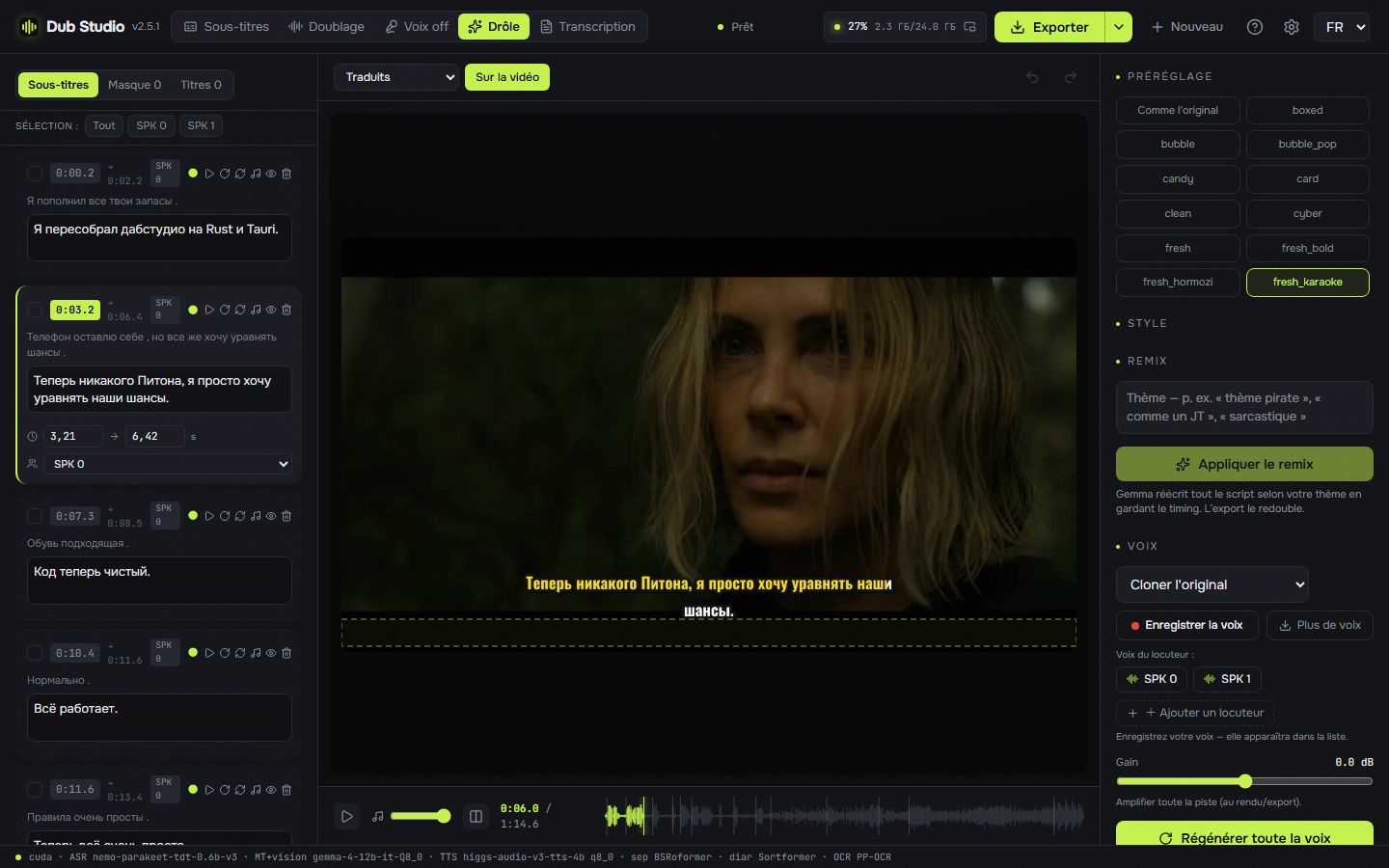
**[▶ Watch the before/after video showcase →](https://timoncool.github.io/dub-studio/#showcase)** — real clips dubbed end‑to‑end on a local GPU: different videos, different modes, different languages, nothing left the machine.
|  |  |  |
|:--:|:--:|:--:|
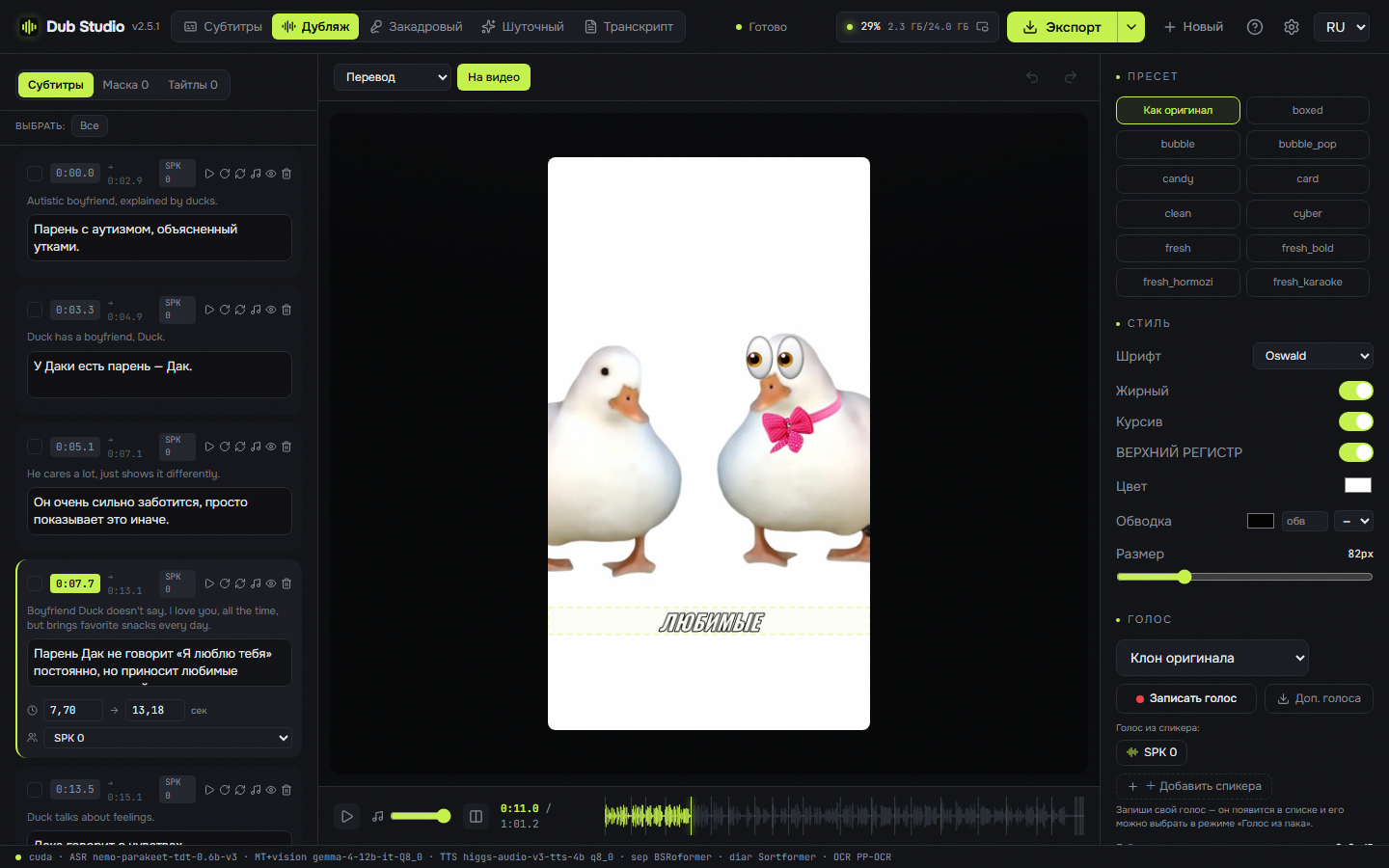
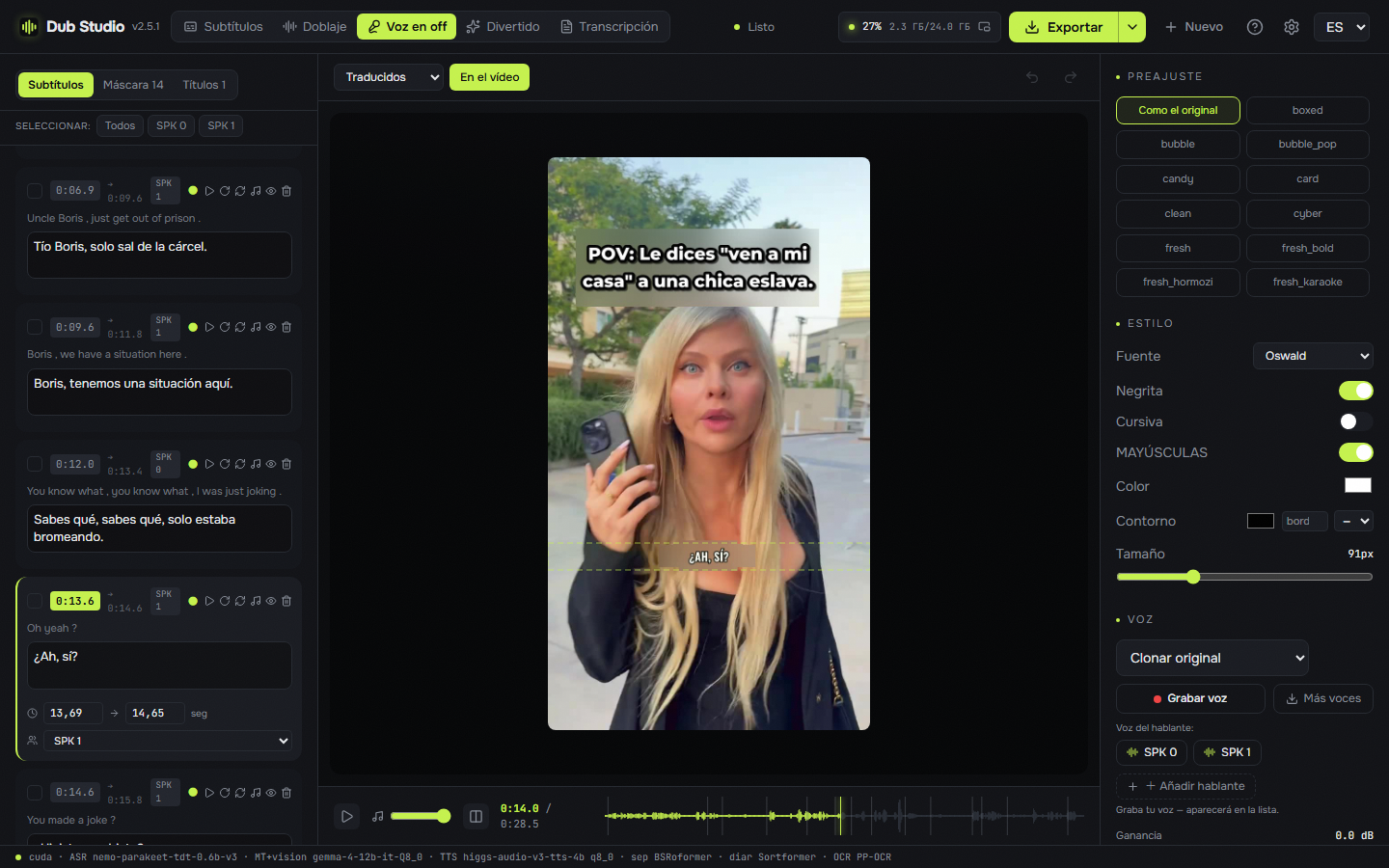
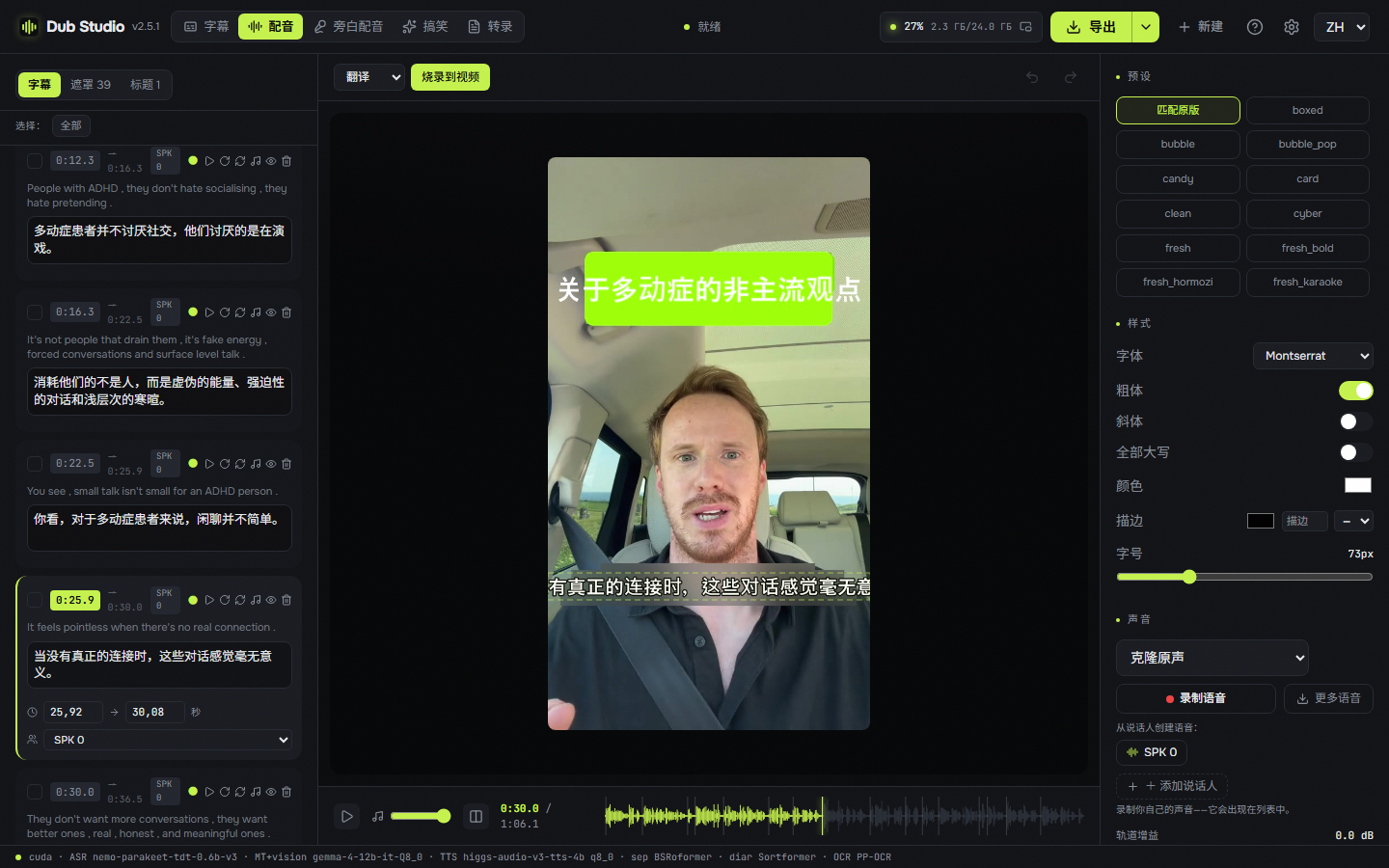
| 🎙️ **Full dub** · EN→RU | 🗣️ **Voice-over** · EN→ES | 🈶 **Full dub** · →中文, CJK on frame |
| 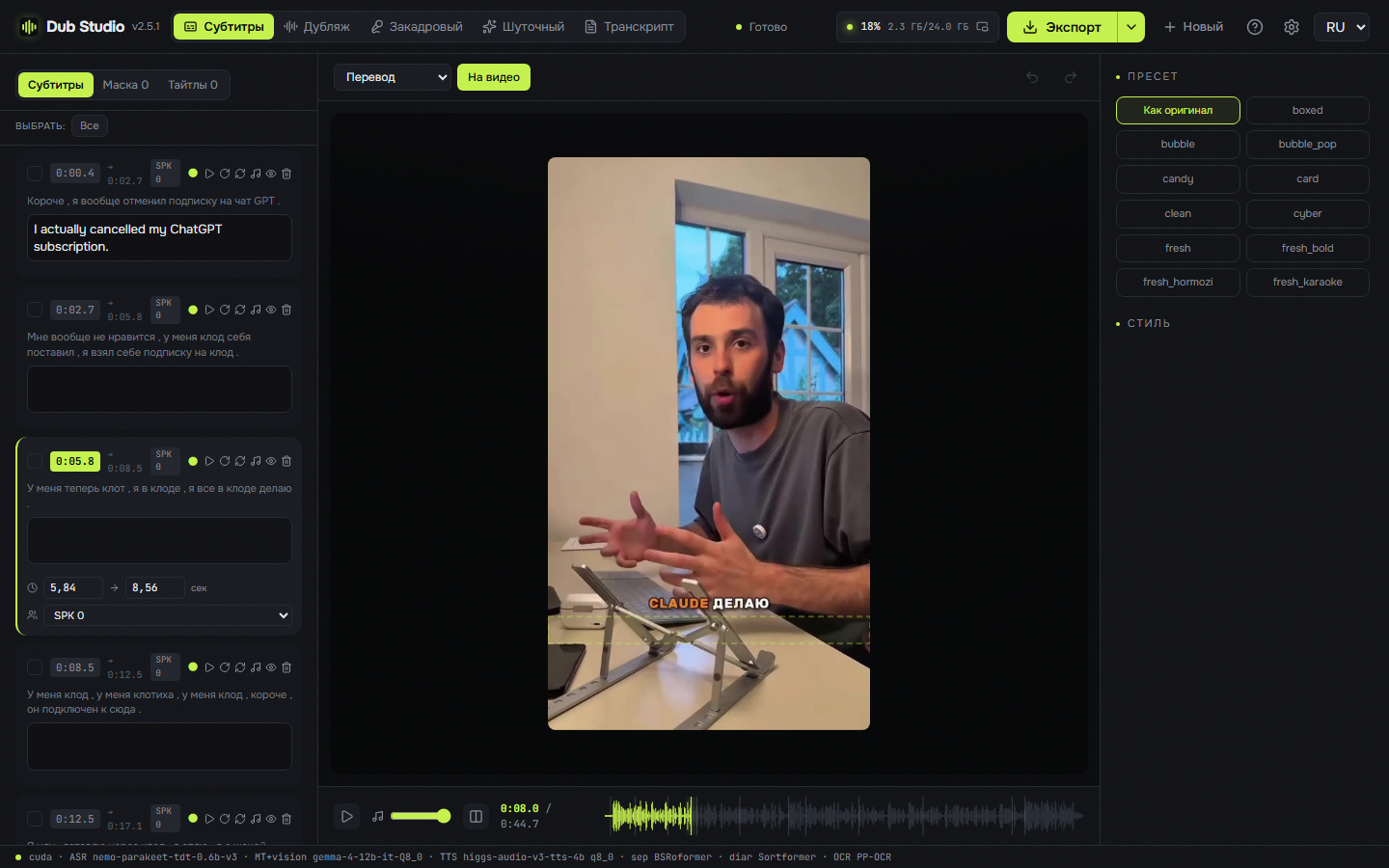 |  |  |
| 📝 **Subtitles** · original-lang | 🎬 **Full dub** · widescreen 16:9 | 🔤 **Transcript** · diarized |
## For AI agents
While Dub Studio is open it serves MCP at `http://127.0.0.1:8793/mcp`: an agent such as Claude Code, Claude Desktop, Cursor or Codex does everything the window does, through the same code — makes projects of video files, analyzes them, fixes the translation, timing and speakers line by line, casts the voices, styles the subtitles, adds titles and blur boxes, renders, exports the same video in more languages, writes SRT and TXT, and saves the results to a folder. Settings, **Agent (MCP)** shows whether an agent is connected and what to paste into the client.
Given this repository, an agent can set everything up and drive the studio by itself:
1. Install the studio from the [latest release](https://github.com/timoncool/dub-studio/releases/latest) and start it.
2. Connect to its MCP server:
```bash
claude mcp add --transport http dub-studio http://127.0.0.1:8793/mcp
```
Other clients: `{ "mcpServers": { "dub-studio": { "type": "streamable-http", "url": "http://127.0.0.1:8793/mcp" } } }`
3. Read the skill the server serves (resource `studio://skill`, prompt `studio`), the same text as [docs/mcp-skill.md](docs/mcp-skill.md) — every tool, the ground rules and step-by-step recipes — and start with the tool `studio_status`.
[llms.txt](llms.txt) says the same for tools that look for it. To keep the skill in Claude Code, save [docs/mcp-skill.md](docs/mcp-skill.md) as `~/.claude/skills/dub-studio/SKILL.md`. Only agents on this computer and the studio's own window may connect.
## Five modes, switchable on the fly
| Mode | What it does |
|------|--------------|
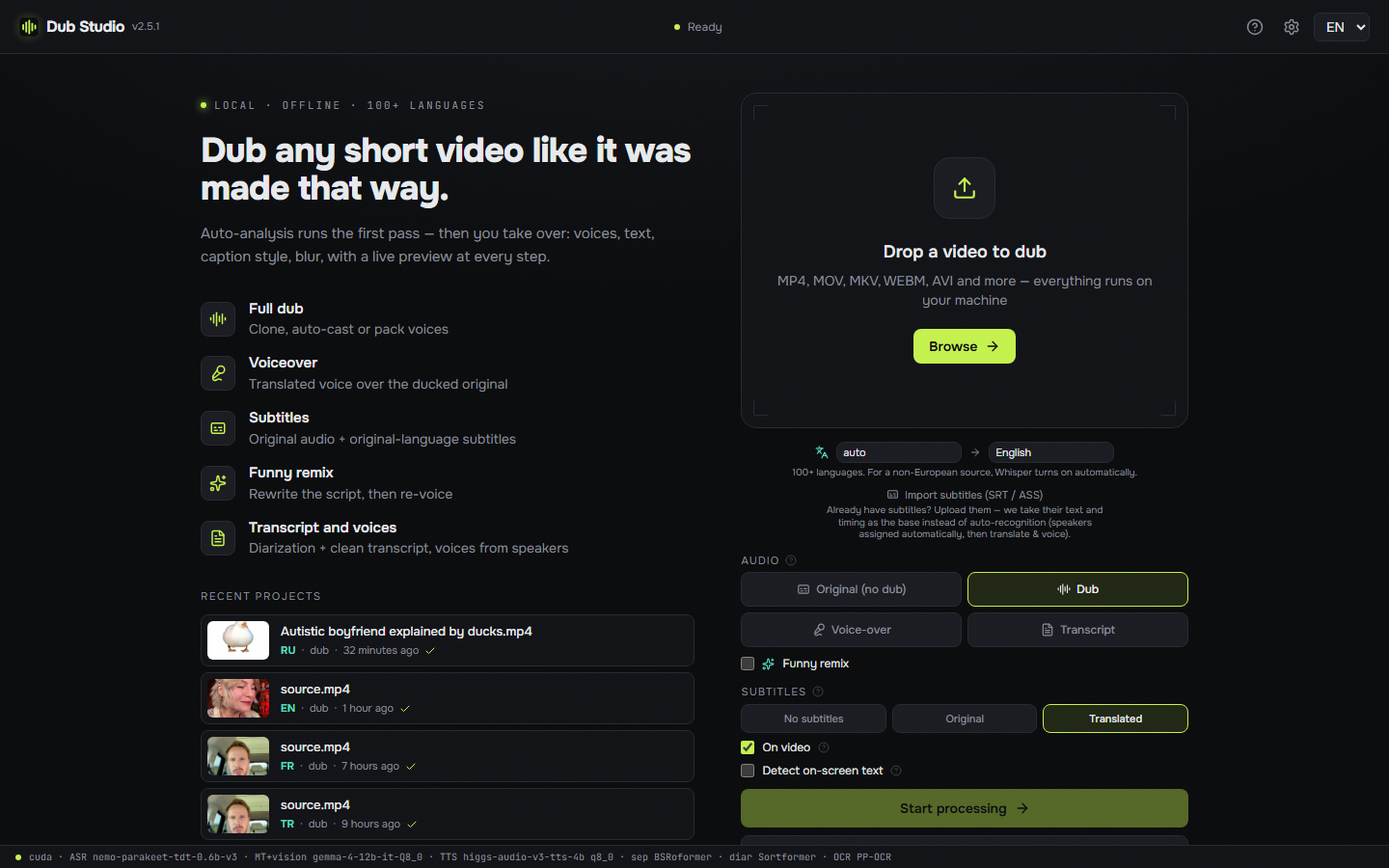
| 🎙️ **Dub** | Full re-voice into the target language with the **original timbre cloned** — auto-cast per speaker or pick a voice |
| 🗣️ **Voice-over** | Translated voice **over the ducked original** — the source is still audible underneath; balance is adjustable |
| 📝 **Subtitles** | Burn **original-language** captions, keep the original audio — no dubbing, no translation |
| ✨ **Funny remix** | Give a theme ("as a pirate", "as a news report") → the model **rewrites the whole script**, then re-dubs |
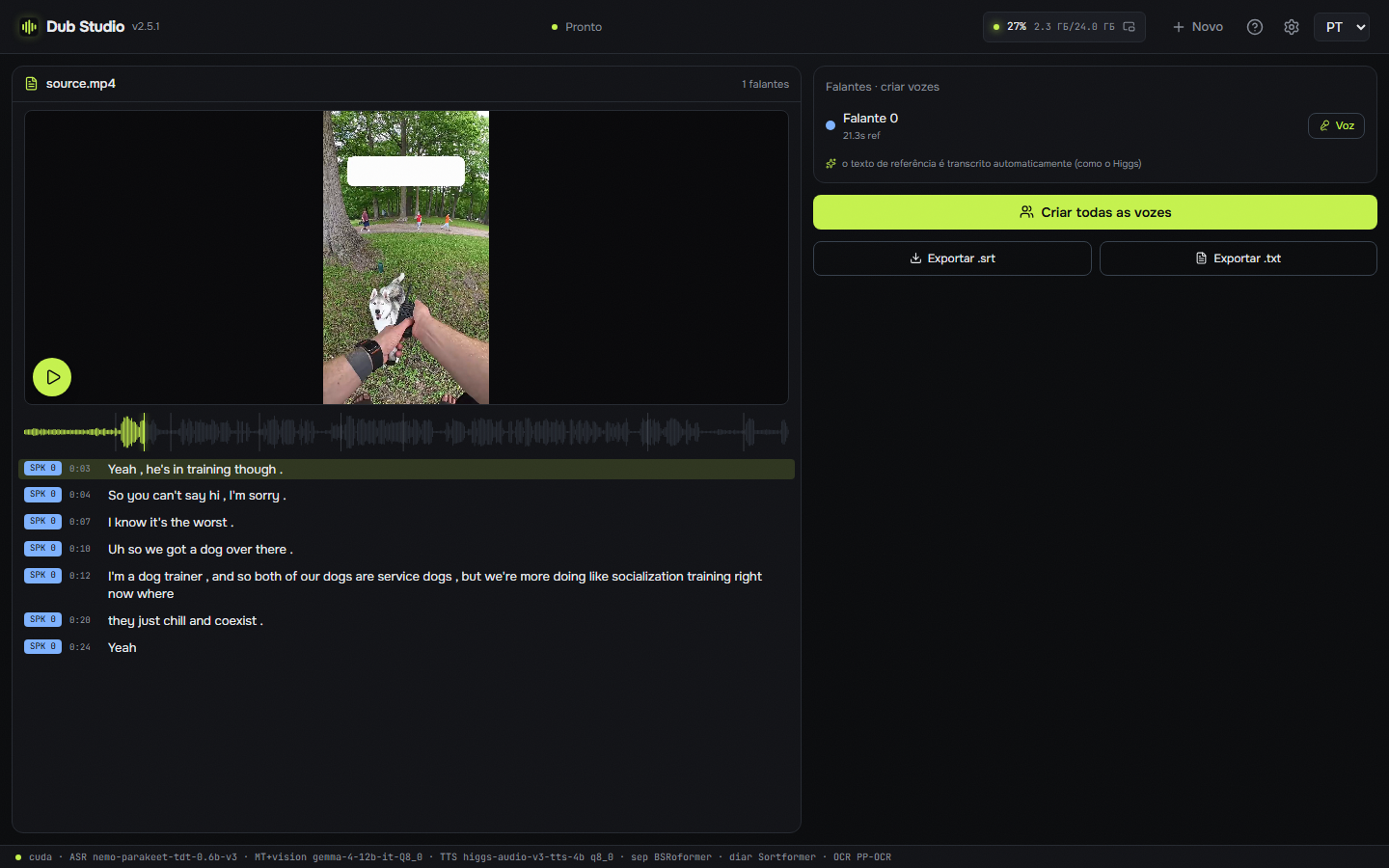
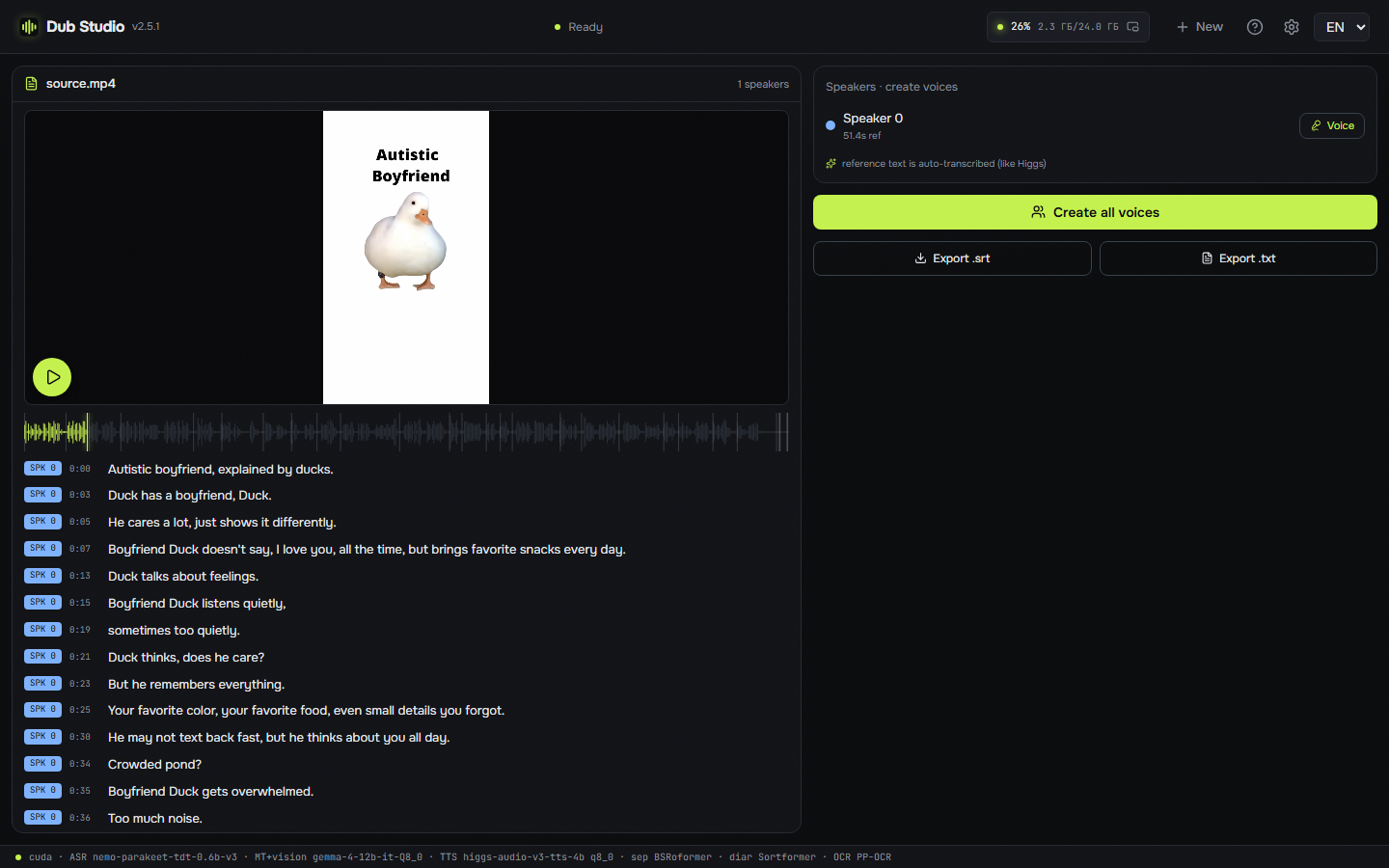
| 🎬 **Transcript** | Clean **diarized transcript** with per-speaker layout, karaoke play-along, one-click voice creation, `.srt`/`.txt` export |
Load a clip once and send it into any mode — right inside the editor.
## Features
- **Voice cloning** — the original timbre is cloned and speaks the new language (native [Higgs Audio v3](https://huggingface.co/bosonai) engine, GGUF). Auto-cast by speaker or bring your own voice from a pack.
- **Speaker diarization** — who speaks and when (NVIDIA **Nemotron 3 Diarization**, up to 8 voices), a distinct voice per speaker.
- **Character casting (beta)** — a character is a **face + voice** pair. The app gathers faces across the whole video, recognizes the same person and **binds them to a speaker by co-occurrence** (the one on camera in close-up gets the voice, a background listener doesn't); it auto-picks the clearest avatar frame and **saves a casting profile for the whole series** — assign voices and character descriptions once, and the **next episode applies them automatically**. A **real-faces / cartoon·anime** toggle switches the face detection accordingly.
- **Choice of ASR engine** — transcribe with **Parakeet-TDT** (GPU, default) or **Whisper** ([Purfview faster-whisper standalone](https://github.com/Purfview/whisper-standalone-win), runs on CPU) — pick the model size (tiny … large-v3-turbo) and quant (compute type) right in settings.
- **Import ready-made subtitles** — bring your own `.srt`/`.ass` as the exact transcript: text and timing come straight from the file instead of auto-recognition (speakers are still auto-assigned by diarization). Tick **“subtitles already in the target language”** and translation is skipped too — an English clip + your Russian subs → a Russian dub straight from them, no ASR and no MT.
- **Multi-language export** — the **▾** next to Export sends one video into several languages at once; each inherits all your edits (subtitle layout, styles, blur boxes, cloned voice) — only the text is re-translated and re-voiced.
- **Save & reopen projects** — autosave, a list of recent projects on the start screen, and jump back into unfinished work in one click.
- **Searchable voice & language pickers** — type part of a name to filter hundreds of voices or 100+ languages; languages also match by their name in your UI language.
- **Composable pipeline** — independent toggles at the input: audio (original / dub / voiceover / transcript) × subtitles (none / original / translated) × burn-in on/off × funny remix. Any combination — dub without subtitles, translated subtitles without dubbing, funny dub with your own voices — in batch and in the editor too.
- **On-screen text localization** — OCR detects baked-in text (**PP-OCR** ONNX), **blurs the original** and prints a localized title on top in a matched style — a feature no other tool has.
- **Translation + vision style analysis** — the transcript is translated locally with **Gemma-4 12B** (GGUF, llama.cpp); a vision pass reads the frame layout: caption style, titles, brands, text zones.
- **SOTA vocal separation** — **Mel-Band Roformer** (native BSRoformer.cpp on CUDA) splits voice from music, so the backing track is **preserved** and the clone latches onto clean speech.
- **26 caption presets** — karaoke / word-by-word / hormozi / neon and more, rendered **on your own frame** (WYSIWYG, JASSUB over the same `.ass` that ffmpeg burns).
- **Karaoke transcript** — play the video and follow along as the current line and the current **word** light up in the transcript.
- **Live editor** — edit transcript, voices, caption style, blur boxes, titles; **~0.17 s/frame preview**, every change visible instantly.
- **Smart re-gen** — export re-synthesizes and recomputes **only the segments you changed**, not the whole clip.
- **Add your own lines** — insert custom phrases into the transcript; each is voiced in the speaker's cloned voice and shown in the subtitles.
- **Batch processing** — a queue of files, all run with one setup, per-file progress.
- **Before/after compare** — original and dub side by side.
- **100+ languages** — dub into any major language (Spanish, Chinese, Japanese, Arabic, Hindi and more), with source-language auto-detect.
- **Any video format** — MP4, MOV, MKV, WEBM, AVI and more (decoded via ffmpeg).
- **One-button setup + resumable downloads + in-app auto-update** — models, engines, CUDA/VC++ runtime and ffmpeg download on first run; large models (10 GB+) **resume from where they stopped** after a dropped connection instead of restarting; the app updates itself.
- **Run each stage where you want** — separation, diarization and recognition each switch independently between **GPU and CPU**, and recognition, translation, vision and voice can be offloaded to **OpenRouter**. The *What runs where* table below lists what each stage can actually use.
- **Tune for your hardware** — every engine ships multiple quants (TTS Q8/Q6/Q4, translation Q4…Q8, ASR int8/fp32 or Whisper tiny…large-v3-turbo, separation Q8/Q5/Q4) — switch in settings; cap the **prefill batch** and **voice-reference length** to fit 8–12 GB GPUs and 32 GB RAM.
- **The whole app in your language** — progress, errors, setup, casting and the reports an agent reads come in the six languages of the window.
- **Google Gemini voices** — Gemini TTS beside the local engine and OpenRouter, with its own key and a live model list; **Batch** runs at half the price, and a stopped render picks up the same paid batch.
- **Number of speakers** — leave it automatic or set 1 to 8 people; voices are matched across a long recording, which is transcribed in windows of about 90 seconds.
- **Even out loudness** — a switch, on by default: phrases at one level and the dub at -14 LUFS with a -1 dBTP ceiling; off, the mix stays as it came.
- **Fully portable** — nothing is written to your user profile; delete the folder and no trace remains.
## Screenshots
Home — five modes, a preview of the selected video, language pickers, any video format:
Transcript mode — diarized transcript with per-speaker layout, karaoke play-along and one-click voice creation from each speaker:
## Requirements
- **OS:** Windows 10 / 11 (x64); Linux x86-64 as an experimental build (see *Linux (experimental)*)
- **GPU:** NVIDIA with 8 GB of VRAM or more (presets exist for 8, 12, 16, 24 and 32 GB) and a recent driver. Local voice (Higgs Audio), translation and vision (Gemma) run on CUDA, and subtitles are burned in with NVENC. Without NVIDIA only the stages that *What runs where* marks for the CPU or the cloud can run, and that setup is not tested
- **WebView2** — preinstalled on Windows 11; on Windows 10 the installer fetches it (see *Troubleshooting* if that fails)
- **Disk:** ~15 GB for the default models, engines and runtime (fetched on first run), plus room for your projects; the alternative quantizations and Whisper models are extra
On an NVIDIA machine the only thing you install by hand is a recent **[NVIDIA driver](https://www.nvidia.com/Download/index.aspx)**. Everything else — models (Higgs Audio v3, Gemma-4 12B + vision, Parakeet-TDT, Nemotron 3 Diarization, Mel-Band Roformer), engines, CUDA runtime and ffmpeg — the app downloads with a button on first run.
## Quick start
1. **Download** the portable build from [Releases](https://github.com/timoncool/dub-studio/releases) and unzip anywhere (or install via `-setup.exe`).
2. **Run** `Dub Studio.exe`.
3. On the **First-run** panel press **Download all** — the app fetches models, engines and runtime (~15 GB, once). If the NVIDIA driver is missing, the button opens the download page.
4. **Drop a video**, pick a target language → the auto-pass makes the first draft. Fine-tune everything in the editor and hit **Export**.
> Everything downloads and lives **inside the app folder**. Models, caches and projects go nowhere else.
What changed and when is in [CHANGELOG.md](CHANGELOG.md), and the sparkles button at the top of the app shows it. Rules for contributors and coding agents: [AGENTS.md](AGENTS.md).
## Everything the app downloads
The first-run panel fetches all of this with one button. Behind a proxy, or where Hugging Face is blocked, set the proxy in Settings → **Network**: as in Windows, your own (HTTP, HTTPS, SOCKS5 or SOCKS4; a seller's `host:port:login:password` works as it is) or none. Model downloads, the cloud and app updates all go through it. You can also download the direct files yourself, put them where the last column says, counted from the app folder (the one that holds `models\`), and press **Import from folder**; the archive components (`.zip`, `.whl`) the app downloads itself.
A file in the listed place counts as installed when its size is exactly the listed one; every download is checked against the file's pinned SHA-256 before it is used, and a file already in place is checked the same way before it is skipped. **Import from folder** (in the first-run panel and in the model settings) finds a component's files by name and exact size in the folder you choose and links or copies them into place. Components that come as zip or wheel archives (engines, runtimes) are not imported and count as installed only when the app downloaded them itself: it keeps a record of the checked archive next to the unpacked files. Sizes and hashes are those of the app's own manifest, `crates/dub-server/src/setup.rs`, and this table is checked against it.
The Visual C++ runtime and the PP-OCR models come inside the release and are not downloaded; the NVIDIA driver is installed on its own.
| Component | Need | Files (direct links) | Size | Put it in |
|---|---|---|---|---|
| Higgs Audio v3 Q8_0 | required | [q8_0.gguf](https://huggingface.co/drbaph/Higgs-Audio-v3-Studio/resolve/c6e9db5a2062c15accc1b9bfa54d927bbdb124dc/models/higgs-q8_0/q8_0.gguf) → `models\higgs-q8_0\q8_0.gguf`