# Telegram MCP Server
[](LICENSE)
[](https://github.com/tolboy/telegram-mcp-tdlib/actions/workflows/ci.yml)
[](https://github.com/tolboy/telegram-mcp-tdlib/actions/workflows/security.yml)
[](https://github.com/tolboy/telegram-mcp-tdlib/releases/latest)
**Telegram MCP for real accounts — safe by default, TDLib-powered, production-ready.**
A local-first [Model Context Protocol](https://modelcontextprotocol.io/) server that gives
an AI agent real Telegram-account access without handing it the keys to your account. It
starts read-only, hides write tools until you opt in, and runs over **STDIO** for desktop
clients or **Streamable HTTP** at `/mcp` for managed deployments.
### Why this one?
- **Safe by default** — boots in read-only mode with a small `inbox`/`reader` profile;
write and quota-consuming tools are *hidden from the model*, not merely blocked, until you
turn them on.
- **Human approval that does not depend on your client** — destructive tools ask a person
first: through the MCP host where elicitation exists, otherwise on a single-use loopback
page this server hosts. Either way the question leaves and the answer returns outside the
model's turn, so an injected instruction can make the model *request* a ban, not approve one.
- **Sends an agent can retry** — an `idempotency_key` turns a lost response into a stored
receipt instead of a duplicate message; an unconfirmed send is reported as `UNKNOWN`,
never silently resent.
- **Real user accounts, not just bots** — built on **TDLib** (via tdlight-java), so an agent
can read and act on your actual account, not only a Bot API subset.
- **Isolated multi-account** — each account gets its own session, mandatory selection, and
scoped API keys; reads never fan out across accounts.
- **Two transports** — STDIO for Claude Desktop / Cursor / VS Code / Codex, Streamable HTTP
for a managed service.
- **No JDK to install** — runtime-inclusive release bundles for Windows, Linux x64/ARM64, and
Apple-silicon macOS, with checksums, an SBOM, and signed container digests.
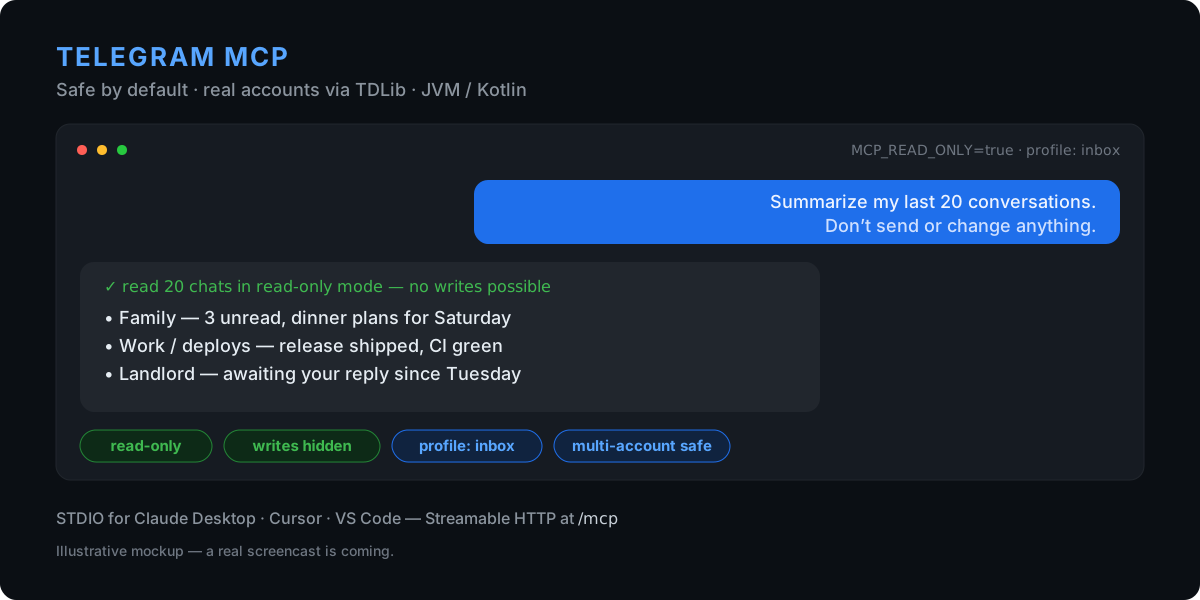
> The image is an illustrative mockup; a real screencast is on the way.
## Safe first run
Runtime-inclusive releases need no JDK, Gradle, Git, Python, or Node.js. Use a test account
for your first run if you can.
**1. Install** (macOS Apple silicon / Linux with Homebrew):
```bash
brew install --formula https://github.com/tolboy/telegram-mcp-tdlib/releases/latest/download/telegram-mcp.rb
```
Windows with Scoop:
```powershell
scoop install https://github.com/tolboy/telegram-mcp-tdlib/releases/latest/download/telegram-mcp.json
```
**2. Log in** with a QR scan — the one-time code never touches your shell history:
```bash
telegram-mcp auth --method qr
```
**3. Check the session** is ready — this reads local state and starts no server:
```bash
telegram-mcp session doctor
```
Do not run `serve --transport stdio` yourself to try it out. With STDIO your AI
client starts the server and owns its lifetime; a copy you launched in a terminal
holds the TDLib session, and the client's own copy then exits with code 2 because
it cannot lock `td.binlog`. Give the command to the client instead (below) and let
it do the starting.
Then try a first prompt that cannot change anything:
> “Summarize my last 20 conversations. Do not send or modify anything.”
In this mode write and quota-consuming tools are absent from the tool list entirely, so the
model has nothing destructive to call. Switch to `MCP_READ_ONLY=false` only after you have
reviewed the surface. When you do, add `MCP_DESTRUCTIVE_APPROVAL=auto` so deletes, bans and
leaves wait for your answer through host elicitation where available, or through the
server's loopback page otherwise, rather than trusting the model's own `"confirmed": true`.
## Connect your client
Generate the entry instead of transcribing one — it fills in the key your client
actually expects and pins the version it was generated from:
```bash
telegram-mcp config --client claude
```
`--client claude-code|cursor|vscode|codex` switches target — Codex gets TOML, VS
Code gets the `servers` key it actually reads, Claude Code gets the explicit
transport `type`. `--writes` enables write tools and the approval prompt that
guards the destructive ones — pair it with a write-capable
`--profile inbox|community-admin|all`, since the default `reader` surface hides
write tools before read-only mode is consulted. `--docker default` emits a container entry with a
pinned image, and `--http default` emits the shared-daemon entry for Claude Code,
Cursor, VS Code, or Codex. Claude Desktop does not read remote servers from
`claude_desktop_config.json`; add a network-reachable remote endpoint under
Settings → Connectors instead. Claude remote connectors do not accept the
generator's custom API-key header, so this server must be exposed over HTTPS
with `MCP_AUTH_MODE=oauth`. The generator therefore rejects
`--client claude --http`.
STDIO is the low-friction path for desktop clients. The generated entry looks like:
```json
{
"mcpServers": {
"telegram": {
"command": "telegram-mcp",
"args": ["serve", "--transport", "stdio"],
"env": {
"TDLIB_API_ID": "123456",
"TDLIB_API_HASH_FILE": "/absolute/path/to/telegram-api-hash",
"MCP_TOOL_PROFILE": "inbox",
"MCP_READ_ONLY": "true"
}
}
}
}
```
- **Claude Desktop** — add the block above to `claude_desktop_config.json`, then quit the app
from the tray and start it again. Use Settings → Developer → Edit Config to open the file:
it points at the right copy for your build. Editing `%APPDATA%\Claude` by hand works only
for the installer build — the Microsoft Store build is packaged as MSIX and keeps its config
in `%LOCALAPPDATA%\Packages\Claude_pzs8sxrjxfjjc\LocalCache\Roaming\Claude\` instead.
- **Cursor** — add it to `~/.cursor/mcp.json` (or Settings → MCP → Add).
- **VS Code** — use `.vscode/mcp.json`; VS Code names the top-level key `servers`
instead of `mcpServers` and requires an explicit `"type": "stdio"` or
`"type": "http"`.
To share one local process across clients, use `telegram-mcp daemon start` and
`telegram-mcp daemon attach --client cursor` (or `codex`, `vscode`, `claude-code`).
See [managed local daemon](docs/LOCAL_DAEMON.md) for status, stop and onboarding.
For a managed HTTP deployment instead of STDIO:
```bash
docker run --rm -p 127.0.0.1:8080:8080 \
-e TDLIB_API_ID -e TDLIB_API_HASH -e MCP_API_KEY \
ghcr.io/tolboy/telegram-mcp-tdlib:latest
```
See [CLI and STDIO](docs/CLI_AND_STDIO.md), [interactive authentication](docs/INTERACTIVE_AUTH.md), and [client compatibility](docs/MCP_CLIENT_COMPATIBILITY.md) for exact platform/client variants.
## Recipes
For reusable agent instructions, install the free
[Telegram Inbox Assistant skill](skills/telegram-inbox-assistant/SKILL.md).
Requires server 1.17.2 or later. Shared-daemon users of Claude Desktop can use
the optional [tools bridge](docs/CLAUDE_DESKTOP_BRIDGE.md), included in runtime
packages with its Python dependency instructions.
Its [setup guide](skills/telegram-inbox-assistant/SETUP.md) includes client
configuration templates and explains the separately required local server
and Telegram authorization. The skill summarizes and searches in read-only mode.
Copy-paste configurations and prompts for real tasks, each with the smallest
tool surface that can do the job:
[summarize your inbox](docs/recipes/summarize-inbox.md),
[find a lost message](docs/recipes/find-lost-message.md),
[research public groups](docs/recipes/research-public-groups.md),
[read-only community health check](docs/recipes/community-review-readonly.md),
and [draft replies without sending](docs/recipes/safe-draft-reply.md) —
index in [docs/recipes](docs/recipes/README.md).
## How it compares
Most Telegram MCP servers wrap the Bot API or a Telethon user session and expose every
capability to the model at once. This project optimizes for connecting an agent to a **real
account you care about**, safely:
| Dimension | This server | Typical Telethon / Bot-API MCP servers |
|---|---|---|
| Account access | Real user account via TDLib (tdlight-java) | Often bot-only, or a single Telethon user session |
| Default posture | Read-only; write/quota tools **hidden** until enabled | Usually all tools exposed from the start |
| Multi-account | Isolated sessions, mandatory selection, scoped keys, **no cross-account read fan-out** | Single account, or implicit fan-out |
| Transports | STDIO **and** Streamable HTTP `/mcp` | Usually STDIO only |
| Guardrails | Confirmation gating, audit log, anti-spam limits, chat allow-list, untrusted-content marking | Minimal |
| Distribution | Signed runtime bundles (no JDK), SBOM + provenance, GHCR image | Source install via pip/npx |
A fuller architectural comparison (TDLib vs Telethon vs Bot API, and why "hidden,
not blocked" matters) is in [docs/COMPARISON.md](docs/COMPARISON.md). The detailed,
dated benchmark against the leading public servers — including features
deliberately declined (raw MTProto escape hatch, ownership transfer, bulk contact export) —
is in [PUBLIC_BENCHMARK_AND_ROADMAP.md](docs/PUBLIC_BENCHMARK_AND_ROADMAP.md).
## Tool profiles
You don't expose 116 tools on day one. `MCP_TOOL_PROFILE` narrows the advertised surface
*before a client ever sees it*, without weakening account scoping, read-only mode,
confirmation, audit, or anti-spam:
| Profile | Surface |
|---|---|
| `reader` | Always non-mutating — safe for a first look |
| `inbox` | Personal messages, drafts, media, contacts, privacy |
| `community-admin` | Moderation, group/channel, permissions, bot commands |
| `research` | Bounded account/public discovery and reading |
| `all` | The full inventory (opt in deliberately) |
See [TOOL_PROFILES.md](docs/TOOL_PROFILES.md) for the exact intent of each surface.
## Features
- **116 MCP tools** — messages, polls, read receipts, scheduled sends, chats, folders,
invite-link administration, contacts, media, drafts, privacy, bot commands, detailed group
permissions, profile, search, and account routing.
- **TDLib via tdlight-java** — real user accounts, not just the Bot API.
- **Isolated multi-account mode** — independent sessions, mandatory account selection, and
optional per-key account scopes with no cross-account read fan-out.
- **Safe by default** — read-only tool surface, human approval for destructive actions
(`MCP_DESTRUCTIVE_APPROVAL`, over the host or a loopback page), and task-focused profiles
(`reader`/`inbox`/`community-admin`/`research`/`all`).
- **Recoverable sends** — optional idempotency keys and durable receipts for text, replies,
files, voice, stickers, forwards and scheduled messages; see
[delivery recovery](docs/SEND_IDEMPOTENCY.md).
- **Per-client permissions** — a reviewed JSON file grants each client `read`, `download`,
`mutate`, `quota` or `policy` actions on named accounts and chats; everything else is
denied. See [permissions](docs/PERMISSIONS.md).
- **Answers an agent can trust** — every tool publishes a typed output schema, errors carry
a stable code with retry guidance, and exports and searches say when they are incomplete.
- **Long-running work** — compact inbox and conversation tools with response budgets,
exports that resume after a restart, and a change journal that reports its own gaps.
- **Two transports** — STDIO for desktop clients and Streamable HTTP `/mcp`
(Spring AI 2.0 / MCP SDK 2.0), with API-key auth; `telegram-mcp daemon` shares one
local server between several clients.
- **Guardrails** — audit logging, anti-spam via Resilience4j rate limiter (30 req/s) and
circuit breaker, chat allow-list, prompt-injection patterns, and untrusted-content marking.
- **Observability** — Micrometer metrics, Prometheus endpoint, and structured JSON logging
with MDC (`traceId`, `sessionId`, `toolName`).
- **Verified, runtime-inclusive releases** — Windows x64, Linux x64/ARM64, and Apple-silicon
macOS bundles with checksums, an SBOM, and signed container digests — no JDK required.
More capabilities
- **Entity resolution** — resolve `@username`, `+phone`, or numeric IDs transparently.
- **MCP behavior annotations** — every advertised tool declares read-only, destructive,
retry, and open-world hints for safer client UX.
- **Structured, marked output** — backward-compatible JSON text plus `structuredContent`;
Telegram-controlled fields are explicitly untrusted and presentation-control Unicode is
escaped.
- **Host-friendly discovery** via `/.well-known/mcp-server.json` for installers, desktop
hosts, and service managers.
- **File security service** for safe media uploads; **Actuator** health/info/metrics;
**graceful shutdown** with configurable timeout.
- **Multi-stage Docker** build + docker-compose with dev hot-reload.
- **Runtime-inclusive app images** — the supported release archives include their own Java
runtime and pass an actual STDIO handshake before publication.
- **Offline session doctor** — inspect configured TDLib state paths and lock availability
without starting TDLib or printing secrets.
- **Clean Architecture** — config / model / client / service / tool / security / util /
exception.
- **Language-neutral public search** — callers pass synonyms, translations, and spelling
variants in any language; product-specific policy interpretation stays in the MCP host.
## Tech Stack
| Component | Version |
|------------------|------------------|
| Java | 25 |
| Kotlin | 2.4.21 |
| Spring Boot | 4.1.1 |
| Spring AI MCP | 2.0.1 |
| MCP Java SDK | 2.1.0 |
| TDLib (tdlight) | 3.5.9+td.1.8.68 |
| Gradle | 9.8.2 |
| Resilience4j | 2.4.0 |
## Quick Start
### Prerequisites
- Java 25+ (or use Docker)
- Telegram API credentials from https://my.telegram.org (`TDLIB_API_ID`, `TDLIB_API_HASH`)
- Exactly one authentication mode: `TDLIB_PHONE_NUMBER` for user-account mode or `TDLIB_BOT_TOKEN` for bot mode
### 1. Clone and configure
```bash
git clone https://github.com/tolboy/telegram-mcp-tdlib.git
cd telegram-mcp-tdlib
cp .env.example .env
# Edit .env — set TDLIB_API_ID, TDLIB_API_HASH, one of TDLIB_PHONE_NUMBER/TDLIB_BOT_TOKEN, and MCP_API_KEY
```
On Windows PowerShell, use `Copy-Item .env.example .env` instead of `cp`.
### 2. Run locally
```bash
./gradlew bootRun
```
The server starts on `http://localhost:8080`. Its MCP Streamable HTTP endpoint is `http://localhost:8080/mcp`.
### Your first 60 seconds
1. Add a remote **Streamable HTTP** MCP server in your client with URL
`http://127.0.0.1:8080/mcp` and `Authorization: Bearer `.
Cursor, VS Code, Codex, Claude Code, and Inspector can use that local HTTP
endpoint. Claude Desktop's config file supports the local STDIO entry above;
its remote connectors are added through Settings → Connectors and require a
network-reachable HTTPS endpoint with `MCP_AUTH_MODE=oauth`, rather than this
loopback URL plus a custom header. Exact connection data is kept in
[MCP_CLIENT_COMPATIBILITY.md](docs/MCP_CLIENT_COMPATIBILITY.md).
2. Start safely with `MCP_READ_ONLY=true` and one focused surface, for example
`MCP_TOOL_PROFILE=inbox` or `MCP_TOOL_PROFILE=research`.
3. Ask the client one of these concrete first questions:
- **Inbox:** “Summarize my last 20 relevant conversations. Do not send or modify anything.”
- **Community:** “Show recent admin actions and default permissions in this group; propose changes, but do not apply them.”
- **Research:** “Find public chats matching these English and Russian query variants, and report evidence from descriptions and recent messages.”
Switch to `MCP_READ_ONLY=false` only after reviewing the discovered surface;
confirmation remains enabled by default for destructive actions.
On Windows, Gradle outputs default to the system temp directory to avoid file-lock issues in synchronized folders. Set `KTM_BUILD_DIR` or pass `-Pktm.buildDir=...` to override.
### 3. Run with Docker
```bash
docker compose up --build
```
The compose stack persists TDLib session data in the `tdlib-data` volume, downloads in `telegram-downloads`, and mounts `${MCP_UPLOADS_DIR:-./docker-data/uploads}` into the container as `/data/uploads` for upload/download tools.
By default, compose binds the service to `127.0.0.1` via `MCP_BIND_HOST` so the local boxed/developer scenario is not exposed on the LAN by accident.
Dev mode with hot-reload:
```bash
docker compose --profile dev up telegram-mcp-dev
```
With Prometheus monitoring:
```bash
docker compose --profile monitoring up
```
Production note: terminate TLS in front of the container (reverse proxy, ingress, or load balancer). API keys should not traverse plaintext HTTP outside trusted local development networks.
Deployment guidance for local boxed installs vs remote/VPS exposure is documented in `docs/DEPLOYMENT_MODES.md`.
Connector discovery for a multi-server MCP host or installer is documented in `docs/CONNECTOR_DISCOVERY.md`.
Client compatibility, a portable JSON-Schema profile, and a Streamable HTTP smoke test are documented in [MCP_CLIENT_COMPATIBILITY.md](docs/MCP_CLIENT_COMPATIBILITY.md).
Offline-safe TDLib session inspection and clearing are documented in [SESSION_MAINTENANCE.md](docs/SESSION_MAINTENANCE.md).
The comparison with the leading public Telegram MCP servers and the prioritized follow-up work are documented in [PUBLIC_BENCHMARK_AND_ROADMAP.md](docs/PUBLIC_BENCHMARK_AND_ROADMAP.md).
## Releases
CI runs on every pull request and push to `master`. A signed-off release is a Git tag in the `vX.Y.Z` form; the release workflow builds the images, runs the cross-platform tool-surface smoke and the container lifecycle contract **against the pushed digest**, attests and signs it, and only then moves the public tags (`latest`, `X.Y.Z`, `X.Y`, immutable `sha-`, and the `-stdio` variants) onto that exact digest — verifying afterwards that each tag resolves to it. Release bundles for Windows x64, Linux x64/ARM64, and macOS ARM64 ship alongside. Public releases include an SPDX SBOM for the runnable JAR, GitHub provenance attestations for release assets, and a keyless Sigstore signature plus provenance for the container digest. See [release-bundle verification](docs/RELEASE_BUNDLES.md#supply-chain-verification).
Use a concrete semver tag for reproducible deployments. `v1.0.0` is the first Streamable HTTP / MCP SDK 2.0 public baseline; `v1.1.0` adds account isolation, scoped keys, and cross-platform native packaging; `v1.2.0` adds premium voice-note transcription and the neutral package namespace; `v1.3.0` adds privacy, bot-command, detailed group-permission controls, and verified release bundles; `v1.4.0` adds focused MCP tool profiles; `v1.7.x` adds the STDIO transport, CLI with an interactive auth wizard, structured tool output, optional OAuth resource-server mode, and runtime-inclusive release images; `v1.13.0` adds human approval for destructive tools over the host or a loopback page, and `telegram-mcp config` to generate client entries; `v1.14.0` ties every published image tag to the digest that passed verification and signing; `v1.15.0` makes the running build checkable from the connector's own answer; `v1.16.0` fixes interactive login: authorization requests actually reach TDLib, a second login attempt no longer aborts the process, and the auth state says where Telegram delivered the code; `v1.17.0` adds recoverable keyed sends, per-client permissions, typed output for every tool with structured errors, compact task tools, resumable exports with a change journal, and a managed local daemon. The complete history is in [CHANGELOG.md](CHANGELOG.md).
To find out which release is actually answering, call the `_manifest` tool: the
response carries `serverVersion` next to `schemaVersion`. It is read from the
jar's own build metadata — the Gradle version derived from the release tag — so
`MCP_SERVER_VERSION` cannot rewrite it, and `telegram-mcp version` on the same
artifact prints the same string.
> The current TDLight native release publishes an Apple-silicon macOS binary but not an Intel macOS classifier. The server supports Intel macOS at the JVM/path level, but TDLib-backed Telegram access on that platform requires an upstream native package before it can run.
To create the runtime-inclusive app image for the current matching platform:
```powershell
./scripts/package-app-image.ps1 -Version -Target windows-x64 -OutputDirectory release-assets
```
The build verifies the actual `BOOT-INF/lib` contents, launcher-reported version,
and a live STDIO handshake. See [RELEASE_BUNDLES.md](docs/RELEASE_BUNDLES.md)
for the target matrix.
```bash
git checkout master
git pull --rebase origin master
git tag -a vX.Y.Z -m "Telegram MCP Server vX.Y.Z"
git push origin master vX.Y.Z
```
## Environment Variables
### TDLib (primary Telegram client)
| Variable | Required | Default | Description |
|-------------------------|-------------|-----------------|-------------|
| `TDLIB_API_ID` | Yes* | — | API ID from https://my.telegram.org |
| `TDLIB_API_HASH` | Yes* | — | API hash from https://my.telegram.org |
| `TDLIB_API_HASH_FILE` | No | — | Secret-file alternative to `TDLIB_API_HASH` |
| `TDLIB_PHONE_NUMBER` | No† | — | Phone for user-account mode (full API access) |
| `TDLIB_BOT_TOKEN` | No† | — | Bot token for bot mode |
| `TDLIB_BOT_TOKEN_FILE` | No | — | Secret-file alternative to bot token |
| `TDLIB_2FA_PASSWORD` | No | — | 2FA password (supply for headless startup) |
| `TDLIB_2FA_PASSWORD_FILE`| No | — | Secret-file alternative to 2FA password |
| `TDLIB_AUTH_CODE` | No | — | One-time login code (supply for headless first run) |
| `TDLIB_AUTH_CODE_FILE` | No | — | Secret-file alternative to auth code |
| `TDLIB_DATA_DIR` | No | OS app-data dir | Session database directory |
| `TDLIB_DOWNLOADS_DIR` | No | (under data dir)| Directory for downloaded media |
| `TDLIB_LOG_VERBOSITY` | No | `1` | TDLib native log verbosity (0–10) |
| `TDLIB_SYSTEM_LANGUAGE_CODE` | No | `en` | Language code reported for the Telegram session |
| `TDLIB_DEVICE_MODEL` | No | `Telegram MCP Server` | Recognizable device label shown in Telegram session settings |
| `TDLIB_PROXY_TYPE` | No | — | `socks5`, `http` (HTTP CONNECT), or `mtproto` |
| `TDLIB_PROXY_SERVER` / `TDLIB_PROXY_PORT` | With proxy | — | Proxy hostname/IP and port |
| `TDLIB_PROXY_USERNAME` | No | — | SOCKS5/HTTP proxy username (requires password too) |
| `TDLIB_PROXY_PASSWORD` / `_FILE` | No | — | SOCKS5/HTTP proxy password; `_FILE` is the mounted-secret alternative |
| `TDLIB_PROXY_SECRET` / `_FILE` | MTProto only | — | MTProto secret; `_FILE` is the mounted-secret alternative |
| `TDLIB_PROXY_HTTP_ONLY` | No | `false` | Restrict an HTTP proxy to HTTP requests; normally leave `false` for CONNECT |
\* Required when TDLib integration is enabled.
† Set exactly one: `TDLIB_PHONE_NUMBER` or `TDLIB_BOT_TOKEN`.
Non-interactive auth: on a fresh container, set `TDLIB_AUTH_CODE` once (plus `TDLIB_2FA_PASSWORD` if 2FA is enabled). After the session persists to `TDLIB_DATA_DIR`, neither is needed on restart. Every direct secret setting has a mutually exclusive `*_FILE` alternative for Docker/Podman/Kubernetes secret mounts.
For a local first-time login without putting the one-time code in the
environment, use the phone/code or QR flow documented in
[INTERACTIVE_AUTH.md](docs/INTERACTIVE_AUTH.md). `TDLIB_DEVICE_MODEL` and
`TDLIB_SYSTEM_LANGUAGE_CODE` control the recognizable session identity shown
under Telegram **Settings → Devices**.
At-rest encryption note: `SimpleTelegramClient` (tdlight-java) does not expose the TDLib database-encryption key. For production, encrypt the `TDLIB_DATA_DIR` volume at the filesystem level (LUKS, FileVault, EFS) rather than relying on a library-level flag. Additional `use-file-database`, `use-chat-info-database`, `use-message-database` toggles are available in [TdLibProperties.kt](src/main/kotlin/dev/telegrammcp/server/config/TdLibProperties.kt).
### Telegram proxy
The server configures TDLib's own proxy before login, so it covers both
initial authentication and normal Telegram traffic. Use one of these complete
configurations; incomplete or invalid proxy settings make startup fail before
the account can connect.
```dotenv
# SOCKS5 with optional username/password authentication
TDLIB_PROXY_TYPE=socks5
TDLIB_PROXY_SERVER=proxy.example.net
TDLIB_PROXY_PORT=1080
TDLIB_PROXY_USERNAME=connector
TDLIB_PROXY_PASSWORD_FILE=/run/secrets/telegram_proxy_password
# HTTP CONNECT (set HTTP_ONLY=false to route all TDLib traffic through it)
# TDLIB_PROXY_TYPE=http
# TDLIB_PROXY_SERVER=proxy.example.net
# TDLIB_PROXY_PORT=3128
# TDLIB_PROXY_HTTP_ONLY=false
# MTProto (secret must be supplied directly or through *_FILE)
# TDLIB_PROXY_TYPE=mtproto
# TDLIB_PROXY_SERVER=proxy.example.net
# TDLIB_PROXY_PORT=443
# TDLIB_PROXY_SECRET_FILE=/run/secrets/telegram_mtproto_secret
```
Named accounts can have independent settings using
`TELEGRAM_ACCOUNTS_