88,905 Nuclei Templates for WordPress Security Scanning 🥳
---
Level up your WordPress security game! This project's got a treasure trove of fresh [Nuclei](https://github.com/projectdiscovery/nuclei) templates for WordPress. Scan for weaknesses in Core, plugins, and themes – all based on the latest intel from [Wordfence.com](https://www.wordfence.com/threat-intel/vulnerabilities/).
Here's why this is your new best friend:
* **Massive collection**: No more hunting for individual templates, you've got a whole arsenal at your fingertips.
* **Always on point**: These templates stay updated with the freshest threats, so you're never behind the curve.
* **Open source magic**: Need to tweak a template for a specific situation? No problem, you've got full control.
If you're guarding a WordPress site, this project is your secret weapon to identify vulnerabilities before the bad guys do. Stop wasting time and secure your sites like a pro!
---
> [!TIP]
> If you found this project helpful, please consider buying me a coffee.
>
> [](https://www.buymeacoffee.com/topscoder)
### ✨ What's in it?!
## 🚀 Quick Start
To install this `nuclei-wordfence-cve` repository for use with Nuclei, you can use the following commands:
```bash
export GITHUB_TEMPLATE_REPO=topscoder/nuclei-wordfence-cve
nuclei -update-templates
```
Once you have installed this template repo using the commands above, you can run the following command to scan for vulnerabilities using Nuclei:
```bash
nuclei -t github/topscoder/nuclei-wordfence-cve -u https://target.com
```
Wordfence provides two separate feeds for vulnerabilities. The first feed includes only production vulnerabilities, each with an assigned CVE. The second feed contains candidate vulnerabilities, which do not yet have a CVE assigned and may or may not be promoted to the production feed. To differentiate templates generated from these feeds, a tag is assigned to each template—either production or candidate—allowing you to target them using a tag filter.
_Include only production templates:_
```bash
nuclei -t github/topscoder/nuclei-wordfence-cve -tags production -u https://target.com
```
_Include only candidate templates:_
```bash
nuclei -t github/topscoder/nuclei-wordfence-cve -tags candidate -u https://target.com
```
### 💻 Examples
Here are some examples how to use the templates:
* To scan for **all known vulnerabilities** in WordPress, you can run the following command:
```bash
nuclei -t github/topscoder/nuclei-wordfence-cve -u https://target.com
```
* To scan for a **CVE specific vulnerability**, you can run the following command:
```bash
nuclei -t github/topscoder/nuclei-wordfence-cve -template-id cve-2023-32961 -u https://target.com
```
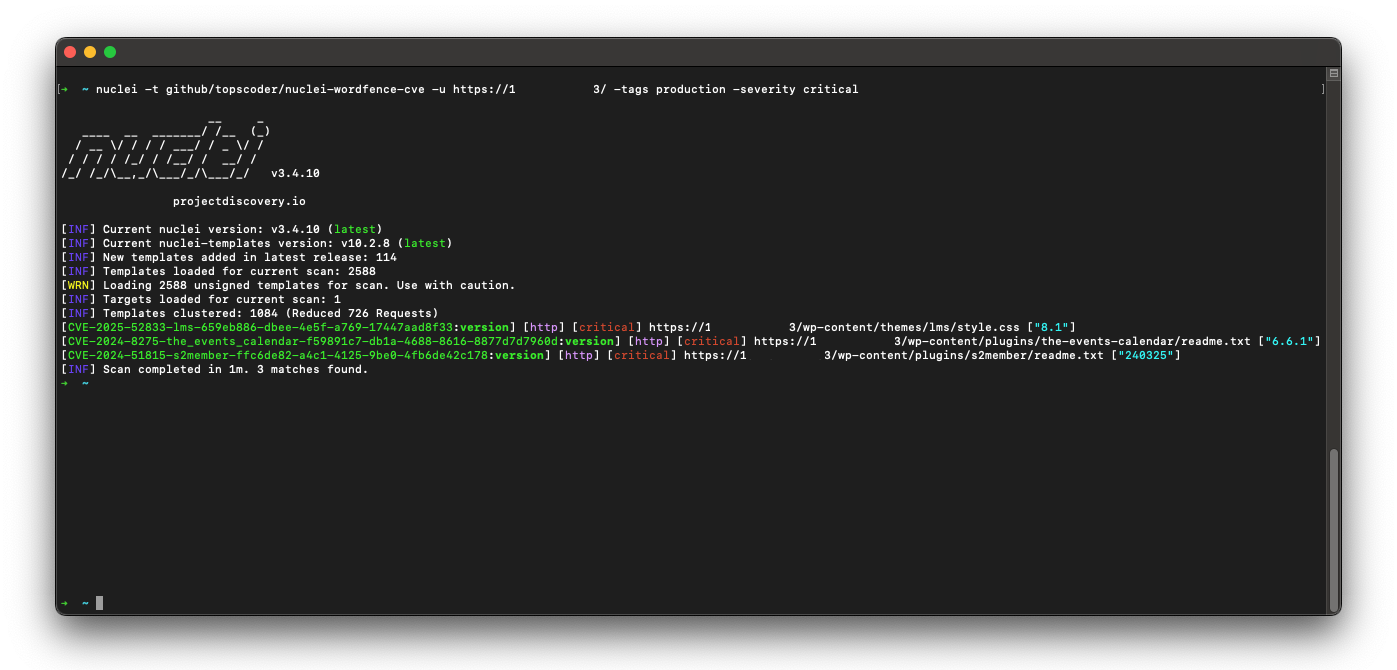
* To scan only for **critical vulnerabilities**, you can run the following command:
```bash
nuclei -t github/topscoder/nuclei-wordfence-cve -severity critical -u https://target.com
```
* To scan only for **WordPress core vulnerabilities**, you can run the following command:
```bash
nuclei -t github/topscoder/nuclei-wordfence-cve -tags wp-core -u https://target.com
```
* To scan only for **WordPress plugin vulnerabilities**, you can run the following command:
```bash
nuclei -t github/topscoder/nuclei-wordfence-cve -tags wp-plugin -u https://target.com
```
* To scan only for **WordPress theme vulnerabilities**, you can run the following command:
```bash
nuclei -t github/topscoder/nuclei-wordfence-cve -tags wp-theme -u https://target.com
```
* To go wild, you can combine and combine and combine:
```bash
nuclei -t github/topscoder/nuclei-wordfence-cve -tags wp-plugin,wp-theme -severity critical,high
```
* To go even wilder, you can use the template condition flag (`-tc`) that allows complex expressions like the following ones:
```bash
nuclei -t github/topscoder/nuclei-wordfence-cve -template-condition "contains(to_lower(name),'cross-site scripting') || contains(to_upper(name),'XSS')" -u https://target.com
nuclei -t github/topscoder/nuclei-wordfence-cve -template-condition "contains(to_lower(name),'sql injection') || contains(to_lower(description),'sql injection')" -u https://target.com
nuclei -t github/topscoder/nuclei-wordfence-cve -template-condition "contains(to_lower(name),'file inclusion') || contains(to_lower(description),'file inclusion')" -u https://target.com
nuclei -t github/topscoder/nuclei-wordfence-cve -template-condition "contains(to_upper(name),'CSRF') || contains(to_upper(description),'CSRF')" -u https://target.com
```
## 🤖 Severity recalculation
Template severity is adjusted by the parser to better reflect real-world impact. The `determine_severity` function in `src/lib/wordfence_api_parser.py` inspects the vulnerability title and description and will downscale issues that are limited to authenticated users (e.g., require login or elevated roles).
Example (simplified):
- If the title or description contains the word `authenticated` (and not `unauthenticated`), the function treats the issue as lower risk and returns `Low` instead of a higher CVSS label.
This helps avoid assigning `Medium`/`High` severities to vulnerabilities that only affect logged-in users, which reduces noise when scanning publicly accessible sites.
## 👥 Contributing
If you would like to contribute to this project, please feel free to fork the repository and submit a pull request.
## 📚 License
This project is licensed under the MIT License.
> [!NOTE]
> ~~ Please use it responsibly!