# Storybook for Django  [](https://www.npmjs.com/package/storybook-django) [](https://github.com/torchbox/storybook-django/actions)
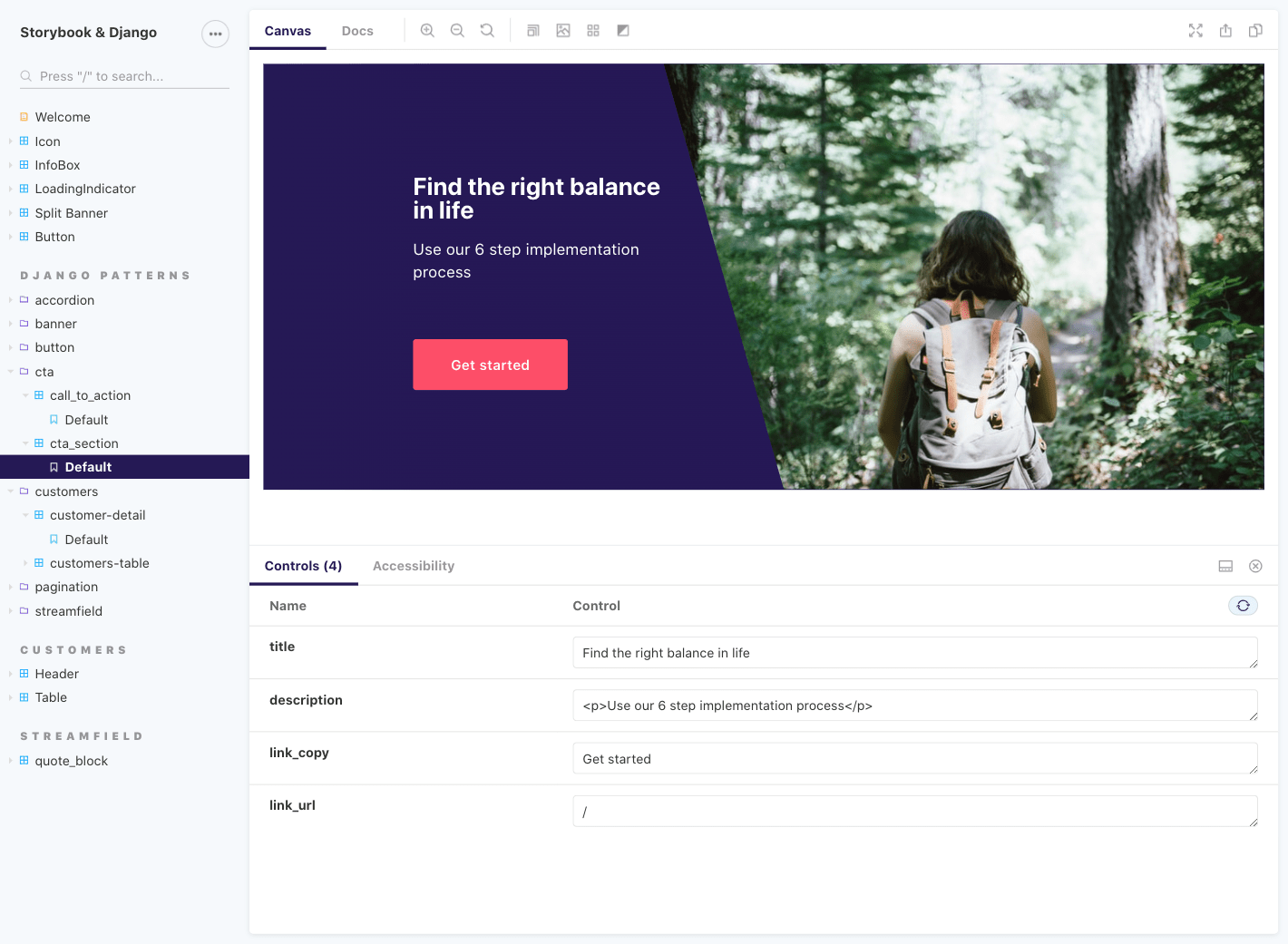
Storybook for Django is an experimental UI development environment for Django components. It allows you to implement, document, and test UI components in isolation from your Django views.
## How it works
Server-side, this uses [django-pattern-library](https://github.com/torchbox/django-pattern-library) to mock template context and template tags. Client-side, we use [Storybook](https://storybook.js.org/) to create stories from our templates.
## Getting started
Let’s get you set up. There are two requirements:
1. First, start by setting up [django-pattern-library](https://github.com/torchbox/django-pattern-library), v0.7.0 and up. Have a look at our [demo settings.py](https://github.com/torchbox/storybook-django/blob/main/demo/settings.py) as an example.
2. Then, set up [Storybook](https://storybook.js.org/). We expect `storybook-django` to work with any framework supported by Storybook, and provide built-in support for React (Vue in progress).
Next, install our package:
```sh
npm install --save-dev storybook-django
```
### Middleware
Add a `middleware.js` inside your Storybook configuration folder (`.storybook` by default):
```js
const {
createDjangoAPIMiddleware,
} = require('storybook-django/src/middleware');
module.exports = createDjangoAPIMiddleware({
// Point this at your Django runserver instance, with the correct port number.
origin: 'http://localhost:8001',
apiPath: ['/pattern-library/'],
});
```
This will forward pattern library API requests to Django. You may optionally add more API path patterns to `apiPath` to make other requests to your Django backend.
### Optional Webpack configuration
This is optional but highly recommended. To leverage Storybook’s live-reloading and documentation capabilities, we need to configure it to load our templates. Edit your Storybook `main.js` file to customise the `webpackFinal` option:
```js
module.exports = {
webpackFinal: (config) => {
config.module.rules = config.module.rules.concat([
{
test: /\.html$/,
// Webpack 5:
type: 'asset/source',
// Webpack 4 (make sure to also install the raw-loader package):
// use: 'raw-loader',
},
]);
return config;
}
```
### React usage
Here is the most basic story for a Django template:
```js
import { Pattern } from 'storybook-django/src/react';
export default {};
export const Base = () => (
);
```
`Pattern` uses a hard-coded `endpoint` of `/pattern-library/api/v1/render-pattern` by default. To change this, pass a different value. For example,
```js
```
If this is a necessity for your project, consider creating your own wrapper for the `Pattern` component rather than having to define the `endpoint` in all stories.
#### With auto-generated template paths
Our `Pattern` component has to be told which `template` to render, Alternatively, we can use [Webpack’s `__filename`](https://webpack.js.org/api/module-variables/#__filename-nodejs) support to auto-generate the template path. First, configure Webpack:
```js
config.node = {
__filename: true,
};
```
Then, use the `filename` prop instead of `template`:
```js
```
This `filename` prop assumes the template is in the same folder as the template, with the same file name except for the extension (replaces `.stories.(js|tsx)` with `.html`).
#### With Storybook features
And here is a more advanced examples, showcasing different Storybook features:
- Setting a custom title for the story.
- Loading Markdown files to use as documentation.
- Loading the component’s template to display alongside the docs, and for live-reloading.
- Setting up [controls](https://storybook.js.org/docs/react/essentials/controls).
- Having multiple stories with different data.
```js
import { Pattern } from 'storybook-django/src/react';
import docs from './quote_block.md';
import template from './quote_block.html';
export default {
title: 'Components / quote_block',
parameters: {
docs: {
source: { code: template },
extractComponentDescription: () => docs,
},
},
argTypes: {
quote: {
control: { type: 'text' },
description: 'Will be displayed first',
},
attribution: {
control: { type: 'text' },
description: 'Underneath the quote (optional)',
},
},
};
export const Base = (args) => (
);
Base.args = {
quote: 'Someone believed in me once and now it’s time for me to do the same.',
attribution: 'Young person',
};
export const NoAttribution = Base.bind({});
NoAttribution.args = {
quote: Base.args.quote,
attribution: null,
};
```
#### Making the most of React
The point of using React is to be able to fully customise the context within which our Django components are displayed. Here is an example, with a simple SVG icon template:
```js
const IconPattern = (props) => (
);
export const ReactDemoStory = () => (
View our complete guide
);
```
### Vue usage
We are working on Vue support. Please refer to [Usage with Vue #7](https://github.com/torchbox/storybook-django/issues/7) in the meantime, and provide feedback.
### Usage with other frameworks
storybook-django’s implementation is largely framework-agnostic, and should work equally as well with Storybook’s HTML and Web Components support.
You will need to directly import the imperative APIs:
```js
import {
renderPattern,
simulateLoading,
insertHTMLWithScripts,
} from 'storybook-django';
```
- `renderPattern` calls the django-pattern-library API rendering endpoint.
- `simulateLoading` includes `insertHTMLWithScripts`, and fires a `DOMContentLoaded` event.
- `insertHTMLWithScripts` is like `.innerHTML`, but additionally executing any `
[](https://www.npmjs.com/package/storybook-django) [](https://github.com/torchbox/storybook-django/actions)
Storybook for Django is an experimental UI development environment for Django components. It allows you to implement, document, and test UI components in isolation from your Django views.

## How it works
Server-side, this uses [django-pattern-library](https://github.com/torchbox/django-pattern-library) to mock template context and template tags. Client-side, we use [Storybook](https://storybook.js.org/) to create stories from our templates.
## Getting started
Let’s get you set up. There are two requirements:
1. First, start by setting up [django-pattern-library](https://github.com/torchbox/django-pattern-library), v0.7.0 and up. Have a look at our [demo settings.py](https://github.com/torchbox/storybook-django/blob/main/demo/settings.py) as an example.
2. Then, set up [Storybook](https://storybook.js.org/). We expect `storybook-django` to work with any framework supported by Storybook, and provide built-in support for React (Vue in progress).
Next, install our package:
```sh
npm install --save-dev storybook-django
```
### Middleware
Add a `middleware.js` inside your Storybook configuration folder (`.storybook` by default):
```js
const {
createDjangoAPIMiddleware,
} = require('storybook-django/src/middleware');
module.exports = createDjangoAPIMiddleware({
// Point this at your Django runserver instance, with the correct port number.
origin: 'http://localhost:8001',
apiPath: ['/pattern-library/'],
});
```
This will forward pattern library API requests to Django. You may optionally add more API path patterns to `apiPath` to make other requests to your Django backend.
### Optional Webpack configuration
This is optional but highly recommended. To leverage Storybook’s live-reloading and documentation capabilities, we need to configure it to load our templates. Edit your Storybook `main.js` file to customise the `webpackFinal` option:
```js
module.exports = {
webpackFinal: (config) => {
config.module.rules = config.module.rules.concat([
{
test: /\.html$/,
// Webpack 5:
type: 'asset/source',
// Webpack 4 (make sure to also install the raw-loader package):
// use: 'raw-loader',
},
]);
return config;
}
```
### React usage
Here is the most basic story for a Django template:
```js
import { Pattern } from 'storybook-django/src/react';
export default {};
export const Base = () => (
);
```
`Pattern` uses a hard-coded `endpoint` of `/pattern-library/api/v1/render-pattern` by default. To change this, pass a different value. For example,
```js
```
If this is a necessity for your project, consider creating your own wrapper for the `Pattern` component rather than having to define the `endpoint` in all stories.
#### With auto-generated template paths
Our `Pattern` component has to be told which `template` to render, Alternatively, we can use [Webpack’s `__filename`](https://webpack.js.org/api/module-variables/#__filename-nodejs) support to auto-generate the template path. First, configure Webpack:
```js
config.node = {
__filename: true,
};
```
Then, use the `filename` prop instead of `template`:
```js
```
This `filename` prop assumes the template is in the same folder as the template, with the same file name except for the extension (replaces `.stories.(js|tsx)` with `.html`).
#### With Storybook features
And here is a more advanced examples, showcasing different Storybook features:
- Setting a custom title for the story.
- Loading Markdown files to use as documentation.
- Loading the component’s template to display alongside the docs, and for live-reloading.
- Setting up [controls](https://storybook.js.org/docs/react/essentials/controls).
- Having multiple stories with different data.
```js
import { Pattern } from 'storybook-django/src/react';
import docs from './quote_block.md';
import template from './quote_block.html';
export default {
title: 'Components / quote_block',
parameters: {
docs: {
source: { code: template },
extractComponentDescription: () => docs,
},
},
argTypes: {
quote: {
control: { type: 'text' },
description: 'Will be displayed first',
},
attribution: {
control: { type: 'text' },
description: 'Underneath the quote (optional)',
},
},
};
export const Base = (args) => (
);
Base.args = {
quote: 'Someone believed in me once and now it’s time for me to do the same.',
attribution: 'Young person',
};
export const NoAttribution = Base.bind({});
NoAttribution.args = {
quote: Base.args.quote,
attribution: null,
};
```
#### Making the most of React
The point of using React is to be able to fully customise the context within which our Django components are displayed. Here is an example, with a simple SVG icon template:
```js
const IconPattern = (props) => (
);
export const ReactDemoStory = () => (
View our complete guide
);
```
### Vue usage
We are working on Vue support. Please refer to [Usage with Vue #7](https://github.com/torchbox/storybook-django/issues/7) in the meantime, and provide feedback.
### Usage with other frameworks
storybook-django’s implementation is largely framework-agnostic, and should work equally as well with Storybook’s HTML and Web Components support.
You will need to directly import the imperative APIs:
```js
import {
renderPattern,
simulateLoading,
insertHTMLWithScripts,
} from 'storybook-django';
```
- `renderPattern` calls the django-pattern-library API rendering endpoint.
- `simulateLoading` includes `insertHTMLWithScripts`, and fires a `DOMContentLoaded` event.
- `insertHTMLWithScripts` is like `.innerHTML`, but additionally executing any `