


Windows ARM64 ·
Intel Mac ·
Linux ARM64 ·
AppImage & all downloads

Chat On Steroids
Codex-style tools. Your ChatGPT plan. No Codex quota.
Give ChatGPT a project and let it work.
Read files, edit code, run commands, use your desktop and delegate to sub-agents.
Free & open source · Windows / macOS / Linux · Setup guide

The whole workspace. 10 seconds. Watch the sharper MP4 · Screenshots
**Your ChatGPT conversation does the work.** Chat On Steroids gives it local tools and a desktop workspace; it does not run a Codex model or consume Codex quota. Your ChatGPT plan's model availability, usage and context limits still apply.
What you can do · Before you install · Get started · Plugins · Changelog
## Features
### Less copy-paste. More done.
Ask for a fix, watch the edits and tests, then steer the next step from the same conversation. Your project, tool results and working history stay together.
| You want to… | Chat On Steroids gives you… |
| --- | --- |
| **Work on real code** | Codex-style file reading, multi-file patches, interactive terminals and background commands. Code mode combines several tools in one call. |
| **Work in parallel** | Reusable sub-agents with their own ChatGPT conversations. Start with two workers; configure up to eight per family. |
| **Keep a long project moving** | Compact & Resume carries the task into a fresh conversation attached to the same local session, with earlier history still searchable. |
| **Steer without interrupting** | A visible plan, editable queued steps and Inject now for corrections while work is running. |
| **Let ChatGPT use the interface** | Screenshots, clicks, typing and desktop inspection on Windows and macOS. |
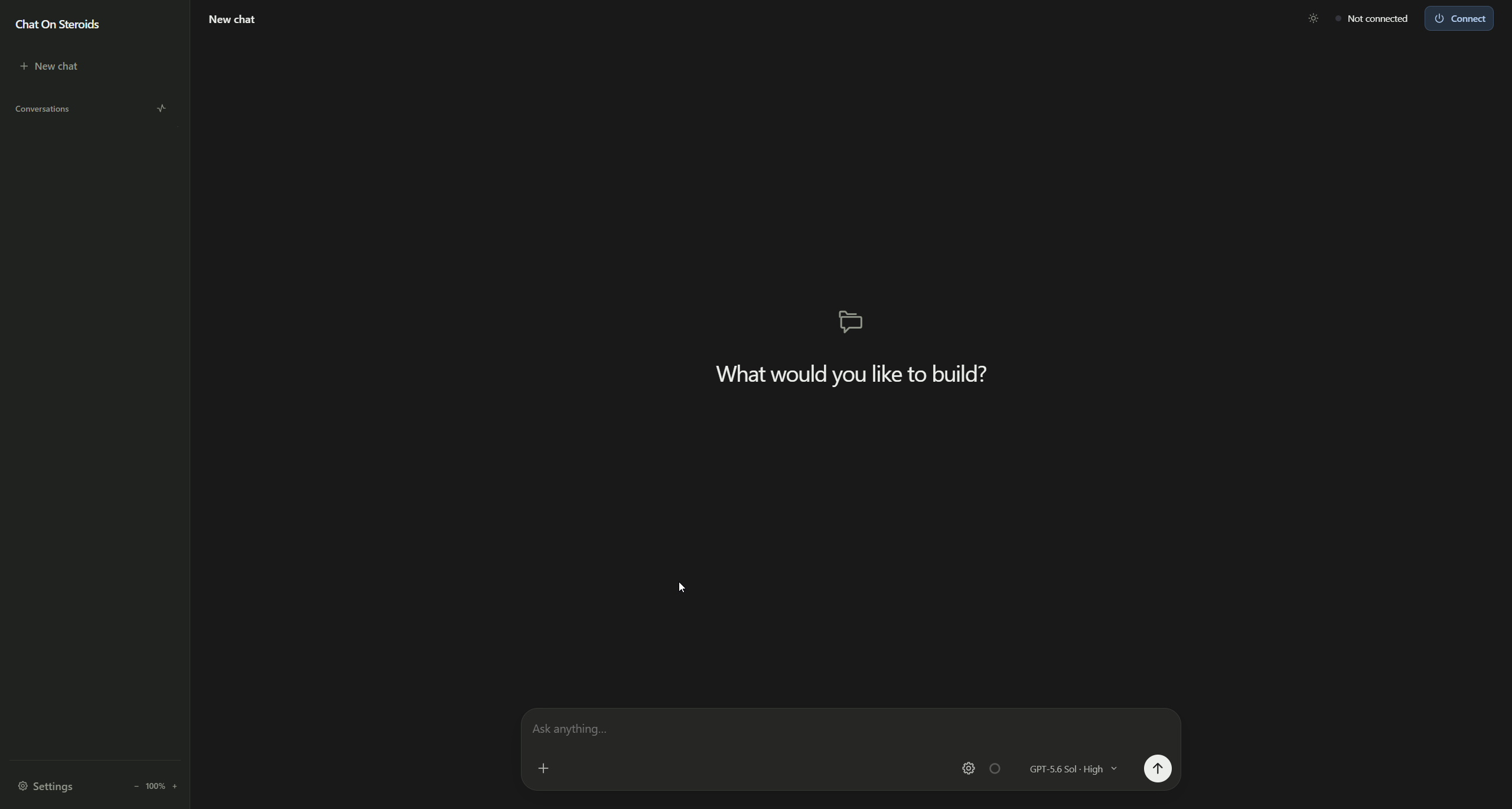
| **Choose how it thinks** | The models and reasoning levels available to your connected ChatGPT account, directly in the composer. |
| **Connect more tools** | Plugins such as Blender, Playwright and Memory, plus custom local and remote MCP servers. |
### Keep going after the first answer
**Infinite Astra turns:** with Session finish enabled, Astra can receive your next instruction, a queued checkpoint or a Goal/Loop follow-up through its tools in the same working turn. You can steer it or end the turn from the composer. Context, usage and runtime limits still apply.
**Goal** follows unfinished work toward your objective. **Loop** keeps asking for more work within that objective until you switch it off. Generate plans and follow-ups through a ChatGPT helper, or choose an optional OpenRouter/custom API backend.
**Compaction keeps the project together:** continue in a fresh chat without rebuilding your local history, project association or pending queue. Manual compaction is available; automatic compaction applies only to eligible active chats and excludes Pro models.
Ready to give ChatGPT the tools?
Download Chat On Steroids · Follow the setup guide
## Screenshots
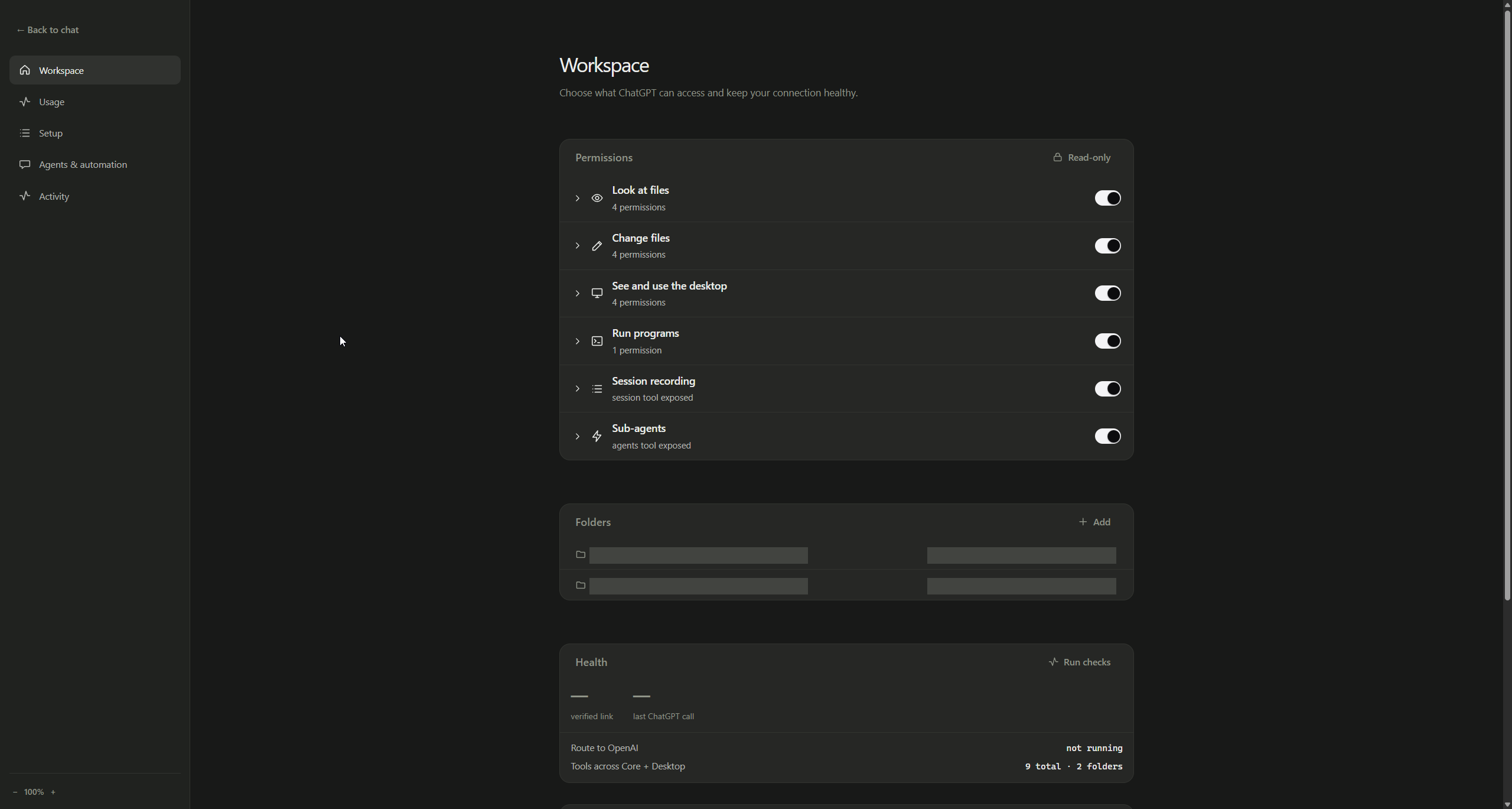
Explore the workspace, model picker and settings

## Before you install
**Does this use my Codex allowance?** No. Model execution happens in your normal ChatGPT conversation. ChatGPT's own limits still apply, including to worker and helper chats.
**What do I need?** A ChatGPT account/workspace that supports Developer mode and custom MCP apps, a supported desktop OS, and Chrome or Edge with the companion extension. Check the [requirements](#requirements) and [setup guide](#quick-start).
**Do I need an API key?** The coding conversation uses ChatGPT. The recommended Secure MCP Tunnel setup needs a restricted tunnel API key. Other tunnel options are available; an optional API backend for plans or Goal/Loop uses its own credentials and provider billing.
**Is it ready for my machine?** Installers are available for Windows, macOS and Linux on x64 and ARM64. This is an unsigned beta; review the platform notes below and approve only the folders and capabilities you want to use.
## Download
| Platform | x64 | ARM64 |
| --- | --- | --- |
| **Windows** | [Installer](../../releases/latest/download/Chat-On-Steroids-Setup-x64.exe) | [Installer](../../releases/latest/download/Chat-On-Steroids-Setup-arm64.exe) |
| **macOS** | [DMG](../../releases/latest/download/Chat-On-Steroids-macOS-x64.dmg) · [ZIP](../../releases/latest/download/Chat-On-Steroids-macOS-x64.zip) | [DMG](../../releases/latest/download/Chat-On-Steroids-macOS-arm64.dmg) · [ZIP](../../releases/latest/download/Chat-On-Steroids-macOS-arm64.zip) |
| **Linux** | [AppImage](../../releases/latest/download/Chat-On-Steroids-Linux-x64.AppImage) · [DEB](../../releases/latest/download/Chat-On-Steroids-Linux-x64.deb) | [AppImage](../../releases/latest/download/Chat-On-Steroids-Linux-arm64.AppImage) · [DEB](../../releases/latest/download/Chat-On-Steroids-Linux-arm64.deb) |
Every package ships with matching native dependencies, a pinned `tunnel-client`, ripgrep and the Chrome extension for that CPU. A standalone [extension zip](../../releases/latest/download/Chat-On-Steroids-Extension.zip) is attached for manual installs, and [`SHA256SUMS.txt`](../../releases/latest/download/SHA256SUMS.txt) lists every hash.
Windows and AppImage installs check GitHub for a newer release on start and every six hours, download it, verify its checksum and apply it when you quit or choose **Install update**. Staged downloads are revalidated before installation. macOS and DEB installs link to the release page for manual installation.
**Debian and Ubuntu: prefer the DEB.** The AppImage uses electron-builder's static launcher. On a host that disables unprivileged user namespaces, that launcher can fall back to starting Chromium with `--no-sandbox` so the app still opens. If you do not want that fallback, use the DEB.
**The builds are not publisher-signed yet**, and macOS builds are not notarized. SmartScreen, Gatekeeper or your browser will warn. Verify the hash first, then use the normal "run anyway" path, or [build from source](#building).
```powershell
Get-FileHash .\Chat-On-Steroids-Setup-x64.exe -Algorithm SHA256 # Windows
```
```sh
shasum -a 256 Chat-On-Steroids-macOS-arm64.dmg # macOS
sha256sum Chat-On-Steroids-Linux-x64.AppImage # Linux
```
> **This is a beta with real permissions.** A fresh install starts with Core capabilities on, including ChatGPT file saving, read-only mode off, multi-agent mode on with two workers, and, on Windows, the Desktop permissions on. On macOS the Desktop permissions start off; enable them in **Settings → Workspace**, then grant Screen Recording and Accessibility in System Settings. Linux has Core tools but no Desktop computer-control backend. Review folder access before connecting: `exec_command` runs programs as your logged-in user.
## Requirements
- **Windows 10/11**, **macOS 13 Ventura or newer**, or a current desktop **Linux**, on x64 or ARM64 matching the build you downloaded.
- **Chrome 116 or newer**, or a current Microsoft Edge with the companion extension. Without it you still get the MCP tools, but not session attribution, Compact & Resume, worker chats or the Goal loop.
Using Edge? Choose **Settings → Browser & history → ChatGPT browser → Microsoft Edge**. Install the companion and sign in to ChatGPT in that browser's active profile (`edge://extensions` for Edge). This choice controls app-originated launches, including startup model discovery; already connected tabs and source-tab continuations keep their browser. Older configurations retain Chrome. If the selected browser is missing or cannot start, the app reports an error instead of opening a different browser. The setting chooses a browser family, not a particular profile.
- **Linux:** a Secret Service keyring such as GNOME Keyring or KWallet. The app refuses Electron's unencrypted `basic_text` fallback for stored keys.
- A ChatGPT account/workspace with **Developer mode** and custom MCP actions. Check [OpenAI’s availability guide](https://help.openai.com/en/articles/12584461-developer-mode-and-mcp-apps-in-chatgpt) for your plan and workspace.
- An **OpenRouter API key** (or your own OpenAI-compatible endpoint) only if you select the API source for plans, Goal or Loop. The default ChatGPT helper source uses your connected browser session.
Use a normal ChatGPT conversation with the custom app enabled. OpenAI's built-in Agent mode does not use custom apps.
## Quick start
1. Install the build for your CPU and open Chat On Steroids. It lives in the tray or menu bar.
2. Open **Settings → Workspace**, review permissions and approve a project folder. Press **Add**, or drop the folder onto the Folders card.
3. Create an OpenAI Secure MCP Tunnel and a restricted API key, then press **Connect**. Details below.
4. In ChatGPT on the web, enable Developer mode and create the **Core** app from the tunnel. On Windows, create the **Desktop** app too if you left screen and input control on; on macOS, if you switched them on.
5. Press **Open extension folder**, open `chrome://extensions`, enable Developer mode, choose **Load unpacked** and select that folder. Pairing is automatic.
**Settings → Setup** marks each hop done only once the app has actually seen traffic on it. Back in chat, select a project and model, write a message, or choose **Create plan** from the gear. Images can be attached or dropped into the composer.
### OpenAI Secure MCP Tunnel (recommended)
1. In [Platform → Tunnels](https://platform.openai.com/settings/organization/tunnels), create a tunnel in the same workspace you use in ChatGPT and copy its id (`tunnel_…`).
2. In [Platform → API keys](https://platform.openai.com/settings/organization/api-keys), create a **Restricted** key with only **Tunnels: Read** and **Tunnels: Use**.
3. Paste both into the Setup tab and press **Connect**.
4. In ChatGPT, enable Developer mode under **Settings → Apps → Advanced settings** and create a custom app of type **Tunnel**. Review the discovered actions and enable it.
Core and the optional Desktop surface (Windows and macOS) use separate tunnel ids, because ChatGPT treats each custom app as one endpoint. Release builds bundle a checksum-verified `tunnel-client`; a path you set explicitly wins over it, and `PATH` is only a fallback.
### Other tunnels
**Cloudflare quick tunnel:** press **Connect**, copy the URL and use it as the MCP server URL in ChatGPT. The random path in that URL is the secret. It changes on every restart.
**Your own HTTPS tunnel:** point it at the loopback URL the app shows and give ChatGPT the public equivalent, secret path included.
Permission changes take effect locally immediately. Schema changes schedule a separate connector refresh; if that refresh fails, refresh the custom app in ChatGPT. ChatGPT may keep an older reviewed action list until it refreshes.
## What ChatGPT gets
| Connector | Tools | What they do |
| --- | --- | --- |
| **Core** (all platforms) | `read`, `view_image`, `find`, `apply_patch`, `exec_command`, `write_stdin`, `download_artifact`, `session`, `update_plan`, `agents`, `exec` | Bounded reads and search inside approved folders, preflighted multi-file patches, shell commands and interactive terminals, saving ChatGPT-generated files, lookups into the recorded session, and worker chat control |
| **Desktop** (Windows, and macOS when switched on) | `observe`, `computer` | Screenshots, window and control inspection, mouse, keyboard and clipboard |
The live tool list follows your settings: `find` is the no-shell search fallback and steps aside when commands are enabled. Enabling Session finish adds the Astra-only `session_finish` tool. Revoking a permission takes effect immediately, even while ChatGPT still shows the old schema. The full contract lives in [`docs/tool-surface.md`](docs/tool-surface.md).
Every call is answered with a structured outcome the model can act on. A refused call says why and what to do next, whether that is a missing permission, a folder outside the approved roots, unread background results it has to collect first, or a chat that lost its identity.
How sessions, compaction, Astra and sub-agents work
## Sessions and the extension
Recording is on by default and can be switched off. The app keeps a durable local history of every conversation the extension can see: the messages, each tool call, and the real result the app returned. That history feeds the Chat timeline in the app and the `session` tool, so ChatGPT can search what it did last week instead of guessing. Retention defaults to 30 days. Data lives under the app's per-user directory: `%APPDATA%\chat-on-steroids\sessions\` on Windows, `~/Library/Application Support/chat-on-steroids/sessions/` on macOS, `${XDG_CONFIG_HOME:-~/.config}/chat-on-steroids/sessions/` on Linux.
The extension runs only on `chatgpt.com` and `chat.openai.com` plus the app's loopback bridge. It proves which conversation made each MCP call, captures the visible transcript, draws richer tool rows in the chat, and coordinates worker tabs. App and extension are versioned together: after updating the app, press **Reload** on the unpacked extension.
### The desktop composer
The gear holds the per-chat Goal/Loop controls, task editor, plan creation and Compact & Resume. The small circle beside it shows estimated current-chat tokens on hover or click. Pro chats use a static circle; other chats show a proportion of the configured local limit. These are recorder estimates, not the provider's exact context counter.
During work, **Inject now** queues messages for tool delivery; multiple injections can wait together until the next eligible call. A plan advances one stage at a time at `session_finish` for Astra, or after a completed answer for ordinary models. Queue cards can be edited or cancelled. Delivery status follows the tool handout, and earlier transcript pages remain accessible.
### Compact & Resume
The app estimates context pressure locally. Fresh installs warn at about 400k estimated tokens, mark 533k as the ceiling, and enable automatic compaction at 400k. **Pro models never auto-compact**, regardless of that setting. Other eligible chats follow the configured threshold and live-work checks. These are local estimates, not ChatGPT's own counter.
Compact & Resume asks the current chat for a handoff brief, stores it, opens a fresh conversation and rebinds the same local session to it. While the brief is being written the old chat is refused every tool, so a turn that will not stop cannot keep changing the machine the brief describes. Both sends carry durable checkpoints tied to marked ChatGPT messages, so a refresh, a closed tab or an app restart cannot submit either prompt twice or lose the session between the two chats. If the handoff cannot complete, the original session stays where it was. Goal, task and worker history all move with it.
### Goal and Loop
For ordinary models, **Goal** checks a completed answer and either drafts a follow-up or decides the task is complete. **Loop** generates continued work until switched off. Edit the task and prompts in **Settings → Agents & automation**. ChatGPT helper generation is the default; API generation uses your encrypted OpenRouter key. Goal also supports prepared messages with completion markers; Loop uses ChatGPT or API generation. Tool details can be included when you enable that option.
**Astra behaves differently.** With Session finish enabled, Goal and Loop both use Loop instructions and deliver through tool injection. Queued user instructions and plan stages take priority. When Astra calls `session_finish` with nothing waiting, your setting chooses a finish notification or automatic follow-up generation. A per-chat Goal/Loop switch also selects automatic generation. The generated instruction arrives on a later tool call; it never automatically starts a new turn after Astra has really finished. Silence alone does not queue a Pro goal, and Pro silence recovery waits ten minutes.
Finish reminders are added by the delivery layer, separate from the visible plan. Desktop notifications depend on OS support and notification settings; the app also offers **Generate Goal** while waiting at a finish point. Native notification actions and cold background browser focus are not yet verified across every supported desktop environment.
At a finish point, temporary Goal API failures retry after 15 seconds by default, honoring a provider's retry delay. The same operation delivers its completed instruction through the next tool result; new user instructions or ending the turn cancel it. Permanent errors such as invalid credentials require correction.
For the API backend, choose OpenRouter or a custom OpenAI-compatible endpoint under **Settings → Agents & automation**. Custom URLs use HTTPS, or HTTP on loopback for local servers. Enter the server's model ID and optional API key; keys use secure OS storage and stay out of browser state. Switching back to OpenRouter selects its default model.
### Multi-agent mode
One prime chat can open up to eight worker chats (two by default) and exchange brokered messages with them through the `agents` tool. Provider rate limits still apply. Workers cannot talk to each other.
Workers are reusable conversations. When one reports its result it goes to sleep, frees its slot and keeps its full chat. Messaging it again wakes the same conversation. At about 400k recorded tokens a worker becomes non-revivable after its next stop; workers never compact themselves. With background chats enabled, app-managed tabs share one browser window. Sleeping workers remain available for reuse. Idle time alone does not authorize closing a tab; automatic closure requires terminal or other explicit retirement authority and fresh browser checks. Active generation, unsent drafts and user-pinned tabs remain protected.
Each prime owns its worker history. If the last worker sleeps, the run is parked and another chat can start its own workers; the original prime still sees its full history in `agents action=status`, can spawn fresh workers, and can wake old ones when the execution slot is free. Turning multi-agent off pauses execution and keeps that history. **Clear swarm** is what discards it.
Identity is fail-closed. Spawning, messaging and every other identity-sensitive action needs the extension to prove which conversation made the call. A chat used from somewhere the extension cannot see, such as the phone app, still gets the ordinary Core tools but not agent control.
### Blocking a chat
A wedged ChatGPT page can leave a turn running with no working Stop button while the model keeps calling tools. The app cannot end that turn, but it can take its tools away. **Block** in the Chat tab refuses every call from that conversation with a message telling the model to abandon the task and answer, and the turn ends itself. It is not a cancel, and it applies only to calls whose owner is proven.
## Security in one page
- **File tools stay inside approved folders.** Paths are validated and canonicalised first. This is application-level containment, not an OS sandbox; same-user filesystem races remain possible.
- **Commands are not folder-sandboxed.** They start in an approved folder and then run with your normal user privileges.
- **Desktop control is not folder-scoped.** When enabled, it applies to the whole Windows or macOS desktop. On macOS it is off until you switch it on, and macOS additionally enforces its own Screen Recording and Accessibility grants.
- **The MCP server is loopback-only** behind a random secret path. ChatGPT reaches it through the tunnel you configure. Treat any public tunnel URL as a password.
- **The browser bridge is loopback-only and separate.** It exists for the extension and exposes no file, command or settings routes.
- **Secrets use Electron `safeStorage`:** DPAPI on Windows, Keychain on macOS, libsecret or KWallet on Linux.
- **Read-only mode** disables file writes, command execution, desktop control and clipboard writes in one switch.
Report vulnerabilities privately per [`SECURITY.md`](SECURITY.md).
### The extension and OpenAI's terms
The MCP connector uses ChatGPT's documented Developer mode and Secure MCP Tunnel path. The extension is different: it observes ChatGPT's web UI, records rendered conversation state locally, and multi-agent mode opens and types into extra ChatGPT tabs. None of that is a documented public automation API. Depending on your account, OpenAI's [terms and policies](https://openai.com/policies/) on automated access, rate limits and permitted use may apply. Read the agreement that governs your account before using the extension or multi-agent mode, and do not use these features to scrape ChatGPT, evade limits or bypass safety controls.
Browser behavior and troubleshooting
## Browser behavior in the current source
The current source reads account-evaluated model IDs, available efforts and version choices instead of English picker labels. New model families appear after **Reload ChatGPT models**, provided ChatGPT exposes them to your account in the supported picker structure. Discovery restores the previous selection and sends no message.
The current composer accepts dropped files (including Markdown) and dropped text, or **Add photos & files**. Files keep their original bytes and appear as compact filename cards above the message. Up to 20 files and 512 MB total can be prepared per message; ChatGPT's account, format and upload limits still determine acceptance. Files wait for the next native message when a turn is running. The app sends only after every attachment is confirmed and the draft is still unchanged. A failed upload leaves a visible error and is never automatically resent. Install the matching protocol-13 companion with this source build.
Opening the app reuses an idle ChatGPT tab for its initial observation when the browser is already present; showing the window again does not refresh a ready catalog or open Chrome. Explicit model reloads also reuse suitable tabs. A pending operation keeps its selected tab through settings navigation and extension-worker suspension. A slow page or missing receipt never authorizes a second OS open.
In **Chat settings → Browser & history**, enable **Browser only** to prevent automatic plugin-refresh and recovery operations from creating tabs. Existing eligible tabs can still be used; explicit new chats, workers and model reloads retain their normal behavior. Closing a helper does not restart the same operation every maintenance cycle. Connector refresh verifies the installed App ID and complete tool declarations, and clicks Refresh only after the app has durably claimed a changed schema.
## Troubleshooting
- **A new ChatGPT tab every half minute:** this is a bug, not normal operation. The current source fixes repeated helper ownership loss and duplicate opening after slow browser handoffs. Browser only also disables automatic helper creation.
- **A folder cannot be listed:** use the actual virtual path shown for your approved folder. `/folder` is an example, not an automatically configured root. Confirm the Core plugin is installed and the folder is approved in the app.
- **Tools missing or stale after a permission change:** tool-schema changes schedule a connector refresh after a 20-second debounce. If it fails, refresh the custom app in ChatGPT; this is separate from reloading the companion extension.
- **Extension says app not found:** recording or multi-agent mode must be on for the bridge to run. Then reopen the popup.
- **Extension version mismatch:** reload the unpacked extension after every app update.
- **`agents` says `UNIDENTIFIED_CALLER`:** use that conversation in the paired browser so the extension can observe its request id. The app will not guess identity from the active tab.
- **`COMPACTION_IN_PROGRESS` in a chat:** that chat is being handed off. Let it write the brief; work continues in the replacement.
- **OS warning about an unverified app:** expected for the unsigned beta. Verify `SHA256SUMS.txt` before overriding.
- **Linux says secure credential storage is unavailable:** unlock GNOME Keyring or KWallet and restart the app.
- **Tunnel unavailable:** point Advanced settings at an explicit `tunnel-client` or `cloudflared`, or use the bundled copy.
Build from source and contribute
## Development
```sh
npm ci
npm run dev # run the app with hot reload
npm run verify # typecheck, tests and the privacy gate; the same gate CI runs
```
Read [`AGENTS.md`](AGENTS.md) before changing anything. It is the design record: what each invariant is, which incident produced it, and which test guards it.
## Building
```sh
npm run dist:x64 # Windows x64
npm run dist:arm64 # Windows ARM64
npm run dist:mac:x64 # macOS Intel DMG + ZIP
npm run dist:mac:arm64 # macOS Apple Silicon DMG + ZIP
npm run dist:linux:x64 # Linux x64 AppImage + DEB
npm run dist:linux:arm64 # Linux ARM64 AppImage + DEB
```
Package on the target operating system. The release workflow runs on native Windows, macOS and Linux runners for both CPUs, pins and verifies the tunnel and ripgrep assets, stages matching native dependencies, smoke-tests the packaged runtime, and assembles one release candidate with the extension zip and `SHA256SUMS.txt`. Publishing checks OpenAI's current stable `tunnel-client` release before and after the candidate build and refuses a stale pin, while keeping the tagged build reproducible.
## Contributing
Bug reports, feature requests and PRs are welcome. Read [`CONTRIBUTING.md`](CONTRIBUTING.md) first. Release history is in [`CHANGELOG.md`](CHANGELOG.md).
## Licence
MIT. See [`LICENSE`](LICENSE).
Not affiliated with, endorsed by, or connected to OpenAI. "ChatGPT" and "Codex" are trademarks of OpenAI, used here only to describe what this tool works with.