# 2022 Update
This tool is no longer actively maintained. I suggest using either [tsup](https://github.com/egoist/tsup), [tsdx](https://github.com/jaredpalmer/tsdx), or [microbundle](https://github.com/developit/microbundle).
Here's an [article](https://transitivebullsh.it/javascript-dev-tools-in-2022#823feddaa1bb4edea19042852b0a5b54) I wrote in April 2022 which should help you decide between these different tools.
# create-react-library
CLI for creating reusable, modern React libraries using Rollup and create-react-app.
> 这是一个 CLI 工具,借此您可以使用 Rollup 和 create-react-app 创建一个现代的,并可以可重复使用的您自己的 React 库(libraries)。
[](https://www.npmjs.com/package/create-react-library) [](https://travis-ci.org/transitive-bullshit/create-react-library) [](https://standardjs.com)
## 简介

## 功能
- 容易上手的 CLI
- 处理所有流行的 JS 功能
- 打包了 commonjs 和 es 模块的格式
- 使用 [create-react-app](https://github.com/facebookincubator/create-react-app) 作为案例演示和本地开发
- 使用 [Rollup](https://rollupjs.org/) 来打包
- 使用 [Babel](https://babeljs.io/) 来转码
- 使用 [Jest](https://facebook.github.io/jest/) 进行测试
- 支持复杂的同等依赖(peer-dependencies)
- 支持 CSS 模块(modules)
- 可以支持 TypeScript
- 创建 Sourcemap
- 上千个开源模块
- 贴心的文档 😍
- [中文文档参考](./readme.zh-CN.md) by [@monsterooo](https://github.com/monsterooo)
## 全局安装
此安装包必须依赖 `node 版本大于或者等于 10`。
```bash
npm install -g create-react-library
```
## 使用 npx
```bash
npx create-react-library
```
_([npx](https://medium.com/@maybekatz/introducing-npx-an-npm-package-runner-55f7d4bd282b) 通常要求 npm 5.2+ 或者更高版本, 详情请参考 [关于较低 npm 版本的说明](https://gist.github.com/gaearon/4064d3c23a77c74a3614c498a8bb1c5f))_
## 创建一个新的模块
```bash
create-react-library
```
根据提示,输入你想创建模块的一些基本信息,然后 CLI 将会执行以下步骤:
- 将模板复制到 template 中
- 通过 yarn 或 npm 安装依赖包
- 将安装包一起链接到本地开发中
- 初始化本地 git 仓库
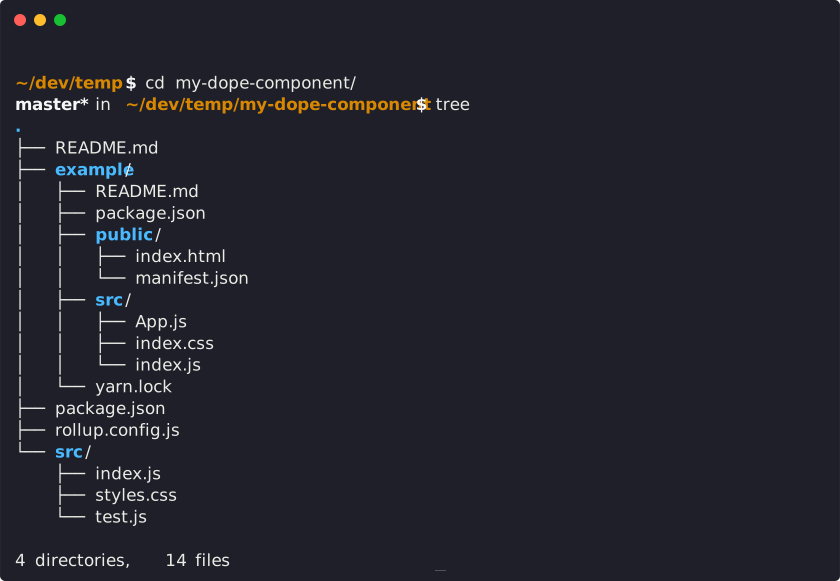
在这个时候,你的新模块目录应该和下面的截图一直,这是本地开发的所有需要的设置啦。
## 开发
我们将本地开发分成两个部分(推荐开启两个 tabs)。
首先, 运行 rollup 可以监听你的 `src/` 模块, 当你有做出任何变更的时候会自动编译到 `dist/` 中。
```bash
npm start # 运行 rollup 并且监听变更
```
第二步就是运行 create-react-app 创建的 `example/` 文件,它使用了您开发的模块的最新版本。
```bash
# (在一个新的终端窗口中运行)
cd example
npm start # runs create-react-app dev server
```
现在, 若你改变 `src/` 或演示项目下 `example/src` 的任何内容, `create-react-app` 会实时地加载本地开发的服务器, 您可以借此来实时迭代开发您的组件。

#### 发布到 npm 中
```bash
npm publish
```
您会发现此命令创建了 `commonjs` 和 `es` 版本的模块,然后把您的模块发布到 `npm`。
请务必要确保您将任何同等依赖(peer dependencies)的 npm 模块正确地加入到 `package.json` 中的 `peerDependencies`里。这样一来 rollup 将它们识别为同等依赖,而不会将它们打包到您的模块中。
然后就可以愉快的发布拉
#### 部署到 Github 页面中
```bash
npm run deploy
```
这行命令会创建一个生产环境下的 example `create-react-app` 文件,这样能够展示您的库,然后请运行 `gh-pages` 来部署最终的打包文件。
## 使用 React Hooks
如果您在项目中使用 [react-hooks](https://reactjs.org/docs/hooks-intro.html),当您调试 example 项目时,您会遇到一个问题 [Invalid Hook Call Warning](https://reactjs.org/warnings/invalid-hook-call-warning.html)。
此 [问题](https://github.com/facebook/react/issues/14257) 解释了其中的缘由,我们的库和文档使用了一个不同的实例,而我们的解决方案是重写您 example 中的 `react` 路径为"file:../node_modules/react"或者'link:../node_modules/react'。
## 一些例子
### 导出多个文件名
查看此 [branch](https://github.com/transitive-bullshit/react-modern-library-boilerplate/tree/feature/multiple-exports) 可以参考多个命名导出的方法。此模块中导出了两个组件,分别为 `Foo` 和 `Bar`, 以及如何在 example 中调用它们。
### Material-UI
查看此 [branch](https://github.com/transitive-bullshit/react-modern-library-boilerplate/tree/feature/material-ui) 可以参考如何使用一个相对复杂一些的同等依赖,[material-ui](https://github.com/mui-org/material-ui)。 利用 [rollup-plugin-peer-deps-external](https://www.npmjs.com/package/rollup-plugin-peer-deps-external) 强大的功能,可以轻松的创建一个可重复使用的模块,它包含了复杂的同等依赖,但是不需要作为您模块的部分一起打包。
### Boilerplate
本 CLI 基于此 [boilerplate](https://github.com/transitive-bullshit/react-modern-library-boilerplate),您也可以选择性地阅读 [此文档](https://hackernoon.com/publishing-baller-react-modules-2b039d84bce7)。
### 开源库
下面是一些使用 `create-react-library` 引导来创建的一些库的例子。
- [tabler-react](https://github.com/tabler/tabler-react) - React Tabler UI 组件和展示。
- [react-background-slideshow](https://github.com/transitive-bullshit/react-background-slideshow) - React 创建背景性感的幻灯片效果 🔥
- [react-starfield-animation](https://github.com/transitive-bullshit/react-starfield-animation) - React 创建基于 Canvas 的星空动画 ✨
- [react-particle-effect-button](https://github.com/transitive-bullshit/react-particle-effect-button) - React 创建的爆破粒子按钮效果 🎉
- [react-particle-animation](https://github.com/transitive-bullshit/react-particle-animation) - React 创建基于 Canvas 的粒子动画 🌐
- [react-block-image](https://github.com/transitive-bullshit/react-block-image) - React 中通过使用`div`替换`img`来获得更多的控制 🌃
- [react-mp3-recorder](https://github.com/transitive-bullshit/react-mp3-recorder) - React 实现的使用麦克风来记录 mp3 音频 🎵
- [react-before-after-slider](https://github.com/transitive-bullshit/react-before-after-slider) - React 创建的两个图片比较的库.
- [worldwind-react-globe](https://github.com/emxsys/worldwind-react-globe) - React 实现的 NASA 虚拟地球组件。
- [react-shimmer](https://github.com/gokcan/react-shimmer) - 加载图片时使用一个闪光的效果.
- [react-login-modal-sm](https://github.com/Silind/react-login-modal-sm) - 定制的 React 社交平台登录模态框(modal)。
- [react-gradient-scroll-indicator](https://github.com/jbccollins/react-gradient-scroll-indicator) - 封装了带渐变效果的内容的滚动。
- [react-editext](https://github.com/alioguzhan/react-editext) - 可编辑的 Text 组件。
- ... 以及上百个更多的!
有兴趣查看更复杂的列表? 请查看 [Made with CRL](https://made-with-crl.netlify.com/)。
想把您的项目添加到我们的列表中吗?欢迎在 _Made with CRL_ 库中提交一个 [PR] (https://github.com/HurricaneInteractive/made-with-crl#adding-a-library)。
## 证书
MIT © [Travis Fischer](https://github.com/transitive-bullshit)
Support my OSS work by following me on twitter 