# Lighthouse CI Action
> Audit URLs using [Lighthouse](https://developers.google.com/web/tools/lighthouse)
> and test performance with [Lighthouse CI](https://github.com/GoogleChrome/lighthouse-ci).
This action integrates Lighthouse CI with Github Actions environment.
Making it simple to see failed tests, upload results, run jobs in parallel, store secrets, and interpolate env variables.
It is built in collaboration between Lighthouse Team, Treo (web performance monitoring company), and many excellent contributors.
**Features**:
- ✅ Audit URLs using Lighthouse v12.6
- 🎯 Test performance with Lighthouse CI assertions or performance budgets
- 😻 See failed results in the action interface
- 💾 Upload results to a private LHCI server, Temporary Public Storage, or as artifacts
- ⚙️ Full control over Lighthouse CI config
- 🚀 Fast action initialization (less than 1 second)
 ## Example
Run Lighthouse on each push to the repo, test performance budget, save results as action artifacts.
Create `.github/workflows/main.yml` with the list of URLs to audit using Lighthouse.
```yml
name: Lighthouse CI
on: push
jobs:
lighthouse:
runs-on: ubuntu-latest
steps:
- uses: actions/checkout@v6
- name: Audit URLs using Lighthouse
uses: treosh/lighthouse-ci-action@v12
with:
urls: |
https://example.com/
https://example.com/blog
budgetPath: ./budget.json # test performance budgets
uploadArtifacts: true # save results as an action artifacts
temporaryPublicStorage: true # upload lighthouse report to the temporary storage
```
Describe your performance budget using a [`budget.json`](https://web.dev/use-lighthouse-for-performance-budgets/).
```json
[
{
"path": "/*",
"resourceSizes": [
{ "resourceType": "document", "budget": 18 },
{ "resourceType": "total", "budget": 200 }
]
}
]
```
[⚙️ See this workflow in use](https://github.com/treosh/lighthouse-ci-action/actions?workflow=LHCI-assert-on-budget)
## Recipes
## Example
Run Lighthouse on each push to the repo, test performance budget, save results as action artifacts.
Create `.github/workflows/main.yml` with the list of URLs to audit using Lighthouse.
```yml
name: Lighthouse CI
on: push
jobs:
lighthouse:
runs-on: ubuntu-latest
steps:
- uses: actions/checkout@v6
- name: Audit URLs using Lighthouse
uses: treosh/lighthouse-ci-action@v12
with:
urls: |
https://example.com/
https://example.com/blog
budgetPath: ./budget.json # test performance budgets
uploadArtifacts: true # save results as an action artifacts
temporaryPublicStorage: true # upload lighthouse report to the temporary storage
```
Describe your performance budget using a [`budget.json`](https://web.dev/use-lighthouse-for-performance-budgets/).
```json
[
{
"path": "/*",
"resourceSizes": [
{ "resourceType": "document", "budget": 18 },
{ "resourceType": "total", "budget": 200 }
]
}
]
```
[⚙️ See this workflow in use](https://github.com/treosh/lighthouse-ci-action/actions?workflow=LHCI-assert-on-budget)
## Recipes
Run Lighthouse and validate against Lighthouse CI assertions.
Create `.github/workflows/main.yml` with the list of URLs to audit
and identify a `lighthouserc` file with `configPath`.
#### main.yml
```yml
name: Lighthouse
on: push
jobs:
lighthouse:
runs-on: ubuntu-latest
steps:
- uses: actions/checkout@v6
- name: Run Lighthouse on urls and validate with lighthouserc
uses: treosh/lighthouse-ci-action@v12
with:
urls: 'https://exterkamp.codes/'
configPath: './lighthouserc.json'
```
Make a `lighthouserc.json` file with [LHCI assertion syntax](https://github.com/GoogleChrome/lighthouse-ci/blob/master/docs/configuration.md).
#### lighthouserc.json
```json
{ "ci": { "assert": { "assertions": { "first-contentful-paint": ["error", { "minScore": 0.6 }] } } } }
```
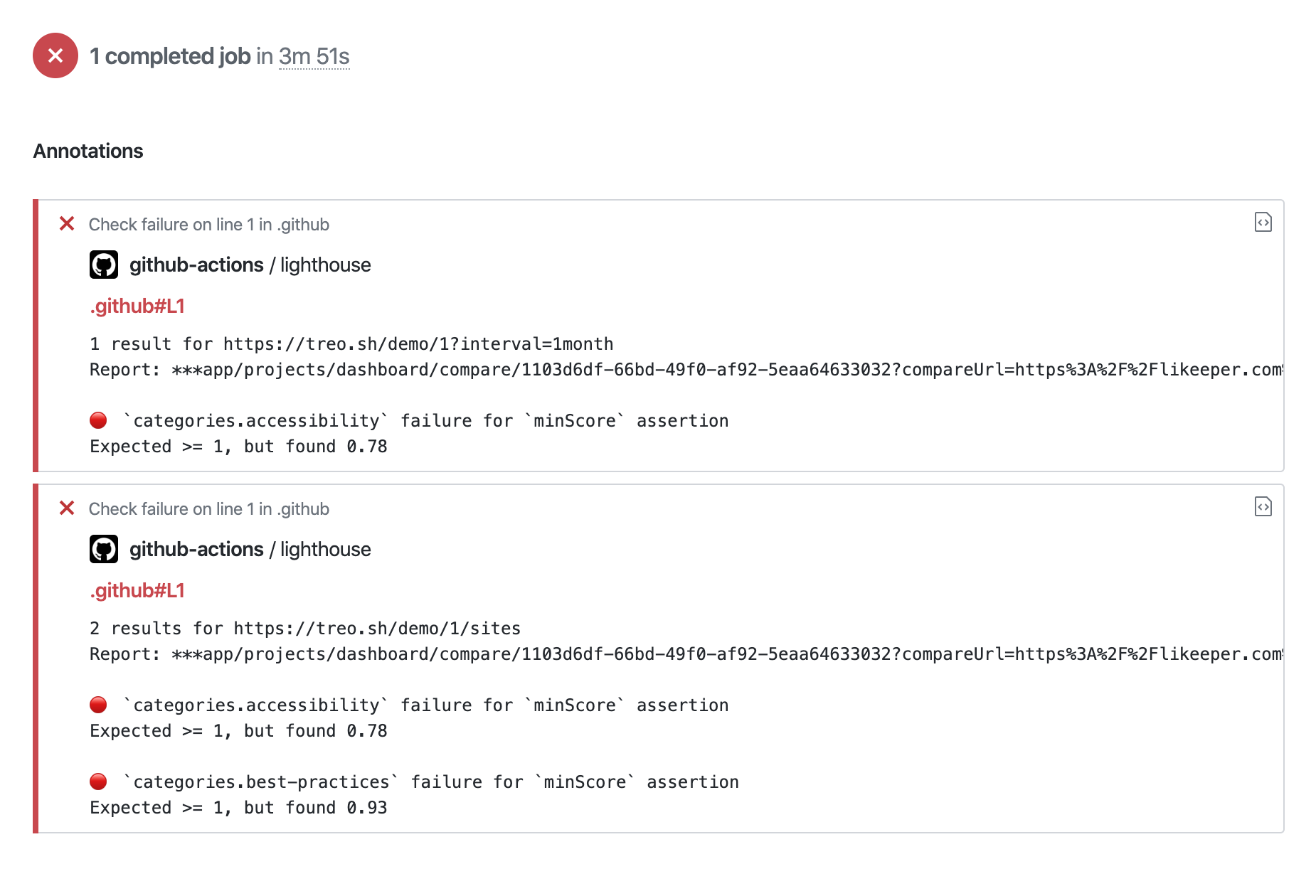 [⚙️ See this workflow in use](https://github.com/treosh/lighthouse-ci-action/actions?workflow=LHCI-assert-on-lighthouserc)
Upload results to a private LHCI server.
Create `.github/workflows/main.yml` with the list of URLs to audit using lighthouse,
and identify a `serverBaseUrl` to upload to and an `token` to use.
> **Note**: use [GitHub secrets](https://help.github.com/en/actions/automating-your-workflow-with-github-actions/creating-and-using-encrypted-secrets#creating-encrypted-secrets) to keep your server address hidden!
#### main.yml
```yml
name: Lighthouse
on: push
jobs:
lighthouse:
runs-on: ubuntu-latest
steps:
- uses: actions/checkout@v6
- name: Run Lighthouse on urls and upload data to private lhci server
uses: treosh/lighthouse-ci-action@v12
with:
urls: 'https://example.com/'
serverBaseUrl: ${{ secrets.LHCI_SERVER_URL }}
serverToken: ${{ secrets.LHCI_SERVER_TOKEN }}
```
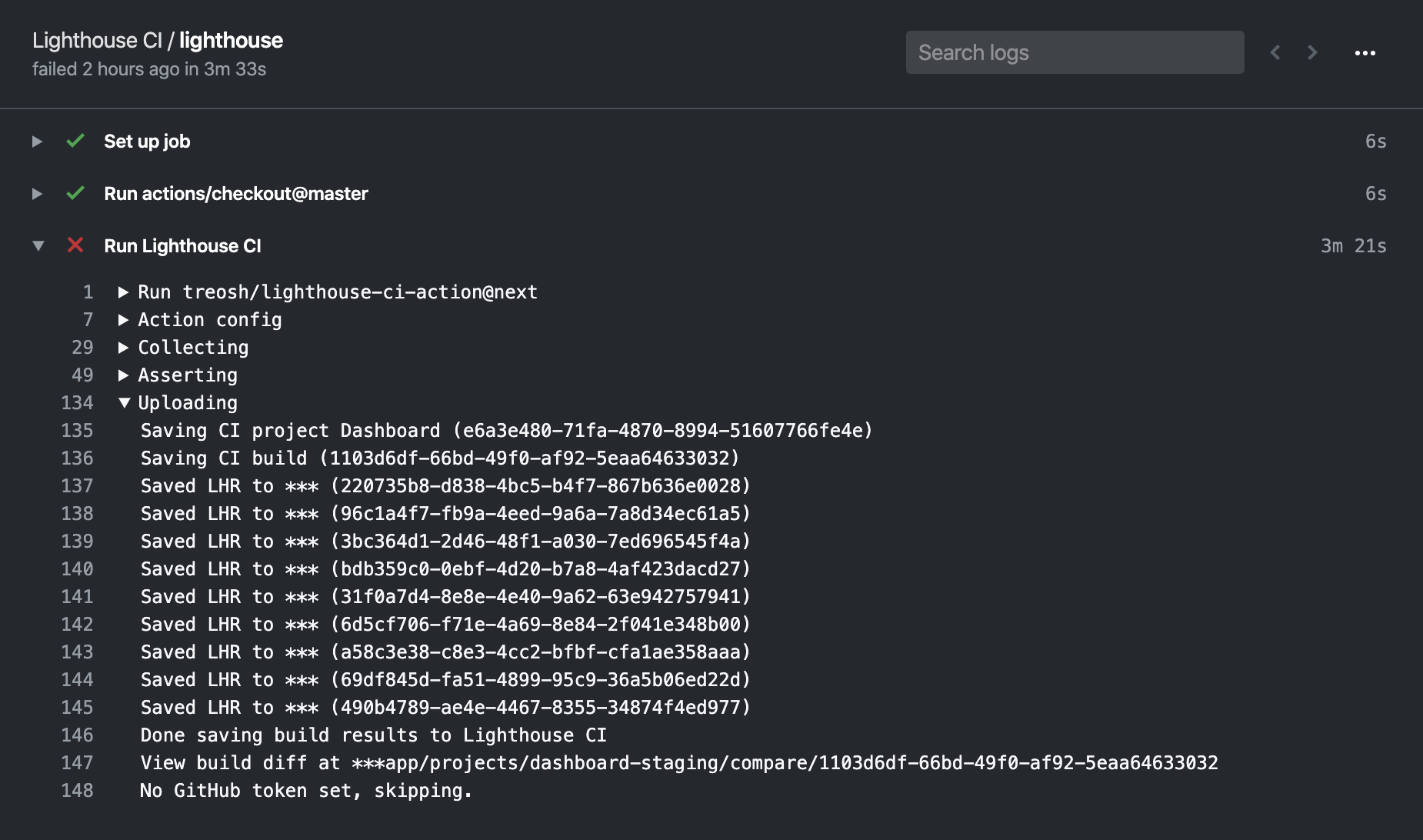 [⚙️ See this workflow in use](https://github.com/treosh/lighthouse-ci-action/actions?workflow=LHCI-upload-to-private-server)
Audit with custom Chrome options and custom Lighthouse config.
Create `.github/workflows/main.yml` with the list of URLs to audit and
identify a `lighthouserc` file with `configPath`.
#### main.yml
```yml
name: Lighthouse
on: push
jobs:
lighthouse:
runs-on: ubuntu-latest
steps:
- uses: actions/checkout@v6
- name: Run Lighthouse on urls with lighthouserc
uses: treosh/lighthouse-ci-action@v12
with:
urls: 'https://example.com/'
configPath: './lighthouserc.json'
```
Chrome flags can be set directly in the `lighthouserc`'s `collect` section.
#### lighthouserc.json
```json
{ "ci": { "collect": { "numberOfRuns": 1, "settings": { "chromeFlags": "--disable-gpu --no-sandbox --no-zygote" } } } }
```
Custom Lighthouse config can be defined in a separate Lighthouse config using
the [custom Lighthouse config syntax](https://github.com/GoogleChrome/lighthouse/blob/master/docs/configuration.md).
This is then referenced by the `lighthouserc` file in the `configPath`.
#### lighthouserc.json
```json
{ "ci": { "collect": { "numberOfRuns": 1, "settings": { "configPath": "./lighthouse-config.js" } } } }
```
Then put all the custom Lighthouse config in the file referenced in the `lighthouserc`.
#### lighthouse-config.js
```javascript
module.exports = {
extends: 'lighthouse:default',
settings: {
emulatedFormFactor: 'desktop',
audits: [{ path: 'metrics/first-contentful-paint', options: { scorePODR: 800, scoreMedian: 1600 } }],
},
}
```
[⚙️ See this workflow in use](https://github.com/treosh/lighthouse-ci-action/actions?workflow=LHCI-advanced-config)
Test a static site without having to deploy it.
Create `.github/workflows/main.yml` and identify a `lighthouserc` file with a
`staticDistDir` config.
#### main.yml
```yml
name: Lighthouse
on: push
jobs:
static-dist-dir:
runs-on: ubuntu-latest
steps:
- uses: actions/checkout@v6
- name: Run Lighthouse against a static dist dir
uses: treosh/lighthouse-ci-action@v12
with:
# no urls needed, since it uses local folder to scan .html files
configPath: './lighthouserc.json'
```
#### lighthouserc.json
```json
{ "ci": { "collect": { "staticDistDir": "./dist" } } }
```
Inside your `staticDistDir` there should be html files that make up your site.
LHCI will run a simple static webserver to host the files, then run an audit
against each of them. More details on this process are in the [Lighthouse CI docs](https://github.com/GoogleChrome/lighthouse-ci/blob/master/docs/getting-started.md#run-lighthouse-ci).
 [⚙️ See this workflow in use](https://github.com/treosh/lighthouse-ci-action/actions?workflow=LHCI-static-dist-dir)
Integrate Lighthouse CI with Netlify
It waits for Netlify to finish building a preview and then uses a built version to check performance.
Hence, recipe is a composition of 2 actions: [Wait for Netlify Action](https://github.com/JakePartusch/wait-for-netlify-action)
and Lighthouse CI Action.
```yml
name: Lighthouse CI for Netlify sites
on: pull_request
jobs:
build:
runs-on: ubuntu-latest
steps:
- uses: actions/checkout@v6
- name: Wait for the Netlify Preview
uses: jakepartusch/wait-for-netlify-action@v1.4
id: netlify
with:
site_name: 'gallant-panini-bc8593'
- name: Audit URLs using Lighthouse
uses: treosh/lighthouse-ci-action@v12
with:
urls: |
${{ steps.netlify.outputs.url }}
${{ steps.netlify.outputs.url }}/products/
budgetPath: ./budget.json
uploadArtifacts: true
```
[⚙️ See this workflow in use](https://github.com/denar90/lightouse-ci-netlify-preact/actions/runs/115659149)
Use URLs interpolation to pass secrets or environment variables
URLs support interpolation of process env variables so that you can write URLs like:
```yml
name: Lighthouse CI
on: push
jobs:
lighthouse:
runs-on: ubuntu-latest
steps:
- uses: actions/checkout@v6
- name: Run Lighthouse and test budgets
uses: treosh/lighthouse-ci-action@v12
with:
urls: |
https://pr-$PR_NUMBER.staging-example.com/
https://pr-$PR_NUMBER.staging-example.com/blog
budgetPath: ./budgets.json
temporaryPublicStorage: true
env:
PR_NUMBER: ${{ github.event.pull_request.number }}
```
[⚙️ See this workflow in use](https://github.com/treosh/lighthouse-ci-action/actions?workflow=LHCI-urls-interpolation)
Use with a Lighthouse plugin.
Combine the [field performance](https://github.com/treosh/lighthouse-plugin-field-performance) plugin with Github Actions.
#### main.yml
```yml
name: Lighthouse CI with a plugin
on: push
jobs:
lighthouse:
runs-on: ubuntu-latest
steps:
- uses: actions/checkout@v6
- run: npm install # install dependencies, that includes Lighthouse plugins
- name: Audit URLs with Field Performance Plugin
uses: treosh/lighthouse-ci-action@v12
with:
urls: |
https://www.example.com/
configPath: '.lighthouserc.json'
temporaryPublicStorage: true
```
#### lighthouserc.json
```json
{ "ci": { "collect": { "settings": { "plugins": ["lighthouse-plugin-field-performance"] } } } }
```
Add a plugin as a dependency, so it's installed locally:
#### package.json
```json
{ "devDependencies": { "lighthouse-plugin-field-performance": "^2.0.1" } }
```
[⚙️ See this workflow in use](https://github.com/treosh/lighthouse-ci-action/actions?workflow=LHCI-lighthouse-plugin)
Use `output` for a powerful composition with other actions
#### main.yml
```yml
# Example of output usage
name: LHCI-output-webhook
on: push
jobs:
output-webhook:
runs-on: ubuntu-latest
steps:
- uses: actions/checkout@v6
- name: Use output for sending data to API.
id: LHCIAction
uses: ./
with:
urls: |
https://treo.sh/
- name: Webhook
uses: denar90/webhook-action@0.1.1
with:
webhookUrl: ${{secrets.ACTION_WEBHOOK_URL}}
data: '{ "links": ${{steps.LHCIAction.outputs.links}}, "manifest": ${{steps.LHCIAction.outputs.manifest}} }'
```
[⚙️ See this workflow in use](https://github.com/treosh/lighthouse-ci-action/actions?workflow=LHCI-output-webhook)
GitHub Action workflow on self-hosted GitHub runner (e.g. on-premise)
#### main.yml
```yml
name: Lighthouse CI
on: push
jobs:
lighthouse:
runs-on: [self-hosted, your-custom-label]
steps:
- uses: actions/checkout@v6
- name: install Node.js
- uses: browser-actions/setup-chrome@latest
- run: chrome --version
- uses: actions/setup-node@v5
with:
node-version: ${{YOUR_REQUIRED_NODE_JS_VERSION}}
- name: Audit URLs using Lighthouse
uses: treosh/lighthouse-ci-action@v12
with:
urls: |
https://example.com/
https://example.com/blog
[...]
````
[Learn more about hosted runners](https://docs.github.com/en/actions/hosting-your-own-runners/about-self-hosted-runners)
Dynamically generate URLs
Use github-script or any other means to dynamically generate a list of URLs to test
#### main.yml
```yml
jobs:
lighthouse:
runs-on: ubuntu-latest
steps:
- uses: actions/checkout@v6
- name: Generate URLs
id: urls
uses: actions/github-script@v8
with:
github-token: ${{ secrets.GITHUB_TOKEN }}
script: |
const globber = await glob.create('elements/*/demo/*.html');
const files = await globber.glob();
const urls = files
.map(x => x.match(/([\w-]+)/)[1])
.map(x => `${${{ env.DOMAIN }}}/components/${x}/demo/`)
.join('\n');
core.setOutput('urls', urls);
- name: Lighthouse CI Action
id: lighthouse
uses: treosh/lighthouse-ci-action@v12
with:
urls: |
${{ steps.urls.outputs.urls }}
```
Explore more workflows in [public examples](./.github/workflows).
Submit a pull request with a new one if they don't cover your use case.
## Inputs
#### `urls`
Provide the list of URLs separated by a new line.
Each URL is audited using the latest version of Lighthouse and Chrome preinstalled on the environment.
```yml
urls: |
https://example.com/
https://example.com/blog
https://example.com/pricing
````
#### `uploadArtifacts` (default: false)
Upload Lighthouse results as [action artifacts](https://help.github.com/en/actions/configuring-and-managing-workflows/persisting-workflow-data-using-artifacts) to persist results. Equivalent to using [`actions/upload-artifact`](https://github.com/actions/upload-artifact) to save the artifacts with additional action steps.
```yml
uploadArtifacts: true
```
#### `uploadExtraArgs`
Add extra args to the [upload command](https://github.com/GoogleChrome/lighthouse-ci/blob/main/docs/configuration.md#upload).
```yml
uploadExtraArgs: "--extraHeaders.Authorization='Bearer X92sEo3n1J1F0k1E9' --extraHeaders.Foo='Bar'"
```
#### `temporaryPublicStorage` (default: false)
Upload reports to the [_temporary public storage_](https://github.com/GoogleChrome/lighthouse-ci/blob/master/docs/getting-started.md#collect-lighthouse-results).
> **Note**: As the name implies, this is temporary and public storage. If you're uncomfortable with the idea of your Lighthouse reports being stored
> on a public URL on Google Cloud, use a private [LHCI server](#serverBaseUrl). Reports are automatically deleted 7 days after upload.
```yml
temporaryPublicStorage: true
```
#### `budgetPath`
Use a performance budget to keep your page size in check. `Lighthouse CI Action` will fail the build if one of the URLs exceeds the budget.
Learn more about the [budget.json spec](https://github.com/GoogleChrome/budget.json) and [practical use of performance budgets](https://web.dev/use-lighthouse-for-performance-budgets).
```yml
budgetPath: ./budget.json
```
#### `runs` (default: 1)
Specify the number of runs to do on each URL.
> **Note**: Asserting against a single run can lead to flaky performance assertions.
> Use `1` only to ensure static audits like Lighthouse scores, page size, or performance budgets.
```yml
runs: 3
```
#### `configPath`
Set a path to a custom [lighthouserc file](https://github.com/GoogleChrome/lighthouse-ci/blob/master/docs/configuration.md) for full control of the Lighthouse environment and assertions.
Use `lighthouserc` to configure the collection of data (via Lighthouse config and Chrome Flags), and CI assertions (via LHCI assertions).
```yml
configPath: ./lighthouserc.json
```
If some configurations aren't set using action parameters, the settings are fetched from the config file provided here.
#### `serverBaseUrl`
Upload Lighthouse results to a private [LHCI server](https://github.com/GoogleChrome/lighthouse-ci) by specifying both `serverBaseUrl` and `serverToken`.
This will replace uploading to `temporary-public-storage`.
```yml
serverBaseUrl: ${{ secrets.LHCI_SERVER_BASE_URL }}
serverToken: ${{ secrets.LHCI_SERVER_TOKEN }}
```
> **Note**: Use [Github secrets](https://help.github.com/en/actions/automating-your-workflow-with-github-actions/creating-and-using-encrypted-secrets#creating-encrypted-secrets) to keep your token hidden!
#### `basicAuthUsername` `basicAuthPassword`
Lighthouse servers can be protected with basic authentication [LHCI server basic authentication](https://github.com/GoogleChrome/lighthouse-ci/blob/master/docs/server.md#basic-authentication) by specifying both `basicAuthUsername` and `basicAuthPassword` will authenticate the upload.
```yml
basicAuthUsername: ${{ secrets.LHCI_SERVER_BASIC_AUTH_USERNAME }}
basicAuthPassword: ${{ secrets.LHCI_SERVER_BASIC_AUTH_PASSWORD }}
```
> **Note**: Use [Github secrets](https://help.github.com/en/actions/automating-your-workflow-with-github-actions/creating-and-using-encrypted-secrets#creating-encrypted-secrets) to keep your username and password hidden!
## Outputs
Use outputs to compose results of the LHCI Action with other Github Actions, like webhooks, notifications, or custom assertions.
### `resultsPath`
A path to `.lighthouseci` results folder:
```
/Users/lighthouse-ci-action/.lighthouseci
```
### `links`
A JSON string with a links to uploaded results:
```js
{
'https://treo.sh/': 'https://storage.googleapis.com/lighthouse-infrastructure.appspot.com/reports/1593981455963-59854.report.html'
...
}
```
### `assertionResults`
A JSON string with assertion results:
```js
[
{
name: 'maxNumericValue',
expected: 61440,
actual: 508455,
values: [508455],
operator: '<=',
passed: false,
auditProperty: 'total.size',
auditId: 'resource-summary',
level: 'error',
url: 'https://treo.sh/',
auditTitle: 'Keep request counts low and transfer sizes small',
auditDocumentationLink: 'https://developers.google.com/web/tools/lighthouse/audits/budgets',
},
...
]
```
### `manifest`
A JSON string with report results ([LHCI docs reference](https://github.com/GoogleChrome/lighthouse-ci/blob/master/docs/configuration.md#outputdir)):
```json
[
{
"url": "https://treo.sh/",
"isRepresentativeRun": true,
"htmlPath": "/Users/lighthouse-ci-action/.lighthouseci/treo_sh-_-2020_07_05_20_37_18.report.html",
"jsonPath": "/Users/lighthouse-ci-action/.lighthouseci/treo_sh-_-2020_07_05_20_37_18.report.json",
"summary": { "performance": 0.99, "accessibility": 0.98, "best-practices": 1, "seo": 0.96, "pwa": 0.71 }
}
]
```
---
## Credits
Sponsored by [Treo](https://treo.sh/) and [Google](https://google.com/).
[](https://github.com/treosh/lighthouse-ci-action/actions?workflow=CI)
[](./LICENSE)