
The open-source coding agent that uses 63% fewer tokens.
Download ↓



macOS button is for Apple Silicon (M1 and later). Intel Mac? Download for Intel Mac. Linux button is the x64 AppImage; .deb and ARM64 builds are listed below.




Website · Benchmarks · Docs
## Highlights - [63% fewer tokens](#benchmarks) than Codex CLI on the same model, at the same success rate. - [**Auto reasoning effort**](docs/auto-reasoning-effort.md) — each message and tool step gets the effort it needs, judged in about 0.1 s by a 150 MB model that runs locally on the CPU. On by default. - Use the **Claude, ChatGPT, Grok, or Muse Code** subscription you already have, API keys, or local models on your own GPU. - Mix models by role and scale from **Solo to Swarm** — a strong model leads while cheaper ones search, edit, and review in parallel. Switch the workflow or mode mid-conversation, and set fallback models for usage limits. - **Bots and rooms** — your own bots with their own models, tools, and permissions, group rooms where they talk together, and a representative bot that sits above the composer on your desktop. - A full workspace: editor, terminals, Git and GitHub, code graph, and language servers, with themes and photo skins. - Keeps working on its own with **Goals, schedules, and webhooks** — and continues from your phone, end-to-end encrypted. - Goes beyond code with **browser and desktop control**, Office and PDF documents, and image and video generation. - Runs on Windows, macOS, and Linux. No config files. ## Installation Download the desktop app: | Platform | Download | | --- | --- | | Windows (x64) | [`mixdog-desktop-win-x64.exe`](https://github.com/tribgames/mixdog/releases/latest/download/mixdog-desktop-win-x64.exe) | | macOS (Apple Silicon) | [`mixdog-desktop-mac-arm64.dmg`](https://github.com/tribgames/mixdog/releases/latest/download/mixdog-desktop-mac-arm64.dmg) | | macOS (Intel) | [`mixdog-desktop-mac-x64.dmg`](https://github.com/tribgames/mixdog/releases/latest/download/mixdog-desktop-mac-x64.dmg) | | Linux (x64, AppImage) | [`mixdog-desktop-linux-x86_64.AppImage`](https://github.com/tribgames/mixdog/releases/latest/download/mixdog-desktop-linux-x86_64.AppImage) | | Linux (x64, .deb) | [`mixdog-desktop-linux-amd64.deb`](https://github.com/tribgames/mixdog/releases/latest/download/mixdog-desktop-linux-amd64.deb) | | Linux (ARM64, AppImage) | [`mixdog-desktop-linux-arm64.AppImage`](https://github.com/tribgames/mixdog/releases/latest/download/mixdog-desktop-linux-arm64.AppImage) | | Linux (ARM64, .deb) | [`mixdog-desktop-linux-arm64.deb`](https://github.com/tribgames/mixdog/releases/latest/download/mixdog-desktop-linux-arm64.deb) | Then sign in with a ChatGPT, Claude, Grok, or Muse Code account, or paste an API key. A five-step tutorial walks you through the rest. > [!NOTE] > The Windows installer and app are code-signed, and the Mac app is signed and > notarized. If SmartScreen still appears, choose **More info → Run anyway**. Or run it in the terminal (Node.js 22.19+ or 24+): ```bash npm install -g mixdog mixdog ```mixdog exec
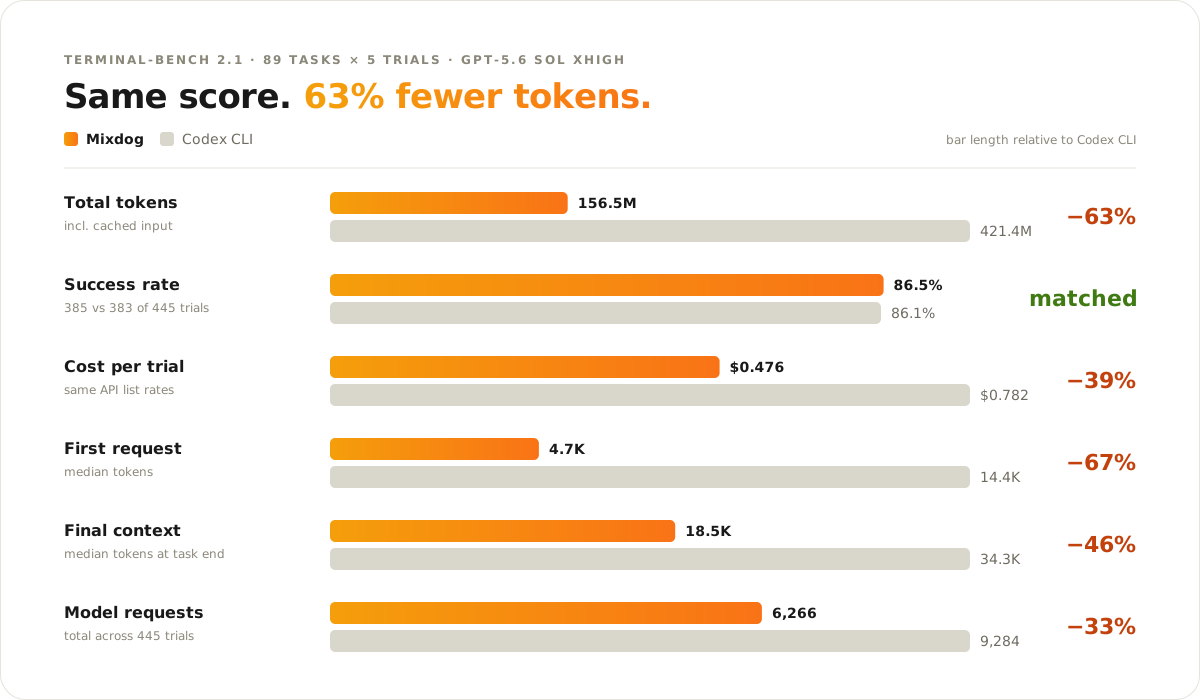
All 89 Terminal-Bench 2.1 tasks × 5 trials on GPT-5.6 Sol xhigh, scored by the official Harbor verifier.
Mixdog used fewer tokens on 87 of 89 tasks. With Claude Opus 5, it solved 2 more tasks than Claude Code at 19% lower cost. Every verdict, log, and script is published in [`benchmarks/terminal-bench-2.1/`](benchmarks/terminal-bench-2.1/), and [Context efficiency](docs/context-efficiency.md) explains where the savings come from.