# HUF
**Open-source AI infrastructure for any app. Build multi-agent solutions, automate AI-driven deterministic workflows, and keep your data under your control.**
HUF is a complete, self-hosted AI layer built on open standards. It gives teams everything needed to create intelligent multi-agent solutions, ground them in real data, execute secure code sandboxes, manage multi-channel communication gateways, and orchestrate complex workflows — without sending data to third-party platforms or rebuilding infrastructure from scratch.
[**Documentation**](https://docs.huf.ai/) | [**Report Issue**](https://github.com/tridz-dev/huf/issues) | [**Discussions**](https://github.com/tridz-dev/huf/discussions)
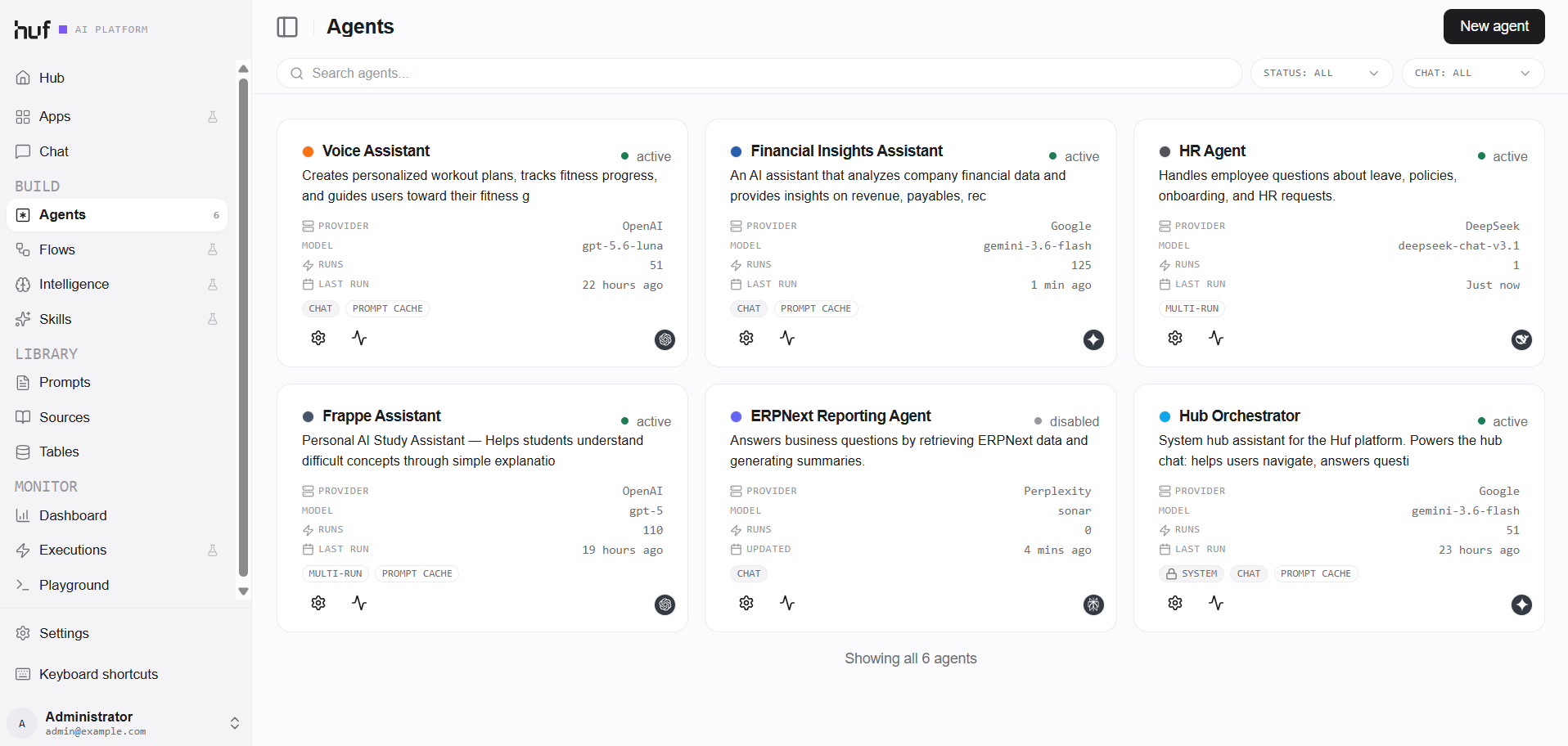
> **Note:** HUF is under active development.
---
## Why HUF
AI adoption inside organizations is fragmented:
- **Knowledge lives in too many places** — scattered across docs, databases, and people's heads
- **Automation is rigid and rule-based** — breaks on edge cases, requires constant maintenance
- **AI tools operate in isolation** — each team rebuilds similar assistants and prompt integrations
- **Execution lacks safety & governance** — unmonitored script execution and data flowing outside your control
HUF exists to **centralize intelligence, execution, and communication** into a single, self-hosted engine — so AI can be trusted to operate inside real business systems without compromising data ownership or security.
**Key principles:**
- **Open source and self-hosted.** Your agents, your data, your infrastructure. Nothing leaves your servers unless you decide it should.
- **Local model support.** Connect to Ollama, LM Studio, or any OpenAI-compatible local endpoint alongside cloud providers.
- **Pluggable execution environments.** Run agent tools locally, in isolated virtualenvs, over SSH, or inside Docker containers.
- **No-code visual control with code-level depth.** Visual flow builders, agent configuration, and multi-channel gateways alongside hardened Python code execution sandboxes.
- **Built-in data governance.** Role-based permissions, execution profiles, full audit trails, and cost/cache analytics give complete visibility.
---
## What HUF Does
HUF is the **core AI infrastructure layer** inside an organization or product, not a surface-level chatbot or a single-purpose assistant.
**One engine. Multiple ways to use it.**
| Capability | What it enables |
|------------|-----------------|
| **Universal AI Access** | Connect to major cloud providers or local models — with unified routing and open-router free tier seeding |
| **Intelligent Agents & Memory** | Build autonomous agents with custom instructions, role permissions, and persistent scoped memory |
| **Execution Profiles & Sandboxing** | Execute code tools safely in local venvs, direct SSH backends, Frappe SSH connections, or Docker containers |
| **Multi-Channel Gateways** | Connect agents directly to Email/Gmail, Telegram, Slack, WhatsApp, and Webhooks |
| **Knowledge Grounding** | Hybrid search via FTS5 BM25, ChromaDB vector, pgvector (PostgreSQL), and custom Data Tables |
| **Skills & Apps Ecosystem** | Package agent capabilities, prompt templates, tools, and MCP servers into reusable skills and Huf Apps |
| **Event-Driven Automation** | Trigger agents on document lifecycle events, cron schedules, or inbound webhooks |
| **Visual Flow Builder** | Design complex multi-step workflows with React Flow / XYFlow, router nodes, and Human-in-the-Loop (HITL) approval gates |
| **Managed Integrations & MCP** | Connect to external platforms via Model Context Protocol (MCP) and managed OAuth credentials |
| **Full Observability & Analytics** | Detailed execution traces (`/executions/:runId`), context usage, prompt caching analytics, and token/cost rollups |
---
## Use HUF As
### AI Infrastructure for Products
Use HUF as the **backend AI engine** for products that need intelligence, automation, execution sandboxing, and integrations.
**Ideal for:**
- AI-first startups building on Frappe/ERPNext
- SaaS products adding AI capabilities and copilots
- Platforms needing agent orchestration, cost control, and full execution auditability
---
### Internal Intelligence Platform
Use HUF to power **internal AI experiences** grounded in company knowledge and business databases.
**Build:**
- Internal chat systems grounded in internal documents and live ERP data
- Role-based assistants for Operations, HR, Sales, and Support
- Automated email/messaging triage assistants connected via Multi-Channel Gateways
---
### Automation & Multi-Agent Orchestration Engine
Use HUF to build **AI-driven workflows** that reason, execute code, and act across systems.
**Suited for:**
- Multi-step business processes with conditional routing and Human-in-the-Loop approvals
- Code-execution tasks running in isolated SSH or Docker environments
- Cross-tool automation with automated retry, fallback, and error handling
---
### Embedded AI Layer for SaaS
Use HUF to **embed AI capabilities directly into products** without building custom backend infrastructure.
**Enable:**
- In-app copilots and interactive assistants
- Customer-facing AI features with strict role-based access rules
- Vertical AI capabilities with isolated execution sandboxes and cost governance
---
## Core Capabilities
### Agent System & Scoped Memory
Create AI agents with tailored instructions, tool access, execution profiles, and memory retention policies:
- **CRUD Operations** — Read, create, update, delete any Frappe document out of the box
- **Scoped Memory System** — Persistent agent memory policies and per-agent memory records that persist facts across runs
- **Custom Functions & Tools** — Connect Python functions, HTTP endpoints, or client-side tools
- **Agent Chaining & Multi-Agent Teams** — Async message passing between agents and orchestrators
- **Role-Based Permissions** — Fine-grained capability gating for agents, tools, data tables, and MCP servers
- **Prompt Caching & Analytics** — Reduce latency and token costs with automated prompt cache tracking
### Execution Profiles & Code Sandboxing
Safely run Python code tools and commands with environment isolation and strict security controls:
- **Pluggable Execution Profiles** — Choose between Local Python, Isolated Venv, Direct SSH, Frappe SSH Connection, or Docker container runners
- **Hardened Code Sandbox** — Import allowlisting and AST inspection prevent unauthorized system access or unsafe imports
- **Remote Host Execution** — Run long-running analysis or heavy data tasks on remote SSH hosts or containerized execution backends
- **Execution Management UI** — View, create, test, and audit execution profiles and SSH connections directly from the UI
### Skills & Huf Apps
Organize AI capabilities into modular, reusable packages:
- **Skills Catalog** — Combine system prompts, tools, knowledge sources, and MCP configurations into shareable skills
- **Huf Apps** — Package complete agentic applications (agents, flows, data tables, skills) into installable Huf Apps
- **App Discovery** — Automatically discover and register installed apps and skill dependencies
- **Official Skills Catalog** — [`tridz-dev/huf-skills`](https://github.com/tridz-dev/huf-skills) is the curated, official collection of skills for Huf agents, and the default source in skill settings
- **Coding Agent Skill** — [`tridz-dev/huf_app_skill`](https://github.com/tridz-dev/huf_app_skill) helps AI coding agents (Claude Code, Codex, Cursor, OpenCode, Kimi) build Huf Apps. Clone it and run `./install.sh` from the repo directory, as described in its README
### Multi-Channel Gateways
Connect your agents to inbound and outbound communication channels:
- **Supported Channels** — Gmail / Email, Telegram, Slack, WhatsApp, and custom HTTP Webhooks
- **Access & Binding Rules** — Control which users or external senders can invoke specific agents or flows
#### Telegram
- Webhook gateway with pairing-first access, text/media/voice in and out, buttons, and edit-in-place
- Group addressing by mention, forum threads, bot-to-bot loop guard, and guest mode
- Message templates (text, variables, media, buttons) managed on the Templates tab and sent by agents
- Agent reply blocks: `telegram-buttons` (inline and reply keyboards) and `telegram-media` (photos, files, locations, polls)
- Agent tools: `telegram` (send, edit, forum, template and chat actions) and `telegram_admin` (group admin, bot profile, business), both gated per gateway
- Business (Secretary) mode is observe-only by default; Draft sends a reply to the owner for approval first
- Group join requests: Queue, Decline or Agent, with an optional Guard Mini App captcha
- Streaming replies (private chats) follow the Gateway `telegram_streaming` checkbox
- Admin Mini App at `/huf/tg-app`; owner/admin cockpit in private chats with signed buttons, confirm-before-write, and audit rows
- Setup, troubleshooting, known gaps and a live test checklist: `docs/gateways/telegram-runbook.md`; cockpit design: `docs/gateways/telegram-admin-cockpit.md`
- **Event-Driven Messaging** — Inbound messages trigger agent runs; responses route back to the original channel automatically
### Knowledge Grounding
Ground AI responses in real business knowledge and structured databases:
- **Multi-Backend Search** — Full-text search (SQLite FTS5 / BM25), semantic vector search (ChromaDB), and PostgreSQL vector search (pgvector)
- **Input Sources** — Raw files, text snippets, web URLs, Frappe DocTypes, and custom Data Tables
- **Automatic Chunking** — Intelligent document segmentation with configurable chunk sizes and overlap
### Data Tables
Create and manage custom structured datasets directly inside HUF:
- **Visual Table Editor** — Build tables, edit schemas, and manage rows via the web UI
- **Agent Integration** — Use tables directly as knowledge inputs or structured data tools
- **Dynamic Columns** — Flexible fields without requiring database schema migrations
### Trigger System
Run agents automatically based on real-time events:
- **Document Events** — `after_insert`, `on_submit`, `on_cancel`, `on_update`
- **Schedules** — Flexible cron expressions and interval schedules
- **Webhooks** — Authenticated HTTP endpoints for external webhooks
- **Conditional Logic** — Python expressions to evaluate execution conditions before running
### Visual Flow Builder
Design complex workflows through a modern React Flow / XYFlow visual canvas:
- **Drag-and-Drop Canvas** — Connect triggers, agents, router/orchestrator nodes, conditions, and HTTP actions
- **Human-in-the-Loop (HITL)** — Built-in approval gates that pause flow execution until a human approves or rejects
- **Execution Tracking** — Trace flow execution step-by-step with status, input/output data, and error logs
### Managed Integrations & MCP Client
Connect agents to external software and services:
- **MCP Client** — Connect Model Context Protocol (MCP) servers (Slack, GitHub, Gmail, Filesystem, Postgres, etc.)
- **Managed Credentials** — Encrypted per-service credential management with OAuth support
- **Integration Services & Recipients** — Map integration tools and notifications to specific users or teams
### Models & Providers
Connect to any AI provider or run local models on private hardware:
- **Cloud Providers** — OpenAI, Anthropic, Google Gemini, Groq, Mistral, OpenRouter (with seeded free models), Moonshot, and more
- **Local Endpoints** — Ollama, LM Studio, or any OpenAI-compatible local API
- **Unified Routing** — LiteLLM integration layer handles model parameter mapping and fallbacks seamlessly
#### Provider support & LiteLLM version policy
HUF routes all chat/completion inference through [LiteLLM](https://docs.litellm.ai/docs/providers), so any provider that LiteLLM supports can be used. The curated **Provider Brand** list in the AI Provider DocType is used for UI labels and logos; if a provider is not in the catalog, use **Other / Custom** and enter the model as LiteLLM expects it (e.g. `someprovider/model-name`).
Version constraints in `pyproject.toml`:
```toml
litellm>=1.74.7,!=1.82.7,!=1.82.8,<1.83.8
```
- `>=1.74.7` ensures providers such as **Moonshot AI** are present in LiteLLM’s provider registry.
- `!=1.82.7,!=1.82.8` excludes the compromised PyPI releases from March 2026.
- `<1.83.8` caps the version because LiteLLM `1.83.8+` restricts installs to Python `<3.14`, and `1.90+` builds the `litellm-rust` extension with PyO3 that currently only supports up to Python 3.13. Frappe v16 requires Python 3.14, so newer LiteLLM releases cannot be installed cleanly until LiteLLM ships Python 3.14-compatible wheels ([upstream issue](https://github.com/BerriAI/litellm/issues/33116)).
Regional or self-hosted endpoints can be configured via the **API Base URL** field on any AI Provider, including hosted providers such as Moonshot China (`https://api.moonshot.cn/v1`).
### Observability & Analytics
End-to-end visibility into every AI operation:
- **Execution Trace View (`/executions/:runId`)** — Inspect complete run traces, prompt segments, tool inputs/outputs, and error stacks
- **Context & Cache Analytics** — Dedicated links from chat messages directly to run analytics showing token distribution and prompt cache hits
- **Cost Rollups** — Real-time tracking of token usage and financial cost across models, users, and teams
- **User Feedback & Auditing** — Ratings, feedback logs, and full conversation history
---
## Roadmap
Upcoming capabilities in active development:
| Capability | What it enables |
|------------|-----------------|
| **Frappe Cloud Self-Provisioning** | Automated bench and site lifecycle management for deploying HUF on Frappe Cloud |
| **Desk AI Super-Assistant** | In-desk AI assistant for Frappe/ERPNext forms, navigation, and automated document actions |
| **Voice & Realtime Audio** | Native streaming voice capabilities for real-time conversational agents |
| **File-Based Agent Declaration** | Declarative YAML/JSON agent configuration for app developers |
| **Advanced Multi-Agent Swarms** | Autonomous graph routing and parallel agent dispatching |
---
## Quick Start
### Try with Docker
```bash
git clone https://github.com/tridz-dev/huf.git
cd huf/docker
docker compose up
```
Open http://localhost:8000 and login:
- **User:** Administrator
- **Password:** admin
### Install on Existing Bench
```bash
bench get-app git@github.com:tridz-dev/huf.git
bench install-app huf
bench setup requirements
bench restart
```
---
## Architecture at a Glance
```
┌──────────────────────────────────────────────────────────────────────────────────────────┐
│ HUF Platform │
├──────────────────────────────────────────────────────────────────────────────────────────┤
│ SURFACES & GATEWAYS │
│ ┌──────────────┐ ┌──────────────┐ ┌──────────────┐ ┌──────────────┐ ┌─────────────┐ │
│ │ Chat UI │ │ API / PWA │ │ Flow Builder │ │ Gateways │ │ Huf Apps │ │
│ │ (Studio/PWA) │ │ Endpoints │ │ (React Flow) │ │(Email/TG/Slack│ │ & Extensions│ │
│ └──────┬───────┘ └──────┬───────┘ └──────┬───────┘ └──────┬───────┘ └──────┬──────┘ │
├─────────┼─────────────────┼─────────────────┼─────────────────┼─────────────────┼────────┤
│ CORE ENGINE │
│ ┌────────────────────────┐ ┌────────────────────────┐ ┌───────────────────────────┐ │
│ │ Agent Core │ │ Flow Engine │ │ Trigger System │ │
│ │ Instructions | Memory │ │ Visual Canvas | Router │ │ Document Events | Schedules │ │
│ │ Role Permissions │ │ HITL Approval Gates │ │ Webhooks | Conditions │ │
│ └───────────┬────────────┘ └───────────┬────────────┘ └─────────────┬─────────────┘ │
├──────────────┼───────────────────────────┼─────────────────────────────┼─────────────────┤
│ EXECUTION, KNOWLEDGE & TOOLS │
│ ┌────────────────────────┐ ┌────────────────────────┐ ┌───────────────────────────┐ │
│ │ Execution Profiles │ │ Knowledge Layer │ │ Integrations & MCP │ │
│ │ Local | SSH | Docker │ │ FTS5 | ChromaDB │ │ MCP Client | Credentials │ │
│ │ Hardened Code Sandbox │ │ pgvector | DataTables │ │ Integration Services │ │
│ └───────────┬────────────┘ └───────────┬────────────┘ └─────────────┬─────────────┘ │
├──────────────┼───────────────────────────┼─────────────────────────────┼─────────────────┤
│ FOUNDATION & OBSERVABILITY │
│ ┌────────────────────────────────────────────────────────────────────────────────────┐ │
│ │ LiteLLM Unified Model Router │ │
│ │ Cloud (OpenAI/Anthropic/Gemini) | Local (Ollama/LM Studio) │ │
│ ├────────────────────────────────────────────────────────────────────────────────────┤ │
│ │ Observability & Execution Analytics │ │
│ │ Run Traces (/executions/:runId) | Prompt Cache Hits | Cost Rollups │ │
│ └────────────────────────────────────────────────────────────────────────────────────┘ │
└──────────────────────────────────────────────────────────────────────────────────────────┘
```
---
## Tech Stack
| Layer | Technology |
|-------|------------|
| **Backend** | Frappe Framework, Python 3.10+ |
| **AI Integration & Routing** | LiteLLM (cloud providers + local models) |
| **Execution Sandboxing** | Local Python, Isolated Venv, Direct SSH, Frappe SSH, Docker Containers |
| **Multi-Channel Gateways** | Email/Gmail, Telegram, Slack, WhatsApp, Webhooks |
| **Knowledge & Search** | SQLite FTS5 (BM25), ChromaDB (Vector), pgvector (PostgreSQL Vector) |
| **Frontend** | React 18, TypeScript, Tailwind CSS, Vite |
| **Flow Builder** | React Flow / XYFlow |
| **Database** | MariaDB |
---
## Security Notice
**HUF uses LiteLLM as a dependency for AI provider routing.** On March 24, 2026, the LiteLLM team disclosed that PyPI releases `1.82.7` and `1.82.8` were compromised — both contained a malicious `.pth` startup payload injected into the package.
HUF was affected as a downstream consumer. We responded immediately:
- Blocked both compromised versions in our dependency constraints (`litellm>=1.74.7,!=1.82.7,!=1.82.8,<1.83.8`)
- Added install-time detection in `huf/install.py` — if a compromised version is already present in your environment, HUF will surface a critical alert on startup
If you are running either of those LiteLLM versions, upgrade immediately.
Upstream incident thread: https://github.com/BerriAI/litellm/issues/24518
---
## Documentation
- [**Full Documentation**](https://docs.huf.ai/) — Guides, tutorials, and API reference
- [**Bruno API Collection**](./api-docs/bruno/) — Ready-to-use API collection for testing and exploration
- [**AGENTS.md**](./AGENTS.md) — Technical context for AI agents. Adopts the [agents.md](https://agents.md) standard.
- [**CLAUDE.md**](./CLAUDE.md) — Defines coding standards, review criteria, and project-specific rules.
- [**huf_app_skill**](https://github.com/tridz-dev/huf_app_skill) — An AI coding agent skill (Claude Code, Codex, Cursor, OpenCode, Kimi) that scaffolds new Huf Apps or external HUF API clients through a guided plan-then-build flow.
---
## Research
- Erooth, S. (2026). *Don't Retry Blind: Recovering from Partial Side Effects in Agent
Procedures*. Zenodo. https://doi.org/10.5281/zenodo.22945662
---
## License
MIT License — see [LICENSE](./LICENSE) for details.
---
Built for teams who want AI that actually works.