### Build and deploy fully‑managed AI agents and workflows
[Website](https://trigger.dev) | [Docs](https://trigger.dev/docs) | [Issues](https://github.com/triggerdotdev/trigger.dev/issues) | [Example projects](https://github.com/triggerdotdev/examples) | [Feature requests](https://triggerdev.featurebase.app/) | [Public roadmap](https://triggerdev.featurebase.app/roadmap) | [Self-hosting](https://trigger.dev/docs/self-hosting/overview)
[](https://github.com/triggerdotdev/trigger.dev)
[](https://github.com/triggerdotdev/trigger.dev/blob/main/LICENSE)
[](https://www.npmjs.com/package/@trigger.dev/sdk)
[](https://www.npmjs.com/package/@trigger.dev/sdk)
[](https://twitter.com/triggerdotdev)
[](https://discord.gg/nkqV9xBYWy)
[](https://deepwiki.com/triggerdotdev/trigger.dev)
[](https://github.com/triggerdotdev/trigger.dev)
## About Trigger.dev
Trigger.dev is the open-source platform for building AI workflows in TypeScript. Long-running tasks with retries, queues, LLM observability, and elastic scaling.
## The platform designed for building AI agents
Build [AI agents](https://trigger.dev/product/ai-agents) using all the frameworks, services and LLMs you're used to, deploy them to Trigger.dev and get durable, long-running agents with retries, queues, LLM observability, and elastic scaling out of the box.
- **Long-running without timeouts**: Execute your tasks with absolutely no timeouts, unlike AWS Lambda, Vercel, and other serverless platforms.
- **Durability, retries & queues**: Build rock solid agents and AI applications using our durable tasks, retries, queues and idempotency.
- **True runtime freedom**: Customize your deployed tasks with system packages – run browsers, Python scripts, FFmpeg and more.
- **Human-in-the-loop**: Programmatically pause your tasks until a human can approve, reject or give feedback.
- **Realtime apps & streaming**: Move your background jobs to the foreground by subscribing to runs or streaming AI responses to your app.
- **Observability & monitoring**: Each run has full tracing and logs. Configure error alerts to catch bugs fast.
## Key features
- **[AI chat agents](https://trigger.dev/docs/ai-chat/overview)** - Durable multi-turn AI chats — one Trigger.dev task per conversation, surviving refreshes, deploys, and crashes.
- **[Prompts](https://trigger.dev/docs/ai/prompts)** - Define prompt templates as code, version them on deploy, and override from the dashboard without redeploying.
- **[LLM observability](https://trigger.dev/docs/ai/observability)** - Capture Vercel AI SDK calls in a task as spans in the run trace, with model, token usage, cost, and latency.
- **[Webhooks](https://trigger.dev/docs/webhooks/overview)** (public beta) - Receive provider webhooks on hosted, verified endpoints and route each event to tasks, agents, and waiting runs.
- **[MCP server](https://trigger.dev/docs/mcp-introduction)** - The Trigger.dev MCP (Model Context Protocol) Server enables AI assistants to interact directly with your Trigger.dev projects.
- **[Skills](https://trigger.dev/docs/skills)** - Install Trigger.dev agent skills to teach any AI coding assistant how to write tasks, realtime frontends, and chat.agent AI agents.
- **[Query](https://trigger.dev/docs/observability/query)** - Query allows you to write custom queries against your data using TRQL (Trigger.dev Query Language), a SQL-style language based on ClickHouse SQL.
- **[Dashboards](https://trigger.dev/docs/observability/dashboards)** - Create custom dashboards with real-time metrics powered by TRQL queries.
- **[Health report](https://trigger.dev/docs/reports)** - Get a deterministic verdict on your project's health — split into Flow, Execution, and Liveness — from the CLI, an MCP tool or prompt, or the HTTP API.
- **[Input streams](https://trigger.dev/docs/realtime/backend/input-streams)** - Send data into running tasks from your backend code
- **[Development branches](https://trigger.dev/docs/deployment/dev-branches)** - Run multiple local dev sessions in isolation by giving each one its own development branch.
- **[Atomic deployments](https://trigger.dev/docs/deployment/atomic-deployment)** - Keep your app and your tasks in sync with version skew protection: pin every run to the deployment built for the release of your app that triggered it.
- **[JavaScript and TypeScript SDK](https://trigger.dev/docs/tasks/overview)** - Build background tasks using familiar programming models
- **[Long-running tasks](https://trigger.dev/docs/runs/max-duration)** - Handle resource-heavy tasks without timeouts
- **[Durable cron schedules](https://trigger.dev/docs/tasks/scheduled)** - Create and attach recurring schedules of up to a year
- **[Trigger.dev Realtime](https://trigger.dev/docs/realtime/overview)** - Trigger, subscribe to, and get real-time updates for runs, with LLM streaming support
- **[Build extensions](https://trigger.dev/docs/config/extensions/overview)** - Hook directly into the build system and customize the build process. Run Python scripts, FFmpeg, browsers, and more.
- **[React hooks](https://trigger.dev/docs/frontend/react-hooks)** - Interact with the Trigger.dev API on your frontend using our React hooks package
- **[Batch triggering](https://trigger.dev/docs/triggering#tasks-batchtrigger)** - Use batchTrigger() to initiate multiple runs of a task with custom payloads and options
- **[Structured inputs / outputs](https://trigger.dev/docs/tasks/schemaTask)** - Define precise data schemas for your tasks with runtime payload validation
- **[Waits](https://trigger.dev/docs/wait)** - Add waits to your tasks to pause execution for a specified duration
- **[Preview branches](https://trigger.dev/docs/deployment/preview-branches)** - Create isolated environments for testing and development. Integrates with Vercel and git workflows
- **[Waitpoints](https://trigger.dev/docs/wait-for-token)** - Add human-in-the-loop judgment at critical decision points without disrupting workflow
- **[Concurrency & queues](https://trigger.dev/docs/queue-concurrency)** - Set concurrency rules to manage how multiple tasks execute
- **[Multiple environments](https://trigger.dev/docs/how-it-works#dev-mode)** - Support for DEV, PREVIEW, STAGING, and PROD environments
- **[No infrastructure to manage](https://trigger.dev/docs/how-it-works#trigger-dev-architecture)** - Auto-scaling infrastructure that eliminates timeouts and server management
- **[Automatic retries](https://trigger.dev/docs/errors-retrying)** - If your task encounters an uncaught error, we automatically attempt to run it again
- **[Checkpointing](https://trigger.dev/docs/how-it-works#the-checkpoint-resume-system)** - Tasks are inherently durable, thanks to our checkpointing feature
- **[Versioning](https://trigger.dev/docs/versioning)** - Atomic versioning allows you to deploy new versions without affecting running tasks
- **[Machines](https://trigger.dev/docs/machines)** - Configure the number of vCPUs and GBs of RAM you want the task to use
- **[Observability & monitoring](https://trigger.dev/product/observability-and-monitoring)** - Monitor every aspect of your tasks' performance with comprehensive logging and visualization tools
- **[Logging & tracing](https://trigger.dev/docs/logging)** - Comprehensive logging and tracing for all your tasks
- **[Tags](https://trigger.dev/docs/tags)** - Attach up to ten tags to each run, allowing you to filter via the dashboard, realtime, and the SDK
- **[Run metadata](https://trigger.dev/docs/runs/metadata)** - Attach metadata to runs which updates as the run progresses and is available to use in your frontend for live updates
- **[Bulk actions](https://trigger.dev/docs/bulk-actions)** - Perform actions on multiple runs simultaneously, including replaying and cancelling
- **[Real-time alerts](https://trigger.dev/docs/troubleshooting-alerts)** - Choose your preferred notification method for run failures and deployments
## Write long-running agents in your codebase
Create agents where they belong: in your codebase. Version control, localhost, test and review like you're already used to.
```ts
import { chat } from "@trigger.dev/sdk/ai";
import { stepCountIs } from "ai";
import { anthropic } from "@ai-sdk/anthropic";
export const myChat = chat.agent({
id: "my-chat",
run: async ({ messages, signal, streamText }) => {
return streamText({
model: anthropic("claude-opus-5-5"),
messages,
abortSignal: signal,
stopWhen: stepCountIs(15),
});
},
});
```
## Deployment
Use our SDK to write tasks in your codebase. There's no infrastructure to manage, your tasks automatically scale and connect to our cloud. Or you can always self-host.
## Environments
We support `Development`, `Staging`, `Preview`, and `Production` environments, allowing you to test your tasks before deploying them to production.
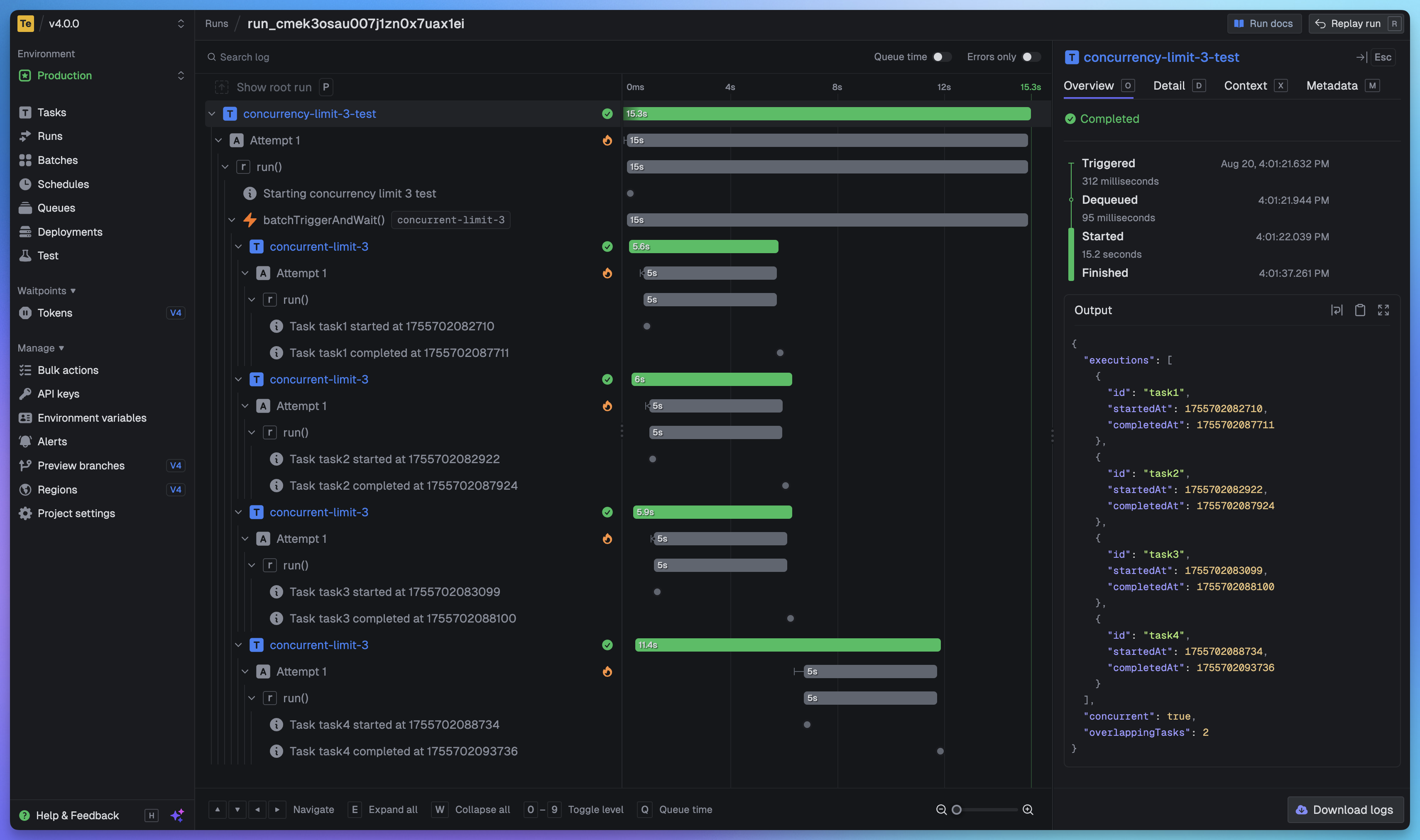
## Full visibility of every job run
View every task in every run so you can tell exactly what happened. We provide a full trace view of every task run so you can see what happened at every step.
# Getting started
The quickest way to get started is to create an account and project in our [web app](https://cloud.trigger.dev), and follow the instructions in the onboarding. Build and deploy your first task in minutes.
### Useful links:
- [Quick start](https://trigger.dev/docs/quick-start) - get up and running in minutes
- [How it works](https://trigger.dev/docs/how-it-works) - understand how Trigger.dev works under the hood
- [Guides and examples](https://trigger.dev/docs/guides/introduction) - walk-through guides and code examples for popular frameworks and use cases
## Self-hosting
If you prefer to self-host Trigger.dev, you can follow our [self-hosting guides](https://trigger.dev/docs/self-hosting/overview):
- [Docker self-hosting guide](https://trigger.dev/docs/self-hosting/docker) - use Docker Compose to spin up a Trigger.dev instance
- [Kubernetes self-hosting guide](https://trigger.dev/docs/self-hosting/kubernetes) - use our official Helm chart to deploy Trigger.dev to your Kubernetes cluster
## Support and community
We have a large active community in our official [Discord server](https://trigger.dev/discord) for support, including a dedicated channel for self-hosting.
## Development
To setup and develop locally or contribute to the open source project, follow our [development guide](./CONTRIBUTING.md).
## Meet the Amazing People Behind This Project: