
AI Architecture & Code Intelligence Platform
1,500+ deterministic rules, 100 LLM rules. JavaScript, TypeScript, Python, C#.


TrueCourse catches two classes of defect, through two independent tools — use either on its own or both together:
- **Code defects** (`truecourse analyze`) — from the categories linters cover (unused code, style, missing types) through to ones they don't reach: circular dependencies, layer violations, dead modules, race conditions, security anti-patterns, performance footguns. Tree-sitter analysis combined with LLM review.
- **Business-logic drift** (`truecourse guard`) — when the implementation no longer matches what the docs say it should do. TrueCourse curates your PRDs/ADRs/READMEs into a spec corpus, an LLM authors **scenario tests bound to each spec section** once, and `guard run` executes them deterministically — a failing scenario means that section and the code disagree.
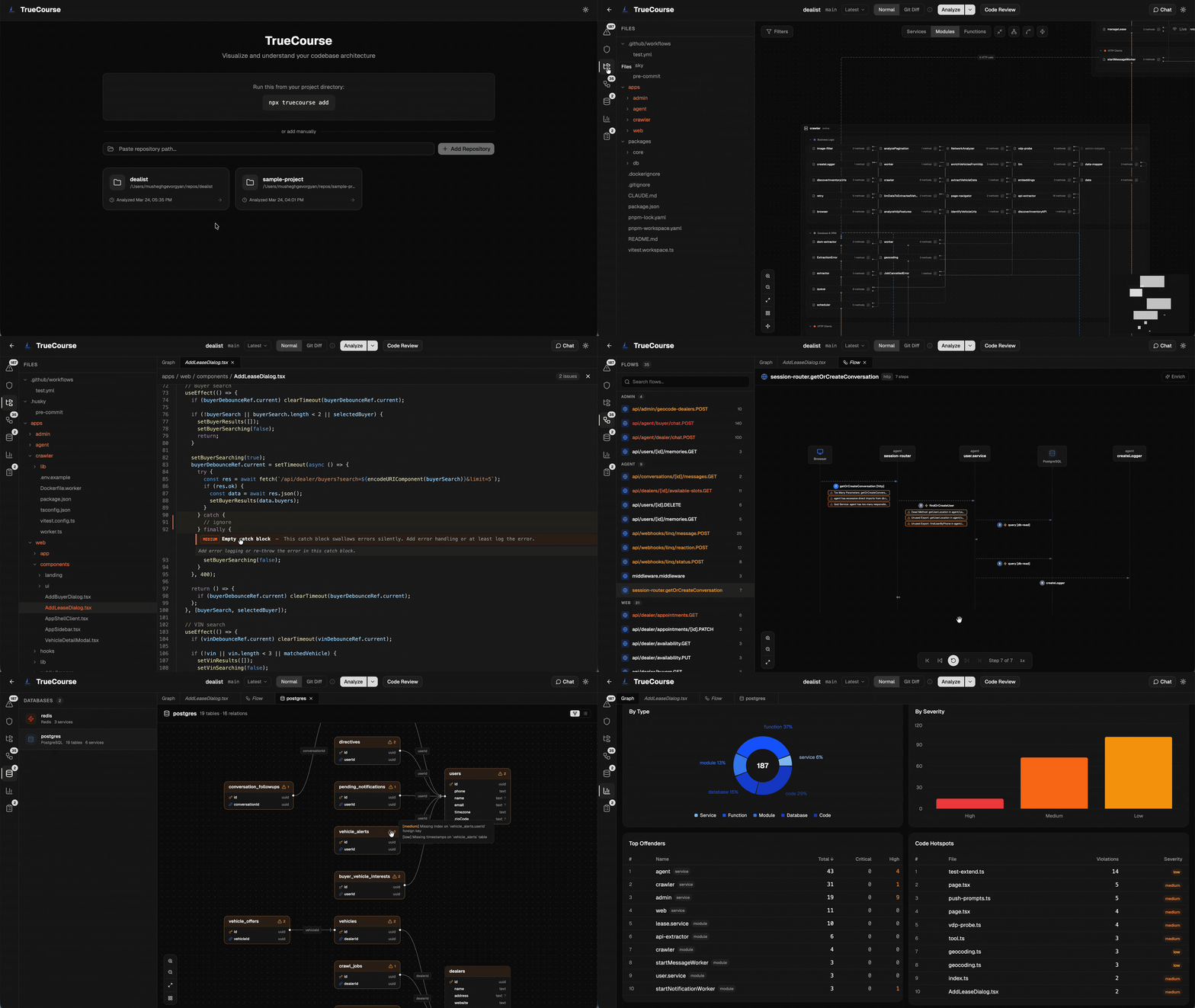
Both store their results under `.truecourse/` and surface them in a shared [dashboard](#dashboard-web-ui) for human review, with plain-text CLI output an agent can read directly.
Jump to: **[Install](#install)** · **[1. Analyze](#1-analyze--code-intelligence)** · **[2. Spec → Guard](#2-spec--guard--business-logic-drift)** · **[Dashboard](#dashboard-web-ui)**
No setup step and no database: TrueCourse creates `.truecourse/` in your repo on first use and stores everything there as plain JSON files. It uses the [Claude Code CLI](https://docs.anthropic.com/en/docs/claude-code) for LLM-powered work — if `claude` isn't on your PATH, deterministic analysis still runs and LLM-dependent features are skipped.
---
# Install
```bash
npm install -g truecourse
```
This puts the `truecourse` command on your PATH — every example below uses it. Prefer not to install globally? Run any command one-off with `npx truecourse ` instead.
See [Prerequisites](#prerequisites) for Node, Claude Code, and C# requirements.
---
# 1. Analyze — code intelligence
Static + LLM analysis of your code: architecture, security, bugs, performance, and more.
## Quick Start
```bash
cd
truecourse analyze # Runs the full analysis in-process
truecourse list # Show the violations it found
```
The first analyze creates `.truecourse/` and stores results as plain JSON. View them visually with [`truecourse dashboard`](#dashboard-web-ui).
## Setup
The first `truecourse analyze` creates `.truecourse/` in your repo. Three files inside it are committable and travel with the repo:
| File | Purpose |
|---|---|
| `LATEST.json` | Most recent analysis snapshot. Doubles as the baseline for `truecourse analyze --diff` and the pre-commit hook. |
| `config.json` | Per-repo rule categories and LLM toggles. |
| `hooks.yaml` | Pre-commit hook policy (created by `truecourse hooks install`). |
Everything else (`analyses/`, `diff.json`, `history.json`, `ui-state.json`, `logs/`, `.analyze.lock`) is local-only and added to `.truecourse/.gitignore` automatically.
**First time, on `main`:**
```bash
truecourse analyze
git add .truecourse/LATEST.json .truecourse/config.json
git commit -m "add truecourse baseline"
```
**Refreshing the baseline:** re-run `truecourse analyze` after merging to `main` and commit the updated `LATEST.json`. **Don't commit `LATEST.json` from feature branches** — two PRs both updating it will conflict on a large generated JSON.
### Worktrees and fresh clones
`LATEST.json` is tracked, so `git worktree add ../feat-x` and fresh clones inherit the baseline through git. `truecourse analyze --diff` and the pre-commit hook both work on the first commit in a new worktree — no per-checkout cold-start. Inside a worktree, run `truecourse analyze --diff` to see what your in-flight changes introduce relative to `main`'s committed baseline; the diff result lands in `.truecourse/diff.json` (gitignored, per-checkout).
## What it catches
**Architecture** — Circular dependencies, layer violations, god modules, dead modules, tight coupling, cross-service imports
**Code quality** — Magic numbers, empty catch, console.log, cognitive complexity, unused variables, redundant code, missing type hints
**Security** — SQL injection, hardcoded secrets, eval usage, insecure random, XSS, path traversal, unsafe deserialization
**Bugs** — Race conditions, type mismatches, mutable defaults, implicit optional, off-by-one, unchecked returns
**Performance** — N+1 queries, O(n²) string concat, unnecessary allocations, missing pagination, sync I/O in async
**Reliability** — Unhandled promises, resource leaks, missing timeouts, swallowed exceptions, unsafe error handling
**Database** — Missing indexes, missing transactions, lazy loading in loops, raw SQL bypassing ORM, schema issues
**Style** — Import ordering, naming conventions, docstring completeness, formatting preferences
### Rule coverage
TrueCourse ships with **1,200+ deterministic rules** and **100 LLM rules** across 8 categories:
| Category | Deterministic | LLM | Total |
|---|---:|---:|---:|
| Security | 150+ | 1 | 150+ |
| Bugs | 250+ | 4 | 250+ |
| Architecture | 30+ | 7 | 40+ |
| Code Quality | 500+ | 3 | 500+ |
| Performance | 50+ | 10 | 60+ |
| Reliability | 40+ | 10 | 50+ |
| Database | 30+ | 5 | 35+ |
| Style | 50+ | — | 50+ |
**Deterministic rules** run via tree-sitter AST visitors — fast, zero-cost, no API calls. **LLM rules** send source code to the configured LLM for semantic analysis — deeper but requires an LLM provider.
## Commands
```bash
truecourse analyze # Analyze current repo (prompts before stashing dirty trees)
truecourse analyze --stash # Pre-approve stashing pending changes (CI-friendly)
truecourse analyze --no-stash # Analyze working tree as-is, no stash
truecourse analyze --diff # New/resolved violations from your uncommitted changes
truecourse list # Show violations from latest analysis
truecourse list --all # Show all violations (no pagination)
truecourse list --diff # Show diff check results
truecourse add # Register repo without analyzing
```
### Rules
Configure which rule categories and LLM-powered rules are enabled per repository:
```bash
# Categories
truecourse rules categories # Show enabled/disabled
truecourse rules categories --enable style # Enable a category
truecourse rules categories --disable style # Disable a category
# LLM-powered rules
truecourse rules llm # Show LLM rules status
truecourse rules llm --enable # Enable LLM rules
truecourse rules llm --disable # Disable LLM rules
# Individual rules
truecourse rules list # List rules with on/off status
truecourse rules list --disabled # Show only disabled rules
truecourse rules disable # Disable a single rule
truecourse rules enable # Re-enable a single rule
truecourse rules reset [ruleKey] # Clear per-rule overrides (one or all)
```
Disabled rules are skipped at analyze time (no detection cost, no LLM calls) and any existing violations from them are hidden from the dashboard and `truecourse list` until re-enabled. The list of disabled rule keys lives in `/.truecourse/config.json` under `disabledRules`, which is intended to be committed.
In the dashboard you can also toggle rules from the Rules panel (Shield icon in the top-right) or silence a noisy rule directly from any violation card via the **⋮** menu → **Disable rule for this repo**.
### Git Hooks
TrueCourse can install a pre-commit hook that blocks commits introducing new violations at or above a configured severity:
```bash
truecourse hooks install # Install pre-commit hook
truecourse hooks uninstall # Remove pre-commit hook
truecourse hooks status # Show hook status + config
```
On every commit the hook runs `truecourse analyze --diff` against the repo's last full analysis and blocks if any newly-introduced violation matches the configured block severities. **Commits will take as long as a full diff analysis** — on large repos that can be tens of seconds per commit. `truecourse hooks install` warns you and requires confirmation before writing the hook.
The hook diffs against `.truecourse/LATEST.json`, so you need a committed baseline first — see [Setup](#setup). Without it the hook has nothing to diff against.
**Bypass:** `git commit --no-verify` (standard git).
**Configuration** — `hooks install` seeds `/.truecourse/hooks.yaml` with starter defaults; commit the file so your team shares one policy. The hook reads only from this file — if you delete it, the hook warns and passes every commit (no hidden code-level defaults). Current shape:
```yaml
pre-commit:
block-on: [critical, high] # severities. Valid: info|low|medium|high|critical
llm: false # run LLM rules on every commit (tokens per commit)
```
---
# 2. Spec → Guard — business-logic drift
TrueCourse builds a curated spec corpus from your docs, then **guards** it: an LLM authors declarative scenario tests bound to each spec section once, and running them is fully deterministic — no model in the verification loop. A failing scenario means "this section and the code disagree" (a drift or a bug — the developer's call). This is a separate pipeline from `analyze`: it answers a different question, has different prerequisites (it reads your docs), and runs on a different time scale.
> **Prerequisite:** the spec scan and guard generator shell out to the Claude Code CLI (`claude -p`). Install Claude Code and sign in once before running `spec scan` or `guard generate`. `guard run` needs neither — it's deterministic.
## Quick Start
```bash
cd
truecourse spec scan # Curate docs → corpus (areas + overlap flags)
truecourse spec conflicts list # Review flagged overlaps (resolve with `spec conflicts resolve`)
truecourse guard generate # Author scenario tests from spec sections (classify → generate → birth-validate)
truecourse guard run # Run the committed scenarios; exits non-zero on any drift (CI gate)
```
Resolve conflicts and review section coverage, scenarios, and run results visually in the [dashboard](#dashboard-web-ui)'s Guard section, or drive every step from the CLI.
> Like `analyze`, the spec → guard track requires a **git repository** — TrueCourse's baselines are commit-anchored (committable `LATEST.json`, diff vs HEAD). On a non-git folder these commands stop with a clear message and the dashboard hides their actions.
## How it works
Stages run in order, each producing committable artifacts the next consumes:
**1. Spec consolidation** — Walks every `.md` file in the repo (PRDs, ADRs, RFCs, READMEs, design notes; `.truecourse/`, `node_modules/`, `.git/` etc. are skipped). An LLM relevance filter drops obvious non-spec material (task lists, research logs, AI agent prompts). For the docs that remain, an LLM tags each into **areas** (`product/concern`) and flags within-area **overlaps** where two docs may disagree. Output: `.truecourse/specs/corpus.json` (the curated corpus every downstream stage consumes — kept docs + area tags, docs grouped by area, overlap flags, and the relevance-dropped docs; committable) and `.truecourse/specs/decisions.json` (the user's resolutions: `manualAreas`, `manualIncludes`, `manualExcludes`, and conflict verdicts — committable).
Only genuine within-area **disagreements** flag as overlaps — docs that agree never surface. You resolve them in the dashboard's Guard → Coverage tab or via `spec conflicts` (pick a side or dismiss).
**2. Guard generation** (`truecourse guard generate`) — Splits each kept doc into sections and, per section: **classifies** whether the section makes a claim a driver can assert (today's driver runs your project's CLI; a non-testable verdict carries a one-sentence reason and surfaces as a visible coverage gap), **authors** one or more declarative YAML scenarios from the section's claim plus the code, and **birth-validates** each one by running it immediately — a scenario that fails at birth is reported as a finding (the spec and the code already disagree) instead of being silently committed. Output, all committable: `.truecourse/scenarios//*.yaml` (the scenarios), `scenarios/recipe.json` (how to build/prepare the repo for a run), and `scenarios/manifest.json` (section ↔ scenario bindings + section fingerprints, so re-generates only touch changed sections).
**3. Guard run** (`truecourse guard run`) — Fully deterministic: builds the repo via the recipe, executes every committed scenario, and writes the run to `.truecourse/guard/` (per-run snapshots, `LATEST.json`, per-failure evidence transcripts). Exits non-zero on any drift, so it drops straight into CI. No LLM, no API key, no `claude` binary.
The section ↔ scenario binding is **bidirectional**: code changed → its scenarios fail (code-side drift); a spec section edited → its scenarios go stale (spec-side drift). The spec document itself becomes the coverage UI — every section visibly carries its proof and its status.
## What it catches
Any documented behavior a scenario can drive and assert (today through your project's CLI; api/web/tui drivers are planned): wrong responses and exit codes, missing or mistyped output fields, illegal state transitions, bypassed validation and auth rules, silently-dropped side effects, formulas producing wrong results — plus the reverse direction: spec sections whose scenarios went stale because the docs changed out from under them.
## Setup
The spec, the scenarios, and a guard baseline are committable so they travel with the repo; everything else is local-only. Per-repo layout under `.truecourse/`:
```
.truecourse/
├── specs/ ← curated corpus (committable)
│ ├── corpus.json ← kept docs + area tags, docs-by-area, overlap flags, dropped docs
│ └── decisions.json ← user resolutions: conflict verdicts + manual areas + manual includes/excludes
├── scenarios/ ← the guard scenario corpus (committable)
│ ├── recipe.json ← how to build/prepare the repo for a run
│ ├── manifest.json ← section ↔ scenario bindings + section fingerprints
│ └── /*.yaml ← the scenario tests
├── guard/ ← guard run store (mirrors analyze; `truecourse guard run`)
│ ├── runs/ ← per-run snapshots (gitignored)
│ ├── LATEST.json ← current run state (committable)
│ ├── history.json ← per-run summaries (gitignored)
│ ├── evidence// ← per-failure transcripts (gitignored)
│ └── result.json ← last `guard generate` summary (gitignored)
└── .cache/ ← LLM caches (gitignored)
```
Like analyze, `guard/LATEST.json` is the committable baseline — commit it after merging to `main` (re-run `truecourse guard run`, commit the result), not from feature branches.
### The recipe — `scenarios/recipe.json`
The recipe tells guard how to build your repo and what binary the scenarios exercise:
```json
{
"install": "pnpm install --frozen-lockfile",
"build": "pnpm turbo build --filter=...{./tools/cli}",
"entry": ["node", "tools/cli/dist/index.js"],
"env": { "MY_FLAG": "1" }
}
```
- `install` *(optional)* — one shell command, run in the repo root before every build, to fetch
dependencies (e.g. `npm ci`). Needed wherever the tree is a fresh checkout with no
`node_modules`; omit it when the build needs no dependency fetch.
- `build` — one shell command, run in the repo root before scenarios execute.
- `entry` — the entrypoint argv; each scenario's command is appended to it. Repo-relative.
- `env` *(optional)* — extra environment variables for every scenario run.
It's discovered by the LLM **once**, on your first `guard generate`, and never touched again —
**the file is yours to edit**: an existing `recipe.json` always wins, and it's committed so the
whole team runs the same preparation. Edit it when the discovered command isn't what you want —
for example, if your build tool's cache can serve stale output across branch switches, harden the
build (`turbo build --force …`, or a clean step) at the cost of slower runs. Recipe edits change
the recipe fingerprint, so the dashboard flags runs made under an older recipe.
## Commands
```bash
# Spec consolidation (docs → curated corpus)
truecourse spec scan # Curate docs into corpus.json (areas + overlap flags)
truecourse spec status # Summary: docs, areas, open vs resolved overlaps
# Conflict resolution — flagged within-area overlaps
# (agent-friendly; also available in the dashboard Spec tab)
truecourse spec conflicts list # List flagged within-area overlaps
truecourse spec conflicts show # An area's overlapping docs with prose excerpts
truecourse spec conflicts resolve \ # Pick a side or dismiss a detector false-positive
--right | --dismiss [--note ]
truecourse spec docs list # List the kept (corpus) docs + area tags
truecourse spec docs skipped # Docs the relevance filter excluded
truecourse spec docs include # Force-include a skipped doc (re-scans)
truecourse spec docs uninclude # Remove a force-include override
truecourse spec docs exclude # Force-exclude a kept doc (re-scans)
truecourse spec docs unexclude # Remove a force-exclude override
# Guard — spec-section-bound scenario tests (author once, run deterministically)
truecourse guard generate # Author scenarios from spec sections (classify → generate → birth-validate)
truecourse guard run # Build via the recipe + run committed scenarios; exits non-zero on any drift (CI gate)
truecourse guard run --scenario # Run a single scenario
truecourse guard run --verbose # List every scenario result (one ✓ line per pass; default shows failures only)
truecourse guard status # Compact summary: section coverage, last run, last generate (LLM-free, no re-run)
truecourse guard drifts # List the latest run's non-pass scenarios, most severe first (paginated; --all / --offset / --json)
```
---
# Dashboard (web UI)
One web UI for both capabilities — browse code findings and business-logic drift side by side, with the architecture graph, analytics, and the spec-curation + guard workflow.
```bash
truecourse dashboard # Start + open the dashboard
truecourse dashboard --reconfigure # Re-prompt for console vs background service mode
truecourse dashboard stop # Stop the dashboard
truecourse dashboard status # Show dashboard status
truecourse dashboard logs # Tail dashboard logs (service mode only)
truecourse dashboard uninstall # Remove the background service
```
- **Code Analysis** — architecture graph, violations list, severity/category analytics, code hotspots, trend over time; toggle rules and silence noisy ones inline.
- **Guard** — Coverage shows each spec doc's sections with their scenario coverage and walks you through resolving spec conflicts (pick / write custom / mark superseded / include skipped doc); Scenarios lists the committed scenario corpus with the recipe and last-generate summary; Runs shows each run's drifts with per-failure evidence.
---
# Common
## Claude Code Skills
TrueCourse includes [Claude Code skills](https://docs.anthropic.com/en/docs/claude-code/skills) for conversational analysis from within Claude Code.
The first `truecourse analyze` (or `truecourse add`) in a fresh repo asks whether to install skills into `.claude/skills/truecourse/`. Re-runs skip the prompt if skills are already present. Pass `--install-skills` / `--no-skills` to bypass the prompt explicitly.
| Skill | What it does |
|---|---|
| `/truecourse-analyze` | Runs analysis or diff check, summarizes results |
| `/truecourse-list` | Shows full violation details |
| `/truecourse-fix` | Lists fixable violations, applies changes |
| `/truecourse-hooks` | Installs, configures, or removes the pre-commit hook |
## Language Support
| Language | Status |
|---|---|
| JavaScript / TypeScript | Supported |
| Python | Supported |
| C# | Supported * |
| Go | Planned |
| Rust | Planned |
| PHP | Planned |
\* Analyzing C# requires the .NET 8 SDK — its **semantic** rules run in a Roslyn host (build-required; analysis fails fast without it). See [Prerequisites](#prerequisites).
## Prerequisites
- Node.js >= 20
- [Claude Code](https://docs.anthropic.com/en/docs/claude-code) CLI on your PATH — optional. The default `cli` transport spawns it for LLM-powered work; deterministic rules and the `agent` transport (below) don't need it.
- [.NET 8 SDK](https://dotnet.microsoft.com/download) — **required to analyze C#** (not needed for other languages). C#'s semantic rules run in a Roslyn host you build once (`dotnet build -c Release tools/csharp-roslyn-host`, or point `TRUECOURSE_ROSLYN_HOST` at a prebuilt binary). Analyzing a repo that contains C# without the host **fails fast** with a build-the-host message — there is deliberately no tree-sitter-only fallback, since a silent half-analysis is worse than a clear error.
## LLM transport (`--llm-transport`)
Every LLM-powered step — `analyze`'s LLM rules, and the whole Spec → Guard pipeline (`spec scan`, `guard generate`) — reaches the model through a pluggable **transport**, chosen with `--llm-transport`:
| Mode | How it reaches the model | Needs |
|---|---|---|
| **`cli`** *(default)* | spawns `claude -p …` per call | the `claude` binary on PATH, signed in. No API key. |
| **`agent`** | a **filesystem mailbox** under `--io ` | nothing — no `claude` binary, no API key |
In **`agent`** mode the tool doesn't call the model itself: for each prompt it writes `requests/.json` (`{ stage, system, user, schema, … }`) into the `--io` directory and waits for a matching `responses/.json` (`{ text }`). An **orchestrating agent that is itself an LLM** — e.g. a [Claude Code routine](https://code.claude.com/docs/en/routines) — watches that directory and answers each prompt. This lets guard generation and `analyze`'s LLM rules run **inside a headless cloud session with no `claude` binary and no API key**.
```bash
# default: spawn the claude CLI
truecourse analyze --llm
truecourse guard generate
# agent transport: the tool parks prompts in ./io and an external agent answers them
truecourse analyze --llm --llm-transport agent --io ./io
truecourse spec scan --llm-transport agent --io ./io
truecourse guard generate --llm-transport agent --io ./io
```
Accepted by: `analyze`, `spec scan`, `guard generate`. (On `analyze`, `--llm` / `--no-llm` is a *separate* flag — it decides **whether** LLM rules run; `--llm-transport` decides **how** to reach the model.) Both modes send identical prompts and parse identical schema-validated JSON — only the delivery differs.
## Configuration
TrueCourse talks to Claude Code via the `claude` CLI. You can tune how that interaction behaves — which binary to invoke, which model to pass, timeouts, retries, and how many `claude` processes to run in parallel — through environment variables.
For packaged installs (`npx truecourse` or `npm install -g truecourse`), the simplest place to set them is `~/.truecourse/.env`. The file is loaded automatically on every invocation:
```
CLAUDE_CODE_BINARY=claude # override the `claude` binary on PATH (CLAUDE_CODE_BIN also accepted)
CLAUDE_CODE_MODEL= # Claude Code --model flag (empty = default)
CLAUDE_CODE_TIMEOUT_MS=120000 # per-call timeout (ms)
CLAUDE_CODE_MAX_RETRIES=2 # retry attempts on parse/validation failure
CLAUDE_CODE_MAX_CONCURRENCY=10 # max concurrent `claude` processes per run
```
Every command that uses Claude (`analyze` with LLM rules, `spec scan`, `guard generate`) runs a quick up-front preflight: it makes one tiny `claude` call to confirm the CLI is installed and logged in, and aborts with the CLI's own error message if not — so an expired login is caught immediately instead of failing every extraction subprocess at the end of a long run. `CLAUDE_CODE_BINARY` is the canonical way to point at a non-default binary; `CLAUDE_CODE_BIN` is honored as a legacy alias.
**`CLAUDE_CODE_MAX_CONCURRENCY`** caps how many Claude CLI processes TrueCourse spawns in parallel during a single run. Default `10`. Raise it on CI runners with spare headroom; lower it on resource-constrained machines (e.g. 8 GB laptops, shared VMs) to avoid OOM on large repos. Must be a positive integer.
For a one-off override, prefix the command:
```bash
CLAUDE_CODE_MAX_CONCURRENCY=2 truecourse analyze
```
### Per-stage model selection
Each LLM-powered pipeline stage resolves its model independently, so you can run cheap stages on Haiku and reserve Opus for scenario generation. Resolution precedence: `TRUECOURSE_MODEL_` (per-stage) › `TRUECOURSE_MODEL` (global) › `.truecourse/config.json` (`llm.stages.`) › the built-in default. `truecourse config llm` prints the effective model + source for every stage.
| stage | env override | default |
|---|---|---|
| doc relevance keep/drop | `TRUECOURSE_MODEL_SPEC_RELEVANCE` | haiku |
| area tagging | `TRUECOURSE_MODEL_SPEC_AREA_TAG` | sonnet |
| overlap flagging | `TRUECOURSE_MODEL_SPEC_OVERLAP` | haiku |
| guard section classify/extract | `TRUECOURSE_MODEL_GUARD_EXTRACT` | sonnet |
| guard scenario generate | `TRUECOURSE_MODEL_GUARD_GENERATE` | opus |
| guard recipe derivation | `TRUECOURSE_MODEL_GUARD_RECIPE` | sonnet |
`TRUECOURSE_FALLBACK_MODEL` sets the `--fallback-model` used when the primary is overloaded. `TRUECOURSE_MAX_CONCURRENCY` caps concurrent LLM calls across every stage (default `min(cpus, 4)`). `TRUECOURSE_LLM_TIMEOUT_SCALE` multiplies every stage's per-call timeout by a float (default `1`); a slow model or proxy that trips the built-in ceilings can widen them all with one knob — e.g. `TRUECOURSE_LLM_TIMEOUT_SCALE=3` for a slow proxy. `TRUECOURSE_LLM_LOG` / `TRUECOURSE_LLM_DUMP` enable per-call logging.
### Excluding files from analysis
TrueCourse honors `.gitignore` automatically (including nested `.gitignore` files, `.git/info/exclude`, and your configured global excludes file).
For paths you want tracked in git but not analyzed — generated code, vendored snapshots, large fixtures — add a `.truecourseignore` at the repo root. Same syntax as `.gitignore`:
```
# generated
src/generated/
# vendored
third_party/
# specific files
scripts/ingest-epub.js
```
Patterns are anchored to the file's location, so `src/generated/` matches the top-level directory only; use `**/generated/` to match at any depth.
## Telemetry
TrueCourse collects anonymous usage data to improve the product — one event per command (`analyze`, `spec_scan`), each carrying only coarse, bucketed counts (file/finding *ranges*, duration range), the surface (CLI vs dashboard), OS, and tool version. No source code, file paths, identities, or violation details are collected. It is automatically disabled in CI environments.
```bash
truecourse telemetry status # Check telemetry status
truecourse telemetry disable # Opt out of anonymous telemetry
truecourse telemetry enable # Opt back in
```
Or set `TRUECOURSE_TELEMETRY=0` to opt out.
## Development
```bash
git clone https://github.com/truecourse-ai/truecourse.git
cd truecourse
pnpm install
pnpm build # Build all packages — required before the first `pnpm test` (tests resolve workspace packages from their dist/)
dotnet build -c Release tools/csharp-roslyn-host # One-time, needs the .NET 8 SDK — see note below
pnpm dev # Start dashboard at http://localhost:3000 (server on :3001, Vite on :3000)
pnpm test # Run tests
```
`pnpm dev` expects a `.truecourse/` folder at the repo root — created automatically on the first `truecourse analyze` against the repo (or simply `mkdir -p .truecourse`).
The full test suite requires the C# Roslyn host to be built (same requirement as [analyzing C#](#prerequisites)): the C# e2e test fails without it, and the Roslyn semantic-rule tests silently skip. CI builds it before running tests (`.github/workflows/test.yml`); do the same locally, once per checkout/worktree.
## Community
Join the [TrueCourse Discord](https://discord.gg/TanxB63arz) to ask questions, share feedback, and follow what's shipping.
## Contact
Questions, feedback, or security reports: **Mushegh Gevorgyan** — [mushegh@truecourse.dev](mailto:mushegh@truecourse.dev).
## License
MIT