
TruffleHog
Find leaked credentials.
---
[](https://goreportcard.com/report/github.com/trufflesecurity/trufflehog/v3)
[](/LICENSE)
[](/pkg/detectors)
---
# :mag_right: _Now Scanning_

**...and more**
To learn more about TruffleHog and its features and capabilities, visit our [product page](https://trufflesecurity.com/trufflehog?gclid=CjwKCAjwouexBhAuEiwAtW_Zx5IW87JNj97Ci7heFnA5ar6-DuNzT2Y5nIl9DuZ-FOUqx0Qg3vb9nxoClcEQAvD_BwE).
# :globe_with_meridians: TruffleHog Enterprise
Are you interested in continuously monitoring **Git, Jira, Slack, Confluence, Microsoft Teams, Sharepoint (and more)** for credentials? We have an enterprise product that can help! Learn more at .
We take the revenue from the enterprise product to fund more awesome open source projects that the whole community can benefit from.
# What is TruffleHog 🐽
TruffleHog is the most powerful secrets **Discovery, Classification, Validation,** and **Analysis** tool. In this context, secret refers to a credential a machine uses to authenticate itself to another machine. This includes API keys, database passwords, private encryption keys, and more.
## Discovery 🔍
TruffleHog can look for secrets in many places including Git, chats, wikis, logs, API testing platforms, object stores, filesystems and more.
## Classification 📁
TruffleHog classifies over 800 secret types, mapping them back to the specific identity they belong to. Is it an AWS secret? Stripe secret? Cloudflare secret? Postgres password? SSL Private key? Sometimes it's hard to tell looking at it, so TruffleHog classifies everything it finds.
## Validation ✅
For every secret TruffleHog can classify, it can also log in to confirm if that secret is live or not. This step is critical to know if there’s an active present danger or not.
## Analysis 🔬
For the 20 some of the most commonly leaked out credential types, instead of sending one request to check if the secret can log in, TruffleHog can send many requests to learn everything there is to know about the secret. Who created it? What resources can it access? What permissions does it have on those resources?
# :loudspeaker: Join Our Community
Have questions? Feedback? Jump into Slack or Discord and hang out with us.
Join our [Slack Community](https://join.slack.com/t/trufflehog-community/shared_invite/zt-pw2qbi43-Aa86hkiimstfdKH9UCpPzQ)
Join the [Secret Scanning Discord](https://discord.gg/8Hzbrnkr7E)
# :tv: Demo

```bash
docker run --rm -it -v "$PWD:/pwd" trufflesecurity/trufflehog:latest github --org=trufflesecurity
```
# :floppy_disk: Installation
Several options are available for you:
### MacOS users
```bash
brew install trufflehog
```
### Docker:
_Ensure Docker engine is running before executing the following commands:_
#### Unix
```bash
docker run --rm -it -v "$PWD:/pwd" trufflesecurity/trufflehog:latest github --repo https://github.com/trufflesecurity/test_keys
```
#### Windows Command Prompt
```bash
docker run --rm -it -v "%cd:/=\%:/pwd" trufflesecurity/trufflehog:latest github --repo https://github.com/trufflesecurity/test_keys
```
#### Windows PowerShell
```bash
docker run --rm -it -v "${PWD}:/pwd" trufflesecurity/trufflehog github --repo https://github.com/trufflesecurity/test_keys
```
#### M1 and M2 Mac
```bash
docker run --platform linux/arm64 --rm -it -v "$PWD:/pwd" trufflesecurity/trufflehog:latest github --repo https://github.com/trufflesecurity/test_keys
```
### Binary releases
```bash
Download and unpack from https://github.com/trufflesecurity/trufflehog/releases
```
### Compile from source
```bash
git clone https://github.com/trufflesecurity/trufflehog.git
cd trufflehog; go install
```
### Using installation script
```bash
curl -sSfL https://raw.githubusercontent.com/trufflesecurity/trufflehog/main/scripts/install.sh | sh -s -- -b /usr/local/bin
```
### Using installation script, verify checksum signature (requires cosign to be installed)
```bash
curl -sSfL https://raw.githubusercontent.com/trufflesecurity/trufflehog/main/scripts/install.sh | sh -s -- -v -b /usr/local/bin
```
### Using installation script to install a specific version
```bash
curl -sSfL https://raw.githubusercontent.com/trufflesecurity/trufflehog/main/scripts/install.sh | sh -s -- -b /usr/local/bin
```
# :closed_lock_with_key: Verifying the artifacts
Checksums are applied to all artifacts, and the resulting checksum file is signed using cosign.
You need the following tool to verify signature:
- [Cosign](https://docs.sigstore.dev/cosign/system_config/installation/)
Verification steps are as follows:
1. Download the artifact files you want, and the following files from the [releases](https://github.com/trufflesecurity/trufflehog/releases) page.
- trufflehog\_{version}\_checksums.txt
- trufflehog\_{version}\_checksums.txt.pem
- trufflehog\_{version}\_checksums.txt.sig
2. Verify the signature:
```shell
cosign verify-blob \
--certificate \
--signature \
--certificate-identity-regexp 'https://github\.com/trufflesecurity/trufflehog/\.github/workflows/.+' \
--certificate-oidc-issuer "https://token.actions.githubusercontent.com"
```
3. Once the signature is confirmed as valid, you can proceed to validate that the SHA256 sums align with the downloaded artifact:
```shell
sha256sum --ignore-missing -c trufflehog_{version}_checksums.txt
```
Replace `{version}` with the downloaded files version
Alternatively, if you are using the installation script, pass `-v` option to perform signature verification.
This requires Cosign binary to be installed prior to running the installation script.
# :rocket: Quick Start
## 1: Scan a repo for only verified secrets
Command:
```bash
trufflehog git https://github.com/trufflesecurity/test_keys --results=verified
```
Expected output:
```
🐷🔑🐷 TruffleHog. Unearth your secrets. 🐷🔑🐷
Found verified result 🐷🔑
Detector Type: AWS
Decoder Type: PLAIN
Raw result: AKIAYVP4CIPPERUVIFXG
Line: 4
Commit: fbc14303ffbf8fb1c2c1914e8dda7d0121633aca
File: keys
Email: counter
Repository: https://github.com/trufflesecurity/test_keys
Timestamp: 2022-06-16 10:17:40 -0700 PDT
...
```
## 2: Scan a GitHub Org for only verified secrets
```bash
trufflehog github --org=trufflesecurity --results=verified
```
## 3: Scan a GitHub Repo for only verified secrets and get JSON output
Command:
```bash
trufflehog git https://github.com/trufflesecurity/test_keys --results=verified --json
```
Expected output:
```
{"SourceMetadata":{"Data":{"Git":{"commit":"fbc14303ffbf8fb1c2c1914e8dda7d0121633aca","file":"keys","email":"counter \u003ccounter@counters-MacBook-Air.local\u003e","repository":"https://github.com/trufflesecurity/test_keys","timestamp":"2022-06-16 10:17:40 -0700 PDT","line":4}}},"SourceID":0,"SourceType":16,"SourceName":"trufflehog - git","DetectorType":2,"DetectorName":"AWS","DecoderName":"PLAIN","Verified":true,"Raw":"AKIAYVP4CIPPERUVIFXG","Redacted":"AKIAYVP4CIPPERUVIFXG","ExtraData":{"account":"595918472158","arn":"arn:aws:iam::595918472158:user/canarytokens.com@@mirux23ppyky6hx3l6vclmhnj","user_id":"AIDAYVP4CIPPJ5M54LRCY"},"StructuredData":null}
...
```
## 4: Scan a GitHub Repo + its Issues and Pull Requests
```bash
trufflehog github --repo=https://github.com/trufflesecurity/test_keys --issue-comments --pr-comments
```
## 5: Scan an S3 bucket for high-confidence results (verified + unknown)
```bash
trufflehog s3 --bucket= --results=verified,unknown
```
## 6: Scan S3 buckets using IAM Roles
```bash
trufflehog s3 --role-arn=
```
## 7: Scan a Github Repo using SSH authentication in Docker
```bash
docker run --rm -v "$HOME/.ssh:/root/.ssh:ro" trufflesecurity/trufflehog:latest git ssh://github.com/trufflesecurity/test_keys
```
## 8: Scan individual files or directories
```bash
trufflehog filesystem path/to/file1.txt path/to/file2.txt path/to/dir
```
## 9: Scan a local git repo
Clone the git repo. For example [test keys](git@github.com:trufflesecurity/test_keys.git) repo.
```bash
$ git clone git@github.com:trufflesecurity/test_keys.git
```
Run trufflehog from the parent directory (outside the git repo).
```bash
$ trufflehog git file://test_keys --results=verified,unknown
```
To guard against malicious git configs in local scanning (see CVE-2025-41390), TruffleHog clones local git repositories to a temporary directory prior to scanning. This follows [Git's security best practices](https://git-scm.com/docs/git#_security). If you want to specify a custom path to clone the repository to (instead of tmp), you can use the `--clone-path` flag. If you'd like to skip the local cloning process and scan the repository directly (only do this for trusted repos), you can use the `--trust-local-git-config` flag.
## 10: Scan GCS buckets for only verified secrets
```bash
trufflehog gcs --project-id= --cloud-environment --results=verified
```
## 11: Scan a Docker image for only verified secrets
Use the `--image` flag multiple times to scan multiple images.
```bash
# to scan from a remote registry
trufflehog docker --image trufflesecurity/secrets --results=verified
# to scan from the local docker daemon
trufflehog docker --image docker://new_image:tag --results=verified
# to scan from an image saved as a tarball
trufflehog docker --image file://path_to_image.tar --results=verified
```
## 12: Scan in CI
Set the `--since-commit` flag to your default branch that people merge into (ex: "main"). Set the `--branch` flag to your PR's branch name (ex: "feature-1"). Depending on the CI/CD platform you use, this value can be pulled in dynamically (ex: [CIRCLE_BRANCH in Circle CI](https://circleci.com/docs/variables/) and [TRAVIS_PULL_REQUEST_BRANCH in Travis CI](https://docs.travis-ci.com/user/environment-variables/)). If the repo is cloned and the target branch is already checked out during the CI/CD workflow, then `--branch HEAD` should be sufficient. The `--fail` flag will return an 183 error code if valid credentials are found.
```bash
trufflehog git file://. --since-commit main --branch feature-1 --results=verified,unknown --fail
```
## 13: Scan a Postman workspace
Use the `--workspace-id`, `--collection-id`, `--environment` flags multiple times to scan multiple targets.
```bash
trufflehog postman --token= --workspace-id=
```
## 14: Scan a Jenkins server
```bash
trufflehog jenkins --url https://jenkins.example.com --username admin --password admin
```
## 15: Scan an Elasticsearch server
### Scan a Local Cluster
There are two ways to authenticate to a local cluster with TruffleHog: (1) username and password, (2) service token.
#### Connect to a local cluster with username and password
```bash
trufflehog elasticsearch --nodes 192.168.14.3 192.168.14.4 --username truffle --password hog
```
#### Connect to a local cluster with a service token
```bash
trufflehog elasticsearch --nodes 192.168.14.3 192.168.14.4 --service-token ‘AAEWVaWM...Rva2VuaSDZ’
```
### Scan an Elastic Cloud Cluster
To scan a cluster on Elastic Cloud, you’ll need a Cloud ID and API key.
```bash
trufflehog elasticsearch \
--cloud-id 'search-prod:dXMtY2Vx...YjM1ODNlOWFiZGRlNjI0NA==' \
--api-key 'MlVtVjBZ...ZSYlduYnF1djh3NG5FQQ=='
```
## 16. Scan a GitHub Repository for Cross Fork Object References and Deleted Commits
The following command will enumerate deleted and hidden commits on a GitHub repository and then scan them for secrets. This is an alpha release feature.
```bash
trufflehog github-experimental --repo https://github.com//.git --object-discovery
```
In addition to the normal TruffleHog output, the `--object-discovery` flag creates two files in a new `$HOME/.trufflehog` directory: `valid_hidden.txt` and `invalid.txt`. These are used to track state during commit enumeration, as well as to provide users with a complete list of all hidden and deleted commits (`valid_hidden.txt`). If you'd like to automatically remove these files after scanning, please add the flag `--delete-cached-data`.
**Note**: Enumerating all valid commits on a repository using this method takes between 20 minutes and a few hours, depending on the size of your repository. We added a progress bar to keep you updated on how long the enumeration will take. The actual secret scanning runs extremely fast.
For more information on Cross Fork Object References, please [read our blog post](https://trufflesecurity.com/blog/anyone-can-access-deleted-and-private-repo-data-github).
## 17. Scan Hugging Face
### Scan a Hugging Face Model, Dataset or Space
```bash
trufflehog huggingface --model --space --dataset
```
### Scan all Models, Datasets and Spaces belonging to a Hugging Face Organization or User
```bash
trufflehog huggingface --org --user
```
(Optionally) When scanning an organization or user, you can skip an entire class of resources with `--skip-models`, `--skip-datasets`, `--skip-spaces` OR a particular resource with `--ignore-models `, `--ignore-datasets `, `--ignore-spaces `.
### Scan Discussion and PR Comments
```bash
trufflehog huggingface --model --include-discussions --include-prs
```
## 18. Scan stdin Input
```bash
aws s3 cp s3://example/gzipped/data.gz - | gunzip -c | trufflehog stdin
```
# :question: FAQ
- All I see is `🐷🔑🐷 TruffleHog. Unearth your secrets. 🐷🔑🐷` and the program exits, what gives?
- That means no secrets were detected
- Why is the scan taking a long time when I scan a GitHub org
- Unauthenticated GitHub scans have rate limits. To improve your rate limits, include the `--token` flag with a personal access token
- It says a private key was verified, what does that mean?
- A verified result means TruffleHog confirmed the credential is valid by testing it against the service's API. For private keys, we've confirmed the key can be used live for SSH or SSL authentication. Check out our Driftwood blog post to learn more [Blog post](https://trufflesecurity.com/blog/driftwood-know-if-private-keys-are-sensitive/)
- Is there an easy way to ignore specific secrets?
- If the scanned source [supports line numbers](https://github.com/trufflesecurity/trufflehog/blob/d6375ba92172fd830abb4247cca15e3176448c5d/pkg/engine/engine.go#L358-L365), then you can add a `trufflehog:ignore` comment on the line containing the secret to ignore that secrets.
# :newspaper: What's new in v3?
TruffleHog v3 is a complete rewrite in Go with many new powerful features.
- We've **added over 700 credential detectors that support active verification against their respective APIs**.
- We've also added native **support for scanning GitHub, GitLab, Docker, filesystems, S3, GCS, Circle CI and Travis CI**.
- **Instantly verify private keys** against millions of github users and **billions** of TLS certificates using our [Driftwood](https://trufflesecurity.com/blog/driftwood) technology.
- Scan binaries, documents, and other file formats
- Available as a GitHub Action and a pre-commit hook
## What is credential verification?
For every potential credential that is detected, we've painstakingly implemented programmatic verification against the API that we think it belongs to. Verification eliminates false positives and provides three result statuses:
- **verified**: Credential confirmed as valid and active by API testing
- **unverified**: Credential detected but not confirmed valid (may be invalid, expired, or verification disabled)
- **unknown**: Verification attempted but failed due to errors, such as a network or API failure
For example, the [AWS credential detector](pkg/detectors/aws/aws.go) performs a `GetCallerIdentity` API call against the AWS API to verify if an AWS credential is active.
# :memo: Usage
TruffleHog has a sub-command for each source of data that you may want to scan:
- git
- github
- gitlab
- docker
- s3
- filesystem (files and directories)
- syslog
- circleci
- travisci
- gcs (Google Cloud Storage)
- postman
- jenkins
- elasticsearch
- stdin
- multi-scan
Each subcommand can have options that you can see with the `--help` flag provided to the sub command:
```
$ trufflehog git --help
usage: TruffleHog git []
Find credentials in git repositories.
Flags:
-h, --help Show context-sensitive help (also try --help-long and --help-man).
--log-level=0 Logging verbosity on a scale of 0 (info) to 5 (trace). Can be disabled with "-1".
--profile Enables profiling and sets a pprof and fgprof server on :18066.
-j, --json Output in JSON format.
--json-legacy Use the pre-v3.0 JSON format. Only works with git, gitlab, and github sources.
--github-actions Output in GitHub Actions format.
--concurrency=20 Number of concurrent workers.
--no-verification Don't verify the results.
--results=RESULTS Specifies which type(s) of results to output: verified (confirmed valid by API), unknown (verification failed due to error), unverified (detected but not verified), filtered_unverified (unverified but would have been filtered out). Defaults to all types.
--allow-verification-overlap
Allow verification of similar credentials across detectors
--filter-unverified Only output first unverified result per chunk per detector if there are more than one results.
--filter-entropy=FILTER-ENTROPY
Filter unverified results with Shannon entropy. Start with 3.0.
--config=CONFIG Path to configuration file.
--print-avg-detector-time
Print the average time spent on each detector.
--no-update Don't check for updates.
--fail Exit with code 183 if results are found.
--verifier=VERIFIER ... Set custom verification endpoints.
--custom-verifiers-only Only use custom verification endpoints.
--archive-max-size=ARCHIVE-MAX-SIZE
Maximum size of archive to scan. (Byte units eg. 512B, 2KB, 4MB)
--archive-max-depth=ARCHIVE-MAX-DEPTH
Maximum depth of archive to scan.
--archive-timeout=ARCHIVE-TIMEOUT
Maximum time to spend extracting an archive.
--include-detectors="all" Comma separated list of detector types to include. Protobuf name or IDs may be used, as well as ranges.
--exclude-detectors=EXCLUDE-DETECTORS
Comma separated list of detector types to exclude. Protobuf name or IDs may be used, as well as ranges. IDs defined here take precedence over the include list.
--version Show application version.
-i, --include-paths=INCLUDE-PATHS
Path to file with newline separated regexes for files to include in scan.
-x, --exclude-paths=EXCLUDE-PATHS
Path to file with newline separated regexes for files to exclude in scan.
--exclude-globs=EXCLUDE-GLOBS
Comma separated list of globs to exclude in scan. This option filters at the `git log` level, resulting in faster scans.
--since-commit=SINCE-COMMIT
Commit to start scan from.
--branch=BRANCH Branch to scan.
--max-depth=MAX-DEPTH Maximum depth of commits to scan.
--bare Scan bare repository (e.g. useful while using in pre-receive hooks)
Args:
Git repository URL. https://, file://, or ssh:// schema expected.
```
For example, to scan a `git` repository, start with
```
trufflehog git https://github.com/trufflesecurity/trufflehog.git
```
## Configuration
TruffleHog supports defining [custom regex detectors](#custom-regex-detector-alpha)
and multiple sources in a configuration file provided via the `--config` flag.
The regex detectors can be used with any subcommand, while the sources defined
in configuration are only for the `multi-scan` subcommand.
The configuration format for sources can be found on Truffle Security's
[source configuration documentation page](https://docs.trufflesecurity.com/scan-data-for-secrets).
Example GitHub source configuration and [options reference](https://docs.trufflesecurity.com/github#Fvm1I):
```yaml
sources:
- connection:
'@type': type.googleapis.com/sources.GitHub
repositories:
- https://github.com/trufflesecurity/test_keys.git
unauthenticated: {}
name: example config scan
type: SOURCE_TYPE_GITHUB
verify: true
```
You may define multiple connections under the `sources` key (see above), and
TruffleHog will scan all of the sources concurrently.
## S3
The S3 source supports assuming IAM roles for scanning in addition to IAM users. This makes it easier for users to scan multiple AWS accounts without needing to rely on hardcoded credentials for each account.
The IAM identity that TruffleHog uses initially will need to have `AssumeRole` privileges as a principal in the [trust policy](https://aws.amazon.com/blogs/security/how-to-use-trust-policies-with-iam-roles/) of each IAM role to assume.
To scan a specific bucket using locally set credentials or instance metadata if on an EC2 instance:
```bash
trufflehog s3 --bucket=
```
To scan a specific bucket using an assumed role:
```bash
trufflehog s3 --bucket= --role-arn=
```
Multiple roles can be passed as separate arguments. The following command will attempt to scan every bucket each role has permissions to list in the S3 API:
```bash
trufflehog s3 --role-arn= --role-arn=
```
Exit Codes:
- 0: No errors and no results were found.
- 1: An error was encountered. Sources may not have completed scans.
- 183: No errors were encountered, but results were found. Will only be returned if `--fail` flag is used.
## :octocat: TruffleHog Github Action
### General Usage
```
on:
push:
branches:
- main
pull_request:
jobs:
test:
runs-on: ubuntu-latest
steps:
- name: Checkout code
uses: actions/checkout@v4
with:
fetch-depth: 0
- name: Secret Scanning
uses: trufflesecurity/trufflehog@main
with:
extra_args: --results=verified,unknown
```
In the example config above, we're scanning for live secrets in all PRs and Pushes to `main`. Only code changes in the referenced commits are scanned. If you'd like to scan an entire branch, please see the "Advanced Usage" section below.
### Shallow Cloning
If you're incorporating TruffleHog into a standalone workflow and aren't running any other CI/CD tooling alongside TruffleHog, then we recommend using [Shallow Cloning](https://git-scm.com/docs/git-clone#Documentation/git-clone.txt---depthltdepthgt) to speed up your workflow. Here's an example of how to do it:
```
...
- shell: bash
run: |
if [ "${{ github.event_name }}" == "push" ]; then
echo "depth=$(($(jq length <<< '${{ toJson(github.event.commits) }}') + 2))" >> $GITHUB_ENV
echo "branch=${{ github.ref_name }}" >> $GITHUB_ENV
fi
if [ "${{ github.event_name }}" == "pull_request" ]; then
echo "depth=$((${{ github.event.pull_request.commits }}+2))" >> $GITHUB_ENV
echo "branch=${{ github.event.pull_request.head.ref }}" >> $GITHUB_ENV
fi
- uses: actions/checkout@v3
with:
ref: ${{env.branch}}
fetch-depth: ${{env.depth}}
- uses: trufflesecurity/trufflehog@main
with:
extra_args: --results=verified,unknown
...
```
Depending on the event type (push or PR), we calculate the number of commits present. Then we add 2, so that we can reference a base commit before our code changes. We pass that integer value to the `fetch-depth` flag in the checkout action in addition to the relevant branch. Now our checkout process should be much shorter.
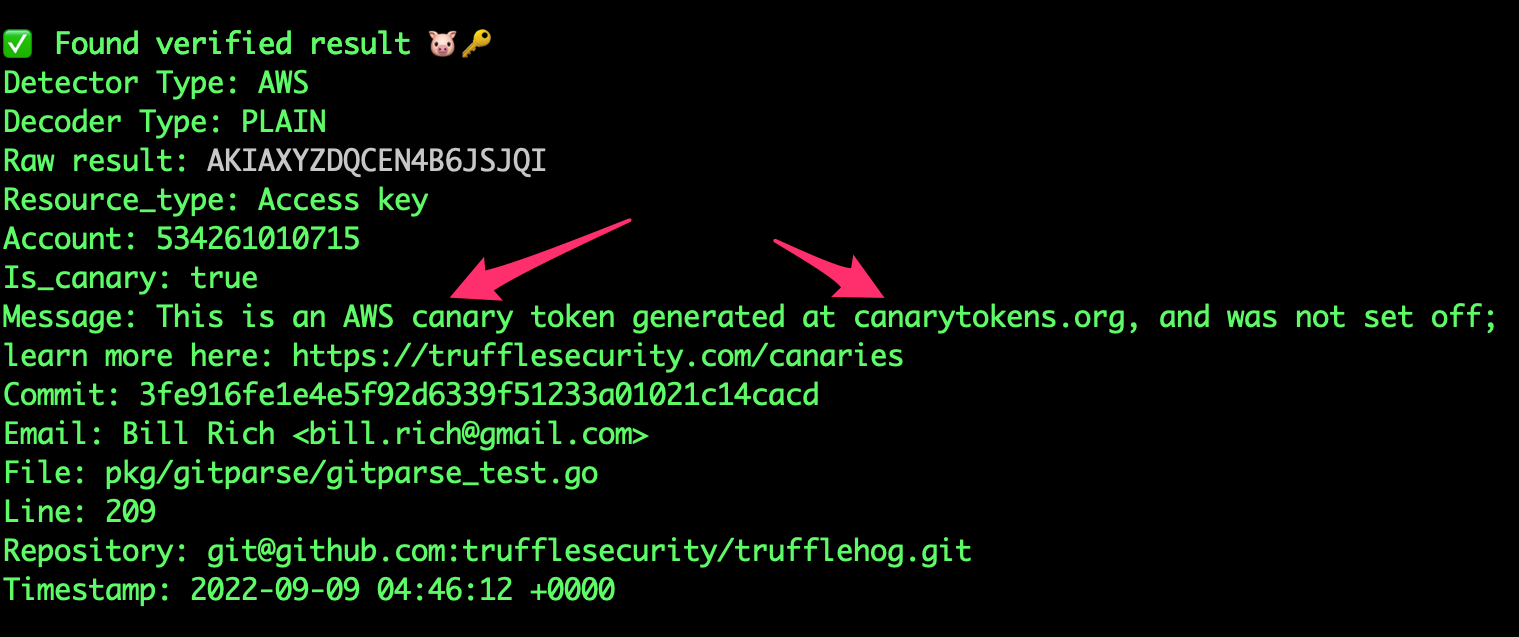
### Canary detection
TruffleHog statically detects [https://canarytokens.org/](https://canarytokens.org/).
### Advanced Usage
```yaml
- name: TruffleHog
uses: trufflesecurity/trufflehog@main
with:
# Repository path
path:
# Start scanning from here (usually main branch).
base:
# Scan commits until here (usually dev branch).
head: # optional
# Extra args to be passed to the trufflehog cli.
extra_args: --log-level=2 --results=verified,unknown
```
If you'd like to specify specific `base` and `head` refs, you can use the `base` argument (`--since-commit` flag in TruffleHog CLI) and the `head` argument (`--branch` flag in the TruffleHog CLI). We only recommend using these arguments for very specific use cases, where the default behavior does not work.
#### Advanced Usage: Scan entire branch
```
- name: scan-push
uses: trufflesecurity/trufflehog@main
with:
base: ""
head: ${{ github.ref_name }}
extra_args: --results=verified,unknown
```
## TruffleHog GitLab CI
### Example Usage
```yaml
stages:
- security
security-secrets:
stage: security
allow_failure: false
image: alpine:latest
variables:
SCAN_PATH: "." # Set the relative path in the repo to scan
before_script:
- apk add --no-cache git curl jq
- curl -sSfL https://raw.githubusercontent.com/trufflesecurity/trufflehog/main/scripts/install.sh | sh -s -- -b /usr/local/bin
script:
- trufflehog filesystem "$SCAN_PATH" --results=verified,unknown --fail --json | jq
rules:
- if: '$CI_PIPELINE_SOURCE == "merge_request_event"'
```
In the example pipeline above, we're scanning for live secrets in all repository directories and files. This job runs only when the pipeline source is a merge request event, meaning it's triggered when a new merge request is created.
## Pre-commit Hook
TruffleHog can be used in a pre-commit hook to prevent credentials from leaking before they ever leave your computer.
See the [pre-commit hook documentation](PreCommit.md) for more information.
## Custom Regex Detector (alpha)
TruffleHog supports detection and verification of custom regular expressions.
For detection, at least one **regular expression** and **keyword** is required.
A **keyword** is a fixed literal string identifier that appears in or around
the regex to be detected. To allow maximum flexibility for verification, a
webhook is used containing the regular expression matches.
TruffleHog will send a JSON POST request containing the regex matches to a
configured webhook endpoint. If the endpoint responds with a `200 OK` response
status code, the secret is considered verified. If verification fails due to network/API errors, the result is marked as unknown.
Custom Detectors support a few different filtering mechanisms: entropy, regex targeting the entire match, regex targeting the captured secret,
and excluded word lists checked against the secret (captured group if present, entire match if capture group is not present). Note that if
your custom detector has multiple `regex` set (in this example `hogID`, and `hogToken`), then the filters get applied to each regex. [Here](examples/generic_with_filters.yml) is an example of a custom detector using these filters.
**NB:** This feature is alpha and subject to change.
### Regex Detector Example
[Here](/pkg/custom_detectors/CUSTOM_DETECTORS.md) is how to setup a custom regex detector with verification server.
## Generic JWT Detection
TruffleHog supports detection and verification of a subset of generic JWTs it finds.
Specifically, if a JWT uses public-key cryptography rather than HMAC and the public key can be obtained, TruffleHog can determine whether the JWT is live or not.
## :mag: Analyze
TruffleHog supports running a deeper analysis of a credential to view its permissions and the resources it has access to.
```bash
trufflehog analyze
```
# :heart: Contributors
This project exists thanks to all the people who contribute. [[Contribute](CONTRIBUTING.md)].
 # :computer: Contributing
Contributions are very welcome! Please see our [contribution guidelines first](CONTRIBUTING.md).
We no longer accept contributions to TruffleHog v2, but that code is available in the `v2` branch.
## Adding new secret detectors
We have published some [documentation and tooling to get started on adding new secret detectors](hack/docs/Adding_Detectors_external.md). Let's improve detection together!
# Use as a library
Currently, trufflehog is in heavy development and no guarantees can be made on
the stability of the public APIs at this time.
# License Change
Since v3.0, TruffleHog is released under a AGPL 3 license, included in [`LICENSE`](LICENSE). TruffleHog v3.0 uses none of the previous codebase, but care was taken to preserve backwards compatibility on the command line interface. The work previous to this release is still available licensed under GPL 2.0 in the history of this repository and the previous package releases and tags. A completed CLA is required for us to accept contributions going forward.
# :computer: Contributing
Contributions are very welcome! Please see our [contribution guidelines first](CONTRIBUTING.md).
We no longer accept contributions to TruffleHog v2, but that code is available in the `v2` branch.
## Adding new secret detectors
We have published some [documentation and tooling to get started on adding new secret detectors](hack/docs/Adding_Detectors_external.md). Let's improve detection together!
# Use as a library
Currently, trufflehog is in heavy development and no guarantees can be made on
the stability of the public APIs at this time.
# License Change
Since v3.0, TruffleHog is released under a AGPL 3 license, included in [`LICENSE`](LICENSE). TruffleHog v3.0 uses none of the previous codebase, but care was taken to preserve backwards compatibility on the command line interface. The work previous to this release is still available licensed under GPL 2.0 in the history of this repository and the previous package releases and tags. A completed CLA is required for us to accept contributions going forward.