**Skylanders: Spyro's Adventure** (Xbox 360, 2011) as a native Windows game: a controller, up to
3x the console's resolution, 60 FPS, no emulator. You bring your own copy of the game; nothing of it
comes with this project.
> Unofficial fan project. Not affiliated with or endorsed by Activision or Toys for Bob.
## Getting started
**The easy way:** install [Core of Light](https://github.com/tsapZ/SkylandersCoreOfLight/releases)
and show it your disc. It downloads this game, sets it up and keeps it up to date, and does the same
for the other five games.
**On its own:**
1. Download `SSARecompSetup-.exe` from the [Releases](https://github.com/tsapZ/SSARecomp/releases) page.
2. Run it and pick your disc, as an ISO file or an extracted folder. It checks the version and takes
what it needs.
3. Start the game from the desktop or the Start menu.
What you need:
- Windows 10 or 11 (64-bit) and a graphics card with DirectX 12
- your own Xbox 360 disc of the game ([which one](#which-disc))
- a controller (Xbox or compatible); keyboard and mouse work too. A real Portal of Power is optional.
The setup isn't signed, so Windows may say "Windows protected your PC": click **More info**, then
**Run anyway**. No admin rights needed.
## What you get
- **A sharper picture:** 1x, 2x or 3x the console's 720p, AMD CAS sharpening and 16x texture
filtering, with the presets *Performance*, *Quality* and *Best*.
- **60 FPS**, or 30 as on the console, or 144 and more. The game keeps its normal speed.
- **Ultrawide:** a wider window shows more to the sides.
- **No portal needed:** when the game asks for a Skylander, a menu with every figure opens by itself,
in the game's own look. A real USB portal works too, or both at once.
- **Your figures keep their progress** (level, gold, hats, upgrades) in files you can back up, and
each one is backed up before the game first saves over it: the portal menu puts an older version back.
- **Quick swap:** one button puts the Skylander you played before back on the portal.
- **A settings menu** in the game: graphics, frame rate, language, portal, controls, and *Extras*
(no health loss, full gold; off by default, and *Show cheats* hides the lot).
- **Achievements.**
- **A Discord status,** if you switch it on: the game, your Skylander and the level.
- **HD texture packs** work too ([how](https://github.com/tsapZ/SwapForceRecomp/blob/main/docs/texture-packs.md)).
- **Languages:** English and German menus; the disc also has French, Spanish, Italian, Dutch, Danish,
Finnish, Norwegian and Swedish.
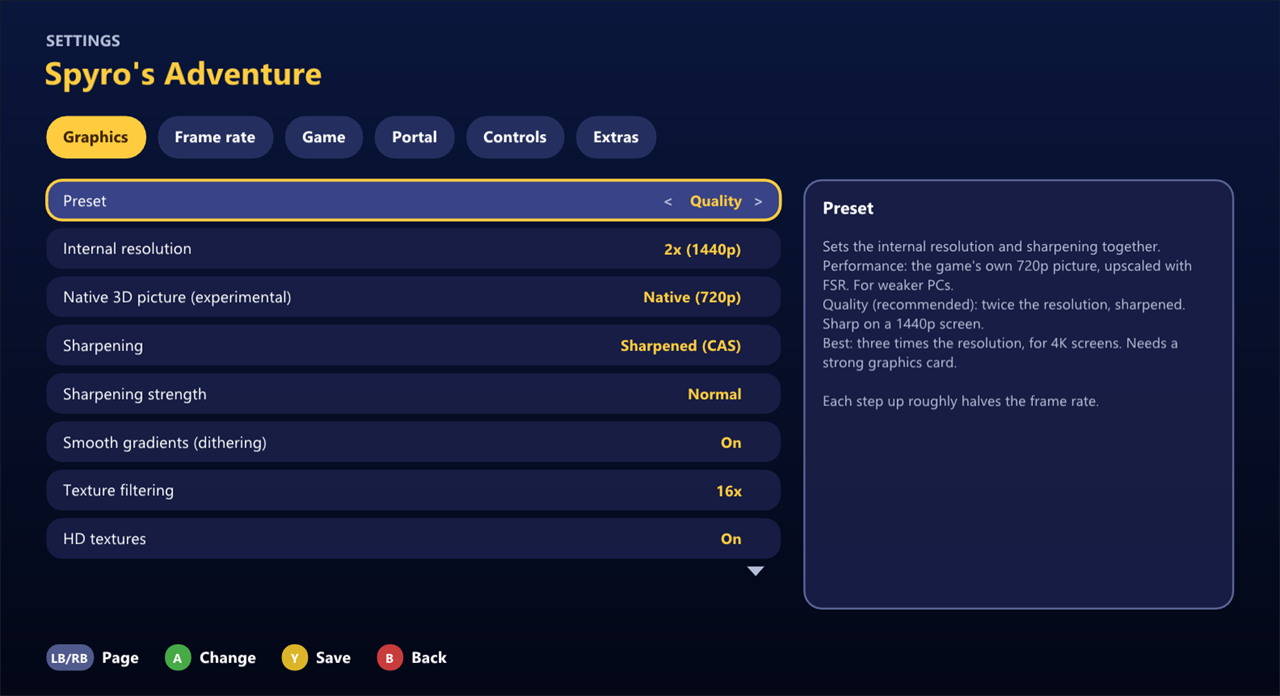 Its settings in Core of Light, the same pages as in the game's own menu (F4). The game's own pictures aren't shown here: they're Activision's.
## Controls
The game plays as it always did. On top of that:
| | Controller | Keyboard |
|---|---|---|
| Portal menu (put figures on) | Guide, or Back + Start | F6 |
| Take figures off | Back + Y | F5 |
| Settings | Back + RB | F4 |
| Achievements | in the settings, under Game | F7 |
| Which controller plays which player | L3 + R3 | F9 |
The settings menu shows the keyboard keys for the game itself under Controls.
## How far it is
Chapter 1 plays all the way through, cutscenes and voices included, and has been played a lot. The
rest of the game should work the same way, but nobody has played it to the end yet. If something
breaks further in, please [tell me](https://github.com/tsapZ/SSARecomp/issues/new/choose).
What's being worked on: [docs/roadmap.md](docs/roadmap.md). Known bugs and the details:
[docs/STATUS.md](docs/STATUS.md).
## Help
**The setup says it's the wrong disc.** This port is made for one version of the game (see
[Which disc](#which-disc)). If you have another one, open an issue with the message (it names the disc's title, region and hash).
**It runs slowly.** Press F4, go to Graphics and pick *Performance*, or a lower internal resolution.
**Where are my saves and figures?** Saves in `Documents\Skylanders\Spyro's Adventure`, figures in
`Documents\Skylanders\Figures` (shared by all six games). Core of Light can export all of it for a
new PC.
**Why are there no screenshots of the game?** They'd show its artwork, which belongs to Activision. The picture above is its settings page in Core of Light, the banner our own drawing.
## Which disc
The Xbox 360 disc with a region-free `default.xex` (title `415608AB`), text and voices in ten
languages. Its SHA-256 is in [docs/game/default.xex.sha256](docs/game/default.xex.sha256); the
setup, the game and the launcher check it. Another pressing with the same code (another language set, for example) works as well: they also compare the code part of the file ([docs/game/default.xex.code](docs/game/default.xex.code)).
## Reporting a problem
Open an [issue](https://github.com/tsapZ/SSARecomp/issues/new/choose) with the **Problem** form:
what you did and what happened. It helps a lot to attach the report from Core of Light (**LB**, the
launcher's settings, > **Report a problem**, or the question it asks after a crash). That's one text
file on your desktop with the latest logs and settings, your Windows user name taken out. Without
the launcher, the logs are in the `logs` folder next to the game's exe.
## Why this exists
I wanted to play the Xbox 360 Skylanders games on my PC with just a controller, no emulator, and
with a nicer picture. That's really all it is: a private fan project. It's public in case someone
else wants the same.
## How it was made
To be upfront about it: almost all of the code here was written by [Claude](https://claude.ai) in
Claude Code, the recompile setup, the fixes, the portal menu, the launcher and the installer, and
most of the docs too. I decided what to build, said what was broken and played the games a lot. If
AI-made projects aren't your thing, that's fair.
## For developers
The game's Xbox 360 code is recompiled to x86-64 with [ReXGlue](https://github.com/rexglue/rexglue-sdk)
(no CPU emulation); the graphics go through Xenia's D3D12 path. This repository holds only our own
code: the recompiled game code is made on your PC from your disc's `default.xex` when you build.
Building needs Windows, Visual Studio 2022 (C++ workload and C++ Clang tools), CMake, Ninja, just,
Git and Python 3, and the extracted disc in `rom/` ([rom/README.md](rom/README.md)). Steps:
[docs/development.md](docs/development.md), then `just play-release`. `just package-installer` builds
the setup. All docs: [docs/README.md](docs/README.md).
The banner and the button at the top are drawn by Core of Light's [`tools/make_banner.ps1`](https://github.com/tsapZ/SkylandersCoreOfLight/blob/main/tools/make_banner.ps1).
## Credits
- **[SwapForceRecomp](https://github.com/tsapZ/SwapForceRecomp)** (Skylanders: Swap Force): this
project is scaffolded from it; app, portal, menus and tooling come from there.
- **[GiantsRecomp](https://github.com/TheBiemGamer/GiantsRecomp)** by TheBiemGamer brought
Skylanders Giants to PC and is the template SwapForceRecomp started from: build setup, tooling
and workflow.
- **[ReXGlue](https://github.com/rexglue/rexglue-sdk)**, the static recompilation SDK, here in
TheBiemGamer's fork with our fixes on top.
- **[skylanders-portal](https://github.com/TheBiemGamer/skylanders-portal)** by TheBiemGamer:
the portal (software and USB), its overlay and the figure catalog, here in a fork with the
shared portal and settings menus on top.
- Figure save-data decoding builds on public reverse-engineering of the Skylanders NFC format,
among others **[SkyReader](https://github.com/reedstrm/SkyReader)**.
- **[extract-xiso](https://github.com/XboxDev/extract-xiso)** is included (prebuilt, unmodified)
for the installer (`installer/extract-xiso.LICENSE.txt`).
Skylanders is a trademark of Activision. This project is not affiliated with or endorsed by
Activision.
## License
The code and documentation in this repository are released under the [MIT license](LICENSE). That
doesn't cover the game or its data, which you need to own and supply yourself, or the third-party
components in `thirdparty/`, which keep their own licenses.