
Tell RStudio where to find the Git executable
You only have to set this up once per machine.
TL;DR
Make sure RStudio can find the git executable.
- File > New Project… Do you see an option to create from Version Control? If yes, good.
- Select New Directory > Empty Project. Do you see a checkbox “Create a git repository”? If yes, good, CHECK IT.
- Give this disposable test project a name and click Create Project. Do you see a “Git” tab in the upper right pane, the same one that has “Environment” and “History”? If yes, good.
If all looks good, you can delete this project. Looks like RStudio and git are talking to each other. YAY.
Keep reading if things don’t go so well or you want to know more.
Find Git
RStudio can only act as a GUI front-end for Git if Git has been successfully installed AND RStudio can find it.
A basic test for successful installation of git is to simply enter git in the shell. If you get a complaint about git not being found, it means installation was unsuccessful or that it is not being found, i.e. it is not on your PATH.
If you are not sure where the git executable lives, try this in a shell:
which git(Mac, Linux)where git(most versions of Windows)
If Git appears to be installed and findable, launch RStudio. Quit and re-launch RStudio if there’s any doubt in your mind about whether you opened RStudio before or after installing Git. Don’t make me stop this car and restart RStudio for you in office hours. DO IT.
From RStudio, go to Tools > Global Options > Git/SVN and make sure that the box Git executable points to … the Git executable. It should read something like:
/usr/bin/git(Mac, Linux)C:/Program Files (x86)/Git/bin/git.exe(Windows)Here is a screenshot of someone doing this on a Windows machine.
- WARNING: On Windows, do NOT use
C:/Program Files (x86)/Git/cmd/git.exe.binis GOOD YES!cmdis BAD NO!
- WARNING: On Windows, do NOT use
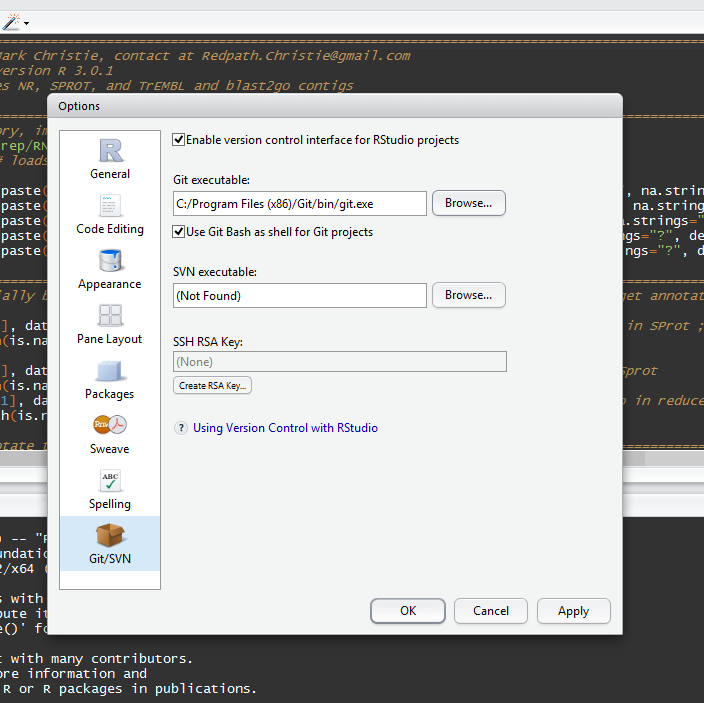
Restart RStudio if you make any changes. Don’t make me stop this car again and restart RStudio for you in office hours. DO IT.
Do the steps at the top of the page to see if RStudio and git are communicating now.
No joy?
I’ve seen this help: With your Project open, go to
Tools > Project Options.... If available, click on “Git/SVN” and select “Git” in the Version control system dropdown menu. Answer “yes” to the “Confirm New Git Repository” pop up. Answer “yes” to the “Confirm Restart RStudio” pop up.If you installed Git via GitHub for Windows, it is possible the Git executable is really well hidden. Get our help or install Git another way.
Your
PATHis probably not set up correctly and/or you should re-install Git and control/notice where it’s going. Read more in troubleshooting.Get our help.
Go back to the index for the all the Git stuff.