
High performance rasterization tool for Python built in Rust, inspired by the [fasterize](https://github.com/ecohealthalliance/fasterize.git) package with lots of useful improvements (see [API](#API)).
**rusterize** is designed to work on _all_ shapely geometries, even when they are nested inside complex geometry collections. Functionally, it supports four input types:
- [geopandas](https://geopandas.org/en/stable/) GeoDataFrame and GeoSeries
- [polars-st](https://oreilles.github.io/polars-st/) GeoDataFrame
- Python list of geometries in shapely.Geometry, WKB, or WKT format
- Numpy array of geometries in shapely.Geometry, WKB, or WKT format
It returns a [xarray](https://docs.xarray.dev/en/stable/), a [numpy](https://numpy.org/), or a sparse array in COOrdinate format.
### Installation
**rusterize** comes with numpy as the only required dependency and is distributed in different flavors. A `core` library that performs the rasterization and returns a bare `numpy` array, a `xarray` flavor that returns a georeferenced `xarray` (requires `xarray` and `rioxarray` and is the recommended flavor), or an `all` flavor with dependencies for all supported inputs.
Install the current version with pip:
```shell
# core library
pip install rusterize
# xarray capabilities
pip install 'rusterize[xarray]'
# support all input types
pip install 'rusterize[all]'
```
### Contributing
Any contribution is welcome! You can install **rusterize** directly from this repo using [maturin](https://www.maturin.rs/) as an editable package. For this to work, you’ll need to have [Rust](https://www.rust-lang.org/tools/install) and [cargo](https://doc.rust-lang.org/cargo/getting-started/installation.html) installed. To run the tests you need to have `gdal` installed as well as the `rusterize[all]` flavor.
```shell
# clone repo
git clone https://github.com//rusterize.git
cd rusterize
# install Rust nightly toolchain
rustup toolchain install nightly-2026-01-09
# install maturin
pip install maturin
# install editable version with optmized code
maturin develop --profile dist-release
# test the new contribution
pytest
```
### API
**rusterize** has a simple API consisting of a single function `rusterize()`:
```python
from rusterize import rusterize
rusterize(
data,
like=None,
res=(30, 30),
out_shape=(10, 10),
extent=(0, 10, 10, 20),
field="field",
by="by",
burn=None,
fun="sum",
background=0,
encoding="xarray",
all_touched=False,
tap=False,
dtype="uint8"
)
```
- **data** : `geopandas.GeoDataFrame`, `geopandas.GeoSeries`, `polars.DataFrame`, `list`, `numpy.ndarray`
Input data to rasterize.
- If `polars.DataFrame`, it must be have a "geometry" column with geometries stored in WKB or WKT format.
- If `list` or `numpy.ndarray`, geometries must be in WKT, WKB, or shapely formats (EPSG is not inferred and defaults to None).
- **like** : `xarray.DataArray` or `xarray.Dataset` (default: None)
Template array used as a spatial blueprint (resolution, shape, extent). Mutually exclusive with `res`, `out_shape`, and `extent`. Requires xarray and rioxarray.
- **res** : `tuple` or `list` (default: None)
Pixel resolution defined as (xres, yres).
- **out_shape** : `tuple` or `list` (default: None)
Output raster dimensions defined as (nrows, ncols).
- **extent** : `tuple` or `list` (default: None)
Spatial bounding box defined as (xmin, ymin, xmax, ymax).
- **field** : `str` (default: None)
Column name to use for pixel values. Mutually exclusive with `burn`. Not considered when input is list or numpy.ndarray.
- **by** : `str` (default: None)
Column used for grouping. Each group is rasterized into a distinct band in the output. Not considered when input is list or numpy.ndarray.
- **burn** : `int`, `float`, or `numpy.ndarray` (default: None)
A static value or a list of values to apply to each geometries. If a `numpy.ndarray`, it must match the length of the geometry data. Mutually exclusive with `field`.
If `burn` is a `numpy.ndarray`, its dtype should match the output `dtype`, otherwise it is internally casted. If `data` is a `geopandas.GeoSeries`, its index is used as `burn` value, unless otherwise specified.
- **fun** : `str` (default: "last")
Pixel function to use when burning geometries. Available options: `sum`, `first`, `last`, `min`, `max`, `count`, or `any`.
- **background** : `int` or `float` (default: numpy.nan)
Value assigned to pixels not covered by any geometry.
- **encoding** : `str` (default: "xarray")
The format of the returned object: `"xarray"`, `"numpy"`, or `"sparse"`.
- **all_touched** : `bool` (default: False)
If True, every pixel touched by a geometry is burned.
- **tap** : `bool` (default: False)
Target Aligned Pixel: aligns the extent to the pixel resolution.
- **dtype** : `str` (default: "float64")
Output data type (e.g., `uint8`, `int32`, `float32`).
Note that control over the desired extent is not as strict as for resolution and shape. That is, when resolution, output shape, and extent are specified, priority is given to resolution and shape. So, extent is not guaranteed, but resolution and shape are. If extent is not given, it is taken from the polygons and is not modified, unless you specify a resolution value. If you only specify an output shape, the extent is maintained. This mimics the logics of `gdal_rasterize`.
### Encoding
**rusterize** offers three encoding options for the rasterization output. You can return a `xarray/numpy` with the rasterized geometries, or a new `SparseArray` structure. This `SparseArray` structure stores the band/row/column triplets of where the geometries should be burned onto the final raster, as well as their corresponding values before applying any pixel function. This can be used as an intermediate output to avoid allocating memory before materializing the final raster, or as a final product. `SparseArray` has three convenience functions: `to_xarray()`, `to_numpy()`, and `to_frame()`. The first two return the final `xarray/numpy` with the appropriate pixel function, the last returns a `polars` dataframe with only the coordinates and values of the rasterized geometries. Note that `SparseArray` avoids allocating memory for the array during rasterization until it's actually needed (e.g. calling `to_xarray()`). See below for an example.
### Usage
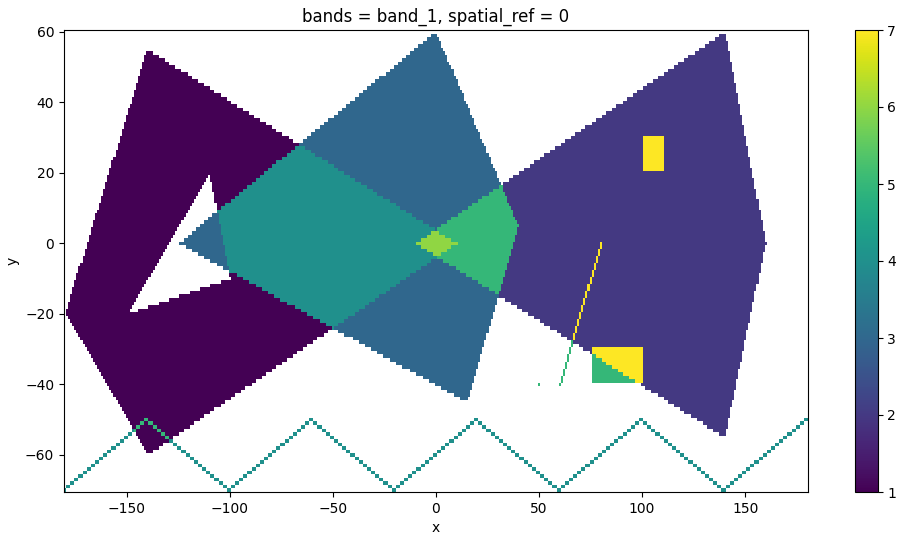
```python
from rusterize import rusterize
import geopandas as gpd
from shapely import wkt
import matplotlib.pyplot as plt
# construct geometries
geoms = [
"POLYGON ((-180 -20, -140 55, 10 0, -140 -60, -180 -20), (-150 -20, -100 -10, -110 20, -150 -20))",
"POLYGON ((-10 0, 140 60, 160 0, 140 -55, -10 0))",
"POLYGON ((-125 0, 0 60, 40 5, 15 -45, -125 0))",
"MULTILINESTRING ((-180 -70, -140 -50), (-140 -50, -100 -70), (-100 -70, -60 -50), (-60 -50, -20 -70), (-20 -70, 20 -50), (20 -50, 60 -70), (60 -70, 100 -50), (100 -50, 140 -70), (140 -70, 180 -50))",
"GEOMETRYCOLLECTION (POINT (50 -40), POLYGON ((75 -40, 75 -30, 100 -30, 100 -40, 75 -40)), LINESTRING (60 -40, 80 0), GEOMETRYCOLLECTION (POLYGON ((100 20, 100 30, 110 30, 110 20, 100 20))))"
]
# create a GeoDataFrame with shapely geometries from WKT
gdf = gpd.GeoDataFrame({'value': range(1, len(geoms) + 1)}, geometry=wkt.loads(geoms), crs='EPSG:32619')
# or pass values directly to rusterize
# rusterize to "xarray" -> returns a xarray with the burned geometries and spatial reference when available (default)
# will raise a ModuleNotFoundError if xarray and rioxarray are not found
output = rusterize(
geoms,
res=(1, 1),
fun="sum",
burn=np.arange(1, len(geoms) + 1)
).squeeze()
output = rusterize(
gdf,
res=(1, 1),
field="value",
fun="sum",
).squeeze()
# plot it
fig, ax = plt.subplots(figsize=(12, 6))
output.plot.imshow(ax=ax)
plt.show()
# rusterize to "sparse" -> custom structure storing the coordinates and values of the rasterized geometries
output = rusterize(
gdf,
res=(1, 1),
field="value",
fun="sum",
encoding="sparse"
)
output
# SparseArray:
# - Shape: (131, 361)
# - Extent: (-180.5, -70.5, 180.5, 60.5)
# - Resolution: (1.0, 1.0)
# - EPSG: 32619
# - Estimated size: 378.33 KB
# materialize into xarray or numpy
array = output.to_xarray()
array = output.to_numpy()
# get only coordinates and values
output.to_frame()
# shape: (29_340, 3)
# ┌─────┬─────┬──────┐
# │ row ┆ col ┆ data │
# │ --- ┆ --- ┆ --- │
# │ u32 ┆ u32 ┆ f64 │
# ╞═════╪═════╪══════╡
# │ 6 ┆ 40 ┆ 1.0 │
# │ 6 ┆ 41 ┆ 1.0 │
# │ 6 ┆ 42 ┆ 1.0 │
# │ 7 ┆ 39 ┆ 1.0 │
# │ 7 ┆ 40 ┆ 1.0 │
# │ … ┆ … ┆ … │
# │ 64 ┆ 258 ┆ 1.0 │
# │ 63 ┆ 259 ┆ 1.0 │
# │ 62 ┆ 259 ┆ 1.0 │
# │ 61 ┆ 260 ┆ 1.0 │
# │ 60 ┆ 260 ┆ 1.0 │
# └─────┴─────┴──────┘
```
### Benchmarks
**rusterize** is fast! Let’s try it on small and large datasets in comparison to GDAL ([benchmark_rusterize.py](benchmarks/benchmark_rusterize.py)). You can run this with [pytest](https://docs.pytest.org/en/stable/) and [pytest-benchmark](https://pytest-benchmark.readthedocs.io/en/stable/):
```
pytest --benchmark-min-rounds=10 --benchmark-time-unit='s'
--------------------------------------------- benchmark: 8 tests -------------------------------------------------
Name (time in s) Min Max Mean StdDev Median IQR Outliers OPS Rounds Iterations
------------------------------------------------------------------------------------------------------------------
test_water_small_f64_numpy 0.0038 0.0045 0.0040 0.0001 0.0040 0.0002 56;3 248.7981 181 1
test_water_small_f64 0.0048 0.0057 0.0050 0.0001 0.0050 0.0001 21;9 198.8759 158 1
test_water_small_gdal_f64 0.0053 0.0057 0.0054 0.0001 0.0054 0.0001 28;14 184.3595 160 1
test_water_large_f64_numpy 1.2628 1.3610 1.3133 0.0314 1.3193 0.0498 5;0 0.7614 10 1
test_water_large_f64 1.2762 1.4723 1.3342 0.0628 1.3149 0.0165 2;4 0.7495 10 1
test_water_large_gdal_f64 1.4128 1.4229 1.4178 0.0029 1.4180 0.0040 3;0 0.7053 10 1
test_roads_uint8 3.3184 3.5184 3.4021 0.0578 3.3849 0.0527 3;1 0.2939 10 1
test_roads_gdal_uint8 9.0672 9.1040 9.0901 0.0109 9.0920 0.0125 2;0 0.1100 10 1
------------------------------------------------------------------------------------------------------------------
```
And fasterize ([benchmark_fasterize.r](benchmarks/benchmark_fasterize.r)). Note that it doesn't support custom `dtype` so the returning raster is `float64`.
```
Unit: seconds
expr min lq mean median uq max neval
fasterize_small_f64 0.05764281 0.06274373 0.1286875 0.06520358 0.1128432 0.6000182 10
fasterize_large_f64 36.91321005 37.71877265 41.0140303 40.81343803 43.9201820 46.5596799 10
```
### Comparison with other tools
While **rusterize** is fast, there are other fast alternatives out there, including `rasterio` and `geocube`. However, **rusterize** allows for a seamless, Rust-native processing with similar or lower memory footprint that **does not** require you to install GDAL and returns the geoinformation you need for downstream processing with ample control over resolution, shape, extent, and data type.
The following is a time comparison of 10 runs (median) on the same large water bodies dataset used earlier (dtype is `float64`) ([run_others.py](benchmarks/run_others.py)).
```
rusterize: 1.3 sec
rasterio: 14.5 sec
geocube: 124.9 sec
```
### Integrations
**rusterize** is integrated into the following libraries:
- [rasterix](https://github.com/xarray-contrib/rasterix)
Disclaimer: Logo originally generated with Nano Banana Pro