
MCP Chaos Rig
A local MCP server that breaks on demand. Test your client against auth failures, disappearing tools, flaky responses, and token expiry, all from a web UI.


---
## The problem
You're building an MCP client. You need to test OAuth flows, token refresh, tool discovery, error handling, and session lifecycle. Production servers don't fail on command. You need a server that does.
## What Chaos Rig does
Run a local MCP server where you control everything:
- **Break authentication**: force 401s and 500s mid-session, expire tokens on demand, reject refresh tokens
- **Break tools**: disable tools to trigger `tools/changed`, switch schema versions live
- **Break reliability**: add random latency, make tool calls fail at configurable rates
- **See everything**: live request log shows inbound JSON-RPC calls and outbound SSE responses, with click-to-expand bodies
### Test scenarios
| Scenario | How to test it |
| --------------------------- | ------------------------------------------------------------------------------------------------ |
| OAuth 2.1 consent flow | Use the interactive consent page: approve, decline, invalid code, tampered state |
| Fixed header auth | Switch to Headers mode, configure key-value pairs, verify client sends them |
| Missing/wrong headers | Send requests with missing or mismatched headers — 401 with details |
| Token rejection mid-session | Toggle "Reject OAuth" to 401 or 500 while client is connected |
| Token expiry and refresh | Set access token TTL to a short value, watch the client refresh |
| Reject refresh tokens | Toggle "Reject refresh tokens" to force re-authentication |
| Wrong client refreshing | Enable "Enforce refresh token ownership" — catches clients that lose credentials and re-register |
| No dynamic registration | Switch to "Pre-registered client only" — `/register` 404s, only your `client_id` works |
| Rotated client credentials | Change the pre-registered `client_id` mid-session — the old one now fails with `invalid_client` |
| Scope discovery conflict | Set different scopes in metadata vs WWW-Authenticate header, test which the client trusts |
| Tool disappearing | Disable a tool in the Tools tab. Clients receive `tools/changed` |
| Tool schema changing | Switch echo or add between v1 and v2 schemas |
| Flaky tool calls | Set failure rate 0-100%. Failed calls return `isError: true` |
| Slow responses | Enable slow mode with configurable latency range |
| PKCE code exchange | OAuth consent page offers "Wrong Code" and "Wrong State" options |
| Database-backed tools | CRUD operations on a real SQLite contact database |
---
## Quick start
```bash
npx mcp-chaos-rig
```
Control panel at [localhost:4100/ui](http://localhost:4100/ui), MCP endpoint at `http://localhost:4100/mcp`. Requires Node 20+.
If you prefer a global install:
```bash
npm install -g mcp-chaos-rig
mcp-chaos-rig
```
Or run from source:
```bash
git clone https://github.com/Typewise/mcp-chaos-rig.git
cd mcp-chaos-rig
npm install
npm run dev
```
### Remote access
If your production environment needs to reach Chaos Rig, expose it via a tunnel (ngrok, Cloudflare Tunnel, etc.) and set `BASE_URL` so OAuth redirects resolve correctly:
```bash
BASE_URL=https://your-tunnel.example.dev npx mcp-chaos-rig
```
Auth mode starts at Bearer, so a tunnel-facing rig usually wants `AUTH_MODE` too (`none`, `bearer`, `headers`, `oauth`). For OAuth with pre-registered credentials, see [Client registration](#client-registration).
### Auth state
All state is in-memory and resets on restart, back to whatever the environment seeds (`AUTH_MODE`, `OAUTH_CLIENT_MODE`, `STATIC_*`) or to the built-in defaults. Bearer starts with token `test-token-123` (valid until changed). OAuth tokens expire per TTL. Refresh tokens track ownership per client when enabled. After restart, do one refresh with ownership off to re-seed, then turn it on.
---
## Control panel tabs
### Server
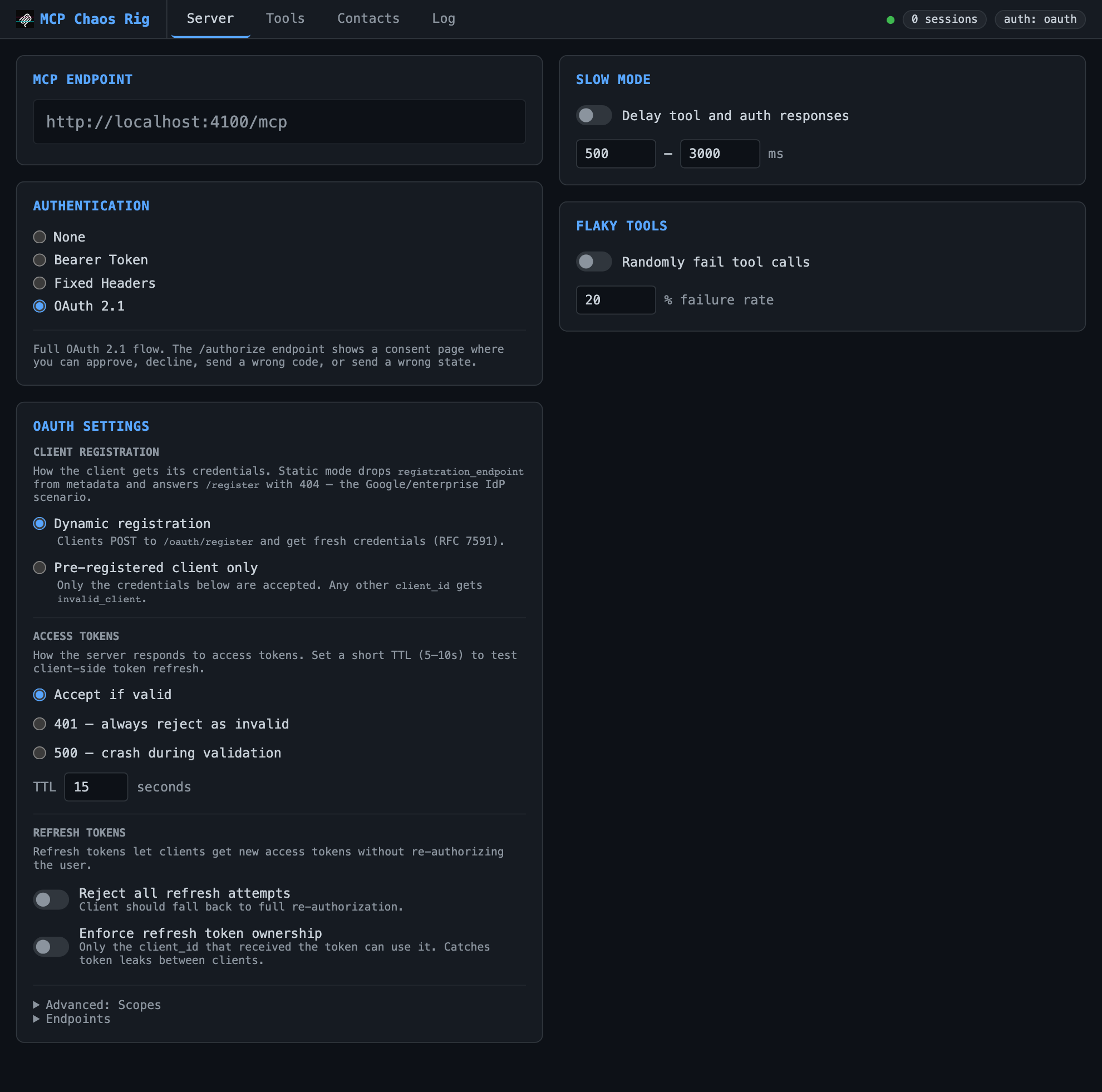
Configure auth mode, slow mode (random latency), and flaky tools (% failure rate).
| Auth mode | Behavior |
| ------------- | ----------------------------------------------------- |
| None | All requests pass through |
| Bearer | Requires `Authorization: Bearer test-token-123` |
| Fixed Headers | Requires configured key-value header pairs on every request |
| OAuth 2.1 | Full authorization flow with interactive consent page |
Bearer, Fixed Headers and OAuth modes support fault injection: force 401 or 500 responses to test error handling. The mode starts at Bearer unless `AUTH_MODE` says otherwise.
OAuth mode adds controls for client registration, access token TTL, refresh token rejection, and refresh token ownership enforcement. OAuth endpoints are listed in a collapsible section.
#### Client registration
| Mode | Behavior |
| -------------------------- | ----------------------------------------------------------------------------------------- |
| Dynamic registration | Clients register themselves at `/oauth/register` and get fresh credentials (RFC 7591) |
| Pre-registered client only | Only the configured `client_id` / `client_secret` is accepted; registration is turned off |
Static mode reproduces authorization servers that issue credentials out of band (Google, Atlassian, most enterprise IdPs):
- `registration_endpoint` disappears from the well-known metadata
- `POST /oauth/register` and `POST /register` return 404 `registration_not_supported`
- any other `client_id` gets `invalid_client` at `/authorize` and `/token`
- an empty `client_secret` makes it a public client, so the token endpoint accepts auth method `none`
- redirect URIs must match a configured one exactly, except the port on loopback hosts (RFC 8252)
The shipped default redirect URI points at a local client. Testing against a deployed client means registering that client's callback instead, or `/authorize` returns 400 `invalid_request` — the response lists the URIs that are registered, since the port relaxation only applies to loopback hosts and `https://` callbacks must match exactly.
Set the client at boot so a tunnel-facing rig starts ready:
```bash
AUTH_MODE=oauth \
OAUTH_CLIENT_MODE=static \
STATIC_CLIENT_ID=acme-client \
STATIC_CLIENT_SECRET=acme-secret \
STATIC_REDIRECT_URIS=https://platform-api.example.app/api/mcp/oauth/callback \
BASE_URL=https://your-tunnel.example.dev npx mcp-chaos-rig
```
`AUTH_MODE` is required here: it defaults to `bearer`, and the OAuth endpoints 404 until it is `oauth` (`none`, `bearer`, `headers`, `oauth`; anything else fails at startup). `STATIC_REDIRECT_URIS` is comma-separated. An empty `STATIC_CLIENT_SECRET=` boots a public client. Everything stays editable from the Server tab afterwards.
Changing the `client_id` drops the previous one, so you can test credential rotation against a live client. Set it from the API too:
```bash
curl -X POST localhost:4100/api/oauth-client -H 'Content-Type: application/json' \
-d '{"mode":"static","clientId":"acme-client","clientSecret":"acme-secret","redirectUris":["http://localhost:3000/api/mcp/oauth/callback"]}'
```
### Tools
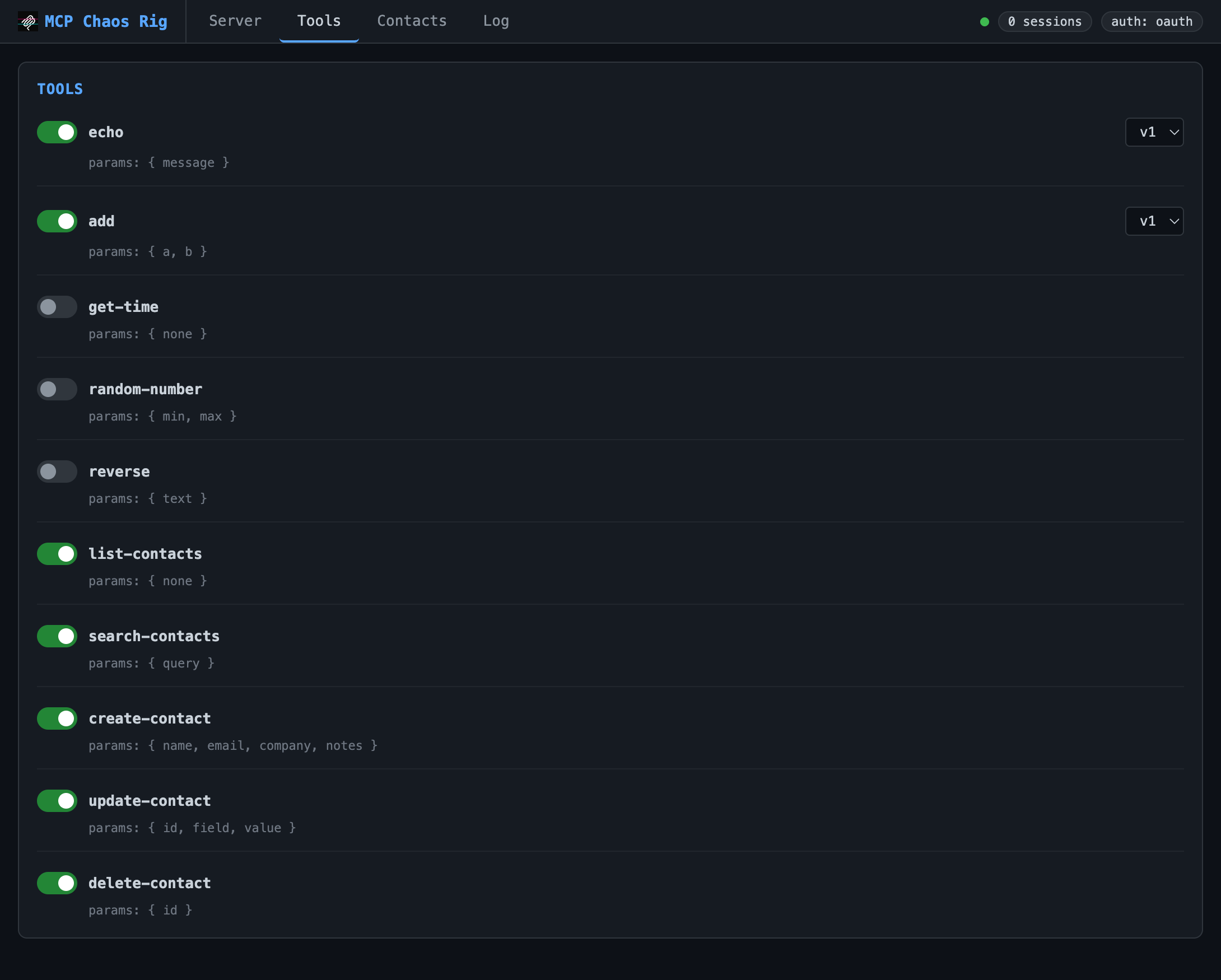
Toggle tools on/off. Disabling sends `tools/changed` to connected clients. Some tools (echo, add) support version switching.
**Available tools:**
- `echo`: returns your message (v2 adds format options)
- `add`: sums two numbers (v2 accepts an array)
- `get-time`: current server time as ISO 8601
- `random-number`: random integer in a range
- `reverse`: reverses a string
- `typeEcho`: echoes one optional parameter per JSON Schema primitive, to check a client round-trips every type
- `dispute-charge`: files a billing dispute, returns a JSON receipt
- `list-contacts`, `get-contact-by-id`, `get-contact-by-email`, `search-contacts`, `create-contact`, `update-contact`, `delete-contact`: SQLite CRUD
Three large-schema tools start disabled, for testing how a client handles wide inputs: `submit-customs-declaration` (all fields required), `create-product-listing` (25 required, 25 optional), `search-properties` (50 optional filters).
### Contacts
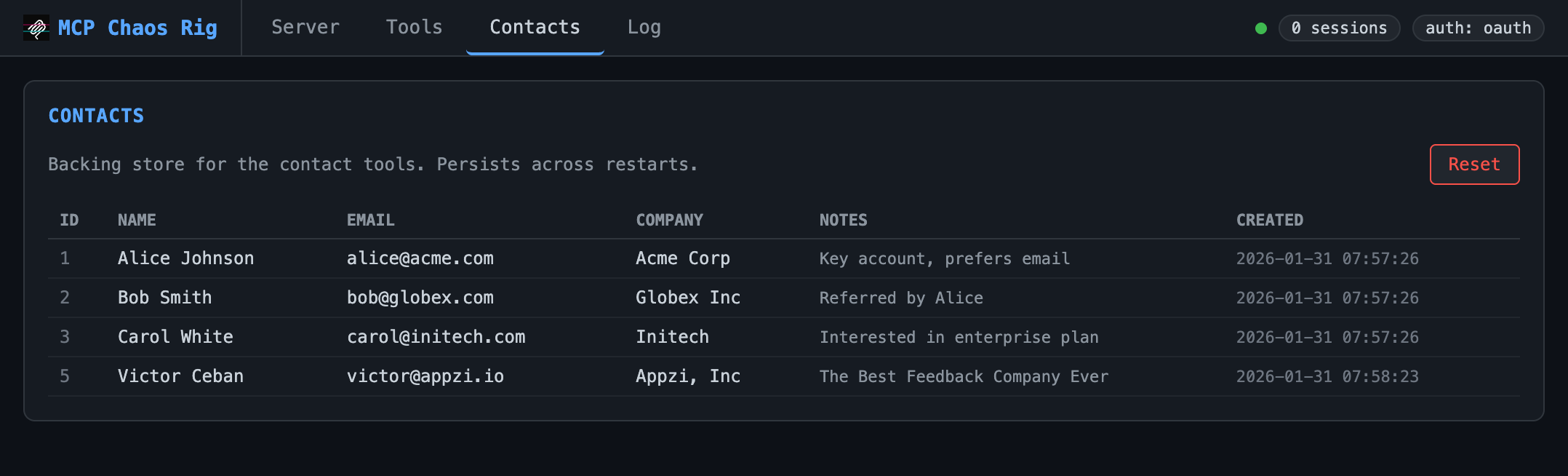
View and reset the SQLite database backing the contact tools. Starts with three seed records.
### Log
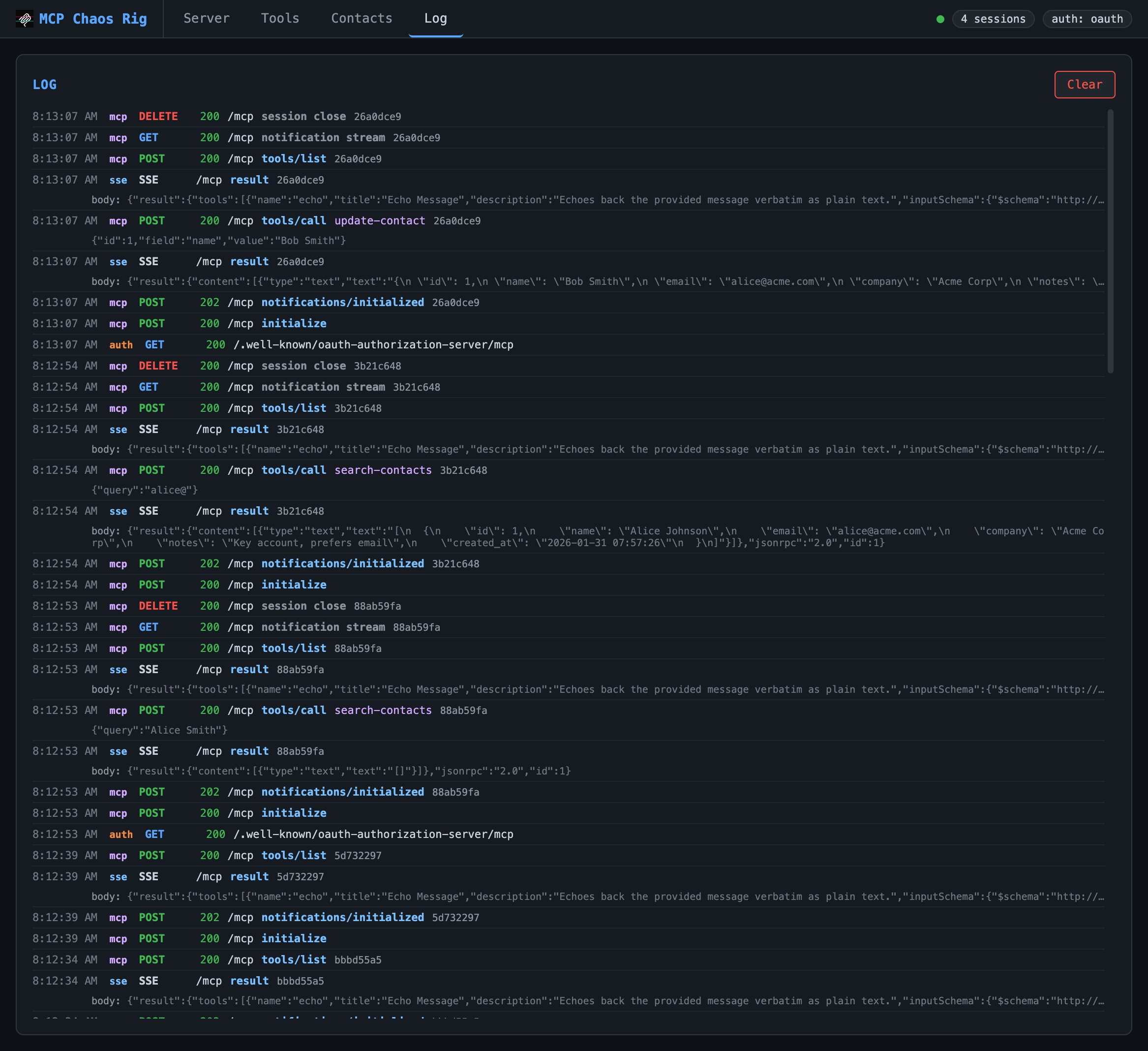
Live request log showing inbound requests and outbound SSE responses. Displays timestamp, source (mcp/auth/sse), method, status, JSON-RPC method, tool name, and arguments. Click any truncated body or args line to expand it. Keeps last 200 entries.
---
## OAuth consent page
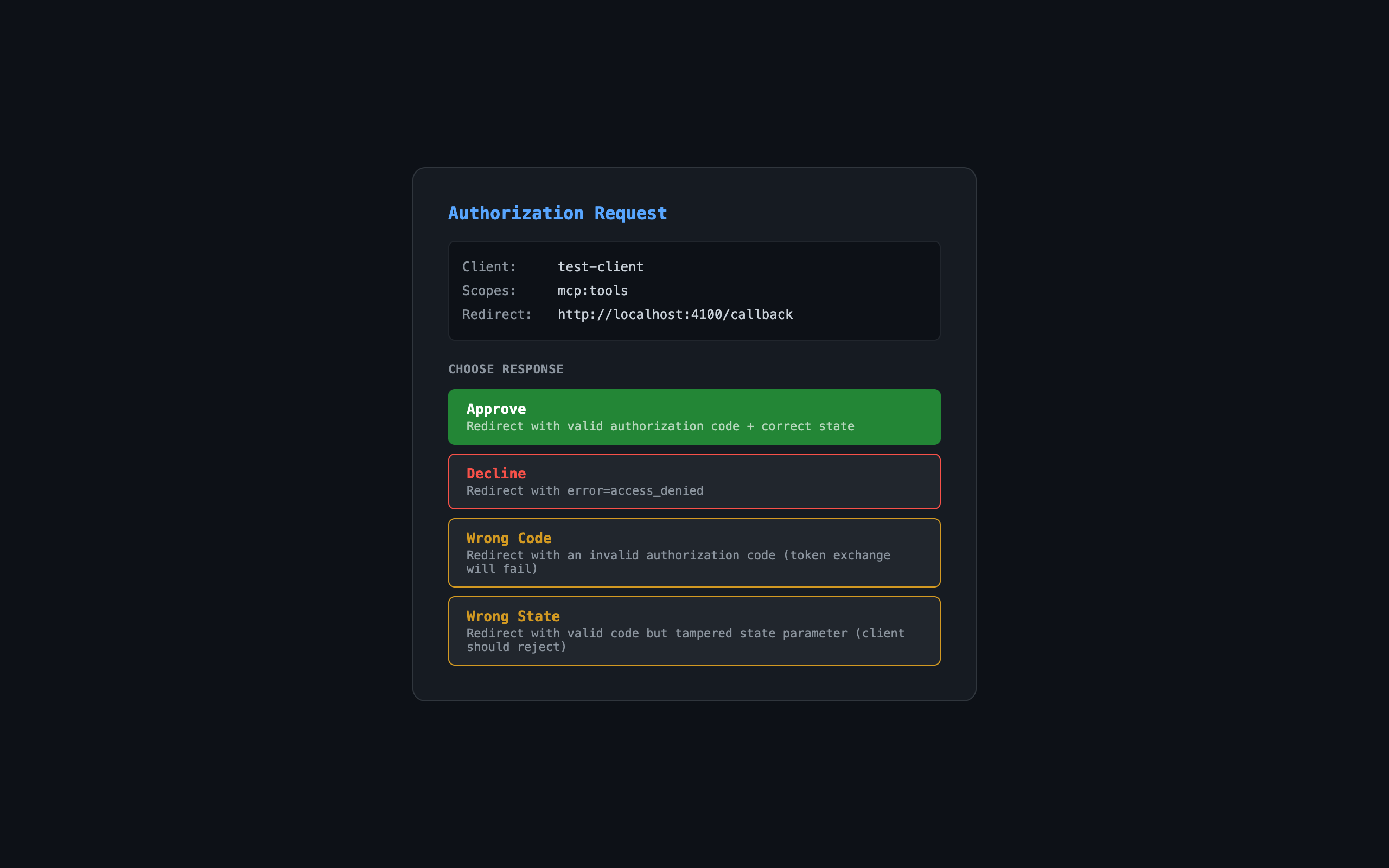
When auth mode is OAuth, the authorization endpoint shows an interactive consent page:
| Button | Result |
| ----------- | -------------------------------------------------- |
| Approve | Redirects with valid authorization code |
| Decline | Redirects with `error=access_denied` |
| Wrong Code | Redirects with invalid code (token exchange fails) |
| Wrong State | Redirects with tampered state parameter |
---
## Links
- [npm package](https://www.npmjs.com/package/mcp-chaos-rig)
- [GitHub repository](https://github.com/Typewise/mcp-chaos-rig)
- [MIT License](LICENSE)