# Neo Chat

A local-first AI chat workspace for models, agents, skills, plugins, search, RAG, voice, memory, and artifacts.
简体中文


Neo Chat is a self-hostable, local-first AI chat application built with Next.js, React, TypeScript, and Zustand. It brings multi-provider chat, assistant presets, text-only Skills, OpenAPI-style plugin tools, remote streamable HTTP MCP servers, web and local global search, knowledge-base RAG, versioned backup and restore, local memory, voice, generated media, rich message rendering, citations, and editable artifacts into one clean workspace.
It is designed for people who want the power of modern AI workspaces without giving up local data ownership. Chat history, workspace metadata, skills, plugin configuration, memories, search indexes, and files stay in the browser by default; server routes act as controlled proxies for model providers, web search, RAG, document parsing, voice, plugin and MCP execution, and deployment health.
## v2.3.0 Highlights
- Added a local global search center for active conversation branches,
attachments, workspaces, knowledge, and memories, with filters, incremental
indexing, direct navigation, and `Ctrl`/`Cmd` + `K` access.
- Added version 3 ZIP backup and transactional restore for local app data and
referenced OPFS files, with integrity checks, rollback recovery, legacy
version 2 JSON compatibility, and deliberate credential exclusion.
- Expanded knowledge-base recovery with preserved originals, editable extracted
content, separate storage/index states, and retry, reparse, reindex,
cancellation, reconciliation, and per-file concurrency protection.
- Added optional destructive-tool approval with allow-once or deny decisions,
plus risk floors, argument redaction, stable function fingerprints,
non-destructive chat-scoped approvals, and fail-closed server validation for
plugin and MCP execution.
- Made marketplace and deployment failures visible, unified effective search
capability, kept Firecrawl usable without an API key, and supported trusted
user-configured HTTP/private-network endpoints in self-hosted deployments.
- Fixed OpenAI Responses multi-turn history, cross-origin image display/export,
model-message download progress, search-setting persistence, restore/clear
write races, and added import hygiene plus isolated Playwright E2E coverage.
## v2.2.0 Highlights
- Added native Anthropic Messages API support through the official SDK.
- Added remote streamable HTTP MCP server discovery and installation from the
official MCP Registry, with plugin-market management, authentication, and
server-side tool execution. This release intentionally supports remote MCP
servers only.
- Strengthened provider requests, API route policy, context budgeting,
outbound URL safety, plugin registration, and Worker deployment validation.
- Reconstructed the chat shell, composer, message rendering, and chat service
internals into smaller modules while preserving existing workflows.
- Fixed known issues across chat history, tool calls, provider streams, media
and exports, memory/RAG/search/voice flows, settings, and accessibility.
## v2.1.0 Highlights
- Rebuilt System Settings with clearer grouped controls, an About panel, deployment health visibility, and local data export/reset actions.
- Added native model image generation/editing with ordered mixed text/image output blocks and OPFS-backed image display caching.
- Expanded built-in plugin media tools with Agnes/Gemini image processing, separate OpenAI-compatible Images API and OpenAI Responses image processing plugins, plugin-level Base URL/Model ID controls, image count parameters where supported, compact image tool results, and Agnes image/video processing upgrades.
- Added thinking intensity controls for reasoning-capable Google/Gemini and OpenAI-compatible models.
- Added Japanese localization for the app shell, SEO metadata, assistant locale routing, voice language handling, and the public Skills catalog.
- Hardened hosted deployments with API request proof, shared-store checks, service health coverage, safer URL/secret handling, and Cloudflare Worker command fixes.
- Added changelog-driven GitHub Release automation and a fork-only upstream sync workflow.
## Features
- Multi-provider chat with Google, Anthropic, OpenAI, and OpenAI-compatible endpoints.
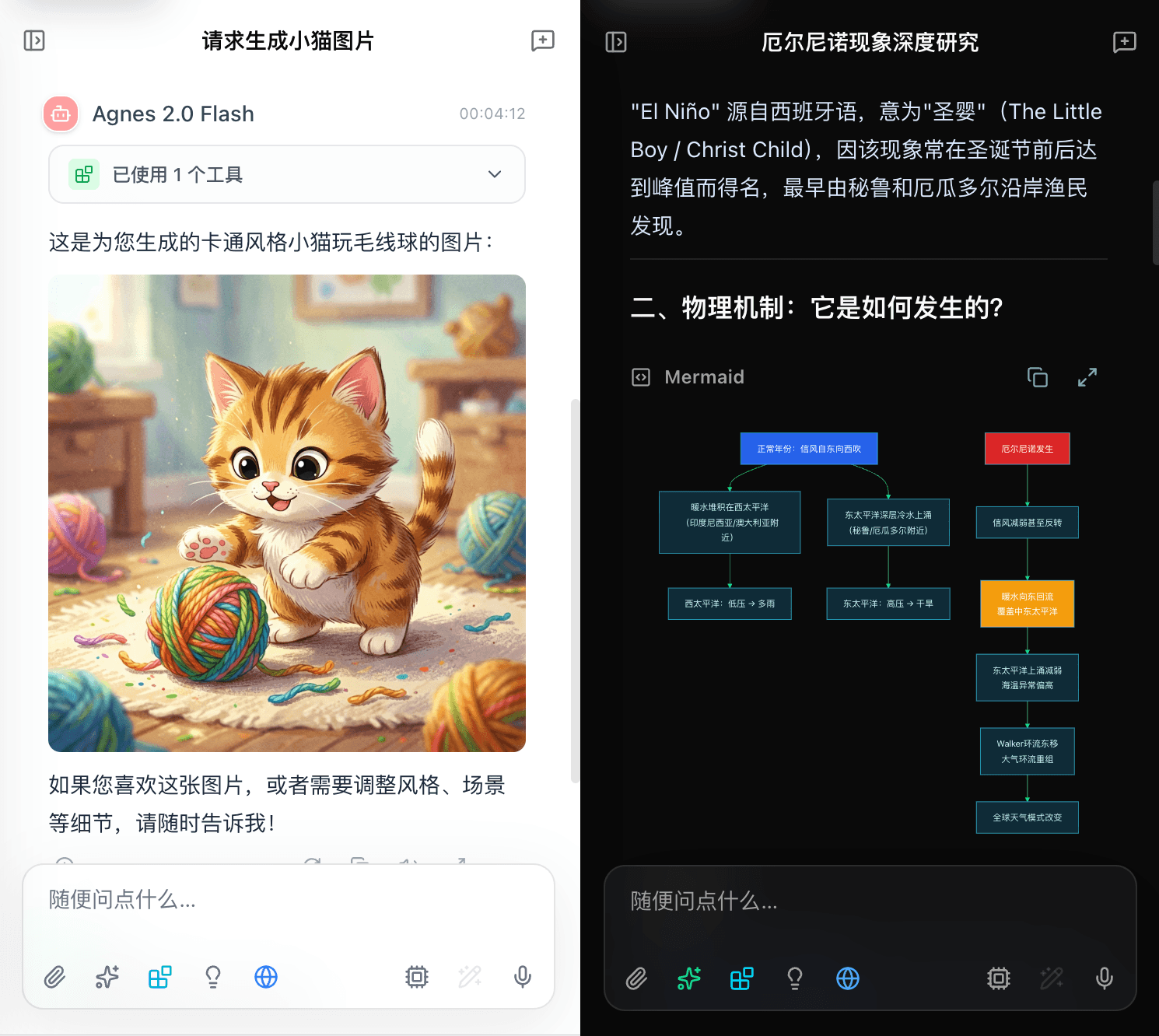
- Native image generation and image editing for models whose metadata exposes image output/input, with ordered mixed text/image message blocks and OPFS-backed Blob URL display caching.
- Local-first sessions, branches, pinned chats, workspaces, workspace files, and assistant instructions.
- Assistant presets from the LobeHub agent registry plus local custom assistants.
- Text-only Skills with localized public catalogs, install/uninstall flows, local edits, custom skills, auto-selection, and workspace presets.
- OpenAPI-based plugin tools plus remote streamable HTTP MCP servers, with per-plugin authentication, server-side execution, transport-derived risk floors, and optional confirmation for destructive calls.
- Built-in tools for web reading, weather, Unsplash search, Agnes/Google image processing, OpenAI-compatible image processing, OpenAI Responses image processing, and Agnes video generation. Agnes image processing supports image-to-image edits, and Agnes video generation supports public image URL to video plus plugin-level model IDs. Image processing plugins remain separate from native model image output.
- Web search through Google native Google Search, OpenAI Web Search, or external providers such as Tavily, Firecrawl, Exa, Bocha, and SearXNG.
- Local global search across active chat branches, attachments, workspaces, knowledge, and memories, with source/date/role filters and direct result navigation.
- Knowledge-base RAG with preserved original files, editable extracted content, Mineru/LlamaParse document parsing, optional vector indexing, and recovery actions for failed parsing or indexing.
- Versioned ZIP backup and transactional restore for local metadata and referenced OPFS files, excluding credentials and external service data.
- Local memory with optional memory search, background extraction, and dream consolidation.
- Voice input and output through browser APIs, ElevenLabs, Mimo, or compatible configured providers.
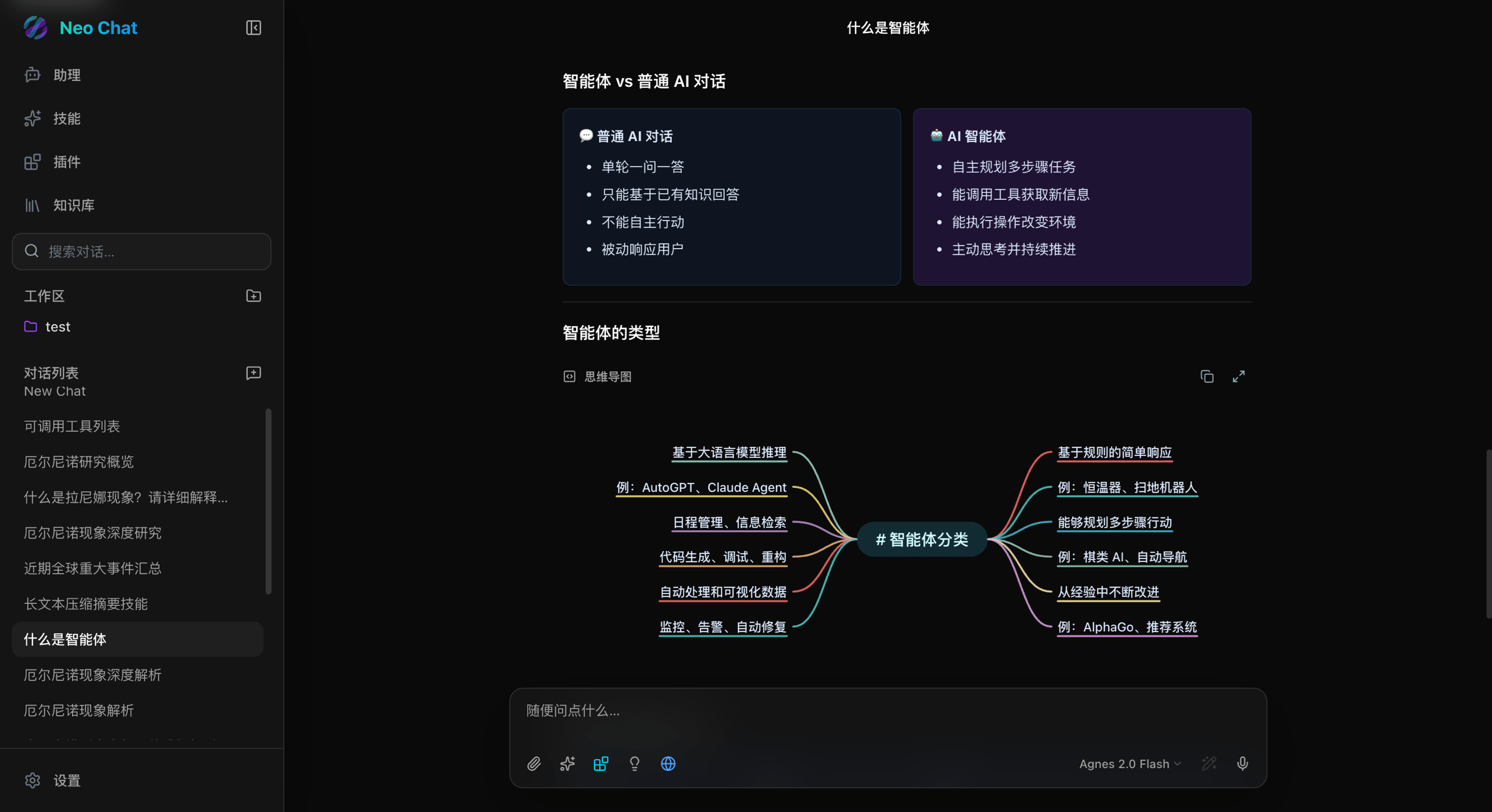
- Rich message rendering for Markdown, safe inline HTML visual blocks, GFM tables, math, code highlighting, Mermaid diagrams, mind maps, citations, reasoning, tool calls, images, audio, and artifacts.
- Local BYOK encryption for user-entered provider, plugin, search, RAG, and voice secrets.
- Deployment health checks for BYOK, access password, shared stores, default model, search, RAG, and voice readiness.
- Docker and Cloudflare Workers deployment paths.
## Screenshots
## Quick Start
### Requirements
- Node.js 22
- pnpm 10.30.3
### Run Locally
```bash
pnpm install
pnpm dev
```
Open `http://localhost:3000`, then configure at least one model provider in Settings.
For deployment-wide defaults, copy the environment template:
```bash
cp .env.example .env.local
```
Most settings can be managed in the browser. Server environment variables are useful when you want a shared default provider, hosted deployment safety, access password protection, shared runtime stores, or managed defaults for search, RAG, document parsing, voice, memory, and HTML visual rendering.
## Deployment
### Docker Compose
```bash
docker compose up --build
```
The compose file publishes Neo Chat on `http://localhost:3000` and uses local/self-hosted safety defaults. For production Docker deployments, set stable BYOK values, use shared stores for hosted or multi-instance deployments, and enable `TRUST_PROXY_HEADERS` only behind a proxy that strips spoofed forwarded headers.
### Docker Image
```bash
docker build -t neo-chat:local .
docker run --rm -p 3000:3000 -e BYOK_ALLOW_EPHEMERAL_KEY=true neo-chat:local
```
The Docker workflow builds pull requests and publishes `main` / `v*` tags to GitHub Container Registry:
```text
ghcr.io/u14app/neo-chat:latest
```
### Vercel
Import the repository as a Next.js project. Vercel can use the framework preset
and package manager detection from `pnpm-lock.yaml` and the `packageManager`
field, so the project does not need a custom output directory.
Recommended project settings:
```text
Framework Preset: Next.js
Install Command: default, or corepack pnpm install --frozen-lockfile
Build Command: pnpm build
Output Directory: default
```
For public Vercel deployments, configure production environment variables in
the Vercel project settings:
```bash
DEPLOYMENT_MODE=hosted
RATE_LIMIT_STORE=upstash
DOCUMENT_PARSE_JOB_STORE=upstash
PLUGIN_REGISTRY_STORE=upstash
BYOK_ALLOW_EPHEMERAL_KEY=false
NEXT_PUBLIC_SITE_URL=https://your-domain.com
```
Store deployment passwords, provider keys, BYOK material, and shared store
credentials as Vercel environment variables with the appropriate Production,
Preview, or Development scope. Do not commit these values to the repository.
When a `NEXT_PUBLIC_*` value affects metadata or generated public links, set it
for the environments that build those deployments.
### Cloudflare Workers
```bash
pnpm build:worker
pnpm worker:size
pnpm worker:dry-run
pnpm preview:worker
pnpm deploy:worker
```
Workers should run in hosted mode and use public HTTPS upstreams. When using
Cloudflare Workers Builds, use separate build and deploy commands so the
OpenNext build output exists before deployment:
```bash
# Build command
pnpm build:worker
# Deploy command
pnpm exec opennextjs-cloudflare deploy -- --keep-vars
```
`--keep-vars` preserves runtime variables and secrets configured in the
Cloudflare dashboard instead of replacing them with only the values committed in
`wrangler.jsonc`.
Production Workers should configure runtime variables in the Cloudflare
dashboard under **Settings -> Variables and Secrets**. Use plain variables for
non-sensitive deployment defaults:
```bash
DEPLOYMENT_MODE=hosted
RATE_LIMIT_STORE=upstash
DOCUMENT_PARSE_JOB_STORE=upstash
PLUGIN_REGISTRY_STORE=upstash
BYOK_ALLOW_EPHEMERAL_KEY=false
NEXT_PUBLIC_SITE_URL=https://your-domain.com
```
Use secrets for deployment passwords, provider keys, BYOK material, and shared
store credentials:
```bash
wrangler secret put BYOK_PRIVATE_KEY_PEM
wrangler secret put BYOK_KEY_ID
wrangler secret put UPSTASH_REDIS_REST_URL
wrangler secret put UPSTASH_REDIS_REST_TOKEN
wrangler secret put ACCESS_PASSWORD
```
For Cloudflare Workers Builds, also add build-time variables under
**Settings -> Builds -> Variables and Secrets** when a value must be available
during `next build`, especially `NEXT_PUBLIC_*` values. Runtime variables are
not available to the build step unless they are also configured there.
Do not commit personal API keys or deployment secrets to `wrangler.jsonc`.
Deployment-level provider keys such as `DEFAULT_PROVIDER_API_KEY` are shared by
everyone using that Worker instance; leave them unset if users should provide
their own keys in the browser.
See [Deployment Hardening](docs/deployment-hardening.md) for production configuration guidance.
## Configuration
Neo Chat is local-first by default:
- Core settings, provider records, selected models, and provider API keys are stored in browser `localStorage`.
- Chat metadata, messages, app settings, installed plugins, installed/custom skills, skill catalog caches, assistants, knowledge metadata, and local memories are stored in IndexedDB through `localforage`.
- Uploaded chat and workspace files, knowledge originals and extracted text, and image display-cache copies are stored in browser OPFS. Runtime `blob:` URLs remain temporary; version 3 ZIP backups bundle referenced app-owned OPFS files while excluding credentials and remote service data.
- User-entered secrets are encrypted in the browser as BYOK envelopes before being sent to API routes.
Important server-side settings:
```bash
# Access gate
ACCESS_PASSWORD="your-access-password"
# Stable BYOK server key for production
BYOK_PRIVATE_KEY_PEM="-----BEGIN PRIVATE KEY-----\n...\n-----END PRIVATE KEY-----"
BYOK_KEY_ID="prod-2026-07"
BYOK_ALLOW_EPHEMERAL_KEY="false"
# Deployment safety
DEPLOYMENT_MODE="local" # or hosted
ALLOW_LOCAL_NETWORK_PROXY=""
# Shared short-lived state for hosted or multi-instance deployments
RATE_LIMIT_STORE="upstash"
DOCUMENT_PARSE_JOB_STORE="upstash"
PLUGIN_REGISTRY_STORE="upstash"
UPSTASH_REDIS_REST_URL="https://..."
UPSTASH_REDIS_REST_TOKEN="..."
```
Default model provider:
```bash
DEFAULT_PROVIDER_TYPE="Google"
DEFAULT_PROVIDER_NAME="Google"
DEFAULT_PROVIDER_BASE_URL=""
DEFAULT_PROVIDER_API_KEY="provider-key"
DEFAULT_PROVIDER_MODELS="model-a,model-b"
```
`DEFAULT_PROVIDER_MODELS` supports multiple formats:
```bash
# Comma-separated model IDs
DEFAULT_PROVIDER_MODELS="gpt-5.5,gpt-5.4-mini"
# JSON string array
DEFAULT_PROVIDER_MODELS='["gpt-5.5","gpt-5.4-mini"]'
# JSON object array with optional display names, capability aliases, and modalities
DEFAULT_PROVIDER_MODELS='[{"id":"gpt-image-2","name":"GPT Image 2","capabilities":["image_generation"]},{"id":"gemini-3.1-flash-image","modalities":{"input":["text","image"],"output":["text","image"]}},"gpt-5.4-mini"]'
```
For JSON object entries, `name` is optional and falls back to `id`.
`capabilities` accepts aliases such as `vision`, `attachment`, `reasoning`,
`tool_call`, `image_generation`, `image_output`, and `image_editing`.
Explicit `modalities.input` / `modalities.output` are preferred when present.
Default task models:
```bash
DEFAULT_MODEL_TITLE_GENERATION="model-a"
DEFAULT_MODEL_RELATED_QUESTIONS="model-a"
DEFAULT_MODEL_CONTEXT_COMPRESSION="model-a"
DEFAULT_MODEL_PROMPT_OPTIMIZATION="model-a"
DEFAULT_MODEL_RAG_QUERY="model-a"
DEFAULT_MODEL_MEMORY="model-a"
```
Search, RAG, document parsing, and voice defaults:
```bash
DEFAULT_SEARCH_PROVIDER="firecrawl"
# Firecrawl search works without an API key; set one for higher rate limits.
DEFAULT_SEARCH_API_KEY=""
DEFAULT_SEARCH_BASE_URL="https://search.example"
DEFAULT_RAG_BASE_URL="https://rag.example"
DEFAULT_RAG_TOKEN="rag-token"
DEFAULT_RAG_TOP_K="10"
DEFAULT_RAG_CHUNK_SIZE="512"
DEFAULT_RAG_NAMESPACE="default"
DEFAULT_DOCUMENT_PARSE_PROVIDER="mineru"
DEFAULT_MINERU_API_TOKEN=""
DEFAULT_LLAMA_PARSE_API_KEY="llama-parse-key"
DEFAULT_VOICE_PROVIDER="elevenlabs"
DEFAULT_ELEVENLABS_API_KEY="elevenlabs-key"
DEFAULT_ELEVENLABS_STT_MODEL="scribe_v2"
DEFAULT_ELEVENLABS_TTS_MODEL="eleven_flash_v2_5"
DEFAULT_ELEVENLABS_TTS_VOICE_ID="bIHbv24MWmeRgasZH58o"
DEFAULT_MIMO_API_KEY="mimo-key"
DEFAULT_MIMO_STT_MODEL="mimo-v2.5-asr"
DEFAULT_MIMO_TTS_MODEL="mimo-v2.5-tts"
DEFAULT_MIMO_TTS_VOICE_ID="mimo_default"
```
Default system behavior:
```bash
DEFAULT_SYSTEM_PROMPT=""
DEFAULT_ENABLE_AUTO_TITLE="true"
DEFAULT_ENABLE_RELATED_QUESTIONS="true"
DEFAULT_ENABLE_AUTO_COMPRESSION="true"
DEFAULT_ENABLE_CODE_COLLAPSE="true"
DEFAULT_ENABLE_HTML_VISUAL_PROMPT="true"
```
Public site URL:
```bash
NEXT_PUBLIC_SITE_URL="https://your-domain.com"
```
For the full template, see [.env.example](.env.example).
## Architecture
```mermaid
flowchart LR
Browser["Browser app\nReact + Zustand"] --> LocalStorage["localStorage\nproviders + settings"]
Browser --> IndexedDB["IndexedDB\nsessions + plugins + skills + knowledge + memories"]
Browser --> OPFS["OPFS\nuploads + workspace files"]
Browser --> ApiRoutes["Next.js API routes"]
ApiRoutes --> Providers["Model providers\nGoogle / Anthropic / OpenAI / compatible"]
ApiRoutes --> Search["Search providers"]
ApiRoutes --> Rag["RAG + document services"]
ApiRoutes --> Plugins["Plugin APIs"]
ApiRoutes --> Voice["Voice providers"]
ApiRoutes --> Health["Deployment health"]
Browser -. encrypted BYOK envelopes .-> ApiRoutes
```
The app keeps durable user data in browser storage whenever possible. API routes provide:
- provider request normalization and streaming;
- BYOK decryption on the server side;
- URL safety gates for proxied upstreams;
- plugin execution through registered plugin IDs and function names;
- deployment health reporting through `/api/health`;
- hosted-mode checks for shared stores and fixed-service network boundaries.
## Skills, Plugins, Search, RAG, and Voice
Skills are text-only prompt-context modules. The app loads localized metadata catalogs from `public/data/skills`, fetches full skill definitions only when needed, and stores installed, edited, and custom skills locally. Active skills can be selected manually, inherited from workspace presets, or auto-selected for a message.
Plugins are executable tools installed from OpenAPI manifests, built-in definitions, or remote streamable HTTP MCP servers discovered from the official MCP Registry. Enabled plugin functions are exposed to compatible models as tools, then executed by the server-side plugin route. MCP v1 support is remote-only: stdio, npm, Docker, local process transports, and OAuth login flows are intentionally out of scope. User-configured MCP server URLs may use HTTP or HTTPS and may target localhost or private networks in either deployment mode; the official Registry remains HTTPS-only. Built-in image processing plugin results stay in the tool details and compact conversation history, so the model can decide whether and how to reference generated or edited images in its follow-up message. OpenAI-compatible Images API and OpenAI Responses image processing are separate plugins so their credentials and activation can be managed independently. Supported built-in media plugins expose plugin-level API Base URL and Model ID fields, optional image count parameters, Agnes image-to-image editing, and Agnes video generation from a public HTTPS image URL while keeping Agnes video as the explicit `create_video` / `get_video_result` two-step flow. Tool-call orchestration uses a high but bounded loop limit to avoid runaway recursive calls while still allowing multi-step tasks.
Search can run through Google native Google Search, OpenAI Web Search, or external providers for other model families including Anthropic. Firecrawl's public service works without an API key; a key only raises its request rate. The separate local global search center indexes active chat branches, attachments, workspaces, knowledge, and memories in browser memory and excludes reasoning, tool payloads, and credentials.
Knowledge-base RAG preserves uploaded originals separately from editable or indexable extracted text, optionally parses documents with Mineru or LlamaParse, and can index chunks into an external vector service. Failed files can be retried, reparsed, reindexed, cancelled, or reconciled without discarding a usable original.
Voice workflows support browser speech APIs and configured external providers. Set `DEFAULT_VOICE_PROVIDER` to `elevenlabs` or `mimo` to enable a server default; leaving it empty keeps browser-native speech as the default. Empty default model values disable the matching STT or TTS capability, and the UI can store user-specific secrets locally.
Deployment health is available from Settings and `/api/health`. It reports non-secret readiness for BYOK, access password, hosted mode, shared stores, default model, search, RAG, and voice configuration.
## Security Model
Neo Chat is self-hosting friendly, not a turnkey public SaaS security boundary.
- User-configured provider, search, RAG, plugin, and MCP targets may use HTTP and private-network addresses in either deployment mode.
- Fixed registries and built-in service targets retain their HTTPS and host allowlists; HTTP media proxying remains controlled by `ALLOW_LOCAL_NETWORK_PROXY`.
- BYOK envelopes prevent plain user-entered secrets from being sent in request bodies.
- API schemas reject unknown high-risk fields and oversized payloads.
- Plugin execution remains server-proxied and validated. Tool calls run automatically by default; an optional System setting pauses only destructive calls for one-time approval or denial. Destructive approval is never persisted for the chat.
- `ACCESS_PASSWORD` is a deployment gate, not an account system.
Before exposing Neo Chat as a public multi-user service, add account authentication, tenant isolation, server-side secret storage, quotas, audit logs, abuse controls, and provider spend limits.
See [Reliability and Safety Model](docs/reliability-and-safety.md) for runtime behavior and recovery notes.
## Development
Quality checks:
```bash
pnpm check:imports
pnpm format:check
pnpm hygiene:artifacts
pnpm lint
pnpm typecheck
pnpm test
pnpm test:e2e
pnpm build
pnpm audit --audit-level low
```
Useful scripts:
```bash
pnpm dev # Start Next.js dev server
pnpm build # Production build
pnpm start # Start production server
pnpm format # Format the repository with Prettier
pnpm format:check # Check repository formatting
pnpm check:imports # Reject disallowed long relative imports
pnpm hygiene:artifacts # Check generated artifact hygiene
pnpm test:e2e # Run isolated Playwright smoke tests on port 3100
pnpm build:worker # Build for Cloudflare Workers
pnpm worker:size # Check Worker gzip size budget
pnpm worker:dry-run # Validate Worker deploy without publishing
pnpm preview:worker # Preview Worker build
pnpm deploy:worker # Deploy Worker build while preserving dashboard vars
pnpm byok:generate # Generate copyable BYOK key values
```
Project layout:
```text
src/app/ Next.js routes and API routes
src/components/ Chat UI, settings, plugin market, knowledge base
src/lib/ Server/client domain helpers and safety gates
src/services/ Provider, search, voice, RAG, and plugin service clients
src/store/ Zustand stores and persistence migrations
src/__tests__/ Vitest coverage for utilities, routes, and workflows
e2e/ Playwright browser smoke tests
docs/ Deployment and reliability notes
```
Project documentation:
- [Environment Variables](docs/environment-variables.md)
- [Plugin Development](docs/plugin-development.md)
- [Privacy and Local Data](docs/privacy-and-local-data.md)
- [Deployment Hardening](docs/deployment-hardening.md)
- [Reliability and Safety Model](docs/reliability-and-safety.md)
- [Roadmap](ROADMAP.md)
- [Changelog](CHANGELOG.md)
### Fork Synchronization
Fork maintainers can enable the `Sync upstream` workflow to fast-forward their fork from the upstream `u14app/neo-chat` `main` branch.
1. In the fork, open **Settings > Actions > General** and allow GitHub Actions to run.
2. In **Workflow permissions**, select **Read and write permissions** so `GITHUB_TOKEN` can push to the fork.
3. Open **Actions > Sync upstream > Run workflow** to trigger the first sync manually.
4. Keep the scheduled workflow enabled if you want the fork to sync daily.
The workflow is skipped in the upstream repository and only runs when GitHub marks the repository as a fork. It uses fast-forward-only merging, so it fails safely when the fork branch has diverged from upstream or a branch protection rule blocks the push.
Optional repository variables can override the defaults:
```text
UPSTREAM_REPOSITORY=u14app/neo-chat
UPSTREAM_BRANCH=main
TARGET_BRANCH=
```
## FAQ
### Does Neo Chat store my data on a server?
By default, durable chat and configuration data live in browser storage. API routes proxy external services, and production deployments should still treat server logs, upstream services, and configured stores according to their own privacy requirements.
### Can I use OpenAI-compatible providers?
Yes. Add an OpenAI-compatible provider in Settings or configure deployment defaults with `DEFAULT_PROVIDER_TYPE="OpenAI Compatible"` and a compatible `/v1` base URL.
### Can I use Anthropic's native Messages API?
Yes. Add an Anthropic provider in Settings or configure `DEFAULT_PROVIDER_TYPE="Anthropic"`. The official base URL is `https://api.anthropic.com`; the app uses Anthropic's native `/v1/messages` API through the official TypeScript SDK.
### Why do I need a stable BYOK private key in production?
Browser secrets are encrypted to the server public key. If the server private key changes, existing local envelopes cannot be decrypted until users re-enter their secrets.
### Can I deploy this as a public SaaS?
Not as-is. Hosted mode tightens URL policy and shared-state requirements, but public SaaS still needs accounts, tenancy, quotas, auditing, and server-side secret management.
### Why did a tool stop after many calls?
Neo Chat keeps tool calls high but bounded. The model can run multi-step tool workflows, but recursive tool loops stop after the configured tool-round limit.
### How do I retrieve previous versions?
Previous versions of the project were developed solely based on the Gemini ecosystem. If you need previous versions, you can obtain them from the `gemini-next-chat` branch, **which has its code archived**.
## Contributing
Contributions are welcome. Keep changes focused, preserve local-first behavior, and run the quality checks before opening a pull request. For security-sensitive changes, include tests for both local and hosted deployment modes.
Read [Contributing](CONTRIBUTING.md), [Security Policy](SECURITY.md), and the
[Code of Conduct](CODE_OF_CONDUCT.md) before opening larger changes.
## Community Support
[LinuxDo](https://linux.do/)
## License
Neo Chat is released under the [MIT License](LICENSE).