# Polyglot Piranha
Polyglot Piranha is a flexible multilingual structural search/replace engine that allows users to apply chains of interdependent structural search/replace rules for deeper cleanups. Polyglot Piranha builds upon tree-sitter queries for expressing the structural search/replace rules.
__This repository contains the Polyglot Piranha framework and pre-built cleanup rules that can be leveraged for deleting code related to stale feature flags__.
## Table of Contents
- [Polyglot Piranha](#polyglot-piranha)
- [Table of Contents](#table-of-contents)
- [Overview](#overview)
- [When is Polyglot Piranha useful?](#when-is-polyglot-piranha-useful)
- [Using Polyglot Piranha](#using-polyglot-piranha)
- [:snake: Python API](#snake-python-api)
- [:computer: Command-line Interface](#computer-command-line-interface)
- [Languages supported](#languages-supported)
- [Piranha's DSL](#piranha-dsl)
- [Getting Started with demos](#getting-started-with-demos)
- [*Stale Feature Flag Cleanup* in depth](#stale-feature-flag-cleanup-in-depth)
- [Visualizing Graphs for Rules and Groups](#visualizing-graphs-for-rules-and-groups)
- [Piranha Arguments](#piranha-arguments)
- [Contributing](#contributing)
## Overview
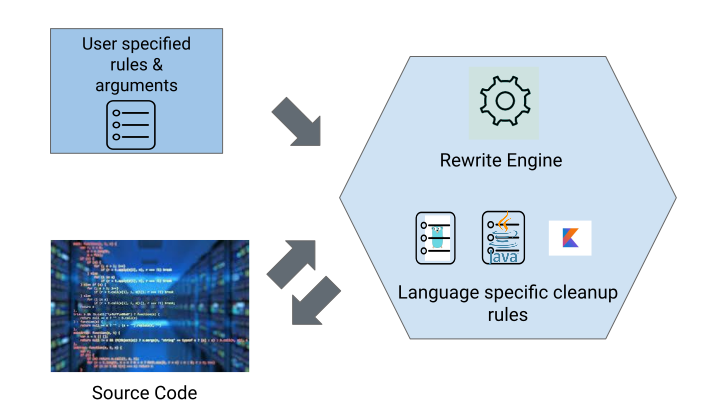
This is the higher level architecture of Polyglot Piranha.
At its heart, Polyglot Piranha is a structural find/replacement (rewrite) engine and pre-build language specific cleanup rules like - like simplifying boolean expressions, simplifying `if-else` statements, deleting empty class, deleting files with no type declarations, inline local variables, and many more.
A user provides :
- A set (or, a graph) of structural find/replace rules
- Path to the code base
- [Arguments](#piranha-arguments) to modify Piranha's behavior (like deleting associated comments).
When Piranha applies the set (or graph) of user defined rules, it triggers the __pre-built__ language specific cleanup rules to do a deep cleanup.
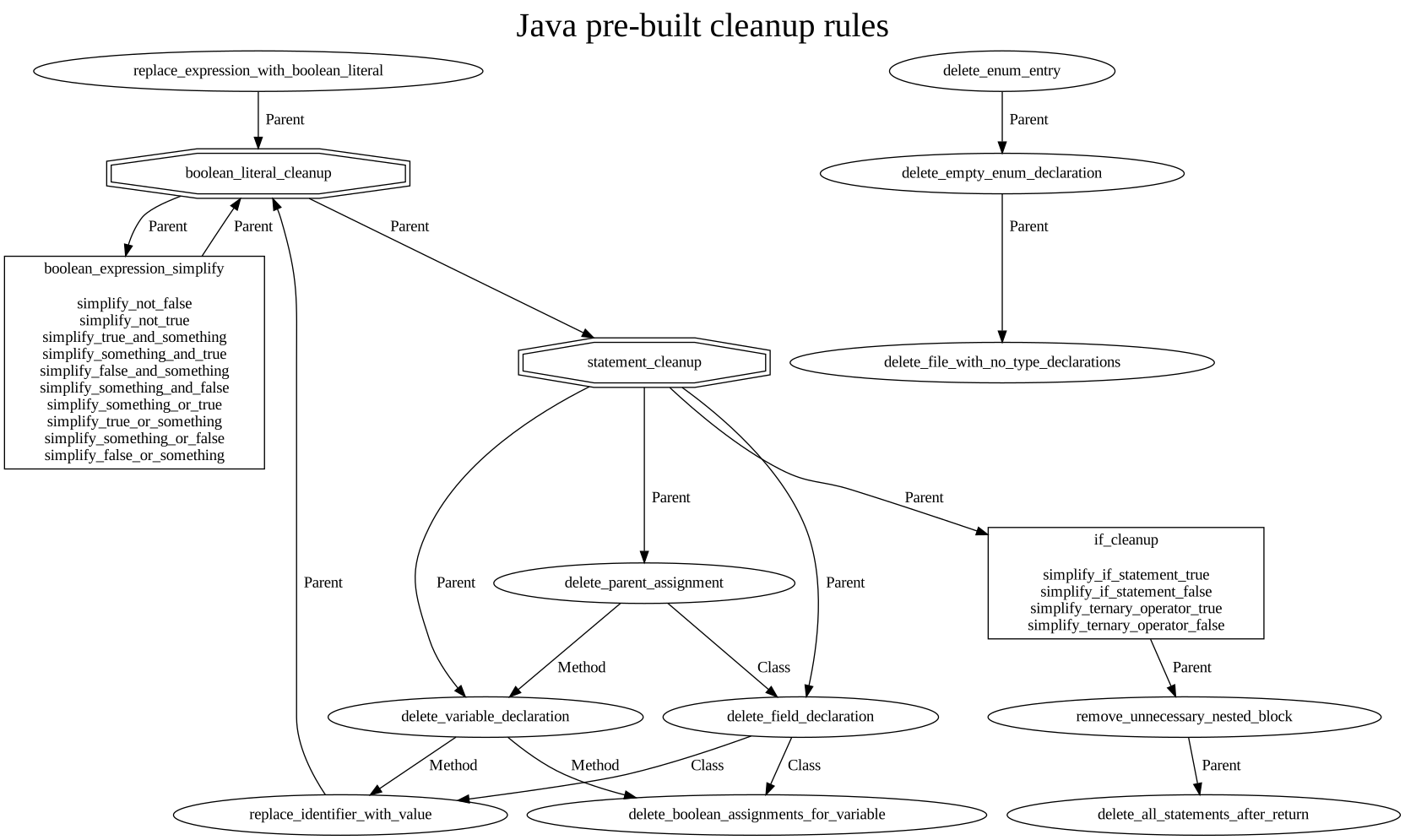
Below we can see an [automatically generated graph](#visualizing-graphs-for-rules-and-groups) for the Java pre-built cleanup rules.
## When is Polyglot Piranha useful?
Example 1 (Stale Feature Flag Cleanup)
Let's take an example, where we know for a fact that the expression `exp.isTreated("SHOW_MENU")` always returns `true` (i.e. the feature *Show Menu* is treated)
```java
public String fooBar(boolean x) {
if(exp.isTreated("SHOW_MENU")|| x){
String menu = getMenu();
return menu;
}
return "";
}
```
To cleanup this code with Piranha, a user would have to write *one* rule to update the expressions like `exp.isTreated("SHOW_MENU")` to `true` and hook it to the pre-built boolean simplification rules. It would result in :
```java
public String fooBar(boolean x) {
String menu = getMenu();
return menu;
}
```
Note how, user only specified the seed rule to update the expression to true, and Piranha simplified the disjunction (`exp.isTreated("SHOW_MENU")|| x` => `true`), then removed the stale if condition and finally deleted the unreachable return statement (`return "";`).
Example 2 (Structural Find/Replace with built-in cleanup)
Let's say a user writes a piranha rule to delete an unused enum case (let's say `LOW`). However, this enum case "co-incidentally" is the only enum case in this enum declaration.
```java
enum Level {
LOW,
}
```
If the user hooks up this *enum case deletion* rule to the pre-built rules, it would not only delete the enum case (`LOW`), but also the consequent empty enum declaration and also optionally delete the consequently empty compilation unit.
Example 3 (Structural Find/Replace with custom cleanup)
Let's take a canonical example of replacing `Arrays.asList` with `Collections.singletonList`, when possible.
This task involves two steps (i) Replacing the expression (ii) Adding the import statement for `Collections` if absent (Assuming *google java format* takes care of the unused imports :smile:).
However, Piranha does not contain pre-built rules to add such a custom import statements.
```java
import java.util.ArrayList;
import java.util.Arrays;
+ import java.util.Collections;
class Character{
String name;
List friends;
List enemies;
Character(String name) {
this.name = name;
this.friends = new ArrayList<>();
- this.enemies = Arrays.asList(this.name);
+ this.enemies = Collections.singletonList(this.name);
}
}
```
For such a scenario a developer could first write a seed rule for replacing the expression and then craft a custom "cleanup" rule (that would be triggered by the seed rule) to add the import statement if absent within the same file.
*Note a user can also craft a set of rules that trigger no other rule, i.e. use piranha as a simple structural find/replace tool*
*If you end up implementing a cleanup rule that could be useful for the community, feel free to make a PR to add it into the pre-built language specific rules*
## Using Polyglot Piranha
Polyglot Piranha can be used as a python library or as a command line tool.
### :snake: Python API
Installing the Python API
`pip install polyglot-piranha`
Currently, we support one simple API (`execute_piranha`), a simple python wrapper around Polyglot Piranha's CLI.
We believe this makes it easy to incorporate Piranha in *"pipelining"*.
execute_piranha
```python
from polyglot_piranha import execute_piranha, PiranhaArguments
piranha_arguments = PiranhaArguments(
path_to_codebase = "...",
path_to_configurations = "...",
language= "java",
substitutions = {},
dry_run = False,
cleanup_comments = True
)
piranha_summary = execute_piranha(piranha_arguments)
```
The API `execute_piranha` accepts a `PiranhaArguments`
An object of PiranhaArguments can be instantiated with the following arguments:
- (*required*) `path_to_codebase` (`str`): Path to source code folder
- (*required*) `path_to_configuration` (`str`) : A directory containing files named `rules.toml` and `edges.toml`
* `rules.toml`: *piranha rules* expresses the specific AST patterns to match and __replacement patterns__ for these matches (in-place). These rules can also specify the pre-built language specific cleanups to trigger.
* `edges.toml` : expresses the flow between the rules
- (*required*) `language` (`str`) : Target language (`java`, `py`, `kt`, `swift`, `py`, `ts` and `tsx`)
- (*required*) `substitutions` (`dict`): Substitutions to instantiate the initial set of feature flag rules
- (*optional*) `dry_run` (`bool`) : Disables in-place rewriting of code
- (*optional*) `cleanup_comments` (`bool`) : Enables deletion of associated comments
- (*optional*) `cleanup_comments_buffer` (`usize`): The number of lines to consider for cleaning up the comments
- (*optional*) `number_of_ancestors_in_parent_scope` (`usize`): The number of ancestors considered when `PARENT` rules
- (*optional*) `delete_file_if_empty` (`bool`): User option that determines whether an empty file will be deleted
- (*optional*) `delete_consecutive_new_lines` (`bool`) : Replaces consecutive `\n`s with a single `\n`
Returns
`[Piranha_Output]` : a [`PiranhaOutputSummary`](/src/models/piranha_output.rs) for each file touched or analyzed by Piranha. It contains useful information like, matches found (for *match-only* rules), rewrites performed, and content of the file after the rewrite. The content is particularly useful when `dry_run` is passed as `true`.
### :computer: Command-line Interface
Get platform-specific binary from [releases](https://github.com/uber/piranha/releases) or build it from source following the below steps:
* Install [Rust](https://www.rust-lang.org/tools/install)
* `git clone https://github.com/uber/piranha.git`
* `cd piranha`
* `cargo build --release` (`cargo build --release --no-default-features` for macOS)
* Binary will be generated under `target/release`
```bash
Polyglot Piranha
A refactoring tool that eliminates dead code related to stale feature flags
Usage: polyglot_piranha [OPTIONS] --path-to-codebase --path-to-configurations -l
Options:
-c, --path-to-codebase
Path to source code folder or file
--include [...]
Paths to include (as glob patterns)
--exclude [...]
Paths to exclude (as glob patterns)
-t, --code-snippet
Code snippet to transform [default: ]
-s
These substitutions instantiate the initial set of rules. Usage : -s stale_flag_name=SOME_FLAG -s namespace=SOME_NS1
-f, --path-to-configurations
Directory containing the configuration files - `rules.toml` and `edges.toml` (optional)
-j, --path-to-output-summary
Path to output summary json file
-l
The target language [possible values: java, swift, py, kt, go, tsx, ts]
--delete-file-if-empty
User option that determines whether an empty file will be deleted
--delete-consecutive-new-lines
Replaces consecutive `\n`s with a `\n`
--global-tag-prefix
the prefix used for global tag names [default: GLOBAL_TAG.]
--number-of-ancestors-in-parent-scope
The number of ancestors considered when `PARENT` rules [default: 4]
--cleanup-comments-buffer
The number of lines to consider for cleaning up the comments [default: 2]
--cleanup-comments
Enables deletion of associated comments
--dry-run
Disables in-place rewriting of code
--allow-dirty-ast
Allows syntax errors in the input source code
-h, --help
Print help
```
The output JSON is the serialization of- [`PiranhaOutputSummary`](/src/models/piranha_output.rs) produced for each file touched or analyzed by Piranha.
*It can be seen that the Python API is basically a wrapper around this command line interface.*
## Piranha DSL
In PolyglotPiranha, programs are graphs of match-replace rules that can be composed and chained.
### Rules
Individual edits are represented as rules in Polyglot Piranha, where each rule matches and replaces a specific code snippet.
A program in PolyglotPiranha should contain at least one rule with the following properties:
- `query`: A query to find the code pattern to refactor
- `replace_node`: The captured node in the query that will be replaced.
- `replace_string`: Replacement string or pattern for the refactored code.
- `holes`: Placeholders in your queries that will be instantiated at runtime.
- `is_seed_rule`: Specifies whether this rule is an entry point for the rule graph.
Optionally, a rule can have filters. Piranha supports two kinds of filters:
- `enclosing_node`: A pattern that specifies the enclosing node of the rule.
- `not_enclosing_node`: A pattern that should not match any parent of the main match.
The `enclosing_node` and `not_enclosing_node` filters can be refined using contains with specified `[at_least, at_most]` bounds, as well as `not_contains`.
The rule queries, and filters can be written in the following languages:
Tree-sitter Queries
For a detailed understanding of the syntax, refer to the [Tree-sitter Syntax Reference](https://tree-sitter.github.io/tree-sitter/syntax-highlighting#queries).
Regular Expressions (Regex)
To create a rule in regex, prepend your query with `rgx `.
For instance: `rgx `. Piranha supports the regex syntax derived from the [regex](https://docs.rs/regex/) crate.
Concrete Syntax
Piranha's Concrete Syntax is a custom rule language designed for matching and replacing code.
Concrete Syntax operates at the parse tree level, similar to [comby](https://comby.dev/).
The key difference is that it matches a parse tree node only if the entire parse tree can be traversed using the concrete syntax template.
To use concrete syntax, prepend the query with `cs `.
For example, to match the code snippet `exp.isTreated("SHOW_MENU")`, you can use the following query `cs :[object].isTreated(:[string])`
Example of a rule in TOML
```toml
[[rules]]
name = "your_rule_name"
query = """(
(method_invocation name: (_) @name
arguments: (argument_list) @args) @invk
(#eq? @name @method_name))
"""
replace_node = "invk"
replace = "foo @args"
holes = ["method_name"]
is_seed_rule = true
[[rules.filters]]
enclosing_node = "cs class MyClass { :[body] }"
```
### Edges
Edges in Polyglot Piranha allow rules to depend on each other, establishing a hierarchy or sequence of application among rules.
An edge essentially describes the direction of dependency between two or more rules.
Edges are also represented in the TOML format.
Example edges in TOML:
```toml
[[edges]]
scope = "Method"
from = "your_rule_name"
to = ["other_rule_name", "another_rule_name"]
[[edges]]
scope = "Method"
from = "other_rule_name"
to = ["your_rule_name"]
```
## Getting Started with demos
Running the Demos
We believe, the easiest way to get started with Piranha is to build upon the demos.
To setup the demo please follow the below steps:
* `git clone https://github.com/uber/piranha.git`
* `cd piranha`
* Create a virtual environment:
- `python3 -m venv .env`
- `source .env/bin/activate`
* Install Polyglot Piranha
- `pip install --upgrade pip`
- `pip install .` to run demo against current source code (please install [Rust](https://www.rust-lang.org/tools/install), it takes less than a minute)
- Or, `pip install polyglot-piranha` to run demos against the latest release.
Currently, we have demos for the following :
Stale Feature Flag Cleanup:
* run `python3 demo/stale_feature_flag_cleanup_demos.py`. It will execute the scenarios listed under [demo/feature_flag_cleanup/java](demo/feature_flag_cleanup/java/configurations/rules.toml) and [demo/feature_flag_cleanup/kt](demo/feature_flag_cleanup/kt/configurations/rules.toml). These scenarios use simple feature flag API.
* In these demos the `configurations` contain :
* `rules.toml` : expresses how to capture different feature flag APIs (`isTreated`, `enum constant`)
* `piranha_arguments.toml` : expresses the flag behavior, i.e. the flag name and whether it is treated or not. Basically the `substitutions` provided in the `piranha_arguments.toml` can be used to instantiate the rules [reference](#piranha-arguments).
Match-only rules:
* run `python3 demo/match_only_demos.py`
* This demo also shows how the piranha summary output can be used.
* `rules.toml` : express how to capture two patterns - (i) invocation of the method `fooBar("...")` and invocation of the method `barFoo("...")` (but only in non-static methods)
Structural Find/Replace
* run `python3 demo/find_replace_demos.py`
* This demo shows how to use Piranha as a simple structural find/replace tool (that optionally hooks up to built-in cleanup rules)
Structural Find/Replace with Custom Cleanup
* run `python3 demo/find_replace_custom_cleanup_demos.py`
* This demo shows how to replace `new ArrayList<>()` with `Collections.emptyList()`. Note it also adds the required import statement.
*Please refer to our test cases at [`/test-resources//`](/crates/core/test-resources/) as a reference for handling complicated scenarios*
Building upon the stale feature flag cleanup demo
First, check if Polyglot Piranha supports *Stale feature flag cleanup* for the required language.
Then see if your API usage is similar to the ones shown in the demo ([java-demo](/demo/java/configurations/rules.toml)) or in the test resources ([java-ff_system1](/crates/core/test-resources/java/feature_flag_system_1/control/configurations/rules.toml), [java-ff_system2](/crates/core/test-resources/java/feature_flag_system_2/control/configurations/rules.toml), [kt-ff_system1](/crates/core/test-resources/kotlin/feature_flag_system_1/control/configurations/rules.toml), [kt-ff_system2](/crates/core/test-resources/kotlin/feature_flag_system_2/control/configurations/rules.toml)).
If not :|, try to adapt these examples to your requirements. Further, you can study the [tree-sitter query documentation](https://tree-sitter.github.io/tree-sitter/using-parsers#pattern-matching-with-queries) to understand how tree-sitter queries work. It is recommended to read the section- [Adding support for a new feature flag system](#adding-support-for-a-new-feature-flag-system)
Then adapt the [argument file](/demo/java/configurations/piranha_arguments.toml) as per your requirements. For instance, you may want to update the value corresponding to the `@stale_flag_name` and `@treated`. If your rules do not contain require other tags feel free to remove them from your arguments file. In most cases [edges file](/src/cleanup_rules/java/edges.toml) is not required, unless your feature flag system API rules are inter-dependent.
More details for configuring Piranha - [Adding support for a new feature flag system](#adding-support-for-a-new-feature-flag-system)
and [Adding Cleanup Rules](#adding-cleanup-rules).
*One can similarly build upon the other demos too.*
## *Stale Feature Flag Cleanup* in depth
Adding support for a new feature flag system
To onboard a new feature flag system users will have to specify the `/rules.toml` and `/edges.toml` files (look [here](/src/cleanup_rules/java)). The `rules.toml` will contain rules that identify the usage of a feature flag system API. Defining `edges.toml` is required if your feature flag system API rules are inter-dependent.
For instance, you want to delete a method declaration with specific annotations and then update its usages with some boolean value.
Please refer to the `test-resources/java` for detailed examples.
Adding a new API usage
The example below shows a usage of a feature flag API (`experiment.isTreated(STALE_FLAG)`), in a `if_statement`.
```java
class PiranhaDemo {
void demoMethod(ExperimentAPI experiment){
// Some code
if (experiment.isTreated(STALE_FLAG)) {
// Do something
} else {
// Do something else
}
// Do other things
}
}
```
In the case when STALE_FLAG is treated, we would expect Piranha to refactor the code as shown below (assuming that `STALE_FLAG` is treated) :
```java
class PiranhaDemo {
void demoMethod(ExperimentAPI experiment){
// Some code
// Do something
// Do other things
}
}
```
This can be achieved by adding a rule in the `input_rules.toml` file (as shown below) :
```toml
[[rules]]
name = "Enum Based, toggle enabled"
query = """((
(method_invocation
name : (_) @n1
arguments: ((argument_list
([
(field_access field: (_)@f)
(_) @f
])) )
) @mi
)
(#eq? @n1 "isTreated")
(#eq? @f "@stale_flag_name")
)"""
replace_node = "mi"
replace = "@treated"
groups = [ "replace_expression_with_boolean_literal"]
holes = ["treated", "stale_flag_name"]
```
This specifies a rule that matches against expressions like `exp.isTreated(SOME_FLAG_NAME)` and replaces it with `true` or `false`.
The `query` property of the rule contains a [tree-sitter query](https://tree-sitter.github.io/tree-sitter/using-parsers#pattern-matching-with-queries) that is matched against the source code.
The node captured by the tag-name specified in the `replace_node` property is replaced with the pattern specified in the `replace` property.
The `replace` pattern can use the tags from the `query` to construct a replacement based on the match (like [regex-replace](https://docs.microsoft.com/en-us/visualstudio/ide/using-regular-expressions-in-visual-studio?view=vs-2022)).
Each rule also contains the `groups` property, that specifies the kind of change performed by this rule. Based on this group, appropriate
cleanup will be performed by Piranha. For instance, `replace_expression_with_boolean_literal` will trigger deep cleanups to eliminate dead code (like eliminating `consequent` of a `if statement`) caused by replacing an expression with a boolean literal.
Currently, Piranha provides deep clean-ups for edits that belong the groups - `replace_expression_with_boolean_literal`, `delete_statement`, and `delete_method`. Basically, by adding an appropriate entry to the groups, a user can hook up their rules to the pre-built cleanup rules.
Setting the `is_seed_rule=False` ensures that the user defined rule is treated as a cleanup rule not as a seed rule (For more details refer to `demo/find_replace_custom_cleanup`).
A user can also define exclusion filters for a rule (`rules.filters`). These filters allow matching against the context of the primary match. For instance, we can write a rule that matches the expression `new ArrayList<>()` and exclude all instances that occur inside static methods (For more details, refer to the `demo/match_only`).
At a higher level, we can say that - Piranha first selects AST nodes matching `rules.query`, excluding those that match **any of** the `rules.filters.not_contains` (within `rules.filters.enclosing_node`). It then replaces the node identified as `rules.replace_node` with the formatted (using matched tags) content of `rules.replace`.
Parameterizing the behavior of the feature flag API
The `rule` contains `holes` or template variables that need to be instantiated.
For instance, in the above rule `@treated` and `@stale_flag_name` need to be replaced with some concrete value so that the rule matches only the feature flag API usages corresponding to a specific flag, and replace it specifically with `true` or `false`. To specify such a behavior,
user should create a `piranha_arguments.toml` file as shown below (assuming that the behavior of STALE_FLAG is **treated**):
```toml
language = ["java"]
substitutions = [
["stale_flag_name", "STALE_FLAG"],
["treated", "true"]
]
```
This file specifies that, the user wants to perform this refactoring for `java` files.
The `substitutions` field captures mapping between the tags and their corresponding concrete values. In this example, we specify that the tag named `stale_flag_name` should be replaced with `STALE_FLAG` and `treated` with `true`.
Adding Cleanup Rules
This section describes how to configure Piranha to support a new language. Users who do not intend to onboard a new language can skip this section.
This section will describe how to encode cleanup rules that are triggered based on the update applied to the flag API usages.
These rules should perform cleanups like simplifying boolean expressions, or if statements when the condition is constant, or deleting empty interfaces, or in-lining variables.
For instance, the below example shows a rule that simplifies a `or` operation where its `RHS` is true.
```toml
[[rules]]
name = "Or - right operand is True"
query = """(
(binary_expression
left : (_)*
operator:"||"
right: (true)
) @binary_expression)"""
replace_node = "binary_expression"
replace = "true"
```
Currently, Piranha picks up the language specific configurations from `src/cleanup_rule/`.
Example
Let's consider an example where we want to define a cleanup for the scenario where
Before
After
```java
int foobar(){
boolean x = exp.isTreated(SOME_STALE_FLAG);
if (x || someCondition()) {
return 100;
}
return 0;
}
```
```java
int foobar(){
return 100;
}
```
We would first define flag API rules as discussed in the section [Adding Support for a new language](#adding-support-for-a-new-language). Assuming this rule replaces the occurrence of the flag API corresponding to `SOME_STALE_FLAG` with `true`; we would have to define more cleanup rules as follows:
* `R0`: Deletes the enclosing variable declaration (i.e. `x`) (E.g. [java-rules](/src/cleanup_rules/java/rules.toml):`delete_variable_declarations`)
* `R1`: replace the identifier with the RHS of the deleted variable declaration, within the body of the enclosing method where `R0` was applied i.e. replace `x` with `true` within the method body of `foobar`. (E.g. [java-rules](/src/cleanup_rules/java/rules.toml):`replace_expression_with_boolean_literal`)
* `R2`: simplify the boolean expressions, for example replace `true || someCondition()` with `true`, that encloses the node where `R1` was applied. (E.g. [java-rules](/src/cleanup_rules/java/rules.toml): `true_or_something`)
* `R3`: eliminate the enclosing if statement with a constant condition where `R2` was applied (`if (true) { return 100;}` → `return 100;`). E.g. [java-rules](/src/cleanup_rules/java/rules.toml): `simplify_if_statement_true, remove_unnecessary_nested_block`
* `R4`: eliminate unreachable code (`return 0;` in `return 100; return 0;`) in the enclosing block where `R3` was applied. (E.g. [java-rules](/src/cleanup_rules/java/rules.toml): `delete_all_statements_after_return`)
The fact that `R2` has to be applied to the enclosing node where `R1` was applied, is expressed by specifying the `edges.toml` file.
To define how these cleanup rules should be chained, one needs to specify edges (e.g. the [java-edges](/src/cleanup_rules/java/edges.toml) file) between the groups and (or) individual rules.
The edges can be labelled as `Parent`, `Global` or even much finer scopes like `Method` or `Class` (or let's say `functions` in `go-lang`).
* A `Parent` edge implies that after Piranha applies the `"from"` rule to update the node `n1` in the AST to node `n2`, Piranha tries to apply `"to"` rules on any ancestor of `"n2"` (e.g. `R1` → `R2`, `R2` → `R3`, `R3` → `R4`)
* A `Method` edge implies that after Piranha applies the `"from"` rule to update the node `n1` in the AST to node `n2`, Piranha tries to apply `"to"` rules within the enclosing method's body. (e.g. `R0` → `R1`)
* A `Class` edge implies that after Piranha applies the `"from"` rule to update the node `n1` in the AST to node `n2`, Piranha tries to apply `"to"` rules within the enclosing class body. (e.g. in-lining a private field)
* A `Global` edge implies that after Piranha applies the `"from"` rule to update the node `n1` in the AST to node `n2`, Piranha tries to apply `"to"` rules in the entire code base. (e.g. in-lining a public field).
`scope_config.toml` file specifies how to capture these fine-grained scopes like `method`, `function`, `lambda`, `class`.
First decide, what scopes you need to capture, for instance, in Java we capture "Method" and "Class" scopes. Once, you decide the scopes construct scope query generators similar to [java-scope_config](/src/cleanup_rules/java/scope_config.toml). Each scope query generator has two parts - (i) `matcher` is a tree-sitter query that matches the AST for the scope, and (ii) `generator` is a tree-sitter query with holes that is instantiated with the code snippets corresponding to tags when `matcher` is matched.
## Visualizing Graphs for Rules and Groups
Visualizing rules, groups and their edges through a graph is a great way to understand how Piranha Polyglot works.
We use [Graphviz](https://graphviz.org/) to generate a .dot file and a .svg image generated by `visualize_rules_graph.py`.
Please follow the instructions to install Graphviz at .
Moreover, the script also needs the `toml` and `graphviz` python packages.
The script takes as first argument a path for the generated .dot file.
The following arguments are paths for directories containing `rules.toml` and `edges.toml` files.
Optionally, you can provide a `--title` argument to give a title to the generated graph.
To generate the .dot file and the .svg image used in this README (assuming a Python venv and a valid Graphviz installation):
```bash
pip install toml
pip install graphviz
python visualize_rules_graph.py ./java_prebuilt_rules.dot src/cleanup_rules/java --title "Java pre-built cleanup rules"
```
To generate an image for [java-ff_system1](crates/core/test-resources/java/feature_flag_system_1/control/configurations/) in our tests:
```bash
python visualize_rules_graph.py ./java-ff_system1.dot src/cleanup_rules/java test-resources/java/feature_flag_system_1/control/configurations --title "Java Test Feature Flag Cleanup System 1"
```
## Piranha Arguments
The purpose of Piranha Arguments is determining the behavior of Piranha.
- `language` : The programming language used by the source code
- `substitutions` : Seed substitutions for the rules (if any). In case of stale feature flag cleanup, we pass the stale feature flag name and whether it is treated or not.
- `delete_file_if_empty` : enables delete file if it consequently becomes empty
- `delete_consecutive_new_lines` : enables deleting consecutive empty new line
- `cleanup_comments` : enables cleaning up the comments associated to the deleted code elements like fields, methods or classes
- `cleanup_comments_buffer` : determines how many lines above to look up for a comment.
## Development
Prerequisites:
* Install [pre-commit](https://pre-commit.com/)
* Install [taplo](https://taplo.tamasfe.dev/cli/introduction.html)
Naming conventions for the rules
* We name the rules in the format - _. E.g., `delete_method_declaration` or `replace_expression with_boolean_literal`
* We name the dummy rules in the format - `_cleanup` E.g. `statement_cleanup` or `boolean_literal_cleanup`. Using dummy rules (E.g. [java-rules](/src/cleanup_rules/java/rules.toml): `boolean_literal_cleanup`) makes it easier and cleaner when specifying the flow between rules.
Writing tests
Currently we maintain
* Unit tests for the internal functionality can be found under `/unit_test`.
* End-to-end tests for the configurations execute Piranha on the test scenarios in `test-resources//input` and check if the output is as expected (`test-resources//expected_treated` and `test-resources//expected_control`).
To add new scenarios to the existing tests for a given language, you can add them to new file in the `input` directory and then create similarly named files with the expected output in `expected_treated` and `expected_control` directory.
Update the `piranha_arguments_treated.toml` and `piranha_arguments_control.toml` files too.
To add tests for a new language, please add a new `` folder inside `test-resources/` and populate the `input`, `expected_treated` and `expected_control` directories appropriately.