
# unch
[](https://github.com/uchebnick/unch/releases/latest)
[](https://github.com/uchebnick/homebrew-tap)
[](https://github.com/uchebnick/unch/actions/workflows/ci.yml)
[](https://github.com/uchebnick/unch)
[](https://unch.mintlify.app/)
[](https://t.me/unchchat)
**Semantic code search for code symbols and docs.**
`unch` indexes functions, methods, types, classes, interfaces, and attached docs with Tree-sitter, then lets you search them from the terminal. It is useful when you know what the code does, but not the symbol name or file path. Local `llama.cpp` embeddings are the default; OpenRouter and remote publishing are opt-in.
## Why `unch`
- **Indexes symbols, not just lines.** `unch` stores top-level API objects and attached docs for `Go`, `Rust`, `TypeScript`, `JavaScript`, and `Python`.
- **Keeps the local workflow simple.** Build an index once, search from the CLI, and keep everything on your machine unless you explicitly choose OpenRouter embeddings or publish a remote index.
- **Still works with CI.** If you want a shared index, GitHub Actions publishing is available, but it is not required for the normal local flow.
## Install
npm is the recommended install path:
```bash
npm install -g @uchebnick/unch
unch codex install
```
It installs the `unch` CLI and downloads the matching native release binary for your platform.
Run `unch codex install` once to register unch in Codex through `codex mcp add` and install the `unch` skill in `~/.codex/skills/unch/SKILL.md`, then restart Codex.
Homebrew on macOS:
```bash
brew install uchebnick/tap/unch
```
Release installer on macOS and Linux:
```bash
curl -fsSL https://raw.githubusercontent.com/uchebnick/unch/main/install.sh | sudo sh -s -- -b /usr/local/bin
```
This installs `unch` into a system `PATH` directory so you can run it immediately after the installer finishes.
On Apple Silicon macOS, use `/opt/homebrew/bin` instead of `/usr/local/bin`:
```bash
curl -fsSL https://raw.githubusercontent.com/uchebnick/unch/main/install.sh | sudo sh -s -- -b /opt/homebrew/bin
```
PowerShell installer on Windows:
```powershell
iwr https://raw.githubusercontent.com/uchebnick/unch/main/install/install.ps1 -useb | iex
```
This makes `unch` available immediately in the current PowerShell session.
To keep it available in future PowerShell or terminal sessions, add `$HOME\AppData\Local\Programs\unch\bin` to your user `PATH`.
Source install:
```bash
go install github.com/uchebnick/unch/cmd/unch@latest
```
This install path requires a cgo-capable Go toolchain. It is smoke-tested in CI in the official Debian-based Go container image. To pin a specific release, use `@`.
If you want to build from the current checkout:
```bash
go build -o unch ./cmd/unch
```
Published release archives:
- macOS: `arm64`, `x86_64`
- Linux: `arm64`, `x86_64`
- Windows: `arm64`, `x86_64` (`unch.exe`)
On those targets, the installers use published release archives by default, so Go is not required. `install.sh` and `install/install.ps1` only fall back to `go install` when no matching archive is available. `install.sh` is smoke-tested in CI on Ubuntu, Debian, Arch, and NixOS-like environments, including the default no-`-b` path selection flow; the PowerShell installer is smoke-tested on Windows `arm64` and `x86_64`.
Verify the installed binary:
```bash
unch --version
unch --help
```
See [Compatibility](docs/compatibility.md) for the support matrix and upgrade rules, and [Benchmarks](docs/benchmarks.md) for the checked-in `smoke`, `ci`, and `default` suites.
Model selection accepts either a known model id or a direct `.gguf` path:
```bash
unch index --model embeddinggemma
unch index --model qwen3
unch search --model qwen3 "create a new router"
```
OpenRouter is also supported as an embedding provider:
```bash
unch auth openrouter --token sk-or-...
unch index --provider openrouter --model openai/text-embedding-3-small
unch search --provider openrouter --model openai/text-embedding-3-small "create a new router"
```
By default `unch auth openrouter` writes `~/.config/unch/tokens.json`, so you do not need to keep the token in your shell environment. Use `--local` if you want to store it in `.semsearch/tokens.json` for one repository.
## Quick Start
```bash
cd path/to/repo
unch index --root .
unch search "create a new router"
unch search --details "get path variables from a request"
```
OpenRouter flow:
```bash
cd path/to/repo
unch auth openrouter --token sk-or-...
unch index --root . --provider openrouter --model openai/text-embedding-3-small
unch search --provider openrouter --model openai/text-embedding-3-small "create a new router"
```
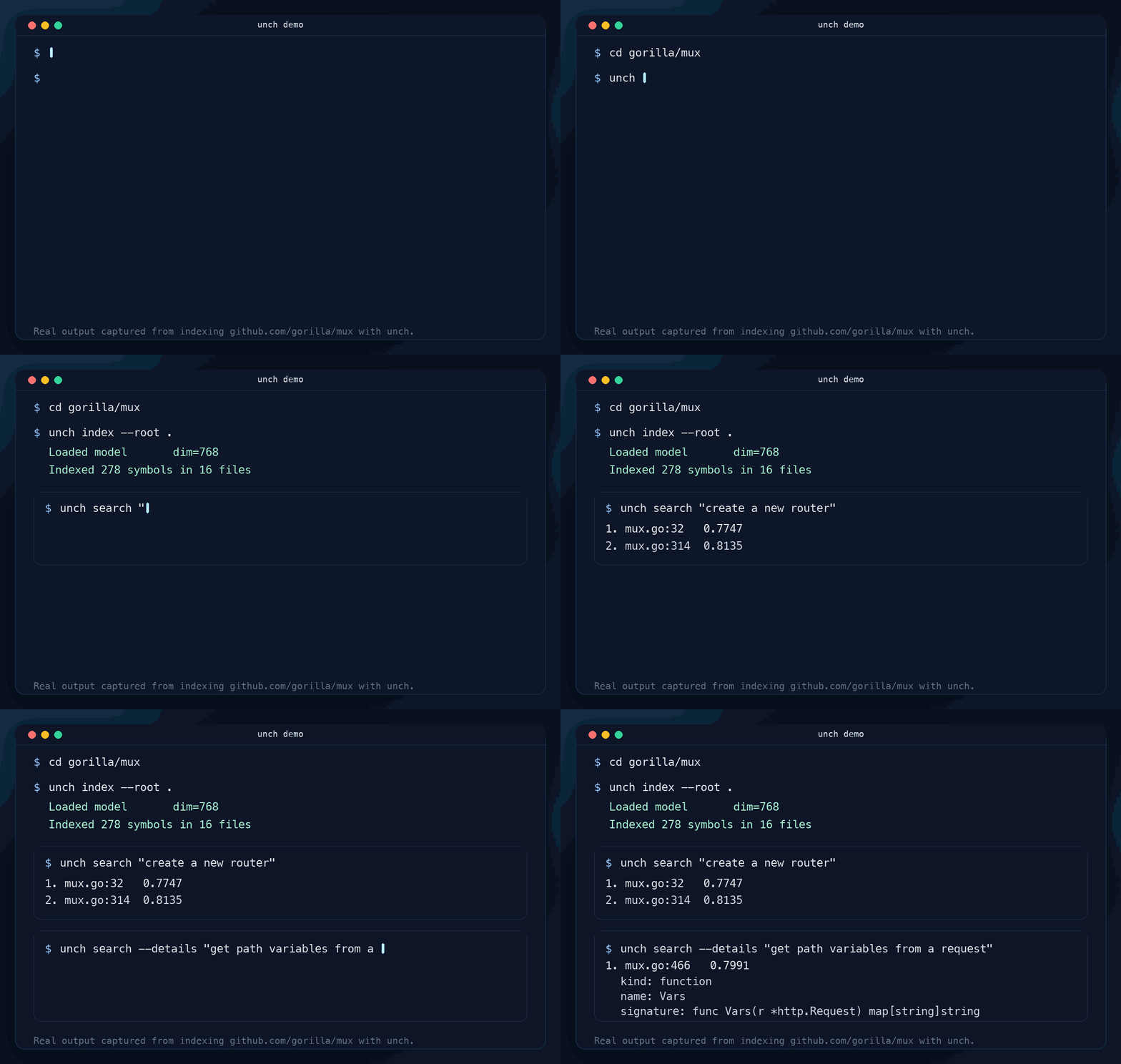
Real output from indexing [`gorilla/mux`](https://github.com/gorilla/mux):
```text
$ unch index --root .
Loaded model dim=768
Indexed 278 symbols in 16 files
$ unch search "create a new router"
1. mux.go:32 0.7747
2. mux.go:314 0.8135
$ unch search --details "get path variables from a request"
1. mux.go:466 0.7991
kind: function
name: Vars
signature: func Vars(r *http.Request) map[string]string
docs: Vars returns the route variables for the current request, if any.
```
The first local `llama.cpp` run may download the default embedding model, fetch local `yzma` runtime libraries, and create `./.semsearch/`.
Each provider and model pair keeps its own active index snapshot. Rebuilding `openrouter/openai/text-embedding-3-small` does not replace the active `llama.cpp/embeddinggemma` snapshot until the new run finishes successfully.
## MCP for Codex
The recommended MCP setup is through the npm wrapper:
```bash
npm install -g @uchebnick/unch
unch codex install
```
Then restart Codex. The setup command registers the `unch` MCP server and installs the `unch` skill in `~/.codex/skills/unch/SKILL.md`.
After restart, ask Codex a codebase question as usual. The skill tells Codex to use these MCP tools before broad file reads:
- `workspace_status` to inspect the repository root, state directory, active provider/model, and index status
- `search_code` to search indexed code symbols before opening many files
- `index_repository` to build or refresh the index when needed
- `remote_sync_index` to refresh from a bound GitHub Actions index before rebuilding locally
- `create_ci_workflow`, `bind_remote_ci`, and `remote_download_index` when you ask Codex to set up or use remote CI-backed indexes
All MCP tools accept an optional `directory` argument. The installed skill passes the active repository path so `unch` searches the workspace Codex is currently editing, even if the MCP server was launched from somewhere else.
Codex starts the stdio server for you with `unch start mcp`; you normally do not need to run that command by hand.
## What It Supports Today
- Tree-sitter indexing for `Go`, `Rust`, `TypeScript`, `JavaScript`, and `Python`
- Top-level API objects and attached documentation
- Local indexing and search first, optional remote publishing through GitHub Actions
- `auto`, `semantic`, and `lexical` search modes
- Legacy `--comment-prefix` and `--context-prefix` only for `index` fallback on unsupported files or parser failures
## Core Commands
### `index`
Build or refresh the local index for a repository.
```bash
unch index --root .
```
Useful flags:
- `--exclude` to skip generated, vendor, or irrelevant paths
- `--provider` to switch between local `llama.cpp` embeddings and remote `openrouter`
- `--model` to use `embeddinggemma`, `qwen3`, or a custom `.gguf` path
- `--ctx-size` to override the selected model context size; `0` uses the model default
- `--lib` to use an existing `yzma` runtime directory
- `--state-dir` to keep index state in a custom `.semsearch` directory
### `search`
Query the current index.
```bash
unch search "sqlite schema"
unch search --mode lexical "Run"
```
Useful flags:
- `--mode` for `auto`, `semantic`, or `lexical`
- `--limit` to control result count
- `--max-distance` to narrow semantic matches
- `--provider` to select the embedding provider that matches the indexed snapshot
- `--model` to search with `embeddinggemma`, `qwen3`, or a custom `.gguf` path
- `--ctx-size` to override the selected model context size; `0` uses the model default
- `--state-dir` to search against a custom `.semsearch` directory
- `--details` to print symbol metadata, signature, docs, and body context for each match
## Remote / CI
Remote indexing is optional. Use it when you want GitHub Actions to publish an index for a repository. The generated workflow file is `.github/workflows/unch-index.yml`.
Create the workflow scaffold:
```bash
unch create ci
```
Bind the local repository state to a GitHub repo or workflow URL:
```bash
unch bind ci https://github.com/uchebnick/unch
```
After the workflow is committed and runs successfully once, `unch search` can refresh the published index automatically when a newer remote version exists. Use `unch remote sync` when you want to force a refresh before searching.
The cross-platform benchmark matrix stays separate from ordinary push CI. It runs on release-tag pushes and manual `workflow_dispatch`, uses the checked-in `ci` suite with a lighter `1 cold / 1 warm / 1 search repeat` profile, and publishes per-platform summaries for Linux, macOS, and Windows.
## Contributing and Feedback
- See [CONTRIBUTING.md](CONTRIBUTING.md) for the local dev loop.
- Open a [bug report](https://github.com/uchebnick/unch/issues/new?template=bug_report.md) if search quality or indexing behavior looks wrong.
- Open a [feature request](https://github.com/uchebnick/unch/issues/new?template=feature_request.md) if you want new language support, ranking behavior, or workflow features.