---
title: "Data Visualization With ggplot2 (and Seaborn)"
subtitle: Biostat 203B
author: "Dr. Hua Zhou @ UCLA"
date: today
format:
html:
theme: cosmo
embed-resources: true
number-sections: true
toc: true
toc-depth: 4
toc-location: left
code-fold: false
knitr:
opts_chunk:
fig.align: 'center'
fig.width: 6
fig.height: 4
message: FALSE
cache: false
---
## Preamble
Display machine information for reproducibility.
::: {.panel-tabset}
#### R
```{r}
sessionInfo()
```
#### Python
```{python}
import IPython
print(IPython.sys_info())
```
:::
We use the ggplot2 package in tidyverse for static visualization. The closest thing in Python is the [plotnine](https://plotnine.readthedocs.io/en/stable/index.html#) library. But we mostly use [Seaborn](https://seaborn.pydata.org/) library, which is based on [matplotlib](https://matplotlib.org/), due to its popularity in the Python data science community. For Julia users, I recommend [Makie.jl](https://docs.makie.org/stable/).
::: {.panel-tabset}
#### R
```{r}
library(tidyverse)
```
#### Python
```{python}
# Load the pandas library
import pandas as pd
# Load numpy for array manipulation
import numpy as np
# Load seaborn plotting library
import seaborn as sns
import matplotlib.pyplot as plt
# Set font sizes in plots
sns.set(font_scale = 1.25)
# Display all columns
pd.set_option('display.max_columns', None)
```
:::
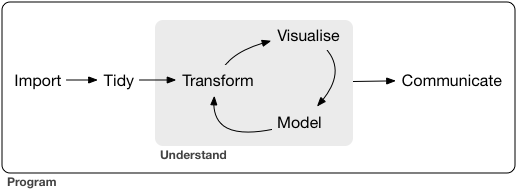
A typical data science project:
## Data visualization
> “The simple graph has brought more information to the data analyst’s mind than any other device.”
>
> John Tukey
## `mpg` data
::: {.panel-tabset}
#### R
- `mpg` data is available from the `ggplot2` package:
```{r}
mpg %>% print(width = Inf)
```
- Tibbles are a generalized form of data frames, which are extensively used in tidyverse.
#### Python
- `mpg` data is available from the `plotline` package:
```{python}
from plotnine.data import mpg
mpg
mpg.info()
```
Note the `mpg` data in Seaborn is different from that in ggplot2: different number of samples and different variable namees.
```{python}
sns.load_dataset("mpg").shape
sns.load_dataset("mpg").info()
```
:::
- `displ`: engine size, in liters.
`hwy`: highway fuel efficiency, in mile per gallon (mpg).
## Aesthetic mappings | r4ds chapter 3.3
### Scatter plot
- `hwy` vs `displ`
::: {.panel-tabset}
#### R
```{r}
ggplot(data = mpg) +
geom_point(mapping = aes(x = displ, y = hwy))
```
#### Python
```{python}
plt.figure()
sns.relplot(
data = mpg,
kind = "scatter",
x = "displ",
y = "hwy"
);
plt.show()
```
:::
- An aesthetic maps data to a specific feature of plot.
- Check available aesthetics for a geometric object by `?geom_point`.
### Color of points
- Color points according to `class`:
::: {.panel-tabset}
#### R
```{r}
ggplot(data = mpg) +
geom_point(mapping = aes(x = displ, y = hwy, color = class))
```
#### Python
```{python}
plt.figure()
sns.relplot(
data = mpg,
kind = "scatter",
x = "displ",
y = "hwy",
hue = "class",
height = 8
);
plt.show()
```
:::
### Size of points
- Assign different sizes to points according to `class`:
::: {.panel-tabset}
#### R
```{r}
#| warning: false
ggplot(data = mpg) +
geom_point(mapping = aes(x = displ, y = hwy, size = class))
```
#### Python
Better to reverse the order, using `size_order` argument.
```{python}
plt.figure()
sns.relplot(
data = mpg,
kind = "scatter",
x = "displ",
y = "hwy",
size = "class",
size_order = np.sort(np.unique(mpg['class']))[::-1],
height = 8
);
plt.show()
```
:::
### Transparency of points
- Assign different transparency levels to points according to `class`:
::: {.panel-tabset}
#### R
```{r}
ggplot(data = mpg) +
geom_point(mapping = aes(x = displ, y = hwy, alpha = class))
```
#### Python (???)
The `alpha` argument in Seaborn only takes a number. I don't know how to do it elegantly, besides stacking different levels of points.
```{python}
plt.figure()
# alphas mapping to each level of class
cats = mpg['class'].unique() # levels sorted
alphas = np.linspace(0, 1, num = cats.size + 2)[1:-1]
_, ax = plt.subplots()
for cls, alpha in zip(cats, alphas):
sns.scatterplot(
data = mpg[mpg['class'] == cls],
x = "displ",
y = "hwy",
alpha = alpha,
ax = ax
);
ax.legend(
labels = cats,
fontsize = 16
)
plt.show()
```
:::
### Shape of points (markers)
- Assign different shapes to points according to `class`:
::: {.panel-tabset}
#### R
```{r}
#| warning: false
ggplot(data = mpg) +
geom_point(mapping = aes(x = displ, y = hwy, shape = class))
```
- Maximum of 6 shapes at a time. By default, additional groups will go unplotted.
#### Python
```{python}
plt.figure()
sns.relplot(
data = mpg,
kind = "scatter",
x = "displ",
y = "hwy",
style = "class",
# marker size
s = 20,
height = 8
);
plt.show()
```
:::
### Manual setting of an aesthetic
- Set the color of all points to be blue:
::: {.panel-tabset}
#### R
```{r}
ggplot(data = mpg) +
geom_point(mapping = aes(x = displ, y = hwy), color = "blue")
```
#### Python
```{python}
plt.figure()
sns.relplot(
data = mpg,
kind = "scatter",
x = "displ",
y = "hwy",
color = "blue", # matplotlib argument
height = 8
);
plt.show()
```
:::
## Facets | r4ds chapter 3.5
### Facets
- Facets divide a plot into subplots based on the values of one or more discrete variables.
::: {.panel-tabset}
#### R
- A subplot for each car type:
```{r}
ggplot(data = mpg) +
geom_point(mapping = aes(x = displ, y = hwy)) +
facet_wrap(~ class, nrow = 2)
```
- A subplot for each car type and drive:
```{r}
ggplot(data = mpg) +
geom_point(mapping = aes(x = displ, y = hwy)) +
facet_grid(drv ~ class)
```
#### Python
- A subplot for each car type:
```{python}
plt.figure()
sns.relplot(
data = mpg,
kind = "scatter",
x = "displ",
y = "hwy",
# Variables that define subsets to plot on different facets
col = "class",
col_wrap = 4
);
plt.show()
```
- A subplot for each car type and drive:
```{python}
sns.relplot(
data = mpg,
kind = "scatter",
x = "displ",
y = "hwy",
# Variables that define subsets to plot on different facets
col = "class",
row = "drv"
);
plt.show()
```
:::
## Geometric objects | r4ds chapter 3.6
### `geom_smooth()`: smooth line
- `hwy` vs `displ` line:
::: {.panel-tabset}
#### R
```{r}
ggplot(data = mpg) +
geom_smooth(mapping = aes(x = displ, y = hwy))
```
#### Python (???)
We can use [`lmplot`](https://seaborn.pydata.org/generated/seaborn.lmplot.html#seaborn.lmplot) (figure-level function) or [`regplot`](https://seaborn.pydata.org/generated/seaborn.regplot.html) (axes-level functions) for regression lines.
The lowess curve looks different from ggplot2. [How to pass lowess parameters to the statsmodels package under the hood?](https://github.com/mwaskom/seaborn/issues/2351)
Confidence intervals cannot currently be drawn for this kind of model.
```{python}
plt.figure()
sns.lmplot(
data = mpg,
x = "displ",
y = "hwy",
scatter = False,
lowess = True
);
plt.show()
```
:::
### Different line types
- Different line types according to `drv`:
::: {.panel-tabset}
#### R
```{r}
ggplot(data = mpg) +
geom_smooth(mapping = aes(x = displ, y = hwy, linetype = drv))
```
#### Python (???)
I don't know how to map line styles to a categorical variable elegantly, besides doing a dumb loop.
```{python}
plt.figure()
drvs = np.sort(mpg['drv'].unique()) # levels sorted: '4', 'f', 'r'
ls = ["-", "--", "-."] # ["solid", "dashed", "dashdot"]
_, ax = plt.subplots()
for dr, ls in zip(drvs, ls):
sns.regplot(
data = mpg[mpg['drv'] == dr],
x = "displ",
y = "hwy",
scatter = False,
lowess = True,
line_kws = {"ls": ls},
ax = ax,
)
ax.legend(
labels = drvs,
fontsize = 16
)
plt.show()
```
:::
### Different line colors
- Different line colors according to `drv`:
::: {.panel-tabset}
#### R
```{r}
ggplot(data = mpg) +
geom_smooth(mapping = aes(x = displ, y = hwy, color = drv))
```
#### Python
```{python}
plt.figure()
sns.lmplot(
data = mpg,
x = "displ",
y = "hwy",
hue = "drv",
scatter = False,
lowess = True
);
plt.show()
```
:::
### Points and lines (together)
::: {.panel-tabset}
#### R
- Lines overlaid over scatter plot:
```{r}
ggplot(data = mpg) +
geom_point(mapping = aes(x = displ, y = hwy)) +
geom_smooth(mapping = aes(x = displ, y = hwy))
```
- Same as
```{r}
ggplot(data = mpg, mapping = aes(x = displ, y = hwy)) +
geom_point() + geom_smooth()
```
#### Python
The keyword argument `scatter` in the `lmplot` or `regplot` functions turns on or off scatter plot, besides the line plot
```{python}
plt.figure()
sns.lmplot(
data = mpg,
x = "displ",
y = "hwy",
scatter = True,
lowess = True
);
plt.show()
```
:::
### Aesthetics for each geometric object
- Different aesthetics in different layers:
::: {.panel-tabset}
#### R
```{r}
ggplot(data = mpg, mapping = aes(x = displ, y = hwy)) +
# Different color for each class
geom_point(mapping = aes(color = class)) +
# Only display the line for subcompact cars
geom_smooth(data = mpg %>% filter(class == "subcompact"), se = FALSE)
```
#### Python
```{python}
plt.figure()
ax = sns.scatterplot(
data = mpg,
x = "displ",
y = "hwy"
);
sns.regplot(
data = mpg[mpg['class'] == "subcompact"],
x = "displ",
y = "hwy",
scatter = False,
lowess = True,
ax = ax
);
plt.show()
```
:::
## Jitter
Jitter adds random noise to X and Y position of each element to avoid over-plotting.
::: {.panel-tabset}
#### R
- `position = "jitter"` adds random noise to X and Y position of each element to avoid over-plotting:
```{r}
ggplot(data = mpg) +
geom_point(mapping = aes(x = displ, y = hwy), position = "jitter")
```
- `geom_jitter()` is similar:
```{r}
ggplot(data = mpg) +
geom_jitter(mapping = aes(x = displ, y = hwy))
```
#### Python (???)
I can only use the `stripplot` to achieve something similar. It treats the `displ` variable as a categorical variable.
```{python}
plt.figure()
sns.stripplot(
data = mpg,
x = "displ",
y = "hwy",
jitter = 0.5,
size = 2.5,
color = "black",
native_scale = True
)
plt.show()
```
:::
## Bar plots | r4ds chapter 3.7
### `diamonds` data
- `diamonds` data:
::: {.panel-tabset}
#### R
```{r}
diamonds
```
#### Python
```{python}
from plotnine.data import diamonds
diamonds
diamonds.info()
```
:::
### Bar plot
::: {.panel-tabset}
#### R
- `geom_bar()` creates bar chart:
```{r}
ggplot(data = diamonds) +
geom_bar(mapping = aes(x = cut))
```
- Bar charts, like histograms, frequency polygons, smoothers, and boxplots, plot some computed variables instead of raw data.
- Check available computed variables for a geometric object via help:
```{r}
#| eval: false
?geom_bar
```
- Use `stat_count()` directly:
```{r}
ggplot(data = diamonds) +
stat_count(mapping = aes(x = cut))
```
- `stat_count()` has a default geom `geom_bar()`.
#### Python
It is called `countplot` in Seaborn!
```{python}
plt.figure()
sns.countplot(
data = diamonds,
x = "cut",
# Single color
color = "skyblue"
)
plt.show()
```
Or the newer `histplot`
```{python}
plt.figure()
sns.histplot(
data = diamonds,
x = "cut"
)
plt.show()
```
Another high-level, figure-level function for displaying categorical variables is [`catplot`](https://seaborn.pydata.org/tutorial/categorical.html).
```{python}
plt.figure()
sns.catplot(
data = diamonds,
x = "cut",
kind = "count"
);
plt.show()
```
:::
- Display frequency instead of counts:
::: {.panel-tabset}
#### R
```{r}
ggplot(data = diamonds) +
geom_bar(mapping = aes(x = cut, y = after_stat(prop), group = 1))
```
Note the aesthetics mapping `group=1` overwrites the default grouping (by `cut`) by considering all observations as a group. Without this we get
```{r}
ggplot(data = diamonds) +
geom_bar(mapping = aes(x = cut, y = after_stat(prop)))
```
#### Python
```{python}
plt.figure()
sns.histplot(
data = diamonds,
x = "cut",
stat = "probability",
# shrink = .8
);
plt.show()
```
:::
- Color bar:
::: {.panel-tabset}
#### R
```{r, results = 'hold'}
ggplot(data = diamonds) +
geom_bar(mapping = aes(x = cut, colour = cut))
```
#### Python (???)
Not sure how to do this in Python.
:::
- Fill color:
::: {.panel-tabset}
#### R
```{r, results = 'hold'}
ggplot(data = diamonds) +
geom_bar(mapping = aes(x = cut, fill = cut))
```
#### Python
By default, `countplot` is already filling different colors for levels. For single color, use the `color` argument.
```{python}
plt.figure()
sns.countplot(
data = diamonds,
x = "cut"
)
plt.show()
```
:::
- Fill color according to another variable:
::: {.panel-tabset}
#### R
```{r}
ggplot(data = diamonds) +
geom_bar(mapping = aes(x = cut, fill = clarity))
```
#### Python (???)
Counts don't look right?
```{python}
plt.figure()
sns.histplot(
data = diamonds,
x = "cut",
hue = "clarity",
multiple = "stack"
)
plt.show()
```
:::
### `geom_bar()` vs `geom_col()`
::: {.panel-tabset}
#### R
- `geom_bar()` makes the height of the bar proportional to the number of cases in each group (or if the weight aesthetic is supplied, the sum of the weights).
```{r}
ggplot(data = diamonds) +
geom_bar(mapping = aes(x = cut))
```
The height of bar is the number of diamonds in each cut category.
- `geom_col()` makes the heights of the bars to represent values in the data.
```{r}
ggplot(data = diamonds) +
geom_col(mapping = aes(x = cut, y = carat))
```
The height of bar is total carat in each cut category.
#### Python
In `histplot` without `weights` argument, bar height is the count of each category.
```{python}
plt.figure()
sns.histplot(
data = diamonds,
x = "cut",
weights = "carat"
)
plt.show()
```
`histplot` with `weights` argument set to the variable being counted/sumed.
```{python}
plt.figure()
sns.histplot(
data = diamonds,
x = "cut",
weights = "carat"
)
plt.show()
```
:::
- `position_fill()` stack elements on top of one another,
normalize height:
::: {.panel-tabset}
#### R
```{r}
ggplot(data = diamonds) +
geom_bar(mapping = aes(x = cut, fill = clarity), position = "fill")
```
#### Python (???)
Set `multiple` to `"fill"` in `histplot`:
```{python}
plt.figure()
sns.histplot(
data = diamonds,
x = "cut",
hue = "clarity",
multiple = "fill"
)
plt.show()
```
:::
- `position_dodge()` arrange elements side by side:
::: {.panel-tabset}
#### R
```{r}
ggplot(data = diamonds) +
geom_bar(mapping = aes(x = cut, fill = clarity), position = "dodge")
```
#### Python
Set `multiple` argument to `dodge` in `histplot`.
```{python}
plt.figure()
sns.histplot(
data = diamonds,
x = "cut",
hue = "clarity",
multiple = "dodge"
)
plt.show()
```
:::
- `position_stack()` stack elements on top of each other:
::: {.panel-tabset}
#### R
```{r}
ggplot(data = diamonds) +
geom_bar(mapping = aes(x = cut, fill = clarity), position = "stack")
```
#### Python
Why the counts look different?
```{python}
plt.figure()
sns.histplot(
data = diamonds,
x = "cut",
hue = "clarity",
multiple = "layer"
)
plt.show()
```
:::
## Box and violin plots
- Recall the mpg data:
::: {.panel-tabset}
#### R
```{r}
mpg
```
#### Python
```{python}
mpg
```
:::
- Boxplots (grouped by class):
::: {.panel-tabset}
#### R
Default:
```{r}
ggplot(data = mpg, mapping = aes(x = class, y = hwy)) +
geom_boxplot()
```
Add notches:
```{r}
ggplot(data = mpg, mapping = aes(x = class, y = hwy)) +
geom_boxplot(notch = TRUE)
```
#### Python
Default:
```{python}
plt.figure()
sns.boxplot(
data = mpg,
x = 'class',
y = 'hwy',
)
plt.show()
```
Add notches:
```{python}
plt.figure()
sns.boxplot(
data = mpg,
x = 'class',
y = 'hwy',
notch = True
)
plt.show()
```
:::
- Violin plots (grouped by class):
::: {.panel-tabset}
#### R
```{r}
ggplot(data = mpg, mapping = aes(x = class, y = hwy)) +
geom_violin()
```
#### Python
```{python}
plt.figure()
sns.violinplot(
data = mpg,
x = 'class',
y = 'hwy',
)
plt.show()
```
:::
## Coordinate systems | r4ds chapter 3.9
- `coord_cartesian()` is the default Cartesian coordinate system:
::: {.panel-tabset}
#### R
```{r}
ggplot(data = mpg, mapping = aes(x = class, y = hwy)) +
geom_boxplot() +
coord_cartesian(xlim = c(0, 5))
```
#### Python
Set xlim:
```{python}
plt.figure()
sns.boxplot(
data = mpg,
x = "class",
y = "hwy"
).set_xlim(-2, 7);
plt.show()
```
:::
- `coord_fixed()` specifies aspect ratio (x / y):
::: {.panel-tabset}
#### R
```{r}
ggplot(data = mpg, mapping = aes(x = class, y = hwy)) +
geom_boxplot() +
coord_fixed(ratio = 1/2)
```
#### Python
`catplot` function accepts the `aspect` argument for aspect ratio.
```{python}
plt.figure()
sns.catplot(
data = mpg,
x = "class",
y = "hwy",
kind = "box",
aspect = 0.5
)
plt.show()
```
:::
- `coord_flip()` flips x- and y- axis:
::: {.panel-tabset}
#### R
```{r}
ggplot(data = mpg, mapping = aes(x = class, y = hwy)) +
geom_boxplot() +
coord_flip()
```
#### Python
Just need to flip the x and y arguments! Looks much nicer.
```{python}
plt.figure()
sns.catplot(
data = mpg,
y = "class",
x = "hwy",
kind = "box"
)
plt.show()
```
:::
- Pie chart:
::: {.panel-tabset}
#### R
```{r}
ggplot(data = mpg, mapping = aes(x = factor(1), fill = class)) +
geom_bar(width = 1) +
coord_polar("y")
```
#### Python
Seaborn does not have a function for pie chart. Let's use Pandas groupby and matplotlib.
```{python}
plt.figure()
mpg.groupby("class").size().plot.pie(autopct = "%.1f%%")
plt.show()
```
:::
- A map:
```{r}
library("maps")
nz <- map_data("nz")
head(nz, 20)
```
```{r}
ggplot(nz, aes(x = long, y = lat, group = group)) +
geom_polygon(fill = "white", colour = "black")
```
- `coord_quickmap()` puts maps in scale:
```{r}
ggplot(nz, aes(long, lat, group = group)) +
geom_polygon(fill = "white", colour = "black") +
coord_quickmap()
```
## Maps
- More extensive mapping functions are provided in `ggmap` package in R.
```{r}
library(ggmap)
# This is Dr. Hua Zhou's key, replace by your own Google Map AIP key
register_google(key = "AIzaSyBbGk_0NghvQIy-6isLQ3KmNoFk55oZc1w")
# Path from LA to Yosemite
trek_df <- trek(
from = "los angeles, california",
to = "yosemite, california",
structure = "route"
)
qmap("california", zoom = 7) +
geom_path(
aes(x = lon, y = lat),
colour = "blue",
linewidth = 1.5,
alpha = .5,
data = trek_df,
lineend = "round"
)
```
- Python users check the [`Cartopy`](https://scitools.org.uk/cartopy/docs/latest/) package.
```{python}
import cartopy.crs as ccrs
plt.figure()
ax = plt.axes(projection=ccrs.Mollweide())
ax.stock_img()
plt.show()
```
- For interactive maps, use `leaflet`!
```{r}
library(leaflet)
leaflet() %>%
addTiles() %>% # Add default OpenStreetMap map tiles
addMarkers(lng = -118.44481, lat = 34.07104, popup = "Bruin")
```
- See this [tutorial](https://nih-r25-modelersandstorytellers.github.io/2023/data-science-tutorials/00-la/00-la.html) for more examples of pulling social-economic data from US Census and ACS (American Community Survey) and mapping them in R.
## Graphics for communications | r4ds chapter 28
### Title
- Figure title should be descriptive:
::: {.panel-tabset}
#### R
```{r}
ggplot(mpg, aes(x = displ, y = hwy)) +
geom_point(aes(color = class)) +
geom_smooth(se = FALSE) +
labs(title = "Fuel efficiency generally decreases with engine size")
```
#### Python
```{python}
plt.figure()
sns.relplot(
data = mpg,
kind = "scatter",
x = "displ",
y = "hwy"
).set(
title = "Fuel efficiency generally decreases with engine size"
)
plt.show()
```
:::
### Subtitle and caption
::: {.panel-tabset}
#### R
```{r}
ggplot(mpg, aes(displ, hwy)) +
geom_point(aes(color = class)) +
geom_smooth(se = FALSE) +
labs(
title = "Fuel efficiency generally decreases with engine size",
subtitle = "Two seaters (sports cars) are an exception because of their light weight",
caption = "Data from fueleconomy.gov"
)
```
#### Python
```{python}
plt.figure()
sns.relplot(
data = mpg,
kind = "scatter",
x = "displ",
y = "hwy"
).set(
title = "Fuel efficiency generally decreases with engine size"
)
plt.suptitle("Two seaters (sports cars) are an exception because of their light weight", fontsize = 12)
plt.show()
```
:::
### Axis labels
::: {.panel-tabset}
#### R
```{r}
ggplot(mpg, aes(displ, hwy)) +
geom_point(aes(colour = class)) +
geom_smooth(se = FALSE) +
labs(
x = "Engine displacement (L)",
y = "Highway fuel economy (mpg)"
)
```
#### Python
```{python}
plt.figure()
sns.regplot(
data = mpg,
x = "displ",
y = "hwy",
scatter = True,
lowess = True
).set(
xlabel = "Engine displacement (L)",
ylabel = "Highway fuel economy (mpg)"
)
plt.show()
```
:::
### Math equations
::: {.panel-tabset}
#### R
```{r}
df <- tibble(x = runif(10), y = runif(10))
ggplot(df, aes(x, y)) + geom_point() +
labs(
x = quote(sum(x[i] ^ 2, i == 1, n)),
y = quote(alpha + beta + frac(delta, theta))
)
```
- `?plotmath`
#### Python
```{python}
plt.figure()
df = pd.DataFrame({
'x': np.random.rand(10),
'y': np.random.rand(10)
})
sns.regplot(
data = df,
x = "x",
y = "y"
).set(
xlabel = r'$\sum_1^n x_i^2$',
ylabel = r'$\alpha + \beta + \frac{\delta}{\theta}$'
)
plt.show()
```
:::
### Annotations
::: {.panel-tabset}
#### R
- Find the most fuel efficient car in each car class:
```{r}
best_in_class <- mpg %>%
group_by(class) %>%
filter(row_number(desc(hwy)) == 1)
best_in_class
```
- Annotate points
```{r}
ggplot(mpg, aes(x = displ, y = hwy)) +
geom_point(aes(colour = class)) +
geom_text(aes(label = model), data = best_in_class)
```
- `ggrepel` package automatically adjusts labels so that they don’t overlap:
```{r}
library("ggrepel")
ggplot(mpg, aes(displ, hwy)) +
geom_point(aes(colour = class)) +
geom_point(size = 3, shape = 1, data = best_in_class) +
ggrepel::geom_label_repel(aes(label = model), data = best_in_class)
```
#### Python (???)
I don't know easy way to annotate, besides writing a loop.
```{python}
# Locate the most efficient car in each class
best_in_class = mpg.sort_values(
by = 'hwy',
ascending = False
).groupby('class').first()
best_in_class
```
```{python}
plt.figure()
# Regression line
sns.relplot(
data = mpg,
x = "displ",
y = "hwy",
hue = "class"
)
# Loop to add text annotation
for i in range(0, best_in_class.shape[0]):
plt.text(
x = best_in_class.displ[i],
y = best_in_class.hwy[i],
s = best_in_class.model[i]
)
plt.show()
```
:::
### Scales
```{r}
#| eval: false
ggplot(mpg, aes(displ, hwy)) +
geom_point(aes(colour = class))
```
automatically adds scales
```{r}
ggplot(mpg, aes(displ, hwy)) +
geom_point(aes(colour = class)) +
scale_x_continuous() +
scale_y_continuous() +
scale_colour_discrete()
```
- `breaks`
::: {.panel-tabset}
#### R
```{r}
ggplot(mpg, aes(displ, hwy)) +
geom_point() +
scale_y_continuous(breaks = seq(15, 40, by = 5))
```
#### Python
```{python}
plt.figure()
sns.scatterplot(
data = mpg,
x = "displ",
y = "hwy"
).set_yticks(
np.arange(start = 15, stop = 41, step = 5)
)
plt.show()
```
:::
- `labels`
::: {.panel-tabset}
#### R
```{r}
ggplot(mpg, aes(displ, hwy)) +
geom_point() +
scale_x_continuous(labels = NULL) +
scale_y_continuous(labels = NULL)
```
#### Python
```{python}
plt.figure()
ax = sns.scatterplot(
data = mpg,
x = "displ",
y = "hwy"
)
ax.set_xticklabels([])
ax.set_yticklabels([])
plt.show()
```
:::
- Plot y-axis at log scale:
::: {.panel-tabset}
#### R
```{r}
ggplot(mpg, aes(x = displ, y = hwy)) +
geom_point() +
scale_y_log10()
```
#### Python
```{python}
plt.figure()
ax = sns.scatterplot(
data = mpg,
x = "displ",
y = "hwy"
).set_yscale("log")
plt.show()
```
:::
- Plot x-axis in reverse order:
::: {.panel-tabset}
#### R
```{r}
ggplot(mpg, aes(x = displ, y = hwy)) +
geom_point() +
scale_x_reverse()
```
#### Python
```{python}
plt.figure()
ax = sns.scatterplot(
data = mpg,
x = "displ",
y = "hwy"
).invert_xaxis()
plt.show()
```
:::
### Legends
::: {.panel-tabset}
#### R
- Set legend position: `"left"`, `"right"`, `"top"`, `"bottom"`, `none`:
```{r}
#| collapse: true
ggplot(mpg, aes(displ, hwy)) +
geom_point(aes(colour = class)) +
theme(legend.position = "left")
```
- See following link for more details on how to change title, labels, ... of a legend.
#### Python
```{python}
plt.figure()
ax = sns.scatterplot(
data = mpg,
x = "displ",
y = "hwy",
hue = "class"
)
plt.legend(loc = "upper left")
plt.show()
```
:::
### Zooming
- Without clipping (calculate smoothing line using all data points)
::: {.panel-tabset}
#### R
```{r}
ggplot(mpg, mapping = aes(displ, hwy)) +
geom_point(aes(color = class)) +
geom_smooth() +
coord_cartesian(xlim = c(5, 7), ylim = c(10, 30))
```
#### Python
```{python}
plt.figure()
ax = sns.regplot(
data = mpg,
x = "displ",
y = "hwy",
scatter = True,
lowess = True,
)
ax.set_xlim(left = 5, right = 7)
ax.set_ylim(bottom = 10, top = 30)
plt.show()
```
:::
- With clipping (calculate smoothing line ignoring unseen data points)
::: {.panel-tabset}
#### R
```{r, message = FALSE, warning = FALSE}
ggplot(mpg, mapping = aes(displ, hwy)) +
geom_point(aes(color = class)) +
geom_smooth() +
xlim(5, 7) + ylim(10, 30)
```
```{r, message = FALSE, warning = FALSE}
ggplot(mpg, mapping = aes(displ, hwy)) +
geom_point(aes(color = class)) +
geom_smooth() +
scale_x_continuous(limits = c(5, 7)) +
scale_y_continuous(limits = c(10, 30))
```
```{r, message = FALSE}
mpg %>%
filter(displ >= 5, displ <= 7, hwy >= 10, hwy <= 30) %>%
ggplot(aes(displ, hwy)) +
geom_point(aes(color = class)) +
geom_smooth()
```
#### Python
```{python}
plt.figure()
sns.regplot(
data = mpg[(mpg["displ"] >= 5) & (mpg["displ"] <= 7) & (mpg["hwy"] >= 10) & (mpg["hwy"] <= 30)],
x = "displ",
y = "hwy",
scatter = True,
lowess = True,
)
plt.show()
```
:::
### Themes
::: {.panel-tabset}
#### R
```{r, message = FALSE}
ggplot(mpg, aes(displ, hwy)) +
geom_point(aes(color = class)) +
geom_smooth(se = FALSE) +
theme_bw()
```
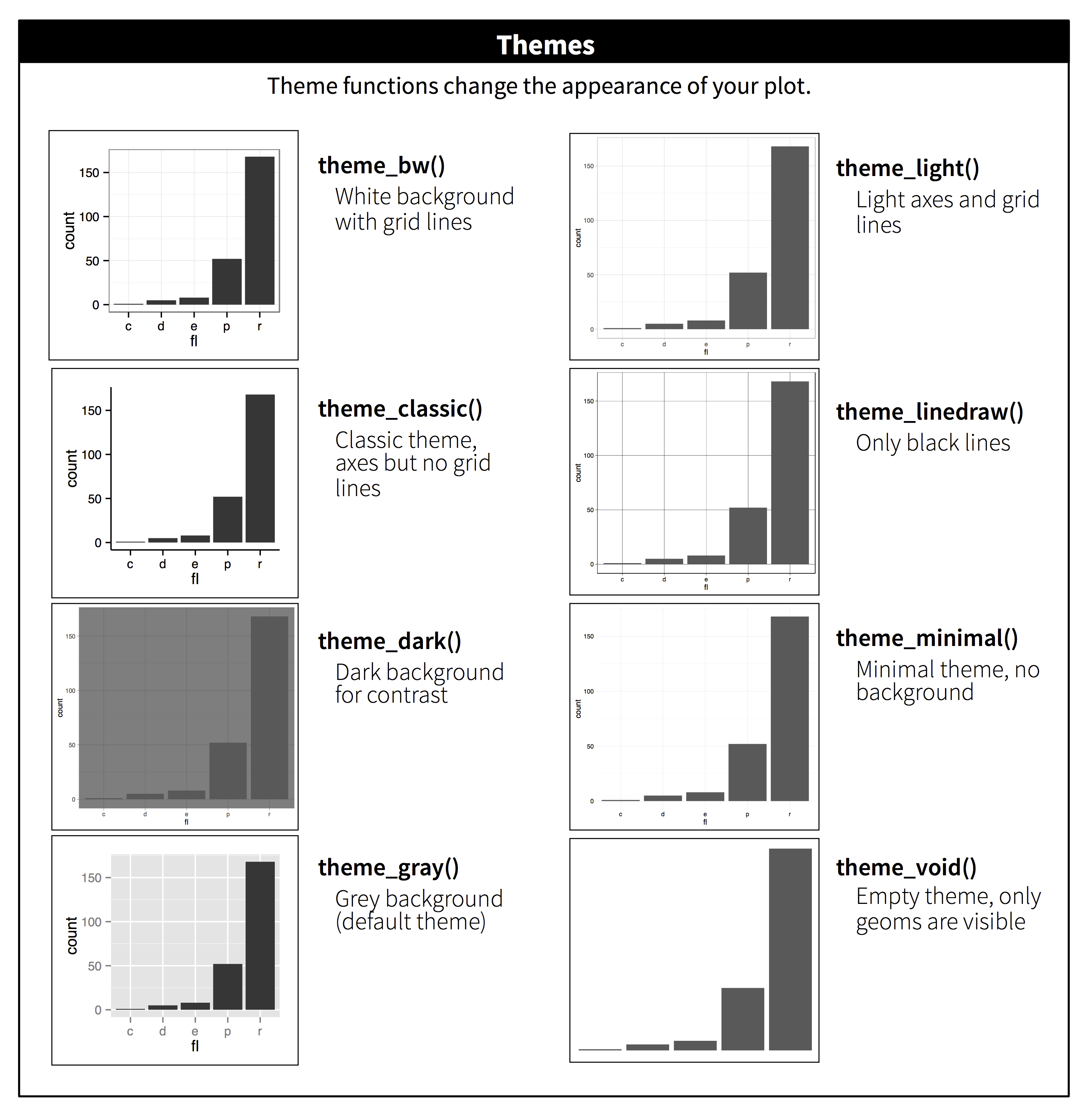
Many options exist in the `theme()` function for specific customization
```{r, message = FALSE}
ggplot(mpg, aes(displ, hwy)) +
geom_point(aes(color = class)) +
geom_smooth(se = FALSE) +
theme(
legend.position = c(0.85, 0.85),
legend.key = element_blank(),
axis.text.x = element_text(angle = 0, size = 12),
axis.text.y = element_text(angle=0, size = 12),
axis.ticks = element_blank(),
legend.text = element_text(size = 8),
panel.grid.major = element_blank(),
panel.border = element_blank(),
panel.grid.minor = element_blank(),
panel.background = element_blank(),
axis.line = element_line(color = 'black', linewidth = 0.3),
text = element_text(size = 13)
)
```
#### Python
There are five preset seaborn themes: `darkgrid`, `whitegrid`, `dark`, `white`, and `ticks`. They are each suited to different applications and personal preferences. The default theme is `darkgrid`.
```{python}
sns.set_style("white")
plt.figure()
ax = sns.regplot(
data = mpg,
x = "displ",
y = "hwy",
scatter = True,
lowess = True,
)
plt.show()
```
:::
::: {.callout-tip}
For academic papers, use the `white` theme in Seaborn or `theme_bw` in ggplot2.
:::
### Manual Colors
You may want to manually enter colors instead of relying on default colors. There is a [tool to pick optimally distinct colors](https://medialab.github.io/iwanthue/) that is useful.
::: {.panel-tabset}
#### R
Manually select colors to use
```{r, message = FALSE}
ggplot(
filter(mpg, class %in% c("suv", "compact", "pickup", "minivan")),
aes(displ, hwy)
) +
geom_point(aes(color = class)) +
theme_bw() +
scale_color_manual(values = c(
"#24aad8",
"#cb6450",
"#80a14b",
"#aa65ba"
))
```
Manually assign labels to each color
```{r, message = FALSE}
ggplot(
filter(mpg, class %in% c("suv", "compact", "pickup", "minivan")),
aes(displ, hwy)
) +
geom_point(aes(color = class)) +
theme_bw() +
scale_color_manual(values = c(suv = "#24aad8",
pickup = "#cb6450",
minivan = "#80a14b",
compact = "#aa65ba"))
```
#### Python
[Choose color palettes in Seaborn](https://seaborn.pydata.org/tutorial/color_palettes.html).
:::
### Saving plots
::: {.panel-tabset}
#### R
```{r, collapse = TRUE}
#| eval: false
ggplot(mpg, aes(displ, hwy)) + geom_point()
ggsave("my-plot.pdf")
```
#### Python
```{python}
#| eval: false
sns.scatterplot(
data = mpg,
x = "displ",
y = "hwy"
).get_figure().savefig("my-plot.pdf")
```
:::
## Cheat sheet
[Posit cheat sheet](https://rstudio.github.io/cheatsheets/html/data-visualization.html) is extremely helpful.