---
title: "Data Transformation With dplyr"
subtitle: Biostat 203B
author: "Dr. Hua Zhou @ UCLA"
date: today
format:
html:
theme: cosmo
embed-resources: true
number-sections: true
toc: true
toc-depth: 4
toc-location: left
code-fold: false
knitr:
opts_chunk:
fig.align: 'center'
fig.width: 6
fig.height: 4
message: FALSE
cache: false
---
## Preamble
Display machine information for reproducibility.
::: {.panel-tabset}
#### R
```{r}
sessionInfo()
```
#### Python
```{python}
import IPython
print(IPython.sys_info())
```
#### Julia
```{julia}
using InteractiveUtils
versioninfo()
```
:::
Load tidyverse (R), Pandas (Python), and DataFrames.jl (Julia).
::: {.panel-tabset}
#### R
```{r}
library(tidyverse)
```
#### Python
```{python}
# Load the pandas library
import pandas as pd
# Load numpy for array manipulation
import numpy as np
```
#### Julia
```{julia}
using DataFrames, Pipe, StatsBase
```
:::
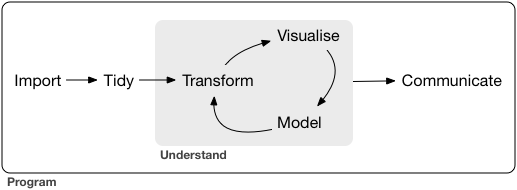
A typical data science project:
## nycflights13 data
- Available from the nycflights13 package.
- 336,776 flights that departed from New York City in 2013:
::: {.panel-tabset}
#### R
```{r}
library("nycflights13")
flights
```
#### Python
The nycflights13 data is available from the nycflights13 package in Python.
```{python}
from nycflights13 import flights
flights
```
Note there are some differences of this `flights` data from that in tidyverse. The data types for some variables are different. There are no natural ways in Pandas to hold integer column with missing values; so `dep_time` , `arr_time` are `float64` instead of `int64`.
```{python}
flights.info()
```
To be more consistent with `nycflights13` in tidyverse, we cast `time_hour` to `datetime` type.
```{python}
flights['time_hour'] = pd.to_datetime(flights['time_hour'])
```
#### Julia
Let's use RCall.jl to retrieve the nycflights13 data from R.
```{julia}
using RCall
R"""
library(nycflights13)
"""
flights = rcopy(R"flights")
```
:::
To display more rows or columns:
::: {.panel-tabset}
#### R
- By default, tibble prints the first 10 rows and all columns _that fit on screen_.
- To change number of rows and columns to display:
```{r}
nycflights13::flights |>
print(n = 10, width = Inf)
```
Here we see the **pipe operator** `|>` pipes the output from previous command to the (first) argument of the next command.
- To change the default print setting globally:
- `options(tibble.print_max = n, tibble.print_min = m)`: if more than `m` rows, print only `n` rows.
- `options(dplyr.print_min = Inf)`: print all row.
- `options(tibble.width = Inf)`: print all columns.
#### Python
- Pandas by default displays 10 rows and limits the number of columns to the display area.
- We can override this behavior by
```{python}
#| eval: true
pd.set_option("display.max_rows", 500)
pd.set_option("display.max_columns", 20)
```
#### Julia
By default DataFrames.jl limits the number of rows and columns when displaying a data frame in a Jupyter Notebook to 25 and 100, respectively. You can override this behavior by changing the values of the `ENV["DATAFRAMES_COLUMNS"]` and `ENV["DATAFRAMES_ROWS"]` variables to hold the maximum number of columns and rows of the output. All columns or rows will be printed if those numbers are equal or lower than 0.
:::
## dplyr basics
* Pick observations (rows) by their values: `filter()`.
* Reorder the rows: `arrange()`.
* Pick variables (columns) by their names: `select()`.
* Create new variables with functions of existing variables: `mutate()`.
* Collapse many values down to a single summary: `summarise()`.
```
verb meaning
--------------------------------------------
filter() subset observations (or rows)
arrange() re-order the observations
distinct() remove duplicate entries
slice_*() select rows by position
sample_*() sample rows
--------------------------------------------
select() select variables (or columns)
mutate() add new variables (or columns)
relocate() move variables (or columns) to new positions
rename() rename variables (or columns)
--------------------------------------------
group_by() aggregate
summarise() reduce to a single row
--------------------------------------------
left_join() merge two data objects
collect() force computation and bring data back into R
```
## Manipulate rows (cases)
### Filter rows with `filter()`
- Flights on Jan 1st:
::: {.panel-tabset}
#### R
```{r}
# same as filter(flights, month == 1 & day == 1)
filter(flights, month == 1, day == 1)
```
#### Python
```{python}
flights[(flights['month'] == 1) & (flights['day'] == 1)]
```
#### Julia
```{julia}
filter(row -> (row.month == 1) & (row.day == 1), flights)
```
:::
- Flights in Nov or Dec:
::: {.panel-tabset}
#### R
```{r}
filter(flights, month == 11 | month == 12)
```
#### Python
```{python}
flights[(flights['month'] == 11) | (flights['month'] == 12)]
```
#### Julia
```{julia}
filter(row -> (row.month == 11) | (row.month == 12), flights)
```
:::
### Remove rows with duplicate values
- One row from each month:
::: {.panel-tabset}
#### R
```{r}
distinct(flights, month, .keep_all = TRUE)
```
- With `.keep_all = FALSE`, all variables/columns are kept:
```{r}
distinct(flights, month)
```
#### Python
```{python}
flights.drop_duplicates(subset = ['month'])
```
#### Julia
```{julia}
unique(flights, :month)
```
:::
### Sample rows
::: {.panel-tabset}
#### R
- Randomly select `n` rows:
```{r}
sample_n(flights, 10, replace = TRUE)
```
- Randomly select fraction of rows:
```{r}
sample_frac(flights, 0.1, replace = TRUE)
```
#### Python
Sample `n=10` rows.
```{python}
flights.sample(n = 10, axis = 0, replace = True)
```
Sample 10\% rows:
```{python}
flights.sample(frac = 0.1, replace = True)
```
#### Julia
I'm not sure whether there's a native function in DataFrames.jl for sampling.
Sample 10 rows:
```{julia}
rowidx = StatsBase.sample(1:nrow(flights), 10, replace = true);
flights[rowidx, :]
```
Sample 10\% rows:
```{julia}
rowidx = StatsBase.sample(
1:nrow(flights),
round(Int, nrow(flights) * 0.1),
replace = true);
flights[rowidx, :]
```
:::
### Select rows by position
::: {.panel-tabset}
#### R
- Select rows by position:
```{r}
slice(flights, 1:5)
```
- First rows:
```{r}
slice_head(flights, n = 5)
```
- Last rows:
```{r}
slice_tail(flights, n = 5)
```
- Top `n` rows with the highest values:
```{r}
# deprecated: top_n(flights, 5, wt = time_hour)
# This function is quick
slice_max(flights, n = 5, order_by = time_hour) |>
print(width = Inf)
```
- Bottom `n` rows with lowest values:
```{r}
# same as slice_max(flights, n = 5, order_by = desc(time_hour))
slice_min(flights, n = 5, order_by = time_hour) |>
print(width = Inf)
```
- `slice_*` verbs apply to groups for grouped tibbles.
#### Python
- Select rows by position:
```{python}
flights.iloc[range(0, 5)]
```
- First rows:
```{python}
flights.head(5)
```
- Last rows:
```{python}
flights.tail(5)
```
- Top `n` rows with the highest values:
```{python}
flights.nlargest(n = 5, columns = 'time_hour')
```
- Bottom `n` rows with lowest values:
```{python}
flights.nsmallest(n = 5, columns = 'time_hour')
```
I don't think `nlargest` and `nsmallest` apply to grouped DataFrame. But I may be wrong.
#### Julia
- Select rows by position:
```{julia}
flights[1:5, :]
```
- First rows:
```{julia}
first(flights, 5)
```
- Last rows:
```{julia}
last(flights, 5)
```
- Top `n` rows with the highest values:
```{julia}
last(sort(flights, [:time_hour]), 5)
```
- Bottom `n` rows with lowest values:
```{julia}
first(sort(flights, [:time_hour]), 5)
```
:::
### Arrange rows with `arrange()`
::: {.panel-tabset}
#### R
- Sort in ascending order:
```{r}
arrange(flights, year, month, day)
```
Note input order matters!
```{r}
arrange(flights, day, month, year)
```
- Sort in descending order:
```{r}
arrange(flights, desc(arr_delay)) |>
print(width = Inf)
```
- By default, `arrange` ignores grouping in grouped tibbles. Set `.by_group = TRUE` to arrange within each group.
```{r}
# What are the worst delays in each month?
flights |>
group_by(month) |>
arrange(desc(arr_delay), .by_group = TRUE) |>
print(width = Inf)
```
#### Python
- Sort in ascending order:
```{python}
flights.sort_values(by = 'arr_delay')
```
- Sort in descending order:
```{python}
flights.sort_values(
by = 'arr_delay',
ascending = False
)
```
- To sort within groups (`month`)
```{python}
flights.sort_values(
by = ['month', 'arr_delay'],
ascending = [True, False]
)
```
#### Julia
Sort in ascending order:
```{julia}
sort(flights, [:arr_delay])
```
Sort in descending order:
```{julia}
sort(flights, [:arr_delay], rev = true)
```
To sort within groups (`month`):
```{julia}
sort(flights, [:month, order(:arr_delay, rev= true)])
```
:::
## Manipulate columns (variables)
### Select columns with `select()`
- Select columns by variable names:
::: {.panel-tabset}
#### R
```{r}
select(flights, year, month, day)
```
#### Python
```{python}
flights[['year', 'month', 'day']]
```
#### Julia
```{julia}
select(flights, [:year, :month, :day])
```
:::
- Pull values of _one_ column as a vector:
::: {.panel-tabset}
#### R
Not displayed because the vector is long.
```{r}
#| eval: false
pull(flights, year)
```
#### Python
```{python}
#| eval: false
# Following are same
flights.year
flights.loc[:, 'year']
```
#### Julia
```{julia}
#| eval: false
# Return a vector
flights.year
# Return a vector
flights."year"
# Return a vector
flights[!, :year] # does not make a copy
# Return a vector
flights[!, "year"] # does not make a copy
# Return a vector
flights[:, :year] # make a copy!
# Return a vector
flights[:, "year"] # make a copy!
```
:::
- Select columns between two variables:
::: {.panel-tabset}
#### R
```{r}
select(flights, year:day)
```
#### Python
```{python}
flights.loc[:, 'year':'day']
```
#### Julia
```{julia}
select(flights, Between(:year, :day))
```
:::
- Select all columns _except_ those between two variables:
::: {.panel-tabset}
#### R
```{r}
select(flights, -(year:day))
```
#### Python
```{python}
flights.drop(flights.loc[:, 'year':'day'].columns, axis = 1)
```
#### Julia
```{julia}
select(flights, Not(Between(:year, :day)))
```
:::
- Select columns by positions:
::: {.panel-tabset}
#### R
```{r}
select(flights, seq(1, 10, by = 2))
```
#### Python
```{python}
flights.iloc[:, range(0, 9, 2)]
```
#### Julia
```{julia}
select(flights, 1:2:10)
```
:::
- Move variables to the start of data frame:
::: {.panel-tabset}
#### R
```{r}
select(flights, time_hour, air_time, everything())
```
#### Python (???)
Not sure what's the optimal way to do this.
```{python}
# Note time_hour is missing in Python dataframe
cols_to_move = ['arr_delay', 'air_time']
flights[cols_to_move + [x for x in flights.columns if x not in cols_to_move]]
```
#### Julia
```{julia}
select(flights, :time_hour, :air_time, Not([:time_hour, :air_time]))
```
:::
- Helper functions in `dplyr`.
* `everying()`: matches all variables.
* `last_col()`: select last variable, possibly with an offset.
* `starts_with("abc")`: matches names that begin with “abc”.
* `ends_with("xyz")`: matches names that end with “xyz”.
* `contains("ijk")`: matches names that contain “ijk”.
* `matches("(.)\\1")`: selects variables that match a regular expression.
* `num_range("x", 1:3)`: matches x1, x2 and x3.
* `all_of()`: matches variables names in a character vector. All names must be present, otherwise an out-of-bounds error is thrown.
* `any_of()`: same as `all_of()`, but no error is thrown.
### Add new variables with `mutate()`
- A tibble with fewer columns.
::: {.panel-tabset}
#### R
```{r}
flights_sml <-
select(flights, year:day, ends_with("delay"), distance, air_time)
flights_sml
```
#### Python (???)
Is there better way?
```{python}
import re
cols = ['year', 'month', 'day'] + list(filter(re.compile(".*delay").match, flights.columns)) + ['distance', 'air_time']
flights_sml = flights.loc[:, cols]
flights_sml
```
#### Julia
```{julia}
flights_sml = select(flights, Between(:year, :day), r".*delay$", :distance, :air_time)
flights_sml
```
:::
- Add variables `gain` and `speed`:
::: {.panel-tabset}
#### R
```{r}
mutate(
flights_sml,
gain = arr_delay - dep_delay,
speed = distance / air_time * 60
)
```
#### Python
```{python}
flights_sml['gain'] = flights_sml['arr_delay'] - flights_sml['dep_delay']
flights_sml['speed'] = flights_sml['distance'] / flights_sml['air_time'] * 60
flights_sml
```
#### Julia
Julia analog is `transform`:
```{julia}
# Following are equivalent
transform(flights_sml, [:arr_delay, :dep_delay] => (-) => :gain)
insertcols!(flights_sml, :gain => flights.arr_delay - flights.dep_delay)
```
:::
- Refer to columns that you’ve just created:
::: {.panel-tabset}
#### R
```{r}
mutate(flights_sml,
gain = arr_delay - dep_delay,
hours = air_time / 60,
gain_per_hour = gain / hours
)
```
#### Python (???)
Not sure how to refer to columns in the same command.
#### Julia (???)
Not sure how to do this, except using two lines.
```{julia}
# Following are equivalent
@pipe flights |>
transform(
_ ,
[:arr_delay, :dep_delay] => (-) => :gain,
[:air_time] => (x -> x / 60) => :hours,
) |>
transform(
_,
[:gain, :hours] => ByRow(/) => :gain_per_hour
)
```
:::
- Only keep the new variables by `transmute()`:
```{r}
transmute(
flights,
gain = arr_delay - dep_delay,
hours = air_time / 60,
gain_per_hour = gain / hours
)
```
- `mutate_all()`: apply funs to all columns.
::: {.panel-tabset}
#### R
```{r}
#| eval: false
mutate_all(data, funs(log(.), log2(.)))
```
#### Python (???)
TODO
#### Julia
```{julia}
#| eval: false
mapcols(col -> 2col, df)
```
:::
- `mutate_at()`: apply funs to specific columns.
```{r}
#| eval: false
mutate_at(data, vars(-Species), funs(log(.)))
```
- `mutate_if()`: apply funs of one type
```{r}
#| eval: false
mutate_if(data, is.numeric, funs(log(.)))
```
## Summaries
### Summaries with `summarise()`
- Mean of a variable:
::: {.panel-tabset}
#### R
```{r}
summarise(flights, delay = mean(dep_delay, na.rm = TRUE))
```
#### Python
```{python}
flights.agg({'dep_delay': np.mean})
```
#### Julia
```{julia}
combine(flights, :dep_delay => (x -> mean(skipmissing(x))) => :delay)
```
:::
- Convert a tibble into a grouped tibble:
::: {.panel-tabset}
#### R
```{r}
by_day <- group_by(flights, year, month, day) |>
print(width = Inf)
```
#### Python
```{python}
by_day = flights.groupby(['year', 'month', 'day'])
by_day
```
#### Julia
```{julia}
by_day = groupby(flights, [:year, :month, :day])
by_day
```
:::
- Grouped summaries:
```{r}
summarise(by_day, delay = mean(dep_delay, na.rm = TRUE))
```
### Pipe
- Consider following analysis (find destinations excluding `HNL` that have >20 flights, and calculate the average distances and arrival delay):
```{r}
#| message: false
by_dest <- group_by(flights, dest)
delay <- summarise(by_dest, count = n(),
dist = mean(distance, na.rm = TRUE),
delay = mean(arr_delay, na.rm = TRUE)
)
delay <- filter(delay, count > 20, dest != "HNL")
delay
```
----
- Cleaner code using pipe `|>`:
```{r}
delays <- flights |>
group_by(dest) |>
summarise(
count = n(),
dist = mean(distance, na.rm = TRUE),
delay = mean(arr_delay, na.rm = TRUE)
) |>
filter(count > 20, dest != "HNL")
delays
```
- ggplot2 accepts pipe too.
```{r}
delays |>
ggplot(mapping = aes(x = dist, y = delay)) +
geom_point(aes(size = count), alpha = 1/3) +
geom_smooth(se = FALSE) +
labs(x = "Distance from NYC (miles)",
y = "Arrival delay (mins)")
```
### Other summary functions
- Location: `mean(x)`, `median(x)`.
::: {.panel-tabset}
#### R
```{r}
# Equivalent code using filter
# not_cancelled <- flights |>
# filter(!is.na(dep_delay), !is.na(arr_delay)) |>
# print(width = Inf)
not_cancelled <- flights |>
drop_na(dep_delay, arr_delay) |>
print(width = Inf)
```
```{r}
not_cancelled |>
group_by(year, month, day) |>
summarise(
avg_delay1 = mean(arr_delay),
avg_delay2 = mean(arr_delay[arr_delay > 0]), # the average positive delay
)
```
Question: why is the `day` group dropped?
#### Python
```{python}
not_cancelled = flights.dropna(subset = ['dep_delay', 'arr_delay'])
not_cancelled
```
```{python}
flights.groupby(['year', 'month', 'day']).agg(
avg_delay1 = ('arr_delay', np.mean),
avg_delay2 = ('arr_delay', lambda x: np.mean(x[x > 0]))
)
```
#### Julia
```{julia}
not_cancelled = dropmissing(flights, [:dep_delay, :arr_delay])
not_cancelled
```
```{julia}
@pipe not_cancelled |>
groupby(_, [:year, :month, :day]) |>
combine(
_,
:arr_delay => (x -> [(mean(x), mean(skipmissing(x[x .>= 0])))]) => [:avg_delay1, :avg_delay2]
)
```
:::
- Spread: `sd(x)`, `IQR(x)`, `mad(x)`.
::: {.panel-tabset}
#### R
```{r}
# destinations with largest variation in distance
not_cancelled |>
group_by(dest) |>
summarise(distance_sd = sd(distance)) |>
arrange(desc(distance_sd))
```
#### Python
```{python}
flights.groupby(['dest']).agg(
distance_sd = ('distance', np.std)
).sort_values('distance_sd', ascending = False)
```
#### Julia
```{julia}
@pipe flights |>
groupby(_, :dest) |>
combine(_, :distance => std => :distance_sd) |>
sort(_, :distance_sd, rev = true)
```
:::
- Rank: `min(x)`, `quantile(x, 0.25)`, `max(x)`.
::: {.panel-tabset}
#### R
```{r}
# Earliest and latest flights on each day?
not_cancelled |>
group_by(year, month, day) |>
summarise(
first = min(dep_time),
last = max(dep_time)
)
```
#### Python
```{python}
not_cancelled.groupby(['year', 'month', 'day']).agg(
first = ('dep_time', np.min),
last = ('dep_time', np.max)
)
```
#### Julia
```{julia}
@pipe not_cancelled |>
groupby(_, [:year, :month, :day]) |>
combine(_, :dep_time => (x -> [extrema(x)]) => [:first, :last])
```
:::
- Position: `first(x)`, `nth(x, 2)`, `last(x)`. Note unless the variable is sorted, `first` is different from `min` and `last` is different from `max`.
::: {.panel-tabset}
#### R
```{r}
not_cancelled |>
group_by(year, month, day) |>
summarise(
first_dep = first(dep_time),
last_dep = last(dep_time)
)
```
#### Python
```{python}
not_cancelled.groupby(['year', 'month', 'day']).agg(
first_dep = ('dep_time', lambda x: x.iloc[0]),
last_dep = ('dep_time', lambda x: x.iloc[-1]),
)
```
#### Julia
```{julia}
@pipe not_cancelled |>
groupby(_, [:year, :month, :day]) |>
combine(
_,
:dep_time => first => :first_dep,
:dep_time => last => :last_dep
)
```
:::
- Count: `n(x)`, `sum(!is.na(x))`, `n_distinct(x)`.
::: {.panel-tabset}
#### R
```{r}
# Which destinations have the most carriers?
not_cancelled |>
group_by(dest) |>
summarise(carriers = n_distinct(carrier)) |>
arrange(desc(carriers))
```
Similarly
```{r}
# which destination has most flights from NYC?
not_cancelled |>
count(dest) |>
arrange(desc(n))
```
#### Python
```{python}
not_cancelled.groupby('dest').agg(
carriers = ('carrier', lambda x: x.nunique(dropna = True))
).sort_values('carriers', ascending = False)
```
#### Julia
```{julia}
@pipe not_cancelled |>
groupby(_, :dest) |>
combine(_, :carrier => length ∘ unique => :carriers) |>
sort(_, :carriers, rev = true)
```
:::
- Example: which aircraft flew most (in distance) in 2013?
::: {.panel-tabset}
#### R
```{r}
not_cancelled |>
count(tailnum, wt = distance) |>
arrange(desc(n))
```
#### Python
```{python}
not_cancelled.groupby('tailnum').agg(
total_distance = ('distance', sum)
).sort_values('total_distance', ascending = False)
```
#### Julia
```{julia}
@pipe not_cancelled |>
groupby(_, :tailnum) |>
combine(_, :distance => sum ∘ skipmissing => :total_distance) |>
sort(_, :total_distance, rev = true)
```
:::
- Example: How many flights left before 5am? (these usually indicate delayed flights from the previous day)
::: {.panel-tabset}
#### R
```{r}
not_cancelled |>
group_by(year, month, day) |>
summarise(n_early = sum(dep_time < 500)) |>
arrange(desc(n_early))
```
#### Python
```{python}
not_cancelled.groupby(['year', 'month', 'day']).agg(
n_early = ('dep_time', lambda x: sum(x < 500))
).sort_values('n_early', ascending = False)
```
#### Julia
```{julia}
@pipe not_cancelled |>
groupby(_, [:year, :month, :day]) |>
combine(_, :dep_time => (x -> sum(skipmissing(x .< 500))) => :n_early) |>
sort(_, :n_early, rev = true)
```
:::
- Example: What proportion of flights are delayed by more than an hour?
::: {.panel-tabset}
#### R
```{r}
not_cancelled |>
group_by(year, month, day) |>
summarise(hour_perc = mean(arr_delay > 60)) |>
arrange(desc(hour_perc))
```
#### Python
```{python}
not_cancelled.groupby(['year', 'month', 'day']).agg(
hour_perc = ('arr_delay', lambda x: np.mean(x > 60))
).sort_values('hour_perc', ascending = False)
```
#### Julia
```{julia}
@pipe not_cancelled |>
groupby(_, [:year, :month, :day]) |>
combine(_, :arr_delay => (x -> mean(skipmissing(x .> 60))) => :hour_perc) |>
sort(_, :hour_perc, rev = true)
```
:::
## Grouped mutates (and filters)
- Recall the `flights_sml` tibble created earlier:
::: {.panel-tabset}
#### R
```{r}
flights_sml
```
#### Python
```{python}
flights_sml
```
#### Julia
```{julia}
flights_sml
```
:::
- Find the worst members of each group:
::: {.panel-tabset}
#### R
```{r}
flights_sml |>
group_by(year, month, day) |>
filter(rank(desc(arr_delay)) < 10)
```
#### Python
```{python}
flights_sml.groupby(
['year', 'month', 'day']
)['arr_delay'].nlargest(
n = 10
)
```
#### Julia
```{julia}
@pipe flights_sml |>
dropmissing(_, :arr_delay) |>
groupby(_, [:year, :month, :day]) |>
combine(
_,
:arr_delay => (x -> x[x .>= partialsort(x, 10, rev = true)])
)
```
:::
- Find all groups bigger than a threshold:
::: {.panel-tabset}
#### R
```{r}
popular_dests <- flights |>
group_by(dest) |>
filter(n() > 365) |>
print(width = Inf)
```
#### Python
```{python}
popular_dests = flights.groupby('dest').filter(lambda x: len(x) > 365)
popular_dests
```
#### Julia
```{julia}
popular_dests = @pipe flights |>
groupby(_, :dest) |>
combine(_) do sdf
nrow(sdf) > 365 ? sdf : DataFrame()
end
popular_dests
```
:::
- Standardise to compute per group metrics:
::: {.panel-tabset}
#### R
```{r}
popular_dests <- popular_dests |>
filter(arr_delay > 0) |>
mutate(prop_delay = arr_delay / sum(arr_delay)) |>
select(year:day, dest, arr_delay, prop_delay) |>
print(width = Inf)
```
#### Python
```{python}
popular_dests[popular_dests['arr_delay'] > 0].groupby(
'dest'
).apply(
lambda x: x['arr_delay'] / x['arr_delay'].sum()
)
```
#### Julia
```{julia}
@pipe popular_dests |>
dropmissing(_, :arr_delay) |>
subset(_, :arr_delay => x -> x .> 0 ) |>
groupby(_, :dest) |>
combine(_, :arr_delay => (x -> x ./ sum(x)) => :prop_delay)
```
:::
## Combine tables
nycflights13 package has >1 tables:
- We already know a lot about flights:
::: {.panel-tabset}
#### R
```{r}
flights |> print(width = Inf)
```
#### Python
```{python}
flights
```
#### Julia
```{julia}
flights
```
:::
- airlines:
::: {.panel-tabset}
#### R
```{r}
airlines
```
#### Python
```{python}
from nycflights13 import airlines
airlines
```
#### Julia
```{julia}
airlines = rcopy(R"airlines")
```
:::
- airports:
::: {.panel-tabset}
#### R
```{r}
airports
```
#### Python
```{python}
from nycflights13 import airports
airports
```
#### Julia
```{julia}
airports = rcopy(R"airports")
```
:::
- planes:
::: {.panel-tabset}
#### R
```{r}
planes
```
#### Python
```{python}
from nycflights13 import planes
planes
```
#### Julia
```{julia}
planes = rcopy(R"planes")
```
:::
- Weather:
::: {.panel-tabset}
#### R
```{r}
weather |>
print(width = Inf)
```
#### Python
```{python}
from nycflights13 import weather
weather
```
#### Julia
```{julia}
weather = rcopy(R"weather")
```
:::
## Relational data
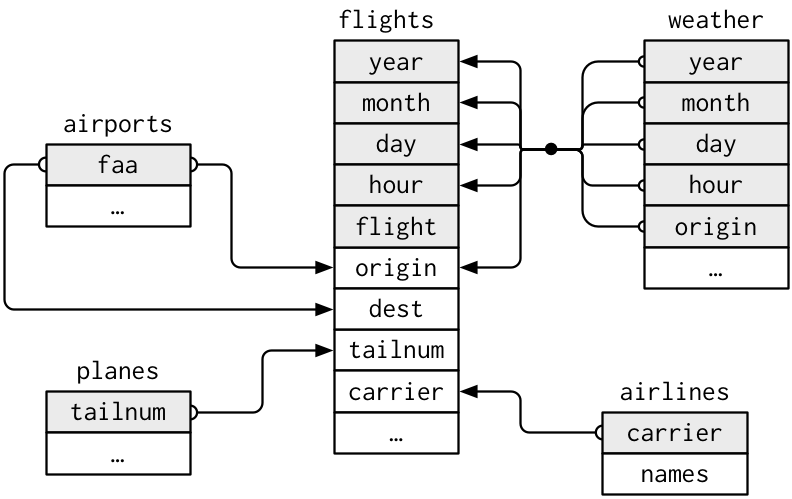
For the MIMIC-III data, the relation structure can be explored at .
### Keys
- A **primary key** uniquely identifies an observation in its own table.
- A **foreign key** uniquely identifies an observation in another table.
## Combine variables (columns)
### Demo tables
::: {.panel-tabset}
#### R
```{r}
(x <- tribble(
~key, ~val_x,
1, "x1",
2, "x2",
3, "x3"
))
```
```{r}
(y <- tribble(
~key, ~val_y,
1, "y1",
2, "y2",
4, "y3"
))
```
#### Python
```{python}
x = pd.DataFrame({
'key': [1, 2, 4],
'val_x': ['x1', 'x2', 'x3']
})
x
```
```{python}
y = pd.DataFrame({
'key': [1, 2, 3],
'val_y': ['y1', 'y2', 'y3']
})
x
```
#### Julia
```{julia}
x = DataFrame(
key = 1:3,
val_x = ["x1", "x2", "x3"]
)
y = DataFrame(
key = [1, 2, 4],
val_y = ["y1", "y2", "y3"]
)
```
:::
### Inner join
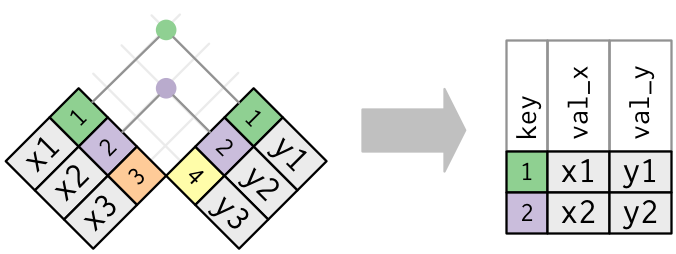
- An **inner join** matches pairs of observations whenever their keys are equal:
::: {.panel-tabset}
#### R
```{r}
inner_join(x, y, by = "key")
```
Same as
```{r}
#| eval: false
x |> inner_join(y, by = "key")
```
#### Python
```{python}
x.join(y.set_index('key'), on = 'key', how = 'inner')
```
#### Julia
```{julia}
innerjoin(x, y, on = :key)
```
:::
### Outer join
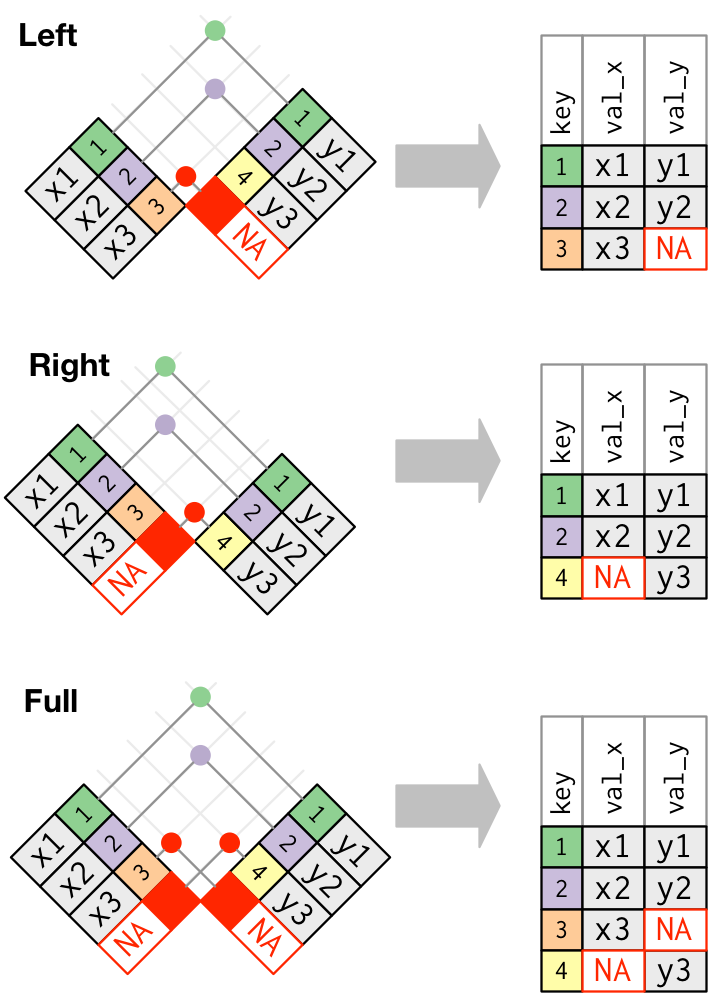
- An **outer join** keeps observations that appear in at least one of the tables.
- Three types of outer joins: left join, right join, and full join.
- A **left join** keeps all observations in `x`.
::: {.panel-tabset}
#### R
```{r}
left_join(x, y, by = "key")
```
#### Python
```{python}
x.join(y.set_index('key'), on = 'key', how = 'left')
```
#### Julia
```{julia}
leftjoin(x, y, on = :key)
```
:::
- A **right join** keeps all observations in `y`.
::: {.panel-tabset}
#### R
```{r}
right_join(x, y, by = "key")
```
#### Python
```{python}
x.join(y.set_index('key'), on = 'key', how = 'right')
```
#### Julia
```{julia}
rightjoin(x, y, on = :key)
```
:::
- A **full join** keeps all observations in `x` or `y`.
::: {.panel-tabset}
#### R
```{r}
full_join(x, y, by = "key")
```
#### Python
```{python}
x.join(y.set_index('key'), on = 'key', how = 'outer')
```
#### Julia
```{julia}
outerjoin(x, y, on = :key)
```
:::
### Duplicate keys
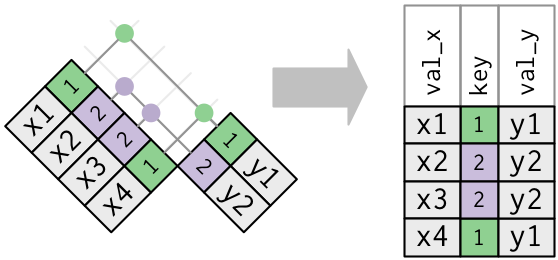
- One table has duplicate keys.
::: {.panel-tabset}
#### R
```{r}
x <- tribble(
~key, ~val_x,
1, "x1",
2, "x2",
2, "x3",
1, "x4"
)
x
y <- tribble(
~key, ~val_y,
1, "y1",
2, "y2"
)
y
left_join(x, y, by = "key")
```
#### Python
```{python}
x = pd.DataFrame({
'key': [1, 2, 2, 1],
'val_x': ["x1", "x2", "x3", "x4"]
})
x
y = pd.DataFrame({
'key': [1, 2],
'val_y': ["y1", "y2"]
})
y
x.join(y.set_index('key'), on = 'key', how = 'left')
```
#### Julia
```{julia}
x = DataFrame(
key = [1, 2, 2, 1],
val_x = ["x1", "x2", "x3", "x4"]
)
y = DataFrame(
key = [1, 2],
val_y = ["y1", "y2"]
)
leftjoin(x, y, on = :key)
```
:::
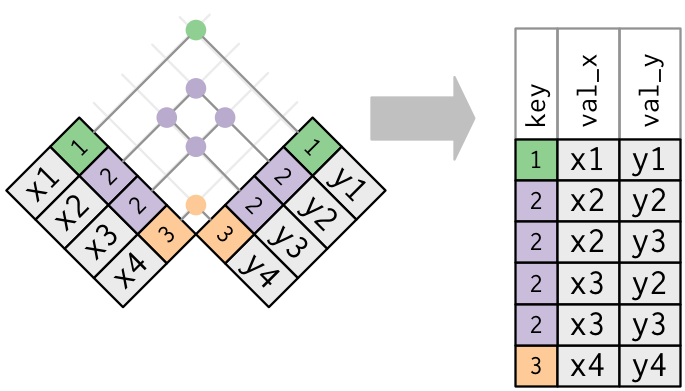
- Both tables have duplicate keys. You get all possible combinations, the Cartesian product:
::: {.panel-tabset}
#### R
```{r}
x <- tribble(
~key, ~val_x,
1, "x1",
2, "x2",
2, "x3",
3, "x4"
)
y <- tribble(
~key, ~val_y,
1, "y1",
2, "y2",
2, "y3",
3, "y4"
)
left_join(x, y, by = "key")
```
#### Python
```{python}
x = pd.DataFrame({
'key': [1, 2, 2, 3],
'val_x': ["x1", "x2", "x3", "x4"]
})
x
y = pd.DataFrame({
'key': [1, 2, 2, 3],
'val_y': ["y1", "y2", "y3", "y4"]
})
y
x.join(y.set_index('key'), on = 'key', how = 'left')
```
#### Julia
```{julia}
x = DataFrame(
key = [1, 2, 2, 3],
val_x = ["x1", "x2", "x3", "x4"]
)
y = DataFrame(
key = [1, 2, 2, 3],
val_y = ["y1", "y2", "y3", "y4"]
)
leftjoin(x, y, on = :key)
```
:::
- Let's create a narrower table from the flights data:
::: {.panel-tabset}
#### R
```{r}
flights2 <- flights |>
select(year:day, hour, origin, dest, tailnum, carrier) |>
print(width = Inf)
```
#### Python
```{python}
flights2 = flights[['year', 'month', 'day', 'hour', 'origin', 'dest', 'tailnum', 'carrier']]
flights2
```
#### Julia
```{julia}
flights2 = select(
flights,
Between(:year, :day),
:hour,
:origin,
:dest,
:tailnum,
:carrier
)
```
:::
- We want to merge with the `weather` table:
::: {.panel-tabset}
#### R
```{r}
weather
```
#### Python
```{python}
weather
```
#### Julia
```{julia}
weather
```
:::
### Defining the key columns
::: {.panel-tabset}
#### R
- `by = NULL` (default): use all variables that appear in both tables:
```{r}
# same as: flights2 |> left_join(weather)
left_join(flights2, weather)
```
- `by = "x"`: use the common variable `x`:
```{r}
# same as: flights2 |> left_join(weather)
left_join(flights2, planes, by = "tailnum")
```
- `by = c("a" = "b")`: match variable `a` in table `x` to the variable `b` in table `y`.
```{r}
# same as: flights2 |> left_join(weather)
left_join(flights2, airports, by = c("dest" = "faa"))
```
#### Python
- Match multiple keys using multi-index:
```{python}
keys = ['origin', 'year', 'month', 'day', 'hour']
flights2.join(
weather.set_index(keys),
on = keys,
how = 'left')
```
- Match the common variable `tailnum`:
```{python}
flights2.join(
planes.set_index('tailnum'),
on = 'tailnum',
how = 'left',
lsuffix = '_x',
rsuffix = '_y'
)
```
- Match variable `a` in table `x` to the variable `b` in table `y`.
```{python}
flights2.set_index(
'dest'
).join(
airports.set_index('faa'),
how = 'left'
)
```
#### Julia
- Match multiple variables:
```{julia}
leftjoin(
flights2,
weather,
on = [:year, :month, :day, :hour, :origin]
)
```
- Match the common variable `tailnum`:
```{julia}
leftjoin(
flights2,
planes,
on = :tailnum,
makeunique = true,
matchmissing = :notequal
)
```
- Match variable `a` in table `x` to the variable `b` in table `y`.
```{julia}
leftjoin(
flights2,
airports,
on = :dest => :faa
)
```
:::
## Combine cases (rows)
- Top 10 most popular destinations:
::: {.panel-tabset}
#### R
```{r}
top_dest <- flights |>
count(dest, sort = TRUE) |>
head(10) |>
print()
```
#### Python
```{python}
top_dest = flights.groupby('dest')['dest'].count(
).to_frame(
name = 'n'
).reset_index(
).sort_values(
'n',
ascending = False
).head(10)
top_dest
```
#### Julia
```{julia}
top_dest = @pipe flights |>
groupby(_, :dest) |>
combine(_, nrow) |>
sort(_, :nrow, rev = true) |>
first(_, 10)
```
:::
- How to filter the cases that fly to these destinations?
### Semi-join
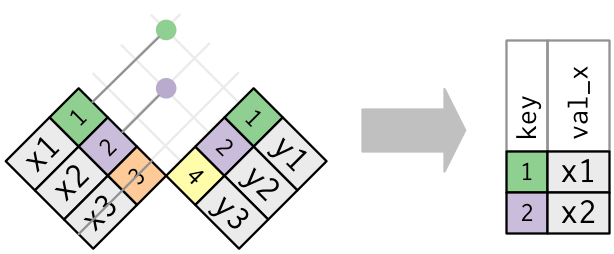
- `semi_join(x, y)` keeps the rows in `x` that have a match in `y`.
::: {.panel-tabset}
#### R
```{r}
semi_join(flights, top_dest)
```
#### Python
```{python}
flights.loc[flights['dest'].isin(top_dest['dest'])]
```
#### Julia
```{julia}
semijoin(flights, top_dest, on = :dest)
```
:::
### Anti-join
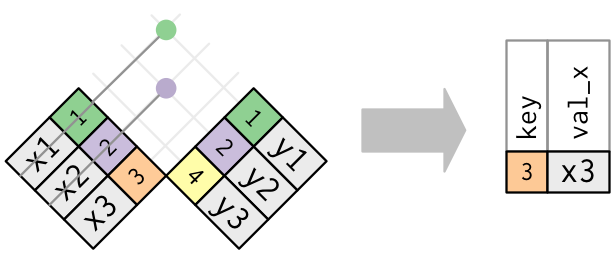
- `anti_join(x, y)` keeps the rows that don’t have a match.
- Useful to see what will not be joined.
::: {.panel-tabset}
#### R
```{r}
# Planes that are not in planes table
flights |>
anti_join(planes, by = "tailnum") |>
count(tailnum, sort = TRUE)
```
#### Python
```{python}
flights.loc[-flights['tailnum'].isin(planes['tailnum'])].groupby('tailnum')['tailnum'].count().sort_values(ascending = False)
```
#### Julia
```{julia}
@pipe antijoin(
flights,
planes,
on = :tailnum,
matchmissing = :notequal
) |>
groupby(_, :tailnum) |>
combine(_, nrow) |>
sort(_, :nrow, rev = true)
```
:::
## Set operations
- Generate two tables:
::: {.panel-tabset}
#### R
```{r}
(df1 <- tribble(
~x, ~y,
1, 1,
2, 1
))
```
```{r}
(df2 <- tribble(
~x, ~y,
1, 1,
1, 2
))
```
#### Python
```{python}
df1 = pd.DataFrame({
'x': [1, 2],
'y': [1, 1]
})
df1
df2 = pd.DataFrame({
'x': [1, 1],
'y': [1, 2]
})
df2
```
#### Julia
```{julia}
df1 = DataFrame(
x = [1, 2],
y = [1, 1]
)
df2 = DataFrame(
x = [1, 1],
y = [1, 2]
)
```
:::
- `bind_rows(x, y)` stacks table `x` one on top of `y`.
::: {.panel-tabset}
#### R
```{r}
bind_rows(df1, df2)
```
#### Python
```{python}
pd.concat([df1, df2], axis = 0)
```
#### Julia
```{julia}
vcat(df1, df2)
```
:::
- `intersect(x, y)` returns rows that appear in both `x` and `y`.
::: {.panel-tabset}
#### R
```{r}
intersect(df1, df2)
```
#### Python
```{python}
pd.merge(df1, df2, how = 'inner', on = ['x', 'y'])
```
#### Julia
```{julia}
DataFrame(intersect(eachrow(df1), eachrow(df2)))
```
:::
- `union(x, y)` returns unique observations in `x` and `y`.
::: {.panel-tabset}
#### R
```{r}
union(df1, df2)
```
#### Python
```{python}
pd.merge(df1, df2, how = 'outer', on = ['x', 'y'])
```
#### Julia
```{julia}
DataFrame(union(eachrow(df1), eachrow(df2)))
```
:::
- `setdiff(x, y)` returns rows that appear in `x` but not in `y`.
::: {.panel-tabset}
#### R
```{r}
setdiff(df1, df2)
```
```{r}
setdiff(df2, df1)
```
#### Python (???)
Not sure how to do this elegantly.
#### Julia
```{julia}
DataFrame(setdiff(eachrow(df1), eachrow(df2)))
DataFrame(setdiff(eachrow(df2), eachrow(df1)))
```
:::
## Cheat sheet
[Posit dplyr cheat sheet](https://rstudio.github.io/cheatsheets/html/data-transformation.html) is extremely helpful.