{width=700px height=350px}
Here $\pi_1 = \pi_2 = \pi_3 = 1/3$. The dashed lines are known as the Bayes decision boundaries. Were they known, they would yield the fewest misclassification errors, among all possible classifiers. The black line is the LDA decision boundary. ::: - LDA on the credit `Default` data. ::: {.panel-tabset} #### R ```{r} library(MASS) # Fit LDA lda_mod <- lda( default ~ balance + income + student, data = Default ) lda_mod # Predicted labels from LDA lda_pred = predict(lda_mod, Default) # Confusion matrix (lda_cfm = table(Predicted = lda_pred$class, Default = Default$default)) ``` Overall training accuracy of LDA (using 0.5 as threshold) is ```{r} # Accuracy (lda_cfm['Yes', 'Yes'] + lda_cfm['No', 'No']) / sum(lda_cfm) ``` The area-under-ROC curve (AUC) of LDA is ```{r} # AUC (lda_auc = roc(Default$default, lda_pred$posterior[, 2])$auc) ``` #### Python ```{python} from sklearn.discriminant_analysis import LinearDiscriminantAnalysis # Pipeline pipe_lda = Pipeline(steps = [ ("col_tf", col_tf), ("model", LinearDiscriminantAnalysis()) ]) # Fit LDA lda_fit = pipe_lda.fit(X, y) # Predicted labels from LDA lda_pred = lda_fit.predict(X) # Confusion matrix lda_cfm = pd.crosstab( lda_pred, y, margins = True, rownames = ['Predicted Default Stats'], colnames = ['True Default Status'] ) lda_cfm ``` ::: The area-under-ROC curve (AUC) of LDA is ```{python} lda_auc = roc_auc_score( y, lda_fit.predict_proba(X)[:, 1] ) lda_auc ``` - Note: + Training error rates will usually be lower than test error rates, which are the real quantity of interest. + The higher the ratio of parameters $p$ to number of samples n, the more we expect this overfitting to play a role. + Since only $3.33\%$ of the individuals in the training sample defaulted, a simple but useless classifier that always predicts that an individual will not default, regardless of his or her credit card balance and student status, will result in an error rate of $3.33\%$. In other words, the trivial **null classifier** will achieve an error rate that null is only a bit higher than the LDA training set error rate. - However this can change, depending how we define `default`. In the two-class case, we often assign an observation to the `default` class if $$ p(\text{default = Yes}|X = x) > 0.5 $$ - But if we are interested in minimizing the number of defaults that we fail to identify, then we should instead assign an observation to the `default` class if $$ p(\text{default = Yes}|X = x) > 0.2. $$ ### Quadratic discriminant analysis (QDA) - In LDA, the normal distribution for each class shares the same covariance $\boldsymbol{\Sigma}$. - If we assume that the normal distribution for class $k$ has covariance $\boldsymbol{\Sigma}_k$, then it leads to the **quadratic discriminant analysis** (QDA). - The discriminant function takes the form $$ \delta_k(x) = - \frac{1}{2} (x - \mu_k)^T \boldsymbol{\Sigma}_k^{-1} (x - \mu_k) + \log \pi_k - \frac{1}{2} \log |\boldsymbol{\Sigma}_k|, $$ which is a quadratic function in $x$. ::: {#fig-lda-vs-qda}{width=700px height=350px}
The Bayes (purple dashed), LDA (black dotted), and QDA (green solid) decision boundaries for a two-class problem. Left: $\boldsymbol{\Sigma}_1 = \boldsymbol{\Sigma}_2$. Right: $\boldsymbol{\Sigma}_1 \ne \boldsymbol{\Sigma}_2$. ::: ::: {.panel-tabset} #### R ```{r} # Fit QDA qda_mod <- qda( default ~ balance + income + student, data = Default ) qda_mod # Predicted probabilities from QDA qda_pred = predict(qda_mod, Default) # Confusion matrix (qda_cfm = table(Predicted = qda_pred$class, Default = Default$default)) ``` Overall training accuracy of QDA (using 0.5 as threshold) is ```{r} # Accuracy (qda_cfm['Yes', 'Yes'] + qda_cfm['No', 'No']) / sum(qda_cfm) ``` The area-under-ROC curve (AUC) of QDA is ```{r} (auc_qda = roc( Default$default, qda_pred$posterior[, 'Yes'] )$auc) ``` #### Python ```{python} from sklearn.discriminant_analysis import QuadraticDiscriminantAnalysis # Pipeline pipe_qda = Pipeline(steps = [ ("col_tf", col_tf), ("model", QuadraticDiscriminantAnalysis()) ]) # Fit QDA qda_fit = pipe_qda.fit(X, y) # Predicted labels from QDA qda_pred = qda_fit.predict(X) # Confusion matrix from the QDA qda_cfm = pd.crosstab( qda_pred, y, margins = True, rownames = ['Predicted Default Stats'], colnames = ['True Default Status'] ) qda_cfm ``` Overall training accuracy of QDA (using 0.5 as threshold) is ```{python} (qda_cfm.loc['Yes', 'Yes'] + qda_cfm.loc['No', 'No']) / qda_cfm.loc['All', 'All'] ``` The area-under-ROC curve (AUC) of QDA is ```{python} qda_auc = roc_auc_score( y, qda_fit.predict_proba(X)[:, 1] ) qda_auc ``` ::: ### Naive Bayes - If we assume $f_k(x) = \prod_{j=1}^p f_{jk}(x_j)$ (conditional independence model) in each class, we get **naive Bayes**. For Gaussian this means the $\boldsymbol{\Sigma}_k$ are diagonal. - Naive Bayes is useful when $p$ is large (LDA and QDA break down). - Can be used for $mixed$ feature vectors (both continuous and categorical). If $X_j$ is qualitative, replace $f_{kj}(x_j)$ with probability mass function (histogram) over discrete categories. - Despite strong assumptions, naive Bayes often produces good classification results. ::: {.panel-tabset} #### R - Note : For each categorical variable a table giving, for each attribute level, the conditional probabilities given the target class. For each numeric variable, a table giving, for each target class, mean and standard deviation of the (sub-)variable. ```{r} library(e1071) # Fit Naive Bayes classifier nb_mod <- naiveBayes( default ~ balance + income + student, data = Default ) nb_mod # Predicted labels from Naive Bayes nb_pred = predict(nb_mod, Default) # Confusion matrix (nb_cfm = table(Predicted = nb_pred, Default = Default$default)) ``` Overall training accuracy of Naive Bayes classifier (using 0.5 as threshold) is ```{r} # Accuracy (nb_cfm['Yes', 'Yes'] + nb_cfm['No', 'No']) / sum(nb_cfm) ``` The area-under-ROC curve (AUC) of NB is ```{r} (auc_nb = roc( Default$default, predict(nb_mod, Default, type = "raw")[, 2] )$auc) ``` #### Python ```{python} from sklearn.naive_bayes import GaussianNB # Pipeline pipe_nb = Pipeline(steps = [ ("col_tf", col_tf), ("model", GaussianNB()) ]) # Fit Naive Bayes classifier nb_fit = pipe_nb.fit(X, y) # Predicted labels by NB classifier nb_pred = nb_fit.predict(X) # Confusion matrix of NB classifier nb_cfm = pd.crosstab( nb_pred, y, margins = True, rownames = ['Predicted Default Stats'], colnames = ['True Default Status'] ) nb_cfm ``` Overall training accuracy of Naive Bayes classifier (using 0.5 as threshold) is ```{python} (nb_cfm.loc['Yes', 'Yes'] + nb_cfm.loc['No', 'No']) / nb_cfm.loc['All', 'All'] ``` The area-under-ROC curve (AUC) of NB is ```{python} nb_auc = roc_auc_score( y, nb_fit.predict_proba(X)[:, 1] ) nb_auc ``` ::: ## $K$-nearest neighbor (KNN) classifier - KNN is a nonparametric classifier. - Given a positive integer $K$ and a test observation $x_0$, the KNN classifier first identifies the $K$ points in the training data that are closest to $x_0$, represented by $\mathcal{N}_0$. It estimates the conditional probability by $$ \operatorname{Pr}(Y=j \mid X = x_0) = \frac{1}{K} \sum_{i \in \mathcal{N}_0} I(y_i = j) $$ and then classifies the test observation $x_0$ to the class with the largest probability. - We illustrate KNN with $K=5$ on the credit default data. ::: {.panel-tabset} #### R ```{r} library(class) X_default <- Default %>% mutate(x_student = as.integer(student == "Yes")) %>% dplyr::select(x_student, balance, income) # KNN prediction with K = 5 knn_pred <- knn( train = X_default, test = X_default, cl = Default$default, k = 5 ) # Confusion matrix (knn_cfm = table(Predicted = knn_pred, Default = Default$default)) ``` Overall training accuracy of KNN classifier with $K=5$ (using 0.5 as threshold) is ```{r} # Accuracy (knn_cfm['Yes', 'Yes'] + knn_cfm['No', 'No']) / sum(knn_cfm) ``` The area-under-ROC curve (AUC) of KNN ($K=5$) is ```{r} # AUC knn_mod <- knn( train = X_default, test = X_default, cl = Default$default, prob = TRUE, k = 5 ) knn_pred_prob <- 1 - attr(knn_mod, "prob") (knn_auc = auc( Default$default, knn_pred_prob )) ``` #### Python ```{python} from sklearn.neighbors import KNeighborsClassifier # Pipeline pipe_knn = Pipeline(steps = [ ("col_tf", col_tf), ("model", KNeighborsClassifier(n_neighbors = 5)) ]) # Fit KNN with K = 5 knn_fit = pipe_knn.fit(X, y) # Predicted labels from KNN knn_pred = knn_fit.predict(X) # Confusion matrix of KNN knn_cfm = pd.crosstab( knn_pred, y, margins = True, rownames = ['Predicted Default Stats'], colnames = ['True Default Status'] ) knn_cfm ``` Overall training accuracy of KNN classifier with $K=5$ (using 0.5 as threshold) is ```{python} (knn_cfm.loc['Yes', 'Yes'] + knn_cfm.loc['No', 'No']) / knn_cfm.loc['All', 'All'] ``` The area-under-ROC curve (AUC) of KNN ($K=5$) is ```{python} knn_auc = roc_auc_score( y, knn_fit.predict_proba(X)[:, 1] ) knn_auc ``` ::: ## Evaluation of classification performance: false positive, false negative, ROC and AUC - Let's summarize the classification performance of different classifiers on the training data. ::: {.panel-tabset} #### R ```{r, message=F} library(pROC) acc_f = function(cfm) { (cfm['Yes', 'Yes'] + cfm['No', 'No']) / sum(cfm) } fpr_f = function(cfm) { cfm['Yes', 'No'] / sum(cfm[, 'No']) } fnr_f = function(cfm) { cfm['No', 'Yes'] / sum(cfm[, 'Yes']) } auc_f = function(pred) { y = pred$y pred_prob = pred$prob roc_object <- roc(y, pred_prob) auc_c = auc(roc_object)[1] return(auc_c) } logit_pred_prob <- predict(logit_mod, Default, type = "response") lda_pred_prob <- lda_pred$posterior[, 2] qda_pred_prob <- qda_pred$posterior[, 2] nb_pred_prob <- predict(nb_mod, Default, type = "raw")[, 2] knn_mod <- knn( train = X_default, test = X_default, cl = Default$default, prob = TRUE, k = 5 ) knn_pred_prob <- 1 - attr(knn_mod, "prob") row_names = c("Null", "Logit", "LDA", "QDA", "NB", "KNN") acc_v = sapply(list(logit_cfm, lda_cfm, qda_cfm, nb_cfm, knn_cfm), acc_f) fpr_v = sapply(list(logit_cfm, lda_cfm, qda_cfm, nb_cfm, knn_cfm), fpr_f) fnr_v = sapply(list(logit_cfm, lda_cfm, qda_cfm, nb_cfm, knn_cfm), fnr_f) auc_v = sapply(list(data.frame(y = Default$default, prob = logit_pred_prob), data.frame(y = Default$default, prob = lda_pred_prob), data.frame(y = Default$default, prob = qda_pred_prob), data.frame(y = Default$default, prob = nb_pred_prob), data.frame(y = Default$default, prob = knn_pred_prob)), auc_f) cfm_null = matrix(c(9667, 333, 0, 0), nrow = 2, ncol = 2, byrow = TRUE) row.names(cfm_null) <- c("No", "Yes") colnames(cfm_null) <- c("No", "Yes") tibble(Classifier = row_names, ACC = c(acc_f(cfm_null), acc_v), FPR = c(fpr_f(cfm_null), fpr_v), FNR = c(fnr_f(cfm_null), fnr_v), AUC = c(0.5, auc_v)) ``` #### Python ```{python} # Confusion matrix from the null classifier (always 'No') null_cfm = pd.DataFrame( data = { 'No': [9667, 0, 9667], 'Yes': [333, 0, 333], 'All': [10000, 0, 10000] }, index = ['No', 'Yes', 'All'] ) null_pred = np.repeat('No', 10000) # Fitted classifiers classifiers = [logit_fit, lda_fit, qda_fit, nb_fit, knn_fit] # Confusion matrices cfms = [logit_cfm, lda_cfm, qda_cfm, nb_cfm, knn_cfm, null_cfm] ``` ```{python} sm_df = pd.DataFrame( data = { 'acc': [(cfm.loc['Yes', 'Yes'] + cfm.loc['No', 'No']) / cfm.loc['All', 'All'] for cfm in cfms], 'fpr': [(cfm.loc['Yes', 'No'] / cfm.loc['All', 'No']) for cfm in cfms], 'fnr': [(cfm.loc['No', 'Yes'] / cfm.loc['All', 'Yes']) for cfm in cfms], 'auc': np.append([roc_auc_score(y, c.predict_proba(X)[:, 1]) for c in classifiers], roc_auc_score(y, np.repeat(0, 10000))) }, index = ['logit', 'LDA', 'QDA', 'NB', 'KNN', 'Null'] ) sm_df.sort_values('acc') ``` ::: - There are two types of classification errors: - **False positive rate**: The fraction of negative examples that are classified as positive. - **False negative rate**: The fraction of positive examples that are classified as negative. 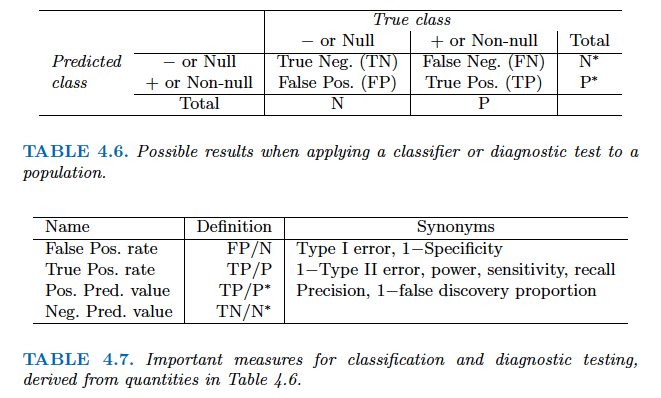 - Above table is the training classification performance of classifiers using their default thresholds. Varying thresholds lead to varying false positive rates (1 - specificity) and true positive rates (sensitivity). These can be plotted as the **receiver operating characteristic (ROC)** curve. The overall performance of a classifier is summarized by the **area under ROC curve (AUC)**. ::: {.panel-tabset} #### R ```{r, message=F} library(pROC) classifiers = c("Logit", "LDA", "QDA", "NB", "KNN", "Null") for(i in seq(1, length(classifiers))) { # i = 1 pred = list( logit = data.frame(y = Default$default, prob = logit_pred_prob), LDA = data.frame(y = Default$default, prob = lda_pred_prob), QDA = data.frame(y = Default$default, prob = qda_pred_prob), NB = data.frame(y = Default$default, prob = nb_pred_prob), KNN = data.frame(y = Default$default, prob = knn_pred_prob), Null = data.frame(y = Default$default, prob = rep(0, 10000)) ) roc_object <- roc(pred[[i]]$y, pred[[i]]$prob) auc_c = auc(roc_object)[1] print(ggroc(roc_object) + ggtitle(str_c(classifiers[i], " ROC with AUC =", round(auc_c, 4), "")) + annotate("segment",x = 1, xend = 0, y = 0, yend = 1, color="red", linetype="dashed") + labs(x = "1 - Specificity", y = "Sensitivity")) } ``` #### Python ```{python} from sklearn.metrics import roc_curve from sklearn.metrics import RocCurveDisplay # plt.rcParams.update({'font.size': 12}) for idx, m in enumerate(classifiers): plt.figure(); RocCurveDisplay.from_estimator(m, X, y, name = sm_df.iloc[idx].name); plt.show() # ROC curve of the null classifier (always No or always Yes) plt.figure() RocCurveDisplay.from_predictions(y, np.repeat(0, 10000), pos_label = 'Yes', name = 'Null Classifier'); plt.show() ``` ::: - See [sklearn.metrics](https://scikit-learn.org/stable/modules/model_evaluation.html) for other popularly used metrics for classification tasks. ## Comparison between classifiers - For a two-class problem, we can show that for LDA, $$ \log \left( \frac{p_1(x)}{1 - p_1(x)} \right) = \log \left( \frac{p_1(x)}{p_2(x)} \right) = c_0 + c_1 x_1 + \cdots + c_p x_p. $$ So it has the same form as logistic regression. The difference is in how the parameters are estimated. - Logistic regression uses the conditional likelihood based on $\operatorname{Pr}(Y \mid X)$ (known as **discriminative learning**). LDA, QDA, and Naive Bayes use the full likelihood based on $\operatorname{Pr}(X, Y)$ (known as **generative learning**). - Despite these differences, in practice the results are often very similar. - Logistic regression can also fit quadratic boundaries like QDA, by explicitly including quadratic terms in the model. - Logistic regression is very popular for classification, especially when $K = 2$. - LDA is useful when $n$ is small, or the classes are well separated, and Gaussian assumptions are reasonable. Also when $K > 2$. - Naive Bayes is useful when $p$ is very large. - LDA is a special case of QDA. - Under normal assumption, Naive Bayes leads to linear decision boundary, thus a special case of LDA. - KNN classifier is non-parametric and can dominate LDA and logistic regression when the decision boundary is highly nonlinear, provided that $n$ is very large and $p$ is small. - See ISL Section 4.5 for theoretical and empirical comparisons of logistic regression, LDA, QDA, NB, and KNN. ## Poisson regression - $Y$ is neither qualitative nor quantitative, but rather a count. - For example, `Bikeshare` data set: + The response is `bikers`, the number of hourly users of a bike sharing program in Washington, DC. + Predictors: + `mnth` month of the year, + `hr` hour of the day, from 0 to 23, + `workingday` an indicator variable that equals 1 if it is neither a weekend nor a holiday, + `temp` the normalized temperature, in Celsius, + `weathersit` a qualitative variable that takes on one of four possible values: clear; misty or cloudy; light rain or light snow; or heavy rain or heavy snow. ```{r} library(ISLR2) ggplot(Bikeshare, aes(x = bikers)) + geom_histogram(bins = 40) ``` ### Try linear regression ```{r} library(ISLR2) Bikeshare <- as_tibble(Bikeshare) %>% mutate(mnth = factor(mnth), hr = factor(hr), workingday = factor(workingday, levels = c(0, 1), labels = c("No", "Yes")), weathersit = factor(weathersit)) ``` ```{r, message=F, warning=F} m1 <- lm(bikers ~ workingday + temp + weathersit, data = Bikeshare) m1 %>% tbl_regression( pvalue_fun = ~ style_pvalue(.x, digits = 2), estimate_fun = function(x) style_number(x, digits = 3) ) %>% add_global_p() %>% bold_p(t = 0.05) %>% bold_labels() %>% modify_column_unhide(columns = c(statistic, std.error)) %>% add_glance_source_note( label = list(sigma ~ "\U03C3"), include = c(r.squared, sigma)) %>% add_n(location = "label") ``` ::: {.panel-tabset} #### R Part of the fitted values in the `Bikeshare` data set are negative. ```{r} m1 %>% ggplot(aes(x = .fitted)) + geom_histogram() ``` ::: - Mean-variance relationship + It shows that the smaller the mean, the smaller the variance. + This violates the assumption of **constant variance** in linear regression. ```{r} ggplot(Bikeshare %>% mutate(hr = as.numeric(hr)), aes(x = hr, y = bikers)) + geom_point() + geom_jitter(width = 0.1) + geom_smooth(method = "loess", span = 0.65) ``` - We could do a transformation, i.e., $\log$ $$ \log(Y) = \sum_{j=1}^p \beta_j X_j + \epsilon. $$ + But the model is no longer linear in the predictors and the interpretation of the coefficients is for $\log(Y)$ rather than $Y$. ### Poisson regression - We often use Poisson regression to model counts $Y$. - Poisson distribution: a random variable $Y$ takes on nonnegative integer values, i.e. $Y \in \{0, 1, 2, \ldots\}$. If $Y$ follows the Poisson distribution, then $$ p(Y=k) = \frac{\lambda^k e^{-\lambda}}{k!}, \quad k = 0, 1, 2, \ldots $$ where $\lambda$ is the **mean and variance** of $Y$, i.e., $\mathbf{E}(Y)$. - Poisson regression model: + Assume that $Y$ follows a Poisson distribution with mean $\lambda$. + We model the log mean as a linear function of the predictors: $$ \log(\lambda(X_1, \ldots, X_p)) = \beta_0 + \beta_1 X_1 + \cdots + \beta_p X_p. $$ or equivalently $$ \lambda(X_1, \ldots, X_p) = \exp(\beta_0 + \beta_1 X_1 + \cdots + \beta_p X_p). $$ - To estimate the parameters $\beta_0, \ldots, \beta_p$, we use the method of maximum likelihood. + The likelihood function is $$ \ell(\beta_0,\ldots,\beta_p) = \prod_{i=1}^n \frac{\lambda_i(x_i)^{y_i} e^{-\lambda_i}}{y_i!} $$ + We estimate the coefficients that maximize the likelihood $\ell(\beta_0,\ldots,\beta_p)$ i.e. that make the observed data as likely as possible. ```{r, message=F, warning=F} m1 <- glm(bikers ~ workingday + temp + weathersit, data = Bikeshare, family = poisson) m1 %>% tbl_regression( pvalue_fun = ~ style_pvalue(.x, digits = 2), estimate_fun = function(x) style_number(x, digits = 3) ) %>% add_global_p() %>% bold_p(t = 0.05) %>% bold_labels() %>% modify_column_unhide(columns = c(statistic, std.error)) %>% add_n(location = "label") ``` - Interpretation: an increase in $X_j$ by one unit is associated with a change in $\mathbf{E}(Y ) = \lambda$ by a factor of $\exp(\beta_j)$. - Mean-variance relationship: since under the Poisson model, $\lambda = \mathbf{E}(Y ) = \mathbf{Var}(Y)$, we implicitly modeled variance, not a constant any more. If variance is much larger than the mean, i.e., overdispersion, we can use negative binomial regression instead. - Nonnegative fitted values: no negative predictions using the Poisson regression model. This is because the Poisson model itself assumes that the response is nonnegative. ## Generalized linear models - We have now discussed three types of regression models: linear, logistic, and Poisson. These approaches share some common characteristics: + Each approach uses predictors $X_1,\ldots,X_p$ to predict a response $Y$. + We assume that, conditional on $X_1,\ldots,X_p$, $Y$ belongs to a certain family of distributions. + For linear regression, assume that $Y$ follows a Gaussian or normal distribution. + For logistic regression, we assume that $Y$ follows a Bernoulli distribution. + For Poisson regression, we assume that $Y$ follows a Poisson distribution. + Each approach models the mean of $Y$ as a function of the predictors. + In linear regression, the mean of $Y$ takes the form, i.e., linear function of the predictors $$ \mathbf{E}(Y \mid X_1,\ldots,X_p) = \beta_0 + \beta_1 X_1 + \cdots + \beta_p X_p. $$ + For logistic regression, the mean instead takes the form $$ \mathbf{E}(Y \mid X_1,\ldots,X_p) = \frac{\exp(\beta_0 + \beta_1 X_1 + \cdots + \beta_p X_p)}{1 + \exp(\beta_0 + \beta_1 X_1 + \cdots + \beta_p X_p)}. $$ + For Poisson regression, the mean instead takes the form $$ \mathbf{E}(Y \mid X_1,\ldots,X_p) = \exp(\beta_0 + \beta_1 X_1 + \cdots + \beta_p X_p). $$ - Each equation can be expressed using a **link function**, $\eta$, which applies a transformation to $\mathbf{E}(Y \mid X_1,\ldots,X_p)$ so that the transformed mean is a linear function of the predictors $$ \eta(\mathbf{E}(Y \mid X_1,\ldots,X_p)) = \beta_0 + \beta_1 X_1 + \cdots + \beta_p X_p. $$ + The link function for linear regression is the identity function, $\eta(\mu) = \mu$. + The link function for logistic regression is the logit function, $\eta(\mu) = \log(\mu/(1-\mu))$. + The link function for Poisson regression is the log function, $\eta(\mu) = \log(\mu)$. - The Gaussian, Bernoulli and Poisson distributions are all members of a wider class of distributions, known as the exponential family. - In general, we form a regression by modeling the response $Y$ as from a particular member of the exponential family, and then transforming the mean of the response so that the transformed mean is a linear function of the predictors via $\eta(\mathbf{E}(Y \mid X_1,\ldots,X_p)) = \beta_0 + \beta_1 X_1 + \cdots + \beta_p X_p$. - Any regression approach that follows this very general recipe known as a **generalized linear model(GLM)**. Thus, linear regression, logistic regression, and Poisson regression are all special cases of GLMs. - Other examples include Gamma regression and negative binomial regression.