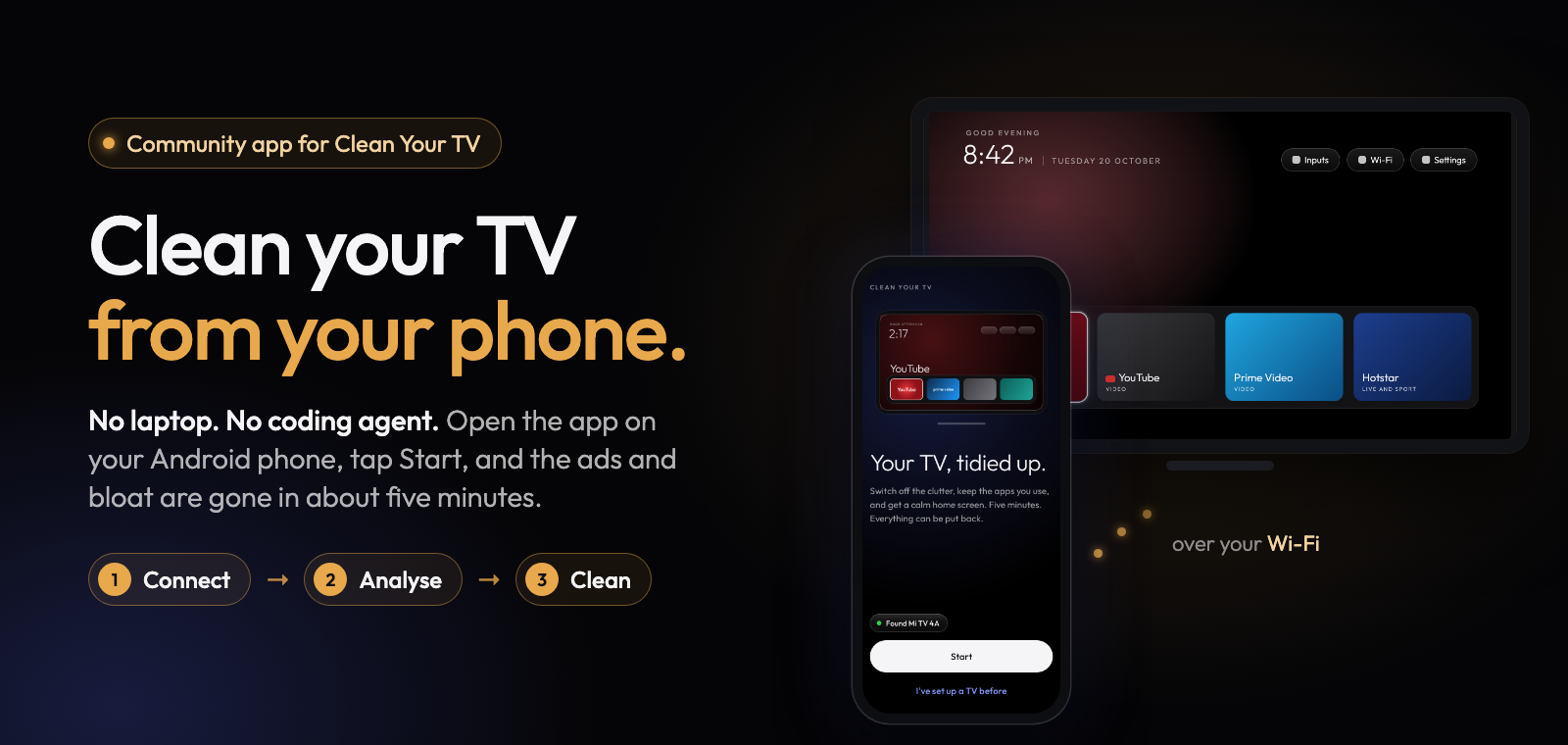




A community-built phone app for Clean Your TV.
Anyone can clean up their TV: no laptop, no coding agent, no cables.
Download ·
Get it with Obtainium ·
How it works ·
Is it safe? ·
Supported TVs
Obtainium follows this app's GitHub releases and updates it by itself.
## How it works
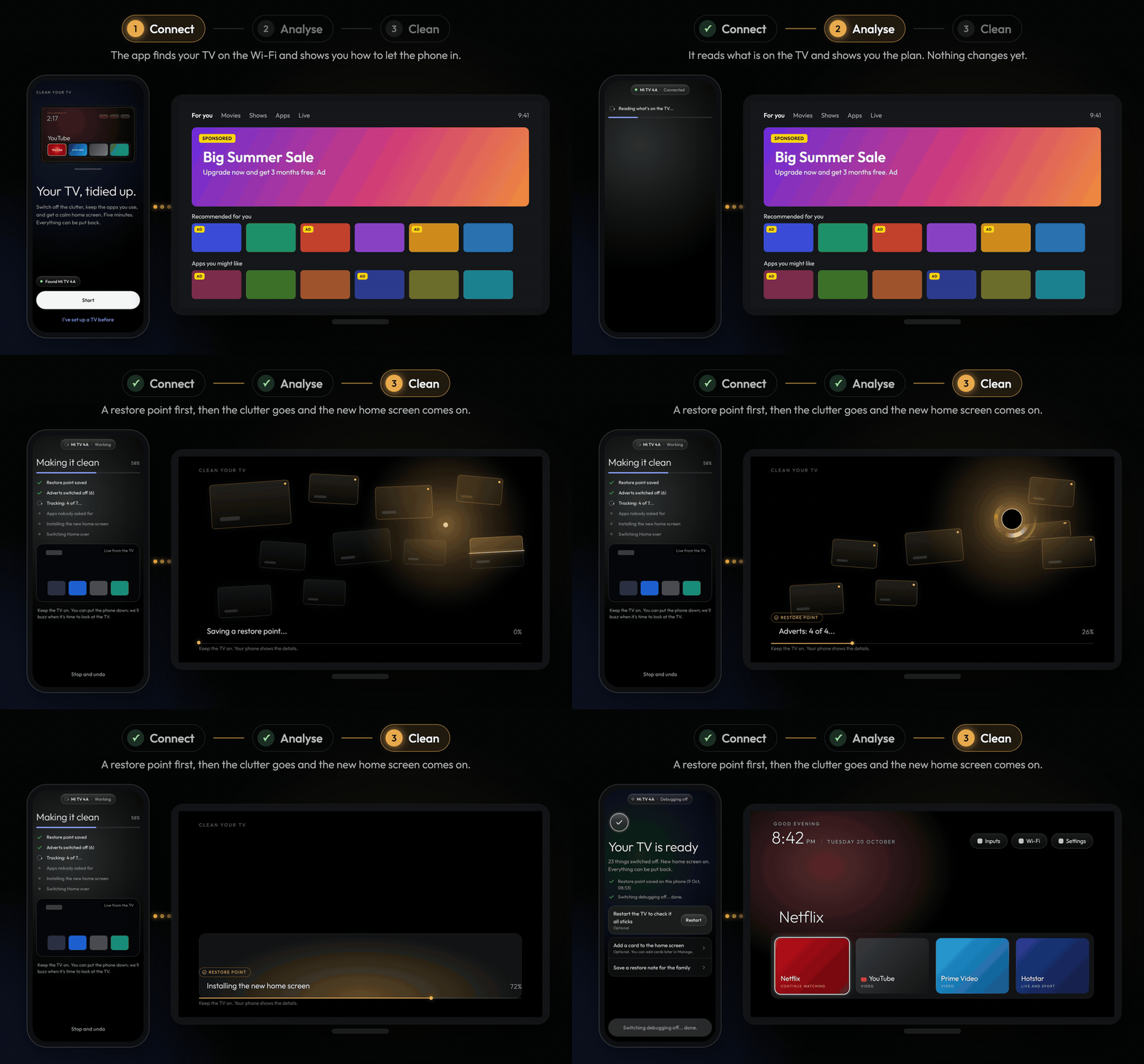
| 1. Connect | 2. Analyse | 3. Clean |
| :-: | :-: | :-: |
|  |
|  |
| 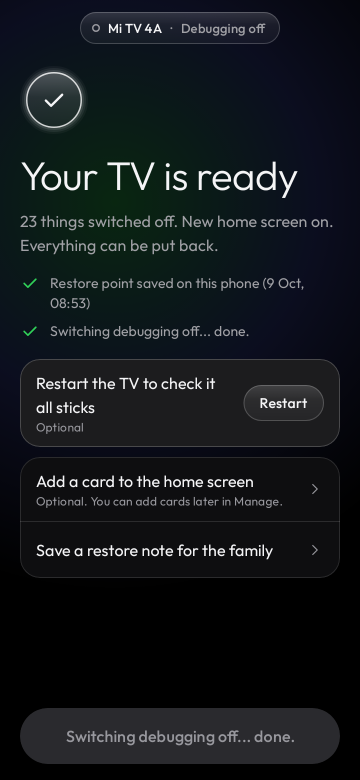 |
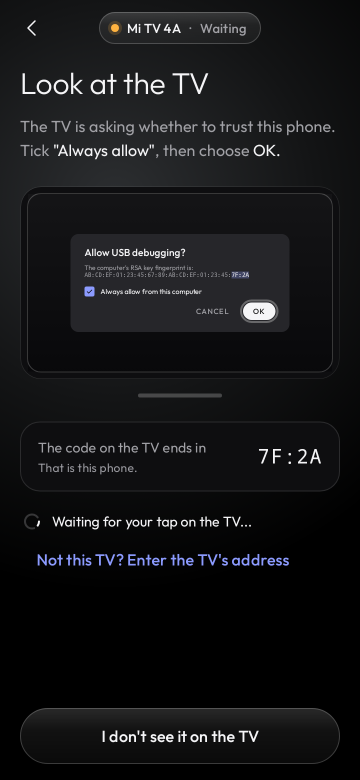
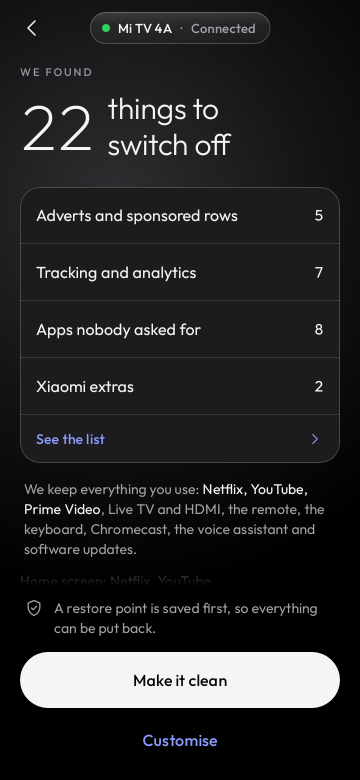
| The app finds your TV on the Wi-Fi and shows you how to let the phone in with the remote. | It reads what is on the TV and shows the plan: what goes off and what stays. Nothing changes yet. | Tap "Make it clean". A restore point first, then the clutter goes and the new home screen comes on. |
**You need** an Android phone (Android 9 or newer, with a screen lock) on the same Wi-Fi as the TV.
[Download the APK](https://github.com/udhaykumarbala/cleanyourtv-app/releases/latest) and open it to
install. Connecting takes about a minute (you switch on network debugging with the remote; the app
shows you how), and the whole clean-up about five minutes.
Come back any time to put an app back, check for leftovers after a TV update, change the dock or
the look, or undo everything.
## What your TV gets
Not every TV gets the new home screen yet. The app says which of these your TV gets before it
changes anything, on the "What we found" screen, and why.
| | Which TVs | What the app does |
| :- | :- | :- |
| **New home screen and clean-up** | TVs where testers confirmed the switch holds after a restart: most Xiaomi and Redmi sets on Android 9 to 11 and the Xiaomi MiTV-MZTU1 on Android 14; OnePlus on Android 11, Sony on Android 8, Hisense on Android 9, Homatics and MECOOL on Android 14 (with Google's Android TV home); and the TCL, Sony, Hisense, Philips and other models whose list says so | Switches off the clutter and puts the Clean Your TV home screen in charge, with a restore point first |
| **Clean-up only, for now** | Most Google TV sets (their setup wizard holds the Wi-Fi, or the TV has no list yet), TVs the app has not met before, and Google's own Chromecast and TV Streamer (the switch would cost casting) | Switches off adverts, tracking and background apps. The TV keeps its own home screen, so it looks the same; the adverts drawn by that home screen stay with it |
| **Not possible** | Fire TV, TCL's China builds, Android 7 and older | Clean-up only, and the app says so up front |
The [TV list](https://udhaykumarbala.github.io/cleanyourtv-app/tvs/) says what each model gets today,
which ones are in the test build, and which are coming soon. A TV with no list of its own moves up
when its owners send its report from the app ("Help add this TV").
## Two ways to clean your TV
[Clean Your TV](https://github.com/Gathin23/cleanyourtv) gives any Android TV a calm, ad-free home
screen and switches off the bloat, using lists tested by its community. On its own it needs a
computer: you run its scripts, or hand its prompt to a coding agent. This app does the whole job
from your phone.
| | Clean Your TV repo | **Clean Your TV app** (this repo) |
| :- | :- | :- |
| **You need** | A computer with ADB, or a coding agent such as Claude Code | **Just an Android phone** on the same Wi-Fi as the TV |
| **You do** | Run the scripts, or give the prompt to the agent | **Tap Start, check the plan, tap "Make it clean"** |
| **Made for** | Tinkerers, themes and new TV lists | **Everyone**: you, your parents, your friends |
Both give you the same Clean Your TV home screen and the same community TV lists, switch apps off
without uninstalling them, and keep a way back for every change.
## Safe by design
- **You see every step.** Nothing runs until you have seen the plan, and Customise shows every
command the app would send, in order.
- **Nothing is deleted.** Apps are switched off for the main user, so each one can come back. Wi-Fi,
the Play Store, the remote, the TV's inputs and the parts Android needs are protected and never
touched; accessibility, casting, voice and updates go off only if you choose.
- **Undo anything.** Put back one app or everything from the restore point. "Save a copy" exports
plain restore scripts that work from any computer with adb, even without this app.
- **A watchdog on the TV.** If the phone does not confirm the new home screen within 150 seconds
(the Wi-Fi drops, the phone dies), the TV puts its own home screen back by itself.
- **Careful where it counts.** On TVs where switching the home screen is known to cause trouble,
the app does the clean-up only and tells you why.
- **Private.** No accounts, no analytics, no ads. The app talks to your TV and, only when you ask,
to GitHub for updates. Network debugging is switched off again at the end unless you keep it on.
## Supported TVs
**173 TV lists from 47 brands**, from the Clean Your TV community lists: TCL, Sony, Xiaomi,
Hisense, Philips, Amazon Fire TV, Panasonic, XGIMI, BenQ, NVIDIA Shield, onn, Google and many more,
on Android TV, Google TV and Fire OS. A model nobody has listed yet still gets a careful clean-up
based on its brand.
|
| The app finds your TV on the Wi-Fi and shows you how to let the phone in with the remote. | It reads what is on the TV and shows the plan: what goes off and what stays. Nothing changes yet. | Tap "Make it clean". A restore point first, then the clutter goes and the new home screen comes on. |
**You need** an Android phone (Android 9 or newer, with a screen lock) on the same Wi-Fi as the TV.
[Download the APK](https://github.com/udhaykumarbala/cleanyourtv-app/releases/latest) and open it to
install. Connecting takes about a minute (you switch on network debugging with the remote; the app
shows you how), and the whole clean-up about five minutes.
Come back any time to put an app back, check for leftovers after a TV update, change the dock or
the look, or undo everything.
## What your TV gets
Not every TV gets the new home screen yet. The app says which of these your TV gets before it
changes anything, on the "What we found" screen, and why.
| | Which TVs | What the app does |
| :- | :- | :- |
| **New home screen and clean-up** | TVs where testers confirmed the switch holds after a restart: most Xiaomi and Redmi sets on Android 9 to 11 and the Xiaomi MiTV-MZTU1 on Android 14; OnePlus on Android 11, Sony on Android 8, Hisense on Android 9, Homatics and MECOOL on Android 14 (with Google's Android TV home); and the TCL, Sony, Hisense, Philips and other models whose list says so | Switches off the clutter and puts the Clean Your TV home screen in charge, with a restore point first |
| **Clean-up only, for now** | Most Google TV sets (their setup wizard holds the Wi-Fi, or the TV has no list yet), TVs the app has not met before, and Google's own Chromecast and TV Streamer (the switch would cost casting) | Switches off adverts, tracking and background apps. The TV keeps its own home screen, so it looks the same; the adverts drawn by that home screen stay with it |
| **Not possible** | Fire TV, TCL's China builds, Android 7 and older | Clean-up only, and the app says so up front |
The [TV list](https://udhaykumarbala.github.io/cleanyourtv-app/tvs/) says what each model gets today,
which ones are in the test build, and which are coming soon. A TV with no list of its own moves up
when its owners send its report from the app ("Help add this TV").
## Two ways to clean your TV
[Clean Your TV](https://github.com/Gathin23/cleanyourtv) gives any Android TV a calm, ad-free home
screen and switches off the bloat, using lists tested by its community. On its own it needs a
computer: you run its scripts, or hand its prompt to a coding agent. This app does the whole job
from your phone.
| | Clean Your TV repo | **Clean Your TV app** (this repo) |
| :- | :- | :- |
| **You need** | A computer with ADB, or a coding agent such as Claude Code | **Just an Android phone** on the same Wi-Fi as the TV |
| **You do** | Run the scripts, or give the prompt to the agent | **Tap Start, check the plan, tap "Make it clean"** |
| **Made for** | Tinkerers, themes and new TV lists | **Everyone**: you, your parents, your friends |
Both give you the same Clean Your TV home screen and the same community TV lists, switch apps off
without uninstalling them, and keep a way back for every change.
## Safe by design
- **You see every step.** Nothing runs until you have seen the plan, and Customise shows every
command the app would send, in order.
- **Nothing is deleted.** Apps are switched off for the main user, so each one can come back. Wi-Fi,
the Play Store, the remote, the TV's inputs and the parts Android needs are protected and never
touched; accessibility, casting, voice and updates go off only if you choose.
- **Undo anything.** Put back one app or everything from the restore point. "Save a copy" exports
plain restore scripts that work from any computer with adb, even without this app.
- **A watchdog on the TV.** If the phone does not confirm the new home screen within 150 seconds
(the Wi-Fi drops, the phone dies), the TV puts its own home screen back by itself.
- **Careful where it counts.** On TVs where switching the home screen is known to cause trouble,
the app does the clean-up only and tells you why.
- **Private.** No accounts, no analytics, no ads. The app talks to your TV and, only when you ask,
to GitHub for updates. Network debugging is switched off again at the end unless you keep it on.
## Supported TVs
**173 TV lists from 47 brands**, from the Clean Your TV community lists: TCL, Sony, Xiaomi,
Hisense, Philips, Amazon Fire TV, Panasonic, XGIMI, BenQ, NVIDIA Shield, onn, Google and many more,
on Android TV, Google TV and Fire OS. A model nobody has listed yet still gets a careful clean-up
based on its brand.
The details
- **Profiles:** TCL (26 lists), Sony (22), Xiaomi (29), Hisense, Philips, Amazon Fire TV,
Panasonic, XGIMI, BenQ, NVIDIA Shield, Skyworth, Haier, CHiQ, onn, Google, Vestel-made sets (JVC,
Toshiba, Cecotec), the Freebox Player and more, on Android TV, Google TV, Fire OS and TCL's China
builds. Each profile names who tested it.
- **Brand fallback:** for Amazon, Hisense, Panasonic, Philips, Sony, TCL, XGIMI and Xiaomi models
without a profile, the app switches off only what every profile of that brand agrees on, and says
it is being careful. More can be switched off by hand under Customise.
- **Other Android TVs** get the clean-up the app is sure about, and keep their own home screen until
a list for them says the switch holds (see "What your TV gets" above and the
[TV list](https://udhaykumarbala.github.io/cleanyourtv-app/tvs/)).
- **Clean-up only** (the TV keeps its own home screen, and the app says why): Fire TV, TCL's China
builds, Android 7, vendor home screens the app does not know, Chromecast with Google TV and the
Google TV Streamer (the switch would cost casting), the Kalley and PRISM+ sets whose setup wizard
returns at every boot, and TVs whose setup wizard has to stay on.
- **Network debugging:** the TV needs ADB over the network (port 5555). On TVs that only offer
Wireless debugging with a pairing code, pair once from a computer; the app shows the three commands.
**Your TV is not listed?** TV lists live in Clean Your TV, so they help everyone, with or without
the app. Add yours there by following its
[contributing guide](https://github.com/Gathin23/cleanyourtv/blob/main/CONTRIBUTING.md), and the app
picks it up in its next release. See also [CONTRIBUTING.md](CONTRIBUTING.md#propose-a-tv-profile).
## Built on Clean Your TV
- The home screen is the [Clean Your TV launcher](https://github.com/Gathin23/cleanyourtv/tree/main/launcher)
by [Gathin](https://github.com/Gathin23). The app carries it inside, built from its source.
- New TV lists and launcher versions from Clean Your TV reach the app in its updates. The app is a
community project; news about Clean Your TV itself comes from [@gathint](https://x.com/gathint).
- The Clean Your TV name and the app's package IDs under `tv.cleanyour` (from `cleanyour.tv`) are
used with Gathin's permission.
- Something wrong in the app itself? [Open an issue here](https://github.com/udhaykumarbala/cleanyourtv-app/issues).
Security issues: see [SECURITY.md](SECURITY.md).
Privacy in detail
- No accounts, no analytics, no advertising, no crash reporting service.
- On your home network the app talks only to the TV you pick (ADB on port 5555) and listens for
TVs announcing themselves (mDNS).
- On the internet it talks only to GitHub, and only when you ask: "Check for updates" makes one
request for the latest release, and an optional add-on downloads from its GitHub release. The
launcher and the TV progress screen are inside the APK, so a normal setup makes no internet
request at all.
- The key the TV trusts lives in the phone's Android Keystore and never leaves the phone. Restore
points stay on the phone unless you save a copy yourself.
- "Report a problem" and "Help add this TV" show the whole report first, remove addresses, serial
numbers, keys and codes, and send nothing themselves: you share it or post it on GitHub.
- Permissions: internet, network state, Wi-Fi multicast (to find the TV), a foreground service
while it works on the TV, notifications and the screen lock prompt. No location, storage, camera
or contacts.
- The full policy: [PRIVACY.md](PRIVACY.md), published at [cleanyour.tv/app/android/privacy](https://cleanyour.tv/app/android/privacy).
Check the download
Every release is signed by the same key, whose certificate SHA-256 is (also in
[docs/release-signer.sha256](docs/release-signer.sha256)):
```
eaf7af3867bb29ff4bb038854842c93f42ffe4198a087e611cb18f925201cd65
```
```bash
sha256sum cleanyourtv-0.2.0.apk # compare with the release notes
apksigner verify --print-certs cleanyourtv-0.2.0.apk
```
Android refuses an update signed by any other key, so after the first install every update is
checked for you. The build is reproducible: for every release tag CI builds the unsigned APK from
the public source, and `scripts/verify-release.sh` checks that the published APK is exactly that
build plus a signature.
## For developers
```bash
git clone --recurse-submodules https://github.com/udhaykumarbala/cleanyourtv-app.git
cd cleanyourtv-app
./gradlew check assembleDebug # JDK 21 and the Android SDK
```
A Kotlin and Jetpack Compose app that speaks ADB to the TV itself, with no computer in between.
[CONTRIBUTING.md](CONTRIBUTING.md) covers tests, screenshot goldens, the module rules and how
releases are built and signed. How the app was designed and reviewed is in
[docs/history](docs/history/README.md), and what changed in each version in [CHANGELOG.md](CHANGELOG.md).
The app is developed with AI coding agents under human review: the maintainer set the design and
reviewed and tested the app, and every change went through automated tests and review.
## Credits
- [Clean Your TV](https://github.com/Gathin23/cleanyourtv) by [Gathin](https://github.com/Gathin23)
and its community contributors, whose launcher, clean-up lists and test reports this app is built on.
- The ADB protocol code started from [dadb](https://github.com/mobile-dev-inc/dadb) by mobile.dev
(Apache 2.0, see [adb/wire/NOTICE](adb/wire/NOTICE)).
- The [Outfit](https://github.com/Outfitio/Outfit-Fonts) typeface (SIL Open Font License 1.1).
- The people who tested the app on their own TVs and told us how it went: [Testers](https://udhaykumarbala.github.io/cleanyourtv-app/testers/).
Full list: [THIRD-PARTY-NOTICES](THIRD-PARTY-NOTICES). Licence: [MIT](LICENSE), like Clean Your TV.