🚀 LLMRouter: An Open-Source Library for LLM Routing
## ✨ Introduction
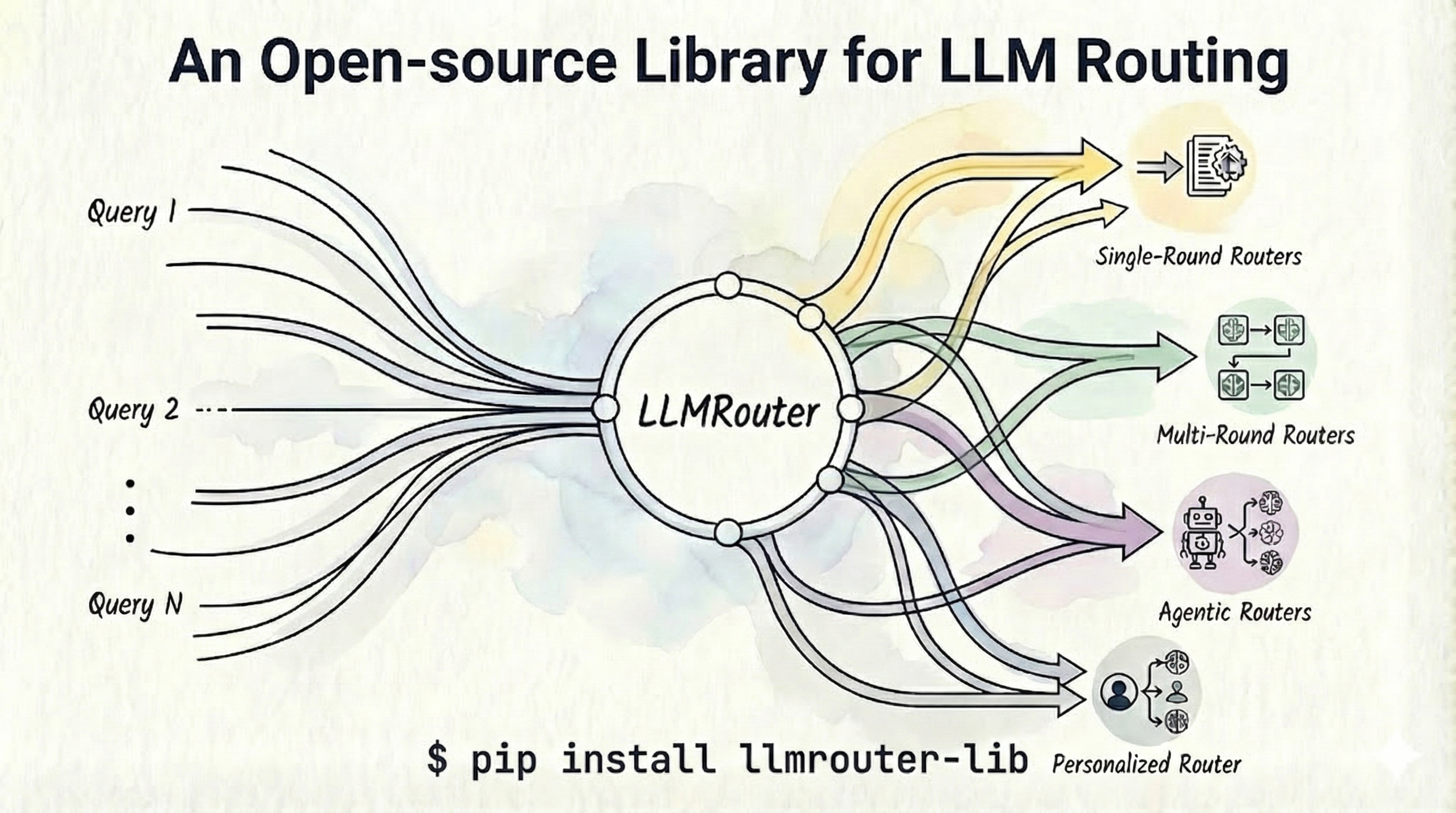
**LLMRouter** is an intelligent routing system designed to optimize LLM inference by dynamically selecting the most suitable model for each query. To achieve intelligent routing, it defines:
1. 🚀 *Smart Routing*: Automatically routes queries to the optimal LLM based on task complexity, cost, and performance requirements.
2. 📊 *Multiple Router Models*: Support for **over 16 routing models**, organized into five major categories—**single-round routers, multi-round routers, multimodal routers, agentic routers, and personalized routers**—covering a wide range of strategies such as KNN, SVM, MLP, Matrix Factorization, Elo Rating, graph-based routing, BERT-based routing, hybrid probabilistic methods, transformed-score routers, and more.
3. 🛠️ *Unified CLI*: Complete command-line interface for training, inference, and interactive chat with Gradio-based UI.
4. 📈 *Data Generation Pipeline*: Complete pipeline for generating training data from 11 benchmark datasets with automatic API calling and evaluation.
## 📰 News
- 🔥 **[2026-08]**: We are honored to have **LLMRouter** featured among the top papers on 🤗 Hugging Face [Daily Papers](https://huggingface.co/papers/2608.06867).
- 🚀 **[2026-08]: LLMRouter** - We've released LLMRouter, a unified infrastructure for developing, evaluating, and deploying LLM routers! LLMRouter formulates routing as a unified sequential decision process spanning single-turn, multi-turn, and personalized scenarios, and provides a modular framework with 16+ representative routing methods. It also introduces xRouteBench, a comprehensive benchmark covering generic LLM, memory-augmented, vision, time-series, and personalized routing, with automated supervision construction and joint evaluation of response quality and inference cost. Experiments show that learned routers outperform the strongest fixed-model baseline by 14.6% relatively, while lightweight and user-conditioned routers offer strong advantages under tight cost budgets and personalized settings. Check out the [paper](https://arxiv.org/abs/2608.06867) for details.
- 📈 **[2026-07]**: **TSRouter** - We've released TSRouter, a multimodal router for time series reasoning! TSRouter routes each time series query to the best (modality, model) pair — text LLMs vs. visual/mix VLMs — via a 4-partite heterogeneous graph over task, query, modality, and model nodes, supports cost-aware routing scenarios and zero-shot generalization to unseen models and novel tasks, and ships with the full TSRBench data pipeline plus a converter to the standard LLMRouter data interface. Check out the [paper](https://arxiv.org/abs/2607.08940v1) for details.
- 🚀 **[2026-05]**: **RouteProfile Code & Paper Released** - We've released **RouteProfile**, a general framework for designing LLM profiles for routing! RouteProfile enables structured profile construction from heterogeneous interaction histories, supports flat, embedding-based, text-GNN, and trainable GNN profiles, and evaluates routing performance across SimRouter, MLPRouter, and GraphRouter under both standard and new-LLM settings. Check out the [paper](https://arxiv.org/abs/2605.00180) and [code](https://github.com/ulab-uiuc/RouteProfile) for details.
- 🖥️ **[2026-02]**: **ComfyUI Interface** - We've released the visual interface for LLMRouter! Now you can visually construct data generation and routing pipelines, drag-and-drop nodes to train routers, and monitor performance in real-time. See [ComfyUI Interface](#-comfyui-interface) for details.
- 🔗 **[2026-02]**: **OpenClaw Router** - OpenAI-compatible server with OpenClaw integration! We've also released llmrouter-lib v0.3.1. Deploy LLMRouter as a production API server that works seamlessly with Slack, Discord, and other messaging platforms via [OpenClaw](https://github.com/openclaw/openclaw). Features include multimodal understanding (image/audio/video), retrieval-augmented routing memory, streaming support, and all 16+ LLMRouter routing strategies. See [OpenClaw Router Integration](#-openclaw-router-openclaw-integration). For deployment with social platforms like Slack, refer to the [Getting Started Guide](https://www.moltcn.com/start/getting-started.html) for step-by-step setup instructions.
- ⭐ **[2026-01]**: **LLMRouter** just crossed 1K GitHub stars! We've also released llmrouter-lib v0.2.0. Updates include service-specific dict configs (OpenAI, Anthropic, etc.) and multimodal routing (Video/Image + Text) on Geometry3K, MathVista, and Charades-Ego—all in the first unified open-source LLM routing library with 16+ routers, a unified CLI, Gradio UI, and 11 datasets. Install via pip install llmrouter-lib. More updates soon! 🚀
- 🚀 **[2025-12]**: **LLMRouter** is officially released - ship smarter 🧠, cost-aware 💸 LLM routing with 16+ routers 🧭, a unified `llmrouter` CLI 🛠️, and a plugin workflow for custom routers 🧩.
## 🔗 Links
- [Supported Routers](#-supported-routers)
- [Installation](#installation)
- [Use Your Own Dataset](#-preparing-training-data)
- [Training a Router](#training-a-router)
- [Running Inference via a Router](#running-inference)
- [Interactive Chat Interface with a Router](#interactive-chat-interface)
- [ComfyUI Interface](#-comfyui-interface)
- [Creating Your Own Routers](#-creating-your-own-routers)
- [Adding Your Own Tasks](#-adding-your-own-tasks)
- [xRouteBench Benchmark Pipeline](#-xroutebench-benchmark-pipeline)
- [OpenClaw Router (OpenClaw Integration)](#-openclaw-router-openclaw-integration)
- [Acknowledgments](#-acknowledgments)
- [Citation](#-citation)
## 🧭 Supported Routers
### Single-Round Routers
| Router | Training | Inference | Description | Tutorial |
|--------|:--------:|:---------:|-------------|:--------:|
| `knnrouter` | ✅ | ✅ | K-Nearest Neighbors based routing | [📖](llmrouter/models/knnrouter/README.md) |
| `svmrouter` | ✅ | ✅ | Support Vector Machine based routing | [📖](llmrouter/models/svmrouter/README.md) |
| `mlprouter` | ✅ | ✅ | Multi-Layer Perceptron based routing | [📖](llmrouter/models/mlprouter/README.md) |
| `racerrouter` | ✅ | ✅ | Robust adaptive cost-efficient routing | [📖](llmrouter/models/racerrouter/README.md) |
| `mfrouter` | ✅ | ✅ | Matrix Factorization based routing | [📖](llmrouter/models/mfrouter/README.md) |
| `elorouter` | ✅ | ✅ | Elo Rating based routing | [📖](llmrouter/models/elorouter/README.md) |
| `routerdc` | ✅ | ✅ | Dual Contrastive learning based routing | [📖](llmrouter/models/routerdc/README.md) |
| `automix` | ✅ | ✅ | Automatic model mixing | [📖](llmrouter/models/automix/README.md) |
| `hybrid_llm` | ✅ | ✅ | Hybrid LLM routing strategy | [📖](llmrouter/models/hybrid_llm/README.md) |
| `graphrouter` | ✅ | ✅ | Graph-based routing | [📖](llmrouter/models/graphrouter/README.md) |
| `causallm_router` | ✅ | ✅ | Causal Language Model router | [📖](llmrouter/models/causallm_router/README.md) |
| `smallest_llm` | N/A | ✅ | Always routes to smallest model | [📖](llmrouter/models/smallest_llm/README.md) |
| `largest_llm` | N/A | ✅ | Always routes to largest model | [📖](llmrouter/models/largest_llm/README.md) |
### Multi-Round Routers
| Router | Training | Inference | Description | Tutorial |
|--------|:--------:|:---------:|-------------|:--------:|
| `router_r1` | [LINK](https://github.com/ulab-uiuc/Router-R1) | ✅ | Pre-trained Router-R1 model for multi-turn conversations | [📖](llmrouter/models/router_r1/README.md) |
### Multimodal Routers
| Router | Training | Inference | Description | Tutorial |
|--------|:--------:|:---------:|-------------|:--------:|
| `tsrouter` | ✅ | ✅ | Routes time series queries to the best (modality, model) pair — text LLMs vs. visual/mix VLMs — via a 4-partite heterogeneous graph ([paper](https://arxiv.org/abs/2607.08940v1), [code](https://github.com/tianyi-lab/TSRouter)) | [📖](llmrouter/models/tsrouter/README.md) |
### Personalized Routers
| Router | Training | Inference | Description | Tutorial |
|--------|:--------:|:---------:|-------------|:--------:|
| `gmtrouter` | ✅ | ✅ | Graph-based personalized router with user preference learning | [📖](llmrouter/models/gmtrouter/README.md) |
| `personalizedrouter` | ✅ | ✅ | GNN-based personalized router with user features | [📖](llmrouter/models/personalizedrouter/README.md) |
### Agentic Routers
| Router | Training | Inference | Description | Tutorial |
|--------|:--------:|:---------:|-------------|:--------:|
| `knnmultiroundrouter` | ✅ | ✅ | KNN-based agentic router for complex tasks | [📖](llmrouter/models/knnmultiroundrouter/README.md) |
| `llmmultiroundrouter` | N/A | ✅ | LLM-based agentic router for complex tasks | [📖](llmrouter/models/llmmultiroundrouter/README.md) |
## 🚀 Get Started
### Installation
#### Install from source
Clone the repository and install in editable mode using a virtual environment (e.g., with anaconda3):
```bash
# Clone the repository
git clone https://github.com/ulab-uiuc/LLMRouter.git
cd LLMRouter
# Create and activate virtual environment
conda create -n llmrouter python=3.10
conda activate llmrouter
# Install the package (base installation)
pip install -e .
# Optional: Install with RouterR1 support (requires GPU)
# RouterR1 is tested with vllm==0.6.3 (torch==2.4.0); the extra pins these versions.
pip install -e ".[router-r1]"
# Optional: Install all optional dependencies
pip install -e ".[all]"
```
#### Install from PyPI
```bash
pip install llmrouter-lib
```
### 🔑 Setting Up API Keys
LLMRouter requires API keys to make LLM API calls for inference, chat, and data generation. Set the `API_KEYS` environment variable using one of the following formats:
> 💡 **Free NVIDIA API Keys**: The NVIDIA endpoints currently used in LLMRouter have freely available API keys. To get started, visit [https://build.nvidia.com/](https://build.nvidia.com/) to create an account, then you can generate your API keys at no cost.
#### **Service-Specific Dict Format** (recommended for multiple providers)
Use this format when you have models from different service providers (e.g., NVIDIA, OpenAI, Anthropic) and want to use different API keys for each provider:
```bash
export API_KEYS='{"NVIDIA": "nvidia-key-1,nvidia-key-2", "OpenAI": ["openai-key-1", "openai-key-2"], "Anthropic": "anthropic-key-1"}'
```
**Dict Format Details:**
- **Keys**: Service provider names (must match the `service` field in your LLM candidate JSON)
- **Values**: Can be:
- Comma-separated string: `"key1,key2,key3"`
- JSON array: `["key1", "key2", "key3"]`
- Single string: `"key1"`
- **Service Matching**: The system automatically matches the `service` field from your LLM candidate JSON to select the appropriate API keys
- **Round-Robin**: Each service maintains its own round-robin counter for load balancing
- **Error Handling**: If a service is not found in the dict, a clear error message will be raised with available services listed
**Example LLM Candidate JSON with service field:**
```json
{
"qwen2.5-7b-instruct": {
"service": "NVIDIA",
"model": "qwen/qwen2.5-7b-instruct",
"api_endpoint": "https://integrate.api.nvidia.com/v1"
},
"gpt-4": {
"service": "OpenAI",
"model": "gpt-4",
"api_endpoint": "https://api.openai.com/v1"
}
}
```
#### **Legacy Formats** (for single provider or backward compatibility)
**JSON Array Format** (for multiple keys from same provider):
```bash
export API_KEYS='["your-key-1", "your-key-2", "your-key-3"]'
```
**Comma-Separated Format** (alternative for multiple keys):
```bash
export API_KEYS='key1,key2,key3'
```
**Single Key** (for one API key):
```bash
export API_KEYS='your-api-key'
```
**Notes**:
- API keys are used for **inference**, **chat interface**, and **data generation** (Step 3 of the pipeline)
- Multiple keys enable automatic load balancing across API calls
- When using **dict format**, ensure the `service` field in your LLM candidate JSON matches the keys in your `API_KEYS` dict
- The environment variable must be set before running inference, chat, or data generation commands
- For persistent setup, add the export command to your shell profile (e.g., `~/.bashrc` or `~/.zshrc`)
### 🌐 Configuring API Endpoints
API endpoints can be specified at two levels (resolved in priority order):
1. **Per-Model** (highest priority): `api_endpoint` field in LLM candidate JSON (`default_llm.json`)
2. **Router-Level** (fallback): `api_endpoint` field in router YAML config
3. **Error**: Raises descriptive error if neither is specified
**LLM Candidate JSON** (per-model endpoints):
```json
{
"qwen2.5-7b-instruct": {
"model": "qwen/qwen2.5-7b-instruct",
"api_endpoint": "https://integrate.api.nvidia.com/v1",
...
},
"custom-model": {
"model": "custom/model-name",
"api_endpoint": "https://api.customprovider.com/v1",
...
}
}
```
**Router YAML** (default endpoint):
```yaml
api_endpoint: 'https://integrate.api.nvidia.com/v1' # Fallback for all models
```
**Benefits**: Different models can use different providers; easy migration; backward compatible with router configs.
For details, see [Data Generation Pipeline documentation](llmrouter/data/README.md#llm-data-json-default_llmjson).
### 🖥️ Using Local LLM Models
LLMRouter supports locally hosted LLM inference servers that provide OpenAI-compatible APIs (e.g., Ollama, vLLM, SGLang). For local providers, you can use an empty string `""` as the API key value - the system automatically detects localhost endpoints and handles authentication accordingly.
**Example with Ollama:**
```bash
export API_KEYS='{"Ollama": ""}'
```
```json
{
"gemma3": {
"size": "3B",
"feature": "Gemma 3B model hosted locally via Ollama",
"input_price": 0.0,
"output_price": 0.0,
"model": "gemma3",
"service": "Ollama",
"api_endpoint": "http://localhost:11434/v1"
}
}
```
**Important**: Use the `/v1` endpoint (OpenAI-compatible), not the native API endpoints. Empty strings are automatically detected for localhost endpoints (`localhost` or `127.0.0.1`).
### 🧪 Testing Model Availability
You can test the availability of different candidate models using the following curl commands. This is useful for verifying that your API keys work correctly and that specific models are accessible:
**Note**: If you're using the dict format for `API_KEYS`, extract the NVIDIA key first (e.g., using `echo $API_KEYS | python3 -c "import sys, json; print(json.load(sys.stdin)['NVIDIA'].split(',')[0])"`), or set a temporary variable with your NVIDIA API key.
```bash
# export API_KEYS=...
# Example API endpoint - adjust based on your configuration
# This example uses NVIDIA's endpoint, but you should use the endpoint
# specified in your LLM candidate JSON or router config
API_ENDPOINT="https://integrate.api.nvidia.com/v1/chat/completions"
# Example model list - adjust based on your LLM candidate configuration
# These are example models; replace with the actual model names/IDs
# from your LLM candidate JSON file
MODELS=(
"qwen/qwen2.5-7b-instruct"
"meta/llama-3.1-8b-instruct"
"mistralai/mistral-7b-instruct-v0.3"
"nvidia/llama-3.3-nemotron-super-49b-v1"
"mistralai/mixtral-8x7b-instruct-v0.1"
"mistralai/mixtral-8x22b-instruct-v0.1"
)
SYSTEM_PROMPT="Hello."
PROMPT="Hello."
for MODEL in "${MODELS[@]}"; do
echo "===== $MODEL ====="
curl "$API_ENDPOINT" \
-H "Content-Type: application/json" \
-H "Authorization: Bearer $API_KEYS" \
-d "{
\"model\": \"$MODEL\",
\"messages\": [
{
\"role\": \"system\",
\"content\": \"$SYSTEM_PROMPT\"
},
{
\"role\": \"user\",
\"content\": \"$PROMPT\"
}
],
\"temperature\": 0.8,
\"max_tokens\": 200
}"
echo
done
```
This script will test each model in the list and display the response, helping you verify which models are available and working with your API key.
### 📊 Preparing Training Data
LLMRouter includes a complete data generation pipeline that transforms raw benchmark datasets into formatted routing data with embeddings. The pipeline supports 11 diverse benchmark datasets including Natural QA, Trivia QA, MMLU, GPQA, MBPP, HumanEval, GSM8K, CommonsenseQA, MATH, OpenbookQA, and ARC-Challenge.
> 💡 **Multimodal Integration**: Learn how to incorporate complex multimodal tasks (Video/Image + Text) into LLMRouter by checking our [Multimodal Task Guide](data/multimodal_tasks/README.md). We currently support 5 multimodal tasks across 3 datasets (Geometry3K, MathVista, Charades-Ego).
#### Pipeline Overview
The data generation pipeline consists of three main steps:
1. **Generate Query Data** - Extract queries from benchmark datasets and create train/test split JSONL files
2. **Generate LLM Embeddings** - Create embeddings for LLM candidates from their metadata
3. **API Calling & Evaluation** - Call LLM APIs, evaluate responses, and generate unified embeddings + routing data
#### Quick Start
Start with the sample configuration file:
```bash
# Step 1: Generate query data
python llmrouter/data/data_generation.py --config llmrouter/data/sample_config.yaml
# Step 2: Generate LLM embeddings
python llmrouter/data/generate_llm_embeddings.py --config llmrouter/data/sample_config.yaml
# Step 3: API calling & evaluation (requires API_KEYS - see "Setting Up API Keys" section above)
python llmrouter/data/api_calling_evaluation.py --config llmrouter/data/sample_config.yaml --workers 100
```
#### Output Files
The pipeline generates the following files:
- **Query Data** (JSONL): `query_data_train.jsonl` and `query_data_test.jsonl` - Query data with train/test split
- **LLM Embeddings** (JSON): `default_llm_embeddings.json` - LLM metadata with embeddings
- **Query Embeddings** (PyTorch): `query_embeddings_longformer.pt` - Unified embeddings for all queries
- **Routing Data** (JSONL): `default_routing_train_data.jsonl` and `default_routing_test_data.jsonl` - Complete routing data with model responses, performance scores, and token usage
**Example routing data entry:**
```json
{
"task_name": "gsm8k",
"query": "Janet has 4 apples. She gives 2 to Bob. How many does she have left?",
"ground_truth": "2",
"metric": "GSM8K",
"model_name": "llama3-chatqa-1.5-8b",
"response": "Janet has 4 apples and gives 2 to Bob, so she has 4 - 2 = 2 apples left.",
"performance": 1.0,
"embedding_id": 42,
"token_num": 453
}
```
#### Configuration
All paths and parameters are controlled via YAML configuration. The sample config file (`llmrouter/data/sample_config.yaml`) references the example data directory and can be used as-is or customized for your setup.
**Note**: Step 3 requires API keys for calling LLM services. See the [Setting Up API Keys](#-setting-up-api-keys) section above for configuration details.
For complete documentation including detailed file formats, embedding mapping system, configuration options, and troubleshooting, see **[llmrouter/data/README.md](llmrouter/data/README.md)**.
### Training a Router
Before training, ensure you have prepared your data using the [Data Generation Pipeline](#-preparing-training-data) or use the example data in `data/example_data/`.
Train various router models with your configuration:
```bash
# Train KNN router
llmrouter train --router knnrouter --config configs/model_config_train/knnrouter.yaml
# Train MLP router with GPU
CUDA_VISIBLE_DEVICES=2 llmrouter train --router mlprouter --config configs/model_config_train/mlprouter.yaml --device cuda
# Train MF router quietly
CUDA_VISIBLE_DEVICES=1 llmrouter train --router mfrouter --config configs/model_config_train/mfrouter.yaml --device cuda --quiet
# Train TSRouter (time series modality-model routing; see data/tsrbench/ for data preparation)
llmrouter train --router tsrouter --config configs/model_config_train/tsrouter.yaml --device cuda
```
### Running Inference
Perform inference with trained routers (requires API keys - see [Setting Up API Keys](#-setting-up-api-keys) section):
```bash
# Single query inference
llmrouter infer --router knnrouter --config config.yaml --query "What is machine learning?"
# Batch inference from file
llmrouter infer --router knnrouter --config config.yaml --input queries.txt --output results.json
# Route only (without calling LLM API - no API keys needed)
llmrouter infer --router knnrouter --config config.yaml --query "Hello" --route-only
# Custom generation parameters
llmrouter infer --router knnrouter --config config.yaml --query "Explain AI" --temp 0.7 --max-tokens 2048 --verbose
```
Input file formats supported: `.txt` (one query per line), `.json` (list of strings or objects with `"query"` field), `.jsonl` (one JSON object per line).
### Interactive Chat Interface
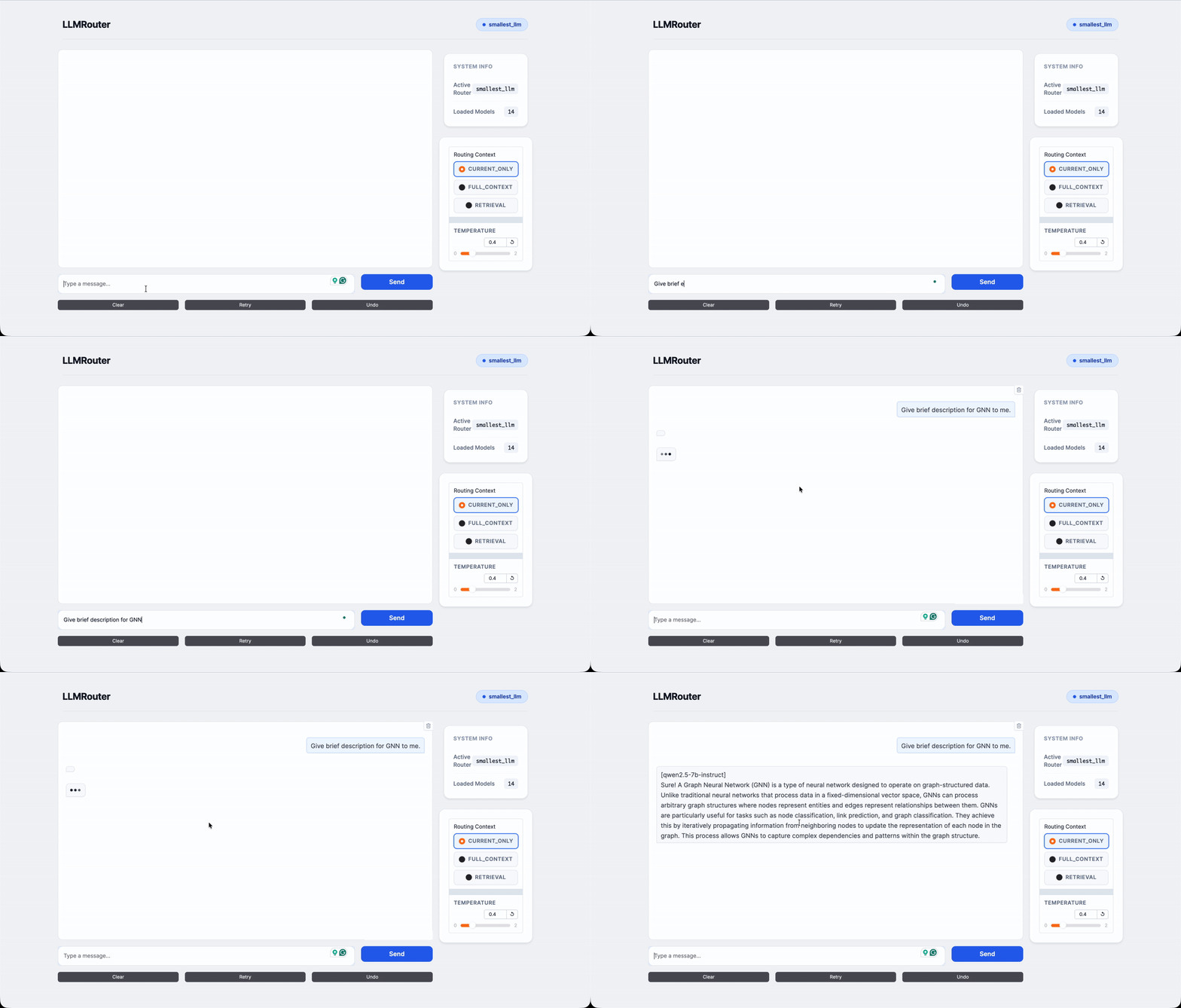
📱 Quick Preview: Animated overview of the LLMRouter chat interface showing real-time routing and model selection.
Launch the chat interface (requires API keys - see [Setting Up API Keys](#-setting-up-api-keys) section):
```bash
# Basic chat interface
llmrouter chat --router knnrouter --config config.yaml
# Custom host and port
llmrouter chat --router knnrouter --config config.yaml --host 0.0.0.0 --port 7860
# With public sharing link
llmrouter chat --router knnrouter --config config.yaml --share
# Specify query mode
llmrouter chat --router knnrouter --config config.yaml --mode full_context --top_k 5
```
Query Modes:
- `current_only`: Routes based on current query only (default)
- `full_context`: Combines all chat history with current query
- `retrieval`: Retrieves top-k similar historical queries for context
### Direct Script Execution
You can also run the CLI scripts directly:
```bash
# Training
python -m llmrouter.cli.router_train --router knnrouter --config config.yaml
# Inference
python -m llmrouter.cli.router_inference --router knnrouter --config config.yaml --query "Hello"
# Chat
python -m llmrouter.cli.router_chat --router knnrouter --config config.yaml
```
## 🎨 ComfyUI Interface
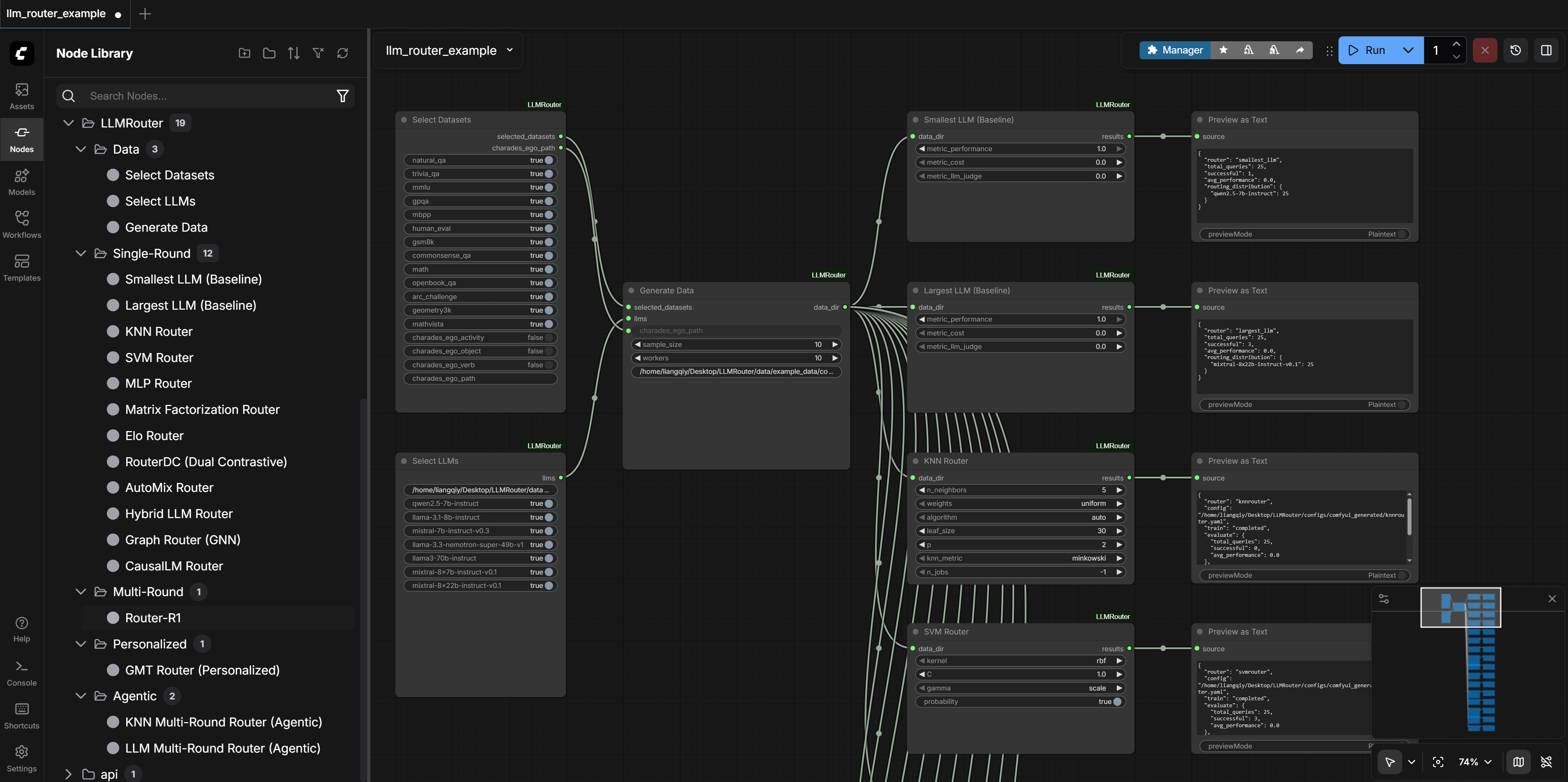
LLMRouter offers a powerful **Visual Interface** via [ComfyUI](https://github.com/Comfy-Org/ComfyUI), transforming how you interact with the routing pipeline. Instead of editing YAML files and running terminal scripts, you can drag, drop, and connect nodes to build your workflow.
### Key Highlights
- **Visual Configuration**: Forget complex YAML files and terminal scripts. Adjust parameters (e.g., sample size, model candidates) and select datasets directly on the canvas.
- **End-to-End Automation**: Seamlessly link nodes to build a complete pipeline: Data Generation $\to$ Router Training $\to$ Evaluation.
- **Real-Time Monitoring**: Track the status of query generation, embedding extraction, and model training with instant visual feedback.
- **Modular Design**: Custom construct your pipeline by dragging, dropping, and connecting nodes for Datasets, LLMs, and Routers.
### Installation & Setup
Prerequisites: You must have [ComfyUI](https://github.com/Comfy-Org/ComfyUI) installed.
To install the LLMRouter custom nodes, you need to create two symbolic links (soft links).
#### 1. Link the Custom Nodes
This allows ComfyUI to load the LLMRouter Python backend logic in the ComfyUI "Nodes" category.
```bash
ln -s /path/to/LLMRouter/ComfyUI /path/to/ComfyUI/custom_nodes/LLMRouter
```
#### 2. Link the Workflow Example (Optional)
This allows you to see the pre-configured workflow in the ComfyUI "Workflows" category.
```bash
ln -s /path/to/LLMRouter/ComfyUI/workflows/llm_router_example.json /path/to/ComfyUI/user/default/workflows/llm_router_example.json
```
#### 3. Running the Application
To start the ComfyUI server with the LLMRouter nodes:
```bash
python /path/to/ComfyUI/main.py
```
#### 4. Remote Access & Port Forwarding
If you are running ComfyUI on a remote server (e.g., a compute cluster) and wish to access the interface locally, you can use SSH tunneling. Once the tunnel is established, access the interface at `http://127.0.0.1:8188`.
### Using the ComfyUI Interface
#### Find the Nodes
To use the nodes:
1. Open the ComfyUI web interface.
2. Use the **Node Library** sidebar or **Right-click** on the canvas.
3. Navigate to the **`LLMRouter`** category.
4. You will find nodes organized by function:
- **Data**: `Select Datasets`, `Select LLMs`, `Generate Data`.
- **Single-Round**: `KNN Router`, `SVM Router`, `MLP Router`, etc.
- **Multi-Round / Agentic**: Specialized routers for complex tasks.
#### Load the Example
To use the ready-to-run example:
1. Click the **`Workflows`** tab.
2. Select **`llm_router_example.json`**.
3. This loads a complete pipeline.
## 🔧 Creating Your Own Routers
LLMRouter supports a **plugin system** that allows you to add custom router implementations without modifying the core codebase. This makes it easy to experiment with new routing strategies or domain-specific routers.
### Quick Start
**1. Create your router directory:**
```bash
mkdir -p custom_routers/my_router
```
**2. Implement your router** (`custom_routers/my_router/router.py`):
```python
from llmrouter.models.meta_router import MetaRouter
import torch.nn as nn
class MyRouter(MetaRouter):
"""Your custom router implementation."""
def __init__(self, yaml_path: str):
# Initialize with a model (can be nn.Identity() for simple routers)
model = nn.Identity()
super().__init__(model=model, yaml_path=yaml_path)
# Get available LLM names from config
self.llm_names = list(self.llm_data.keys())
def route_single(self, query_input: dict) -> dict:
"""Route a single query to the best LLM."""
query = query_input['query']
# Your custom routing logic here
# Example: route based on query length
selected_llm = (self.llm_names[0] if len(query) < 50
else self.llm_names[-1])
return {
"query": query,
"model_name": selected_llm,
"predicted_llm": selected_llm,
}
def route_batch(self, batch: list) -> list:
"""Route multiple queries."""
return [self.route_single(q) for q in batch]
```
**3. Create configuration** (`custom_routers/my_router/config.yaml`):
```yaml
data_path:
llm_data: 'data/example_data/llm_candidates/default_llm.json'
hparam:
# Your hyperparameters here
# Optional: Default API endpoint (used as fallback if models don't specify their own)
# Individual models can override this by specifying api_endpoint in the llm_data JSON file
api_endpoint: 'https://integrate.api.nvidia.com/v1'
```
**4. Use your custom router** (same as built-in routers!):
```bash
# Inference
llmrouter infer --router my_router \
--config custom_routers/my_router/config.yaml \
--query "What is machine learning?"
# List all routers (including custom ones)
llmrouter list-routers
```
### Plugin Discovery
Custom routers are automatically discovered from:
- `./custom_routers/` (recommended - project directory)
- `~/.llmrouter/plugins/` (user home directory)
- `$LLMROUTER_PLUGINS` environment variable (colon-separated paths)
### Example Routers
LLMRouter includes example custom routers you can learn from:
**RandomRouter** - Simple baseline that randomly selects an LLM
```bash
llmrouter infer --router randomrouter \
--config custom_routers/randomrouter/config.yaml \
--query "Hello world"
```
**ThresholdRouter** - Advanced trainable router with difficulty estimation
```bash
# Train the router
llmrouter train --router thresholdrouter \
--config custom_routers/thresholdrouter/config.yaml
# Use for inference
llmrouter infer --router thresholdrouter \
--config custom_routers/thresholdrouter/config.yaml \
--query "Explain quantum computing"
```
### Documentation
For detailed guides on creating custom routers:
- 📖 **Quick Start**: [custom_routers/README.md](custom_routers/README.md)
- 📖 **Implementation Summary**: [CUSTOM_ROUTER_SUMMARY.md](CUSTOM_ROUTER_SUMMARY.md)
### Common Routing Patterns
**Rule-based routing:**
```python
def route_single(self, query_input):
query = query_input['query'].lower()
if 'code' in query:
return {"model_name": "code-specialist"}
elif len(query) < 50:
return {"model_name": "small-fast-model"}
else:
return {"model_name": "large-capable-model"}
```
**Embedding-based routing:**
```python
from llmrouter.utils import get_longformer_embedding
def route_single(self, query_input):
embedding = get_longformer_embedding(query_input['query'])
# Use embedding similarity to select best model
selected = self._find_best_model(embedding)
return {"model_name": selected}
```
**Cost-optimized routing:**
```python
def route_single(self, query_input):
difficulty = self._estimate_difficulty(query_input)
# Select cheapest model that can handle the difficulty
for model_name, info in sorted(self.llm_data.items(),
key=lambda x: x[1]['cost']):
if info['capability'] >= difficulty:
return {"model_name": model_name}
```
## 📝 Adding Your Own Tasks
LLMRouter supports **custom task definitions** that allow you to add new task types with custom prompt templates and evaluation metrics. Custom tasks are automatically discovered and integrated into the data generation and evaluation pipeline.
### Quick Start
**1. Create a task formatter** (`custom_tasks/my_tasks.py`):
```python
from llmrouter.utils.prompting import register_prompt
from llmrouter.prompts import load_prompt_template
@register_prompt('my_task', default_metric='my_metric')
def format_my_task_prompt(sample_data):
system_prompt = load_prompt_template("task_my_task")
user_query = f"Question: {sample_data.get('query', '')}"
return {"system": system_prompt, "user": user_query}
```
**2. Create a prompt template** (`custom_tasks/task_prompts/task_my_task.yaml`):
```yaml
template: |
You are an expert at [task description]. [Instructions].
```
**3. Register a custom metric** (optional):
```python
from llmrouter.evaluation import evaluation_metric
@evaluation_metric('my_metric')
def my_metric(prediction: str, ground_truth: str, **kwargs) -> float:
return 1.0 if prediction == ground_truth else 0.0
```
**4. Use your custom task:**
```python
import custom_tasks.my_tasks # Import triggers registration
from llmrouter.utils import generate_task_query
from llmrouter.utils.evaluation import calculate_task_performance
# Generate prompt
prompt = generate_task_query('my_task', {'query': '...'})
# Evaluate (metric automatically inferred from task)
score = calculate_task_performance(
prediction="...",
ground_truth="...",
task_name="my_task"
)
```
### Documentation
For detailed guides on creating custom tasks:
- 📖 **Complete Guide**: [custom_tasks/README.md](custom_tasks/README.md)
### 🎥 Hands-on: Multi-View Video Tasks
Follow our **step-by-step walkthrough** in the [Charades-Ego Integration Guide](data/charades_ego/README.md) to process paired egocentric videos, generate VLM-based features, and train routers for **Activity**, **Object**, and **Verb** recognition.
## 📈 xRouteBench Benchmark Pipeline
Reproduce the full router benchmark with one command. The
[`benchmark_pipeline/`](benchmark_pipeline/) folder trains and evaluates
**17 routers on the 8 [xRouteBench](https://huggingface.co/datasets/ulab-ai/xRouteBench)
datasets** (classic NLP, memory, time-series, video, multimodal math,
personalized), including cost-aware Pareto training with a composite
`alpha * performance - beta * cost` reward.
```bash
cd benchmark_pipeline
python download_data.py # pull data from HF (ulab-ai/xRouteBench)
python generate_embeddings.py # Qwen3-Embedding-0.6B query embeddings
python run_pipeline.py --datasets all --routers local # 13 local routers, zero API cost
python aggregate_results.py --csv # per-dataset tables + overall ranking
```
Evaluation **replays pre-recorded model executions** — every query in
xRouteBench was pre-run against all 18 candidate LLMs — so the local-router
sweep costs nothing to run. API-calling routers (multi-round, Router-R1,
Automix) are available behind `--include-api-routers`. See
[`benchmark_pipeline/README.md`](benchmark_pipeline/README.md) for details.
## 🔌 OpenClaw Router (OpenClaw Integration)
**OpenClaw Router** is an OpenAI-compatible API server that brings LLMRouter's intelligent routing to production environments. It integrates seamlessly with [OpenClaw](https://github.com/openclaw/openclaw), enabling you to deploy LLM routing via Slack, Discord, and other messaging platforms.
### Why OpenClaw Router?
| Feature | Benefit |
|---------|---------|
| **OpenAI-Compatible API** | Drop-in replacement for any OpenAI client (`/v1/chat/completions`) |
| **All Routing Strategies** | Use any of the 16+ LLMRouter strategies (KNN, SVM, MLP, LLM-based, etc.) |
| **Multimodal Understanding** | Process images, audio, and video - convert to text for routing decisions |
| **Routing Memory** | Persist query→model history; retrieve similar past routes for better decisions |
| **Streaming Support** | Full streaming responses with optional `[model_name]` prefix |
| **Multi-Provider** | Route to Together AI, NVIDIA, OpenAI, Anthropic, or local models |
### Architecture
```
┌─────────────────┐ ┌──────────────────────┐ ┌─────────────────────┐
│ Slack/Discord │────▶│ OpenClaw Gateway │────▶│ OpenClaw Router │
│ (Mobile/Web) │ │ (Socket Mode) │ │ (Port 8000) │
└─────────────────┘ └──────────────────────┘ └──────────┬──────────┘
│
┌────────────────────────────────────────┼────────────────────────────────────────┐
│ │ │
▼ ▼ ▼
┌─────────────────┐ ┌─────────────────┐ ┌─────────────────┐
│ Fast Model │ │ Balanced Model │ │ Powerful Model │
│ (e.g. 8B) │ │ (e.g. 70B) │ │ (e.g. 405B) │
└─────────────────┘ └─────────────────┘ └─────────────────┘
```
### Quick Start
**1. Configure OpenClaw Router** (`openclaw_router/config.yaml`):
```yaml
serve:
host: "0.0.0.0"
port: 8000
show_model_prefix: true
router:
strategy: llm # or: random, round_robin, rules, llmrouter
provider: together
base_url: https://api.together.xyz/v1
model: "meta-llama/Meta-Llama-3.1-8B-Instruct-Turbo"
api_keys:
together: ${TOGETHER_API_KEY}
llms:
llama-3.1-8b:
provider: together
model: "meta-llama/Meta-Llama-3.1-8B-Instruct-Turbo"
base_url: https://api.together.xyz/v1
description: "Fast responses"
llama-3.3-70b:
provider: together
model: "meta-llama/Llama-3.3-70B-Instruct-Turbo"
base_url: https://api.together.xyz/v1
description: "Complex reasoning"
```
**2. Start the server**:
```bash
# Using the startup script (recommended - also starts OpenClaw gateway)
./scripts/start-openclaw.sh
# Or directly via CLI
llmrouter serve --config openclaw_router/config.yaml
# With ML-based router
llmrouter serve --config openclaw_router/config.yaml --router knnrouter
```
**3. Test the API**:
```bash
curl http://localhost:8000/v1/chat/completions \
-H "Content-Type: application/json" \
-d '{
"model": "auto",
"messages": [{"role": "user", "content": "Explain quantum computing"}]
}'
```
### Optional Features
**Routing Memory** (retrieval-augmented routing):
```yaml
memory:
enabled: true
path: "${HOME}/.llmrouter/openclaw_memory.jsonl"
top_k: 10
retriever_model: "facebook/contriever-msmarco"
```
**Media Understanding** (multimodal support):
```yaml
media:
enabled: true
vision_model: "Qwen/Qwen3-VL-8B-Instruct"
audio_model: "openai/whisper-large-v3"
```
### Documentation
For complete setup instructions including Slack/Discord integration:
- 📖 **Full Guide**: [openclaw_router/README.md](openclaw_router/README.md)
## 🗺️ TODO
- [ ] Improve personalized routers: stronger user profiling, cold-start strategies, and online feedback updates.
- [ ] Integrate a multimodal router: support image/audio inputs and route by modality + task type to the right multimodal model.
- [ ] Add continual/online learning to adapt routers to domain drift (e.g., periodic re-training + feedback loops).
## 🙏 Acknowledgments
LLMRouter builds upon the excellent research from the community. We gratefully acknowledge the following works that inspired our router implementations:
- [**RouteLLM**](https://arxiv.org/abs/2406.18665) - Learning to Route LLMs with Preference Data (ICLR 2025)
- [**RouterDC**](https://arxiv.org/abs/2409.19886) - Query-Based Router by Dual Contrastive Learning (NeurIPS 2024)
- [**AutoMix**](https://arxiv.org/abs/2310.12963) - Automatically Mixing Language Models (NeurIPS 2024)
- [**Hybrid LLM**](https://arxiv.org/abs/2404.14618) - Cost-Efficient and Quality-Aware Query Routing (ICLR 2024)
- [**GraphRouter**](https://arxiv.org/abs/2410.03834) - A Graph-based Router for LLM Selections (ICLR 2025)
- [**GMTRouter**](https://arxiv.org/abs/2511.08590) - Personalized LLM Router over Multi-turn User Interactions
- [**PersonalizedRouter**](https://arxiv.org/abs/2511.16883) - Personalized LLM Routing via Graph-based User Preference Modeling
- [**Router-R1**](https://arxiv.org/abs/2506.09033) - Teaching LLMs Multi-Round Routing and Aggregation via RL (NeurIPS 2025)
- [**FusionFactory**](https://arxiv.org/abs/2507.10540) - Fusing LLM Capabilities with Multi-LLM Log Data
We warmly welcome contributions from the community! A powerful open-source router framework requires the collective effort of everyone. If you have developed a new routing method, please consider submitting a PR to add it to LLMRouter. Together, we can build the most comprehensive LLM routing library!
## 🤝 Contribution
We warmly welcome contributions from the community. **LLMRouter is a living, extensible research framework**, and its impact grows through the creativity and expertise of its contributors.
If you have developed a **new routing strategy, learning objective, training paradigm, or evaluation protocol**, we strongly encourage you to submit a pull request to integrate it into LLMRouter. **All accepted contributions are explicitly credited**, documented, and made available to a broad research and practitioner audience.
Contributing to LLMRouter is more than adding code. It is an opportunity to **increase the visibility, adoption, and long-term impact of your work** within the LLM systems community. Together, we aim to build the **most comprehensive and extensible open-source library for LLM routing**.
> **Notable contributions** may be highlighted in documentation, examples, benchmarks, or future releases.
## Star History
## 📚 Citation
If you find LLMRouter useful for your research or projects, please cite it as:
```bibtex
@article{feng2026llmrouter,
title={LLMRouter: Unified Infrastructure for Developing, Evaluating, and Deploying LLM Routers},
author={Feng, Tao and Yu, Fangxu and Zhang, Haozhen and Dai, Zhongjie and Yuan, Liangqi and Lei, Zijie and Zhang, Weizhi and Zhu, Kunlun and Yue, Haodong and Xuan, Keyang and others},
journal={arXiv preprint arXiv:2608.06867},
year={2026}
}
```