
[中文](https://docs.ultralytics.com/zh/inference) | [한국어](https://docs.ultralytics.com/ko/inference) | [日本語](https://docs.ultralytics.com/ja/inference) | [Русский](https://docs.ultralytics.com/ru/inference) | [Deutsch](https://docs.ultralytics.com/de/inference) | [Français](https://docs.ultralytics.com/fr/inference) | [Español](https://docs.ultralytics.com/es/inference) | [Português](https://docs.ultralytics.com/pt/inference) | [Türkçe](https://docs.ultralytics.com/tr/inference) | [Tiếng Việt](https://docs.ultralytics.com/vi/inference) | [العربية](https://docs.ultralytics.com/ar/inference)
# 🦀 Ultralytics YOLO Rust Inference
[English](README.md) | [简体中文](README.zh-CN.md)
用 Rust 编写的高性能 YOLO 推理库。本库基于 ONNX Runtime,为运行 YOLO 模型提供快速、安全、高效的接口,API 设计与 [Ultralytics Python 包](https://github.com/ultralytics/ultralytics)保持一致。
[](https://discord.com/invite/ultralytics)
[](https://community.ultralytics.com/)
[](https://www.reddit.com/r/Ultralytics/)
[](https://app.codecov.io/github/ultralytics/inference)
[](https://github.com/ultralytics/inference/actions/workflows/ci.yml)
[](https://arxiv.org/abs/2606.03748)
[](https://crates.io/crates/ultralytics-inference)
[](https://docs.rs/ultralytics-inference)
[](https://crates.io/crates/ultralytics-inference)
[](https://crates.io/crates/ultralytics-inference)
[](https://github.com/ultralytics/inference/blob/main/LICENSE)
[](https://deps.rs/repo/github/ultralytics/inference)
## ✨ 功能
- 🚀 **高性能**:纯 Rust 实现,使用零成本抽象。
- 🎯 **兼容 Ultralytics API**:`Results`、`Boxes`、`Masks`、`Keypoints`、`Probs`、`SemanticMask` 和 `DepthMap` 类型与 Python API 形态保持一致。
- 🔧 **多后端支持**:通过 ONNX Runtime 支持 CPU、XNNPACK、CUDA、TensorRT、CoreML、OpenVINO 等后端。
- 📦 **双用途**:既可作为 Rust 项目的库,也可作为独立 CLI 应用。
- 🏷️ **自动读取元数据**:自动读取 ONNX 模型中的类别名称、任务类型和输入尺寸。
- ⬇️ **自动下载**:本地不存在时,自动下载支持的 YOLO26、YOLO11 和 YOLOv8 ONNX 模型(尺寸:n/s/m/l/x)。
- 🖼️ **多输入源**:支持图片、目录、glob 模式、视频文件、摄像头和流。
- 🪶 **轻量运行时**:不需要 PyTorch、TensorFlow 或 Python 运行时。
## ✨ 模型
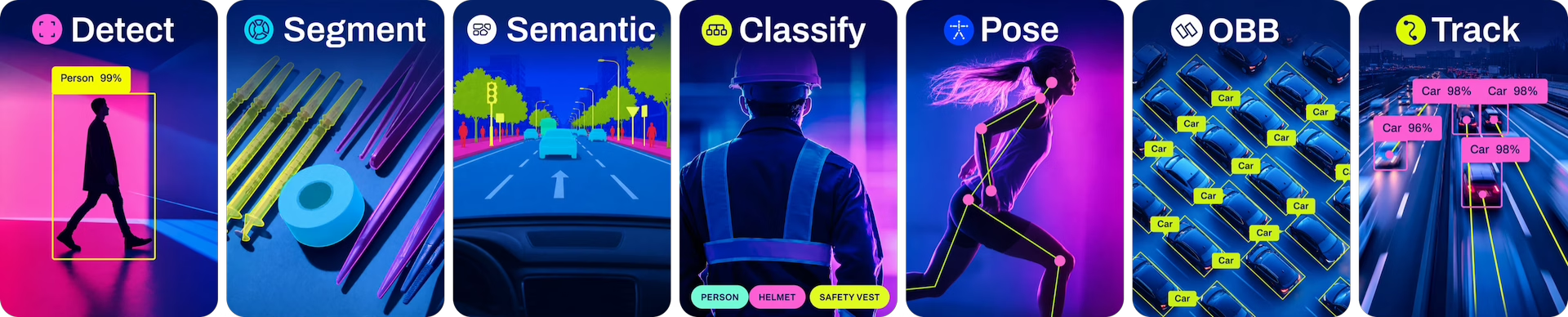
本库可运行 [YOLOv8](https://docs.ultralytics.com/models/yolov8)、[YOLO11](https://docs.ultralytics.com/models/yolo11) 和 [YOLO26](https://docs.ultralytics.com/models/yolo26) 的 ONNX 模型。这些模型在 [COCO](https://docs.ultralytics.com/datasets/detect/coco) 上预训练用于[检测](https://docs.ultralytics.com/tasks/detect)、[分割](https://docs.ultralytics.com/tasks/segment)和[姿态估计](https://docs.ultralytics.com/tasks/pose);在 [DOTA](https://docs.ultralytics.com/datasets/obb/dota-v2) 上预训练用于 [OBB](https://docs.ultralytics.com/tasks/obb);在 [Cityscapes](https://docs.ultralytics.com/datasets/semantic/cityscapes) 上预训练用于[语义分割](https://docs.ultralytics.com/tasks/semantic);在 [ImageNet](https://docs.ultralytics.com/datasets/classify/imagenet) 上预训练用于[分类](https://docs.ultralytics.com/tasks/classify);以及用于单目[深度估计](https://docs.ultralytics.com/tasks/depth)(仅 YOLO26)。所有[模型](https://docs.ultralytics.com/models)在首次使用时自动从最新的 Ultralytics [发布](https://github.com/ultralytics/assets/releases)下载。
## 🚀 快速开始
### 前置条件
- [Rust 1.89+](https://rustup.rs/)(通过 rustup 安装)。
- YOLO ONNX 模型(从 Ultralytics 导出:`yolo export model=yolo26n.pt format=onnx`)。
### 系统依赖
从源码构建(包括 `cargo install`)会编译原生 crate,因此需要 C 编译器。在 Linux 上还需要 `pkg-config` 和 OpenSSL 开发头文件,HTTPS 模型/资源下载器会链接它们。macOS 和 Windows 使用系统自带的 TLS 后端,因此只需 C 工具链。
```bash
# Debian/Ubuntu
sudo apt install build-essential pkg-config libssl-dev
# Fedora/RHEL
sudo dnf install gcc gcc-c++ pkgconf-pkg-config openssl-devel
# Arch
sudo pacman -S base-devel openssl pkgconf
# macOS(Xcode Command Line Tools 提供 clang 编译器)
xcode-select --install
# Windows:从 Visual Studio Build Tools 安装
# “使用 C++ 的桌面开发”工作负载(https://visualstudio.microsoft.com/downloads/)
```
### 安装
```bash
# 从 crates.io 全局安装 CLI
cargo install ultralytics-inference
# 使用自定义 features 全局安装 CLI
# 最小构建(禁用默认 features)
cargo install ultralytics-inference --no-default-features
# 启用视频支持
cargo install ultralytics-inference --features video
# 启用多个加速后端
cargo install ultralytics-inference --features "cuda,tensorrt"
```
### 开发安装
```bash
# 直接从 git 仓库安装 CLI
cargo install --git https://github.com/ultralytics/inference.git ultralytics-inference
# 或克隆源码、构建并安装
git clone https://github.com/ultralytics/inference.git
cd inference
cargo build --release
# 从本地 checkout 安装
cargo install --path . --locked
```
`cargo install` 会把二进制文件安装到 Cargo 默认 bin 目录:
- macOS/Linux:`~/.cargo/bin`
- Windows:`%USERPROFILE%\\.cargo\\bin`
确认该目录已加入 `PATH` 后,可在任意位置运行:
```bash
ultralytics-inference help
```
### 将 YOLO 模型导出为 ONNX
```bash
# 使用 Ultralytics CLI(FP32,默认)
yolo export model=yolo26n.pt format=onnx
# FP16(半精度)——模型体积约小 50%
yolo export model=yolo26n.pt format=onnx quantize=16
```
```python
# 或使用 Python
from ultralytics import YOLO
model = YOLO("yolo26n.pt")
model.export(format="onnx") # FP32(默认)
model.export(format="onnx", quantize=16) # FP16(半精度)
```
> **精度 / 量化:** Ultralytics ≥8.4 使用统一的 `quantize` 参数,取代已弃用的
> `half=True` / `int8=True` 标志。对于 ONNX,支持的取值为 `32`/`fp32`(FP32,默认)、
> `16`/`fp16`(FP16)和 `8`/`int8`(INT8——需通过 `data=` 提供校准数据集)。旧的
> `half=True`(→ `quantize=16`)和 `int8=True`(→ `quantize=8`)仍可用,但会
> 触发弃用警告。详见
> [导出文档](https://docs.ultralytics.com/modes/export) 和
> [ONNX 集成指南](https://docs.ultralytics.com/integrations/onnx)。
### 运行推理
```bash
# 使用默认参数(自动下载 yolo26n.onnx 和示例图片)
ultralytics-inference predict
# 选择任务:自动下载对应任务的 nano 模型
ultralytics-inference predict --task segment # 下载 yolo26n-seg.onnx
ultralytics-inference predict --task pose # 下载 yolo26n-pose.onnx
ultralytics-inference predict --task obb # 下载 yolo26n-obb.onnx
ultralytics-inference predict --task classify # 下载 yolo26n-cls.onnx
ultralytics-inference predict --task semantic # 下载 yolo26n-sem.onnx(仅 YOLO26)
ultralytics-inference predict --task depth # 下载 yolo26n-depth.onnx(仅 YOLO26)
# 使用显式模型(任务从模型元数据读取)
ultralytics-inference predict --model yolo26n.onnx --source image.jpg
# 自动下载任意支持尺寸(n/s/m/l/x)的 YOLO26、YOLO11 和 YOLOv8 模型
ultralytics-inference predict --model yolo26l.onnx --source image.jpg
ultralytics-inference predict --model yolo11x-seg.onnx --source image.jpg
ultralytics-inference predict --model yolov8n.onnx --source image.jpg
# 对图片目录运行推理
ultralytics-inference predict --model yolo26n.onnx --source assets/
# 自定义阈值
ultralytics-inference predict -m yolo26n.onnx -s image.jpg --conf 0.5 --iou 0.45
# 按类别 ID 过滤
ultralytics-inference predict --model yolo26n.onnx --source image.jpg --classes 0
ultralytics-inference predict --model yolo26n.onnx --source image.jpg --classes "0,1,2"
# 可视化并设置自定义图片尺寸
ultralytics-inference predict --model yolo26n.onnx --source video.mp4 --show --imgsz 1280
# 为视频输入保存单帧
ultralytics-inference predict --model yolo26n.onnx --source video.mp4 --save-frames
# 矩形推理
ultralytics-inference predict --model yolo26n.onnx --source image.jpg --rect
# 语义分割:将每张图片的 PNG 类别图写入 runs/semantic/predictN/results/
ultralytics-inference predict --task semantic --source cityscapes/ --save-json
# 深度估计:将彩色化的深度图叠加到原图并保存到 runs/depth/predictN/
ultralytics-inference predict --task depth --source image.jpg
```
### 示例输出
```bash
ultralytics-inference predict
```
```text
WARNING ⚠️ 'model' argument is missing. Using default '--model=yolo26n.onnx'.
WARNING ⚠️ 'source' argument is missing. Using default images: https://ultralytics.com/images/bus.jpg, https://ultralytics.com/images/zidane.jpg
Ultralytics Inference 0.0.33 🚀 Rust ONNX FP32 CPU
Using ONNX Runtime CPUExecutionProvider
YOLO26n summary: 80 classes, imgsz=(640, 640)
image 1/2 /home/ultralytics/inference/bus.jpg: 640x480 4 persons, 1 bus, 36.4ms
image 2/2 /home/ultralytics/inference/zidane.jpg: 384x640 2 persons, 1 tie, 28.6ms
Speed: 1.5ms preprocess, 32.5ms inference, 0.5ms postprocess per image at shape (1, 3, 384, 640)
Results saved to runs/detect/predict1
💡 Learn more at https://docs.ultralytics.com/modes/predict
```
**使用 `--task`(自动下载匹配的 nano 模型):**
```bash
ultralytics-inference predict --task segment
```
```text
WARNING ⚠️ 'model' argument is missing. Using default '--model=yolo26n-seg.onnx'.
WARNING ⚠️ 'source' argument is missing. Using default images: https://ultralytics.com/images/bus.jpg, https://ultralytics.com/images/zidane.jpg
Ultralytics Inference 0.0.33 🚀 Rust ONNX FP32 CPU
Using ONNX Runtime CPUExecutionProvider
YOLO26n-seg summary: 80 classes, imgsz=(640, 640)
image 1/2 /home/ultralytics/inference/bus.jpg: 640x480 4 persons, 1 bus, 48.2ms
image 2/2 /home/ultralytics/inference/zidane.jpg: 384x640 2 persons, 1 tie, 38.1ms
Speed: 1.6ms preprocess, 44.3ms inference, 1.2ms postprocess per image at shape (1, 3, 384, 640)
Results saved to runs/segment/predict1
💡 Learn more at https://docs.ultralytics.com/modes/predict
```
## 📚 使用方式
### 作为 CLI 工具
```bash
# 显示帮助
ultralytics-inference help
# 显示版本
ultralytics-inference version
# 运行推理
ultralytics-inference predict --model --source
```
`--help` 和 `--version` 也可作为标准别名使用。
**CLI 选项:**
| 选项 | 简写 | 说明 | 默认值 |
| --------------- | ---- | ----------------------------------------------------------------------------------------------------------------------------------------------------------------- | --------------------------------- |
| `--model` | `-m` | ONNX 模型文件路径;若为已知 YOLOv8/YOLO11/YOLO26 名称则自动下载 | `yolo26n.onnx` |
| `--task` | | 任务类型(`detect`、`segment`、`pose`、`obb`、`classify`、`semantic`\*、`depth`\*);省略 `--model` 时选择 nano 模型 | `detect` |
| `--source` | `-s` | 输入源(图片、目录、glob、视频、摄像头索引或 URL) | 与任务相关的 Ultralytics URL 资源 |
| `--conf` | | 置信度阈值 | `0.25` |
| `--iou` | | NMS IoU 阈值 | `0.7` |
| `--max-det` | | 最大检测数量 | `300` |
| `--imgsz` | | 推理图片尺寸 | 模型元数据 |
| `--rect` | | 启用矩形推理(最小填充) | `true` |
| `--batch` | | 推理 batch size | `1` |
| `--half` | | 使用 FP16 半精度推理 | `false` |
| `--save` | | 将标注结果保存到 runs/\/predict | `true` |
| `--save-frames` | | 为视频输入保存单帧(而不是视频文件) | `false` |
| `--save-json` | | 保存语义分割类别图 PNG,便于外部评估 | `false` |
| `--show` | | 在窗口中显示结果 | `false` |
| `--device` | | 设备字符串,例如 cpu、cuda:0、coreml、directml:0、intel:cpu、intel:gpu、intel:npu、tensorrt:0、rocm:0、xnnpack;启用 feature 后可选择更多提供方(见 Features 表) | `cpu` |
| `--verbose` | | 显示详细输出 | `true` |
| `--classes` | | 按类别 ID 过滤,例如 `0`、`"0,1,2"` 或 `"[0, 1, 2]"` | 所有类别 |
**任务和模型解析:**
| 调用方式 | 使用模型 | 说明 |
| ------------------------------------------------- | ---------------------- | ------------------------------------------------------- |
| `predict` | `yolo26n.onnx` | 默认检测模型,自动下载 |
| `predict --task segment` | `yolo26n-seg.onnx` | nano 分割模型,自动下载 |
| `predict --task pose` | `yolo26n-pose.onnx` | nano 姿态模型,自动下载 |
| `predict --task obb` | `yolo26n-obb.onnx` | nano OBB 模型,自动下载 |
| `predict --task classify` | `yolo26n-cls.onnx` | nano 分类模型,自动下载 |
| `predict --task semantic` | `yolo26n-sem.onnx`\* | nano 语义分割模型,自动下载(仅 YOLO26) |
| `predict --task depth` | `yolo26n-depth.onnx`\* | nano 深度估计模型,自动下载(仅 YOLO26) |
| `predict --model yolo26l-seg.onnx` | `yolo26l-seg.onnx` | 从模型元数据读取任务 |
| `predict --task segment --model yolo26l-seg.onnx` | `yolo26l-seg.onnx` | `--task` 与元数据一致,正常执行 |
| `predict --task segment --model yolo26n.onnx` | error | `--task` 与模型元数据(`detect`)冲突,程序以错误退出。 |
\* `semantic`(语义分割)和 `depth`(深度估计)仅支持 YOLO26。
**可自动下载的模型:**
YOLOv8、YOLO11 和 YOLO26 ONNX 模型支持 **n / s / m / l / x** 尺寸,并覆盖标准任务变体。YOLO26 还包含用于语义分割的 `-sem` 和用于深度估计的 `-depth`:
| 系列 | 变体 |
| ------ | ----------------------------------------------------------------------------------------------------- |
| YOLO26 | `yolo26{n,s,m,l,x}.onnx`、`yolo26{n,s,m,l,x}-seg.onnx`、`-pose`、`-obb`、`-cls`、`-sem`\*、`-depth`\* |
| YOLO11 | `yolo11{n,s,m,l,x}.onnx`、`yolo11{n,s,m,l,x}-seg.onnx`、`-pose`、`-obb`、`-cls` |
| YOLOv8 | `yolov8{n,s,m,l,x}.onnx`、`yolov8{n,s,m,l,x}-seg.onnx`、`-pose`、`-obb`、`-cls` |
\* `-sem`(语义分割)和 `-depth`(深度估计)仅支持 YOLO26。
**输入源选项:**
| 输入源类型 | 示例输入 | 说明 |
| ---------- | ------------------------------- | ---------------------- |
| 图片 | `image.jpg` | 单张图片文件 |
| 目录 | `images/` | 图片目录 |
| Glob | `images/*.jpg` | 图片 glob 模式 |
| 视频 | `video.mp4` | 视频文件 |
| 摄像头 | `0`,`1` | 摄像头索引(0 为默认) |
| URL | `https://example.com/image.jpg` | 远程图片 URL |
### 作为 Rust 库
添加到 `Cargo.toml`(二选一):
```toml
# crates.io 稳定版本
[dependencies]
ultralytics-inference = "0.0.33"
```
```toml
# 开发版本(GitHub 上最新未发布代码)
[dependencies]
ultralytics-inference = { git = "https://github.com/ultralytics/inference.git" }
```
**基础用法:**
```rust
use ultralytics_inference::YOLOModel;
fn main() -> Result<(), Box> {
// 加载模型 - 自动读取元数据(类别、任务、imgsz)
let mut model = YOLOModel::load("yolo26n.onnx")?;
// 运行推理
let results = model.predict("image.jpg")?;
// 处理结果
for result in &results {
if let Some(ref boxes) = result.boxes {
println!("Found {} detections", boxes.len());
for i in 0..boxes.len() {
let cls = boxes.cls()[i] as usize;
let conf = boxes.conf()[i];
let name = result.names.get(&cls).map(|s| s.as_str()).unwrap_or("unknown");
println!(" {} {:.2}", name, conf);
}
}
}
Ok(())
}
```
**自定义配置:**
```rust
use ultralytics_inference::{YOLOModel, InferenceConfig};
fn main() -> Result<(), Box> {
let config = InferenceConfig::new()
.with_confidence(0.5)
.with_iou(0.45)
.with_max_det(300);
let mut model = YOLOModel::load_with_config("yolo26n.onnx", config)?;
let results = model.predict("image.jpg")?;
Ok(())
}
```
**访问检测数据:**
```rust
if let Some(ref boxes) = result.boxes {
// 不同格式的边界框
let xyxy = boxes.xyxy(); // [x1, y1, x2, y2]
let xywh = boxes.xywh(); // [x_center, y_center, width, height]
let xyxyn = boxes.xyxyn(); // 归一化 [0-1]
let xywhn = boxes.xywhn(); // 归一化 [0-1]
// 置信度和类别 ID
let conf = boxes.conf(); // 置信度
let cls = boxes.cls(); // 类别 ID
}
```
**选择设备:**
```rust
use ultralytics_inference::{Device, InferenceConfig, YOLOModel};
fn main() -> Result<(), Box> {
// 选择设备(例如 CUDA、CoreML、CPU)
let device = Device::Cuda(0);
// 配置模型使用该设备
let config = InferenceConfig::new().with_device(device);
let mut model = YOLOModel::load_with_config("yolo26n.onnx", config)?;
let results = model.predict("image.jpg")?;
Ok(())
}
```
**深度可视化:**
深度结果的渲染方式是将彩色化的深度图以 `alpha = 0.6` 叠加到原图上,使用 `jet` 配色和
`disparity` 归一化。这与 Ultralytics Python 的 `Annotator.depth_map` 默认行为一致,
因此 CLI 无需任何深度相关参数,`--save` 产出与 Python `plot()` 相同的图像。
可通过库接口显式指定配色、归一化方式与叠加不透明度(下面的 `Jet` + `Disparity` + `0.6` 即 CLI 默认值,可替换为其他变体):
```rust
use ultralytics_inference::YOLOModel;
use ultralytics_inference::annotate::{annotate_image_with, load_image};
use ultralytics_inference::visualizer::color::{Colormap, DepthViz};
fn main() -> Result<(), Box> {
let mut model = YOLOModel::load("yolo26n-depth.onnx")?;
let results = model.predict("image.jpg")?;
// 原图分辨率下的逐像素深度(米)
if let Some(depth) = &results[0].depth {
println!("{:?} {:?}m", depth.data.shape(), depth.min_depth());
}
// 配色:inferno / jet / spectral / gray;归一化:disparity / metric。
// 不透明度:0.6 叠加在原图上(CLI 默认),1.0 为完整彩色深度图。
let image = load_image("image.jpg")?;
let annotated = annotate_image_with(&image, &results[0], None, Colormap::Jet, DepthViz::Disparity, 0.6);
annotated.save("depth.jpg")?;
Ok(())
}
```
`disparity` 着色的是 `1/d` 而非 `d`,并裁剪到第 2 至第 98 百分位。取倒数后色彩范围会集中在近处
细节而非远处背景,因此近处呈暖色,且少量离群像素不会冲淡其余部分;`metric` 则直接对深度在其
最小值与最大值之间做线性着色。
可复制并修改的可运行程序,请参见 [examples](examples/README.md) 目录。
## 🗂️ 项目结构
```text
inference/
├── src/
│ ├── lib.rs # 库入口和公开导出
│ ├── main.rs # CLI 应用
│ ├── model.rs # YOLOModel - ONNX session 和推理
│ ├── results.rs # Results, Boxes, Masks, Keypoints, Probs, Obb, SemanticMask, DepthMap
│ ├── preprocessing.rs # 图片预处理(letterbox、normalize、SIMD)
│ ├── postprocessing.rs # 所有任务的后处理(检测 NMS/decode、语义分割 argmax、深度 resize)
│ ├── metadata.rs # ONNX 模型元数据解析
│ ├── source.rs # 输入源处理(图片、视频、摄像头)
│ ├── task.rs # Task 枚举(Detect, Segment, Pose, Classify, Obb, Semantic)
│ ├── inference.rs # InferenceConfig
│ ├── batch.rs # Batch 处理流程
│ ├── device.rs # Device 枚举(CPU, CUDA, CoreML 等)
│ ├── cuda_inference.rs # 融合 CUDA 预处理 kernel(cuda-preprocess feature)
│ ├── parallel.rs # Rayon 并行抽象(wasm 上为顺序执行)
│ ├── download.rs # 模型和资源下载
│ ├── annotate.rs # 图片标注(边界框、实例 mask、关键点、语义叠加、深度色彩图)
│ ├── io.rs # 结果保存(图片、视频)
│ ├── logging.rs # 日志宏
│ ├── error.rs # 错误类型
│ ├── utils.rs # 工具函数(NMS、IoU)
│ ├── cli/ # CLI 模块
│ │ ├── mod.rs # CLI 模块导出
│ │ ├── args.rs # CLI 参数解析
│ │ └── predict.rs # predict 命令实现
│ └── visualizer/ # 实时可视化(minifb)
├── tests/
│ └── integration_test.rs # 集成测试
├── examples/ # 可运行的库示例
│ ├── basic.rs # 加载模型、运行推理、打印检测结果
│ ├── config.rs # 设置置信度、IoU、图片尺寸和设备
│ ├── tasks.rs # 检测、分割、姿态、旋转框、分类的结果概览
│ ├── annotate.rs # 绘制边界框和标签,保存标注后的图片
│ └── README.md # 示例说明
├── assets/ # 测试图片
│ ├── boats.jpg
│ ├── bus.jpg
│ └── zidane.jpg
├── Cargo.toml # Rust 依赖和 features
├── LICENSE # AGPL-3.0 License
├── README.md # 英文 README
└── README.zh-CN.md # 简体中文 README
```
## ⚡ 硬件加速
通过添加 features 启用硬件加速:
```bash
# NVIDIA GPU(CUDA)
cargo build --release --features cuda
# NVIDIA TensorRT
cargo build --release --features tensorrt
# NVIDIA GPU 预处理 + TensorRT 零拷贝输入(最快;需要 CUDA toolkit)
cargo build --release --features cuda-preprocess
# Apple CoreML(macOS/iOS)
cargo build --release --features coreml
# Intel OpenVINO(使用 intel:cpu、intel:gpu 或 intel:npu 选择目标硬件)
cargo build --release --features openvino
ultralytics-inference predict --source bus.jpg --device intel:gpu
# 多个 features
cargo build --release --features "cuda,tensorrt"
```
> NVIDIA 安装、要求和 GPU 预处理快速路径见 [`docs/CUDA.md`](docs/CUDA.md)。
每个加速器 feature 都会链接包含该 provider 的预编译 ONNX Runtime。并非所有组合都有对应的预编译版本,请求不存在的组合会导致构建失败,并提示 `no builds available that satisfy the requested feature set`。若希望选用最接近的可用版本而不是直接报错,可在 `ort` 上启用 `lax-feature-matching`:
```toml
[dependencies]
ultralytics-inference = { version = "0.0.33", features = ["coreml", "xnnpack"] }
ort = { version = "=2.0.0-rc.13", features = ["lax-feature-matching"] }
```
所选版本中缺失的 provider 在运行时将不可用,推理会回退到 CPU。
> CUDA 与 TensorRT 二进制基于 CUDA 13 构建,且未发布 CUDA 12 版本。若需在 CUDA 12 上运行,请自行编译 ONNX Runtime,并通过 `ORT_LIB_PATH` 链接该构建。
**可用 Features:**
默认 features(除非传入 `--no-default-features`):`annotate`、`visualize`。
| Feature | 说明 |
| ----------------- | ---------------------------------------------------------------------------------------- |
| `annotate` | 为 `--save` 提供图片标注(默认) |
| `visualize` | 为 `--show` 提供实时窗口显示(默认) |
| `video` | 视频文件解码/编码(需要 FFmpeg) |
| `cuda` | NVIDIA CUDA 支持 |
| `tensorrt` | NVIDIA TensorRT 优化 |
| `cuda-preprocess` | GPU 预处理 + TensorRT 零拷贝输入(需要 CUDA toolkit;见 [`docs/CUDA.md`](docs/CUDA.md)) |
| `coreml` | Apple CoreML(macOS/iOS) |
| `openvino` | Intel OpenVINO |
| `onednn` | Intel oneDNN |
| `rocm` | AMD ROCm |
| `migraphx` | AMD MIGraphX |
| `directml` | DirectML(Windows) |
| `nnapi` | Android Neural Networks API |
| `qnn` | Qualcomm Neural Networks |
| `xnnpack` | XNNPACK(跨平台) |
| `acl` | ARM Compute Library |
| `armnn` | ARM NN |
| `tvm` | Apache TVM |
| `rknpu` | Rockchip NPU |
| `cann` | Huawei CANN |
| `webgpu` | WebGPU |
| `azure` | Azure |
| `nvidia` | 便捷组合:CUDA + TensorRT |
| `amd` | 便捷组合:ROCm + MIGraphX |
| `intel` | 便捷组合:OpenVINO + oneDNN |
| `mobile` | 便捷组合:NNAPI + CoreML + QNN |
| `all` | 便捷组合:annotate + visualize + video |
## 🌐 浏览器 / WebGPU(WASM)
[](https://www.npmjs.com/package/@ultralytics/yolo)
[](https://www.npmjs.com/package/@ultralytics/yolo)
同一套引擎可编译为 WebAssembly,在浏览器中通过 **WebGPU** 运行。前向推理由官方
ONNX Runtime Web 构建执行,并通过
[`ort-web`](https://ort.pyke.io/backends/web) 桥接到 Rust;预处理与后处理复用
共享的 Rust 代码,因此结果与原生路径一致。
它以 [`@ultralytics/yolo`](web/README.md) npm 包形式发布:
```ts
import { YOLO } from "@ultralytics/yolo";
const model = await YOLO.load("yolo26n.onnx");
const results = await model.predict("bus.jpg");
console.log(results.boxes); // [{ x1, y1, x2, y2, conf, cls, name, color }, ...]
```
通过 `{ device: "webgpu" | "cpu" }` 选择加速器(默认 `"auto"`),并读取
`model.device` 查看实际使用的设备。
浏览器绑定位于 [`crates/web`](crates/web)(`ultralytics-inference-web` cdylib),
JS/TS 封装与构建说明见 [`web/`](web/README.md)。需要支持 WebGPU 的浏览器以及安全
上下文(`https`/`localhost`)。
## 📦 依赖
本库的关键优势之一是使用 Rust/ONNX Runtime 技术栈,不需要 PyTorch、TensorFlow 或 Python 运行时。
### 核心依赖(始终包含)
| Crate | 用途 |
| ------------------- | ----------------------- |
| `ort` | ONNX Runtime 绑定 |
| `ndarray` | N 维数组 |
| `image` | 图片加载/解码 |
| `jpeg-decoder` | JPEG 解码 |
| `fast_image_resize` | SIMD 优化 resize |
| `half` | FP16 支持 |
| `lru` | 预处理 LUT 的 LRU cache |
| `wide` | 快速预处理使用的 SIMD |
### 可选依赖(用于 `annotate` feature)
| Crate | 用途 |
| ----------- | ------------ |
| `imageproc` | 绘制框和形状 |
| `ab_glyph` | 文本渲染字体 |
### 可选依赖(用于视频和可视化)
| Crate | 用途 |
| ---------- | ----------------------- |
| `minifb` | 窗口创建和缓冲区显示 |
| `video-rs` | 视频解码/编码(ffmpeg) |
### 视频支持(FFmpeg)
视频 features 需要系统安装 FFmpeg(7 或 8):
```bash
# macOS
brew install ffmpeg
# Ubuntu/Debian
apt-get install -y ffmpeg libavutil-dev libavformat-dev libavfilter-dev libavdevice-dev libclang-dev
# 使用视频支持构建
cargo build --release --features video
```
如需构建不含标注和可视化支持的更小二进制:
```bash
cargo build --release --no-default-features
```
## 🧪 测试
```bash
# 运行全部测试
cargo test
# 运行并显示输出
cargo test -- --nocapture
# 运行指定测试
cargo test test_boxes_creation
```
## 📊 性能
Apple M4 MacBook Pro(CPU,ONNX Runtime)上的基准:
### YOLO26n 检测模型(640x640)
| 精度 | 模型大小 | 预处理 | 推理 | 后处理 | 总耗时 |
| ---- | -------- | ------ | ----- | ------ | ------ |
| FP32 | 10.2 MB | ~9ms | ~21ms | <1ms | ~31ms |
| FP16 | 5.2 MB | ~9ms | ~24ms | <1ms | ~34ms |
**关键结论:**
- **FP16 模型体积约小 50%**(5.2 MB vs 10.2 MB)。
- **FP32 在 CPU 上略快**(~21ms vs ~24ms),因为 CPU 对 FP32 有原生支持。
- FP16 在大多数 CPU 上需要上转换为 FP32 计算,会增加开销。
- CPU 推理建议使用 **FP32**,GPU 推理建议使用 **FP16**(通常能带来速度提升)。
### 线程优化
ONNX Runtime 线程数设置为 auto(`num_threads: 0`),由 ORT 自动选择最佳线程数:
- 手动线程(4 threads):~40ms 推理。
- 自动线程(0 = ORT 决定):~21ms 推理。
## 🔮 路线图
### 已完成
- [x] 检测、分割、姿态、分类、OBB、语义分割和深度估计推理。
- [x] ONNX 模型元数据解析(自动检测类别、任务和 imgsz)。
- [x] 硬件加速支持(CUDA、TensorRT、CoreML、OpenVINO、XNNPACK)。
- [x] 兼容 Ultralytics 的 Results API(`Boxes`、`Masks`、`Keypoints`、`Probs`、`Obb`、`SemanticMask`、`DepthMap`)。
- [x] 多输入源(图片、目录、glob、URL)。
- [x] 视频文件支持和摄像头/RTSP 流。
- [x] 图片标注和可视化。
- [x] FP16 半精度推理。
- [x] Batch 推理支持。
- [x] 矩形推理支持和优化。
- [x] 类别过滤支持。
- [x] 自动下载所有 YOLO26、YOLO11 和 YOLOv8 ONNX 模型(所有 n/s/m/l/x 尺寸、所有任务)。
- [x] `--task` CLI 参数:省略 `--model` 时选择并自动下载匹配的 nano 模型;任务和模型元数据冲突时退出并报错。
- [x] 通过 WebGPU 的 WebAssembly(WASM)浏览器推理(npm [`@ultralytics/yolo`](https://www.npmjs.com/package/@ultralytics/yolo))。
### 进行中
- [ ] Python 绑定(PyO3)。
## 💡 贡献
Ultralytics 依靠社区协作持续发展,我们重视每一份贡献。无论是报告 bug、提出功能建议,还是提交代码改动,都欢迎参与。
- **报告问题**:[打开 issue](https://github.com/ultralytics/inference/issues)。
- **功能请求**:[提交想法](https://github.com/ultralytics/inference/issues)。
- **Pull Request**:请先阅读[贡献指南](https://docs.ultralytics.com/help/contributing)。
- **反馈**:填写 [Ultralytics 调查问卷](https://www.ultralytics.com/survey?utm_source=github&utm_medium=social&utm_campaign=Survey)。
感谢所有贡献者!你们的努力让 Ultralytics 工具持续变得更好。
[](https://github.com/ultralytics/ultralytics/graphs/contributors)
## 📜 许可证
Ultralytics 提供两种许可方式:
- **AGPL-3.0 许可证**:经 [OSI 批准](https://opensource.org/license/agpl-3.0)的开源许可证,适合学生、研究者和爱好者,鼓励开放协作和知识共享。完整详情请参阅 [LICENSE](https://github.com/ultralytics/inference/blob/main/LICENSE) 文件。
- **Ultralytics 企业许可证**:面向商业使用,允许将 Ultralytics 软件和 AI 模型集成到商业产品与服务中,而无需遵循 AGPL-3.0 的开源要求。如需商业部署,请通过 [Ultralytics Licensing](https://www.ultralytics.com/license) 联系我们。
## 📮 联系方式
- **GitHub Issues**:[bug 报告和功能请求](https://github.com/ultralytics/inference/issues)。
- **Discord**:[加入社区](https://discord.com/invite/ultralytics)。
- **文档**:[docs.ultralytics.com](https://docs.ultralytics.com)。


