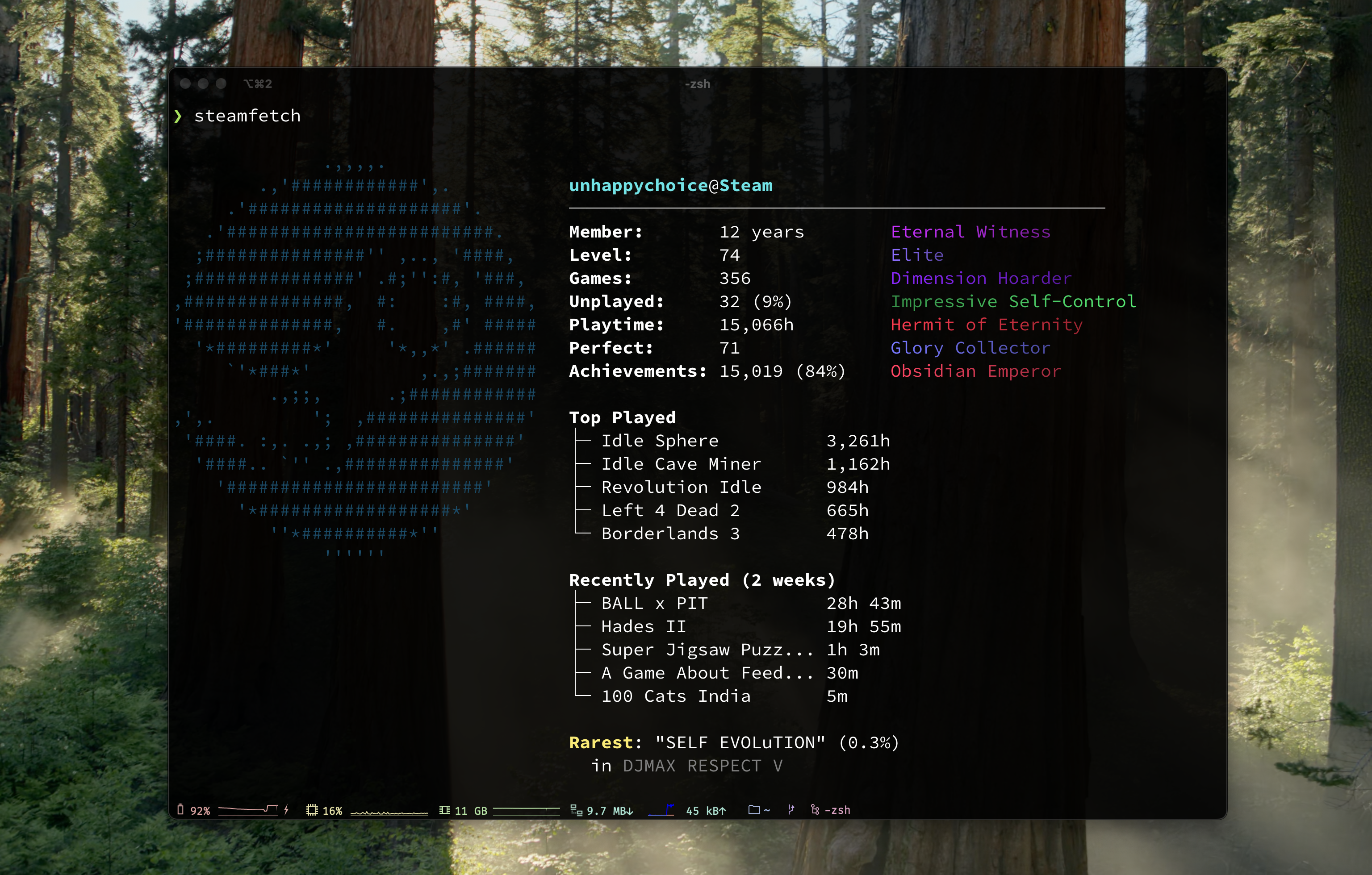


neofetch for Steam — Display your Steam stats in terminal with style.
Account level, playtime, achievements, top games, and rarest unlocks — all rendered with SteamOS-flavored ASCII art.
## Installation
### Install Script (Recommended)
```bash
curl -fsSL https://raw.githubusercontent.com/unhappychoice/steamfetch/main/install.sh | bash
```
### Homebrew (macOS / Linux)
```bash
brew install unhappychoice/tap/steamfetch
```
### Nix
Try it without installing via Nix
```bash
nix run github:unhappychoice/steamfetch
```
To pass arguments, add `--` to the end of the `nix run` invocation
```bash
nix run github:unhappychoice/steamfetch -- --demo # Everything after `--` is passed as an argument to steamfetch
```
### Download Binary
Download the latest release from [GitHub Releases](https://github.com/unhappychoice/steamfetch/releases).
### Build from Source
```bash
git clone https://github.com/unhappychoice/steamfetch.git
cd steamfetch
cargo build --release
# libsteam_api.so is automatically copied to target/release/
./target/release/steamfetch
```
## Setup
### 1. Get Your Steam API Key
1. Visit https://steamcommunity.com/dev/apikey
2. Log in with your Steam account
3. Create a new API key
### 2. Find Your Steam ID
Visit https://steamid.io/ and enter your Steam profile URL.
### 3. Configure
On first run, steamfetch creates a config file at `~/.config/steamfetch/config.toml`.
Edit the config file:
```toml
[api]
steam_api_key = "your_api_key_here"
steam_id = "your_steam_id_here"
[display]
show_top_games = 5
show_recently_played = true
show_achievements = true
show_rarest = true
```
Or use environment variables (takes precedence over config file):
```bash
export STEAM_API_KEY="your_api_key_here"
export STEAM_ID="your_steam_id_here"
```
**Note:** If Steam is running, `STEAM_ID` is auto-detected via Native SDK.
## Usage
```bash
# Display your Steam stats
steamfetch
# Show profile avatar image instead of ASCII logo
steamfetch --image
# Specify image protocol (auto, kitty, iterm, sixel)
steamfetch --image --image-protocol sixel
# Demo mode (no API key required)
steamfetch --demo
# Demo mode with image
steamfetch --demo --image
# Show config file path
steamfetch --config-path
# Use custom config file
steamfetch --config /path/to/config.toml
# Verbose output for debugging
steamfetch --verbose
# Show version
steamfetch --version
# Show help
steamfetch --help
```
## Features
- Steam account stats (level, member since, games owned)
- Playtime statistics with fun titles
- Achievement progress and perfect games count
- Top played games list
- Recently played games (last 2 weeks)
- Rarest achievement display
- Beautiful SteamOS ASCII art with gradient colors
- **Image display**: Show your Steam avatar with `--image` flag
- Demo mode for testing without API setup
### Image Display
Use `--image` to show your Steam profile avatar instead of the ASCII logo.
Supported protocols:
- **Sixel** - Windows Terminal, WezTerm, foot, mlterm, xterm
- **Kitty** - Kitty terminal
- **iTerm2** - iTerm2
- **Block characters** - Fallback for unsupported terminals
Protocol is auto-detected by default. Use `--image-protocol` to override.
Images are cached locally at `~/.cache/steamfetch/images/`.
## How It Works
### With Steam Client Running
Uses Steamworks SDK for accurate game detection:
- Automatically detects logged-in Steam user
- Checks ownership for all known Steam games (~73,000 titles)
- Most accurate game count and achievement statistics
### Without Steam Client
Falls back to Steam Web API:
- Requires `STEAM_API_KEY` and `STEAM_ID` environment variables
- Returns games visible in your library
- Some owned games may not appear in API response
## FAQ
### Game count is lower than expected
The Steam Web API only returns games visible in your library. For a complete and accurate game count, run Steam client natively so steamfetch can use the Steamworks SDK to check ownership of all known Steam titles (~73,000+). A Steam API key is still required even when using the Native SDK.
### "This Steam profile is private" error
steamfetch requires your profile and game details to be public. Go to **Steam > Profile > Edit Profile > Privacy Settings** and set both "My profile" and "Game details" to **Public**.
### Achievement fetching is slow
steamfetch makes two API calls per game (player achievements + global percentages). For large libraries this can take a while on the first run. Results are cached at `~/.cache/steamfetch/achievements.json` and subsequent runs will be much faster. The cache invalidates per-game when you play a game again.
### Image display shows garbled output or falls back to ASCII
- Auto-detected protocol may not match your terminal. Try specifying it explicitly: `steamfetch --image --image-protocol sixel`
- Supported protocols: **Sixel** (Windows Terminal, WezTerm, foot, mlterm, xterm), **Kitty**, **iTerm2**, **Block characters** (fallback)
- Inside tmux/screen, terminal pixel size detection may fail. Try `--image-protocol block` as a workaround.
### How to use Native SDK on WSL?
Install and run Steam inside WSL with a GUI-enabled setup ([WSLg](https://github.com/microsoft/wslg)). Once Steam is running inside WSL, steamfetch will automatically detect it via the Native SDK. Note that Steam running on the Windows host side is not accessible from WSL.
### "libsteam_api.so: cannot open shared object file" error
The `steamfetch` binary requires `libsteam_api.so` (Linux) / `libsteam_api.dylib` (macOS) to be in the same directory as the binary. This is automatically handled by the install script, Homebrew, and GitHub Releases.
If you built from source, `cargo build` copies the library to `target/release/` automatically. If the library is missing, copy it manually next to the binary from the build output.
### How to debug issues?
Run with `steamfetch --verbose` to see detailed output including: Steam client detection status, API request URLs, HTTP status codes, retry attempts, and failure reasons. You can also try `steamfetch --demo` to verify your terminal setup without needing an API key.
## Contributing
Contributions are welcome! Please feel free to submit a Pull Request.
1. Fork the repository
2. Create your feature branch (`git checkout -b feature/amazing-feature`)
3. Commit your changes (`git commit -m 'feat: add amazing feature'`)
4. Push to the branch (`git push origin feature/amazing-feature`)
5. Open a Pull Request
## License
ISC License - see [LICENSE](LICENSE) for details.
## Author
[@unhappychoice](https://unhappychoice.com)
## Support
If you find this project useful, please consider:
- ⭐️ [Star on GitHub](https://github.com/unhappychoice/steamfetch)
- 🐦 [Share on X](https://x.com/intent/post?text=steamfetch%3A%20see%20your%20hours%20played%2C%20library%2C%20and%20Steam%20profile%20right%20in%20your%20terminal%20%F0%9F%95%B9%EF%B8%8F&url=https%3A//github.com/unhappychoice/steamfetch&hashtags=steamfetch,CLI,Rust,Steam)
- 🦋 [Share on Bluesky](https://bsky.app/intent/compose?text=steamfetch%3A%20see%20your%20hours%20played%2C%20library%2C%20and%20Steam%20profile%20right%20in%20your%20terminal%20%F0%9F%95%B9%EF%B8%8F%20%23steamfetch%20%23CLI%20%23Rust%20%23Steam%20https%3A//github.com/unhappychoice/steamfetch)
- 🧵 [Share on Threads](https://www.threads.net/intent/post?text=steamfetch%3A%20see%20your%20hours%20played%2C%20library%2C%20and%20Steam%20profile%20right%20in%20your%20terminal%20%F0%9F%95%B9%EF%B8%8F%20%23steamfetch%20%23CLI%20%23Rust%20%23Steam%20https%3A//github.com/unhappychoice/steamfetch)
- 💼 [Share on LinkedIn](https://www.linkedin.com/sharing/share-offsite/?url=https%3A//github.com/unhappychoice/steamfetch)
- 📘 [Share on Facebook](https://www.facebook.com/sharer/sharer.php?u=https%3A//github.com/unhappychoice/steamfetch)
- 🟧 [Submit to Hacker News](https://news.ycombinator.com/submitlink?u=https%3A//github.com/unhappychoice/steamfetch&t=steamfetch%3A%20see%20your%20hours%20played%2C%20library%2C%20and%20Steam%20profile%20right%20in%20your%20terminal%20%F0%9F%95%B9%EF%B8%8F)
- 💬 Drop it into your Discord server or gaming chat
- ✍️ Write about it on your blog or in a newsletter
Every bit of support helps. Thanks!