
Membase
One memory. Every AI. Only yours.
Teach it once. Every AI remembers.



Website ·
Docs ·
Web app ·
Discord ·
X
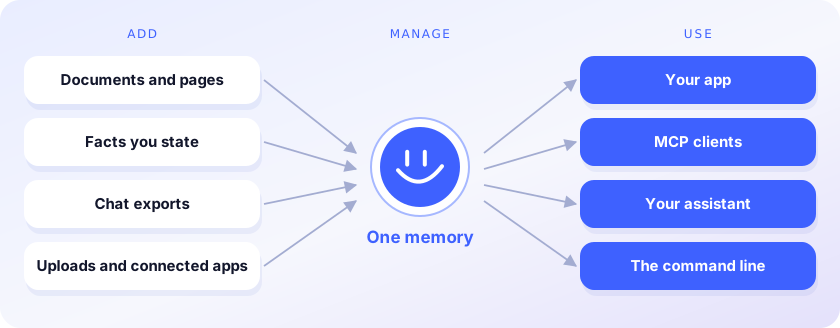
Membase is the memory layer for AI agents. It keeps one memory for everything you and your agents
know, and every AI you use reads it.
You stop re-explaining yourself each time you switch models or tools.
- **Add.** Facts, documents, web pages and chat exports from Claude or ChatGPT go into one memory.
- **Manage.** Containers keep projects apart; search it, ask it questions, forget what should go.
- **Use.** Your code, Claude Code, Cursor, Codex and ChatGPT read the same memory through the SDK or MCP.
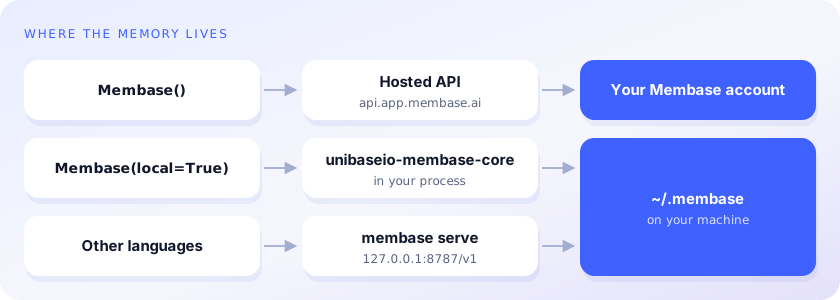
This repository is the developer side: Python and TypeScript clients, the `membase` command line
and an MCP server. The memory lives in your Membase account, which the
[web app](https://app.membase.com) and browser extension also fill, or on your machine with
`unibaseio-membase[local]`.
## Write once, read from any AI
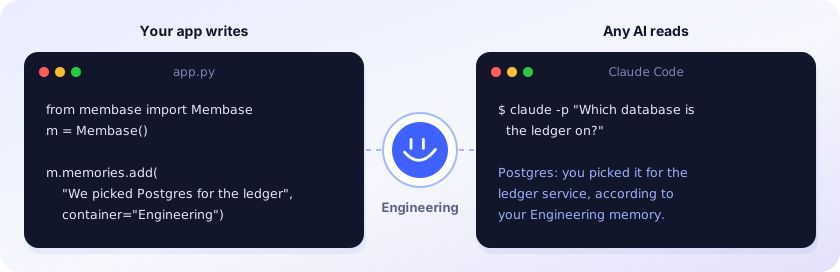
Recordings: [Python SDK](https://github.com/unibaseio/membase-ai/blob/main/assets/videos/sdk.mp4) (57 s) ·
[Claude Code](https://github.com/unibaseio/membase-ai/blob/main/assets/videos/switch-ai.mp4) (1 min 33 s). The answer above is illustrative.
## Accuracy

93.1% on LoCoMo, 92.6% on LongMemEval_S and 92.2% on DMR, using about 3× fewer tokens than the full
history on LoCoMo and 11× fewer on LongMemEval_S. Method and results: [membase.com/research](https://membase.com/research)
## Quickstart
```bash
pip install unibaseio-membase # hosted · Python 3.10+ · needs MEMBASE_API_KEY
pip install 'unibaseio-membase[local]' # local · Python 3.12 or 3.13 · needs OPENAI_API_KEY
npm install @unibaseio/membase # TypeScript · Node 18+
npm install -g @unibaseio/membase-cli # the `membase` command (hosted) without Python
```
```python
from membase import Membase
m = Membase() # hosted
# m = Membase(local=True) # local, in ~/.membase
m.memories.add("We picked Postgres for the ledger service.", container="Engineering")
m.search("what database is the ledger on?")
m.add("Design notes …", container="Engineering", custom_id="design-1") # a document
m.ask("Which database did we choose for the ledger?")
```
Every method, its REST route and MCP tool, and the access it needs: [SDK reference](https://docs.membase.com/build/reference/sdk-quickstart/).
The Python package is `unibaseio-membase` (import `membase`); `membase` on PyPI is unrelated.
## Command line
```bash
membase --local add "We picked Postgres for the ledger" --container Engineering
membase --local search "what did we pick for the ledger?"
membase --local ask "Which database is the ledger on?"
membase --local import ~/Downloads/claude-export.json # Claude, ChatGPT, markdown or JSON chats
membase --local agent ingest trace.json --agent coder
membase --local agent search "fix flaky deploy" --agent coder
```
Without `--local` (or `--store DIR`, both before the command) commands use the hosted API; `agent`,
`import` and `serve` need `unibaseio-membase[local]`.
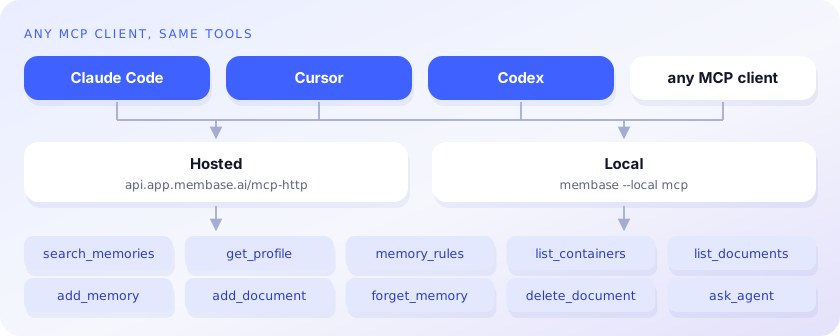
## MCP
```bash
claude mcp add membase -- membase --local mcp # local
claude mcp add --transport http membase https://api.app.membase.com/mcp-http \
--header "Authorization: Bearer $MEMBASE_API_KEY" # hosted
```
Hosted without the header, the connection signs you in and is read-only. Setup for Claude, ChatGPT,
Cursor, Codex and other clients: [Connect your AI](https://docs.membase.com/connect/).
## Docs
- [SDK reference](https://docs.membase.com/build/reference/sdk-quickstart/): methods, REST routes, MCP tools, access levels
- [Memory operations](https://docs.membase.com/build/guides/memory-operations/): containers, documents, memories, profile, ask
- [Authentication](https://docs.membase.com/build/reference/authentication/): keys and what each one can reach
- [Connect your AI](https://docs.membase.com/connect/): per-client MCP setup
- [Local engine](https://github.com/unibaseio/membase-ai/blob/main/docs/reference.md): what it stores, `membase serve`, settings
## License
Copyright © 2026 Unibase. All rights reserved. Proprietary; see
[LICENSE](https://github.com/unibaseio/membase-ai/blob/main/LICENSE). `unibaseio-membase[local]` also
installs unibaseio-membase-core, the compiled engine, under its own Unibase license.