# Disclaimer
This is un-official, alternative Project launcher for Unity Editor.
These materials are not sponsored by or affiliated with Unity Technologies or its affiliates. “Unity” is a trademark or registered trademark of Unity Technologies or its affiliates in the U.S. and elsewhere.
# Project Launcher For Unity
[](https://github.com/unitycoder/UnityLauncherPro/releases/latest/download/UnityLauncherPro.zip) [](https://github.com/unitycoder/UnityLauncherPro/releases/latest/download/UnityLauncherPro.zip) [](https://github.com/unitycoder/UnityLauncherPro/blob/master/LICENSE) [](https://discord.gg/cXT97hU) [](https://www.virustotal.com/gui/url/e123b616cf4cbe3d3f7ba13b0d88cf5fff4638f72d5b9461088d0b11e9a41de3?nocache=1) [](https://github.com/unitycoder/UnityLauncherPro/actions/workflows/codeql.yml)
Handle all your Unity versions and Projects easily!
## Features
- Automagically Open Projects with Correct Unity Version
- Display Recent Projects list with last modified date and project version info
- List more than 40 recent projects!
- Quickly Explore Project Folders
- List installed Unity versions, can easily Run, Explore installation folder, View release notes
- Download Missing Unity Versions in Browser
- Can be used from commandline `UnityLauncherPro.exe -projectPath "c:/project/path/"`
- Explorer context menu integration to launch project from folder
- Use custom commandline launcher arguments per project (optional)
- Show project git branch info (optional)
- Current platform display and selection
- Show list of released Unity versions/updates and view release notes page
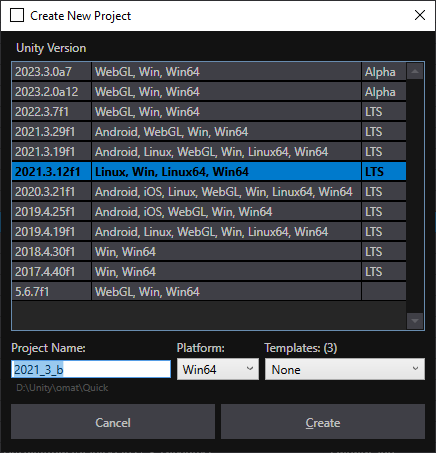
- 1-Click create new project with selected Unity version
- Option to show missing projects in the list (if folder was removed)
- 1-Click Start ADB Logcat with colors in command prompt
- 1-Click browse editor log folder, crash logs folder, browse asset downloads folder, browse player logs folder
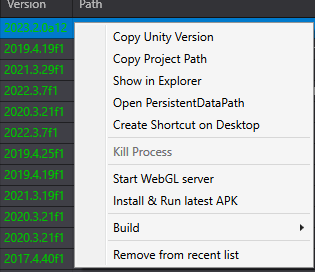
- Quick Unity Editor Process Kill (press ALT+Q in the selected project row or right click context menu)
- 1-Click start web server and launch WebGL build in browser for selected project
- Custom skin color themes https://github.com/unitycoder/UnityLauncherPro/wiki/Custom-themes
- Select template for new project (template based on selected unity version)
- And more: https://github.com/unitycoder/UnityLauncherPro/wiki/Launcher-Comparison
### Powered by
[](https://jb.gg/OpenSourceSupport)
### Forum Thread
https://forum.unity.com/threads/unity-launcher-launch-correct-unity-versions-for-each-project-automatically.488718/
### Instructions
https://github.com/unitycoder/UnityLauncherPro/wiki
### Development
See DEV branch for latest commits https://github.com/unitycoder/UnityLauncherPro/tree/dev
[](https://www.virustotal.com/gui/url/e123b616cf4cbe3d3f7ba13b0d88cf5fff4638f72d5b9461088d0b11e9a41de3?nocache=1) [](https://github.com/unitycoder/UnityLauncherPro/actions/workflows/codeql.yml)
Handle all your Unity versions and Projects easily!
## Features
- Automagically Open Projects with Correct Unity Version
- Display Recent Projects list with last modified date and project version info
- List more than 40 recent projects!
- Quickly Explore Project Folders
- List installed Unity versions, can easily Run, Explore installation folder, View release notes
- Download Missing Unity Versions in Browser
- Can be used from commandline `UnityLauncherPro.exe -projectPath "c:/project/path/"`
- Explorer context menu integration to launch project from folder
- Use custom commandline launcher arguments per project (optional)
- Show project git branch info (optional)
- Current platform display and selection
- Show list of released Unity versions/updates and view release notes page
- 1-Click create new project with selected Unity version
- Option to show missing projects in the list (if folder was removed)
- 1-Click Start ADB Logcat with colors in command prompt
- 1-Click browse editor log folder, crash logs folder, browse asset downloads folder, browse player logs folder
- Quick Unity Editor Process Kill (press ALT+Q in the selected project row or right click context menu)
- 1-Click start web server and launch WebGL build in browser for selected project
- Custom skin color themes https://github.com/unitycoder/UnityLauncherPro/wiki/Custom-themes
- Select template for new project (template based on selected unity version)
- And more: https://github.com/unitycoder/UnityLauncherPro/wiki/Launcher-Comparison
### Powered by
[](https://jb.gg/OpenSourceSupport)
### Forum Thread
https://forum.unity.com/threads/unity-launcher-launch-correct-unity-versions-for-each-project-automatically.488718/
### Instructions
https://github.com/unitycoder/UnityLauncherPro/wiki
### Development
See DEV branch for latest commits https://github.com/unitycoder/UnityLauncherPro/tree/dev
Pre-releases are sometimes available from dev branch: https://github.com/unitycoder/UnityLauncherPro/releases
### Contributing
See https://github.com/unitycoder/UnityLauncherPro/blob/master/CONTRIBUTING.md
### Screenshots


 ### Perform tasks on selected project
### Quick New Project Creation (with Unity version and Templates selection)
### Upgrade Project Version (automatically suggests next higher version)

### Explorer integration (1-click opening projects with correct unity version)

### View and Select current platform

### Perform tasks on selected project

### Quick New Project Creation (with Unity version and Templates selection)

### Upgrade Project Version (automatically suggests next higher version)

### Explorer integration (1-click opening projects with correct unity version)

### View and Select current platform

Old (winforms) version is here: https://github.com/unitycoder/UnityLauncher