# uxlint
Audit any website's UX the way a design-literate reviewer would: contrast, tap targets, type
scale, colour discipline, scan patterns, landmarks. Every finding comes with a prescriptive fix an
agent (or a human) can apply directly. It's designed to sit in a coding agent's loop (MCP) and be
iterated against until green.
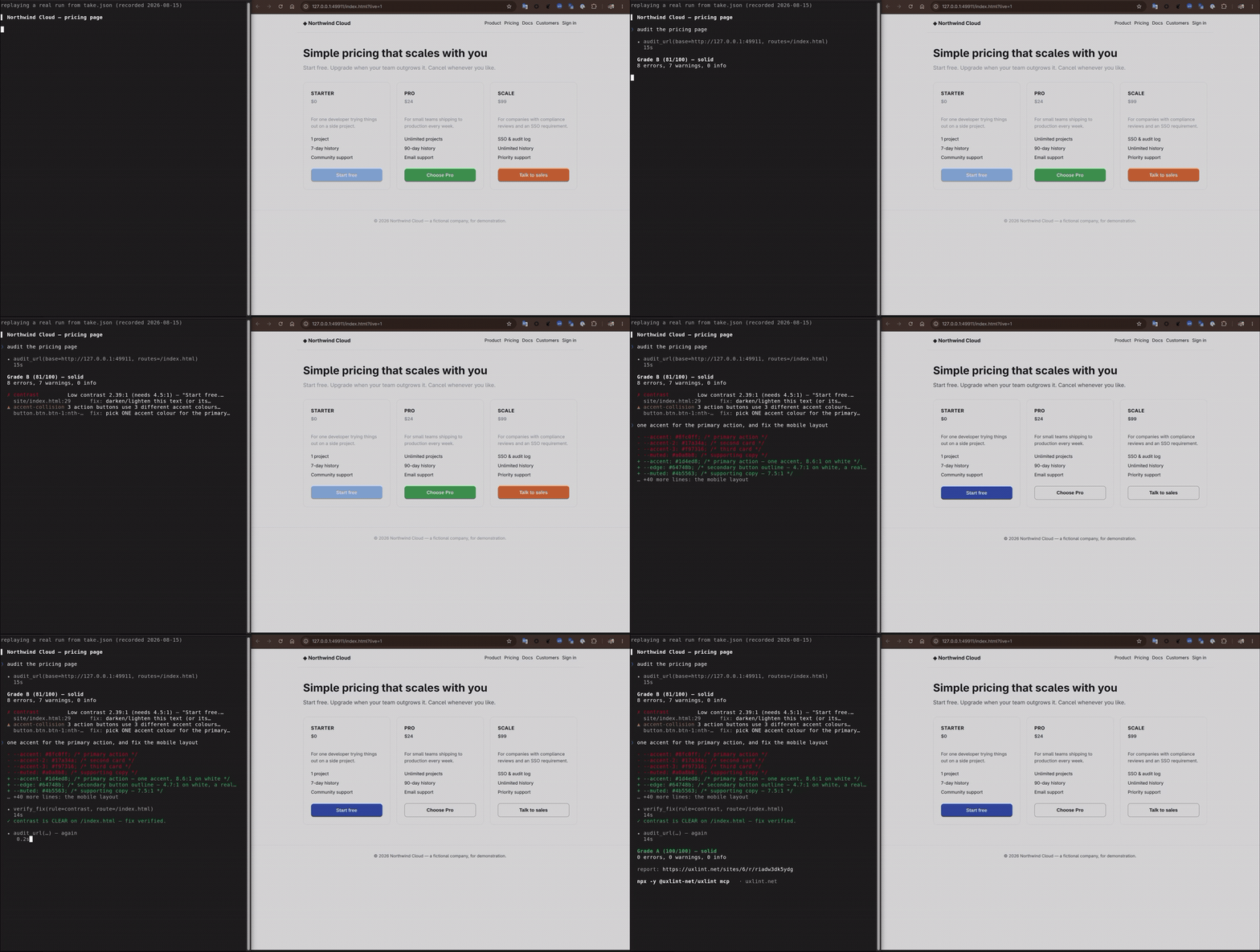
*A real run, start to finish: `audit_url` → **Grade B**, a 2.39:1 contrast error and three CTAs in
three different accent hues → the fix → `verify_fix` → **Grade A**. Every number in it came back
from the tools; only the waiting was cut.*
This is the **CLI**: a small, single static Rust binary. It drives a Chrome/Chromium you already
have installed over the DevTools protocol (no Node, no Playwright, no headless-browser download),
captures what a page looks and reads like, and sends that to uxlint's hosted server, which does
the actual grading. The rules engine, the calibrated thresholds, and the LLM judge all live
server-side, so the client never needs updating when a rule changes.
```
┌──────────────────────────┐ POST /v1/audit {snapshots} ┌──────────────────────────┐
│ uxlint (this binary) │ ───────────────────────────────────────▶ │ uxlint-server (hosted) │
│ drives YOUR Chrome (CDP) │ ◀─────────────────────────────────────── │ rules engine + LLM judge │
└──────────────────────────┘ report {findings + fixes} └──────────────────────────┘
```
## Install
```sh
curl -fsSL https://uxlint.net/install.sh | sh # detects OS/arch, verifies checksum
```
Or with [mise](https://mise.jdx.dev) — its `github` backend pulls the matching build from GitHub
Releases, verifies it, and updates on `mise up`:
```sh
mise use -g "github:uxlint-net/uxlint-cli[rename_exe=uxlint]@latest"
```
or pin it in a project's `mise.toml`:
```toml
[tools]
"github:uxlint-net/uxlint-cli" = { version = "latest", rename_exe = "uxlint" }
```
Or build from source (needs a recent stable Rust toolchain and a Chrome/Chromium on PATH):
```sh
git clone https://github.com/uxlint-net/uxlint-cli && cd uxlint-cli
cargo build --release
./target/release/uxlint --version
```
## Quickstart
```sh
uxlint auth login # opens your browser, saves a token
uxlint audit --base https://your-site.com --routes /,/pricing
```
First time auditing your own project? `uxlint init` picks (or creates) a site to attach reports
to and writes a `uxlint.toml` so every future audit in this directory just works:
```sh
uxlint init
uxlint audit --base http://localhost:5173 --routes /,/pricing
```
Exit code 1 on findings above the configured severity → drop it straight into CI (see
`.github/workflows/` for a template, or the `uxlint-net/uxlint-action` GitHub Action).
## Hiding elements from an audit (`uxlint-hide`)
Some on-page chrome isn't product UI and shouldn't be judged: a dev/staging environment banner, a
"DEV" marker, a debug toolbar, a Storybook/preview affordance. Add the class **`uxlint-hide`** to any
such element and the audit removes it — it's `display:none` from first paint, so it never appears in a
screenshot and is invisible to the collector (it seeds no findings):
```html
STAGING
```
The class is **inert on your real site** — it does nothing unless the audit is running, because the
stylesheet that hides it (`.uxlint-hide { display: none !important; }`) is injected only by uxlint's
browser, before the page's own scripts run. Style your element however you like the rest of the time.
It applies in every capture path — the crawl, goal-walk tests, and fix previews.
## Does it change anything? (`--allow-mutation`)
Interaction audits navigate, read, and click candidate menu, disclosure, and dialog controls.
Discovery skips controls whose accessible name contains a recognised action verb: *delete, remove, accept,
leave, revoke, cancel, transfer, pay, publish, submit, add, create, save*, and their relatives, matched as whole
words anywhere in the label. A label cannot prove what its click handler does, so run interaction
audits against an environment you control with disposable data.
Two probes do write, and both need **`--allow-mutation`** on top of `--states`:
- the **action-feedback** probe clicks a constructive action (Add / Create / Save) to check the page
says something happened;
- the **destructive** probe clicks Delete / Remove *and clicks through the confirm dialog*, to check
the contract that a destructive action either confirms first or offers undo.
They power `action-no-feedback`, `destructive-no-confirm` and `undo-missing`, and those three rules
stay quiet without the flag. **Throwaway environments only.** Being signed in as a user who is allowed
to delete a row is not the same as having asked us to, and this flag is where you say so.
`uxlint mcp` never sets it, and cannot be asked to.
The other way an audit writes is one you wrote yourself: a declared `[[tests]]` walk signs in as a
persona and exercises real flows, which is what a test does.
## MCP (use it from a coding agent)
**Claude Code, one command:**
```
/plugin marketplace add uxlint-net/uxlint-cli
/plugin install uxlint@uxlint
```
That installs the `uxlint` MCP server and, if the CLI isn't already on your PATH, fetches the matching
version once with the same checksum-verifying installer as above — so `/plugin update` updates the CLI
underneath it too. **No Node needed**: it downloads one static binary (verified against a published
checksum) and drives the Chrome you already have.
**Any other agent** — one line (the npm package fetches the binary for your platform, verifies the
checksum published beside it, and hands over). This is the only route that needs **Node 18+**, for
`npx` itself; if you'd rather not, install the binary with the line at the top and register that:
```sh
claude mcp add uxlint -- npx -y @uxlint-net/uxlint mcp
```
Or, for a client that reads a JSON config:
```json
{ "mcpServers": { "uxlint": { "command": "npx", "args": ["-y", "@uxlint-net/uxlint", "mcp"] } } }
```
uxlint is also in the [MCP Registry](https://registry.modelcontextprotocol.io) as
`io.github.uxlint-net/uxlint`, for clients that browse it. Already have the CLI? `uxlint mcp install`
registers it directly, no npx wrapper.
There is no token to set up first: ask your agent to audit something while signed out and it hands you
a sign-in link that mints and saves the token for you (`UXLINT_API_KEY` is for CI, which has no
browser).
Five tools: `audit_url` (full audit, graded verdict + action plan), `verify_fix` (recheck one rule
on one page after an edit), `get_shot` (fetch a finding's annotated screenshot),
`ux_guidance` (best-practice guidance to read *before* building UI), and `lint_feedback` — opt-in
and off by default (§ Privacy) — one tool for three kinds of signal: whether a finding was useful,
a lint uxlint is missing, or a component library it didn't recognise. The agent audits, reads the
fixes, edits, and re-audits until green.
### Verification and design memory
`verify_fix` returns `passed`, `failed`, `not_evaluated` or `inconclusive`. Zero findings alone
never means a fix passed. Passing verification currently covers `page-title-missing`,
`html-lang-missing` and `horizontal-overflow`, with explicit evidence for the requested route and
both viewports. Other checks can report failures but need a full audit and evidence review;
unknown rules, skipped checks and old servers cannot pass. A cleared check never submits an
automatic acceptance vote.
Keep approved project decisions in `uxlint.design.json` beside `uxlint.toml`. `ux_guidance` reads
it afresh each time, including in a new agent session. Start with a draft:
```json
{"version":1,"revision":1,"status":"draft","site":"example.test",
"tokens":{"accent":"var(--color-brand)"},
"components":{"primary_action":"Reuse PrimaryButton"},
"pages":{"/":"Explain the product and offer a clear starting action"},
"journeys":["Start the main task from the homepage"],
"references":["/styleguide"],"exceptions":[]}
```
Set `site` to the project's configured site. Review the decisions with the owner before setting
`status` to `approved` and committing the file. Increment `revision` for subsequent approved
changes. The tool never approves or writes the contract; drafts do not become guidance. References
are not automatically fetched, exceptions do not suppress lints, and this initial local memory
does not yet enforce tokens or compare screenshots. Invalid contracts produce a visible warning.
Keep the file below 32 KiB and do not put credentials or private customer data in it.
## Privacy & trust
This CLI runs on your machine and drives a real browser against real pages, so it's fair to ask
exactly what it captures and where it goes. What we can tell you, because it's what the code in
this repo actually does:
- **The collector is baked in and readable.** It's compiled into this
binary (`include_str!` of `assets/collector.js`), so `uxlint --version` pins the exact capture
code and the server can't inject anything at run time. Everything it captures is page geometry,
visible text, computed styles, and screenshots. For an embedded `