#  vectara-agentic
Documentation ·
Examples ·
Discord





## 📑 Table of Contents
- [✨ Overview](#overview)
- [🚀 Quick Start](#quick-start)
- [🗒️ Agent Instructions](#agent-instructions)
- [🧰 Defining Tools](#defining-tools)
- [🌊 Streaming & Real-time Responses](#streaming--real-time-responses)
- [🔍 Vectara Hallucination Correction (VHC)](#vectara-hallucination-correction-vhc)
- [🔄 Advanced Usage: Workflows](#advanced-usage-workflows)
- [🛠️ Configuration](#configuration)
- [📝 Migrating from v0.3.x](#migrating-from-v03x)
## Overview
`vectara-agentic` is a Python library for developing powerful AI assistants and agents using Vectara and Agentic-RAG. It leverages the LlamaIndex Agent framework and provides helper functions to quickly create tools that connect to Vectara corpora.
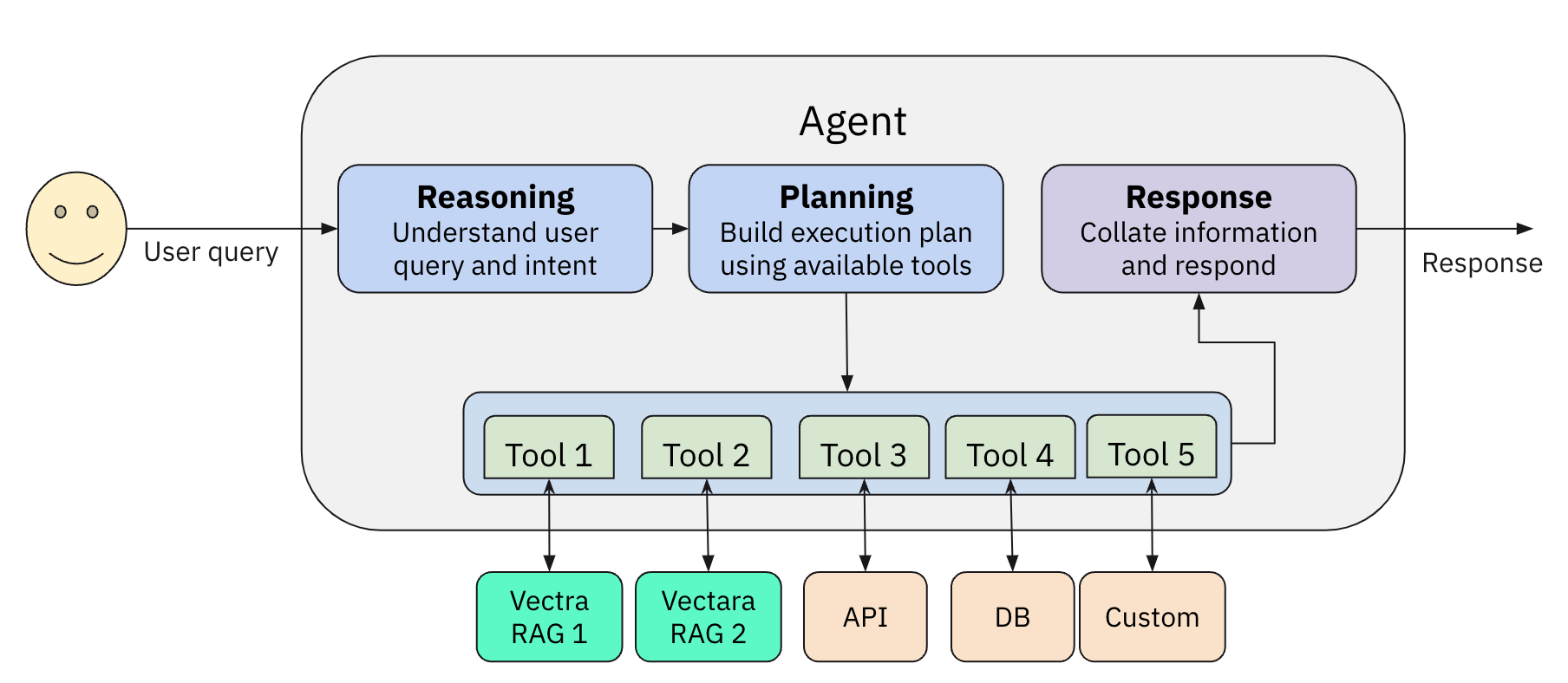
### Key Features
- **Rapid Tool Creation:**
Build Vectara RAG tools or search tools with a single line of code.
- **Agent Flexibility:**
Supports multiple agent types including `ReAct` and `Function Calling`.
- **Pre-Built Domain Tools:**
Tools tailored for finance, legal, and other verticals.
- **Multi-LLM Integration:**
Seamless integration with OpenAI, Anthropic, Gemini, GROQ, Together.AI, Cohere, and Bedrock.
- **Observability:**
Built-in support with Arize Phoenix for monitoring and feedback.
- **Workflow Support:**
Extend your agent's capabilities by defining custom workflows using the `run()` method.
### Example AI Assistants
Check out our example AI assistants:
- [Financial Assistant](https://huggingface.co/spaces/vectara/finance-chat)
- [Justice Harvard Teaching Assistant](https://huggingface.co/spaces/vectara/Justice-Harvard)
- [Legal Assistant](https://huggingface.co/spaces/vectara/legal-agent)
- [EV Assistant](https://huggingface.co/spaces/vectara/ev-assistant)
### Prerequisites
- [Vectara account](https://console.vectara.com/signup/?utm_source=github&utm_medium=code&utm_term=DevRel&utm_content=vectara-agentic&utm_campaign=github-code-DevRel-vectara-agentic)
- A Vectara corpus with an [API key](https://docs.vectara.com/docs/api-keys)
- [Python 3.10 or higher](https://www.python.org/downloads/)
- OpenAI API key (or API keys for Anthropic, TOGETHER.AI, Cohere, GEMINI or GROQ, if you choose to use them).
To use AWS Bedrock, make sure that
* The Bedrock models you need are enabled on your account
* Your environment includes `AWS_PROFILE` with your AWS profile name.
* Your environment includes `AWS_REGION` set to the region where you want to consume the AWS Bedrock services (defaults to us-east-2)
### Installation
```bash
pip install vectara-agentic
```
## Quick Start
Let's see how we create a simple AI assistant to answer questions about financial data ingested into Vectara, using `vectara-agentic`.
### 1. Initialize the Vectara tool factory
```python
import os
from vectara_agentic.tools import VectaraToolFactory
vec_factory = VectaraToolFactory(
vectara_api_key=os.environ['VECTARA_API_KEY'],
vectara_corpus_key=os.environ['VECTARA_CORPUS_KEY']
)
```
### 2. Create a Vectara RAG Tool
A RAG tool calls the full Vectara RAG pipeline to provide summarized responses to queries grounded in data. We define two additional arguments (`year` and `ticker` that map to filter attributes in the Vectara corpus):
```python
from pydantic import BaseModel, Field
years = list(range(2020, 2025))
tickers = {
"AAPL": "Apple Computer",
"GOOG": "Google",
"AMZN": "Amazon",
"SNOW": "Snowflake",
}
class QueryFinancialReportsArgs(BaseModel):
year: int | str = Field(..., description=f"The year this query relates to. An integer between {min(years)} and {max(years)} or a string specifying a condition on the year (example: '>2020').")
ticker: str = Field(..., description=f"The company ticker. Must be a valid ticket symbol from the list {tickers.keys()}.")
ask_finance = vec_factory.create_rag_tool(
tool_name="query_financial_reports",
tool_description="Query financial reports for a company and year",
tool_args_schema=QueryFinancialReportsArgs,
lambda_val=0.005,
summary_num_results=7,
vhc_eligible=True, # RAG tools participate in VHC by default
# Additional Vectara query arguments...
)
```
> **Note:** We only defined the `year` and `ticker` arguments in the QueryFinancialReportsArgs model. The `query` argument is automatically added by `create_rag_tool`.
To learn about additional arguments `create_rag_tool`, please see the full [docs](https://vectara.github.io/py-vectara-agentic/latest/).
### 3. Create other tools (optional)
In addition to RAG tools or search tools, you can generate additional tools the agent can use. These could be mathematical tools, tools
that call other APIs to get more information, or any other type of tool.
See [Agent Tools](#agent-tools-at-a-glance) for more information.
### 4. Create your agent
Here is how we will instantiate our AI Finance Assistant. First define your custom instructions:
```python
financial_assistant_instructions = """
- You are a helpful financial assistant, with expertise in financial reporting, in conversation with a user.
- Never discuss politics, and always respond politely.
- Respond in a compact format by using appropriate units of measure (e.g., K for thousands, M for millions, B for billions).
- Do not report the same number twice (e.g. $100K and 100,000 USD).
- Always check the get_company_info and get_valid_years tools to validate company and year are valid.
- When querying a tool for a numeric value or KPI, use a concise and non-ambiguous description of what you are looking for.
- If you calculate a metric, make sure you have all the necessary information to complete the calculation. Don't guess.
"""
```
Then just instantiate the `Agent` class:
```python
from vectara_agentic import Agent
agent = Agent(
tools =
[ask_finance],
topic="10-K annual financial reports",
custom_instructions=financial_assistant_instructions,
agent_progress_callback=agent_progress_callback
)
```
The `topic` parameter helps identify the agent's area of expertise, while `custom_instructions` lets you customize how the agent behaves and presents information. The agent will combine these with its default general instructions to determine its complete behavior.
The `agent_progress_callback` argument is an optional function that will be called when various Agent events occur (tool calls, tool outputs, etc.), and can be used to track agent steps in real-time. This works with both regular chat methods (`chat()`, `achat()`) and streaming methods (`stream_chat()`, `astream_chat()`).
### 5. Run a chat interaction
You have multiple ways to interact with your agent:
**Standard Chat (synchronous)**
```python
res = agent.chat("What was the revenue for Apple in 2021?")
print(res.response)
```
**Async Chat**
```python
res = await agent.achat("What was the revenue for Apple in 2021?")
print(res.response)
```
**Streaming Chat with AgentStreamingResponse**
```python
# Synchronous streaming
stream_response = agent.stream_chat("What was the revenue for Apple in 2021?")
# Option 1: Process stream manually
async for chunk in stream_response.async_response_gen():
print(chunk, end="", flush=True)
# Option 2: Get final response without streaming
# (Note: stream still executes, just not processed chunk by chunk)
# Get final response after streaming
final_response = stream_response.get_response()
print(f"\nFinal response: {final_response.response}")
```
**Async Streaming Chat**
```python
# Asynchronous streaming
stream_response = await agent.astream_chat("What was the revenue for Apple in 2021?")
# Process chunks manually
async for chunk in stream_response.async_response_gen():
print(chunk, end="", flush=True)
# Get final response after streaming
final_response = await stream_response.aget_response()
print(f"\nFinal response: {final_response.response}")
```
> **Note:**
> 1. Both `chat()` and `achat()` return `AgentResponse` objects. Access the text with `.response` or use `str()`.
> 2. Streaming methods return `AgentStreamingResponse` objects that provide both real-time chunks and final responses.
> 3. For advanced use-cases, explore other `AgentResponse` properties like `sources` and `metadata`.
> 4. Streaming is ideal for long responses and real-time user interfaces. See [Streaming & Real-time Responses](#streaming--real-time-responses) for detailed examples.
> 5. The `agent_progress_callback` works with both regular chat methods (`chat()`, `achat()`) and streaming methods to track tool calls in real-time.
## Agent Instructions
When creating an agent, it already comes with a set of general base instructions, designed to enhance its operation and improve how the agent works.
In addition, you can add `custom_instructions` that are specific to your use case to customize how the agent behaves.
When writing custom instructions:
- Focus on behavior and presentation rather than tool usage (that's what tool descriptions are for)
- Be precise and clear without overcomplicating
- Consider edge cases and unusual scenarios
- Avoid over-specifying behavior based on primary use cases
- Keep instructions focused on how you want the agent to behave and present information
The agent will combine both the general instructions and your custom instructions to determine its behavior.
It is not recommended to change the general instructions, but it is possible as well to override them with the optional `general_instructions` parameter. If you do change them, your agent may not work as intended, so be careful if overriding these instructions.
## Defining Tools
### Vectara tools
`vectara-agentic` provides two helper functions to connect with Vectara RAG:
* `create_rag_tool()` to create an agent tool that connects with a Vectara corpus for querying.
* `create_search_tool()` to create a tool to search a Vectara corpus and return a list of matching documents.
See the documentation for the full list of arguments for `create_rag_tool()` and `create_search_tool()`,
to understand how to configure Vectara query performed by those tools.
#### Creating a Vectara RAG tool
A Vectara RAG tool is often the main workhorse for any Agentic RAG application, and enables the agent to query
one or more Vectara RAG corpora.
The tool generated always includes the `query` argument, followed by 1 or more optional arguments used for
metadata filtering, defined by `tool_args_schema`.
For example, in the quickstart example the schema is:
```python
class QueryFinancialReportsArgs(BaseModel):
year: int | str = Field(..., description=f"The year this query relates to. An integer between {min(years)} and {max(years)} or a string specifying a condition on the year (example: '>2020').")
ticker: str = Field(..., description=f"The company ticker. Must be a valid ticket symbol from the list {tickers.keys()}.")
```
Remember, the `query` argument is part of the rag_tool that is generated, but `vectara-agentic` creates it and you do
not need to specify it explicitly.
For example, in the example above, the agent may call the `query_financial_reports_tool` tool with
query='what is the revenue?', year=2022 and ticker='AAPL'. Subsequently the RAG tool will issue
a Vectara RAG query with the same query, but with metadata filtering (doc.year=2022 and doc.ticker='AAPL').
There are also additional cool features supported here:
* An argument can be a condition, for example year='>2022' translates to the correct metadata
filtering condition doc.year>2022
* if `fixed_filter` is defined in the RAG tool, it provides a constant metadata filtering that is always applied.
For example, if fixed_filter=`doc.filing_type='10K'` then a query with query='what is the reveue', year=2022
and ticker='AAPL' would translate into query='what is the revenue' with metadata filtering condition of
"doc.year=2022 AND doc.ticker='AAPL' and doc.filing_type='10K'"
Note that `tool_args_type` is an optional dictionary that indicates:
* `type`: the level at which metadata filtering is applied for each argument (`doc` or `part`)
* `is_list`: whether the argument is a list type
* `filter_name`: a filter name (in cases where variable name can't be used, e.g. with spaces) to be used
instead of the variable name.
#### Creating a Vectara search tool
The Vectara search tool allows the agent to list documents that match a query.
This can be helpful to the agent to answer queries like "how many documents discuss the iPhone?" or other
similar queries that require a response in terms of a list of matching documents.
### Agent Tools at a Glance
`vectara-agentic` provides a few tools out of the box (see `ToolsCatalog` for details):
**1. Standard tools**
- `summarize_text`: a tool to summarize a long text into a shorter summary (uses LLM)
- `rephrase_text`: a tool to rephrase a given text, given a set of rephrase instructions (uses LLM)
These tools use an LLM and so would use the `Tools` LLM specified in your `AgentConfig`.
To instantiate them:
```python
from vectara_agentic.tools_catalog import ToolsCatalog
summarize_text = ToolsCatalog(agent_config).summarize_text
```
This ensures the summarize_text tool is configured with the proper LLM provider and model as
specified in the Agent configuration.
**2. Legal tools**
A set of tools for the legal vertical, such as:
- `summarize_legal_text`: summarize legal text with a certain point of view
- `critique_as_judge`: critique a legal text as a judge, providing their perspective
**3. Financial tools**
Based on tools from Yahoo! Finance:
- tools to understand the financials of a public company like: `balance_sheet`, `income_statement`, `cash_flow`
- `stock_news`: provides news about a company
- `stock_analyst_recommendations`: provides stock analyst recommendations for a company.
**4. Database tools**
Providing tools to inspect and query a database:
- `list_tables`: list all tables in the database
- `describe_tables`: describe the schema of tables in the database
- `load_data`: returns data based on a SQL query
- `load_sample_data`: returns the first 25 rows of a table
- `load_unique_values`: returns the top unique values for a given column
**5. Additional integrations**
vectara-agentic includes various other tools from LlamaIndex ToolSpecs:
* **Search Tools**
* Tavily Search: Real-time web search using [Tavily API](https://tavily.com/)
```python
from vectara_agentic.tools_catalog import ToolsCatalog
tools_factory = ToolsFactory()
tavily_tools = tools_factory.get_llama_index_tools(
tool_package_name="tavily_research",
tool_spec_name="TavilyToolSpec",
api_key=str(os.environ["TAVILY_API_KEY"]),
)
```
* EXA.AI: Advanced web search and data extraction
```python
exa_tools = tools_factory.get_llama_index_tools(
tool_package_name="exa.ai",
tool_spec_name="ExaToolSpec",
api_key=str(os.environ["EXA_API_KEY"]),
)
```
* Brave Search: Web search using Brave's search engine
```python
brave_tools = tools_factory.get_llama_index_tools(
tool_package_name="brave_search",
tool_spec_name="BraveSearchToolSpec",
api_key=str(os.environ["BRAVE_API_KEY"]),
)
```
* **Academic Tools**
* arXiv: Search and retrieve academic papers
```python
arxiv_tools = tools_factory.get_llama_index_tools(
tool_package_name="arxiv",
tool_spec_name="ArxivToolSpec",
)
```
* **Database Tools**
* Neo4j: Graph database integration
```python
neo4j_tools = tools_factory.get_llama_index_tools(
tool_package_name="neo4j",
tool_spec_name="Neo4jQueryToolSpec",
)
```
* Kuzu: Lightweight graph database
```python
kuzu_tools = tools_factory.get_llama_index_tools(
tool_package_name="kuzu",
tool_spec_name="KuzuGraphStore",
)
```
* Waii: tools for natural langauge query of a relational database
```python
waii_tools = tools_factory.get_llama_index_tools(
tool_package_name="waii",
tool_spec_name="WaiiToolSpec",
)
```
* **Google Tools**
* Gmail: Read and send emails
```python
gmail_tools = tools_factory.get_llama_index_tools(
tool_package_name="google",
tool_spec_name="GmailToolSpec",
)
```
* Calendar: Manage calendar events
```python
calendar_tools = tools_factory.get_llama_index_tools(
tool_package_name="google",
tool_spec_name="GoogleCalendarToolSpec",
)
```
* Search: Google search integration
```python
search_tools = tools_factory.get_llama_index_tools(
tool_package_name="google",
tool_spec_name="GoogleSearchToolSpec",
)
```
* **Communication Tools**
* Slack: Send messages and interact with Slack
```python
slack_tools = tools_factory.get_llama_index_tools(
tool_package_name="slack",
tool_spec_name="SlackToolSpec",
)
```
For detailed setup instructions and API key requirements, please refer the instructions on [LlamaIndex hub](https://llamahub.ai/?tab=tools) for the specific tool.
### Creating custom tools
You can create your own tool directly from a Python function using the `create_tool()` method of the `ToolsFactory` class:
```python
def mult_func(x, y):
return x * y
mult_tool = ToolsFactory().create_tool(mult_func)
```
#### VHC Eligibility
When creating tools, you can control whether their output is eligible for Vectara Hallucination Correction, by using the `vhc_eligible` parameter:
```python
# Tool that provides factual data - should participate in VHC
data_tool = ToolsFactory().create_tool(get_company_data, vhc_eligible=True)
# Utility tool that doesn't provide context - should not participate in VHC
summary_tool = ToolsFactory().create_tool(summarize_text, vhc_eligible=False)
```
**VHC-eligible tools** (default: `True`) are those that provide factual context for responses, such as:
- Data retrieval tools
- Search tools
- API calls that return factual information
**Non-VHC-eligible tools** (`vhc_eligible=False`) are utility tools that don't contribute factual context:
- Text summarization tools
- Text rephrasing tools
- Formatting or processing tools
Built-in utility tools like `summarize_text`, `rephrase_text`, and `get_bad_topics` are automatically marked as non-VHC-eligible.
#### Human-Readable Tool Output
Tools can provide both raw data and human-readable formatted output using the `create_human_readable_output` utility:
```python
from vectara_agentic.tool_utils import create_human_readable_output, format_as_table
def my_data_tool(query: str):
"""Tool that returns structured data with custom formatting."""
raw_data = [
{"name": "Alice", "age": 30, "city": "New York"},
{"name": "Bob", "age": 25, "city": "Boston"}
]
# Return human-readable output with built-in table formatter
return create_human_readable_output(raw_data, format_as_table)
```
Built-in formatters include `format_as_table`, `format_as_json`, and `format_as_markdown_list`. For detailed documentation and advanced usage, see [tools.md](docs/tools.md#human-readable-tool-output).
> **Important:** When you define your own Python functions as tools, implement them at the top module level,
> and not as nested functions. Nested functions are not supported if you use serialization
> (dumps/loads or from_dict/to_dict).
The human-readable format, if available, is used when using Vectara Hallucination Correction.
## Streaming & Real-time Responses
`vectara-agentic` provides powerful streaming capabilities for real-time response generation, ideal for interactive applications and long-form content.
### Why Use Streaming?
- **Better User Experience**: Users see responses as they're generated instead of waiting for completion
- **Real-time Feedback**: Perfect for chat interfaces, web applications, and interactive demos
- **Progress Visibility**: Combined with callbacks, users can see both tool usage and response generation
- **Reduced Perceived Latency**: Streaming makes applications feel faster and more responsive
### Quick Streaming Example
```python
# Create streaming response
stream_response = agent.stream_chat("Analyze the financial performance of tech companies in 2022")
async for chunk in stream_response.async_response_gen():
print(chunk, end="", flush=True) # Update your UI here
# Get complete response with metadata after streaming completes
final_response = stream_response.get_response()
print(f"\nSources consulted: {len(final_response.sources)}")
```
### Tool Call Progress Tracking
You can track tool calls and outputs in real-time with `agent_progress_callback` - this works with both regular chat and streaming methods:
```python
from vectara_agentic import AgentStatusType
def tool_tracker(status_type, msg, event_id):
if status_type == AgentStatusType.TOOL_CALL:
print(f"🔧 Using {msg['tool_name']} with {msg['arguments']}")
elif status_type == AgentStatusType.TOOL_OUTPUT:
print(f"📊 {msg['tool_name']} completed")
agent = Agent(
tools=[your_tools],
agent_progress_callback=tool_tracker
)
# With streaming - see tool calls as they happen, plus streaming response
stream_response = await agent.astream_chat("Analyze Apple's finances")
async for chunk in stream_response.async_response_gen():
print(chunk, end="", flush=True)
# With regular chat - see tool calls as they happen, then get final response
response = await agent.achat("Analyze Apple's finances")
print(response.response)
```
For detailed examples including FastAPI integration, Streamlit apps, and decision guidelines, see our [comprehensive streaming documentation](https://vectara.github.io/py-vectara-agentic/latest/usage/#streaming-chat-methods).
## Vectara Hallucination Correction (VHC)
`vectara-agentic` provides built-in support for Vectara Hallucination Correction (VHC), which analyzes agent responses and corrects any detected hallucinations based on the factual content retrieved by VHC-eligible tools.
### Computing VHC
After a chat interaction, you can compute VHC to analyze and correct the agent's response:
```python
# Chat with the agent
response = agent.chat("What was Apple's revenue in 2022?")
print(response.response)
# Compute VHC analysis
vhc_result = agent.compute_vhc()
# Access corrected text and corrections
if vhc_result["corrected_text"]:
print("Original:", response.response)
print("Corrected:", vhc_result["corrected_text"])
print("Corrections:", vhc_result["corrections"])
else:
print("No corrections needed or VHC not available")
```
### Async VHC Computation
For async applications, use `acompute_vhc()`:
```python
# Async chat
response = await agent.achat("What was Apple's revenue in 2022?")
# Async VHC computation
vhc_result = await agent.acompute_vhc()
```
### VHC Requirements
- VHC requires a valid `VECTARA_API_KEY` environment variable
- Only VHC-eligible tools (those marked with `vhc_eligible=True`) contribute to the analysis
- VHC results are cached for each query/response pair to avoid redundant computation
### Tool Validation
When creating an agent, you can enable tool validation by setting `validate_tools=True`. This will check that any tools mentioned in your custom instructions actually exist in the agent's tool set:
```python
agent = Agent(
tools=[...],
topic="financial reports",
custom_instructions="Always use the get_company_info tool first...",
validate_tools=True # Will raise an error if get_company_info tool doesn't exist
)
```
This helps catch errors where your instructions reference tools that aren't available to the agent.
## Advanced Usage: Workflows
In addition to standard chat interactions, `vectara-agentic` supports custom workflows via the `run()` method.
Workflows allow you to structure multi-step interactions where inputs and outputs are validated using Pydantic models.
To learn more about workflows read [the documentation](https://docs.llamaindex.ai/en/stable/understanding/workflows/basic_flow/)
### What are Workflows?
Workflows provide a structured way to handle complex, multi-step interactions with your agent. They're particularly useful when:
- You need to break down complex queries into simpler sub-questions
- You want to implement a specific sequence of operations
- You need to maintain state between different steps of a process
- You want to parallelize certain operations for better performance
### Defining a Custom Workflow
Create a workflow by subclassing `llama_index.core.workflow.Workflow` and defining the input/output models:
```python
from pydantic import BaseModel
from llama_index.core.workflow import (
StartEvent, StopEvent, Workflow, step,
)
class MyWorkflow(Workflow):
class InputsModel(BaseModel):
query: str
class OutputsModel(BaseModel):
answer: str
class OutputModelOnFail(BaseModel):
partial_response: str = ""
@step
async def my_step(self, ev: StartEvent) -> StopEvent:
# do something here
return StopEvent(result="Hello, world!")
```
When the `run()` method in vectara-agentic is invoked, it calls the workflow with the following variables in the `StartEvent`:
* `agent`: the agent object used to call `run()` (self)
* `tools`: the tools provided to the agent. Those can be used as needed in the flow.
* `llm`: a pointer to a LlamaIndex llm, so it can be used in the workflow. For example, one of the steps may call `llm.acomplete(prompt)`
* `verbose`: controls whether extra debug information is displayed
* `inputs`: this is the actual inputs to the workflow provided by the call to `run()` and must be of type `InputsModel`
If you want to use `agent`, `tools`, `llm` or `verbose` in other events (that are not `StartEvent`), you can store them in
the `Context` of the Workflow as follows:
```python
await ctx.store.set("agent", ev.agent)
```
and then in any other event you can pull that agent object with
```python
agent = await ctx.store.get("agent")
```
Similarly you can reuse the `llm`, `tools` or `verbose` arguments within other nodes in the workflow.
### Using the Workflow with Your Agent
When initializing your agent, pass the workflow class using the `workflow_cls` parameter:
```python
agent = Agent(
tools=[query_financial_reports_tool],
topic="10-K financial reports",
custom_instructions="You are a helpful financial assistant.",
workflow_cls=MyWorkflow, # Provide your custom workflow here
workflow_timeout=120 # Optional: Set a timeout (default is 120 seconds)
)
```
### Running the Workflow
Prepare the inputs using your workflow's `InputsModel` and execute the workflow using `run()`:
```python
# Create an instance of the workflow's input model
inputs = MyWorkflow.InputsModel(query="What is Vectara?", extra_param=42)
# Run the workflow (ensure you're in an async context or use asyncio.run)
workflow_result = asyncio.run(agent.run(inputs))
# Access the output from the workflow's OutputsModel
print(workflow_result.answer)
```
When a workflow reaches its timeout, the timeout handler builds and returns an `OutputModelOnFail`
by reading each field named in that model from the workflow’s Context; for any field that isn’t set in the context,
it uses the default value you’ve defined on `OutputModelOnFail`. In other words, every property in `OutputModelOnFail`
must declare a default so that even if the corresponding context variable is missing, the model can be fully populated and returned without errors.
### Built-in Workflows
`vectara-agentic` includes two workflow implementations that you can use right away:
#### 1. `SubQuestionQueryWorkflow`
This workflow breaks down complex queries into simpler sub-questions, executes them in parallel, and then combines the answers:
```python
from vectara_agentic.sub_query_workflow import SubQuestionQueryWorkflow
agent = Agent(
tools=[query_financial_reports_tool],
topic="10-K financial reports",
custom_instructions="You are a helpful financial assistant.",
workflow_cls=SubQuestionQueryWorkflow
)
# Run the workflow with a complex query
inputs = SubQuestionQueryWorkflow.InputsModel(
query="Compare Apple's revenue growth to Google's between 2020 and 2023"
)
result = asyncio.run(agent.run(inputs))
print(result.response)
```
The workflow works in three steps:
1. **Query**: Breaks down the complex query into sub-questions
2. **Sub-question**: Executes each sub-question in parallel (using 4 workers by default)
3. **Combine answers**: Synthesizes all the answers into a coherent response
#### 2. `SequentialSubQuestionsWorkflow`
This workflow is similar to `SubQuestionQueryWorkflow` but executes sub-questions sequentially, where each question can depend on the answer to the previous question:
```python
from vectara_agentic.sub_query_workflow import SequentialSubQuestionsWorkflow
agent = Agent(
tools=[query_financial_reports_tool],
topic="10-K financial reports",
custom_instructions="You are a helpful financial assistant.",
workflow_cls=SequentialSubQuestionsWorkflow
)
# Run the workflow with a complex query that requires sequential reasoning
inputs = SequentialSubQuestionsWorkflow.InputsModel(
query="What was the revenue growth rate of the company with the highest market cap in 2022?"
)
result = asyncio.run(agent.run(inputs))
print(result.response)
```
The workflow works in two steps:
1. **Query**: Breaks down the complex query into sequential sub-questions
2. **Sub-question**: Executes each sub-question in sequence, passing the answer from one question to the next
### When to Use Each Workflow Type
- **Use SubQuestionQueryWorkflow** when:
- Your query can be broken down into independent sub-questions
- You want to parallelize the execution for better performance
- The sub-questions don't depend on each other's answers
- **Use SequentialSubQuestionsWorkflow** when:
- Your query requires sequential reasoning
- Each sub-question depends on the answer to the previous question
- You need to build up information step by step
- **Create a custom workflow** when:
- You have a specific sequence of operations that doesn't fit the built-in workflows
- You need to implement complex business logic
- You want to integrate with external systems or APIs in a specific way
## Configuration
### Configuring Vectara-agentic
The main way to control the behavior of `vectara-agentic` is by passing an `AgentConfig` object to your `Agent` when creating it.
For example:
```python
from vectara_agentic import AgentConfig, AgentType, ModelProvider
agent_config = AgentConfig(
agent_type = AgentType.REACT,
main_llm_provider = ModelProvider.ANTHROPIC,
main_llm_model_name = 'claude-4-5-sonnet',
tool_llm_provider = ModelProvider.TOGETHER,
tool_llm_model_name = 'deepseek-ai/DeepSeek-V3'
)
agent = Agent(
tools=[query_financial_reports_tool],
topic="10-K financial reports",
custom_instructions="You are a helpful financial assistant in conversation with a user.",
agent_config=agent_config
)
```
The `AgentConfig` object may include the following items:
- `agent_type`: the agent type. Valid values are `REACT` or `FUNCTION_CALLING` (default: `FUNCTION_CALLING`).
- `main_llm_provider` and `tool_llm_provider`: the LLM provider for main agent and for the tools. Valid values are `OPENAI`, `ANTHROPIC`, `TOGETHER`, `GROQ`, `COHERE`, `BEDROCK`, `GEMINI` (default: `OPENAI`).
> **Note:** Fireworks AI support has been removed. If you were using Fireworks, please migrate to one of the supported providers listed above.
- `main_llm_model_name` and `tool_llm_model_name`: agent model name for agent and tools (default depends on provider: OpenAI uses gpt-4.1-mini, Anthropic uses claude-sonnet-4-5, Gemini uses models/gemini-2.5-flash, Together.AI uses deepseek-ai/DeepSeek-V3, GROQ uses openai/gpt-oss-20b, Bedrock uses us.anthropic.claude-sonnet-4-20250514-v1:0, Cohere uses command-a-03-2025).
- `observer`: the observer type; should be `ARIZE_PHOENIX` or if undefined no observation framework will be used.
- `endpoint_api_key`: a secret key if using the API endpoint option (defaults to `dev-api-key`)
If any of these are not provided, `AgentConfig` first tries to read the values from the OS environment.
### Configuring Vectara tools: `rag_tool`, or `search_tool`
When creating a `VectaraToolFactory`, you can pass in a `vectara_api_key`, and `vectara_corpus_key` to the factory.
If not passed in, it will be taken from the environment variables (`VECTARA_API_KEY` and `VECTARA_CORPUS_KEY`). Note that `VECTARA_CORPUS_KEY` can be a single KEY or a comma-separated list of KEYs (if you want to query multiple corpora).
These values will be used as credentials when creating Vectara tools - in `create_rag_tool()` and `create_search_tool()`.
### Setting up a privately hosted LLM
If you want to setup `vectara-agentic` to use your own self-hosted LLM endpoint, follow the example below:
```python
from vectara_agentic import AgentConfig, AgentType, ModelProvider
config = AgentConfig(
agent_type=AgentType.REACT,
main_llm_provider=ModelProvider.PRIVATE,
main_llm_model_name="meta-llama/Meta-Llama-3.1-8B-Instruct",
private_llm_api_base="http://vllm-server.company.com/v1",
private_llm_api_key="TEST_API_KEY",
private_llm_max_tokens=8192, # Optional: set max output tokens for your private LLM
)
agent = Agent(
agent_config=config,
tools=tools,
topic=topic,
custom_instructions=custom_instructions
)
```
## Migrating from v0.3.x
If you're upgrading from v0.3.x, please note the following breaking changes in v0.4.0:
- **Fireworks LLM removed**: Migrate to OpenAI, Anthropic, Together.AI, GROQ, Cohere, Bedrock, or Gemini
- **OPENAI AgentType removed**: Use the FUNCTION_CALLING AgentType instead, when using OpenAI for main_llm_provider
- **StructuredPlanning deprecated**: Use standard Agent workflows or create custom workflows
- **Token counting and compact_docstring removed**: Remove these from your configuration
- **update_func removed**: This functionality is no longer available
For detailed migration instructions, see [CHANGELOG.md](CHANGELOG.md).