
meshpanel
[](https://supermetry.com)
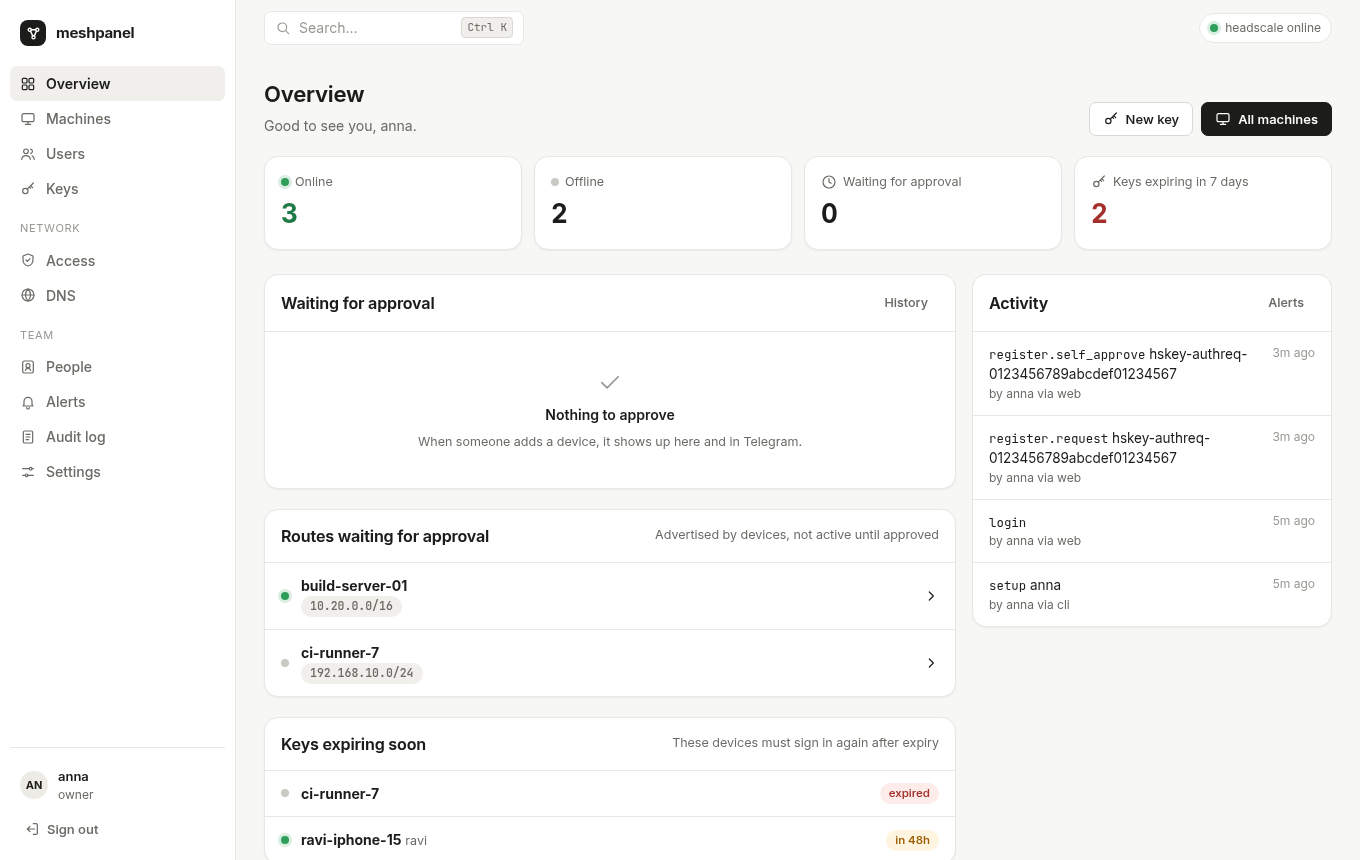
A control panel for headscale that lets people add their own phones and laptops, with no terminal involved.
Device approvals in the browser or on Telegram, local accounts with two-factor, roles for teams, and a live dashboard. One Go binary.
---
## Why
With plain headscale, adding a phone works like this:
1. You type the server URL into the Tailscale app.
2. The app shows `headscale auth register --auth-id … --user …`.
3. Someone has to SSH into the server and run that command with sudo.
meshpanel replaces that last step:
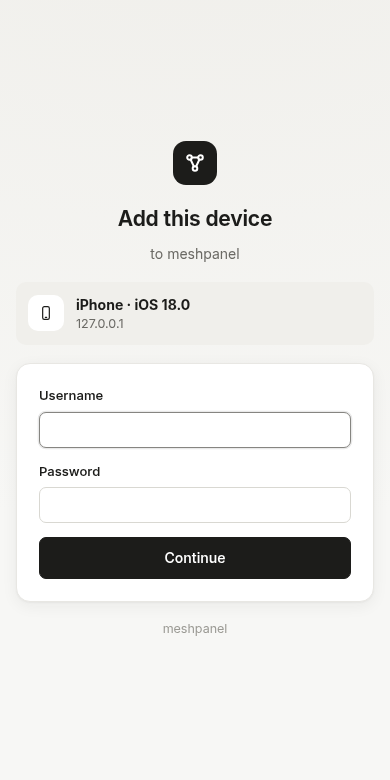
1. The person signs in on the phone with **their own account** (password plus authenticator code).
2. Approvers get a **Telegram message with Approve / Deny buttons**, or approve in the dashboard.
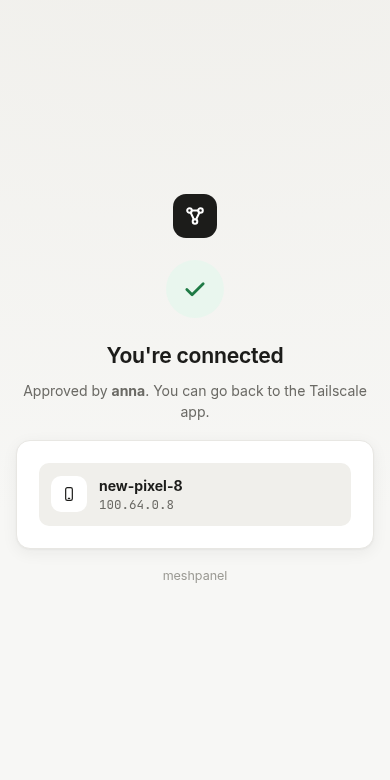
3. The phone joins. Every copy of the Telegram card updates to "Approved by anna".
People who are allowed to approve their own devices skip the wait.
## Features
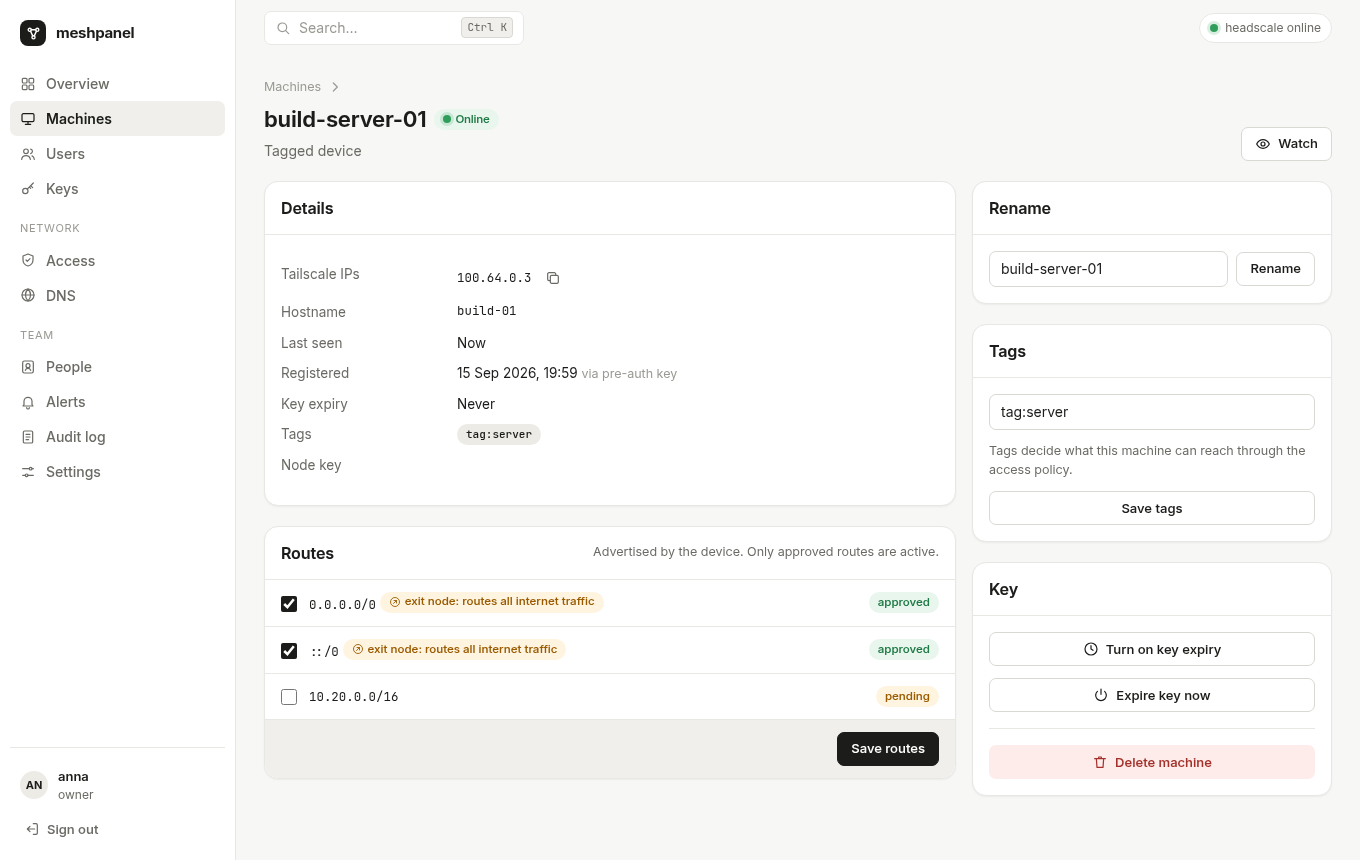
- **Terminal-free device registration.** meshpanel serves its own `/register/` and `/auth/` (SSH check) pages: sign in, 2FA, then approval. Requests are approved exactly once, even when two admins tap at the same moment.
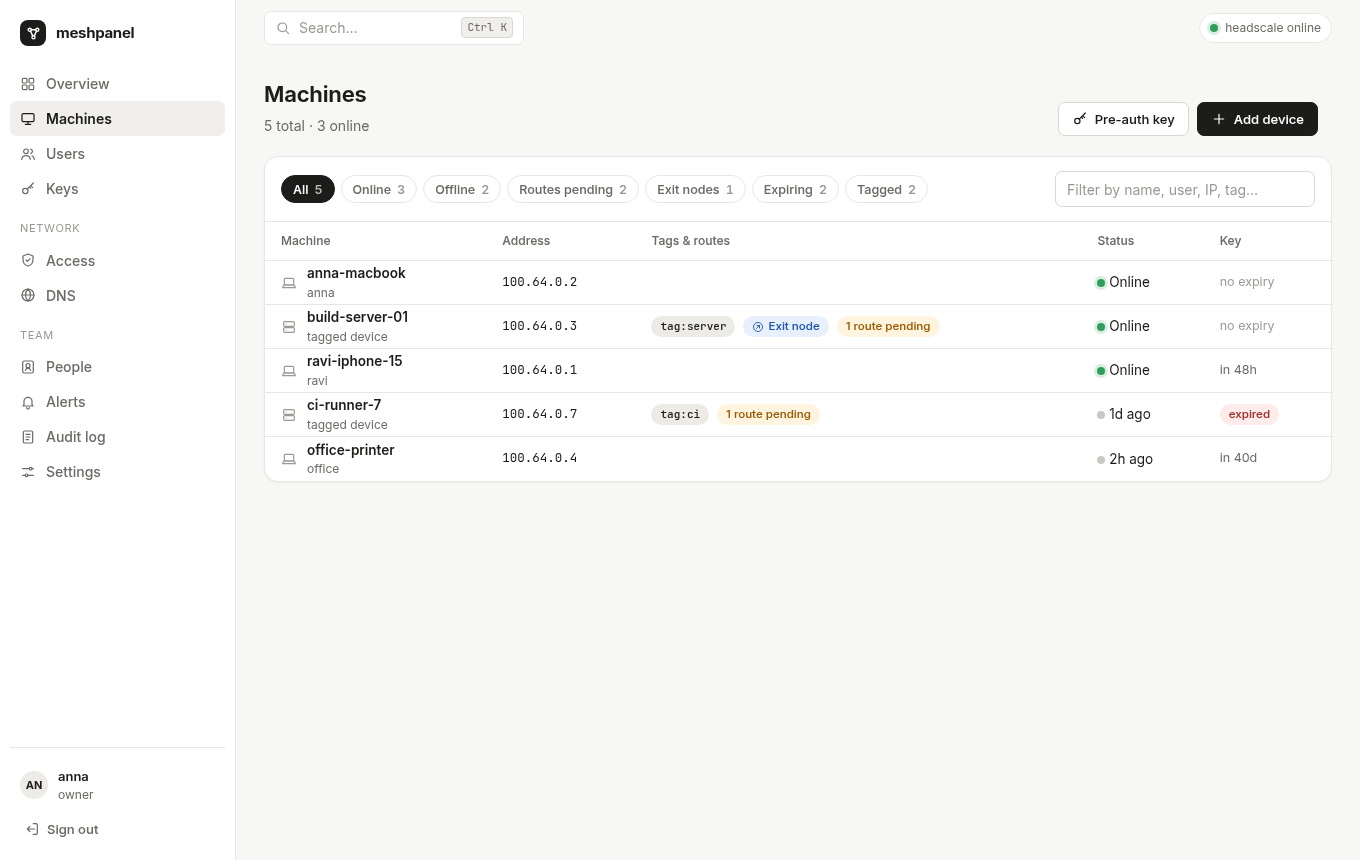
- **Add-a-device helper.** A page that builds the exact `tailscale up` command (or `docker run`) for Linux, macOS, Windows and Docker, with routes, exit node, SSH, tags and an optional pre-auth key.
- **Telegram bot.**
- People link their own Telegram account.
- Approval cards carry single-use buttons, and every tap re-checks the person's current permissions.
- An optional group chat can also receive approval cards.
- **Watch rules.** Alerts for a device, a user, a tag, or everything:
- online / offline
- new device
- key expiring / expired
- route advertised
- not seen for N hours
- …
Offline alerts are debounced, flapping devices are collapsed into one message, and each person can set quiet hours. Security alerts always come through.
- **Local accounts.**
- argon2id passwords, with mandatory TOTP two-factor and backup codes.
- Login lockout, a session list with revoke, and invite links.
- Nobody can grant more permissions than they hold.
- **Roles and permissions:** owner, admin, network admin, IT admin, auditor, viewer and member, plus extra permissions per person. Members only see their own devices, everywhere: lists, search, live updates and alerts.
- **Everything Headplane does**, except the Docker and Kubernetes integrations:
- **Machines:** rename, tags, routes with exit-node and wide-subnet warnings, key expiry, delete.
- **Users and pre-auth keys:** keys come with a QR code and per-OS setup steps.
- **Access policy:** a visual editor plus a HuJSON editor, with download and upload. Changes are checked with headscale, shown as a diff, then applied.
- **DNS:** MagicDNS, nameservers, split DNS and extra records. Changes are written to `config.yaml` with comments kept, a backup is taken, and headscale is restarted. The old file is restored if headscale doesn't come back.
- **Device info (optional).** A small built-in tailnet node reads each machine's OS, model, Tailscale version and endpoints, and shows them in the machine list and detail page.
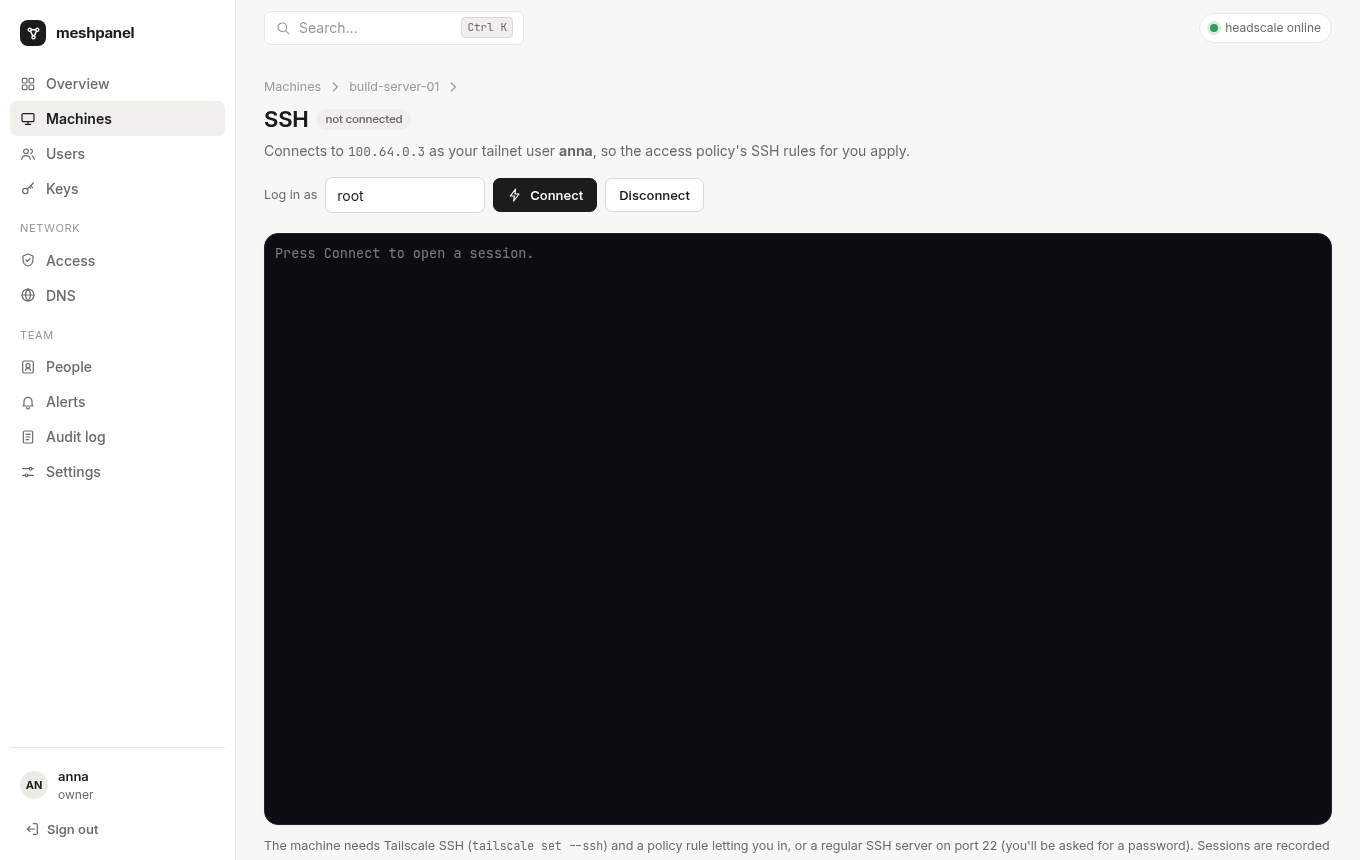
- **Browser SSH terminal (optional).** Open a shell on a machine from the dashboard.
- Each session joins the tailnet as **your own headscale user** (a short-lived node, deleted afterwards), so Tailscale SSH rules apply to you, not to the panel.
- Works with Tailscale SSH and with a regular sshd (you're prompted for a password).
- When an SSH rule requires a fresh check (`"action": "check"`), the terminal shows an **Approve sign-in** button instead of timing out.
- Sessions are recorded in the audit log.
- **Live UI.** The browser updates over WebSocket and falls back to polling. There's a Ctrl+K command palette.
- **Webhooks** for Slack, Discord, or any HTTP endpoint. Generic JSON payloads are HMAC-signed, and delivery is retried. Loopback, link-local and cloud-metadata targets are refused.
- **Device limit.** An optional cap on devices per user. People at the cap can still request more, but an approver has to OK them.
- **Audit log** of every change: who made it, through which channel (web, Telegram or CLI), and before/after values. It can be exported to CSV.
- **Three themes:** Paper (default), Midnight and Console, plus "follow system". Each person picks their own. Admins can set a company accent color and logo.
- **Small and self-contained.**
- A single static binary (about 30 MB, including the embedded Tailscale client for the optional features) with pure-Go SQLite.
- No Node, Docker or CDN.
- Idles at about 40 MB of RAM. The optional agent adds roughly 15 MB, and each open SSH session adds a little more while it's open.
## Requirements
- **headscale 0.29.x or newer.**
- **0.29.x (the current release):** meshpanel uses headscale's REST API at `headscale.http_url` with an API key: `headscale apikeys create --expiration 999d`, then set `headscale.api_key` (or `api_key_path`) in meshpanel's config. Without a key it refuses to start and says so.
- **0.30 and `main` builds:** meshpanel uses headscale's local unix socket, which needs no API key.
- Older than 0.29 is not supported.
- meshpanel runs **on the same machine** as headscale.
- A reverse proxy (Caddy, nginx, …) that already terminates HTTPS for headscale. meshpanel serves plain HTTP on port 8030.
## Quick start
```sh
# 1. Install. Packages from the releases page create the user and service:
sudo dpkg -i meshpanel_*_amd64.deb # or: rpm -i meshpanel_*.rpm
# …or download just the binary (also meshpanel_linux_arm64, meshpanel_linux_armv7):
# curl -Lo meshpanel https://github.com/velixio/meshpanel/releases/latest/download/meshpanel_linux_amd64
# sudo install -m 0755 meshpanel /usr/bin/meshpanel
# curl -LO https://github.com/velixio/meshpanel/releases/latest/download/config.example.yaml
# 2. Configure
sudoedit /etc/meshpanel/config.yaml # set public_url (session_secret is generated if unset)
# 3. Route three paths to meshpanel in your proxy (examples below), then:
sudo systemctl enable --now meshpanel
sudo -u meshpanel meshpanel doctor # checks socket, version, files, proxy
# 4. Open https://headscale.example.com/admin/setup to create the owner account.
# It asks for the one-time setup code printed in the log: journalctl -u meshpanel | grep setup_code
```
### Reverse proxy
meshpanel needs three paths on headscale's public URL. Everything else keeps going to headscale.
| Path | Goes to |
|---|---|
| `/register/*`, `/auth/*` | meshpanel (phone sign-in and approval pages) |
| `/admin/*` | meshpanel (dashboard) |
| everything else | headscale |
**Caddy** ([deploy/Caddyfile](deploy/Caddyfile)):
```caddy
headscale.example.com {
@meshpanel path /register/* /auth/* /admin /admin/*
reverse_proxy @meshpanel 127.0.0.1:8030
reverse_proxy 127.0.0.1:8080
}
```
For **nginx**, see [deploy/nginx.conf](deploy/nginx.conf). Keep the `Host` header and the WebSocket upgrade headers.
### Telegram
1. Create a bot with [@BotFather](https://t.me/BotFather) and put its token in `telegram.token` (or `telegram.token_path`).
2. Restart meshpanel.
3. Each person opens **Alerts → Link Telegram** and taps the link. Approvers get approval cards from then on.
4. Optional: add the bot to a group, then set the group's id under **Settings → Telegram**.
The bot uses long polling, so it needs no webhook or extra proxy route.
### Device info and browser SSH
Both are off by default. Turn them on in the config:
```yaml
agent:
enabled: true # joins the tailnet as headscale user "meshpanel"
web_ssh:
enabled: true # sessions join as the signed-in person's headscale user
```
- **Agent visibility:** with a restrictive access policy, let the agent see devices. Ping is enough:
```json
{"action": "accept", "src": ["meshpanel@"], "dst": ["*:*"], "proto": "icmp"}
```
- **Browser SSH:** the target machine needs Tailscale SSH (`tailscale set --ssh`) plus an `ssh` rule for the person, or a normal SSH server on port 22.
- **Who can use it:** the new `web_ssh` permission. Members have it for their own devices; viewers and auditors don't.
### DNS and policy editing
- **DNS:** set `headscale.config_path` and give meshpanel's group write access to that file. meshpanel restarts headscale through `headscale.restart_command`. The default uses `sudo`; install [deploy/sudoers](deploy/sudoers), or use the polkit rule in [docs/install.md](docs/install.md).
- **Policy, database mode** (`policy.mode: database`): edits go through headscale's API.
- **Policy, file mode:** meshpanel writes the policy file and runs `headscale.reload_command`.
### Updating
**Settings → Updates** (owners only) checks GitHub for a newer release. **Install** asks you to confirm, downloads the release, verifies it, and restarts the panel.
- **Signed:** every release publishes `checksums.txt` with an ed25519 signature (`checksums.txt.sig`). The public key is built into the binary (`internal/update/signing.pub`). meshpanel installs a binary only if the signature verifies **and** the binary's sha256 is in that signed file. A bad or missing signature, a mismatched hash, a downgrade, or a download from anywhere but GitHub installs nothing.
- **Staged, not overwritten:** the download is kept in `/update/` (for example `/var/lib/meshpanel/update/`), so the service needs no write access to `/usr/bin`. On each start meshpanel re-verifies the staged binary and switches to it. A newer installed package replaces the stage automatically.
- **Not for development builds.** Turn it off with `update.enabled: false`. `update.repo` changes the GitHub repository; the signing key still has to match.
- To update by hand, install the new package or binary as before.
Without dashboard access, use the CLI (run as the service user so staged files
remain readable and writable by the service):
```bash
sudo -u meshpanel /usr/bin/meshpanel update -c /etc/meshpanel/config.yaml --check
sudo -u meshpanel /usr/bin/meshpanel update -c /etc/meshpanel/config.yaml
sudo systemctl restart meshpanel
sudo journalctl -u meshpanel -n 20 --no-pager
```
Configure an absolute `db.path` so the CLI and service use the same staging directory.
The command uses the same signed releases as the UI and stages the download;
it does not restart the service itself. It respects `update.enabled` and
`update.repo`, and accounts for a newer verified staged version when the
installed launcher is older. If your launcher does not yet have the `update`
command, use `/var/lib/meshpanel/update/meshpanel` if that staged version supports
it, or install a release containing CLI update support manually first.
### Updating Headscale from the CLI or UI
Owners can check upstream releases in **Settings → Headscale updates**. Binary
installation is opt-in and supports local Linux/systemd installations using
SQLite. Automatic installs are limited to newer patch releases in the same
major/minor version; follow Headscale's release instructions for minor upgrades.
For a service running `/usr/bin/headscale serve` with its data in
`/var/lib/headscale`, configure the privileged helper:
```bash
# For deb/rpm packages:
helper_files=/usr/share/doc/meshpanel
# For a source checkout or extracted release tarball, use instead:
# helper_files=deploy
sudo install -o root -g root -m 0600 "$helper_files/headscale-update.example.yaml" /etc/meshpanel/headscale-update.yaml
sudo editor /etc/meshpanel/headscale-update.yaml
sudo meshpanel headscale update --check
sudo meshpanel headscale update
```
If you installed only the bare binary, obtain the `deploy/` helper files from
the matching release tarball or source checkout first.
Set the helper's paths and health URL to match the actual service. It reads
`config_dir/config.yaml`; the SQLite database must use an absolute path within
`data_dir`. Keep all Headscale state in that directory. PostgreSQL, containers,
relative database paths and installations with external state require a manual
upgrade. The helper configuration and its parent directories must be owned by
root and must not be writable by other users. Its `-c` flag selects this separate
helper configuration, **not** Meshpanel's normal config file.
To enable installation in the UI, first install a Meshpanel binary containing
this command at `/usr/bin/meshpanel` (a staged self-update alone is insufficient).
Validate and install `/usr/share/doc/meshpanel/headscale-update.sudoers`
(deb/rpm), or `deploy/headscale-update.sudoers` (source checkout or extracted
release tarball), as `/etc/sudoers.d/meshpanel-headscale-update` using `visudo`. Set
`headscale.update_enabled: true` in Meshpanel's config, and restart Meshpanel.
Owners then get an **Install Headscale** button with a version-specific
confirmation. The helper runs as a separate systemd job so Meshpanel can retain
its read-only system filesystem sandbox. Keep the fixed sudoers command intact;
do not grant wildcard command arguments.
Both entry points download from `juanfont/headscale` over HTTPS and check the
binary against upstream `checksums.txt`; this is not Meshpanel's signed-release
verification. The service is stopped before backing up its binary, configuration
and complete data directory. The binary is atomically replaced, the service is
started, and its health endpoint is checked. `Restart=always` is supported because
an explicit systemd stop suppresses automatic restart during backup.
Backups are retained in `backup_dir/before-update-*` (root-only), and their path
is reported after installation. If startup or health checks fail, inspect the
Headscale journal and the backup before recovery. The helper does not automatically
downgrade a potentially migrated database. UI update actions are recorded in the
audit log. A browser disconnect does not cancel the installation once started.
## How device approval works
```
phone ──► https://hs.example.com/register/hskey-authreq-… (proxy → meshpanel)
sign in (password + 2FA)
├─ may approve own devices? ─► headscale: POST /api/v1/auth/register ─► connected
└─ otherwise ─► pending request ─► Telegram cards + dashboard
└─ approver taps Approve ─► register ─► phone page updates
```
- Requests expire after about 15 minutes, matching headscale's cache.
- A denied request is rejected in headscale straight away, so the phone stops waiting.
## Configuration
Everything is in one YAML file. [deploy/config.example.yaml](deploy/config.example.yaml) documents every key.
- Every key can be overridden with an environment variable, for example `MESHPANEL_SERVER_LISTEN=:8030` or `MESHPANEL_TELEGRAM_TOKEN=…`.
- Secrets can be read from files with `session_secret_path` and `token_path`.
## CLI
```
meshpanel serve [-c config.yaml] run the panel
meshpanel setup -u NAME [--hs-user NAME] create the first owner from the terminal
meshpanel user reset-2fa NAME when someone lost their phone and backup codes
meshpanel user set-password NAME
meshpanel user list
meshpanel backup DEST consistent copy of the SQLite database
meshpanel doctor check the installation end to end
meshpanel version
```
## Security notes
- **Phone sign-in links:** opening `/register/` never changes anything. Confirming takes a CSRF-protected button, and the page warns against links someone else sent.
- **2FA:** TOTP secrets are encrypted with a key derived from `session_secret`, and each code works once. Changing `session_secret` invalidates 2FA secrets; fix that with `meshpanel user reset-2fa`.
- **Sign-in limits:** throttling is per IP and per account+IP. The per-account limit is gentle, so one attacker can't lock a user out everywhere.
- **Sessions:** server-side, with `HttpOnly` and `SameSite=Lax` cookies. Sessions expire after 7 days idle and 30 days at the most. Logging in issues a fresh session token after 2FA.
- **Requests:** every form is CSRF-protected and cross-origin requests are refused. The CSP allows scripts from meshpanel itself only.
- **Telegram:**
- Buttons are random single-use action ids stored on the server. The data inside a button grants nothing by itself.
- Taps are authorized per person, even in group chats.
- Every decision is audited with its channel.
- **Proxies:** `X-Forwarded-For` is honored only from `server.trusted_proxies`.
- **Updates:** installed only if signed with the release key built into the binary, and only by an owner after a confirmation. The private key lives in the project's GitHub Actions secrets, never in the repository.
- **Secrets:** meshpanel refuses to start with a short or example `session_secret`.
Report vulnerabilities as described in [SECURITY.md](SECURITY.md).
## Roadmap
- OIDC sign-in alongside local accounts
- Session recording for browser SSH
## Development
```sh
make test # unit and HTTP tests
make run # build and run with the example config
make lint size # gofmt/vet, and keep the binary under 40 MB (built with TSTAGS)
```
The UI uses server-rendered Go templates plus htmx, with no build step. CSS lives in `internal/web/static/css`: theme tokens in `tokens.css`, components in `app.css`. See [CONTRIBUTING.md](CONTRIBUTING.md).
## License
MIT. Embedded fonts and htmx are listed in [THIRD_PARTY_NOTICES.md](THIRD_PARTY_NOTICES.md).