



A personal AI assistant that evolves with you.
8 different types of memory (episodic, semantic, procedural, emotional, prospective, behavioral, narrative, shared) make it truly yours. It learns how you work, remembers what matters, and takes action across your apps.
---
## What It Does
If you've set up a Personal AI on OpenClaw, Hermes Agent, or Claude Code, you know how long it takes, and how many times you have to hatch a new one to get it right. Vellum gets you the result you're looking for out of the box, one download away.
| Area | Summary |
| ----------------------------- | --- |
| **Memory** | Eight types (episodic, semantic, procedural, emotional, prospective, behavioral, narrative, shared), each with its own staleness window, hybrid dense + sparse retrieval, and per-user and per-channel isolation. Structured items (identity, preferences, projects, events) extracted from conversations with source attribution and dedup. Embeddings run locally by default. Not a SQLite + Markdown file you maintain yourself. |
| **Identity** | Behavior lives in SOUL.md. During onboarding the assistant observes how you communicate and writes its own personality files. It keeps a per-user journal of reflections and uses NOW.md as a scratchpad for current focus and active threads. |
| **Proactivity** | Every hour the assistant re-reads its notes, looks for anything unfinished or due soon, and messages you if something needs attention. Notifications go to the right channel and won't interrupt an active conversation. |
| **Security** | Actor identity (guardian, trusted, unknown) is resolved once and enforced everywhere; unknown actors can't read memory, trigger tools, or escalate. Credentials live in a separate process and never reach the model. Every tool call runs in a sandbox. The default is to deny. |
| **Channels** | macOS, iOS, Web, Voice, Email, Telegram, Slack, Twilio. One assistant, one memory, every channel. |
| **OAuth** | Slack, Notion, Google, HubSpot, Linear, Discord, Twitter, Telegram, Twilio. No hand-rolled token refresh. |
| **Hosting** | Managed runtime on Vellum Platform, or self-hosted. Same codebase, same data model. |
---
## Get Started
**1. [Sign up](https://vellum.ai/signup) or [download the app](https://vellum.ai/download)**
**2. Pick your mode**
- **Managed**: sign in via Vellum Cloud, no local runtime required
- **Local**: everything runs on your machine
**3. Hatch your assistant**
- It's yours! Have fun with it.
Prefer the terminal? See CLI install below.
---
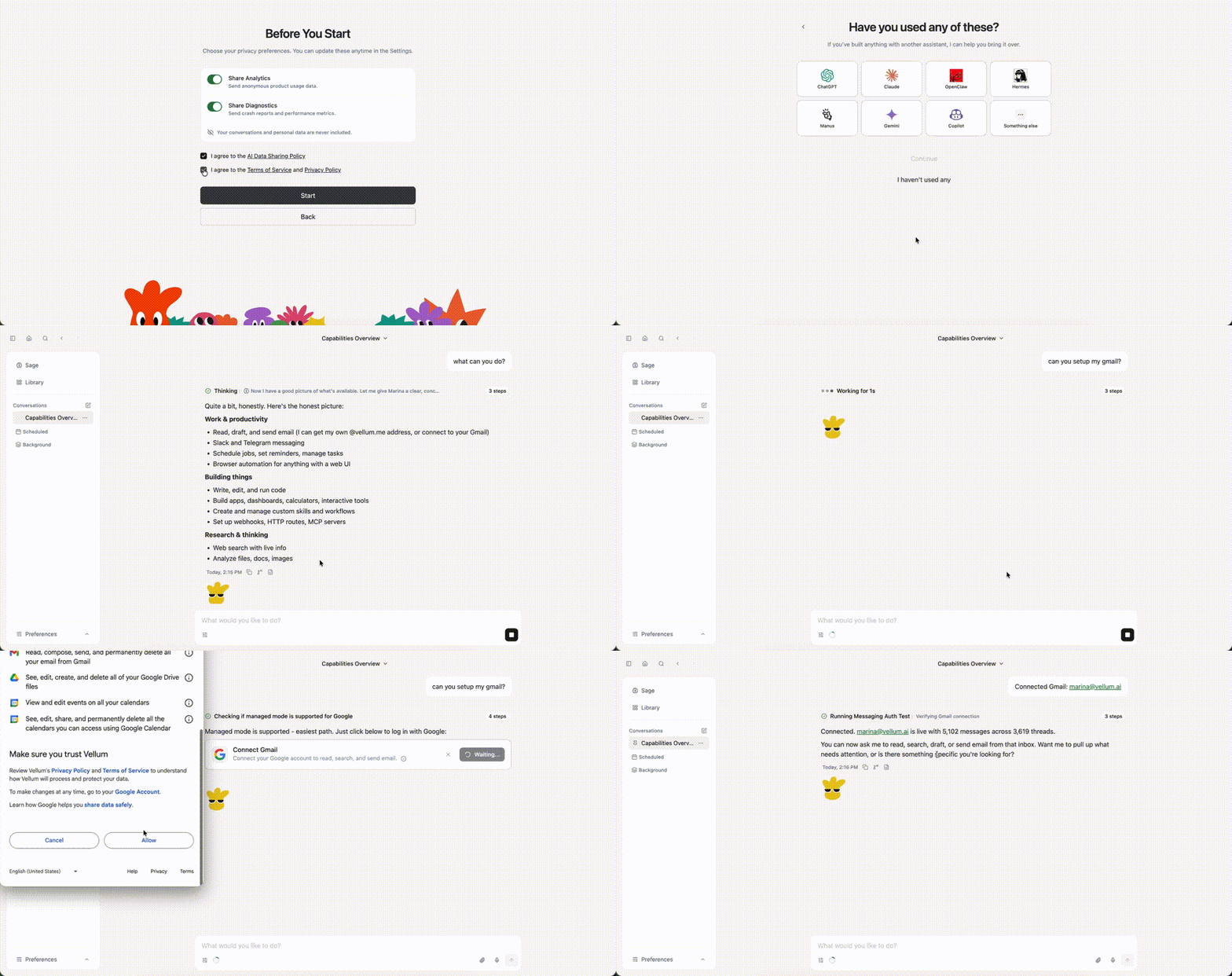
## Quick Demo
---
## CLI
Install and common commands
The CLI works but the desktop app is our primary focus. Available for advanced users, contributors, and non-macOS environments.
**Install**
```bash
bun install -g vellum
vellum hatch
```
**Install from source**
```bash
git clone https://github.com/vellum-ai/vellum-assistant.git
cd vellum-assistant
./setup.sh
source ~/.bashrc
vellum hatch
```
**Common commands**
```bash
vellum wake # start services
vellum sleep # stop services, keep data
vellum client # interact through the terminal
vellum ps # view running assistants
vellum terminal # open a shell into a managed assistant container
vellum upgrade # upgrade to latest version
```
All commands target the default assistant. If you have multiple, pass the assistant ID as the second argument.
**Guides**
- [Your self-hosted assistant on your devices](docs/self-hosted-phone.md) — reach a locally hosted assistant from your phone, tablet, or another computer with the nginx edge, a Tailscale HTTPS front, and one-scan QR pairing.
---
## Infra and security
| Area | Summary |
| -------------------------- | ------------------------------------------------------------------------------------------------------------------------------------------------------------------------------------------------------------------------------------------------------------------------------------------------------------------------ |
| **Computer use** | The assistant works in its own sandbox, and with your approval reaches your actual machine: reads and edits files, runs commands, drives the browser. Every action is permission-gated, and you can grant once, for ten minutes, or always. |
| **Skills** | Plugins defined by a SKILL.md and a TOOLS.json that add tools and prompt sections at runtime, sandboxed like everything else. Install them from the catalog, bundle them, or drop them in the workspace. |
| **Channels** | One assistant with one memory, reachable from the macOS app, Telegram, or Slack. Start a thought in one channel and pick it up in another. |
| **Multi-provider support** | Works with Anthropic, OpenAI, Google Gemini, Fireworks, OpenRouter, MiniMax, [Atlas Cloud](https://www.atlascloud.ai/?utm_source=github&utm_medium=link&utm_campaign=vellum-assistant), and any OpenAI-compatible endpoint. Local models run through Ollama. Embeddings run on local ONNX by default and fall back to cloud providers automatically. |
---
## Foundational documents
The canonical sources for who we are and how we talk about what we're building. The docs site at [vellum.ai/docs](https://vellum.ai/docs) is a rendered view of these files.
| Doc | What it is |
| ------------------------------- | ---------------------------------------------------------------- |
| [Constitution](CONSTITUTION.md) | Who we are, what we believe, and what we refuse to compromise on |
| [Glossary](GLOSSARY.md) | The shared vocabulary we use to talk about personal intelligence |
---
## Documentation
| Section | What's covered |
| ----------------------------------------------------------------------------------- | ------------------------------------------------------------------ |
| [Architecture](https://vellum.ai/docs/developer-guide/architecture) | Platform domains, repo structure, runtime · clients · gateway |
| [Security & Permissions](https://vellum.ai/docs/developer-guide/security) | Sandbox, credentials, trust rules, permission modes |
| [Features & Capabilities](https://vellum.ai/docs/developer-guide/features) | Integrations, dynamic skills, browser, attachments, media embeds |
| [API & Communication](https://vellum.ai/docs/developer-guide/api) | SSE event stream, event payloads, remote access |
| [Development Workflow](https://vellum.ai/docs/developer-guide/development-workflow) | Claude Code commands, parallel PRs, review loops, release pipeline |
📖 **[Full documentation →](https://vellum.ai/docs)**
---
## Contributing
We welcome contributions from everyone.
- **Development**: The [contributing guide](CONTRIBUTING.md) will help you get started.
- Make sure to check out our [Code of Conduct](CODE_OF_CONDUCT.md).
## Community
- 💬 [Discord](https://vellum.ai/community)
- 🐛 [Issues](https://github.com/vellum-ai/vellum-assistant/issues)
## License
MIT. See [License](https://github.com/vellum-ai/vellum-assistant?tab=MIT-1-ov-file). Integration logos from [Simple Icons](https://github.com/simple-icons/simple-icons), licensed [CC0 1.0](https://creativecommons.org/publicdomain/zero/1.0/).
Vellum Assistant is open-source software built by [Vellum AI](https://vellum.ai), a for-profit company. We also offer a managed product, the [Vellum Platform](https://vellum.ai/platform), which sustains the business. Free to use and modify under MIT, and we're committed to keeping it that way.
---
Built with 💚 by Vellum