# plugged.in 🔌
> [!IMPORTANT]
> **Project status (October 2026): open source, community-driven.**
> plugged.in, the hosted service, is moving to a new, separately developed platform. After that move,
> this repository will no longer run plugged.in. The code stays open source under its current license, and the
> community is welcome to carry it on: issues, pull requests, forks and new maintainers are welcome, and
> self-hosting remains supported. The cutover date will be announced here. At the cutover, the current service
> moves to v1.plugged.in and keeps running there until December 31, 2026.
> [What this means](https://github.com/VeriTeknik/pluggedin-app/blob/main/PROJECT_STATUS.md)

**Turn your AI conversations into permanent organizational memory**
[](https://github.com/VeriTeknik/pluggedin-app/releases)
[](https://github.com/VeriTeknik/pluggedin-app/stargazers)
[](LICENSE)
[](https://hub.docker.com/r/veriteknik/pluggedin)
[🚀 Get Started](#-quick-start) • [📚 Documentation](#-documentation) • [🌟 Features](#-key-features) • [💬 Community](#-community--support)
---
🧩 **Now Multi‑Arch Ready!**
Plugged.in Docker images support both `amd64` and `arm64` architectures via a unified manifest.
🧭 **v4.0.0 — Hubs, a hosted MCP connector, and a security pass:**
Workspaces are Hubs now, one Workspace per Hub. `/api/mcp` serves a hosted connector behind an OAuth 2.1 server. Five reported advisories fixed and credited.
---
## 🎯 The Problem We Solve
Every day, you have brilliant conversations with AI - strategy sessions with GPT-4, code reviews with Claude, analysis with Gemini. But when you close that chat window, all that knowledge vanishes. **This is the "AI knowledge evaporation" problem.**
## 💡 The Solution
**plugged.in is the world's first AI Content Management System (AI-CMS)** - a platform that transforms ephemeral AI interactions into persistent, versioned, and searchable organizational knowledge.
Think of it as **"Git for AI-generated content"** meets **"WordPress for AI interactions"**.
---
## ✨ What Makes plugged.in Special
### 🧠 **AI Memory That Persists**
Your AI conversations become permanent assets. Every document is versioned, attributed, and searchable.
### 🤝 **Multi-Model Collaboration**
Claude writes v1, GPT-4 adds technical specs in v2, Gemini refines in v3 - all tracked and attributed.
### 🔌 **Universal MCP Integration**
Works with 1,500+ MCP servers. Connect any tool, any AI, any workflow - all through one interface.
### 🔒 **Enterprise-Grade Security**
End-to-end encryption, OAuth 2.1, rate limiting, and sandboxed execution for your peace of mind.
---
## 📊 Real Platform Statistics
```yaml
Documents Managed: 90+ (72% AI-generated)
Integrated MCP Servers: 1,568
Active Versioning: Documents with up to 4 iterations
Model Attributions: 17 different AI models tracked
RAG Engine: Embedded zvec (RocksDB + HNSW) — zero external dependencies
Search Performance: Sub-second semantic search with cosine similarity
Security: AES-256-GCM encryption, Redis rate limiting
```
---
## 🚀 Quick Start
### Docker (Recommended - 2 minutes)
#### **Self-hosting builds the image locally**
The default `docker-compose.yml` **builds the app image from source** (`./Dockerfile`) for your platform. There is intentionally **no prebuilt self-host image**: the embedded **zvec** vector engine needs build-time flags/bindings that a generic registry image can't carry, so the image is compiled locally with the right `supportedArchitectures` configuration.
> The first `docker compose up --build` takes roughly **10–15 minutes** (installing dependencies + `next build`). Subsequent starts are instant — the image is cached. Requirements: Docker with BuildKit (Docker Desktop, or `docker buildx`) and **at least ~8 GB of memory allotted to the Docker engine** — `next build` is memory-hungry and will abort with "JavaScript heap out of memory" on smaller limits (raise it in Docker Desktop → Settings → Resources).
```bash
# Clone and setup
git clone https://github.com/VeriTeknik/pluggedin-app.git
cd pluggedin-app
cp .env.example .env
# Edit .env and set these three. Compose refuses to start without the last two,
# so there is no way to end up running with a password this repository knows.
# NEXTAUTH_SECRET=$(openssl rand -base64 32)
# POSTGRES_PASSWORD=$(openssl rand -hex 32)
# REDIS_PASSWORD=$(openssl rand -hex 32)
#
# Use hex (or another URL-safe value) for the last two: they are interpolated
# into a postgresql:// / redis:// URL, so @ : / ? # would corrupt it.
# Compose builds DATABASE_URL and REDIS_URL from them — leave those alone.
# Build the app image and start the full stack (PostgreSQL 18 + pgvector,
# Redis, one-shot migration, then the app):
docker compose up --build -d
# Follow startup (migration runs first, then the app becomes healthy):
docker compose logs -f pluggedin-app
# Visit http://localhost:12005
```
Useful commands:
```bash
docker compose ps # service status
docker compose run --rm pluggedin-migrate # re-run database migrations
docker compose down # stop (keeps data)
docker compose down -v # stop + wipe all volumes
```
> **Production / hosted deployments use a different file** — this `docker-compose.yml` is the self-host default, not the production stack:
> - `docker-compose.production.yml` — pulls the prebuilt `veriteknik/pluggedin` image (the hosted/cloud build)
> - `infra/docker-compose.yml` — the Traefik + SOPS production stack used by plugged.in
**What's included:**
- ✅ PostgreSQL 18 with pgvector extension for vector search
- ✅ Redis 7 for rate limiting / caching
- ✅ Embedded zvec vector engine for RAG (no external Milvus/Qdrant needed)
- ✅ Next.js 15 web application with optimized production build
- ✅ Persistent volumes for database, uploads, vectors, and logs
- ✅ Health checks and automatic restarts
**Docker Architecture:**
```yaml
Services:
- pluggedin-migrate: One-shot DB migration; reuses the app image, then exits
- pluggedin-app: Main web application (host port 12005 → container 3000),
starts only after migration completes successfully
- pluggedin-postgres: PostgreSQL 18 + pgvector database (port 5432)
- pluggedin-redis: Redis 7 (port 6379)
Volumes:
- pluggedin-postgres: Database data (persistent)
- pluggedin-redis: Redis append-only data (persistent)
- zvec-data: Vector collections (persistent)
- app-uploads: User uploaded files (persistent)
- app-logs: Application logs (persistent)
- mcp-cache: MCP package cache (persistent)
```
**Upgrading from older versions:**
```bash
# If upgrading from PostgreSQL 16 or earlier
# Option 1: Fresh start (data loss)
docker compose down -v && docker compose up --build -d
# Option 2: Migrate existing data
docker exec pluggedin-postgres pg_dump -U pluggedin pluggedin > backup.sql
docker compose down -v
docker compose up -d
docker exec -i pluggedin-postgres psql -U pluggedin -d pluggedin < backup.sql
```
### Cloud Version
Visit [plugged.in](https://plugged.in) for instant access - no installation required.
---
## 🌟 Key Features
### 📚 Document Management & RAG
- **Embedded Vector Search**: In-process zvec engine (RocksDB + HNSW) — no external services needed
- **Automatic Indexing**: Upload PDFs or text, automatically chunked, embedded, and indexed
- **Version Control**: Track every change with Git-style history
- **Model Attribution**: Know which AI contributed what
- **Semantic Search**: Query your knowledge base with natural language
- **Re-index Recovery**: One-click re-indexing from the library UI for corrupted vectors
### 🔧 MCP Server Hub
- **1,500+ Integrations**: Connect to any MCP-compatible tool
- **Advanced Multi-Select Filtering**: Filter by multiple package types simultaneously (npm, PyPI, Docker, MCPB, NuGet)
- **Smart Search**: Intelligent filtering with real-time result counts and validation
- **Auto-Discovery**: Find and configure servers from GitHub, npm, Smithery
- **Registry Integration**: Claim and manage servers with GitHub credentials
- **Unified Interface**: One API key, all your tools
- **Tool Prefixing**: Automatic namespace management prevents conflicts
- **OAuth Support**: Server-side OAuth handling for MCP servers
### 🎮 Interactive Playground
- **Test Any Model**: Claude, GPT-4, Gemini, and more
- **Live Debugging**: See real-time MCP interactions
- **RAG Integration**: Use your documents as context
- **Custom Instructions**: Per-server configuration
- **Extensive Logging**: Detailed debugging capabilities
### 🔔 Real-Time Intelligence
- **Activity Tracking**: Monitor all MCP operations
- **Email Notifications**: Stay informed about important events
- **Trending Analytics**: See what tools are popular
- **Audit Logs**: Complete activity history
- **Bidirectional Notifications**: Send, receive, mark as read
### 🔐 Security First
- **End-to-End Encryption**: AES-256-GCM for all sensitive data
- **Per-Profile Encryption**: Isolated encryption keys per workspace
- **OAuth 2.1**: Modern authentication flows
- **Sandboxed Execution**: Firejail isolation on Linux
- **Redis Rate Limiting**: Advanced DDoS protection with fallback
- **LRU Cache**: Memory-efficient caching with automatic eviction
- **Enhanced Password Security**: Bcrypt cost factor 14 (16,384 iterations)
- **Dynamic CSP Nonces**: Cryptographically secure Content Security Policy
- **Security Headers**: HSTS, X-Frame-Options, X-Content-Type-Options
### 🏢 Hub & Workspace Management
- **Multi-Hub Architecture**: Organize projects into separate hubs
- **Workspace Isolation**: Each hub contains multiple isolated workspaces
- **Smart Hub Switching**: Automatic workspace selection when switching hubs
- **Data Scoping**: Hub-level and workspace-level data isolation
- **Current Hub Display**: Dashboard shows active hub for context awareness
### 📋 Clipboard & Memory System
- **Named Entries**: Store key-value pairs with semantic names (e.g., `customer_context`, `last_analysis`)
- **Indexed Entries**: Array-like storage with auto-incrementing indices for ordered data
- **Stack Operations**: Push/pop functionality for LIFO workflows and pipelines
- **Rich Content Support**: Store text, JSON, images (base64), and any content type up to 2MB
- **TTL Expiration**: Optional time-to-live for automatic cleanup of temporary data
- **Visibility Controls**: Private, workspace, or public visibility per entry
- **Model Attribution**: Track which AI model created each clipboard entry
- **MCP Integration**: Access clipboard via 6 built-in MCP tools from any AI client
---
## 🏗️ Architecture
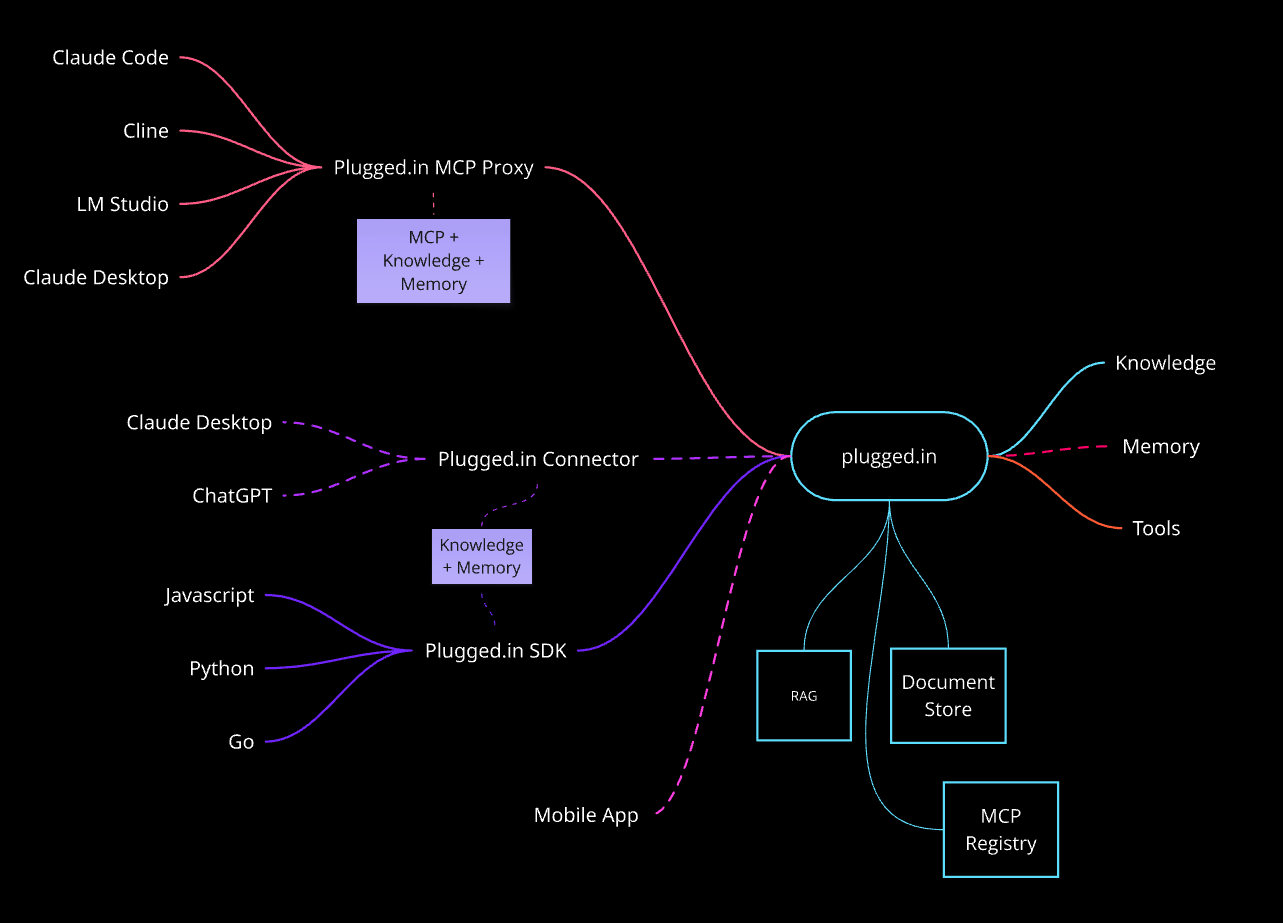
### Architecture Overview
plugged.in acts as **the central hub** connecting various AI clients, development tools, and programming languages with your knowledge base and the broader MCP ecosystem. The architecture is designed for maximum flexibility and extensibility.
### 🟢 Production-Ready Integrations (Solid Lines)
#### **MCP Proxy Interface**
The MCP Proxy serves as a unified gateway that aggregates multiple MCP servers into a single interface:
- **Claude Code** - Official Anthropic CLI for Claude with native MCP support
- **Cline** - VS Code extension for AI-assisted development
- **LM Studio** - Local model execution with MCP integration
- **Claude Desktop** - Anthropic's desktop application
**How it works**: Each AI client connects via STDIO, receiving access to all your configured MCP servers through one connection. The proxy handles:
- Tool prefixing to prevent namespace conflicts
- OAuth authentication for MCP servers
- Activity logging and notifications
- Unified error handling
#### **SDK Support - Multi-Language Integration**
Direct programmatic access through official SDKs:
- **JavaScript/TypeScript SDK** (`@pluggedin/sdk`) - Full-featured SDK for Node.js and browser
- **Python SDK** (`pluggedin-sdk`) - Pythonic interface for AI workflows
- **Go SDK** (`pluggedin-go`) - High-performance Go implementation
**Use Cases**:
```javascript
// Create documents programmatically
const doc = await client.documents.create({
title: "API Analysis",
content: "...",
source: "api"
});
// Query RAG knowledge base
const results = await client.rag.query("How do we handle auth?");
```
#### **Platform Core Features**
The plugged.in web platform provides:
1. **Knowledge Base (Embedded RAG)**
- In-process vector search via zvec (RocksDB + HNSW) — no external services
- Automatic PDF/text chunking, embedding, and indexing
- Project-scoped isolation with per-field filter validation
- Sub-second cosine similarity search
2. **Document Store**
- Version control for AI-generated content
- Multi-model attribution tracking
- Content hash deduplication
- Support for uploads, AI-generated, and API sources
3. **MCP Registry**
- 1,500+ curated MCP servers
- GitHub verification and claiming
- Install tracking and trending
- Auto-discovery from npm, GitHub, Smithery
4. **Tools Management**
- Discover tools from all connected servers
- Test tools in interactive playground
- Custom instructions per server
- Real-time debugging logs
### 🟡 In Development (Dashed Lines)
#### **Native Connectors**
Direct integrations bypassing the MCP Proxy for enhanced performance:
- **Plugged.in Connector for Claude Desktop** - Native plugin architecture
- **Plugged.in Connector for ChatGPT** - OpenAI plugin integration
- **Mobile App** - iOS and Android native apps
**Why Native Connectors?**
- Faster response times (no proxy overhead)
- Richer UI integration
- Platform-specific features
- Offline capabilities
#### **Advanced Memory System**
Persistent memory across sessions:
- **Knowledge + Memory** boxes in the diagram represent:
- Session continuity across different AI clients
- Automatic context injection based on conversation history
- Cross-model memory sharing (Claude remembers what GPT discussed)
- Smart context pruning to stay within token limits
**Example Workflow**:
1. Discuss architecture with Claude Desktop → Memory saved
2. Switch to ChatGPT connector → Previous context automatically available
3. Mobile app accesses same conversation history
4. RAG provides relevant documents automatically
### 📊 Data Flow Example
**User Request Flow**:
```
1. User asks question in Claude Desktop
2. MCP Proxy receives request
3. Proxy checks RAG for relevant context
4. Combines context + user question
5. Routes to appropriate MCP servers
6. Aggregates responses
7. Logs activity to database
8. Returns enriched response to user
```
**Document Creation Flow**:
```
1. AI generates document via SDK or user uploads PDF/text
2. Content processed, chunked, and sanitized
3. Model attribution recorded
4. Version created in Document Store
5. Chunks stored in PostgreSQL, embeddings indexed in zvec
6. Document searchable immediately via semantic search
```
### 🔒 Security Architecture
All connections use:
- **End-to-end encryption** (AES-256-GCM)
- **Per-profile encryption keys** (workspace isolation)
- **Redis rate limiting** with memory fallback
- **Sandboxed execution** (Firejail on Linux)
- **OAuth 2.1** for external services
### 📈 Scalability
The architecture supports:
- **Horizontal scaling** of MCP Proxy instances
- **Database connection pooling** for PostgreSQL
- **Redis caching** for frequently accessed data
- **CDN integration** for static assets
- **Background job processing** for heavy operations
---
## 📚 Documentation
Visit our comprehensive documentation at [docs.plugged.in](https://docs.plugged.in)
### For Users
- [Getting Started](https://docs.plugged.in/introduction) - Platform overview and quick start
- [Installation Guide](https://docs.plugged.in/quickstart/installation) - Step-by-step setup instructions
- [Document Library](https://docs.plugged.in/platform/document-library) - Managing your AI knowledge base
- [RAG Knowledge Base](https://docs.plugged.in/tutorials/rag-knowledge-base) - Setting up RAG for AI context
- [Team Collaboration](https://docs.plugged.in/tutorials/team-collaboration) - Working with your team
### For Developers
- [API Reference](https://docs.plugged.in/api/reference) - Complete API documentation
- [API Authentication](https://docs.plugged.in/api/authentication) - API key and authentication guide
- [Self-Hosting Guide](https://docs.plugged.in/tutorials/self-hosting) - Deploy your own instance
- [Docker Deployment](https://docs.plugged.in/deployment/docker) - Container-based deployment
- [Security Overview](https://docs.plugged.in/security/overview) - Security best practices
### MCP Integration
- [MCP Proxy Overview](https://docs.plugged.in/mcp-proxy/overview) - Understanding the proxy architecture
- [MCP Proxy Installation](https://docs.plugged.in/mcp-proxy/installation) - Setting up the proxy
- [Custom MCP Servers](https://docs.plugged.in/tutorials/custom-mcp-server) - Building your own servers
---
## 🛠️ Installation Options
### Requirements
- Node.js 18+ (20+ recommended)
- PostgreSQL 15+ (18+ recommended)
- Redis (optional, for rate limiting)
- Docker & Docker Compose (for containerized deployment)
### Environment Variables
Create a `.env` file with:
```bash
# Core (Required)
DATABASE_URL=postgresql://user:pass@localhost:5432/pluggedin
NEXTAUTH_URL=http://localhost:12005
NEXTAUTH_SECRET=your-secret-key # Generate: openssl rand -base64 32
# Security (Required)
NEXT_SERVER_ACTIONS_ENCRYPTION_KEY= # Generate: openssl rand -base64 32
# Features (Optional)
ENABLE_RAG=true
ENABLE_NOTIFICATIONS=true
ENABLE_EMAIL_VERIFICATION=true
REDIS_URL=redis://localhost:6379 # For Redis rate limiting
# RAG / Vector Search
ZVEC_DATA_PATH=./data/vectors # Path to zvec collection files
EMBEDDING_MODEL= # OpenAI model (default: text-embedding-3-small)
RAG_SEARCH_TOP_K=5 # Chunks returned per query
RAG_CACHE_TTL_MS=60000 # Storage stats cache TTL
# Email (For notifications)
EMAIL_SERVER_HOST=smtp.example.com
EMAIL_SERVER_PORT=587
EMAIL_FROM=noreply@example.com
```
### Manual Installation
```bash
# Install dependencies
pnpm install
# Setup database
pnpm db:migrate:auth
pnpm db:generate
pnpm db:migrate
# Build for production
NODE_ENV=production pnpm build
# Start the server
pnpm start
```
---
## 🔌 MCP Proxy Integration
Connect your AI clients to plugged.in:
### Claude Desktop
```json
{
"mcpServers": {
"pluggedin": {
"command": "npx",
"args": ["-y", "@pluggedin/pluggedin-mcp-proxy@latest"],
"env": {
"PLUGGEDIN_API_KEY": "YOUR_API_KEY"
}
}
}
}
```
### Cursor IDE
```bash
npx -y @pluggedin/pluggedin-mcp-proxy@latest --pluggedin-api-key YOUR_API_KEY
```
---
## 🎯 Use Cases
### For Developers
- **Code Review Memory**: Keep AI code reviews across sessions
- **Documentation Generation**: Auto-generate and version technical docs
- **Bug Analysis Archive**: Store AI debugging sessions for future reference
### For Teams
- **Knowledge Base**: Build institutional memory from AI interactions
- **Meeting Summaries**: AI-generated summaries with full attribution
- **Strategy Documents**: Collaborative AI-assisted planning with version control
### For Enterprises
- **Compliance Tracking**: Full audit trail of AI-generated content
- **Multi-Model Workflows**: Orchestrate different AIs for complex tasks
- **Secure Deployment**: Self-host with complete data control
---
## 📊 Why Teams Choose plugged.in
| Feature | plugged.in | Traditional AI Chat | MCP Clients Alone |
|---------|------------|-------------------|-------------------|
| Persistent Memory | ✅ Full versioning | ❌ Session only | ❌ No storage |
| Multi-Model Support | ✅ All models | ⚠️ Single vendor | ✅ Multiple |
| Document Management | ✅ Complete CMS | ❌ None | ❌ None |
| Attribution Tracking | ✅ Full audit trail | ❌ None | ❌ None |
| Team Collaboration | ✅ Built-in | ❌ None | ❌ Limited |
| Self-Hostable | ✅ Yes | ⚠️ Varies | ✅ Yes |
| RAG Integration | ✅ Native | ⚠️ Limited | ❌ None |
---
## 🤝 Community & Support
- **GitHub Discussions**: [Join the conversation](https://github.com/orgs/VeriTeknik/discussions)
- **GitHub Issues**: [Bug reports and feature requests](https://github.com/VeriTeknik/pluggedin-app/issues)
- **Reddit**: [r/plugged_in](https://www.reddit.com/r/plugged_in/)
- **Twitter/X**: [@PluggedIntoAI](https://x.com/PluggedIntoAI)
- **Email**: team@plugged.in
### Contributing
We love contributions! See our [Contributing Guide](CONTRIBUTING.md) for details.
```bash
# Fork the repo, then:
git clone https://github.com/YOUR_USERNAME/pluggedin-app.git
cd pluggedin-app
pnpm install
pnpm dev
```
---
## 📜 License
MIT License - see [LICENSE](LICENSE) for details.
---
## 🙏 Acknowledgments
Built on top of these amazing projects:
- [Model Context Protocol](https://modelcontextprotocol.io/) by Anthropic
- [Next.js](https://nextjs.org/) for the web framework
- [PostgreSQL](https://www.postgresql.org/) for reliable data storage
- All the MCP server creators in our community
---
## 📝 Release Notes
**Latest Release: v4.0.0** — Hubs, a hosted MCP connector, and a security pass
### 🎯 What's New in v4.0.0
Major by Semantic Versioning: two features were removed and the data model under
Hubs changed.
**🧭 Workspaces are Hubs** (Breaking Change)
- Every Workspace is its own Hub, one Workspace per Hub; the Workspace switcher is gone
- Existing Workspaces were promoted in place — no row of user data moved
- `mcp_servers.slug` is untouched, so saved instructions naming `{slug}__{tool}` still resolve
**🔌 Hosted MCP connector**
- `/api/mcp` serves the connector, with an OAuth 2.1 authorization server in front of it
- PKCE, refresh-token rotation with reuse detection, RFC 9728 discovery
- Library tools exposed over MCP, behind a Hub boundary a caller cannot step around
**🔒 Security**
- Five advisories fixed and published, each credited to its reporter — see
[Acknowledgements](SECURITY.md#acknowledgements)
- Command injection in the pnpm/uv install path and in `testMcpConnection`
- SSRF guards now classify the parsed address rather than matching hostname text,
and `safeFetch` connects to the address it validated instead of re-resolving
- Server actions no longer trust a caller-supplied identity
**🐳 Deployment**
- Docker + Traefik + SOPS; secrets are decrypted to tmpfs at deploy time
- `infra/scripts/deploy.sh` is the entry point — running compose by hand skips decryption
- Scheduled retention for build artefacts, after a 4 GB-per-push image build filled the disk
**🗑️ Removed**
- Discover / AI Social. The sharing infrastructure underneath it stays
**⚠️ Migration Notes**
- Run `pnpm db:migrate` after upgrading
- Users who hit the duplicate-Hub race will see the second one renamed to
"Default Hub 2"; nothing is merged and nothing is deleted
View the full changelog at [GitHub Releases](https://github.com/VeriTeknik/pluggedin-app/releases/latest)
---
**Ready to give your AI permanent memory?**
[🚀 **Start Now**](https://plugged.in) • [⭐ **Star on GitHub**](https://github.com/VeriTeknik/pluggedin-app/stargazers)
*If this project inspires you, please ⭐ Star it —
stars power the community and keep development momentum alive!*