# framesmith
[](https://opensource.org/licenses/MIT) [](https://github.com/vicmaster/framesmith/releases) [](https://modelcontextprotocol.io) [](https://github.com/vicmaster/framesmith/actions/workflows/ci.yml)
An open-source MCP server that turns your AI coding agent into a capable UI designer. It gives the agent a visual canvas, a library of vetted design patterns, and a quality bar it must clear before showing you anything — so you review a real, non-slop design in the browser and agree on it *before* any framework code is written.
**Contents:** [What it does](#what-framesmith-does) · [Capabilities](#capabilities-at-a-glance) · [Viewer](#viewer) · [Installation](#installation) · [Tools](#tools) · [Usage Example](#usage-example) · [Workflow](#workflow) · [Development](#development)
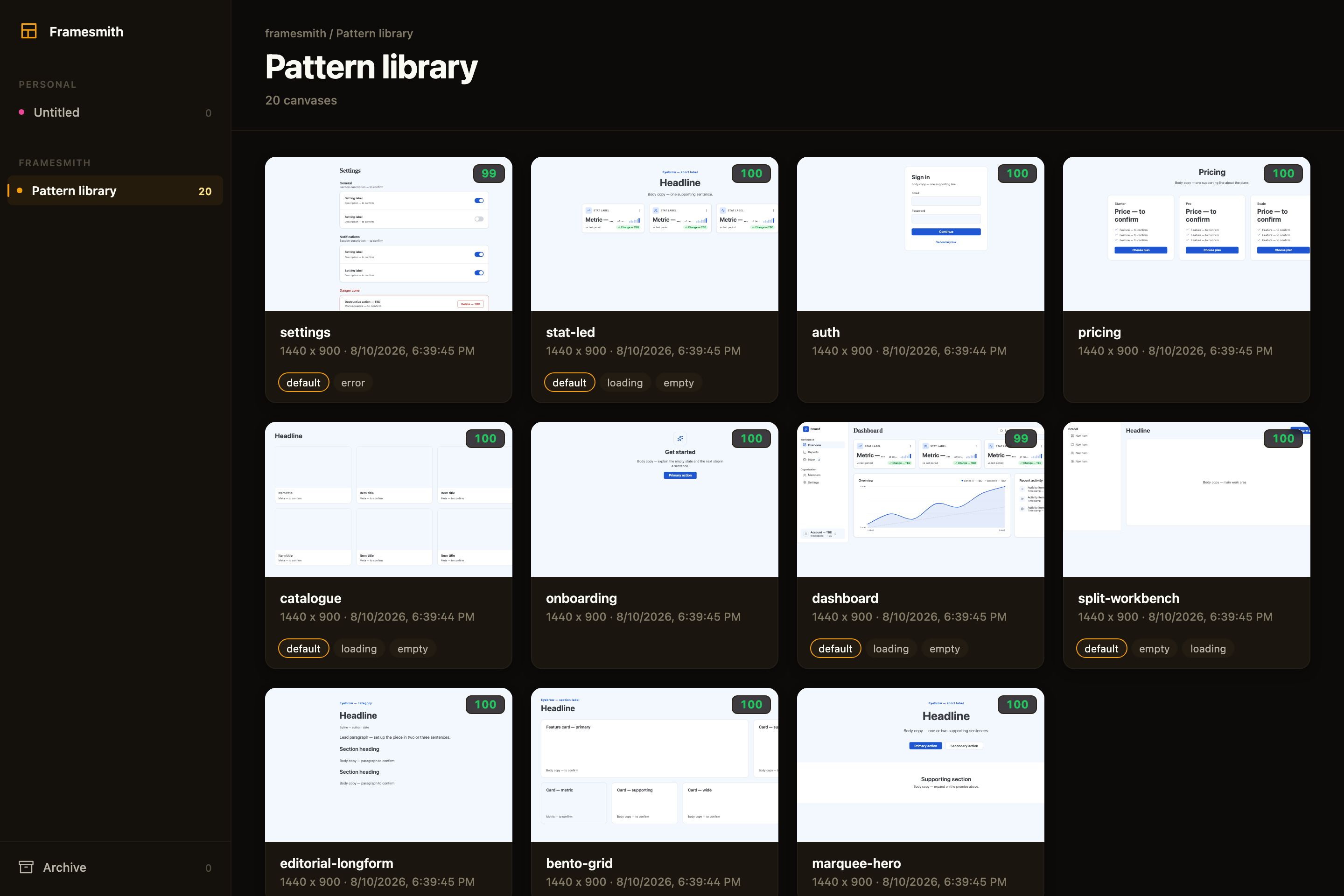
> Above: the framesmith viewer, showing the built-in **pattern library** — 11 vetted page archetypes an agent starts from, each carrying its live quality score and its designed state variants. Workspaces and projects sit in the sidebar; you browse canvases like design files.
### What an agent actually ships
Every screen below was built end-to-end by an agent with framesmith's own vocabulary — one `generate_design_system` call each (a seed color + a personality), stamped patterns, real controls, and every quality gate cleared (score ≥ 95, states designed, stress-tested, both themes):
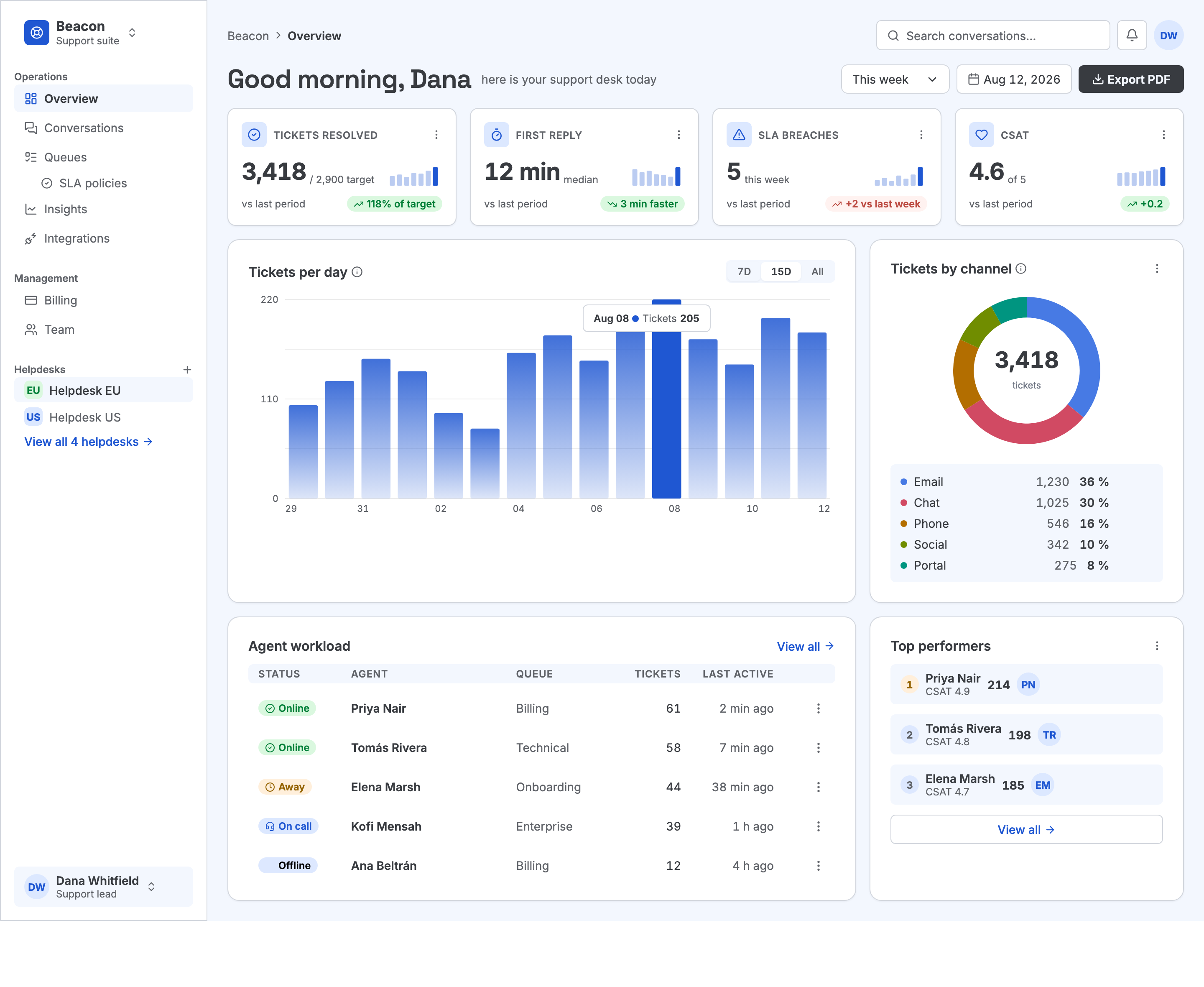
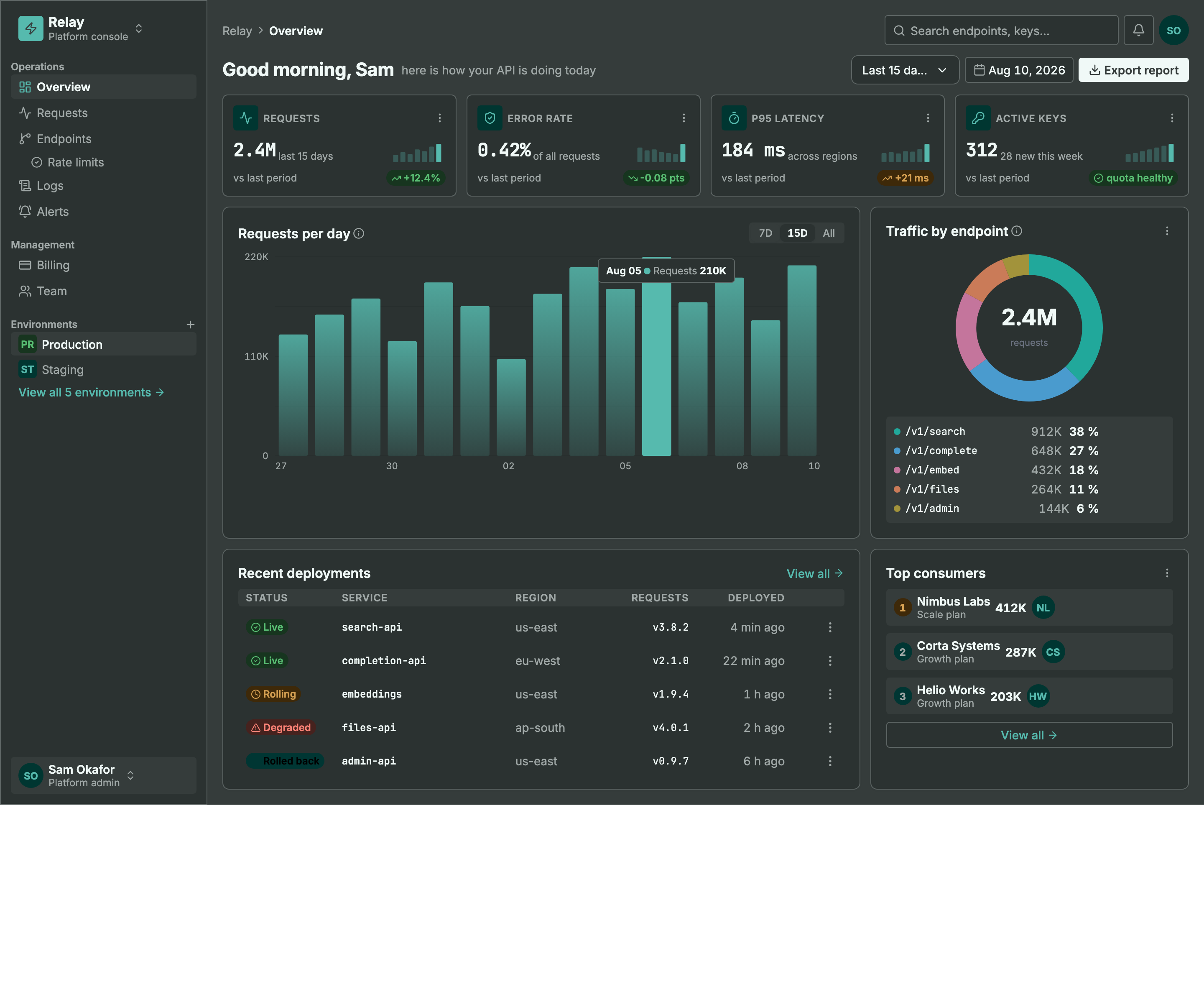
> Same machinery, different seed + personality: a light ops dashboard and a dark API console. Every color pair is AA by construction, every chart is data-bound (edit a value, not an SVG path), and the dark theme is generated — not inverted.
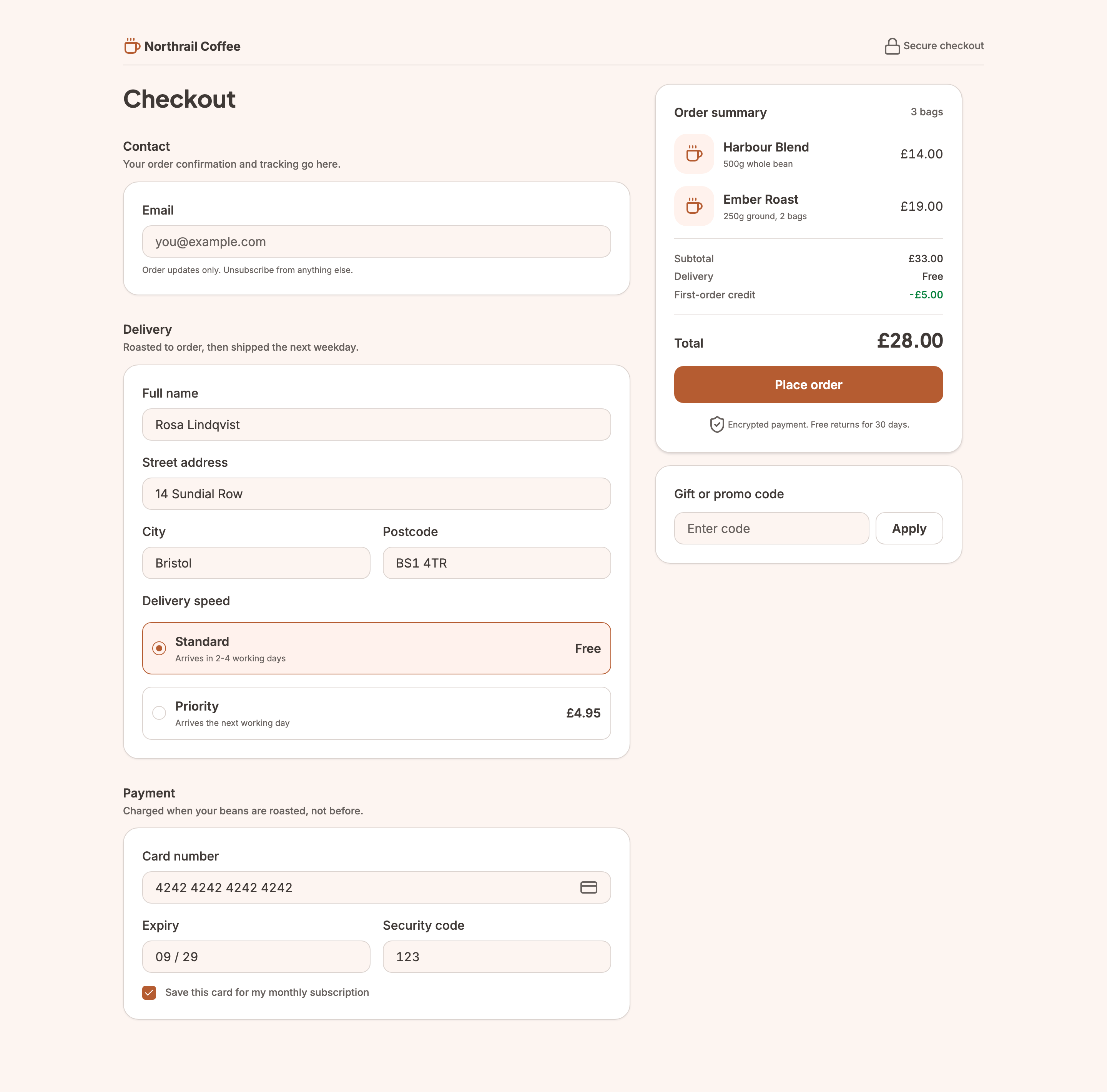
> Not every screen is a dashboard. This checkout carries the `commerce` genre — the transactional counterpart to `dashboard` — so the evaluator reads its line prices and total as the design rather than as fabricated data. It still cleared the same bar as the two screens above, including designed **empty-basket** and **loading** states.
```
MCP Client → stdio → framesmith server
↓
Scene Graph (in-memory JSON tree)
↓
HTML/CSS Renderer (inline styles)
↓
Puppeteer (headless Chromium → PNG)
```
## What framesmith does
Left to itself, an AI agent tends to produce UI that *looks* AI-generated — generic spacing, no icons, a purple gradient by default, placeholder text that reads like placeholder text. framesmith closes that gap by moving design **before** code and holding it to a bar:
1. **Start from taste, not a blank canvas.** The agent stamps one of **11 vetted page patterns** (dashboard, auth, pricing, settings, onboarding, and more) — each regression-tested to score **> 95 with zero cliché tells** across every theme, and every structure (page and component alike) built entirely from type-role tokens so it re-voices under a generated design system instead of injecting stray pixel sizes, and hardened to survive hostile-length content (`canvas_stress` CLEAN) — then adapts it. A blank canvas is where slop comes from; a pattern is a non-slop starting point. *(`list_structures` / `apply_structure`)*
2. **Use the whole toolkit — like a real UI does.** Real icons (Lucide + Material Symbols), fonts resolved by name, real input controls (`toggle` / `checkbox` / `radio` / `select`), data-driven charts (line/bar/donut/sparkline, multi-series, bar emphasis), reusable components, and layered design tokens — never faked with Unicode glyphs, stray ellipses, or hand-drawn SVG paths standing in for a chart.
3. **Evaluate, then self-correct.** `canvas_evaluate` scores the design across five craft categories plus a **cliché-tell** detector, a **state-coverage** check (a data screen without designed empty/loading states isn't done), and a **usability** layer (hit-target floor, label association, honest action copy), and returns a **`READY` / `NOT READY` directive**. The agent resolves every warning and tell and only presents once it's `READY` — polishing to the bar is the agent's job, not yours.
4. **Review in the browser, own the output.** You browse canvases like design files, with a live **quality inspector** and **design-system panel**. Designs persist as **open JSON checked into your repo** — no proprietary format, no lock-in — and can be re-imported from shipped HTML to keep the design honest.
## Capabilities at a glance
| Area | What you get |
|------|--------------|
| **Rendering** | Scene graph → HTML/CSS → Puppeteer PNG · responsive breakpoints · real CSS grid (`layout: "grid"` + spans) for bento/editorial compositions · gradients, shadows, blur, glassmorphism · SVG paths · animations · data-driven charts (line/bar/donut/sparkline, multi-series, bar emphasis + in-SVG gradients) |
| **Pattern library** | 11 vetted page archetypes + 5 component scaffolds, all scoring > 95 with zero cliché tells, typography built from type-role tokens (not literal pixel sizes), and stress-hardened to survive hostile-length content; taxonomy axes + a diversification signal so successive screens vary |
| **Quality & taste** | `canvas_evaluate` (8 categories incl. cliché tells, state coverage + usability floors) with a `READY`/`NOT READY` directive · `canvas_autofix` (mechanical fixes) · optional vision-model rubric critique + `canvas_revise` · `canvas_add_variant` clones a screen into a linked empty/loading/error state · `canvas_stress` content-perturbation testing (long text, i18n, big numbers, empty/many rows) · `project_evaluate` rolls up a project's screens for cross-screen consistency (radius/accent drift, token adoption, hand-copied chrome, state coverage) plus an optional multi-screen flow critique — advisory, never a gate |
| **Design systems** | `generate_design_system`: one seed + one personality (`technical` / `editorial` / `soft` / `data-dense`) → the complete design language — colors, curated font pairing, typography roles, radius/density stances, `$elevation` depth tokens (dark-aware), `$motion` defaults · layered `$token`s (workspace ▸ project ▸ canvas) · style presets · `DESIGN.md` import · `generate_scale` derives a modular type + spacing scale from a named ratio (optional fluid `clamp()` sizes) · `generate_color_system` turns one seed color into OKLCH ramps + AA-checked semantic tokens, a categorical chart palette, and a tint layer for chips/tiles/badges, dark theme included · dual-theme rendering + evaluation (`theme: "dark"` on screenshot/export, both-theme contrast in `canvas_evaluate` with APCA advisory) · token-detachment lint re-attaches literals that drift from a token |
| **Primitives** | Lucide + Material Symbols icons · Google Fonts by name · real form controls · components with instance overrides — `create_component` promotes existing work, `copy_nodes` carries subtrees (and their component defs) across canvases |
| **Import from code** | `canvas_import_html` / `canvas_import_url` — token-mapped, structure-reconstructed · `canvas_sync_from_url` pixel drift · `canvas_check_drift` structural drift · `framesmith verify` / `check-drift` CLI for CI/pre-commit gates, no MCP client needed |
| **Viewer** | Browser gallery + detail view · quality inspector (score, issues, click-to-highlight) · design-system token panel · point-and-tell feedback (Comment mode + Feedback tab) |
| **Open by design** | MIT · plain HTML/CSS · open JSON you own in your repo · content-hash versioning (`canvas_version`) so approvals reference an exact design, not just a name · works with any MCP-compatible client |
## Viewer
Run `npx -p framesmith framesmith-viewer` to start the standalone browser viewer (default port 3001). Open any canvas to review it at multiple breakpoints, compare them side-by-side, inspect the underlying JSON, or archive / delete.
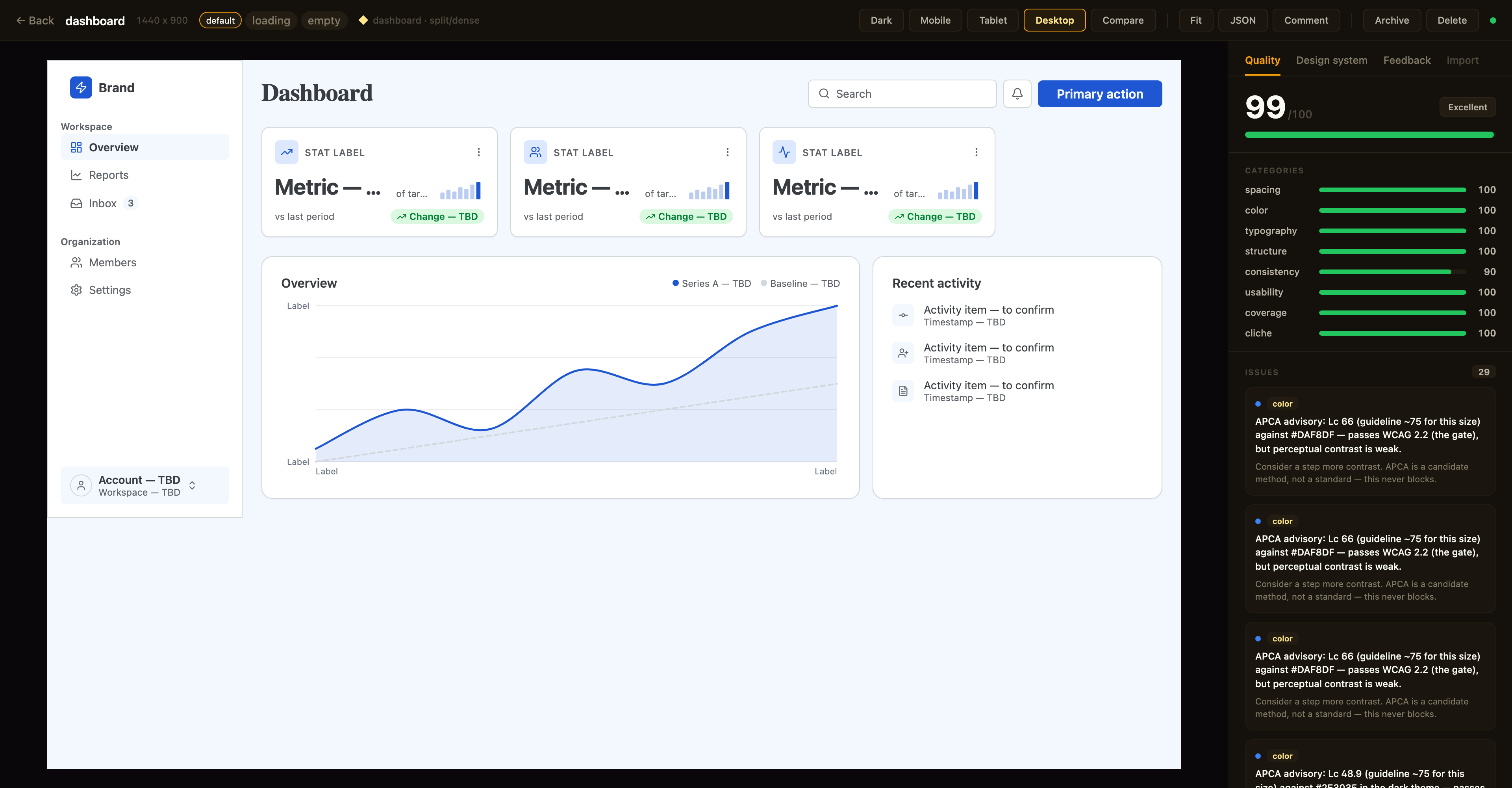
> Above: a canvas in the detail view with the **Quality inspector** on the right — the same `canvas_evaluate` score the agent sees, with per-category bars and the issue list; the tabs along the top switch to the **Design-system** and **Feedback** panels. The toolbar exposes breakpoint previews, Compare, Fit, JSON, a **Comment** toggle for point-and-tell feedback, and lifecycle actions.
**Quality panel.** The canvas detail view shows a read-only **quality inspector** on the right: the heuristic `canvas_evaluate` score (0–100), per-category bars, and the issue list — each cliché tell with its `category · tell` badge, severity, and suggestion. Issues that `canvas_autofix` can resolve carry an **auto-fixable** tag, and clicking any issue **highlights its node** in the live preview. Every gallery card also shows a color-coded score badge so weak canvases stand out at a glance. The score matches what your agent sees over MCP (same fast-mode evaluation, genre-relaxed by the canvas's preset) — it's computed for display only and never written back.
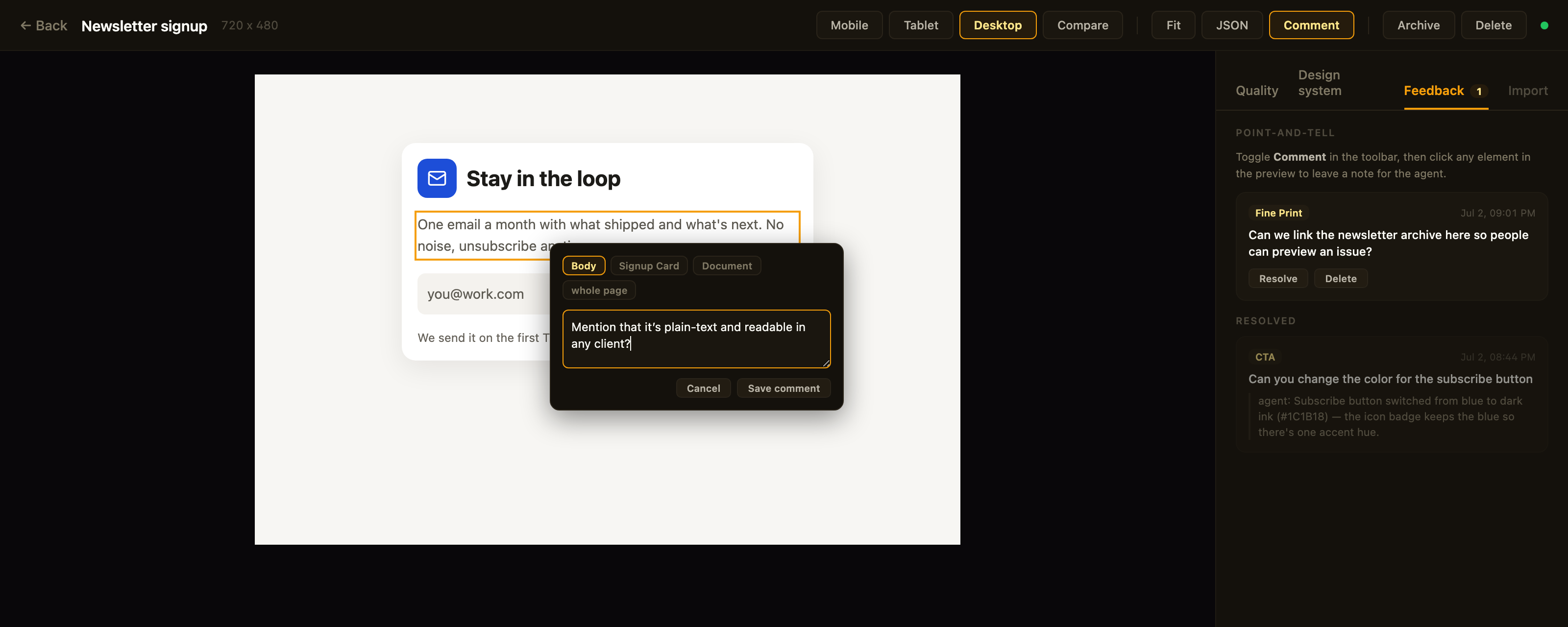
> Above: **point-and-tell** in action — Comment mode is on, the clicked element is outlined, the popover's breadcrumb re-scopes the anchor, and the Feedback tab tracks open comments plus the agent's replies to resolved ones.
**Feedback panel.** Point-and-tell: toggle **Comment** in the toolbar and click any element in the preview to leave a note for the agent — a breadcrumb in the popover re-scopes the anchor from the exact element up to its card, section, or the whole page. The **Feedback** tab lists open comments (badge = open count) with click-to-highlight, lets you resolve or delete them, and shows the agent's resolution note as a reply once it has addressed the item. Comments persist on the canvas itself (`metadata.feedback` — git-diffable in bound repos) and the agent reads them over MCP via `get_feedback`; open feedback blocks the agent from presenting, same as open quality issues.
**Design-system panel.** A second inspector tab shows the canvas's effective design tokens — color swatches, type scale, spacing, and radius — resolved through the full workspace ▸ project ▸ canvas inheritance chain. Each section notes its dominant source layer, and any token resolving from a *different* layer is tagged (`canvas` / `project` / `workspace`) so you can see at a glance what a given canvas customized versus inherited.
Designs are authored through MCP tool calls from your AI assistant — in the viewer you review, comment, and manage lifecycle; you don't edit nodes. Files persist to `~/.framesmith/canvases/` so the viewer keeps showing them across sessions.
## Installation
No clone or build needed — register framesmith with your MCP client via `npx` (requires Node 20+).
### Claude Code
```bash
claude mcp add framesmith -- npx -y framesmith
```
### Codex
Add to `~/.codex/config.toml`:
```toml
[mcp_servers.framesmith]
command = "npx"
args = ["-y", "framesmith"]
```
### Cursor
Add to `~/.cursor/mcp.json` (or per-project `.cursor/mcp.json`):
```json
{
"mcpServers": {
"framesmith": {
"command": "npx",
"args": ["-y", "framesmith"]
}
}
}
```
### Windsurf
Add to `~/.codeium/windsurf/mcp_config.json`:
```json
{
"mcpServers": {
"framesmith": {
"command": "npx",
"args": ["-y", "framesmith"]
}
}
}
```
### VS Code + MCP extension
Add to `.vscode/mcp.json` (project-scoped) or your global MCP settings:
```json
{
"servers": {
"framesmith": {
"command": "npx",
"args": ["-y", "framesmith"]
}
}
}
```
### Any other MCP-compatible client
framesmith speaks standard stdio MCP. Point your client at `npx -y framesmith` using whatever config shape your client expects.
> **Optional:** set `FRAMESMITH_VIEWER_URL=http://localhost:3001` in the MCP server env to pin it to a long-lived standalone viewer process — see [Running the viewer](#running-the-viewer).
### Build from source (for development)
```bash
git clone https://github.com/vicmaster/framesmith.git
cd framesmith
npm install
npm run build
# then point your client at: node /path/to/framesmith/dist/index.js
```
## Tools
### `init`
One-call onboarding — **the recommended first call each session**, and safe to run repeatedly (idempotent). Binds the current repo if it isn't already (canvases become checked-in JSON under `.framesmith/`), ensures the convention projects exist, and returns the live state you need to start working.
| Param | Type | Description |
|-------|------|-------------|
| `dir` | string? | Directory to bind / detect. Defaults to the nearest git repo root above the server working directory. |
| `workspaceName` | string? | Name for the workspace when binding fresh. Defaults to the repo folder name. |
| `projects` | string[]? | Projects to ensure exist (default: `["Foundations", "UI"]`). Existing projects are never removed, so it's safe for adding feature/area projects like `Onboarding`. |
Returns the bound workspace + project IDs (binding **re-keys** IDs to `repo-*` — use the ones `init` returns), the on-disk layout, the workspace-layer token count, a workflow cheatsheet, the current gotchas, the `framesmith://guidelines` URI, and the viewer URL. If any canvas in the workspace has open point-and-tell comments, the result also carries `openFeedback: { total, note }` — a nudge to run `get_feedback` before doing anything else. It does **not** seed design tokens — set those at the workspace layer with `workspace_set_design_system`. The default `Foundations` project is just a canvas that visualizes the workspace tokens (which is where the design system actually lives).
### `canvas_create`
Create a new canvas. If `projectId` is omitted, it lands in the built-in `Untitled` project of the `Personal` workspace.
| Param | Type | Description |
|-------|------|-------------|
| `name` | string? | Canvas name |
| `projectId` | string? | Target project. Defaults to the built-in Untitled project. See `project_list`. |
The response also carries a `diversification` signal for the target project: the recently-built structures (newest first) and a hint to differ on at least one taxonomy axis, so successive canvases don't converge on the same layout. It's advisory — never blocking.
### `canvas_list`
List canvases. Excludes archived canvases by default. A row carrying `openFeedback: n` has open point-and-tell comments waiting — read them with `get_feedback` before working on that canvas.
| Param | Type | Description |
|-------|------|-------------|
| `projectId` | string? | Scope to one project |
| `includeArchived` | bool? | Include archived canvases (default false) |
Returns `[{ id, name, createdAt, lastModified, versionHash, projectId, archived, openFeedback?, variant?, variants? }]` — `openFeedback` (a count) is present only when > 0; `versionHash` is the design-content hash `canvas_version` checks approvals against. `variant: { of, state }` is present on a state-variant row; `variants: [{ state, canvasId }]` rolls the designed states onto a base row (see `canvas_add_variant`).
### `canvas_add_variant`
Clone a screen into a linked **state variant** — the empty / loading / error version of a canvas, as its own sibling canvas. The clone gets re-keyed node IDs, the same project, copied tokens/components/fonts, and carries the provenance/genre stamp (feedback and critique stay behind); it's named ` · ` and linked via `metadata.variant = { of, state }`.
| Param | Type | Description |
|-------|------|-------------|
| `canvasId` | string | The base canvas (a variant id also works — it resolves to the root base; variants never nest) |
| `state` | string | The state this variant designs — `empty` / `loading` / `error` recommended; free string accepted |
Returns `{ canvasId, name, state, of, idMap }` — `idMap` maps every base node id to its clone, so follow-up edits target the right nodes immediately. One canvas per state per base (a duplicate state errors). The viewer shows a screen and its variants as one card with state chips; `canvas_list` rolls designed states onto the base row.
### `canvas_move` / `canvas_archive` / `canvas_unarchive` / `canvas_delete`
Canvas lifecycle. `canvas_move` reassigns a canvas to a different project. `canvas_archive` sets a soft-delete flag (canvas stays on disk, hidden from default `canvas_list`); `canvas_unarchive` clears it. `canvas_delete` removes the canvas and its file permanently — irreversible.
### `viewer_url`
Get the URL of the live viewer plus per-canvas URLs. Share these with the user so they can open the design in their browser. No params.
```json
{
"url": "http://localhost:3001",
"gallery": "http://localhost:3001",
"canvases": [
{ "name": "Login", "viewer": "http://localhost:3001/canvas/abc123" }
]
}
```
`canvas_create` already returns the per-canvas viewer URL in its response; reach for `viewer_url` when you want the gallery URL or to enumerate every existing canvas's URL in one call.
### `workspace_create` / `workspace_list` / `workspace_rename` / `workspace_delete`
Top-level container CRUD. The built-in `Personal` workspace cannot be deleted, and `workspace_delete` refuses if the workspace still contains projects (move or delete them first).
### `project_create` / `project_list` / `project_rename` / `project_delete`
Mid-level container CRUD inside a workspace. The built-in `Untitled` project cannot be deleted. `project_delete` refuses if the project still contains any canvases (archived ones still count — move or delete them first).
### `canvas_bind`
Bind a workspace to the current project directory so its canvases live **in the repo** as open JSON — a `.framesmith/` directory checked in alongside the code, instead of the global `~/.framesmith` store. Run it once per repo.
| Param | Type | Description |
|-------|------|-------------|
| `workspaceId` | string? | Workspace whose projects + canvases migrate into the repo. Defaults to the built-in Personal workspace. |
| `dir` | string? | Directory to bind. Defaults to the nearest git repo root above the server's working directory. |
It creates `.framesmith/workspace.json` (the binding plus the design system, so a fresh clone resolves tokens identically) and one subdirectory per project holding one slug-named file per canvas:
```
.framesmith/
workspace.json # workspace + projects[] + design system
design-system/
design-tokens.json
ui/
bloom-landing.json
login-form.json
```
It migrates the workspace's projects + canvases in and makes the repo the source of truth for the rest of the session. A canvas is either repo-bound or global, never both. Afterwards the server auto-detects `.framesmith/` on startup (walking up from its working directory). **Commit `.framesmith/`** so designs travel with the code and diff cleanly in review.
The bind also records the repo in `~/.framesmith/registry.json`, so the standalone viewer shows bound repos alongside your global workspaces in one gallery (it rebuilds that read-only mirror on launch and whenever the registry changes).
### `batch_design`
Execute operations on the scene graph. Operations are line-separated strings:
```
# Insert a frame into the document root
header=I("document", { type: "frame", layout: "horizontal", fill: "#1a1a2e", padding: 24, gap: 16, width: 1440, height: 80 })
# Insert text into the header
I(header, { type: "text", content: "My App", fontSize: 24, fontWeight: 700, color: "#ffffff" })
# Update a node
U("nodeId", { fill: "#e94560" })
# Delete a node
D("nodeId")
# Copy a node to a new parent
copy=C("sourceId", "parentId", { fill: "#0f3460" })
# Move a node
M("nodeId", "newParentId", 0)
# Replace a node entirely
R("nodeId", { type: "text", content: "Replaced" })
```
**Returns** `{ ok, nodeIds, results }`. `nodeIds` maps each bound variable to the node ID it created — e.g. `{ "header": "n_a1b2" }` — so you can target those nodes in later calls (bindings only live within a single call). `results` lists each op's outcome in order. If the call wrote a `fontFamily` nothing can serve yet (not cached, registered, or system/generic), a `Font warnings` content item names it — a cache-only check with no network call, so it's a heads-up, not exhaustive.
**Node types:** `frame`, `text`, `rectangle`, `ellipse`, `image`, `icon`, `path`, `component`, `instance`, `toggle`, `checkbox`, `radio`, `select`, `chart`, `skeleton` (loading-placeholder block — token-derived neutral fill; pulses subtly in the live viewer, always static in screenshots/exports so diffs stay deterministic; `pulse: false` opts a block out)
**Properties:** `fill`, `gradient`, `stroke`, `strokeWidth`, `strokeStyle`, `borderTop`, `borderRight`, `borderBottom`, `borderLeft`, `cornerRadius`, `width`, `height`, `minWidth`, `minHeight`, `maxWidth`, `layout` (`"horizontal"` | `"vertical"` | `"grid"`), `gap`, `rowGap`, `gridColumns`, `gridColumn`, `gridRow`, `padding`, `alignItems`, `justifyContent`, `fontSize`, `fontFamily`, `fontWeight`, `color`, `content`, `textAlign`, `lineHeight`, `letterSpacing` (px), `textDecoration`, `textTransform`, `textOverflow` (`"ellipsis"` — designed single-line truncation; `canvas_stress` reports clips behind it as info), `tabularNums`, `fontVariationSettings`, `src`, `objectFit`, `opacity`, `shadow` (CSS string, or `"$elevation."` referencing an elevation token), `shadows`, `blur`, `backdropBlur`, `backdropFilter`, `overflow`, `wrap`, `position`, `x`, `y`, `icon`, `iconSize`, `iconColor`, `iconStyle`, `checked`, `disabled`, `value`, `d`, `viewBox`, `strokeLinecap`, `strokeLinejoin`, `strokeDasharray`, `animation`, `transition` (object, or `"$motion."` referencing a motion token), `kind`, `series`, `segments`, `innerRatio`, `centerValue`, `centerLabel`, `sparkKind`, `xDomain`, `yDomain`, `curve`, `gridlines`, `xLabels`, `yLabels`, `componentId`, `overrides`
Use `textTransform: "uppercase"` for uppercase labels (don't bake casing into `content`), `letterSpacing` for tracking, and `fontVariationSettings` (e.g. `'"wght" 650'`) for variable-font axes.
`minHeight` is the vertical analog of `minWidth`: a floor, not a cap. Prefer it over a fixed `height` on any node whose content can grow (a card, a table row) — it holds the design's rest-state rhythm while still letting the box expand under hostile-length content instead of clipping. See [Width strategies](docs/GUIDELINES.md#width-strategies) for the same idea applied on the horizontal axis.
Charts are data-driven — the `chart` node does the value→coordinate math:
```
I(panel, { type: "chart", kind: "line", width: 600, height: 220, curve: "smooth", gridlines: 4,
series: [
{ data: [210, 450, 648, 903, 1133, 1338, 1518], stroke: "$accent", strokeWidth: 2.5, area: true }, // actual
{ data: [225, 450, 675, 900, 1125, 1350, 1575, 1800, 2025, 2250, 2475, 2700], stroke: "$border", strokeDasharray: "6 4" } // target
],
xLabels: ["Jan", "", "", "", "", "", "", "", "", "", "", "Dec"] })
```
Phase 28 adds the dashboard kinds. A **donut** is data-bound segments plus a center figure — the legend stays your composition:
```
I(panel, { type: "chart", kind: "donut", width: 176, height: 176, centerValue: "1,204", centerLabel: "forms",
segments: [
{ value: 385, color: "$chart-1", label: "North" },
{ value: 289, color: "$chart-2", label: "Highlands" },
{ value: 217, color: "$chart-3", label: "River delta" }
] })
```
A **bar chart with a selected day** is `highlight: [11]` on the series (selected bar solid, the rest muted; `barGradient: true` fades the muted bars inside the SVG, invisible to the gradient-overuse tell). A **sparkline** is `kind: "sparkline"` — axis-free, latest point emphasized by default, sized for a KPI card corner. `segments[].color` and series `stroke` both take `$chart-1`…`$chart-6` refs.
Multi-series in one node; x positions are data indexes (a shorter series stops early against a longer one — booked months vs a full-year target); `xDomain`/`yDomain` default from the data (bars floor at 0); `kind: "bar"` renders grouped bars from the same series model. Dash the projected series, solid the actuals. Editing one value is a one-prop edit — never hand-compute path `d` strings for a chart.
Borders: `stroke` + `strokeWidth` draw all four sides (`strokeStyle: "dashed" | "dotted"` for forecast/placeholder outlines); per-side borders take an object — `borderTop: { width: 1, color: "$border", style? }` for table row rules, `borderLeft: { width: 3, color: "$primary" }` for accent edges. Paths dash via `strokeDasharray: "6 4"` (or `[6, 4]`).
Grid: `layout: "grid"` + `gridColumns` (a count → equal columns; an array of fr weights / CSS lengths like `[2, 1, "240px"]`; or a raw template string) gives real CSS grid for bento/editorial compositions that flex can only approximate. Children place with `gridColumn` / `gridRow` — a number means "span N", strings accept `"span 2"` or `"1 / 3"`. `gap` covers both axes, `rowGap` overrides the row axis; `responsive: "stack"` collapses the grid to one column on mobile with spans reset. Tracks render as `minmax(0, Nfr)` so long content can't blow a column past its share. Unsafe `gridColumns`/`gridColumn`/`gridRow` values never reach the DOM — they fall back to equal columns / are dropped.
### `find_nodes`
Find nodes by what they are — property values, text content, or name — instead of hand-tracking ids. Read-only; the query twin of `replace_matching_properties`.
| Param | Type | Description |
|-------|------|-------------|
| `canvasId` | string | Canvas ID |
| `match` | object? | Property/value predicate, AND across keys — e.g. `{ "fontSize": 30 }` (token refs match literally, structured values by shape) |
| `text` | string? | Case-insensitive substring match on text content — e.g. `"$1.52M"` |
| `name` | string? | Exact match on the node name — e.g. `"YearTable"` |
| `scope` | string? | Node ID — limit the search to this subtree (inclusive) |
| `type` | string? | Only match nodes of this type (`text`, `frame`, …) |
All provided filters AND together (at least one is required). **Returns** `{ count, matches }` where each match is `{ id, type, name?, path }` — `path` is the named ancestor chain (`"Document / Table / Row 2 / text"`), so you can tell which match you want before editing it.
### `replace_matching_properties`
Bulk property edit: find every node whose properties equal **all** the `match` entries and apply the `set` properties to each — one call instead of one `U()` op per node.
| Param | Type | Description |
|-------|------|-------------|
| `canvasId` | string | Canvas ID |
| `match` | object | Property/value predicate, AND across keys — e.g. `{ "width": 110 }` or `{ "fill": "$secondary-container" }` (token refs match literally; structured values like `shadows` match by shape) |
| `set` | object | Properties to write on every matched node — e.g. `{ "width": "100%" }`. Can't change `id`/`type` |
| `scope` | string? | Node ID — limit matching to this subtree (inclusive). Default: whole document |
| `type` | string? | Only match nodes of this type (`text`, `frame`, …) |
| `dryRun` | bool? | Preview the matched nodes + count without writing |
**Returns** `{ ok, count, matches, dryRun? }` where `matches` is `[{ id, type, name? }]`; `dryRun: true` is present only on preview calls. Preview with `dryRun: true` before wide matches — a value like `width: 150` can match more nodes than intended.
### `create_component`
Promote an existing subtree to a reusable component — the subtree moves into the canvas's component registry and an `instance` node takes its place, render-identical. Answers the evaluator's "no component instances found" advisory with a one-call action.
| Param | Type | Description |
|-------|------|-------------|
| `canvasId` | string | Canvas ID |
| `nodeId` | string | Root of the subtree to promote (not the document root, not an existing instance) |
| `name` | string? | Component name (default: the node's name, then type); seeds the componentId slug |
**Returns** `{ componentId, instanceId, name, overridableChildren }` — `overridableChildren` lists the named descendants that instance `overrides` can target (overrides match children **by name**). Stamp more copies via `batch_design`: `I("parent", { type: "instance", componentId, overrides: { "Title": { content: "…" } } })`.
### `copy_nodes`
Copy subtrees from one canvas into another (or duplicate within one) — the cross-canvas reuse `C()` can't do. Component definitions referenced by the copied trees travel along automatically.
| Param | Type | Description |
|-------|------|-------------|
| `fromCanvasId` | string | Source canvas |
| `nodeIds` | string[] | Roots of the subtrees to copy |
| `toCanvasId` | string | Target canvas (may equal the source to duplicate) |
| `parentId` | string? | Target parent (default: the target document root) |
| `index` | number? | Insert position (default: append) |
**Returns** `{ ok, copied, idMap, rootIds, copiedComponents }` — `idMap` maps every source node id to its new id; a componentId collision with a *different* def re-keys the incoming def and remaps the copied instances.
### `screenshot`
Render canvas to PNG (returned as base64 image).
| Param | Type | Description |
|-------|------|-------------|
| `canvasId` | string | Canvas ID |
| `nodeId` | string? | Specific node to capture |
| `width` | number? | Viewport width (default 1440) |
| `height` | number? | Viewport height (default 900) |
| `fullPage` | boolean? | Capture the whole design instead of one viewport — default false, so existing captures (diffs, responsive sets, the pattern gate) are byte-identical. A canvas taller than its artboard otherwise cuts off at the artboard height. `export` takes the same option (ignored for PDF, which paginates) |
| `scale` | number? | Device scale (default 2) |
| `theme` | string? | `"dark"` renders the design system's dark token layer (`dark.colors`/`dark.elevation` overrides); default light — a no-op without a dark layer |
### `read_nodes`
Read node data from the scene graph. Already know the id(s)? This is the tool. If you don't — you're hunting for a node by what's on it — use `find_nodes` instead of eyeballing this tree.
| Param | Type | Description |
|-------|------|-------------|
| `canvasId` | string | Canvas ID |
| `nodeIds` | string[]? | Node IDs to read (default: root) |
| `maxDepth` | number? | Max traversal depth (default 5) |
### `snapshot_layout`
Get computed bounding boxes via browser rendering.
| Param | Type | Description |
|-------|------|-------------|
| `canvasId` | string | Canvas ID |
| `nodeId` | string? | Root node to start from |
| `maxDepth` | number? | Max depth (default 10) |
Returns `{ nodeId, x, y, width, height, children? }` per node — plus, on any node whose content exceeds its box, overflow data (`scrollWidth`/`clientWidth`/`scrollHeight`/`clientHeight` and an `ellipsis` flag for designed truncation): the same capture `canvas_stress` uses to detect clipping.
### `generate_scale`
Derive, don't hand-pick: a named ratio + a base size → a full modular **type scale** (`text-xs` … `text-3xl` typography tokens) and a paired **space scale** (`space-3xs` … `space-3xl`, `md` = 1× base), written to the workspace / project / canvas token layer of your choice. Craft defaults are baked into every step — line-height bands (1.5 body / 1.35 subhead / 1.2 display) and negative display tracking — so the tracking advisory and the type-scale ratio check are satisfied by construction (generated sizes are declared as tokens, which pins them). Usage-dependent typography checks — measure, unique-size count, tabular numerals — still depend on how you apply the scale.
| Param | Type | Description |
|-------|------|-------------|
| `ratio` | string \| number | `minor-second` (1.125), `major-second` (1.2), `minor-third` (1.25), `major-third` (1.333), `perfect-fourth` (1.5), `golden` (1.618) — or a number in (1, 2.2] |
| `baseSize` | number? | Body size the scale pivots on (default 16) |
| `stepsDown` / `stepsUp` | number? | Steps below/above base (defaults 2 / 4) |
| `fluid` | object? | `{ minViewport?, maxViewport? }` — emit Utopia-style `clamp()` type sizes interpolating from ~85% at the small viewport to full size at the large (space stays static by design) |
| `canvasId` / `projectId` / `workspaceId` | string? | Exactly one — the token layer written to |
Returns the generated tokens plus `overwrote` (existing names replaced). Reference results as `fontSize: "$text-lg"` (the full token spec applies through the ref) and `gap: "$space-md"`. Fluid `clamp()` sizes render as-is and are exempt from the numeric scale checks.
### `generate_design_system`
The headline call for a new project's look: **one seed color + one personality → the complete design language**, deterministic, no API key. It composes `generate_color_system` and `generate_scale`, then adds everything those engines have no opinion about:
- **A curated font pairing**, loaded through the font pipeline so the first screenshot renders real faces — `technical` = Space Grotesk + Inter, `editorial` = Fraunces + Source Sans 3, `soft` = Plus Jakarta Sans + Inter, `data-dense` = Inter + a JetBrains Mono `figures` role.
- **Typography roles** the structures speak — `$display`, `$heading`, `$title` (page/screen titles — one step below `$display`), `$text-lg` / `$text-sm` (untracked in-between sizes for card titles, nav, prose, and metadata), `$body`, `$label`, `$caption` (+ `$figures` with a mono face) — with per-role weight and tracking, alongside the `text-xs`…`text-3xl` steps. `$label` is the one *tracked* role (it carries `letterSpacing`), so structures reserve it for genuine control/CTA/table-header labels and use `$text-sm` for ordinary prose — labeling prose as `$label` reads as a section eyebrow to the cliché census.
- **A radius stance** (`radius-sm/md/lg` — e.g. 6/10/14 for `technical`, 12/16/20 for `soft`) and a **density stance** (the space scale pivots on the personality).
- **`chart-1`…`chart-6`** — a categorical series palette hue-walked from the seed (≥ 30° apart, purple band avoided unless the seed itself is purple, each ≥ 3:1 on both themes' surfaces per WCAG 1.4.11) for chart segments, series, and legend dots. Near-neutral seeds anchor at a stable blue and say so in the result (`rangeNote`).
- **`accent-tint` / `success-tint` / `warning-tint` / `danger-tint` / `neutral-tint`** — the tint layer: soft same-hue surfaces for status chips, icon tiles, pill badges, and initials avatars. One pairing rule: tint as the fill, base color as the ink (`fill: "$success-tint"` + `color: "$success"`) — AA by construction, dark layer included.
- **`$elevation.flat` / `raised` / `floating` / `overlay`** — layered soft shadow tokens referenced from any node as `shadow: "$elevation.raised"`. The dark layer **re-states** each depth (stronger black ink) so elevation reads on dark surfaces instead of vanishing.
- **`$motion` defaults** (`fast` / `base` / `slow`) tuned to the personality's temperament.
| Param | Type | Description |
|-------|------|-------------|
| `seed` | string | The brand color everything derives from (`#RRGGBB`) |
| `personality` | string | **Required** — `technical`, `editorial`, `soft`, or `data-dense`. Dashboards → `data-dense`/`technical`, marketing/content → `editorial`, consumer → `soft` |
| `baseSize` / `ratio` | number? | Override the personality's type pivot / scale ratio |
| `canvasId` / `projectId` / `workspaceId` | string? | Exactly one — the token layer written to |
| `preserveInherited` | boolean? | Canvas scope only. Default `true` — see "Inherited tokens" below. Pass `false` to write the generated language whole. |
Same seed, different personality = a visibly different product. The two single-purpose generators below stay for targeted regeneration (just the palette, just the scale).
**Inherited tokens (canvas scope).** A token the canvas already resolves through an inherited workspace/project design system is kept instead of silently overwritten, and reported back so you can act on it rather than guess:
- `preservedFromDesignSystem` — ordinary preserved tokens. For typography, preservation is **field-wise**: an inherited token that's only partially specified (e.g. `{ fontSize: 13 }`) is merged with the generated role rather than shadowing it whole, so the personality's `fontFamily`/`fontWeight`/`tracking` still land; the entry's `filledFromPreset` names which fields the preset contributed. A fully-specified inherited token is preserved as-is.
- `designSystemConflicts` — preservations that land on a token in the semantic vocabulary this call itself defines (the surface/ink/border/accent semantics, the **status colours** and their paired `-tint` layer, the `$chart-*` range, and the type roles). Keeping an inherited value there means two design languages on one screen — e.g. a near-black `border` surviving onto a freshly generated light-green system. Status colours matter as much as surfaces: they are AA-tuned against the generated page, and the tint layer is paired with them, so an inherited `success` keeps pairing with the **generated** `success-tint` and fails contrast. Each entry adds `why` and `fix`.
- Pass `preserveInherited: false` to skip all of this and write the generated language whole (the right call when this canvas should *be* the new system, not a blend of two). The response's `typographyRoles` always reports what the canvas actually resolves, which differs from the generated values exactly when preservation fired.
Same contract, same field names, as `apply_preset` and `generate_color_system`.
### `generate_color_system`
One seed color → a full perceptual color system, written to the workspace / project / canvas token layer of your choice:
- **`primary-50` … `primary-900`** — an OKLCH ramp with perceptually even lightness steps and chroma tapered at the extremes; out-of-gamut colors clip toward lower chroma, never hue-shift. (The hand-rolled conversions are validated against Chrome's own `oklch()` parsing.)
- **`neutral-50` … `neutral-900`** — a matched neutral carrying a whisper of the seed's hue: never dead grey, never visibly tinted.
- **`success` / `warning` / `danger`** — status colors, hue held, each darkened from the shared band until it clears WCAG AA (4.5:1) **as text on the generated light page surface** (the off-white `bg-primary`, not pure white — the stricter target, so passing there implies passing on white too) — the invariant is shared contrast, not shared lightness (a raw shared-lightness danger red can read under 4:1).
- **Semantic tokens** — `bg-primary`, `bg-surface`, `bg-elevated`, `text-primary`, `text-secondary`, `border`, `accent`: the same vocabulary the structure scaffolds already use. Text and accent steps are picked by **measured contrast** — every semantic text/surface pair clears WCAG AA *by construction*.
- **`chart-1` … `chart-6`** — the categorical series palette: a deterministic hue walk from the seed, ≥ 30° apart pairwise, purple band skipped unless the seed itself is purple, each color pushed until it clears the 3:1 graphical-object floor (WCAG 1.4.11) on both themes' surfaces. A near-neutral seed (no meaningful hue) anchors the walk at a stable blue instead of amplifying noise, and the response's `rangeNote` says so.
- **`accent-tint` / `success-tint` / `warning-tint` / `danger-tint` / `neutral-tint`** — the tint layer: soft same-hue washes for status chips, icon tiles, pill badges, and initials avatars, each backed off until its paired base color (`accent`, `success`, …) clears AA text contrast on it. Pairing rule: tint as the fill, base color as the ink.
| Param | Type | Description |
|-------|------|-------------|
| `seed` | string | The brand color everything derives from (`#RRGGBB`) |
| `canvasId` / `projectId` / `workspaceId` | string? | Exactly one — the token layer written to |
| `preserveInherited` | boolean? | Canvas scope only. Default `true` — see "Inherited tokens" under `generate_design_system` above. Pass `false` to write the generated palette whole. |
The **dark theme ships in the same call**: the semantic dark mapping (Radix pattern: a reversed walk of the same ramps, AA-checked against its own surfaces) is written to the layer's `dark.colors` override — `theme: "dark"` on screenshot/export renders it, and `canvas_evaluate` contrast-checks both themes from then on. The status colors get a second pass here too: the light-tuned `success`/`warning`/`danger` are re-lit (hue held) until each clears AA against `bg-elevated` (the lightest dark surface — the stricter target), so a `$danger` message reads in both themes. The categorical and tint layers get dark counterparts too (`dark.colors` carries `chart-1`…`chart-6` and the `-tint` tokens re-lit for the dark surfaces), written in the same call. Canvas scope honors the inherited-design-system contract, same as `apply_preset` and `generate_design_system`: ordinary preservations report as `preservedFromDesignSystem`, and a preserved value that lands on a token this call's own semantic vocabulary (`bg-surface`/`text-primary`/`border`/`accent`) reports as `designSystemConflicts` with a `why`/`fix` instead.
### `get_variables` / `set_variables`
Read and write design tokens (colors, spacing, radius, typography — plus `elevation` shadow tokens, a `dark` override layer, and `motion` tokens: `{ duration, easing }` pairs referenced from nodes as `transition: "$motion."`). Use `$tokenName` in node properties to reference variables. The `dark` layer is SPARSE, keyed by token name: anything not overridden inherits the light value — colors AND elevation can both carry a dark override; it drives `theme: "dark"` renders and the dual-theme contrast check.
```json
{
"colors": { "primary": "#e94560", "bg": "#1a1a2e" },
"spacing": { "sm": 8, "md": 16, "lg": 24 },
"radius": { "sm": 4, "md": 8 },
"elevation": { "raised": [{ "x": 0, "y": 2, "blur": 4, "spread": -1, "color": "rgba(16,24,40,0.08)" }] },
"motion": { "fast": { "duration": 150, "easing": "ease-out" } }
}
```
Reference an elevation token from a node as `shadow: "$elevation.raised"` (resolves to the layered `shadows` array; an explicit `shadows` on the node wins).
Then use in nodes: `{ fill: "$primary", padding: "$md", cornerRadius: "$sm", transition: "$motion.fast" }`
### `workspace_set_design_system` / `workspace_get_design_system` / `workspace_apply_preset`
Set tokens at the workspace level — every project + canvas under the workspace inherits them. Resolution order at render is `canvas.variables` (override) → `project.designSystem` → `workspace.designSystem` → built-in defaults, with the rightmost layer winning. Per-category merge: setting only `colors` doesn't reset `spacing`.
```json
workspace_set_design_system({
workspaceId: "...",
variables: {
colors: { primary: "#f59e0b", bg: "#0a0a0a" },
spacing: { sm: 8, md: 16, lg: 24 }
}
})
```
`workspace_apply_preset({ workspaceId, preset })` is a shortcut that copies a named preset (`"dark"`, `"light"`, `"material"`, `"minimal"`) into the workspace.
### `project_set_design_system` / `project_get_design_system` / `project_apply_preset`
Same shape, but at the project layer between workspace and canvas. Use for sub-brand overrides (e.g., a `Marketing` project that overrides one color while inheriting everything else from the workspace).
### `get_fonts` / `set_fonts`
**Fonts load by name automatically** — naming a `fontFamily` in a typography token (or on a node) resolves it from Google Fonts at token-write time, with a render-time backstop catching anything else. Binaries are cached under `~/.framesmith/fonts/`, so renders are offline and deterministic after the first resolve; `typography.body.fontFamily` becomes the document default. `"mono"` / `"sans"` are generic shorthands that render as CSS `monospace` / `sans-serif` — no registration, no network. An unresolvable family renders in the fallback stack **and** adds a `Font warnings` item to the screenshot/export result; `batch_design` additionally warns at write time when a call sets a `fontFamily` that nothing can serve yet.
`set_fonts` covers explicit registration. Three forms, combinable — with a stylesheet URL, the faces register under **your** `family` label (so `{ "family": "mono", "url": "" }` upgrades every `fontFamily: "mono"` node to the real face; the result's `aliased` field shows the mapping):
```json
{
"families": ["Inter", "JetBrains Mono"],
"fonts": [
{ "family": "Inter", "url": "https://fonts.googleapis.com/css2?family=Inter:wght@400;700" },
{ "family": "Brand Face", "url": "https://example.com/brand.woff2", "weight": 400 }
]
}
```
- `families` — resolve by name from Google Fonts and merge into the existing declarations.
- `fonts` with a Google Fonts CSS URL (`fonts.googleapis.com/css2?...`) — faces are extracted from the stylesheet automatically.
- `fonts` with a direct binary URL (`.woff2` / `.woff` / `.ttf` / `.otf` or a `data:` URI) — for non-Google sources.
`fonts` replaces declarations wholesale (pass `[]` to clear); `families` merges. The renderer emits `@font-face` blocks plus `` per remote origin, with `font-display: swap`.
### `export`
Export a canvas or specific nodes to files on disk.
| Param | Type | Description |
|-------|------|-------------|
| `canvasId` | string | Canvas ID |
| `format` | string | `"png"`, `"jpeg"`, `"webp"`, or `"pdf"` |
| `outputPath` | string | Directory to save files |
| `nodeIds` | string[]? | Specific nodes to export (default: full canvas) |
| `width` | number? | Viewport width (default 1440) |
| `height` | number? | Viewport height (default 900) |
| `scale` | number? | Device scale (default 2) |
| `theme` | string? | `"dark"` renders the design system's dark token layer (`dark.colors`/`dark.elevation` overrides); default light — a no-op without a dark layer |
Returns `{ exported: string[], versionHash }` — the exported file paths plus the canvas's design-content hash at export time (see `canvas_version`), so an exported artifact can be tied back to the exact design that produced it.
### `list_presets`
List available style guide presets. No params. Returns preset names and descriptions.
### `apply_preset`
Apply a style guide preset to a canvas. Merges preset design tokens into the canvas variables, and copies in any reusable components (`button`, `card`, `badge`) the preset defines so they can be instanced. The preset is also recorded in the canvas provenance + per-project build log. Tokens the canvas already resolves through an inherited workspace/project design system are kept rather than overwritten and reported as `preservedFromDesignSystem` — for typography this merge is field-wise (a partially-specified inherited token, e.g. just `fontSize`, is filled out with the preset's other fields rather than shadowing the whole role); set them explicitly with `set_variables` if you want the preset's values instead.
| Param | Type | Description |
|-------|------|-------------|
| `canvasId` | string | Canvas ID |
| `preset` | string | Preset name: `"dark"`, `"light"`, `"material"`, `"minimal"` |
### `list_structures`
List available layout structures — named scaffolds you stamp onto a canvas and then populate. Returns each structure's name, `kind`, description, and (for pages) taxonomy axes. Distinct from presets: structures define **layout skeleton**, presets define **color/token theme** — they compose.
| Param | Type | Description |
|-------|------|-------------|
| `projectId` | string? | If given, also return a `diversification` signal for the project (recently-built structures + a hint to differ on ≥ 1 axis), so you pick a shape that contrasts with recent work. Omit it to get just the structure list. |
Two kinds:
- **`page`** — whole-page scaffolds stamped once at the canvas root: `marquee-hero`, `bento-grid`, `stat-led`, `editorial-longform`, `split-workbench`, `catalogue`, `dashboard`, `auth`, `pricing`, `settings`, `onboarding`. Each is tagged on four independent axes — `heroTreatment`, `density`, `rhythm`, `alignment` — so you can deliberately vary page shape instead of defaulting to the same layout. Every page scaffold is regression-tested to score **> 95 with zero cliché tells** across all five presets (the pattern library's taste bar) and to pass `canvas_stress` CLEAN under long-text and i18n content, so it's a non-slop starting point you adapt, not boilerplate.
- **`component`** — reusable fragments stamped under **any** node via `targetId`, repeatably: `data-table` (header + 3 rows with avatar/name/email, role chip, status dot, right-aligned numeric cell, actions, and a pagination footer), `form-field`, `toolbar`, `stat-card` (the original name for the KPI-card anatomy below, kept as an alias), `toggle-row`, plus the state scaffolds `empty-state` (icon + title + hint + CTA — an empty screen is a first-run experience, not a void), `skeleton-table` (real header + skeleton rows matching `data-table` geometry, so the loaded table lands without layout shift), `skeleton-card`, and `skeleton-stat-card` (so a loading dashboard skeletons every data surface — the coverage check warns when a loading variant leaves a live region beside skeletoned ones). Phase 28 adds the dashboard micro-patterns: `kpi-card` (tinted icon tile + uppercase metric label + big tabular value + live sparkline + tinted delta pill — the dashboard structure stamps these), `status-chip` (the tint pair: `$success-tint` fill + `$success` ink), `segmented-control`, `breadcrumb`, and `initials-avatar`. A high-fidelity table costs one stamp instead of ~90 hand-placed nodes; a reference-grade KPI card costs one.
### `apply_structure`
Stamp a layout structure onto a canvas and return the placeholder node IDs to populate. Scaffolds are token-driven, not hard-coded: every scaffold's spacing, radius, elevation, and typography — all of it, every text node's `fontSize`, not just titles — reference `$space-*` / `$radius-*` / `$elevation.*` / the type-role tokens (`$display`/`$title`/`$heading`/`$text-lg`/`$text-sm`/`$body`/`$label`/`$caption`, plus the usual `$color` tokens), so once a project has a generated design system, stamping a pattern already reads in its density, depth, and voice — no re-theming pass needed, and no scaffold can inject a size the generated scale doesn't have. `apply_structure` seeds neutral defaults (the pre-generator literal values) for any of those tokens the canvas can't already resolve, so an unthemed canvas still renders correctly; the result's `seededColors` / `seededTokens` list exactly which names got seeded. Populate the placeholders with `batch_design` `U` ops, then `screenshot` to verify.
- **Page scaffolds** insert at the canvas root (refusing on a non-empty canvas unless `replace`), record provenance (`metadata.provenance`), and append to the **per-project build log** that feeds the `diversification` signal.
- **Component scaffolds** insert under `targetId` (default root), repeatably — every stamp re-keys its node IDs (`form-field-1-…`, `form-field-2-…`) and returns an `idMap` (template ID → live ID) for follow-up ops. Component stamps don't touch provenance or the build log: they don't shape the page.
| Param | Type | Description |
|-------|------|-------------|
| `canvasId` | string | Canvas ID |
| `structure` | string | Structure name (use `list_structures`, e.g. `"marquee-hero"`, `"data-table"`) |
| `replace` | boolean? | Page scaffolds: if the root already has children, clear them before stamping. Default `false` (refuses on a non-empty canvas) |
| `targetId` | string? | Component scaffolds: node to stamp under (default `"document"`) |
### `canvas_import_html`
Import an HTML snippet (+ optional CSS) as an editable canvas — the reverse of `export`. The markup renders headlessly and a computed-style DOM walk maps it to the scene graph:
| Source | → Scene graph |
|--------|---------------|
| flex/block container | `frame` + `layout`/`gap`/`padding`/`alignItems`/`justifyContent`/`wrap` |
| `display: grid` | rows of proportional columns from the computed track template (`grid-column` spans honored — numeric spans win, else the box width decides); irregular templates degrade to a stack with a warning. Recorded in `report.layout` |
| centered content (`margin: auto`, `max-width`, flex-center) | the parent centers (`alignItems`) and the child keeps its real width — `max-width` becomes the fluid `width: "100%"` + `maxWidth` idiom. Recorded in `report.layout` |
| floats / inline-block / unmodeled multi-column CSS | **geometry clustering**: children's computed boxes group into row bands (≥50% vertical overlap, consistent column counts) → rows of proportional columns. Conservative by design — anything that looks multi-column but doesn't cluster consistently imports as an honest stack with a `stack-fallback` entry + warning |
| `
` / `
` / `
`/`
` | a vertical frame of horizontal **row frames** with proportional percentage cell widths (from the computed boxes — colspan handled free); `thead`/`tbody` unwrap, `
` becomes a text node, bottom borders become hairline divider frames. Recorded in `report.layout` |
| text run | `text` (size, weight, color, family, line-height, letter-spacing, transform, align) |
| `` (absolute/data URL) | `image` |
| inline `