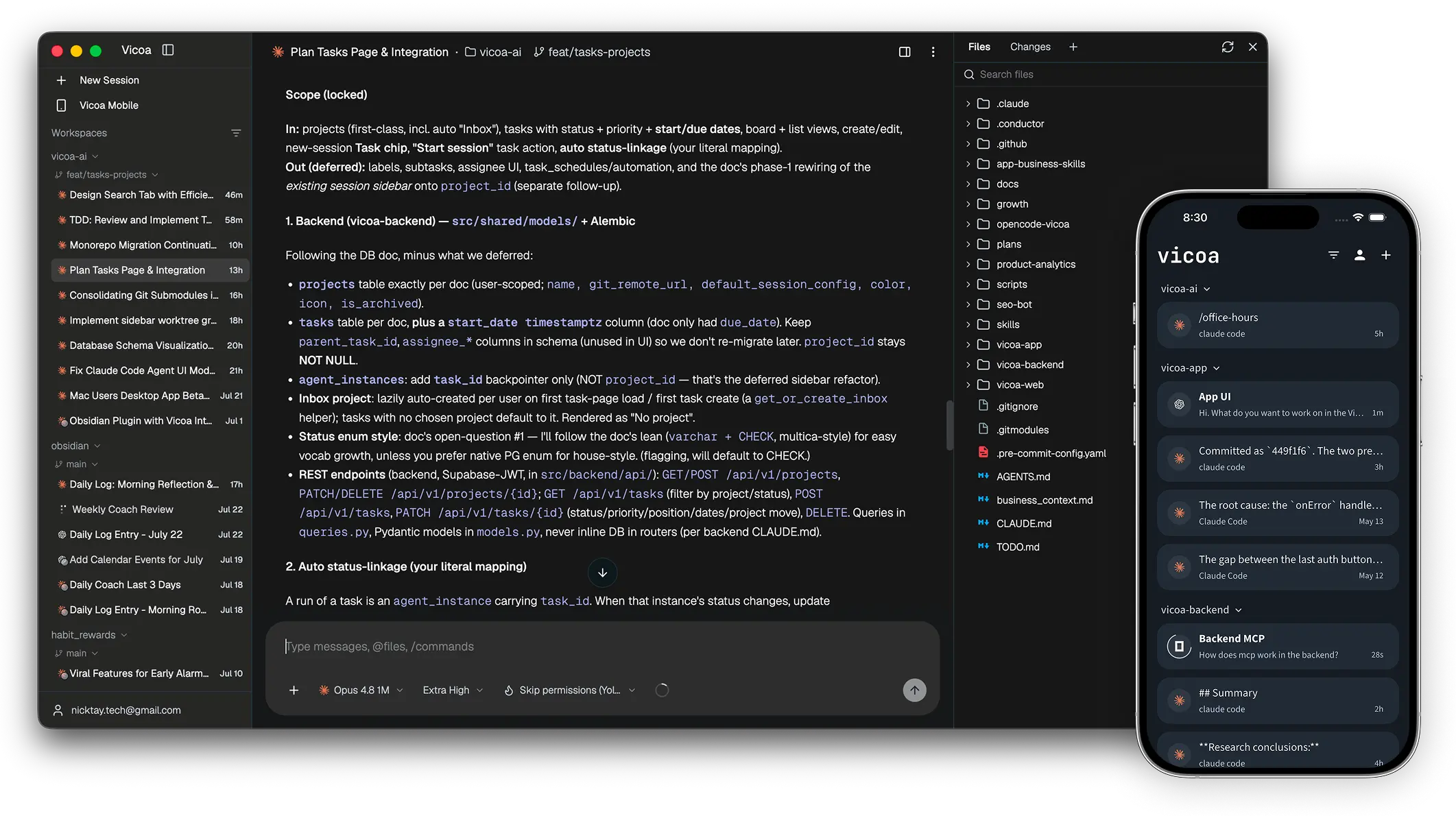
Start at your desk. Steer from your pocket.
---
## Run a team of coding agents
*Claude Code, Codex, Cursor, Pi, Kimi, and more*
- **[Supported Agents](#supported-agents):** 40+ coding agents. Claude Code, Codex, OpenCode, Gemini, Cursor, GitHub Copilot, Kimi, Hermes, Pi, Oh My Pi, and Antigravity are built in; 30+ more (Cline, goose, Kiro, Qwen Code, TRAE, …) are supported via ACP. Run them side by side in one workspace
- **Parallel worktrees:** each agent on its own git worktree and branch, so several can work the same repo at once without stepping on each other.
- **One command center:** every session's status in a single list, so you steer the whole fleet from one place instead of hunting terminal tabs.
- **[Any machine](https://vicoa.ai/docs/start-remote-session):** your Mac, a Windows laptop, a Linux machine, a VPS, a remote server: connect them all and pick where each session runs.
- **[Bring your own key](https://vicoa.ai/docs/alternative-models):** your existing subscription or API keys
## Steer from any device.
*The session you started on your laptop, in your pocket.*
- **[iOS and Android apps](https://vicoa.ai/download):** the same session on a native mobile apps
- **Notifications:** get notified when an agent needs a decision or finishes
- **Vibe code anywhere:** prompt your coding agents on your project from your phone, all sessons are synced
- **[@files and /commands](https://vicoa.ai/docs/vicoa-features):** fuzzy file mentions and the agent's own slash commands work from web, mobile and CLI alike
- **[Dictation](https://vicoa.ai/docs/vicoa-features#talk-to-code-dictation):** talk to your coding agents
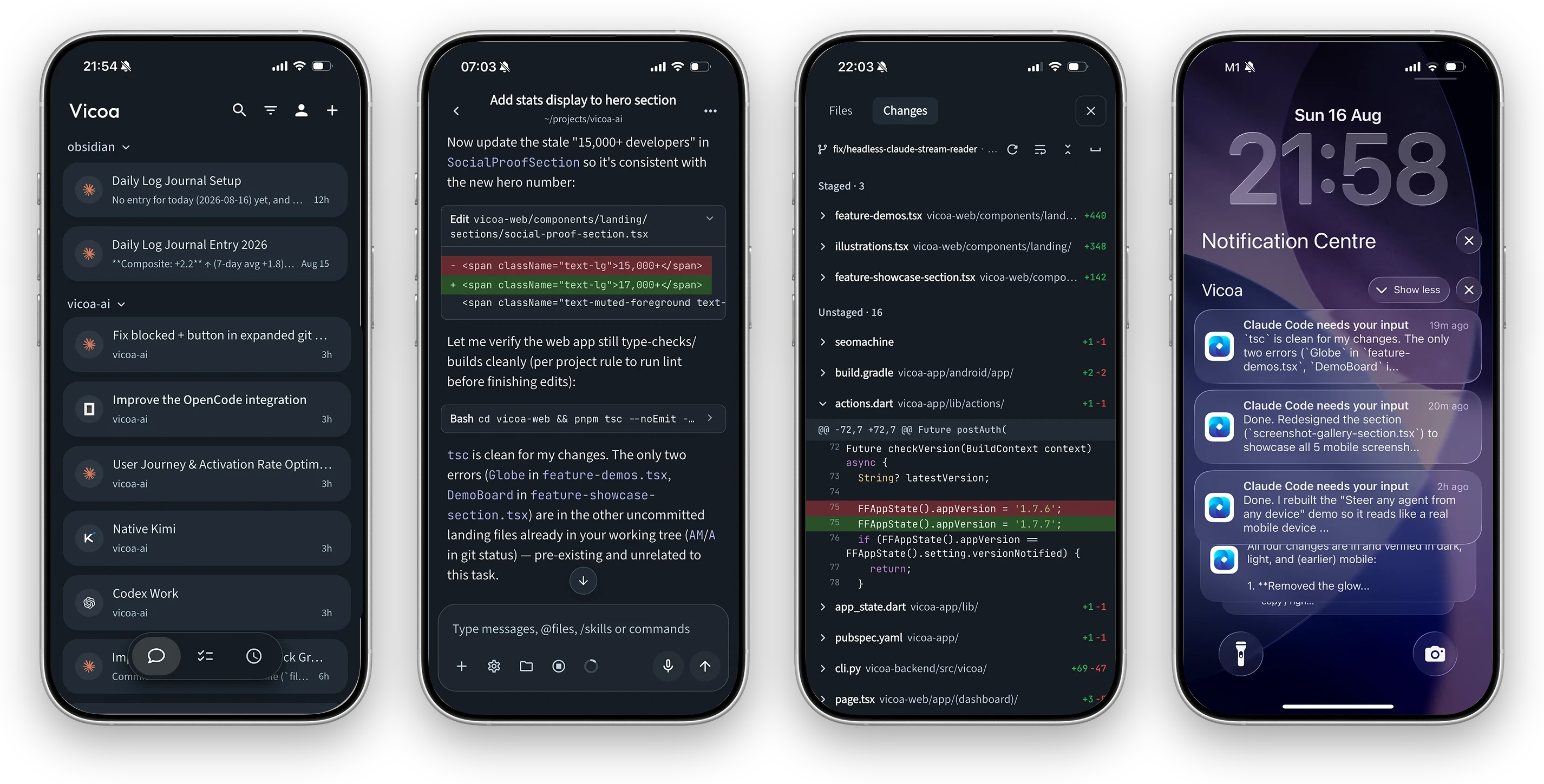
A real mobile coding app, not a chat tab: sessions, conversation, live git diffs, and push notifications.
## More Features
- **Inline diffs:** per-file changes and commit history, reviewable on a desktop and phone
- **File browser:** the tree beside the conversation
- **Terminal:** run commands next to the chat.
- **[Mobile Live preview](https://vicoa.ai/docs/live-preview):** open a local dev website and preview it from your phone in desktop mode.
- **Task management:** plan work on a board, then start a session straight from a task, or let agent pick up automatically with automations.
- **[Automations](https://vicoa.ai/docs/cli-commands#vicoa-automation):** cron schedules get things done on their own
- **Skills:** view, install and remove the agent skills.
- **[CLI](https://vicoa.ai/docs/cli-commands):** sessions, chat history, tasks, and automations are supported via CLI, so your agents can drive Vicoa the same way you do.
- and more ...
---
## Get started
Download
**[Vicoa Desktop](https://vicoa.ai/download)** for macOS, Windows, or Linux. It connects the computer
it runs on and detects installed agents.
The one prerequisite: the machine that runs agents needs at least one
[supported agent CLI](#supported-agents) installed and signed in.
Prefer the terminal?
```bash
npm i -g @vicoa/cli # Node.js 18+; on Intel Macs or old glibc, use: pip install vicoa
vicoa # start a session, or `vicoa daemon` to just connect this machine
```
## Your first session in three minutes
**1. Install and sign in.** Open [Vicoa Desktop](https://vicoa.ai/download) and sign in.
**2. Start some agents.** Click **New Session**, pick the machine, the agent, and enter your first prompt.
**3. Steer from your phone.** Install the Vicoa mobile app and sign in with the same account — running sessions sync automatically.


Full walkthrough: [Set up Vicoa](https://vicoa.ai/docs/getting-started) ·
[Start a remote session](https://vicoa.ai/docs/start-remote-session)
## Supported agents
Vicoa launches the agent harness and CLIs you already have installed and
authenticated, on your machine, with your credentials.
| Agent | CLI | Agent | CLI |
| --- | --- | --- | --- |
| [Claude Code](https://vicoa.ai/docs/agents/claude-code) | `claude` | [Cursor](https://vicoa.ai/docs/agents/more-coding-agents) | `cursor-agent` |
| [Codex](https://vicoa.ai/docs/agents/codex) | `codex` | [GitHub Copilot](https://vicoa.ai/docs/agents/more-coding-agents) | `copilot` |
| [OpenCode](https://vicoa.ai/docs/agents/opencode) | `opencode` | [Kimi](https://vicoa.ai/docs/agents/more-coding-agents) | `kimi` |
| [Gemini](https://vicoa.ai/docs/agents/more-coding-agents) | `gemini` | [Hermes](https://vicoa.ai/docs/agents/more-coding-agents) | `hermes` |
| [Pi](https://vicoa.ai/docs/agents/more-coding-agents) | `pi` | [Oh My Pi](https://vicoa.ai/docs/agents/more-coding-agents) | `omp` |
| [Antigravity](https://vicoa.ai/docs/agents/more-coding-agents) | `agy` | | |
Claude Code, Codex, Pi, Oh My Pi, and Antigravity have native integrations; the rest connect
over the Agent Client Protocol (ACP).
**30+ more via ACP.** Amp, Auggie, Cline, Devin, Factory Droid, goose, Grok, Junie, Kilo,
Kiro, Mistral Vibe, Qwen Code, TRAE, and other ACP agents are in the built-in catalog: add
one from **Settings → Providers → More agents** or `vicoa provider add `. Any other
agent that speaks ACP works with your own launch command. See
[custom agents](https://vicoa.ai/docs/agents/custom-agents).
## Documentation
- **[CLI commands](https://vicoa.ai/docs/cli-commands)** — drive vicoa sessions, tasks, and automations from the terminal.
- **[Self-hosting](./SELF_HOSTING.md)** — run the whole stack on your own infrastructure with Docker.
- **[Getting started](https://vicoa.ai/docs/getting-started)** — install, sign in, and run your first session.
- **[Supported agents](https://vicoa.ai/docs/agents)** — set up Claude Code, Codex, and the rest.
- **[Some Features](https://vicoa.ai/docs/vicoa-features)** — feature introduction
- **[Full documentation →](https://vicoa.ai/docs)**
## What's in this repository
This is **Vicoa, open source**: the complete, self-hostable stack:
- **CLI and local daemon:** starts and runs coding agents on a machine
- **Backend:** backend API and realtime server for auth, sessions, messages, tasks,
automations. Self-hostable with Postgres.
- **Clients:** web app, desktop app, mobile app (iOS / Android).
Vicoa is **BYO-key**: you bring your own agent and model subscriptions or API keys
## Self-hosting
Run the whole stack yourself with Docker:
```bash
cp .env.example .env # passwords and public URLs
./backend/scripts/generate-jwt-keys.sh selfhost/keys
docker compose -f docker-compose.selfhost.yml up -d
```
The full walkthrough is in **[SELF_HOSTING.md](./SELF_HOSTING.md)**.
## Architecture
```
Web · Desktop (macOS/Windows) · iOS · Android · CLI
│
▼
┌──────────────┐ ┌────────────────┐ ┌──────────────────┐
│ Next.js │──>│ FastAPI │──>│ PostgreSQL │
│ dashboard │<──│ backend + WS │<──│ │
└──────────────┘ └───────┬────────┘ └──────────────────┘
│ sessions and messages over WebSocket
┌───────┴───────┐
│ vicoa daemon │ runs on your machine, next to your code
└───────┬───────┘
│ spawns
┌───────┴─────────────────────────────────┐
│ Claude Code · Codex · OpenCode · Gemini │
│ Cursor · Copilot · Kimi · Hermes │
│ Pi · Oh My Pi · Antigravity │
│ + 30 more ACP agents │
└─────────────────────────────────────────┘
```
| Layer | Stack |
| --- | --- |
| Web | Next.js 15 + React 19, shadcn/ui, Fumadocs for the docs |
| Desktop | Electron, running the web UI and supervising a bundled daemon |
| Mobile | Flutter (iOS / Android) |
| Backend | Python 3.10+ / FastAPI: a user-facing REST API, plus an agent-facing REST + WebSocket server |
| Database | PostgreSQL via SQLAlchemy and Alembic |
| Agent runtime | The local `vicoa` daemon, spawning any of the agent CLIs above |
## Development
Start with the **[Contributing.md](./CONTRIBUTING.md)**.
Quick repository layout:
```
vicoa/
├── backend/ # Python: FastAPI backend + REST servers + CLI & daemon
│ └── vicoa/ # the `vicoa` CLI and the local daemon
├── apps/
│ ├── web/ # Next.js dashboard (also the desktop renderer) + docs
│ ├── desktop/ # Electron desktop app
│ └── mobile/ # Flutter app (iOS / Android)
```
Common commands:
```bash
# backend, CLI and daemon (Python)
cd backend
make dev-install
./dev-start.sh
make lint && make test
# web and docs (Next.js)
cd apps/web && pnpm install && pnpm dev
# desktop app (Electron); see apps/desktop/README.md
cd apps/desktop && pnpm install && pnpm dev
# mobile app (Flutter)
cd apps/mobile && flutter pub get && flutter run
```
## Community & Support
- **Discord:** Join the community on **[Discord](https://discord.gg/mqz4qRPV4j)** for help and discussion.
- **Twitter / X:** Follow **[@vicoaai](https://x.com/vicoaai)** for updates and announcements.
- **Feedback & ideas:** We ship fast. Missing something? [Request a feature](https://github.com/vicoa-ai/vicoa/issues), include your platform, versions, and a reproduction (see [CONTRIBUTING.md](./CONTRIBUTING.md)).
- **Security issues:** don't file a public issue; follow [SECURITY.md](./SECURITY.md).
- **Show support:** [Star](https://github.com/vicoa-ai/vicoa) this repo to follow along with our daily ships.
## License
Vicoa is open source under [AGPLv3](./LICENSE) license.
 Vicoa
Vicoa




