# guildId / channelId
## The easy way
### DMs or a Channel
1. Go to the desired Channel or DM conversation on discord
2. Click the  button
### Entire Server
1. Go to any Channel in the Server you want to delete
2. Click the  button
3. Leave the *Channel ID* box empty

----
## The manual way
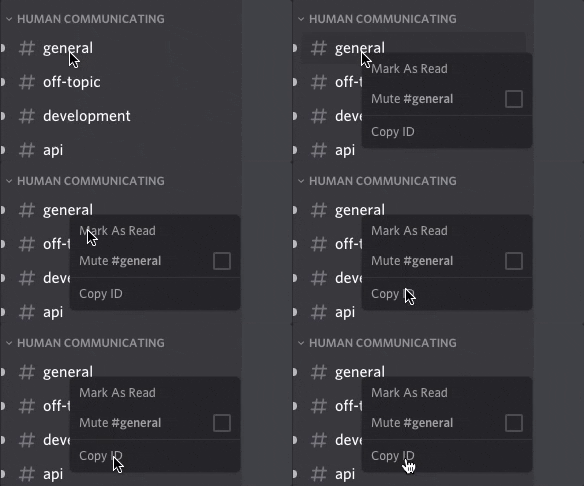
### For public channels:
- Right click a channel, [Copy ID](./developerMode.md)
 ### For a DM/Direct messages:
- copy the number after /@me/ in the URL)
### For a DM/Direct messages:
- copy the number after /@me/ in the URL)
 ---
You can target multiple channels in sequence by separating them with a comma.
---
## Deleting all messages by using the "Request a Copy of your Data" option
To delete all message from every (user) channel do following:
1. Go to "User Settings -> Privacy and Safety" and click on "Request all my Data."
2. You should receive an email within the next 30 days
3. Click on the "Import JSON" button the right JSON file is called "index.json" and is located in the messages folder (messages/index.json).
4. The channel IDs will be imported separated by a comma.
-----
> If the `Copy ID` doesn't show up, you need to enable [Developer mode](./developerMode.md) first.
---
You can target multiple channels in sequence by separating them with a comma.
---
## Deleting all messages by using the "Request a Copy of your Data" option
To delete all message from every (user) channel do following:
1. Go to "User Settings -> Privacy and Safety" and click on "Request all my Data."
2. You should receive an email within the next 30 days
3. Click on the "Import JSON" button the right JSON file is called "index.json" and is located in the messages folder (messages/index.json).
4. The channel IDs will be imported separated by a comma.
-----
> If the `Copy ID` doesn't show up, you need to enable [Developer mode](./developerMode.md) first.