# Adaptive Cards MCP
[](https://opensource.org/licenses/MIT)
[](https://www.typescriptlang.org/)
[](https://adaptivecards.io/)
[](https://github.com/VikrantSingh01/adaptive-cards-mcp/actions/workflows/ci.yml)
[](https://www.npmjs.com/package/adaptive-cards-mcp)
[](https://www.npmjs.com/package/adaptive-cards-mcp)
[](https://registry.modelcontextprotocol.io/?q=adaptive)
[](https://github.com/VikrantSingh01/adaptive-cards-mcp)
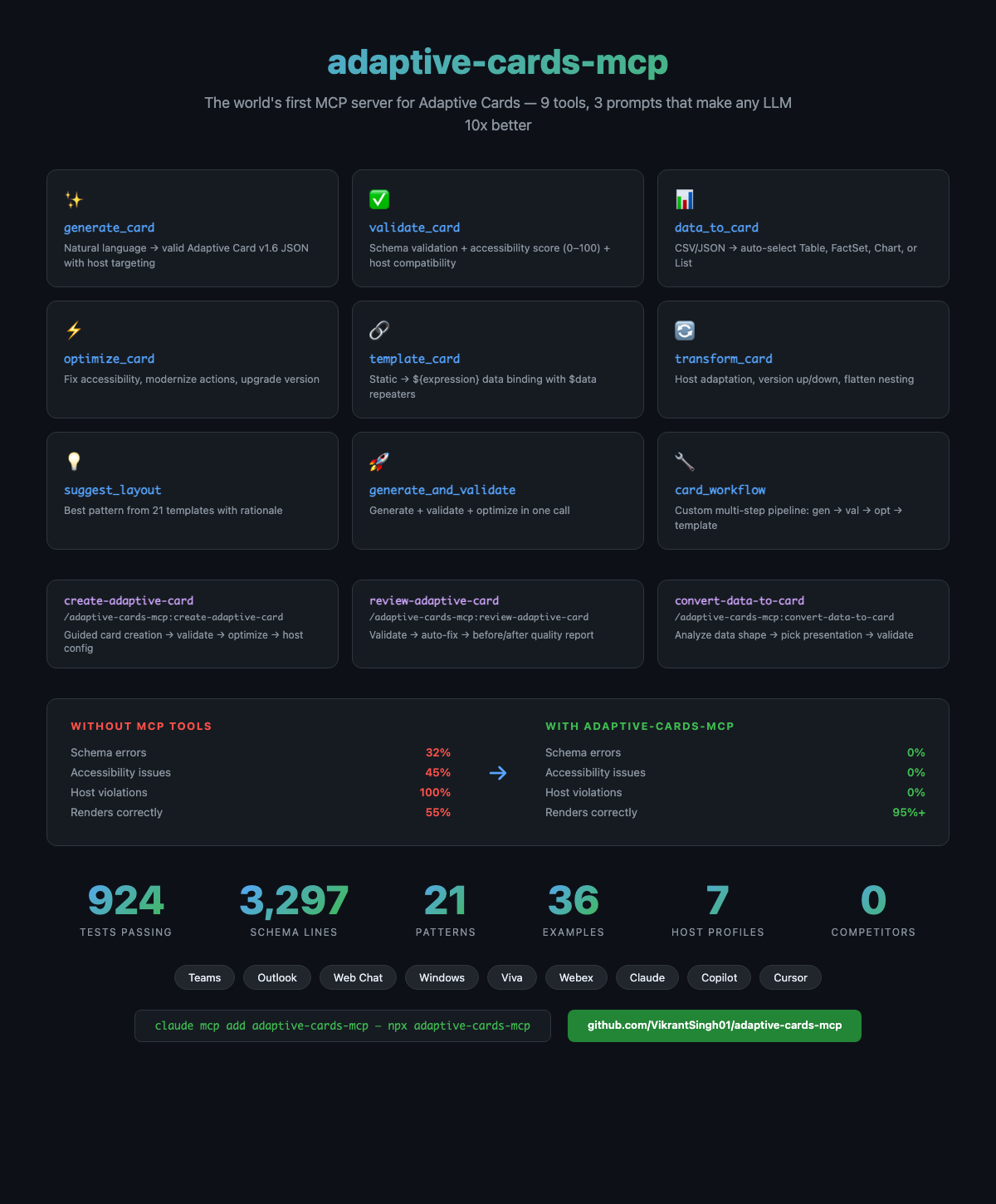
An MCP server that helps AI assistants generate valid, accessible Adaptive Cards for Teams, Outlook, Copilot, and other Microsoft surfaces. 9 tools, 3 guided workflows, 924 tests.
> **Blog:** [I Built an MCP Server That Makes AI 10x Better at Adaptive Cards](https://singhvikrant.substack.com/p/i-built-an-mcp-server-that-makes)
## Demo
## Quick Start
No install needed — `npx` downloads and runs it automatically.
### 1. Add to your AI assistant
Claude Code
```bash
claude mcp add adaptive-cards-mcp -- npx adaptive-cards-mcp
```
GitHub Copilot (VS Code)
Add to `.vscode/mcp.json`:
```json
{
"servers": {
"adaptive-cards-mcp": {
"command": "npx",
"args": ["adaptive-cards-mcp"]
}
}
}
```
Cursor
Add to `.cursor/mcp.json`:
```json
{
"mcpServers": {
"adaptive-cards-mcp": {
"command": "npx",
"args": ["adaptive-cards-mcp"]
}
}
}
```
Windsurf
Add to `~/.codeium/windsurf/mcp_config.json`:
```json
{
"mcpServers": {
"adaptive-cards-mcp": {
"command": "npx",
"args": ["adaptive-cards-mcp"]
}
}
}
```
Microsoft 365 Copilot / Copilot Studio (HTTP/SSE)
```bash
TRANSPORT=sse PORT=3001 npx adaptive-cards-mcp
# With auth enabled
TRANSPORT=sse MCP_API_KEY=your-secret npx adaptive-cards-mcp
```
1. Open [Copilot Studio](https://copilotstudio.microsoft.com/) → your agent → Tools → Add a tool → New tool → **Model Context Protocol**
2. Enter your MCP server URL (e.g., `https://your-server.azurewebsites.net/sse`)
3. Select the tools to expose
OpenAI ChatGPT
1. Enable [Developer mode](https://help.openai.com/en/articles/12584461-developer-mode-apps-and-full-mcp-connectors-in-chatgpt-beta) in ChatGPT settings
2. Go to Settings → Connectors → Create
3. Enter your MCP server HTTPS URL
### 2. Start using it
Just ask your AI assistant in natural language:
```
> Create an expense approval card for Teams
```
```
> Convert this JSON data into an Adaptive Card table
```
```
> Validate this card and fix accessibility issues
```
```
> Make this card work on Outlook (v1.4)
```
The AI picks the right tools, generates a valid card, validates it, and returns production-ready JSON you can paste directly into the [Adaptive Cards Designer](https://adaptivecards.microsoft.com/designer) to preview.
## Usage
### Natural language (recommended)
Describe what you need — the AI figures out which tools to call:
**Approvals and workflows:**
```
> Create an expense approval card for Teams with requester photo, amount,
category, line items, and approve/reject/comment buttons
```
```
> Build a time-off request card — employee name, dates, remaining PTO balance,
manager approval with optional rejection reason
```
**Notifications and alerts:**
```
> Create a CI/CD deployment notification: service name, environment, build number,
commit SHA, deploy status with rollback button
```
```
> Generate a PagerDuty-style incident alert card — severity P1, affected service,
start time, on-call engineer, acknowledge/escalate actions
```
**Data and reports:**
```
> Here's our Q1 sales data, turn it into a card:
[{"region":"APAC","revenue":1250000,"growth":"12%"},
{"region":"EMEA","revenue":980000,"growth":"8%"},
{"region":"Americas","revenue":2100000,"growth":"15%"}]
```
```
> Convert this CSV to a card:
Employee,Department,Start Date,Status
Jane Kim,Engineering,2026-01-15,Active
Bob Lee,Design,2026-02-01,Active
Carol Wu,PM,2026-03-10,Onboarding
```
**Forms and input:**
```
> Create an employee onboarding checklist — new hire name, start date,
assigned buddy, IT setup tasks with checkboxes, and a submit button
```
```
> Build a customer feedback survey card with a 1-5 star rating,
comment field, and NPS score dropdown
```
**Profiles and status:**
```
> Create a team member profile card with photo, name, title, department,
skills tags, and contact buttons for email/chat/calendar
```
```
> Build a service health dashboard card showing 5 microservices
with status indicators (healthy/degraded/down) and last check time
```
**Cross-host and versioning:**
```
> This card works in Teams but breaks in Outlook — fix it
> Make this card work on Webex (v1.3 only, no Table, no Action.Execute)
> Downgrade this v1.6 card to v1.4 for Viva Connections
```
**Validation and optimization:**
```
> Validate this card and tell me what's wrong — I'm getting render errors
> Make this card accessible — it needs to work with screen readers
> This card is too complex, optimize it for performance and compact layout
```
| What you say | What the AI calls |
|-------------|-------------------|
| "Create a leave approval card for Teams" | `generate_and_validate` → optimized card with Approve/Reject actions |
| "Here's my API response, make it a card" | `data_to_card` → auto-picks Table/FactSet/List based on data shape |
| "Is this card valid for Outlook?" | `validate_card` → schema errors, accessibility score, host compatibility |
| "Make this card accessible" | `optimize_card` → adds wrap, altText, speak, heading styles |
| "Convert this card to a reusable template" | `template_card` → static values become `${expression}` bindings |
| "This card needs to work on v1.3" | `transform_card` → downgrades, removes unsupported features |
| "What layout should I use for a dashboard?" | `suggest_layout` → pattern recommendation with rationale |
### Slash commands (MCP prompts)
For guided, multi-step workflows, use the built-in prompts directly:
**Create a card:**
```
> /adaptive-cards-mcp:create-adaptive-card
description: "Expense approval with requester photo, line items table, total amount,
and approve/reject buttons with comment field"
host: teams
intent: approval
```
Runs: generate → validate → optimize → host config
```
> /adaptive-cards-mcp:create-adaptive-card
description: "CI/CD deployment notification with service name, environment,
build number, status badge, and rollback action"
host: teams
intent: notification
```
```
> /adaptive-cards-mcp:create-adaptive-card
description: "Employee profile card with photo, name, title, department,
contact info, and skills tags"
host: outlook
intent: profile
```
**Convert data to a card:**
```
> /adaptive-cards-mcp:convert-data-to-card
data: [
{ "task": "Review PR #482", "assignee": "Jane", "due": "2026-03-21", "status": "pending" },
{ "task": "Deploy hotfix v2.1.3", "assignee": "Bob", "due": "2026-03-19", "status": "in-progress" },
{ "task": "Update API docs", "assignee": "Carol", "due": "2026-03-22", "status": "done" }
]
title: "Sprint Tasks"
presentation: table
```
```
> /adaptive-cards-mcp:convert-data-to-card
data: { "service": "api-gateway", "cpu": "92%", "memory": "78%", "requests": "12.4k/min",
"p99_latency": "245ms", "error_rate": "0.3%", "uptime": "99.97%" }
title: "Service Health — api-gateway"
presentation: facts
```
Runs: analyze data → pick best layout → validate output
**Review an existing card:**
```
> /adaptive-cards-mcp:review-adaptive-card
card: { "type": "AdaptiveCard", "version": "1.6", "body": [...your card...] }
host: outlook
```
Runs: validate schema + accessibility → auto-fix issues → summary report
### npm library (programmatic)
For use in your own code (bots, APIs, CI pipelines), install the package:
```bash
npm install adaptive-cards-mcp
```
```typescript
import { generateCard, validateCardFull, dataToCard, optimizeCard } from 'adaptive-cards-mcp';
const result = await generateCard({
content: "Create a flight status card",
host: "teams",
intent: "display"
});
console.log(result.card); // Adaptive Card JSON
console.log(result.cardId); // Reference ID for subsequent calls
console.log(result.validation); // Schema + accessibility + host compat
```
See the [Library API reference](packages/core/README.md#library-usage) for full details.
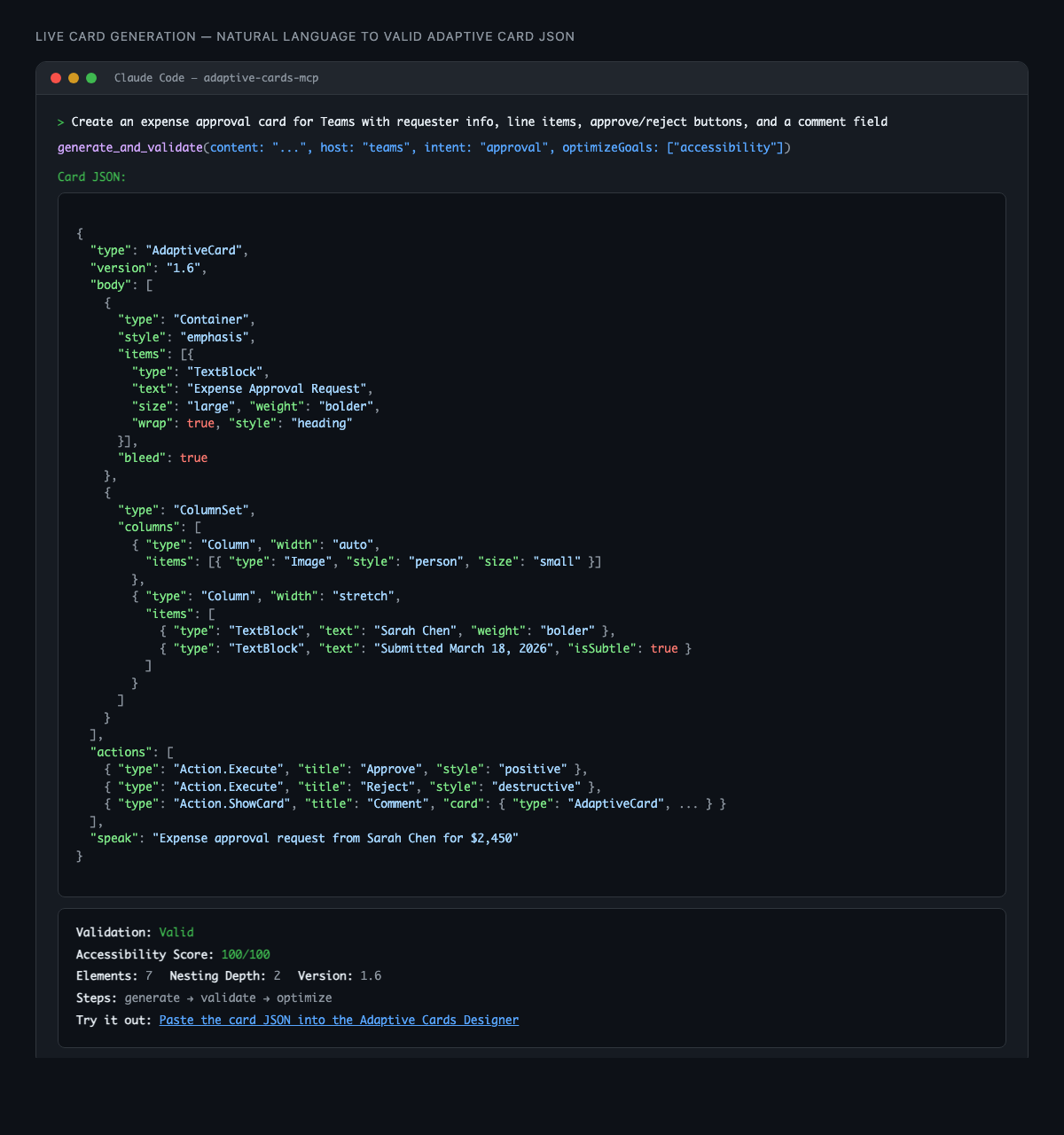
## What you get back
Card-producing tools return **two clean blocks** — card JSON you can copy, and a metadata summary:
````
```json
{
"type": "AdaptiveCard",
"version": "1.6",
"body": [ ... ],
"actions": [ ... ]
}
```
---
**Validation:** Valid
**Accessibility Score:** 100/100
**Elements:** 7 | **Nesting Depth:** 2 | **Version:** 1.6
**Card ID:** card-abc123
**Steps:** generate → validate → optimize
**Try it out:** Paste the card JSON into the [Adaptive Cards Designer](https://adaptivecards.microsoft.com/designer)
**Local Preview:** file:///tmp/ac-preview-xyz.html
````
## Tools, Prompt and Usage
## Reference
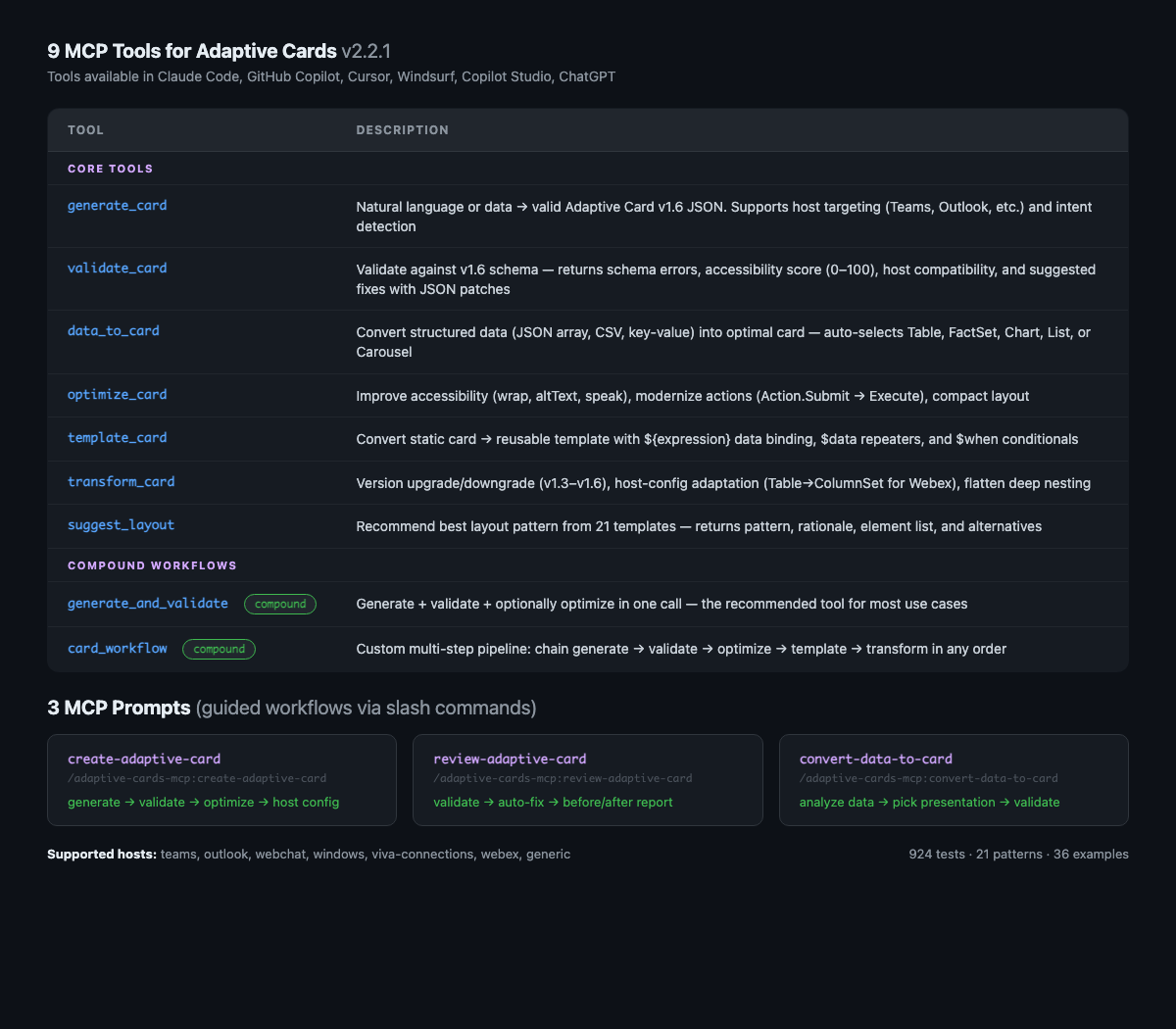
### MCP Tools (9)
| Tool | Description |
|------|-------------|
| `generate_card` | Natural language / data → valid Adaptive Card v1.6 JSON |
| `validate_card` | Schema validation + accessibility score + host compatibility + suggested fixes |
| `data_to_card` | Auto-select Table / FactSet / Chart / List from data shape |
| `optimize_card` | Improve accessibility, performance, modernize actions |
| `template_card` | Static card → `${expression}` data-bound template |
| `transform_card` | Version upgrade/downgrade, host-config adaptation |
| `suggest_layout` | Recommend best layout pattern for a description |
| `generate_and_validate` | Generate + validate + optionally optimize in one call |
| `card_workflow` | Multi-step pipeline: generate → optimize → template → transform |
### MCP Prompts (3)
| Prompt | Pipeline | Slash command |
|--------|----------|---------------|
| `create-adaptive-card` | generate → validate → optimize → host config | `/adaptive-cards-mcp:create-adaptive-card` |
| `review-adaptive-card` | validate → auto-fix → before/after report | `/adaptive-cards-mcp:review-adaptive-card` |
| `convert-data-to-card` | analyze data → pick presentation → validate | `/adaptive-cards-mcp:convert-data-to-card` |
### MCP Resources (5) + Templates (2)
| Resource | Description |
|----------|-------------|
| `ac://schema/v1.6` | Complete JSON Schema for Adaptive Cards v1.6 |
| `ac://hosts` | Host compatibility matrix for all 7 hosts |
| `ac://hosts/{hostName}` | Single host compatibility info |
| `ac://examples` | 36 curated example cards catalog |
| `ac://examples/{intent}` | Examples filtered by intent |
| `ac://patterns` | 21 canonical layout patterns |
| `ac://cards` | Session card store (cards by cardId) |
### Host Compatibility
| Host | Max Version | Notes |
|------|-------------|-------|
| Generic | 1.6 | Default — no host-specific constraints |
| Teams | 1.6 | Max 6 actions, Action.Execute preferred |
| Outlook | 1.4 | Limited elements, max 4 actions |
| Web Chat | 1.6 | Full support |
| Windows | 1.6 | Subset of elements |
| Viva Connections | 1.4 | SPFx-based ACE framework |
| Webex | 1.3 | No Table, no Action.Execute |
### Configuration
| Environment Variable | Description | Default |
|---------------------|-------------|---------|
| `TRANSPORT` | Transport mode: `stdio` or `sse` | `stdio` |
| `PORT` | HTTP port for SSE transport | `3001` |
| `MCP_API_KEY` | API key for HTTP auth | *(disabled)* |
| `MCP_AUTH_MODE` | Auth mode: `bearer` for token validation | *(disabled)* |
| `ANTHROPIC_API_KEY` | Anthropic Claude API key | *(deterministic mode)* |
| `OPENAI_API_KEY` | OpenAI API key | *(deterministic mode)* |
| `AZURE_OPENAI_API_KEY` | Azure OpenAI API key | *(disabled)* |
| `AZURE_OPENAI_ENDPOINT` | Azure OpenAI endpoint URL | *(disabled)* |
| `OLLAMA_BASE_URL` | Ollama local model URL | *(disabled)* |
| `DEBUG` | Enable debug logging: `adaptive-cards-mcp` | *(disabled)* |
| `MCP_RATE_LIMIT` | Enable rate limiting: `true` | `false` |
| `MCP_TELEMETRY` | Enable telemetry: `true` to opt-in | `false` |
| `POSTHOG_API_KEY` | PostHog project API key for remote reporting | *(disabled)* |
| `POSTHOG_HOST` | PostHog API host | `https://eu.i.posthog.com` |
> **Note:** When used via MCP (Claude Code, Copilot, Cursor), the host LLM provides the intelligence — no API key needed. Set an API key only for standalone/library usage.
### Telemetry & Privacy
Telemetry is **opt-in** and disabled by default. When enabled, the server collects
anonymous usage metrics and sends aggregated data to PostHog to help improve the project.
**How to enable:**
- **VS Code extension:** A one-time consent prompt appears on first install. You can
change it anytime in Settings → Adaptive Cards → Telemetry.
- **CLI / MCP server:** Set `MCP_TELEMETRY=true` in your environment, or edit
`~/.adaptive-cards-mcp/config.json` and set `"telemetry": true`.
**What is sent:** Tool names, call counts, durations, error rates, platform (OS),
Node version, package version, transport type.
**What is never sent:** Card content, user prompts, data payloads, IP addresses,
file paths, environment variables.
A random session ID is generated each time the server starts — no persistent
identifier is stored across sessions.
**To disable:** Set `MCP_TELEMETRY=false` or leave unconfigured (default is off).
## Development
```bash
cd packages/core
npm install
npm run build # TypeScript + copy data files
npm test # 924 tests (vitest)
npm run test:coverage # With coverage report
npm run lint # TypeScript type check
npm run lint:eslint # ESLint check
npm run format # Prettier formatting
```
### Local Testing
**Smoke test all tools and prompts:**
```bash
./test-mcp-tools.sh --local # 28 tests — all 9 tools with real-world scenarios
./test-mcp-prompts.sh --local # 10 tests — all 3 prompts (guided workflows)
./test-mcp-tools.sh # same tests against published npm package
./test-mcp-prompts.sh # same tests against published npm package
```
**MCP Inspector (visual UI):**
```bash
cd packages/core && npm run build
npx @modelcontextprotocol/inspector node dist/server.js
# Opens http://localhost:6274 — pick a tool, enter params, click Run
```
**Terminal (stdio):**
```bash
cd packages/core
echo '{"jsonrpc":"2.0","id":1,"method":"initialize","params":{"protocolVersion":"2024-11-05","capabilities":{},"clientInfo":{"name":"test","version":"1.0"}}}
{"jsonrpc":"2.0","id":2,"method":"tools/call","params":{"name":"generate_card","arguments":{"content":"expense approval card","intent":"approval","host":"teams"}}}' \
| node dist/server.js 2>/dev/null | tail -1 | python3 -m json.tool
```
**SSE mode:**
```bash
TRANSPORT=sse PORT=3001 node packages/core/dist/server.js
curl http://localhost:3001/health
```
### Architecture
```
packages/core/src/
├── server.ts # MCP server (stdio + SSE, 9 tools, 3 prompts)
├── index.ts # Library exports
├── types/ # TypeScript interfaces
├── core/ # Schema validator, analyzer, accessibility, host compat
├── generation/ # 21 layout patterns, data analyzer, assembler, LLM client
├── tools/ # 9 tool handlers
├── utils/ # Logger, input guards, rate limiter, card store, auth, telemetry, preview
└── data/ # v1.6 schema, 36 examples, host configs
```
## Ecosystem
| Package | Description |
|---------|-------------|
| [packages/core](packages/core/) | MCP server + npm library (9 tools) — [npm](https://www.npmjs.com/package/adaptive-cards-mcp) |
| [packages/vscode-extension](packages/vscode-extension/) | VS Code extension — [adaptive-cards-ai-vscode](https://github.com/VikrantSingh01/adaptive-cards-ai-vscode) |
## What's New in v2.3.0
- **Accessibility 100/100** — All generated cards now include `speak` property automatically
- **No more broken JSON** — Newlines in content sanitized, titles no longer truncate at version numbers
- **Host-aware generation** — `generate_and_validate` auto-downgrades card version for Outlook (v1.4), Webex (v1.3)
- **CSV fix** — CSV data correctly parsed before building FactSet/Table cards
- **Telemetry** — `/metrics` endpoint with session tracking, per-tool call distribution, host/intent usage
- **MCP Registry** — Listed on the [official MCP Registry](https://registry.modelcontextprotocol.io/?q=adaptive)
- **E2E test suite** — 28 tool tests + 10 prompt tests with quality gates (a11y score, element count)
See the full [CHANGELOG](CHANGELOG.md) for details.
## Links
- [npm](https://www.npmjs.com/package/adaptive-cards-mcp) — Install and package details
- [GitHub](https://github.com/VikrantSingh01/adaptive-cards-mcp) — Source code, issues, and contributions
- [MCP Registry](https://registry.modelcontextprotocol.io/?q=adaptive) — Official MCP server listing
## Related Projects
- [AdaptiveCards-Mobile](https://github.com/nicfera/AdaptiveCards-Mobile) — Cross-platform Adaptive Cards renderer
- [openclaw-adaptive-cards](https://github.com/VikrantSingh01/openclaw-adaptive-cards) — OpenClaw AI agent plugin using this library
- [Adaptive Cards Documentation](https://adaptivecards.microsoft.com/) — Official docs
- [Adaptive Cards Designer](https://adaptivecards.microsoft.com/designer) — Interactive card designer
- [Adaptive Cards Schema Explorer](https://adaptivecards.io/explorer/) — Interactive schema reference
## License
MIT