



Give your AI assistant eyes and ears.
Analyze any video, audio, or image — locally, right inside your editor.
Install ·
Capabilities ·
Modes ·
Examples ·
Tools ·
Options ·
Docs
LLMs read text and glance at a single image — but they can't watch a video or listen to audio. **media-context-mcp** closes that gap. Hand it a file or a link and it returns clean, model-ready context — keyframes, a transcript, or the text on screen — entirely on your machine. Nothing is uploaded.
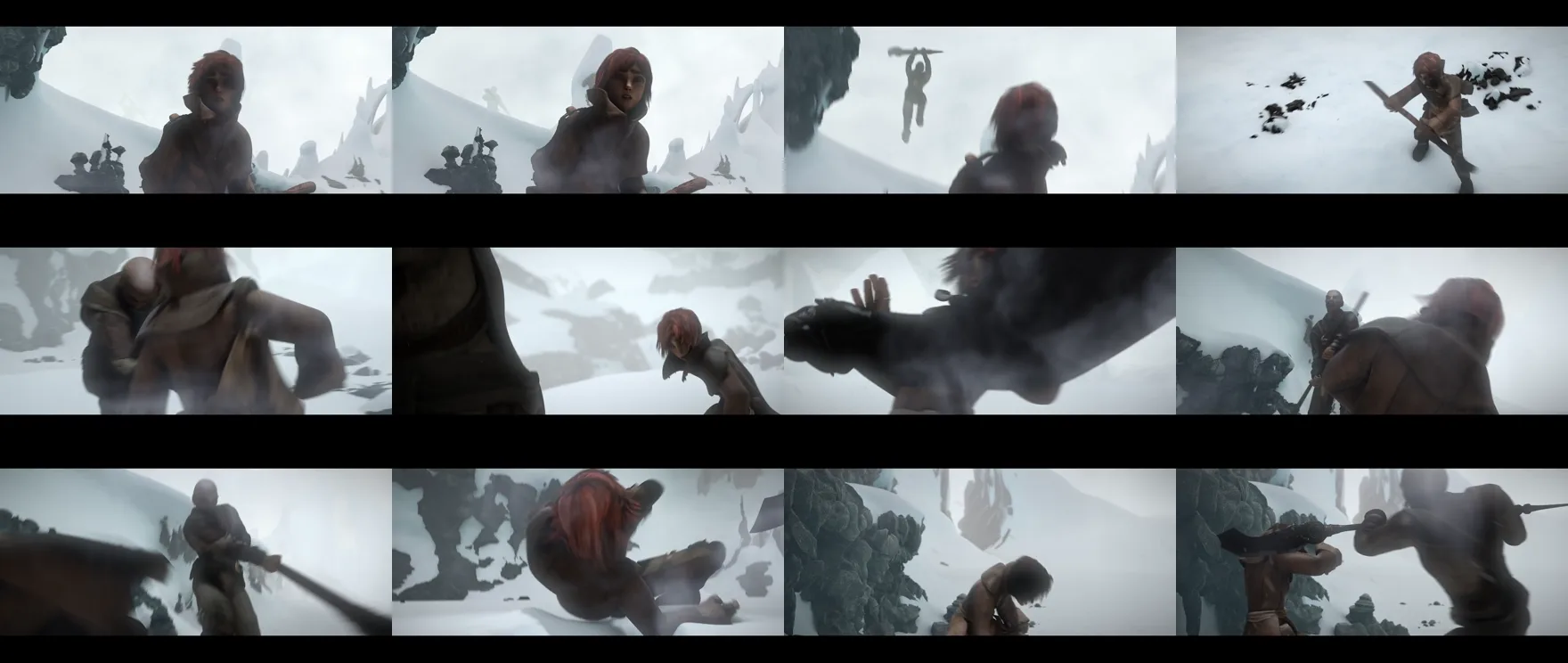
A 10-second clip becomes one tidy contact sheet your model reads in order — not hundreds of stills.
## 🚀 Install
Two steps — add the server, then install the local helpers it uses.
### 1 · Add the server to your client
```bash
# Claude Code
claude mcp add media-context -- npx -y media-context-mcp
```
The launch command is always `npx -y media-context-mcp`. Pick your client:
Claude Desktop
Settings → Developer → Edit Config (`claude_desktop_config.json`):
```json
{
"mcpServers": {
"media-context": { "command": "npx", "args": ["-y", "media-context-mcp"] }
}
}
```
Cursor
`~/.cursor/mcp.json` (global) or `.cursor/mcp.json` (per-project):
```json
{
"mcpServers": {
"media-context": { "command": "npx", "args": ["-y", "media-context-mcp"] }
}
}
```
VS Code (GitHub Copilot, agent mode)
`.vscode/mcp.json` — VS Code uses the `servers` key:
```json
{
"servers": {
"media-context": { "command": "npx", "args": ["-y", "media-context-mcp"] }
}
}
```
Windsurf
`~/.codeium/windsurf/mcp_config.json`:
```json
{
"mcpServers": {
"media-context": { "command": "npx", "args": ["-y", "media-context-mcp"] }
}
}
```
Cline / Roo Code
`cline_mcp_settings.json` (the extension's MCP settings):
```json
{
"mcpServers": {
"media-context": { "command": "npx", "args": ["-y", "media-context-mcp"] }
}
}
```
Kiro
`.kiro/settings/mcp.json` (project) or `~/.kiro/settings/mcp.json` (user):
```json
{
"mcpServers": {
"media-context": { "command": "npx", "args": ["-y", "media-context-mcp"] }
}
}
```
Gemini CLI
`~/.gemini/settings.json`:
```json
{
"mcpServers": {
"media-context": { "command": "npx", "args": ["-y", "media-context-mcp"] }
}
}
```
Zed
`settings.json` — Zed uses `context_servers`:
```json
{
"context_servers": {
"media-context": { "command": { "path": "npx", "args": ["-y", "media-context-mcp"] } }
}
}
```
Codex CLI
`~/.codex/config.toml`:
```toml
[mcp_servers.media-context]
command = "npx"
args = ["-y", "media-context-mcp"]
```
JetBrains AI Assistant
Settings → Tools → AI Assistant → Model Context Protocol → Add, then use command `npx` with args `-y media-context-mcp`.
> **Tip:** in Claude Code you can install it as a plugin instead — run `/plugin marketplace add vishalguptax/media-context-mcp`, then `/plugin install media-context`. To share with a team, install per-project: `--scope project` (writes `.mcp.json`) or commit a `.cursor/mcp.json` in the repo.
### 2 · Install the local helpers
One command sets up everything the server uses, via your OS package manager:
```bash
npx media-context-mcp setup # core: keyframes, links, on-screen text
npx media-context-mcp setup --audio # also enable transcription
```
The server finds the helpers automatically afterward — no extra configuration. Run `check_media_deps` to see what's ready, and `setup --uninstall` to remove them. ([Install by hand →](./docs/installation.md#local-helpers))
### 3 · Ask
> *“Summarize `demo.mp4`.”*
## ✨ Capabilities
| | |
|--|--|
| **Video** | Keyframe overview, full-size stills, scene detection, or a dense filmstrip that catches split-second glitches |
| **Audio** | Speech turned into text — clips, voice notes, meetings, podcasts |
| **Images** | The picture, plus the exact text shown on screen |
| **Anywhere** | Local files or links — YouTube, Vimeo, and 1000+ sites |
| **Private** | Runs on your machine. No API keys, no uploads |
| **Efficient** | A long clip becomes a couple of images, not hundreds |
## 🎞️ Modes
`analyze_media` auto-detects audio and images. For video, choose how frames are sampled:
| Mode | Best for |
|------|----------|
| `sheet` *(default)* | A cheap overview — frames tiled into one or two contact sheets |
| `frames` | Detail on specific moments — individual full-size stills |
| `scenes` | Slide decks & static screencasts — only scene-change frames |
| `filmstrip` | Catching a sub-second UI glitch — a dense, near-native-rate strip |
## 💬 Examples
Just ask in plain language — the assistant picks the right options.
| You ask | What you get |
|---------|--------------|
| *“Summarize `demo.mp4`.”* | A quick overview from sampled keyframes |
| *“What error does `bug.mp4` show at the end?”* | The exact on-screen text, read back |
| *“Walk me through the UI flow in `onboarding.mov`.”* | Step-by-step from scene-change frames |
| *“Transcribe `standup.m4a` and list action items.”* | A local transcript |
| *“Summarize `https://youtu.be/…` with the transcript.”* | Fetched and transcribed |
| *“Read the error in this screenshot `crash.png`.”* | The picture plus its exact text |
| *“Find where the slider in `ui.mp4` flickers ~0:06.”* | The exact frame of a sub-second glitch |
## 🧰 Tools
| Tool | What it does |
|------|--------------|
| **`analyze_media`** | Turn a video, audio, or image — file or URL — into model-readable context. Auto-detects the type and supports cropping, time windows, language, and sampling rate. |
| **`check_media_deps`** | Report which capabilities are ready on this machine. |
Every call runs locally and cleans up after itself.
## ⚙️ Options
Your assistant fills these in for you, but you can steer it (“use filmstrip mode”, “crop to the toolbar”).
Full analyze_media parameters
| Param | Default | Description |
|-------|---------|-------------|
| `source` | — | Local file path (video/audio/image) or http(s) URL |
| `context` | — | A note framing the analysis; echoed atop the summary |
| `detail` | — | `high` = readable stills for screen recordings; `low` = cheap overview |
| `mode` | `sheet` | `sheet` · `frames` · `scenes` · `filmstrip` |
| `format` | `webp` | `webp` (smallest) · `jpeg` · `png` (crisp text) |
| `maxFrames` | `30` | Upper bound on sampled frames |
| `grid` | `5` | Tiles per row/column for contact-sheet modes |
| `scale` | `320` | Per-frame width in px — lower = fewer tokens |
| `sceneThreshold` | `0.4` | Scene-change sensitivity (`scenes` mode) |
| `fps` | auto | Explicit sampling rate; pair high with `filmstrip` |
| `crop` | — | `{x,y,width,height}` (pixels, or `0–1` fractions) to zoom a region |
| `stripRows` | `18` | Tiles per image in `filmstrip` mode |
| `startSec` / `endSec` | — | Restrict to a time window |
| `transcript` | `false` | Also produce a transcript (video) |
| `whisperModel` | `small` | `tiny` · `base` · `small` · `medium` · `large` |
| `ocr` | `false` | Extract on-screen text |
| `ocrLang` | `eng` | Language code(s), e.g. `eng+deu` |
| `ocrPsm` | `3` | Page-segmentation: `3` auto · `6` block · `11` sparse |
| `detectJumps` | `false` | Track an on-screen number and report jump-back glitches with timestamps |
| `maxDurationSec` | `3600` | Reject URL downloads longer than this |
| `maxFileSizeMb` | `500` | Abort a URL download past this size |
Worked recipes for each are in the **[usage guide](./docs/usage.md)**.
## ❓ FAQ
**Can an LLM watch a video?** Not directly — models take images and text, not video. This server turns the video into frames and a transcript it can read.
**Does anything get uploaded?** No. Everything runs on your machine; no keys, no cloud.
**Which clients work?** Any MCP client — Claude Code, Claude Desktop, Cursor, VS Code, Windsurf, Cline, Kiro, Gemini CLI, JetBrains, Zed, Codex.
**Does it handle YouTube and other links?** Yes.
**How much does it cost?** It's free and open source.
## 📋 Requirements
Node.js 18+, on Windows, macOS, or Linux. The one-time `npx media-context-mcp setup` installs everything else.
## 🛠️ Development
```bash
npm install
npm run build
npm test
```
Issues and PRs welcome — see the [usage guide](./docs/usage.md) for the architecture.
## 📄 License
[Apache-2.0](./LICENSE) © Vishal Gupta