# Code-Graph-RAG
Code-Graph-RAG parses a multi-language codebase with Tree-sitter, sharpened by compiler-grade frontends and runtime traces where available, builds a knowledge graph of its structure in Memgraph, and lets you query, edit, and optimise that code in plain English. It works across a monorepo of mixed languages under one unified graph schema.
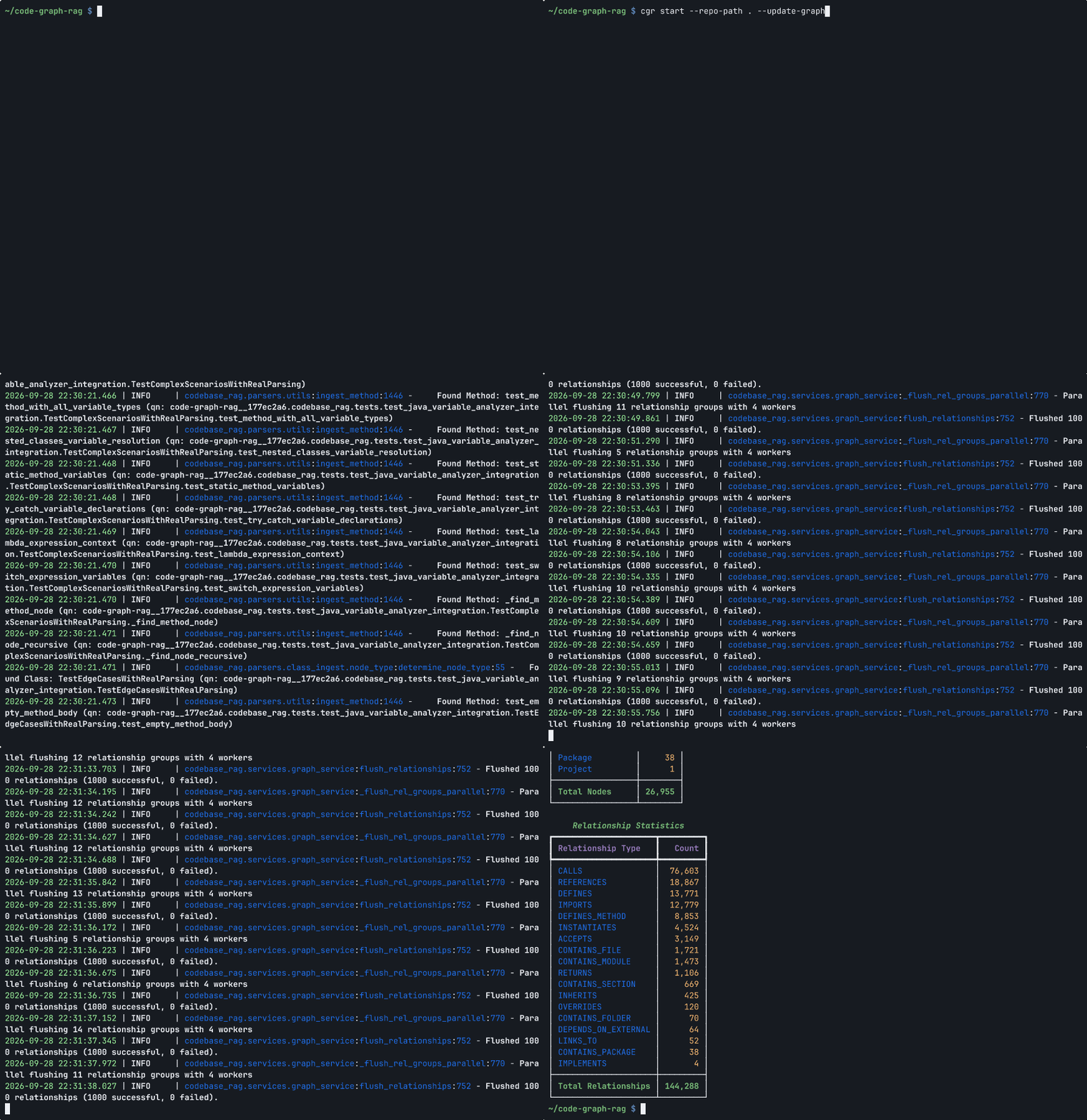
1. Index: cgr start --update-graph parses a repository into a knowledge graph (sped up)
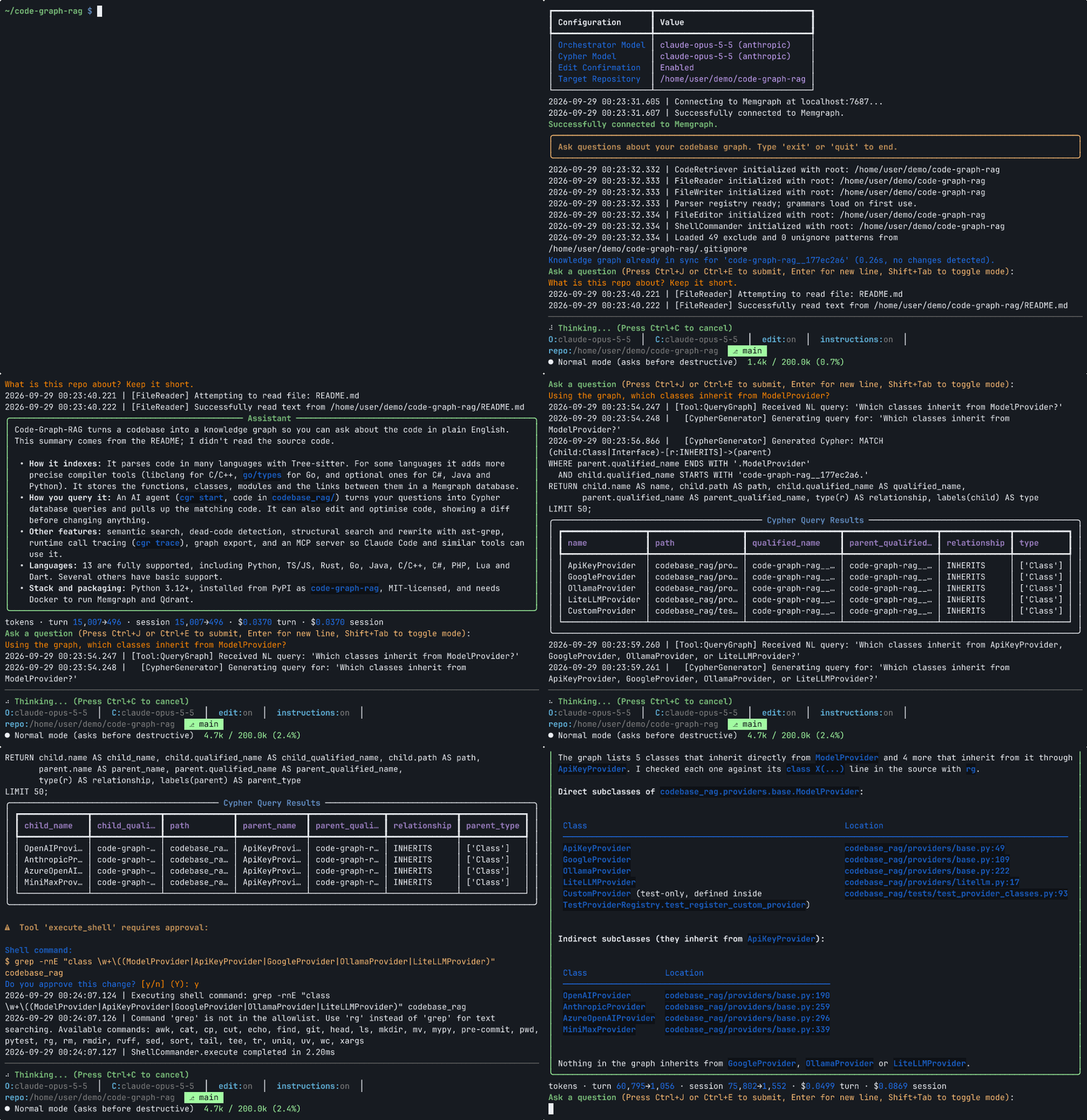
2. Ask: cgr start answers questions and edits code, grounded in that graph
## Latest News 🔥
- **Incremental Indexing**: Improved handling of same-stem sibling matches and skipped EXPOSES cleanups during incremental updates.
- **Real-Time Watcher**: `cgr watch` ships the file watcher with the package, so an installed cgr keeps a repository's graph in sync while you edit, in the same project `cgr start` syncs.
See [NEWS.md](NEWS.md) for the full history.
## What It Does
Point Code-Graph-RAG at a repository and it reads every source file, extracts functions, classes, methods, modules, and the relationships between them, and stores the result as an interconnected graph. Once the graph exists you can:
- Ask questions about the codebase in natural language and get answers grounded in the real structure.
- Retrieve the actual source of any function, class, or method by name or by intent.
- Edit code through the agent with AST-based surgical patching and a diff preview before anything changes.
- Optimise code against language best practices or your own coding standards.
- Find dead code by walking call and reference edges from entry points.
- Search and rewrite structurally by AST pattern with ast-grep.
- Overlay runtime behaviour: trace a test run (or pull production eBPF profiles) with `cgr trace` and merge the calls that actually happened into the graph, exposing dispatch that static analysis cannot see.
## How It Works
The system has two components:
1. **Multi-language parser.** A Tree-sitter based parser reads the codebase and ingests functions, classes, methods, modules, and their relationships into Memgraph under a single language-agnostic schema. Where a toolchain is available, compiler-grade frontends layer exact facts on top (libclang for C/C++, `go/types` for Go, and opt-in Roslyn, `javac` and Jedi for C#, Java and Python), and [dynamic tracing](docs/guide/dynamic-tracing.md) merges calls observed at runtime. Tree-sitter stays the backbone: a trace only sees code that ran, and a compiler frontend only covers what its toolchain can build.
2. **RAG system** (`codebase_rag/`). An interactive CLI that turns natural language into Cypher queries, retrieves matching code, and drives AI-powered editing and optimisation.
```
Source Code -> Tree-sitter Parser -> AST Analysis -> Memgraph Knowledge Graph
|
User Query -> AI Model (Cypher Gen) -> Cypher Query -> Graph Results -> Response
```
See the [Architecture Overview](docs/architecture/overview.md) and [Graph Schema](docs/architecture/graph-schema.md) for the full picture.
## Supported Languages
Python, TypeScript, TSX, JavaScript, Rust, Go, Java, C, C++, C#, PHP, Lua, and Dart are fully supported. Scala is in development, and Ruby, Kotlin, Swift, Elixir, Haskell, Solidity, Bash, and Nix have structural support (modules, functions, classes where the language has them, and imports) through the pluggable ast-grep tier. See the [Language Support](docs/architecture/language-support.md) matrix for per-language capabilities.
## Installation
`cgr` is published to PyPI. Install it system-wide with the `treesitter-full` (tree-sitter grammars), `ast-grep` (Ruby, Kotlin, Swift, Elixir, Haskell, Solidity, Bash, Nix) and `semantic` (vector search) extras:
```bash
# with uv (recommended)
uv tool install "code-graph-rag[treesitter-full,ast-grep,semantic]"
# or with pipx
pipx install "code-graph-rag[treesitter-full,ast-grep,semantic]"
```
### Which version am I getting?
Three version lines exist and they intentionally differ:
| where | what it tracks |
|---|---|
| git tags | every version, one per merge |
| GitHub Releases (binaries, signatures) | every 50th version, plus any security fix |
| PyPI | every 50th version, plus any security fix |
So the newest tag on `main` usually runs ahead of the newest release, often by
tens of patch versions; they coincide only just after a release. Nothing is
stuck, the cadences differ by design. A security fix does NOT wait for the
cadence: it ships a release and a PyPI upload immediately.
`uv tool install` and `pipx install` give you the newest PyPI version, which is the
newest RELEASE, not the newest tag. Interim tags exist so every merge is
addressable; binaries and PyPI uploads follow the cadence above.
To run code newer than the latest release, install from git:
```bash
uv tool install "code-graph-rag[treesitter-full,ast-grep,semantic] @ git+https://github.com/vitali87/code-graph-rag@main"
```
To upgrade an existing install, run `uv tool upgrade code-graph-rag` (with pipx, `pipx upgrade code-graph-rag`, or `pipx reinstall code-graph-rag` for a git install). [Upgrade](docs/getting-started/installation.md#upgrade) covers the other install methods.
You also need Python 3.12+, Docker (for Memgraph), `cmake`, and `ripgrep`. Full prerequisites, source installs, and environment setup are in the [Installation](docs/getting-started/installation.md) guide.
> [!NOTE]
> The wheel is pure Python (`py3-none-any`), so it installs on any platform with Python 3.12 or newer. Older system interpreters (Debian Bookworm ships 3.11) need the interpreter pinned explicitly; see [Installation](docs/getting-started/installation.md#older-system-interpreters) for the commands.
## Quick Start
```bash
# Start the packaged Memgraph + Qdrant stack (no compose file needed)
cgr daemon up
# Parse a repository into the graph, then query it
cgr start --repo-path /path/to/repo --update-graph
cgr start --repo-path /path/to/repo
```
Repeat the first command for each repository you want indexed; the graph is
shared, and syncing one project leaves the others alone. To start over from an
empty graph, add `--clean` — it deletes **every** project in the shared graph,
not just this one, and asks for confirmation first when other
projects would be destroyed.
A default index leaves out the opt-in [capture groups](docs/architecture/graph-schema.md#capture-groups); add them with `--capture` or `CGR_CAPTURE`.
The [Quick Start](docs/getting-started/quickstart.md) guide walks through parsing, querying, and exporting in five minutes.
## MCP Server
Code-Graph-RAG runs as an [MCP](https://modelcontextprotocol.io) server so Claude Code and other MCP clients can query and edit your codebase directly. See the [MCP Server](docs/guide/mcp-server.md) guide for setup.
## Documentation
**Getting Started**
- [Installation](docs/getting-started/installation.md)
- [Quick Start](docs/getting-started/quickstart.md)
- [Configuration](docs/getting-started/configuration.md)
**User Guide**
- [CLI Reference](docs/guide/cli-reference.md)
- [Interactive Querying](docs/guide/interactive-querying.md)
- [Code Optimisation](docs/guide/code-optimization.md)
- [Dead Code Detection](docs/guide/dead-code.md)
- [Dynamic Call Tracing](docs/guide/dynamic-tracing.md)
- [Graph Export](docs/guide/graph-export.md)
- [Real-Time Updates](docs/guide/realtime-updates.md)
- [C/C++ Semantic Mode](docs/guide/cpp-semantic-mode.md)
- [MCP Server](docs/guide/mcp-server.md)
**Architecture**
- [Overview](docs/architecture/overview.md)
- [Graph Schema](docs/architecture/graph-schema.md)
- [Language Support](docs/architecture/language-support.md)
- [Data-Flow Edges](docs/architecture/data-flow-edges.md)
**Python SDK**
- [Overview](docs/sdk/overview.md)
- [Graph Loader](docs/sdk/graph-loader.md)
- [Cypher Generator](docs/sdk/cypher-generator.md)
- [Semantic Search](docs/sdk/semantic-search.md)
**Advanced**
- [Adding Languages](docs/advanced/adding-languages.md)
- [Ignore Patterns](docs/advanced/ignore-patterns.md)
- [Building Binaries](docs/advanced/building-binaries.md)
- [Troubleshooting](docs/advanced/troubleshooting.md)
## Enterprise Services
Code-Graph-RAG is open source and free to use. For organisations that need more, we offer **fully managed cloud-hosted solutions** and **on-premise deployments**:
- **Cloud-Hosted Deployment**: Managed cloud infrastructure for both the graph database and the AI agent connection. Zero infrastructure overhead, so we handle scaling, updates, and availability while your team focuses on building.
- **On-Premise & Air-Gapped Deployment**: Deploy Code-Graph-RAG entirely within your own environment, including air-gapped networks. Full data sovereignty for regulated industries and security-sensitive organisations.
We also offer custom development, integration consulting, technical support contracts, and team training.
**[View plans & pricing at code-graph-rag.com](https://code-graph-rag.com/enterprise)**
## Contributing
Please see [CONTRIBUTING.md](CONTRIBUTING.md) for contribution guidelines. Good first PRs come from the TODO issues.
## Support
For issues or questions, check the [Troubleshooting](docs/advanced/troubleshooting.md) guide first, then open an issue.
## License
MIT. See [LICENSE](LICENSE).
Third-party components and their licences are credited on the [Credits page](https://docs.code-graph-rag.com/credits/).