# Tidegap
**Run non-urgent LLM tasks at the cleanest grid hour before your deadline.**
Tidegap takes the LLM tasks your agent does not need right now, runs them at the lowest-carbon grid hour before a deadline you set, and sends them through the provider Batch API when the deadline allows.
- Picks the dispatch hour from a live 72-hour grid carbon-intensity forecast: 5 real-data feeds, 31 regions (measured, counted in code).
- Routes work with a deadline over 24 hours through the Anthropic and OpenAI Batch APIs, at 50 % of the sync list price (projected, provider list price).
- Writes a signed carbon receipt per task to a local SQLite ledger. `tidegap verify` checks it offline.
[](https://www.npmjs.com/package/@tidegap/core) [](https://pypi.org/project/tidegap/) [](./LICENSE) [](https://glama.ai/mcp/servers/tidegap/tidegap)
```bash
npm install @tidegap/core # TypeScript / Node
pip install "tidegap[anthropic,openai,signing]" # Python 3.11+
claude plugin marketplace add tidegap/tidegap && claude plugin install tidegap # Claude Code
npx -y @tidegap/mcp # any other MCP host
```
```ts
// save as plan.mjs, run: node plan.mjs (GB uses the free UK feed, no API key)
import { recommendWindow, ukCarbonIntensityFeed } from "@tidegap/core";
const deadline = new Date(Date.now() + 24 * 3600 * 1000).toISOString();
const plan = await recommendWindow({ region: "GB", deadline }, { feed: ukCarbonIntensityFeed(), rng: () => 0 });
console.log(plan.scheduledFor, plan.intensityGCo2PerKwh, plan.band);
// 2026-10-16T11:00:00.000Z 66 very_clean (forecast value on 2026-10-15; yours will differ)
```
```python
import asyncio; from datetime import datetime, timedelta, timezone
from tidegap import recommend_window, uk_carbon_intensity_feed
deadline = datetime.now(timezone.utc) + timedelta(hours=24)
plan = asyncio.run(recommend_window(region="GB", deadline=deadline, feed=uk_carbon_intensity_feed(), rng=lambda: 0))
print(plan.scheduled_for, plan.intensity_g_co2_per_kwh, plan.band)
# 2026-10-16T11:00:00.000Z 66 very_clean (forecast value on 2026-10-15; yours will differ)
```
Without `rng`, Tidegap picks at random among the cleanest band of near-equal hours, so repeated runs spread load and can return different hours; an `rng` that returns 0 gives the strict minimum.
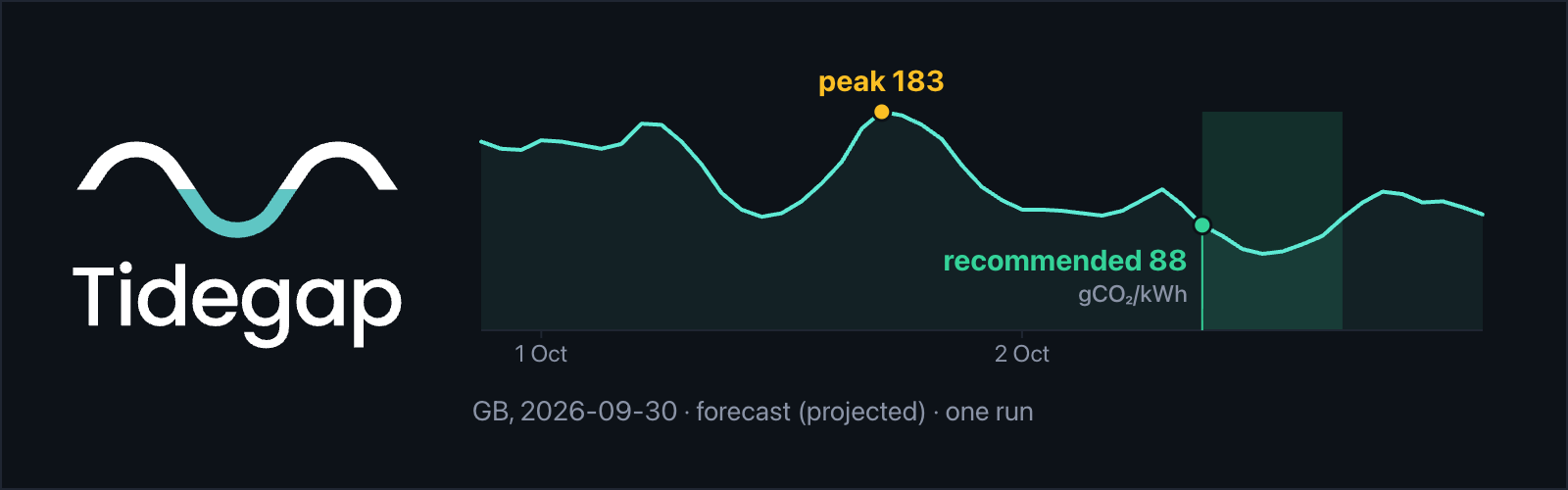
**Proof:** one real run (GB, 2026-09-30, live National Grid ESO forecast). Forecast peak 183 gCO2/kWh, recommended window 88 gCO2/kWh: about 52 % lower, for this run only (forecast, projected). The test task had a 5-minute deadline, so it ran at once; its signed receipt records 158 gCO2/kWh (measured). [Raw output and reproducer](docs/examples/2026-09-30-GB-tick/) · [every number and its source](docs/claims.md)
**In an agent:** in Claude Code, `/tidegap:defer "Summarize today's notifications" --by 4h`. In any other MCP host, the agent calls `recommend_window` and `schedule_task` (12 MCP tools, 12 hosts — [host configs](https://www.tidegap.com/docs#install)).
## Renamed from Ebb AI
Until 0.17 this project was Ebb AI (`@ebb-ai/*`, `ebb-ai` on PyPI, the `ebb` command). 0.18.0 renames it to Tidegap, because "Ebb" conflicts with an existing software trademark. Your queue, receipts, signing key and daemon keep working. The old names worked for one release (0.18) and were removed in 0.19. **Coming from 0.17? Upgrade through 0.18 once before 0.19** (or move `~/.ebb-ai` to `~/.tidegap` by hand): 0.19 no longer moves the old data directory. If 0.19 already ran, stop tidegap, move `~/.tidegap` aside, then rename `~/.ebb-ai` to `~/.tidegap`.
| What you have from 0.17 | What happens on 0.19 | What you do |
|---|---|---|
| Ledger, key and config in `~/.ebb-ai/` | Not read since 0.19; one stderr line names `~/.ebb-ai`. 0.18 moved it to `~/.tidegap/` and left a link | Before 0.19: run any 0.18 command once. After: stop tidegap, move `~/.tidegap` aside, rename `~/.ebb-ai` to `~/.tidegap` |
| `EBB_*` variables (shell, MCP host config) | Not read since 0.19; one stderr line names each one | Rename them to `TIDEGAP_*` |
| `EBB_*` keys in `~/.tidegap/config` | Not read since 0.19; one stderr line names each one | Rename the keys to `TIDEGAP_*` |
| Secrets in `~/.config/ebb/env` | Not read since 0.19; one stderr line names the file. 0.18 `tidegap install` copied it to `~/.config/tidegap/env` | Move it to `~/.config/tidegap/env` and rename its `EBB_*` keys to `TIDEGAP_*` |
| Daemon `com.ebb-ai.tick` / `ebb-tick.timer` | Keeps running while `@ebb-ai/cli` is installed | `npm i -g @tidegap/cli` (uninstall `@ebb-ai/cli` first if npm reports `EEXIST`), `tidegap install`, run the unload commands it prints, then `npm uninstall -g @ebb-ai/cli` |
| `ebb `, `ebb-mcp` | Removed in 0.19 | Use `tidegap `, `tidegap-mcp` |
| `npx -y @ebb-ai/mcp` in a host config | Runs a 0.17.1 shim that starts `@tidegap/mcp` | Switch to `npx -y @tidegap/mcp` under the key `tidegap` (tools become `mcp__tidegap__*`) |
| Claude Code plugin `ebb-ai@ebb-ai`, `/ebb-ai:*` commands | No in-place update: the marketplace and plugin names changed | `claude plugin uninstall ebb-ai`, `claude plugin marketplace remove ebb-ai`, `claude plugin marketplace add tidegap/tidegap`, `claude plugin install tidegap`; then use `/tidegap:*` |
| OpenClaw `clawhub:@vitalini/ebb`, config `plugins.entries.ebb` | The old plugin stays on 0.17; the new plugin id is `tidegap` | `openclaw plugins install clawhub:@vitalini/tidegap`, move your config block to `plugins.entries.tidegap`, remove the old plugin |
| `pip install ebb-ai`, `import ebb_ai` | A 0.17.1 shim installs `tidegap`; the old import works with a warning | `pip install tidegap`, `import tidegap` |
| Links to `github.com/Vitalini/ebb-ai` and `www.ebb-ai.com` | GitHub redirects; the site redirects to `www.tidegap.com` | Nothing |
## Why defer non-urgent AI work?
US data centers are projected to consume 6.7–12% of national electricity
grid load by 2028 ([DOE 2024](https://www.energy.gov/eere/buildings/articles/2024-united-states-data-center-energy-usage-report)), driven primarily by AI compute.
Most agent workload that lands on that load is *deferrable* (overnight
summaries, batch analyses, scheduled compliance scans, multi-step
report generation) — agent code just dispatches it synchronously by
default. `tidegap` makes the choice automatic. Four parallel wins:
1. **Lighter on the grid.** Spreads load away from peak hours, which is
what ISOs and grid operators want from large compute users.
2. **50% cheaper (projected, Batch API list price).** Auto-routes
through Anthropic and OpenAI Batch APIs (24-hour SLA) when the
deadline allows. Same prompt, half the bill.
3. **Faster at off-peak.** Anthropic explicitly expanded off-peak
capacity in 2026 ([rate-limit policy](https://docs.claude.com/en/api/rate-limits))
— doubled usage limits outside peak hours, citing smoothed demand.
Sync calls observe shorter queues.
4. **Lower carbon.** Dispatch lands in the cleanest grid hour inside
the deadline; the saving depends on region and day (see
[docs/claims.md](docs/claims.md)). Per-task carbon receipts against the actual
grid intensity used at dispatch, persisted to a local SQLite ledger.
Auditable, region-aware, reproducible. v0.10+ uses per-model Wh/token
coefficients (Patterson 2021, Luccioni 2024, Hugging Face AI Energy
Score) so receipts reflect what the agent actually ran — not a flat
placeholder. v0.11+ signs every receipt with Ed25519 so consumers can
verify them offline via `tidegap verify` (B2B ESG export path).
`tidegap` is the same code that would have fired a sync LLM call —
now deferred to the cleanest, cheapest, fastest hour inside the
deadline. Apache-2.0.
A real run, excerpted (GB, 2026-09-30T21:03:30Z, live National Grid ESO
feed, local Ollama `llama3.2:1b`; raw output and reproducer in
[`docs/examples/2026-09-30-GB-tick/`](docs/examples/2026-09-30-GB-tick/)):
```console
$ bash docs/examples/2026-09-30-GB-tick/command.sh
forecast source: ukCarbonIntensity (forecast)
forecast now: 2026-09-30T21:00:00.000Z 158 gCO2/kWh
forecast peak: 2026-10-01T17:00:00.000Z 183 gCO2/kWh
recommendWindow({ region: "GB", model: "llama3.2:1b", ... }):
"scheduledFor": "2026-10-02T09:00:00.000Z",
"intensityGCo2PerKwh": 88,
"band": "very_clean",
$ tidegap tick --db --region GB
tick: 1 inspected, 1 dispatched, 0 failed
$ tidegap verify t-ef2354ee-eff0-431c-b11e-6edfcb8299b0 --db
✓ VALID
intensity_g_kwh 158
grid_source ukCarbonIntensity
signer_public_key tTpsWuAS52easY0sgqz5E42aen7tdE5otdfLN6F+kxg=
```
| | UTC hour | Carbon intensity |
|---|---|---|
| Forecast peak | 2026-10-01T17:00 | 183 gCO2/kWh |
| Recommended window (72h deadline) | 2026-10-02T09:00 | 88 gCO2/kWh |
*(forecast (projected), one GB run, 2026-09-30 — 88 vs 183 gCO2/kWh is
~52% lower for this run only; not a general or typical figure. The
158 gCO2/kWh the receipt records at dispatch is the measured value. See
[docs/claims.md](docs/claims.md).)*
Price: not available for this run. Tidegap has no electricity-price feed, and
its sync vs Batch list-price comparison needs at least two candidate models;
this run used one unpriced local Ollama model.
`recommendWindow()` surfaces as an **MCP tool** to any compatible agent host
(Claude Desktop, Claude Code, Cursor, Cline, Continue, Zed,
Windsurf, OpenClaw, OpenAI Codex CLI, Pi). The agent asks
`recommend_window`, sees the plan, then commits via `schedule_task`
— or doesn't.
> **Status:** v0.19.0 (this release) · 2026-10-17 · published on npm and PyPI
> · `@tidegap/{core,mcp,cli}` on npm under the
> `@tidegap` org; `tidegap` on PyPI; `@vitalini/tidegap` OpenClaw
> plugin on ClawHub (`openclaw plugins install clawhub:@vitalini/tidegap`),
> not npm, and shares the queue. **One-command Claude Code plugin**
> via `/plugin marketplace add tidegap/tidegap && /plugin install tidegap`.
> **Five real-data grid feeds** across **31 regions** (NA/EU/APAC)
> — measured against the code, see [docs/claims.md](docs/claims.md):
> UK National Grid ESO Carbon Intensity API (GB, free no key),
> US EIA Open Data (CAISO / ERCOT / ISO-NE / PJM, free with key),
> ENTSO-E Transparency Platform (FR / DE / ES / IT / NL / …, free with
> token), WattTime v3 marginal-emissions forecasts (US ISOs, free with
> account — takes precedence over EIA where covered), and Electricity Maps
> as universal fallback. **v0.10:**
> per-model Wh/token coefficients across 59 LLMs (measured, count grows
> with each catalogue refresh; Patterson 2021,
> Luccioni 2024, HF AI Energy Score) replace the v0.1–v0.9 flat
> placeholder. **v0.11:** Ed25519-signed carbon receipts (offline
> verifiable via `tidegap verify`) plus WAL multi-writer SQLite so
> `tidegap tick` and the MCP server can share `~/.tidegap/queue.db`.
> **v0.12 ("trust repairs"):** Batch API routing is real — deferrable
> tasks (deadline > 24h) are submitted to the provider's Batch API and
> polled to completion (`submitted` status), instead of the previous
> dead-code gate; receipts record grid-data provenance (intensity, feed
> source — synthetic mock is disclosed, not silently signed) and the
> energy-coefficient confidence tier; Python- and TS-signed receipts
> verify in either language (one canonical signing form, JCS numbers);
> daemons installed by `tidegap install` actually dispatch (real
> node/script paths, `~/.config/tidegap/env` secrets); hardened ledger
> (0600, redacted `body_json`); honest feed labeling
> (forecast vs persistence). Anthropic + OpenAI Batch adapters, Python
> port at parity, live dashboard, `recommend_window` planning endpoint,
> always-on `tidegap tick` CLI with macOS launchd + Linux systemd +
> pmset/rtcwake wake events, full control surface (`cancel_task` /
> `expedite_task` / `update_deadline` / `retry_task` / `cancel_all`),
> receipt redaction, file output, retry-with-backoff. **2,289 automated tests** (824 core-ts + 663 cli + 97 mcp-server + 90 openclaw-plugin + 88 extension + 8 web + 519 core-py) across 7 packages. See [QUICKSTART.md](./QUICKSTART.md).
[](#tests)
[](https://www.tidegap.com/docs)
[](https://www.tidegap.com/docs#install)
[](https://www.tidegap.com)
### Live demo
[](https://vercel.com/new/clone?repository-url=https%3A%2F%2Fgithub.com%2Ftidegap%2Ftidegap&root-directory=apps%2Fdashboard&project-name=tidegap-dashboard&repository-name=tidegap-dashboard)
Or visit the maintainer-hosted dashboard at
**[www.tidegap.com](https://www.tidegap.com)** to see live grid-load and
carbon-intensity forecasts across 31 grid regions (NA / EU / APAC —
CAISO, ERCOT, ISO-NE, PJM, Great Britain, France, Germany, and more)
and to try the best-window planner without installing anything.
Great Britain is powered by the free
[National Grid ESO Carbon Intensity API](https://carbonintensity.org.uk/)
(real data, no key required); US ISOs use WattTime v3 marginal-emissions
forecasts when a WattTime account is configured (falling through to the
EIA open-data feed otherwise), EU zones ENTSO-E, with Electricity Maps as
the universal fallback and a clearly-labelled deterministic mock when no
key is configured.
---
## Why
AI inference is becoming a major load on US grid infrastructure.
Data-center electricity demand has doubled since 2020 and is projected
to keep rising as agentic workloads scale.
But the same agent code that triggers this load dispatches it
synchronously by default — even when the task is "summarize my inbox
overnight" or "rewrite these 5,000 product descriptions by Friday."
Three things follow:
- **Cost.** Anthropic and OpenAI both offer Batch APIs at a flat **50%
discount (projected, provider list price)** for tasks that can wait
up to 24 hours. Almost no agent
code uses them, because the choice has to be made at the call site.
`tidegap` makes the choice automatic — and routes deadline-tolerant
work through the cheaper path.
- **Grid load.** Data-center AI compute is concentrated in a few
US regions (PJM Mid-Atlantic / Virginia, ERCOT Texas, CAISO
California). Peak-hour AI workloads compete with hospitals,
industrial users, and residential customers for capacity that is
already constrained — Virginia regulators have flagged data-center
load growth as a top-tier reliability concern. Time-shifting
deferrable workloads to off-peak windows reduces the peak the grid
has to plan for.
- **Carbon, as a measurable side effect.** Grid carbon intensity
swings substantially over a single day as generation mix shifts.
The same dispatch decision that saves cost and smooths load also
emits less CO₂. `tidegap` writes an
auditable receipt for every dispatch — useful for ESG reporting,
cost-accounting, and upcoming compute-disclosure regulations.
`tidegap` automates the choice for any task that is not "answer me
right now."
---
## Components
| Package | Purpose |
|---|---|
| `@tidegap/core` | TypeScript core library. `defer()` API, `AnthropicAdapter`, `OpenAIAdapter`, `GeminiAdapter`, `OllamaAdapter`, opt-in SQLite-backed durable queue, per-model energy coefficients (`estimateEnergyKwh`, `MODEL_ENERGY_COEFFICIENTS`). |
| `@tidegap/mcp` | Model Context Protocol server. Drop-in for Claude Desktop, Claude Code, OpenClaw, Cursor. |
| `tidegap` (Python) | Python 3.11+ port. `asyncio` scheduler, `aiosqlite` persistence, Anthropic + OpenAI + Gemini + Ollama adapters, mirrored `tidegap.energy` module. |
| `apps/web` | Next.js 15 website at https://www.tidegap.com — install picker (12 hosts), live carbon-intensity map, best-window planner, docs. |
| `packages/claude-code-plugin` | Claude Code plugin tree (8 `/tidegap:*` slash commands + auto-invocation skill + MCP wiring). |
| `packages/openclaw-plugin` | OpenClaw plugin (`@vitalini/tidegap-ai` on ClawHub). Native OpenClaw tools mirroring the MCP surface. |
| `docs/spec` | Upstream MCP spec proposal for `priority`, `deadline`, `carbon_budget` fields. |
---
## Architecture

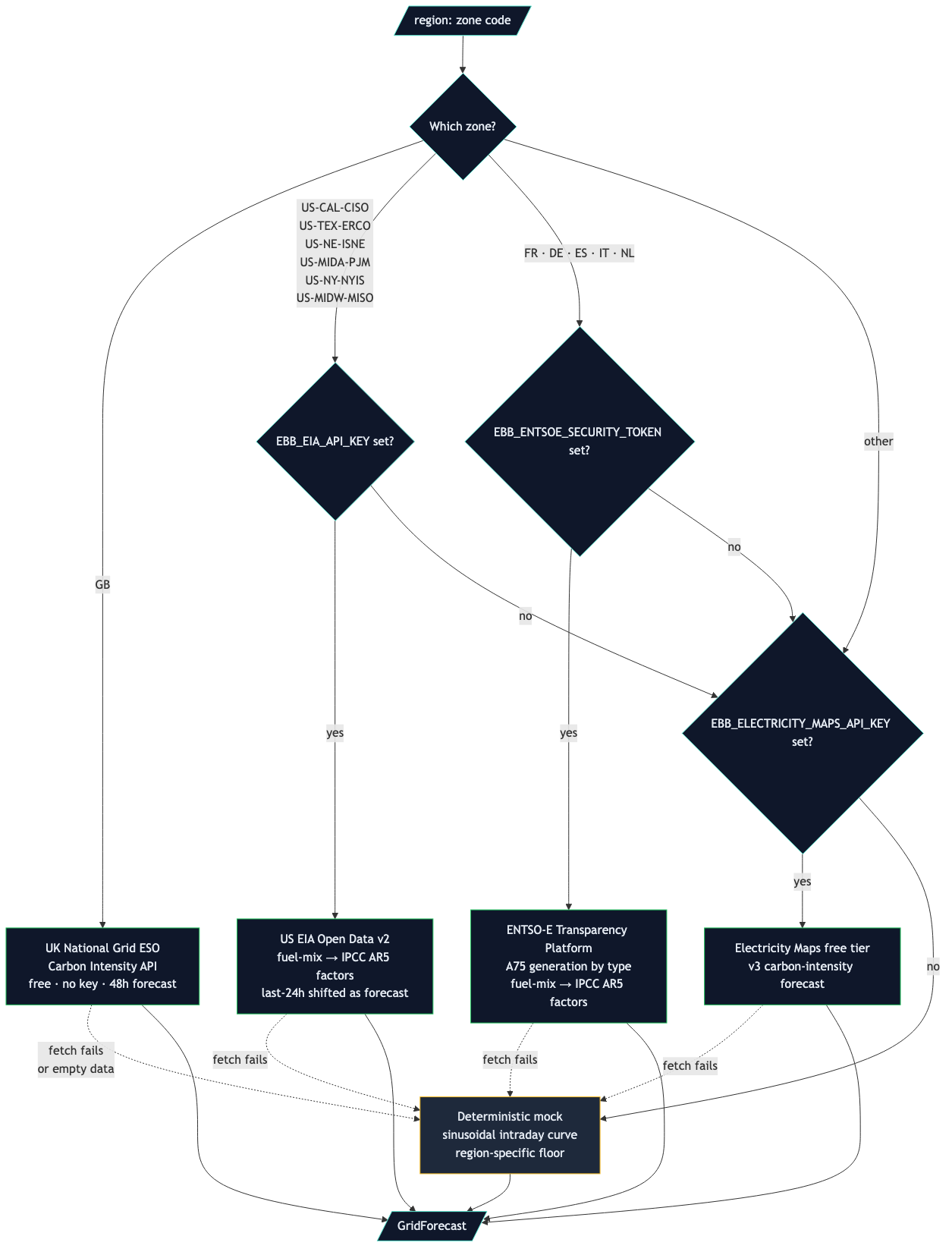
The MCP server is a thin stdio process the agent host (Claude Code,
Claude Desktop, Cursor, Cline, Zed, OpenClaw) spawns. It enqueues
work to a SQLite-backed queue at `~/.tidegap/queue.db`; an off-process
`tidegap tick` daemon (launchd / systemd / cron) reads scheduled rows
and dispatches them to the LLM provider at the chosen window. The
grid feed is a side-channel — the router picks per-zone between four
real-data sources before falling back to mock.
## Quick start
**See [QUICKSTART.md](./QUICKSTART.md) — four steps, five minutes.**
### As a Claude Code plugin (one-command install)
```bash
claude plugin marketplace add tidegap/tidegap
claude plugin install tidegap
```
That ships ten slash commands (`/tidegap:defer`, `/tidegap:plan`,
`/tidegap:check`, `/tidegap:cancel`, `/tidegap:expedite`, `/tidegap:reschedule`,
`/tidegap:retry`, `/tidegap:grid`, `/tidegap:later`, `/tidegap:usage`), an `tidegap` skill, and auto-wires the
`@tidegap/mcp` MCP server. Full plugin reference: **[`packages/claude-code-plugin/README.md`](./packages/claude-code-plugin/README.md)**.
```
> /tidegap:defer "Summarize today's GitHub notifications" --by 4h
Deferred ✓ scheduled for 22:15 UTC (cleanest window inside the deadline)
> /tidegap:check
2 tasks queued · oldest in 1h · cleanest at 03:00 UTC
```
Full command surface: `/tidegap:{defer, plan, check, cancel, expedite,
reschedule, retry, grid}`. Tasks persist to `~/.tidegap/queue.db` and
survive Claude Code restarts.
### As an MCP server (Claude Desktop / Cursor / Cline / Zed)
```bash
npm install -g @tidegap/mcp # or run via npx -y @tidegap/mcp
```
Then add to Claude Desktop's MCP config
(`~/Library/Application Support/Claude/claude_desktop_config.json` on
macOS):
```json
{
"mcpServers": {
"tidegap": {
"command": "npx",
"args": ["-y", "@tidegap/mcp"],
"env": {
"TIDEGAP_ELECTRICITY_MAPS_API_KEY": "optional; falls back to mock data without it. GB is always live via the free UK Carbon Intensity API.",
"TIDEGAP_EIA_API_KEY": "optional; US ISO fuel-mix (average) intensity.",
"TIDEGAP_ENTSOE_SECURITY_TOKEN": "optional; EU zone intensity.",
"WATTTIME_USERNAME": "optional; with WATTTIME_PASSWORD, enables WattTime v3 marginal-emissions forecasts for US ISOs (takes precedence over EIA where covered).",
"WATTTIME_PASSWORD": "optional; pairs with WATTTIME_USERNAME."
}
}
}
}
```
The MCP server exposes twelve tools to the agent (measured, `toolsForHost("mcp")` in
[`packages/core-ts/src/tool-surface.ts`](packages/core-ts/src/tool-surface.ts)):
- `get_grid_forecast(region, hours?)` — returns the next N hours of
carbon intensity for a grid region (e.g. `US-CAL-CISO`).
- `recommend_window(deadline, region?, ...)` — plans the cleanest window
inside the deadline without queueing anything.
- `schedule_task(prompt, deadline, model?, carbon_budget_g?)` — queues a
task for execution at the cleanest window inside the deadline;
`deadline_kind: "quota_reset"` sets the deadline to the next configured
quota reset minus a margin.
- `check_queue_status(task_id?)` — lists pending tasks and any
completed receipts; viewing one finished task marks it read.
- `cancel_task`, `expedite_task`, `update_deadline`, `retry_task`,
`cancel_all` — control a queued task (or the whole queue).
- `reply_task(task_id, text)` — continue a completed task as a new task.
### As a library
```typescript
import { defer } from "@tidegap/core";
const result = await defer(
() => anthropic.messages.create({ /* … */ }),
{
deadline: new Date(Date.now() + 12 * 3600 * 1000).toISOString(), // 12 h from now
carbonBudgetG: 5,
region: "US-CAL-CISO",
},
);
```
### With a provider adapter and the Batch API (v0.2)
```typescript
import { Scheduler, AnthropicAdapter } from "@tidegap/core";
const scheduler = new Scheduler({ dbPath: "/var/lib/tidegap/queue.sqlite" });
const adapter = new AnthropicAdapter();
await scheduler.defer(
() => adapter.dispatch("claude-sonnet-5", "Summarize today's git commits."),
{ deadline: new Date(Date.now() + 12 * 3600 * 1000).toISOString(), region: "US-CAL-CISO" },
);
// or — submit 100 prompts via Anthropic Message Batches for a 50% discount:
const handle = await adapter.dispatchBatch("claude-sonnet-5", prompts);
console.log(handle.batchId);
```
The SQLite-backed queue is opt-in via `dbPath`; without it the
scheduler runs in-memory as in v0.1. The Anthropic and OpenAI SDKs are
peer dependencies — install them only if you use the corresponding
adapter.
### Run through your Claude Code subscription
`tidegap tick` can run tasks through the local `claude` CLI. It uses your Claude Code subscription quota and login, so you need no API key.
**Requirements.** Install Claude Code and log in once (`claude`, then `/login`) as the user who runs the tick daemon. If a task fails with an "unknown option" message, update Claude Code.
**Which tasks use it.**
- A task with `provider: "claude-code"` always runs through Claude Code. `schedule_task` (MCP) and quick add in `tidegap ui` accept this provider. The OpenClaw plugin does not.
- A task that `schedule_task` queues from a Claude Code session gets `provider: "claude-code"` when the call names no provider, and runs in a copy of that session (see "Run in the session that asked" below).
- An `anthropic` task runs through Claude Code when `ANTHROPIC_API_KEY` is not set. When the key is set, it uses the Anthropic API as before.
- `openai`, `gemini` and `ollama` tasks never run through Claude Code. When the tick finds Claude Code and one of these tasks is due without its key, the task fails with "no adapter configured" and does not wait.
**How the tick finds `claude`.** First `TIDEGAP_CLAUDE_BIN`, then each directory on `PATH`, then `~/.local/bin`, `~/.claude/local`, `/opt/homebrew/bin` and `/usr/local/bin`. On macOS, as a last step, it asks your login shell (`zsh -ilc 'command -v claude'`). It does this only when a pending task needs Claude Code. This step finds `claude` under launchd, whose `PATH` does not include `~/.local/bin`.
**What a run can do.** The tick runs:
```bash
claude -p --output-format json --tools "WebSearch,WebFetch" \
--allowedTools "WebSearch,WebFetch" --permission-mode dontAsk \
--max-budget-usd 1 --safe-mode --strict-mcp-config --no-session-persistence \
[--model ] [--system-prompt-file ]
```
- The prompt goes on stdin, so it does not show in `ps`.
- `--tools` and `--allowedTools` name the same tools. `--permission-mode dontAsk` denies every other tool. By default the model can search the web and fetch pages, and nothing else.
- `--safe-mode` and `--strict-mcp-config` turn off your CLAUDE.md, skills, plugins, hooks and MCP servers.
- The run happens in a new temporary directory, never in your repository, and the tick deletes the directory after the run.
- `--no-session-persistence` keeps these runs out of your Claude Code session history.
- The child process does not get `ANTHROPIC_API_KEY` or `ANTHROPIC_AUTH_TOKEN`, so it uses your subscription login. It also does not get your other provider keys, the WattTime login or any `TIDEGAP_*` variable.
- The tick runs a `claude` it finds on `PATH` or in a known location only when neither the file nor its directory is world-writable.
- A run that takes more than 10 minutes is stopped, together with every process it started, and the task fails.
**Tools.** A run gets `WebSearch` and `WebFetch` by default, so a task such as "what is the weather forecast for Kyiv tomorrow" gets a real answer. To change the set for one task, pass `tools` (an array of tool names) to `schedule_task` or `POST /api/tasks`; `[]` means no tools, and a reply keeps the tools of its parent. To change the default, set `TIDEGAP_CLAUDE_TOOLS` (a comma list; an empty value means no tools). Only `WebSearch`, `WebFetch`, `Read`, `Grep` and `Glob` are allowed. Any other name, such as `Bash`, `Write` or `Edit`, is rejected when you queue the task. Web pages are untrusted input: a page can contain text that tries to give the model instructions (prompt injection). For this reason a run never gets a tool that runs commands or writes files. `Read`, `Grep` and `Glob` can read files that your user can read, so add them only for prompts you trust. A set cannot combine a file tool with a web tool, because a fetched page could make the run send a local file out. The receipt records the tool set of the run, and `tidegap queue show ` prints it as `tools:`.
**Model.** The tick passes the task's `model` to `--model` when it is a `claude-*` id or one of `opus`, `sonnet`, `haiku`, `fable`, `opusplan` (optionally with `[1m]`). Otherwise Claude Code uses its own default. A `claude-code` task queued without a model gets `"default"`. The receipt records the model that Claude Code reports. `maxTokens` and `temperature` have no effect, because the CLI has no flags for them.
**Settings** (environment or `~/.config/tidegap/env`):
| Variable | Effect |
|---|---|
| `TIDEGAP_CLAUDE_BIN` | Path of the `claude` binary. Skips the lookup. |
| `TIDEGAP_CLAUDE_CODE=0` | Do not look for Claude Code (`false`, `off` and `no` also work). |
| `TIDEGAP_CLAUDE_CODE_MAX_BUDGET_USD` | `--max-budget-usd` cap per run. Default `1`. An invalid value falls back to `1` with a warning. |
| `TIDEGAP_CLAUDE_TOOLS` | Default tool set, a comma list from the allowlist. Default `WebSearch,WebFetch`; an empty value means no tools. An invalid value keeps the default with a warning. Tasks queued from a Claude Code session do not use it (see below). |
| `TIDEGAP_RESUME=off` | Run every task fresh, also a task queued from a Claude Code session (`0`, `false` and `no` also work). |
| `TIDEGAP_RESUME_MAX_TOKENS` | Context cap of a run that resumes a session. Default `150000`. A larger session runs fresh. |
| `TIDEGAP_CLAUDE_CODE_RESUME_MAX_BUDGET_USD` | `--max-budget-usd` cap of a run that resumes a session. Default `3`. |
**Cost and quota.** Tasks use the same Claude Code quota as your interactive sessions. A night of queued tasks can use up the limit you expect to have in the morning. Claude Code's list-price estimate for each run is in `tidegap queue show --raw` (`total_cost_usd`, next to `session_id`). Your subscription is not billed per run. The budget cap uses this estimate.
**Carbon receipt.** The receipt has provider `claude-code`. Its token count includes the system prompt that Claude Code adds to each run (about 3k tokens) when Claude Code writes it to the prompt cache. Cache reads are not counted. Thus a receipt can show more tokens than an API call with the same prompt.
**Usage limit.** A run that hits the subscription limit does not fail. The task goes back to the queue and does not start before the limit resets; then it runs at the cleanest hour. The reset time comes from your limit state (see "Usage and limits" below) when a window is used up, else from the time in Claude Code's message, else one hour later. After the first limit result in a tick, the other due tasks wait for the same time without a run. A task fails with the limit message when the reset is more than 8 days after the task was queued. `tidegap tick` prints `N deferred until HH:MM`.
**Failures.** Any other failed run fails the task once, with no retry. The error names the cause:
- `claude` not found or not executable: install Claude Code or set `TIDEGAP_CLAUDE_BIN`.
- "Not logged in": run `claude` once as this user and complete `/login`.
- Budget cap: `error_max_budget_usd`.
- Timeout: "timed out after 600s".
- Any other exit: the exit code and the end of stderr.
`retry_task` and `expedite_task` do not run `claude-code` tasks: they dispatch inside the MCP server, which has no Claude Code adapter. They leave the task as it is and name `tidegap queue run-now `, which runs it on the next tick.
### Run in the session that asked
A task that you queue from a Claude Code session runs with that session's conversation as context, in that session's project directory. "Review the diff in queue.ts tonight" can then read the repository and knows what you discussed.
**How Tidegap knows the session.** The Claude Code plugin has a session hook. At each session start (also after `/clear` and `/resume`) it writes `~/.tidegap/sessions/claude-.json` (mode 0600) with the session id, the transcript path and the project directory, and it deletes the file when the session ends. When the agent calls `schedule_task`, the MCP server reads the file of the Claude Code process that runs it. Without the plugin, the server uses the session id from its environment, which does not change after `/clear`. A `/tidegap:defer` call passes the id directly. The server uses a passed id only when it names this process's session (the hook file's or the environment's); another id is ignored, and the reply has a `warning:` line. The hook only takes a `claude` process that runs as you. When no session is found, the task runs as before.
**What runs.** At the clean hour, `tidegap tick` runs a copy (fork) of the session:
```bash
cd && claude -p --output-format json --tools "Read,Grep,Glob" \
--allowedTools "Read(///**)" --permission-mode dontAsk \
--max-budget-usd 3 --safe-mode --strict-mcp-config \
--resume --fork-session
```
- The fork gets a new session id. Your session and its transcript do not change, so you can keep working in it while the task runs.
- Resuming gives context, not permissions. The run can read files inside the project directory only. It never gets `Bash`, `Write` or `Edit`, so it answers with text (a plan, a diff in the reply) and does not change files.
- The fork is kept, so you can open it: `tidegap queue show ` prints `open: cd && claude --resume `. Forks of `-p` runs do not show in the `claude --resume` picker; open them by id.
- A reply to such a task runs in a copy of the session too when it comes from `tidegap queue reply`, the page, or that same session. A `reply_task` call from another session, or from OpenClaw, runs fresh.
- A task that names `tools` keeps them. A task with `WebSearch` or `WebFetch` runs fresh, because session context and web tools together could send a local file out.
**When it runs fresh instead.** The run starts a new session without the conversation when the task has web tools, the project directory or the transcript is gone, the project directory is `/`, your home directory or not yours, the session's last turn used more than `TIDEGAP_RESUME_MAX_TOKENS` tokens (default 150 000), or `TIDEGAP_RESUME=off`. The tick then puts a short header before the prompt: where the task was queued and why it runs fresh. The `schedule_task` reply says where the task is expected to run (`runs_in: a copy of this Claude Code session (d76db676) in /work/app, file tools Read, Grep, Glob`), and the receipt records what ran (`session`: `fork` with the fork id, or `fresh` with the reason).
**Cost.** A fork reads the whole session again, hours later, with a cold cache. A 150k-token session costs much more quota than a short fresh prompt. The cap keeps large sessions out, and a resumed run has its own budget cap (`TIDEGAP_CLAUDE_CODE_RESUME_MAX_BUDGET_USD`, default 3), because a run over budget returns no answer.
**Back in the session.** When you return to the session (`claude --resume `), the plugin's session-start hook tells Claude which of its tasks finished: task ids, status, fork or fresh, and the command that opens the fork. No task text and no reply enters the session. Claude reads a result with `check_queue_status`, which also prints `ran:` (fork or fresh) and, for a fork, `open:`.
**Provider default.** A task queued from a Claude Code session uses `claude-code` when the call names no provider, also when `ANTHROPIC_API_KEY` is set. It then uses your subscription quota, not API credit. Pass `provider: "anthropic"` for the API; an `anthropic` task never resumes a session.
**OpenClaw.** Nothing changes: OpenClaw already runs a task on its gateway runtime and delivers the result to the chat it came from.
### Usage and limits
Tidegap shows how much of your Claude Code 5-hour and weekly limits you used and when they reset. It can start a task after the reset.
**Where the numbers come from.** Claude Code gives the limits to its status line command. `tidegap usage hook` is a status line command: it writes the limits to `~/.tidegap/usage.json` (mode 0600, no token) and prints nothing. `tidegap install` asks, in a terminal, to add it to `~/.claude/settings.json`; it changes the file only when you answer yes. To add it yourself:
```json
{
"statusLine": { "type": "command", "command": "tidegap usage hook" }
}
```
If you already have a status line command, keep it after `--`: `tidegap usage hook -- ~/.claude/statusline.sh`. The hook gives your command the same input and shows its output. Claude Code sends the limits for Pro and Max logins, after the first reply of a session. The values are as old as your last Claude Code reply; `tidegap usage` shows their age.
**Read the limits.**
```bash
tidegap usage # one row per window: used, resets; Codex limits when Codex is installed
tidegap usage --json # the usage/v1 document
tidegap usage --spend # also tokens and a cost estimate of the current 5-hour window
```
The MCP tool `tidegap_usage` returns the same document (`include_spend: true` for the spend). It is read-only. `tidegap ui` shows the limit in a header pill ("Claude 5h 72% · resets 16:30"); click it for every window and a "Show spend" button. The Mac menu bar tooltip and the browser extension popup show the same limit as one line (`Claude 5h: 72%, resets 16:30`), and nothing when there is no reading. `GET /api/usage` serves the document to other clients (see `docs/spec/ui-client-api.md`).
**Spend.** `--spend` reads the Claude Code session logs (`~/.claude/projects`, or `$CLAUDE_CONFIG_DIR/projects`) for the current 5-hour window: input, output, cache-write and cache-read tokens, total, by model and for the five most recent sessions. The cost is an API list-price estimate, not what your subscription bills. The window starts 5 hours before the 5-hour limit resets; with no limit reading it is the last 5 hours. The scan reads only the logs written in that window, newest first, and can take a few seconds when you used Claude Code a lot, so Tidegap runs it only when you ask. It stops at 2,000 files, 4 GiB or 15 seconds and then says the result is partial. It keeps only token counts and model names, never prompt or reply text, and writes nothing. Runs of Tidegap's own `claude-code` tasks are not in these logs.
**Codex.** When `~/.codex` (or `$CODEX_HOME`) has session logs, Tidegap shows the Codex 5-hour and weekly limits from the newest one, with the time Codex last reported them. `--spend` adds the tokens of recent Codex sessions. Tidegap reads only `sessions/`; it never opens Codex's `auth.json`.
**Run after the limit resets.** `tidegap queue later --until after-limit-reset` (add `--reset-at ` when Tidegap has no limit state), `tidegap queue reschedule --after-limit-reset`, or `after_limit_reset: true` on MCP `schedule_task`. The task does not start before the reset, and runs at the cleanest hour after it. The reset is the latest reset of a used-up window; when no window is used up, it is the reset of the fuller window. With no limit state, the command fails and names the cause.
**Optional: the usage API.** `TIDEGAP_USAGE_OAUTH=1` makes Tidegap also read Anthropic's usage endpoint (`api.anthropic.com/api/oauth/usage`) with your Claude Code login. It is off by default. Read this before you turn it on:
- The endpoint is not documented by Anthropic and can change or stop at any time.
- Anthropic's terms say Pro and Max login tokens are for Claude Code and Claude.ai. This read uses that token outside Claude Code. It is not inference, but your account carries the risk.
- Tidegap reads the token from the macOS Keychain (`/usr/bin/security`, which can ask for permission once) or `~/.claude/.credentials.json`. It never stores, logs or refreshes the token, and never writes to `~/.claude` or the Keychain.
- Tidegap uses a status line reading under 5 minutes old first. Every process shares one cache in `~/.tidegap/usage.json`: a reading is reused for 5 minutes (1 minute after a limit result in a tick), and no request is sent for at least 60 minutes after a rate-limit answer.
**Settings** (environment or `~/.tidegap/config`; the environment wins):
| Variable | Effect |
|---|---|
| `TIDEGAP_USAGE=off` | Do not read limits at all (`0`, `false` and `no` also work). The hook writes nothing. |
| `TIDEGAP_USAGE_OAUTH=1` | Also read the usage API (see above). Default off. |
The Mac app and the launchd tick do not see your shell variables, so put these in `~/.tidegap/config`.
### Python
```bash
pip install "tidegap[anthropic,openai,signing]"
```
From a clone, see [Install (development)](#install-development).
```python
import asyncio
from datetime import datetime, timedelta, timezone
from tidegap import defer
asyncio.run(defer(
lambda: do_work(),
deadline=datetime.now(timezone.utc) + timedelta(hours=12),
carbon_budget_g=5,
region="US-CAL-CISO",
))
```
### Your queue: `tidegap ui`, notifications, session line
```bash
tidegap install # write and load the tick daemon (picks --laptop on a Mac with a battery)
tidegap status # will queued tasks run? one line per fact, exit 1 when not
tidegap ui # opens the local task page in your browser
tidegap queue list --unread # the same inbox in the terminal
tidegap queue show # one task: prompt, result, receipt, events (who changed it, when)
tidegap queue later --until tonight # push a task later; never earlier than planned
```
`tidegap queue later` takes `--until` (`+2h`, `tonight`, `tomorrow`,
`tomorrow 9:00`, `HH:MM`, an ISO time, `after-limit-reset` with an optional
`--reset-at`), `--preset` (`1h`, `tonight`, `tomorrow_morning`,
`after_limit_reset`) or `--delay `. A target at or before the
task's planned start is refused with the planned time.
`tidegap queue reschedule --by` is now an alias of `later --until`.
`tidegap ui` serves a local task manager. **Agenda** (the default) lists pending
tasks by day with the carbon band of each run hour; overdue tasks and unread
failures sit in "Needs attention". **Journal** lists finished tasks with
status, provider and kind filters. **Timeline** shows the forecast curve with
tasks at their scheduled hour. A task's drawer shows the result, the
conversation with a reply box, the receipt and the `claude --resume` line of
the session that queued it. From the page you can cancel (with a 5 s Undo),
reschedule, move a task to another day (drag it onto a day, or use the
move-to list), run it now, reply, mark it read or unread, stop a series, and
start a dispatcher when none is running. Actions change the ledger; tasks
still run on the dispatcher's next tick (`tidegap tick`), and the page shows when
that last ran. It listens on 127.0.0.1 only, and every API request needs
a random token that is printed once with the link and changes on every start.
`tidegap tick` posts a desktop notification for each task that completes or
fails (macOS, Linux with `notify-send`, Windows). Turn it off with
`tidegap tick --no-notify`, `TIDEGAP_NO_NOTIFY=1` in the environment, or `TIDEGAP_NOTIFY=0` in `~/.tidegap/config`. The Claude
Code plugin adds one line at session start when finished tasks are unread.
These switches turn off the desktop notification only; Telegram (below) keeps sending.
### Telegram
Tidegap can send the same events to a Telegram chat and take commands from it.
The quick way: open Settings → Integrations in the `tidegap ui` page (the
Settings button) or the Mac app (**Integrations…** in the menu). Paste a bot
token from [@BotFather](https://t.me/BotFather), press Connect, then open the
link or scan the QR code on the phone. The card shows whether the listener
runs and offers Send test message and Disconnect. Only the page and the Mac
app can open it; the browser extensions cannot.
From a terminal:
1. Create a bot with [@BotFather](https://t.me/BotFather). Use a bot only for
Tidegap. A bot that OpenClaw or another program already polls does not
work: Telegram gives each update to one reader, and pairing stops with
"this bot is used elsewhere" when it sees a webhook or a second poller.
2. Put its token in `~/.config/tidegap/env` (mode 0600):
`TIDEGAP_TELEGRAM_BOT_TOKEN=`. `TELEGRAM_BOT_TOKEN` is read when the
first one is not set.
3. Run `tidegap channels add telegram`. It prints a 6-digit code. Send
`/pair ` to the bot from a private chat (groups are ignored). Five
wrong codes stop the pairing.
4. Pairing installs and loads the listener: the LaunchAgent
`com.tidegap.channels` on macOS or the systemd user unit
`tidegap-channels.service` on Linux. Both run `tidegap channels serve` and
restart it when it exits. `--no-load` pairs without it. On Windows, keep
`tidegap channels serve` running yourself.
```bash
tidegap channels add telegram # pair a private chat
tidegap channels list # paired channels (--json)
tidegap channels remove # unpair; the last telegram channel unloads the listener
tidegap channels serve --once # one poll cycle (for checks)
```
The bot answers only the paired chat. Commands: `/queue` (the next tasks,
numbered), `/later <1h|tonight|tomorrow|reset [HH:MM]|HH:MM>`,
`/run `, `/cancel `, `/result ` and `/help`. A number refers
to the last `/queue` listing and expires after 10 minutes. The buttons under a
message do the same as the page's actions.
`tidegap tick` sends a message when a task is done (with a Result button) or
fails, when a clean window starts, and when queued tasks cannot run (once per
change). The listener also reports a stopped tick daemon.
Privacy: a done message includes the first 600 characters of the result, so
model output goes to Telegram's servers. A task with `redact_in_receipt` gets
no preview; use `tidegap queue show ` for it. The token never appears in
logs or errors.
### Dashboard
```bash
pnpm --filter @tidegap/web dev
# → http://localhost:3000
```
Pages: live carbon-intensity map (31 regions, NA/EU/APAC — measured,
see [docs/claims.md](docs/claims.md)), 72-hour forecast charts,
best-window planner, and a queue explainer (`/queue`). The site never
sees your queue; open your own with `tidegap ui` (below).
**Grid data sources** (per zone, falls back to mock on failure):
> **Where do the keys go?** The environment variables in the `Auth` column
> configure the **hosts** — the `tidegap` CLI, the `@tidegap/mcp` server, and this
> dashboard. Each host reads them at its own entry point and injects them into
> `@tidegap/core`, which is environment-pure and reads nothing ambient.
> The **`@vitalini/tidegap` OpenClaw plugin reads no environment variables at all**:
> configure it under `plugins.entries.tidegap.config` in your gateway config, using
> `eiaApiKey`, `entsoeSecurityToken`, `electricityMapsApiKey`,
> `wattTimeUsername` / `wattTimePassword` (plus `anthropicApiKey`,
> `openaiApiKey`, `geminiApiKey` / `googleApiKey`, `ollamaHost`,
> `ollamaModels`, `carbonBudgetG`, `carbonBudgetWindow`, `defaultRegion`,
> `dbPath`). OpenClaw resolves the `"${ENV_VAR}"` shorthand in the credential
> fields, so you can keep exporting the same variables and let the gateway read
> them on the plugin's behalf.
| Zone | Source | Auth (CLI / MCP / dashboard) | Notes |
|---|---|---|---|
| `GB` | [UK National Grid ESO Carbon Intensity API](https://carbonintensity.org.uk/) | None | Real 48h forecast, always on |
| `US-CAL-CISO`, `US-TEX-ERCO`, `US-NE-ISNE`, `US-NY-NYIS`, `US-MIDA-PJM`, `US-MIDW-MISO` | [WattTime v3](https://watttime.org/) marginal (co2_moer) | Free account (`WATTTIME_USERNAME` + `WATTTIME_PASSWORD`) | **Marginal**-emissions FORECAST (lbs/MWh → gCO2/kWh). Takes precedence over EIA where covered; falls through to EIA on any error. Signal disclosed as `signalType: "marginal"` on forecasts/receipts |
| `US-CAL-CISO`, `US-TEX-ERCO`, `US-NE-ISNE`, `US-MIDA-PJM` (+`US-NY-NYIS`, `US-MIDW-MISO`) | [US EIA Open Data](https://www.eia.gov/opendata/) | Free API key (`TIDEGAP_EIA_API_KEY`) | Hourly fuel-mix → carbon intensity via IPCC AR5 factors (average signal; used when WattTime is unconfigured) |
| `FR`, `DE` (plus `ES`, `IT`, `NL` opt-in) | [ENTSO-E Transparency Platform](https://transparency.entsoe.eu/) | Free token (`TIDEGAP_ENTSOE_SECURITY_TOKEN`) | Realised generation by type → carbon intensity |
| any zone (universal fallback) | [Electricity Maps](https://www.electricitymaps.com/) free-tier | `TIDEGAP_ELECTRICITY_MAPS_API_KEY` | Used when zone-specific source missing |
| anything else | Deterministic mock curve | None | Used when no key set or upstream fails |
WattTime v3 uses granular sub-BA region codes; only `US-CAL-CISO →
CAISO_NORTH` is verified against WattTime's live public docs — the other
US mappings are best-effort and marked unverified in
`packages/core-ts/src/grid.ts`, degrading safely to EIA if a code is
rejected. Want to add another free public source? Each adapter is a single
function in `packages/core-ts/src/grid.ts` — open a PR.
---
## Install (development)
```bash
# from the repo root
pnpm install # installs all workspace packages
pnpm build # builds @tidegap/core and @tidegap/mcp
pnpm test # runs vitest across packages
```
Python package from the clone (editable):
```bash
pip install -e "packages/core-py[anthropic,openai,signing]"
```
Requirements: Node 20+, pnpm 9+. Python 3.11+ if working on the Python
package.
---
## Documentation
- [`docs/`](./docs/) — design docs, MCP spec proposals (forthcoming).
- [`examples/`](./examples/) — OpenClaw demo skill, Claude Code config.
---
## License
[Apache License 2.0](./LICENSE) — patent grant included.
---
## Contributing
This project is in active early development. Issues and PRs welcome;
see [`CHANGELOG.md`](./CHANGELOG.md) for what has shipped. Major new features should
be discussed in an issue first to avoid duplicate effort.
---
*Built by [Vitalii Borovyk](https://github.com/Vitalini).*