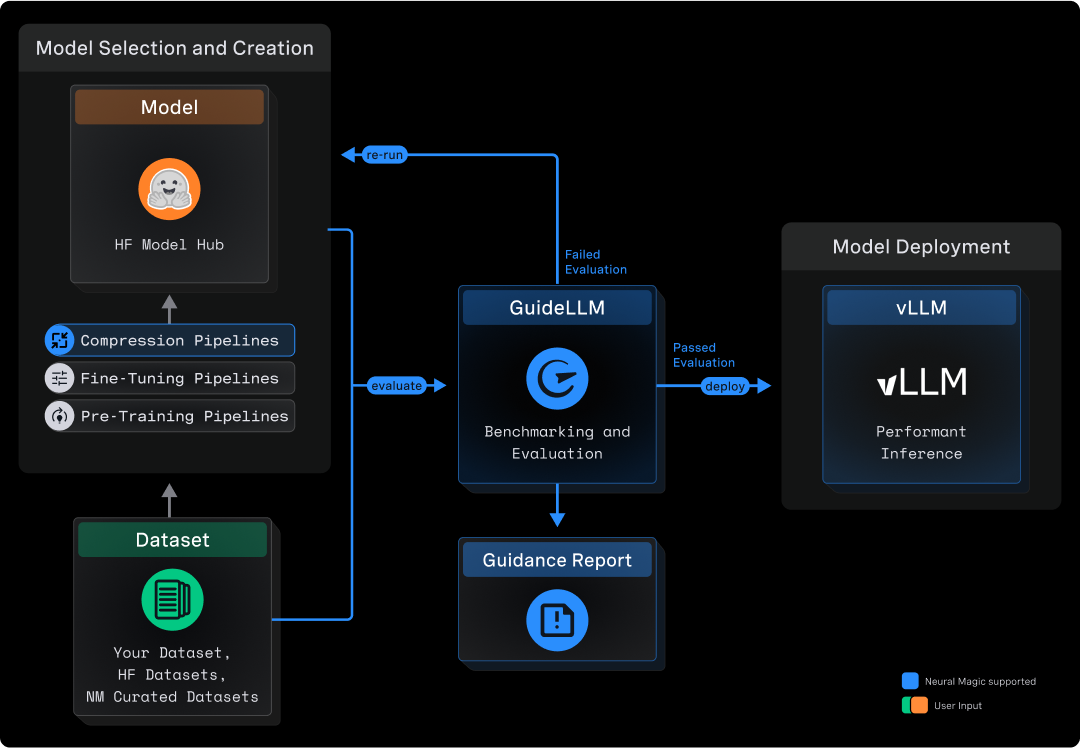
**GuideLLM** is a platform for evaluating how language models perform under real workloads and configurations. It simulates end-to-end interactions with OpenAI-compatible and vLLM-native servers, generates workload patterns that reflect production usage, and produces detailed reports that help teams understand system behavior, resource needs, and operational limits. GuideLLM supports real and synthetic datasets, multimodal inputs, and flexible execution profiles, giving engineering and ML teams a consistent framework for assessing model behavior, tuning deployments, and planning capacity as their systems evolve.
### Why GuideLLM?
GuideLLM gives teams a clear picture of performance, efficiency, and reliability when deploying LLMs in production-like environments.
- **Captures complete latency and token-level statistics for SLO-driven evaluation**, including full distributions for TTFT, ITL, and end-to-end behavior.
- **Generates realistic, configurable traffic patterns** across synchronous, concurrent, and rate-based modes, including reproducible sweeps to identify safe operating ranges.
- **Supports both real and synthetic multimodal datasets**, enabling controlled experiments and production-style evaluations in one framework.
- **Produces standardized, exportable reports for dashboards, analysis, and regression tracking**, ensuring consistency across teams and workflows.
- **Delivers high-throughput, extensible benchmarking** with multiprocessing, threading, async execution, and a flexible CLI/API for customization or quickstarts.
### Comparisons
Many tools benchmark endpoints, not models, and miss the details that matter for LLMs. GuideLLM focuses exclusively on LLM-specific workloads, measuring TTFT, ITL, output distributions, and dataset-driven variation. It fits into everyday engineering tasks by using standard Python interfaces and HuggingFace datasets instead of custom formats or research-only pipelines. It is also built for performance, supporting high-rate load generation and accurate scheduling far beyond simple scripts or example benchmarks. The table below highlights how this approach compares to other options.
| Tool | CLI | API | High Perf | Full Metrics | Data Modalities | Data Sources | Profiles | Backends | Endpoints | Output Types |
| ---------------------------------------------------------------------------- | --- | --- | --------- | ------------ | ------------------------------ | ------------------------------------- | ------------------------------------------------------------- | ------------------------------- | ------------------------------------------------------------------------- | ------------------------ |
| GuideLLM | ✅ | ✅ | ✅ | ✅ | Text, Image, Audio, Video | HuggingFace, Files, Synthetic, Custom | Synchronous, Concurrent, Throughput, Constant, Poisson, Sweep | OpenAI-compatible | /completions, /chat/completions, /audio/translation, /audio/transcription | console, json, csv, html |
| [inference-perf](https://github.com/kubernetes-sigs/inference-perf) | ✅ | ❌ | ✅ | ❌ | Text | Synthetic, Specific Datasets | Concurrent, Constant, Poisson, Sweep | OpenAI-compatible | /completions, /chat/completions | json, png |
| [genai-bench](https://github.com/sgl-project/genai-bench) | ✅ | ❌ | ❌ | ❌ | Text, Image, Embedding, ReRank | Synthetic, File | Concurrent | OpenAI-compatible, Hosted Cloud | /chat/completions, /embeddings | console, xlsx, png |
| [llm-perf](https://github.com/ray-project/llmperf) | ❌ | ❌ | ✅ | ❌ | Text | Synthetic | Concurrent | OpenAI-compatible, Hosted Cloud | /chat/completions | json |
| [ollama-benchmark](https://github.com/aidatatools/ollama-benchmark) | ✅ | ❌ | ❌ | ❌ | Text | Synthetic | Synchronous | Ollama | /completions | console, json |
| [vllm/benchmarks](https://github.com/vllm-project/vllm/tree/main/benchmarks) | ✅ | ❌ | ❌ | ❌ | Text | Synthetic, Specific Datasets | Synchronous, Throughput, Constant, Sweep | OpenAI-compatible, vLLM API | /completions, /chat/completions | console, png |
## What's New
This section summarizes the newest capabilities available to users and outlines the current areas of development. It helps readers understand how the platform is evolving and what to expect next.
**Recent Additions**
- New CLI interface with improved configuration and validation.
- New backends for in-process vLLM Python API and websocket audio transcription.
- Multi-turn conversation capabilities for benchmarking chat agents and dialogue systems.
- Full tool calling support (client and server side) in chat completions and responses APIs.
- Synthetic video and image datasets for controlled experimentation.
- Replay of Mooncake trace files for realistic load testing.
- Support for benchmarking Geospatial LLMs.
**Active Development**
- Replay of OTEL and WEKA trace files.
- Improved scenarios for benchmarking standard workflows.
- Ability to stack scenario files for complex benchmarking workflows.
- Ability to override constraints for individual benchmarks in a profile.
- gRPC backend for benchmarking vLLM-native servers.
## Quick Start
The Quick Start shows how to install GuideLLM, launch a server, and run your first benchmark in a few minutes.
### Install GuideLLM
Before installing, ensure you have the following prerequisites:
- OS: Linux or MacOS
- Python: 3.10 - 3.13
Install the latest GuideLLM release from PyPi using `pip` :
```bash
pip install guidellm[recommended]
```
Or install from source:
```bash
pip install git+https://github.com/vllm-project/guidellm.git
```
Or run the latest container from [ghcr.io/vllm-project/guidellm](https://github.com/vllm-project/guidellm/pkgs/container/guidellm):
```bash
podman run \
--rm -it \
-v "./results:/results:rw" \
-e GUIDELLM__SPEC__BACKEND='{"kind": "openai_http", "target": "http://localhost:8000"}' \
-e GUIDELLM__SPEC__PROFILE='{"kind": "sweep"}' \
-e GUIDELLM__SPEC__CONSTRAINTS='[{"kind": "max_duration", "seconds": 30}]' \
-e GUIDELLM__SPEC__DATA='[{"kind": "synthetic_text", "prompt_tokens": 256, "output_tokens": 128}]' \
ghcr.io/vllm-project/guidellm:latest
```
Published images are multi-arch (`linux/amd64` and `linux/arm64`) for Docker, Podman, Kubernetes, and OpenShift. Prefer pinning a release tag in production:
| Tag | Meaning |
| --------- | --------------------------------------------- |
| `vX.Y.Z` | Immutable release (multi-arch from `v0.7.0+`) |
| `stable` | Newest full release (`vX.Y.Z`) |
| `latest` | Newest release tag (may include pre-releases) |
| `nightly` | Tip of `main` |
Architecture-specific tags such as `vX.Y.Z-amd64` / `vX.Y.Z-arm64` are build artifacts — do not use them as the image reference.
### Launch an Inference Server
Start any OpenAI-compatible endpoint. For vLLM:
```bash
vllm serve "neuralmagic/Meta-Llama-3.1-8B-Instruct-quantized.w4a16"
```
Verify the server is running at `http://localhost:8000`.
### Run Your First Benchmark
Run a sweep that identifies the maximum performance and maximum rates for the model:
```bash
guidellm run \
--backend kind=openai_http,target=http://localhost:8000 \
--profile kind=sweep \
--constraint kind=max_duration,seconds=30 \
--data kind=synthetic_text,prompt_tokens=256,output_tokens=128
```
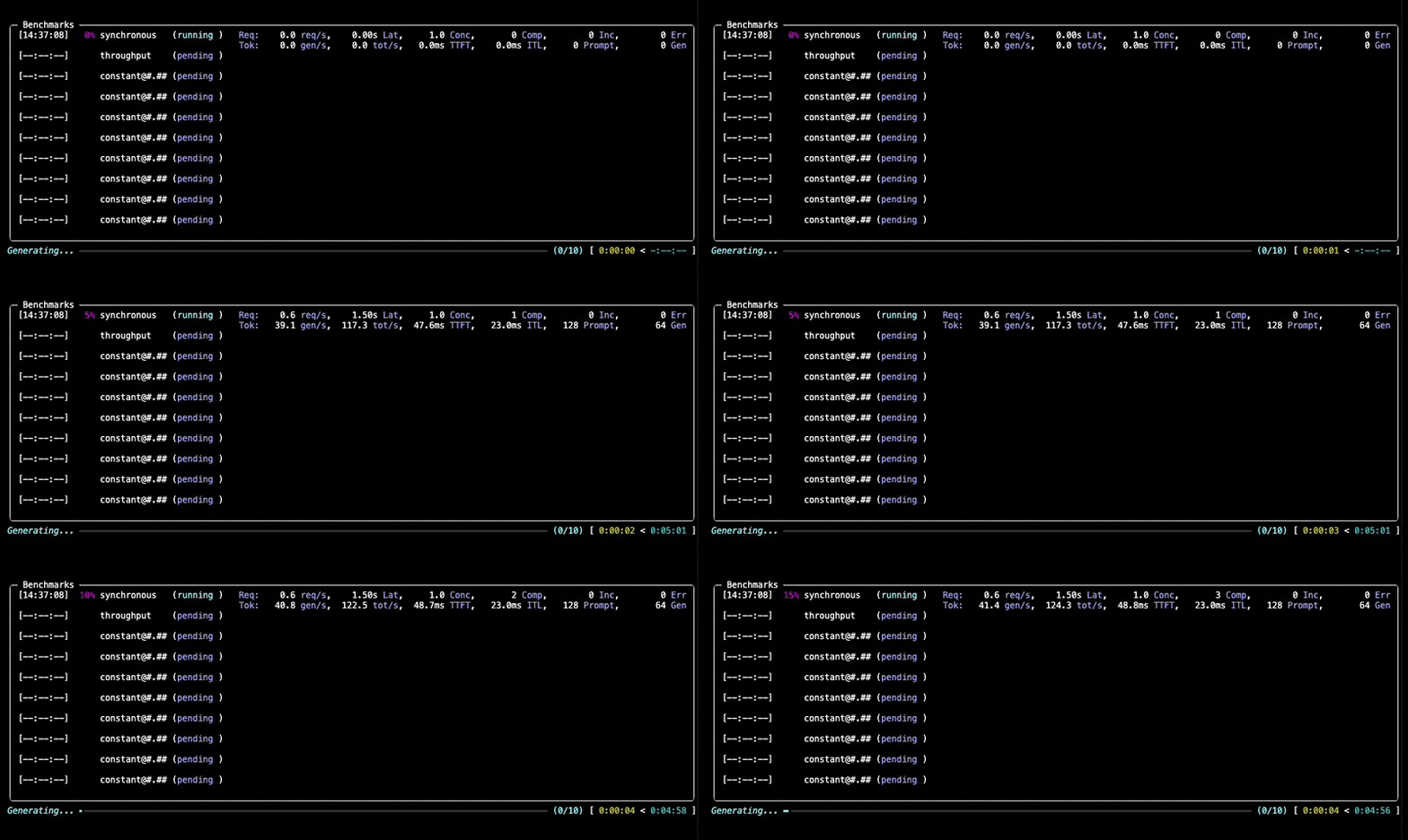
You will see progress updates and per-benchmark summaries during the run, as given below:
### Inspect Outputs
After the benchmark completes, GuideLLM saves all results into the output directory you specified (default: the current directory). You'll see a summary printed in the console along with a set of file locations (`.json,` `.csv`, `.html`) that contain the full results of the run.
The following section, **Output Files and Reports**, explains what each file contains and how to use them for analysis, visualization, or automation.
## Output Files and Reports
After running the Quick Start benchmark, GuideLLM writes several output files to the directory you specified. Each one focuses on a different layer of analysis, ranging from a quick on-screen summary to fully structured data for dashboards and regression pipelines.
**Console Output**
The console provides a lightweight summary with high-level statistics for each benchmark in the run. It's useful for quick checks to confirm that the server responded correctly, the load sweep completed, and the system behaved as expected. Additionally, the output tables can be copied and pasted into spreadsheet software using `|` as the delimiter. The sections will look similar to the following:
**benchmarks.json**
This file is the authoritative record of the entire benchmark session. It includes configuration, metadata, per-benchmark statistics, and sample request entries with individual request timings. Use it for debugging, deeper analysis, or loading into Python with `GenerativeBenchmarksReport`.
Alternatively, a YAML version of this file can be generated for easier human readability with the same content as `benchmarks.json` using `--output yaml "path=benchmarks.yaml"`.
**benchmarks.csv**
This file provides a compact tabular view of each benchmark with the fields most commonly used for reporting—throughput, latency percentiles, token counts, and rate information. It opens cleanly in spreadsheets and BI tools and is well-suited for comparisons across runs.
**benchmarks.html**
The HTML report provides a visual summary of results, including charts of latency distributions, throughput behavior, and generation patterns. It's ideal for quick exploration or sharing with teammates without requiring them to parse JSON.
## Common Use Cases and Configurations
GuideLLM supports a wide range of LLM benchmarking workflows. The examples below show how to run typical scenarios and highlight the parameters that matter most. For a complete list of arguments, details, and options, run `guidellm run --help`.
Each registry-backed option uses the form `--

 ### Inspect Outputs
After the benchmark completes, GuideLLM saves all results into the output directory you specified (default: the current directory). You'll see a summary printed in the console along with a set of file locations (`.json,` `.csv`, `.html`) that contain the full results of the run.
The following section, **Output Files and Reports**, explains what each file contains and how to use them for analysis, visualization, or automation.
## Output Files and Reports
After running the Quick Start benchmark, GuideLLM writes several output files to the directory you specified. Each one focuses on a different layer of analysis, ranging from a quick on-screen summary to fully structured data for dashboards and regression pipelines.
**Console Output**
The console provides a lightweight summary with high-level statistics for each benchmark in the run. It's useful for quick checks to confirm that the server responded correctly, the load sweep completed, and the system behaved as expected. Additionally, the output tables can be copied and pasted into spreadsheet software using `|` as the delimiter. The sections will look similar to the following:
### Inspect Outputs
After the benchmark completes, GuideLLM saves all results into the output directory you specified (default: the current directory). You'll see a summary printed in the console along with a set of file locations (`.json,` `.csv`, `.html`) that contain the full results of the run.
The following section, **Output Files and Reports**, explains what each file contains and how to use them for analysis, visualization, or automation.
## Output Files and Reports
After running the Quick Start benchmark, GuideLLM writes several output files to the directory you specified. Each one focuses on a different layer of analysis, ranging from a quick on-screen summary to fully structured data for dashboards and regression pipelines.
**Console Output**
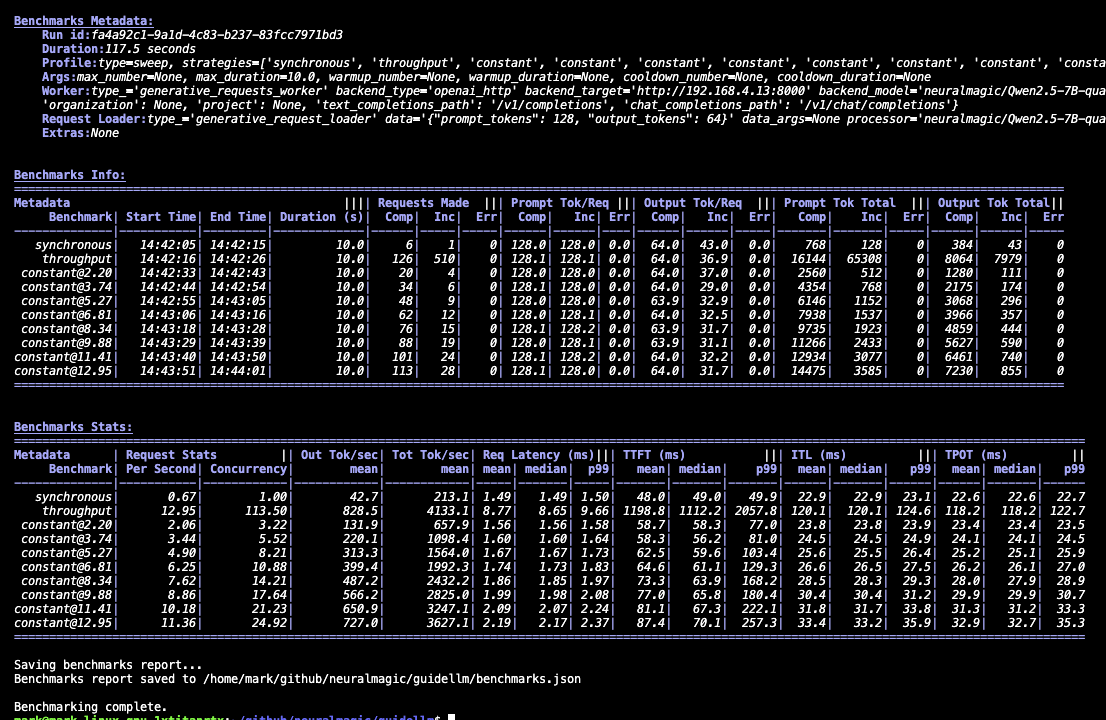
The console provides a lightweight summary with high-level statistics for each benchmark in the run. It's useful for quick checks to confirm that the server responded correctly, the load sweep completed, and the system behaved as expected. Additionally, the output tables can be copied and pasted into spreadsheet software using `|` as the delimiter. The sections will look similar to the following:
 **benchmarks.json**
This file is the authoritative record of the entire benchmark session. It includes configuration, metadata, per-benchmark statistics, and sample request entries with individual request timings. Use it for debugging, deeper analysis, or loading into Python with `GenerativeBenchmarksReport`.
Alternatively, a YAML version of this file can be generated for easier human readability with the same content as `benchmarks.json` using `--output yaml "path=benchmarks.yaml"`.
**benchmarks.csv**
This file provides a compact tabular view of each benchmark with the fields most commonly used for reporting—throughput, latency percentiles, token counts, and rate information. It opens cleanly in spreadsheets and BI tools and is well-suited for comparisons across runs.
**benchmarks.html**
The HTML report provides a visual summary of results, including charts of latency distributions, throughput behavior, and generation patterns. It's ideal for quick exploration or sharing with teammates without requiring them to parse JSON.
## Common Use Cases and Configurations
GuideLLM supports a wide range of LLM benchmarking workflows. The examples below show how to run typical scenarios and highlight the parameters that matter most. For a complete list of arguments, details, and options, run `guidellm run --help`.
Each registry-backed option uses the form `--
**benchmarks.json**
This file is the authoritative record of the entire benchmark session. It includes configuration, metadata, per-benchmark statistics, and sample request entries with individual request timings. Use it for debugging, deeper analysis, or loading into Python with `GenerativeBenchmarksReport`.
Alternatively, a YAML version of this file can be generated for easier human readability with the same content as `benchmarks.json` using `--output yaml "path=benchmarks.yaml"`.
**benchmarks.csv**
This file provides a compact tabular view of each benchmark with the fields most commonly used for reporting—throughput, latency percentiles, token counts, and rate information. It opens cleanly in spreadsheets and BI tools and is well-suited for comparisons across runs.
**benchmarks.html**
The HTML report provides a visual summary of results, including charts of latency distributions, throughput behavior, and generation patterns. It's ideal for quick exploration or sharing with teammates without requiring them to parse JSON.
## Common Use Cases and Configurations
GuideLLM supports a wide range of LLM benchmarking workflows. The examples below show how to run typical scenarios and highlight the parameters that matter most. For a complete list of arguments, details, and options, run `guidellm run --help`.
Each registry-backed option uses the form `--