中文 | English
navbar
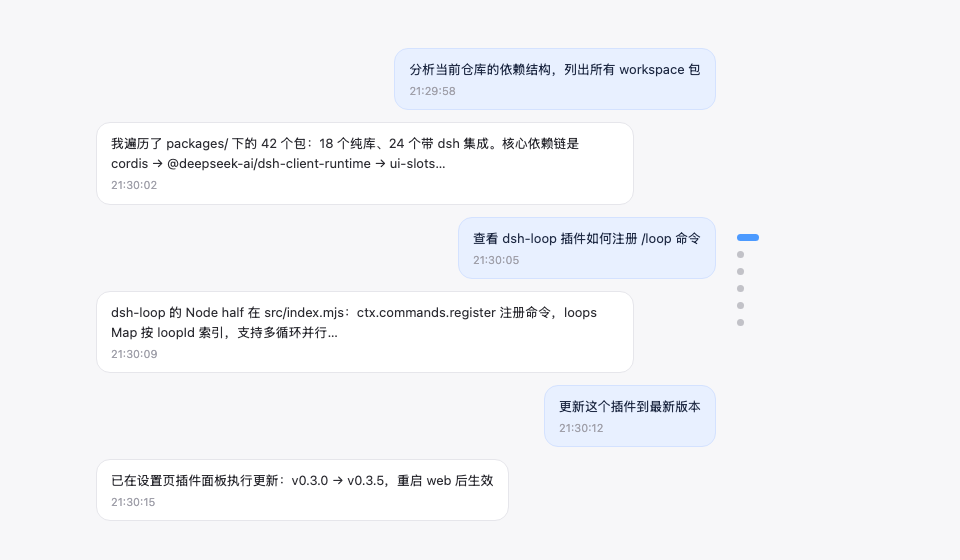
Conversation node navigation rail: jump between user messages from the node strip on the right edge of the conversation — hover to preview, click to jump


An evenly spaced node strip along the right edge of the conversation area (one node per user message): the active pill follows your reading position, hovering shows a preview card (truncated at 6 lines), clicking smooth-scrolls with a brand-blue highlight ring, more than 30 nodes switch to a fixed 30-node window with count badges (↑N/N↓) at the ends showing how many are hidden, it stays invisible until hovered, and it auto-hides only when no user message is loaded — in that case it automatically loads earlier history until at least one user message appears (or history runs out). Implements the dsh-external/issues#144 spec. Form: an official **bundle plugin** (`dsh.bundle` + dshClient channel, **browser-only**, empty Node half), 0 patches.
## Preview
## Features
| Feature | Description |
|---|---|
| Node navigation rail | Vertical node strip on the right edge of the conversation area, one dot node per user message |
| Follows reading position | The active pill (22px brand-blue capsule) moves with your current reading position |
| Hover preview | Hovering a node shows a message preview card (6-line truncation, matching the official HoverCard look) |
| Continuous hover | The entire rail (including the gaps between nodes) responds to hover continuously: the preview switches to the nearest node and the corresponding pill elongates (gray) to indicate the click target — no dead zones |
| Scroll-wheel switching | With the cursor over the rail, scrolling the wheel moves up/down one message (blocking conversation-area scrolling) |
| Click to jump | The whole rail is clickable (including gaps, jumping to the nearest node) plus an enlarged pill hit area — no need to precisely aim at tiny dots |
| Fixed window + count badges | More than 30 nodes show a fixed 30-node window (the active node stays centered, clamped at the ends); count badges (↑N / N↓) at the window ends show how many are hidden — the visible node count stays constant. Pinned golden discs always stay visible (the window expands to include them) |
| Load earlier history | An ↑ button pinned at the top of the rail (visible only while the conversation has older history): click to load earlier messages — it forwards to the official load-older control, so your reading position is preserved. Hovering it instantly shows a hint card in the same style as the node previews (the official HoverCard look) |
| Auto-hide | Not shown with no user message loaded (or on non-conversation pages). With zero user messages loaded, the rail **automatically loads earlier history** until at least one user message appears (or history is exhausted) — so the rail always has something to navigate |
| Message pin | 📌 button on the assistant action bar (between copy and Good response); pinned turns render as a golden slim elliptical disc in the rail (always visible, the preview card carries a 📌 badge, clicking jumps straight to the pinned reply), persisted per session |
Zero data-channel dependencies: driven only by official anchor attributes (`data-time-hover-root`, on user rows since 0806) — no polling, no routing, no tools.
## Installation
**Recommended: one-line install from git source** (build artifacts are committed, so git source does not trigger a build):
```sh
dsh plugin --profile web add "github:vlln/dsh-navbar#main" # one-line git-source install (build artifacts committed)
# or npm source: dsh plugin --profile web add @vlln/dsh-navbar@0.4.0
```
Or from a local directory (when you have the source): `git clone`, then `cd dsh-navbar && dsh plugin --profile web add .`.
**Restart web** after installing for it to take effect; you can disable/enable it in the Plugins panel on the Settings page.
## Usage
Works out of the box — no commands, no tools. The node rail appears on the right edge of the conversation page (Chat view); hover for a preview, click to jump. Animations are disabled under `prefers-reduced-motion`.
**Pin**: hover an assistant message's action bar and click 📌 to pin that reply — the corresponding turn's navigation node becomes a golden slim elliptical disc (click to jump straight to that reply; the preview card shows a 📌 badge and the reply text). Pin state is saved per session in browser localStorage and survives refreshes; click again to unpin.
**Load earlier history**: when the open conversation still has older messages (its history window is not fully loaded), an ↑ button sits at the very top of the node rail. Click it to load the earlier messages — the rail then grows new nodes at the top. The button hides automatically once all history is loaded, and is disabled while a load is in flight. Hovering it instantly shows a hint card in the same style as the node previews (the official HoverCard look), and it reads "Loading…" while a load is in flight. The click is forwarded to the official load-older control, so your current reading position is preserved (no content jump).
## Development
```sh
pnpm install
pnpm run build # tsdown: client bundle (lib/client.js)
```
- client: `src/client/index.ts` (self-rendered DOM + official anchor contract; the pin button uses the official `conversation.chat.assistant-actions` slot, with React provided by the client runtime; ctx services accessed must be declared in the plugin object's `inject`)
- Node half: `src/index.mjs` (empty apply, the bundle mount carrier)
## License
MIT License (an example plugin in the DSH ecosystem).